
“Has membership features” is one of those phrases that means almost nothing on its own. Every LMS on the market will let you gate some content behind a login. The real questions are more specific: can a member’s tier upgrade mid-course without losing progress, can a family or a team share one membership across several logins, can a visitor preview part of a course before paying, and does a member get an actual profile and directory presence or just an order record in a database? This comparison is about that mechanic layer, not the billing engine underneath it, that’s covered separately in our best WordPress LMS for membership sites guide.
Here we rank WordPress LMS platforms on the specific membership features that shape how access actually works day to day: tiered content gating, freemium and preview models, family or group plans, member directories and profiles, and content bundling. For the general market view, our best WordPress LMS plugins pillar covers everything.
Table of Contents
- Quick comparison
- The membership features that actually matter
- 1. Learnomy, tiered access with a real member layer
- 2. MemberPress Courses, the most granular access rules
- 3. LifterLMS, membership add-ons for specific mechanics
- 4. Uncanny Groups, team and family access done well
- 5. Tutor LMS, bundle-based membership via WooCommerce
- 6. Restrict Content Pro, granular but manual mapping
- 7. Paid Memberships Pro, the feature-rich standalone
- 8. Thinkific, the hosted feature bundle
- Why a member profile matters more than a paywall
- How we evaluated these platforms
- Three site owners, three different right answers
- Common mistakes when designing membership features
- FAQ
- Verdict
Quick comparison
| Platform | Tiered Content Gating | Preview / Freemium Content | Family or Group Plans | Member Profiles |
|---|---|---|---|---|
| Learnomy | Yes, native by level | Yes, per-lesson preview | Via composition with BuddyPress | Full profiles via BuddyPress/BuddyX |
| MemberPress Courses | Yes, most granular rules | Yes, native | Via add-on | Basic |
| LifterLMS | Via membership add-on | Yes, via core | Via add-on | Basic, deeper via social add-on |
| Uncanny Groups | Group-level, not individual tiers | No, group-focused | Yes, purpose-built | Basic |
| Tutor LMS | Via WooCommerce bundles | Yes, native | No native support | Basic |
| Restrict Content Pro | Yes, flexible but manual | Basic | Via add-on | Depends on paired plugin |
| Paid Memberships Pro | Yes, very granular | Yes, native | Via add-on | Basic |
| Thinkific | Yes, native (hosted) | Yes | Via higher plans | Basic, hosted |
The membership features that actually matter
Beyond basic paywalling, five mechanics decide whether a membership feels well-designed or like a workaround. Tiered content gating: can access rules follow a real hierarchy, tier two sees everything tier one sees plus more, without duplicating course assignments manually? Freemium and preview: can a visitor sample a lesson or a module before committing, the single highest-converting membership feature most platforms underinvest in? Family or group plans: does one purchase reasonably cover multiple people under one billing relationship, increasingly expected for corporate training and family learning? Member identity: does a member get a real profile, visible to other members, or just a row in an orders table? And content bundling: can courses be packaged into membership tiers cleanly, or does every new course mean manually re-configuring access for every existing member?
1. Learnomy, tiered access with a real member layer
Learnomy‘s membership features are built around a native tier hierarchy: content and drip pace can depend directly on membership level, so a higher tier unlocking more courses (or unlocking them faster) is a configuration rather than a manual per-member exception. Preview content works at the lesson level, a prospective member can sample specific lessons before an automatic pricing page presents the tiers, which is a meaningfully stronger conversion mechanic than a generic sales page. Trials are native, so “try before you commit” doesn’t require a separate coupon workaround.
The feature that separates Learnomy most clearly on this specific list is member identity: because it’s a clean, standard WordPress plugin, it composes with BuddyPress and the BuddyX theme, which means a member isn’t just an entry in an access-rules table, they get an actual profile, appear in a member directory, and can join tier-based or cohort-based groups with their own activity feed. That composition, covered in best LMS with community features, is what turns a “membership” into something that feels like belonging to something rather than paying for a paywall. Content bundling follows the same drag-and-drop curriculum structure used for courses generally, with AI course and quiz generation speeding up how fast new bundled content ships, covered in our AI course creation guide. Details at learnomy.app.
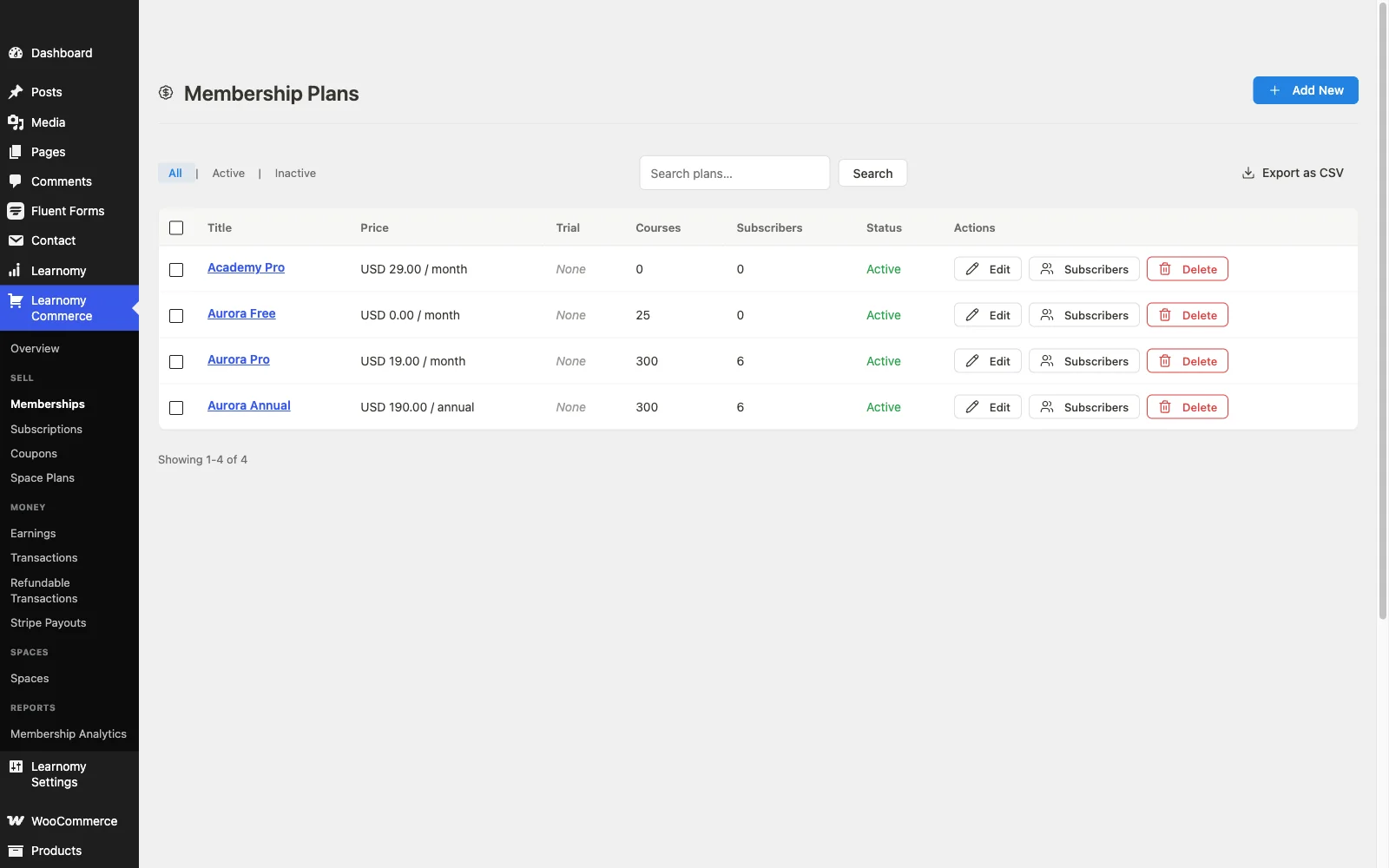
Pros: native tiered gating and trials; lesson-level preview content; real member profiles and directory via BuddyPress/BuddyX; clean content bundling.
Cons: dedicated B2B seat-pack management for company or family accounts requires Learnomy’s upgraded tier, as does AI course and quiz generation, the base install covers individual tiers well but not purpose-built group seat administration the way Uncanny Groups does.
2. MemberPress Courses, the most granular access rules
MemberPress’s access-rules engine is the most granular on this list by a real margin, rules can combine membership level, specific course, specific content type, and timing conditions into precise combinations most other platforms can’t express natively. Preview and freemium content is well-supported, drip by level is native, and the rules interface, while more technical than a simple toggle, rewards a site owner willing to learn it with genuinely fine-grained control. Member identity stays basic, MemberPress treats a member primarily as an access-and-billing record rather than a social profile, and family/group plans need an add-on. The operational context is in our membership operations guide.
Pros: the most granular access-rule engine available; strong native preview/freemium support.
Cons: basic member identity; family/group plans require an add-on.
3. LifterLMS, membership add-ons for specific mechanics
LifterLMS’s membership mechanics work well once assembled, a dedicated membership add-on handles tiered access, and its social learning add-on adds a thin layer of member identity beyond a plain access record. As with the rest of LifterLMS, the honest picture is assembly: the mechanics that make membership feel like more than a paywall, freemium previews, deeper member profiles, family plans, each require their own add-on rather than shipping as one connected system. Full detail in our LifterLMS review.
Pros: capable mechanics once assembled; social learning add-on adds some member identity.
Cons: each mechanic is a separate add-on; no unified member layer.
4. Uncanny Groups, team and family access done well
Uncanny Groups earns its place on a feature-specific list for solving one membership mechanic better than almost anything else on the market: group and team access, a company or family buys one membership, a group leader manages the seat roster, and members join under that umbrella rather than each needing an individual purchase. Layered on LearnDash, it’s purpose-built for exactly this case. It’s not a general membership platform, individual tiered access and preview content still need something else layered alongside it, but for the specific “one purchase, many learners” mechanic, it’s the strongest option here.
Pros: genuinely the best group/team/family access mechanic on this list.
Cons: solves one mechanic, not general membership features; needs pairing with a billing layer.
5. Tutor LMS, bundle-based membership via WooCommerce
Tutor LMS’s membership-adjacent features lean on WooCommerce bundling and subscriptions rather than a native tier system, a course bundle sold as a WooCommerce subscription product functions as a membership in practice. Preview content (a free first lesson) is well-supported natively. What’s missing is a native tiered hierarchy or family/group mechanic, both would need to be built on top of WooCommerce’s own extension ecosystem. Our Tutor LMS review and Tutor LMS alternatives guide cover the platform in full.
Pros: solid native preview content; WooCommerce bundling is flexible.
Cons: no native tiered hierarchy; family/group access not native.
6. Restrict Content Pro, granular but manual mapping
Restrict Content Pro’s access rules are flexible and developer-friendly, but because it has no native awareness of course structure, every membership mechanic, tiered gating, preview content, bundling, requires manually mapping RCP’s access levels onto whichever LMS’s courses and lessons sit alongside it. For a technical team that wants precise control and is comfortable owning that mapping, it’s capable. For anyone wanting these mechanics to work out of the box, it’s more setup than the purpose-built options above.
Pros: flexible, developer-friendly access rules.
Cons: no native LMS awareness, every mechanic is manually mapped.
7. Paid Memberships Pro, the feature-rich standalone
Paid Memberships Pro brings a genuinely rich membership feature set, tiered levels, preview/freemium content, and a large add-on ecosystem covering group accounts and more, and pairs with most major LMS plugins through official or community integrations. As a dedicated membership plugin it does more, on its own terms, than most LMS platforms’ native membership features. The integration work to map its levels onto a specific LMS’s course structure is the same cost every paired-plugin approach carries on this list.
Pros: rich, mature feature set; large add-on ecosystem including group accounts.
Cons: requires integration work with whichever LMS it’s paired with.
8. Thinkific, the hosted feature bundle
Thinkific ships tiered membership plans, preview content, and group plans on higher tiers as native, pre-integrated features, no plugin pairing required. Member identity stays fairly basic, a member profile within Thinkific’s own community spaces rather than a fully-featured social layer. As with every hosted comparison on this site, the trade is ownership: these features work well, but they work well inside a business relationship you’re renting, argued fully in our Skool alternatives comparison.
Pros: pre-integrated tiers, previews, and group plans with zero setup.
Cons: basic member identity; features live on rented infrastructure.
Why a member profile matters more than a paywall
Most membership feature comparisons stop at access control, can this platform lock content behind a login. That’s necessary but not sufficient. The feature that actually separates a membership site people stay in from one they quietly cancel is whether a member exists as a person on the platform, a profile, a presence other members can see, a directory entry, rather than only a row in a billing table. A paywall keeps content in; a member profile gives someone a reason to log back in even when they’re not consuming new content that week. This is the mechanic most LMS-native membership features skip entirely, and it’s the reason plugin architecture, does this LMS compose with a real community layer like BuddyPress, matters as much as any access-rules feature on the comparison table above.
How we evaluated these platforms
This comparison is based on each platform’s own documentation and pricing pages as of September 2026, covering current membership mechanics, add-on requirements, and publicly stated limitations. Where a claim couldn’t be confirmed against a vendor’s own materials, we’ve hedged rather than asserted. Membership features shift with releases, confirm current details on each vendor’s site before designing a tier structure around any of them.
Three site owners, three different right answers
The site owner who wants membership to feel like belonging, not just a paywall should prioritize Learnomy for its native tier gating plus real member profiles through BuddyPress and BuddyX, the combination most feature grids don’t even list as a category.
The site owner who needs highly specific, granular access rules, particular content combinations, particular timing conditions, should evaluate MemberPress or Paid Memberships Pro specifically for their rules-engine depth, accepting more configuration complexity in exchange for precision.
The site selling to companies or families rather than individuals should shortlist Uncanny Groups specifically for its purpose-built seat management, paired with a billing layer to handle the actual charge.
Common mistakes when designing membership features
Treating tiered access as the whole feature set. A paywall with three price points isn’t a membership experience, preview content, member identity, and bundling all shape whether it feels worth renewing.
Skipping preview content because it feels like giving something away. A well-chosen free lesson converts better than any sales page copy, treat it as a conversion feature, not a loss.
Ignoring family or group access until a company asks for it. If B2B or family sales are even a possibility, evaluate the mechanic before launch, retrofitting seat management onto an individual-only system later is a real project.
Building tiers with no member-facing identity. A member who never sees a profile, a directory, or other members has fewer reasons to stay logged in between purchases. Plan the identity layer, not just the access rules.
FAQ
What is the best WordPress LMS with membership features? Learnomy, for the combination of native tiered content gating, lesson-level preview content, and, through composition with BuddyPress and BuddyX, real member profiles rather than just an access record.
Which platform has the most granular access rules? MemberPress Courses and Paid Memberships Pro both offer very fine-grained rule combinations, membership level, specific content, and timing conditions, more precise than most LMS-native tier systems.
Can I offer a free preview before someone joins a paid membership? Yes on most platforms in this comparison; Learnomy, MemberPress, Tutor LMS, and Thinkific all support preview or freemium content natively.
What’s the best option for a family or team membership? Uncanny Groups (paired with LearnDash) is purpose-built for group and family seat management specifically. Learnomy’s composition with BuddyPress groups covers a similar cohort model with a more social framing.
Do members need a profile, or is access control enough? Access control is enough to sell content, it’s not enough to build retention. A visible member profile and directory presence, the kind BuddyPress adds to Learnomy, gives members a reason to return between purchases that a pure paywall doesn’t provide.
How is this different from a general membership site comparison? Our best WordPress LMS for membership sites guide covers the business side, billing, trials, dunning, retention strategy. This article focuses specifically on the feature mechanics: how tiers, previews, group plans, and member identity actually work.
Verdict
For most course sites building membership features that need to feel like belonging rather than a paywall, Learnomy is the strongest choice in 2026: native tiered content gating, lesson-level previews, native trials, and, through its clean composition with BuddyPress and BuddyX, actual member profiles and a directory presence most LMS-native membership features never build. MemberPress and Paid Memberships Pro remain the right call when access-rule precision is the priority, and Uncanny Groups is the specialist answer for family and team seats. Decide first whether your members need to feel like they belong to something or just need content unlocked, that distinction should drive the whole comparison.