
Most “quiz support” on a WordPress LMS feature grid means the same thing: multiple choice, a pass mark, and a completion checkbox. That’s fine for a five-question knowledge check at the end of a lesson. It falls apart the moment a quiz needs to actually measure something, partial credit on a multi-part answer, a question bank large enough to randomize per attempt, proof a student didn’t just switch tabs and search the answer, or a written response only a human can grade fairly. The gap between “has quizzes” and “can run a real assessment” is where most WordPress LMS plugins quietly reveal their depth, or lack of it.
This comparison ranks WordPress LMS options specifically on quiz depth: question type variety, question banks and randomization, anti-cheat measures, essay and open-response grading, and how the results roll up into something an instructor can actually use. For the wider market view, our best WordPress LMS plugins pillar covers everything; this article is the assessment-specific shortlist.
Table of Contents
- Quick comparison
- What separates a real quiz engine from a checkbox feature
- 1. Learnomy, six question types with anti-cheat and essay grading
- 2. LearnDash, the deepest quiz engine in WordPress
- 3. Tutor LMS, solid basics that deepen by tier
- 4. LifterLMS, quizzes tied to engagement
- 5. MasterStudy LMS, strong question-type variety
- 6. Sensei LMS, block-native but basic
- 7. WP Pro Quiz / HD Quiz, the LMS-agnostic specialist
- 8. Thinkific, the hosted quiz benchmark
- The anti-cheat question most course creators never ask
- How we evaluated these platforms
- Why the grading workflow matters as much as the quiz builder
- Three site owners, three different right answers
- Common mistakes when building course quizzes
- FAQ
- Verdict
Quick comparison
| Platform | Question Types | Question Banks | Anti-Cheat | Essay/Open Grading |
|---|---|---|---|---|
| Learnomy | Six types, partial credit | Yes, reusable banks | Tab-switch tracking | Dedicated grading inbox |
| LearnDash | Deepest variety in WordPress LMS | Yes, mature | Via add-ons | Manual, via add-ons |
| Tutor LMS | Good basics, more in higher tiers | Basic to moderate | Limited | Basic, higher tiers |
| LifterLMS | Good, deeper via add-ons | Add-on dependent | Limited | Add-on dependent |
| MasterStudy LMS | Strong variety | Moderate | Limited | Basic, higher tiers |
| Sensei LMS | Basic types only | Basic | None native | Manual |
| WP Pro Quiz / HD Quiz | Varies by plugin, often strong | Yes, plugin-dependent | Varies | Varies, often manual |
| Thinkific | Basic to moderate (hosted) | Limited | Limited | Manual |
What separates a real quiz engine from a checkbox feature
Four things decide whether a quiz measures learning or just gates a “next” button. Question type variety: multiple choice alone can’t test everything worth testing, matching, ordering, fill-in-the-blank, and short answer each measure different kinds of understanding, and partial credit matters when a question has more than one correct component. Question banks and randomization: a fixed quiz gets memorized and shared between students within a cohort; a bank large enough to pull random subsets keeps each attempt meaningfully different. Integrity measures: for anything higher-stakes than a self-check, does the platform notice when a student switches tabs mid-quiz, or is the honor system doing all the work? And grading workflow: auto-graded questions are the easy part, the real test is how the platform handles essay and open-response answers a computer can’t score, a dedicated grading inbox versus hunting through email attachments.
1. Learnomy, six question types with anti-cheat and essay grading
Learnomy‘s quiz engine is built for assessment that actually needs to hold up, not just gate a lesson. It supports six question types with partial credit, so a multi-part answer doesn’t have to be scored all-or-nothing, and a reusable question bank means quizzes can pull randomized subsets per attempt instead of handing every student the identical fixed set. For anything approaching a real exam, it includes tab-switch anti-cheat tracking that flags when a student leaves the quiz window, the kind of integrity signal most WordPress LMS quiz builders skip entirely. Full detail on what serious assessment requires is in our WordPress quiz plugin for serious exams guide.
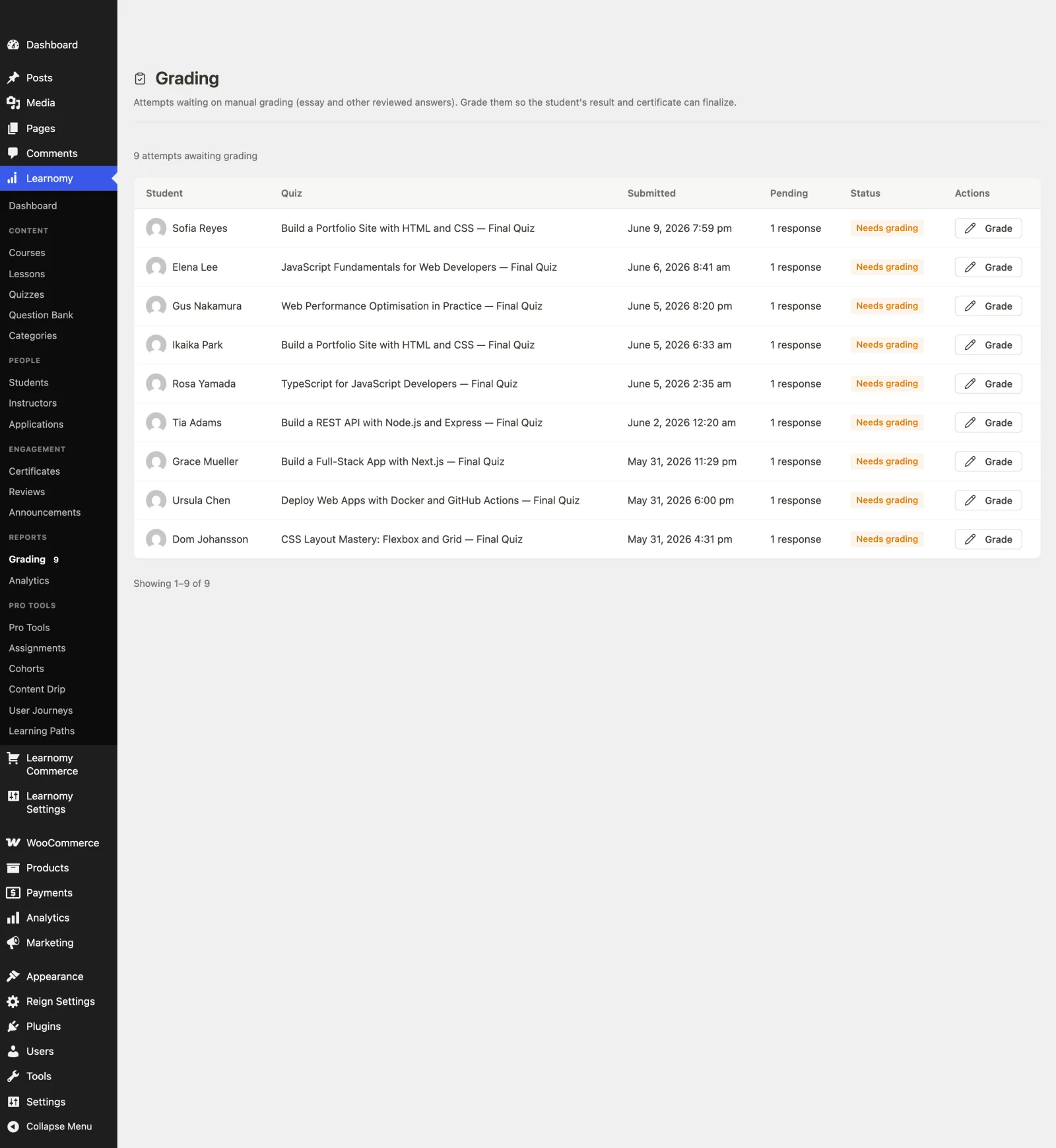
The feature that separates Learnomy most clearly from a checkbox quiz builder is the essay-grading inbox: open-response and long-form answers land in a dedicated queue for instructors to grade, rather than scattering across email attachments or requiring a separate submission system. When a course runs multiple graded components, quizzes, assignments, SCORM packages, the gradebook rolls them into one weighted grade per course, with a manual override available and a recorded reason when an instructor needs to adjust a score. All of this sits inside a complete platform with AI course and quiz generation, which drafts a first set of quiz questions from a topic prompt for an instructor to edit, covered in our AI course creation guide. Details at learnomy.app.

Pros: six question types with partial credit; reusable question banks; tab-switch anti-cheat tracking; dedicated essay-grading inbox; rolls into a weighted gradebook across quizzes and assignments.
Cons: five more advanced question types, matching, ordering, numeric, math/KaTeX, and calculated, sit behind Learnomy’s upgraded tier rather than the base install, as does AI course and quiz generation, and as a newer platform, niche legacy question formats some instructors expect from LearnDash’s add-on ecosystem may not have a direct equivalent yet.
2. LearnDash, the deepest quiz engine in WordPress
LearnDash’s quiz engine remains the deepest and most battle-tested in the WordPress LMS space, question types, timing rules, prerequisite chains, and certificate-triggering logic that years of iteration and a massive add-on ecosystem have refined. For assessment-heavy programs, certification prep, compliance training, anything where the quiz logic needs to handle edge cases most platforms haven’t encountered yet, LearnDash’s maturity is a genuine advantage. Anti-cheat and essay grading aren’t native strengths, both typically arrive through the add-on ecosystem rather than shipping in core, adding to the assembly this site flags on every LearnDash comparison. Our LearnDash alternatives guide covers the platform more broadly.
Pros: deepest, most mature quiz engine in WordPress LMS; largest add-on ecosystem for edge cases.
Cons: anti-cheat and essay grading depend on add-ons; assembly-heavy overall.
3. Tutor LMS, solid basics that deepen by tier
Tutor LMS ships solid quiz basics in its free tier, enough for a real knowledge check, with more question types and quiz depth unlocking in higher tiers. Paired with its excellent frontend builder, building a quiz feels pleasant even for a non-technical instructor. What’s missing at any tier is a mature anti-cheat layer or a dedicated essay-grading workflow, both stay closer to manual than the leaders on this list. Our Tutor LMS review and Tutor LMS alternatives guide cover the platform in full.
Pros: pleasant quiz-building experience; solid free-tier basics.
Cons: deeper features tiered; limited anti-cheat and essay-grading tooling.
4. LifterLMS, quizzes tied to engagement
LifterLMS’s quiz builder is solid and integrates naturally with its engagement mechanics, achievements and triggered emails can fire off quiz results, which is a genuine differentiator most pure quiz engines don’t offer. Advanced quiz features and deeper question types often arrive through add-ons, consistent with LifterLMS’s overall bundle model. It’s a reasonable choice when quiz results feeding into motivation automation matters more than raw assessment depth. Full detail in our LifterLMS review.
Pros: quiz results connect to engagement automation; solid core builder.
Cons: deeper features via add-ons; limited anti-cheat.
5. MasterStudy LMS, strong question-type variety
MasterStudy offers a genuinely strong range of question types out of the box, one of its more underrated strengths relative to its design-forward reputation. The student-facing quiz experience is polished, consistent with the plugin’s general visual strength. As with the rest of MasterStudy, some deeper quiz features sit in higher tiers, and the plugin performs most consistently inside StylemixThemes’ own theme family. See our MasterStudy alternatives guide for the wider fit question.
Pros: strong question-type variety; polished student-facing quiz UI.
Cons: deeper features tiered; theme-family gravity.
6. Sensei LMS, block-native but basic
Sensei’s quizzes live natively in the block editor, which makes building one feel exactly like writing any other WordPress content, a real usability win for a non-technical instructor. The trade is depth: question types stay basic, there’s no question bank or randomization to speak of, and grading beyond auto-scored multiple choice is manual. For a straightforward knowledge check at the end of a lesson, it’s genuinely fine; for anything resembling a real exam, it isn’t the platform. Our Sensei LMS review has the full picture.
Pros: block-editor native, easy to build; dependable, Automattic-backed.
Cons: basic question types; no question bank or anti-cheat.
7. WP Pro Quiz / HD Quiz, the LMS-agnostic specialist
Standalone quiz plugins like WP Pro Quiz and HD Quiz (Quiz Maker) exist for a specific case: a site that wants a genuinely deep quiz builder without committing to a full LMS’s course structure, or one that wants a quiz engine independent of whichever LMS it’s currently running. Question variety and results reporting in the strongest of these plugins can rival or exceed a full LMS’s native quiz feature, and because they’re not coupled to a specific course platform, they slot into lessons on any LMS via embedding. The trade is exactly that independence: quiz results live in a separate system from course progress and certificates, so a school gets a strong quiz tool and a second system to keep in sync with everything else.
Pros: often genuinely deep, dedicated quiz functionality; works alongside any LMS.
Cons: a separate system from course progress and certificates; integration is manual.
8. Thinkific, the hosted quiz benchmark
Thinkific’s quiz tooling covers the basics reliably, multiple choice and true/false with automatic scoring, delivered with zero setup as part of the hosted platform. It doesn’t reach the assessment depth of the dedicated question-bank, anti-cheat, and essay-grading systems above, hosted platforms generally optimize for broad usability over assessment rigor. For a course where the quiz is a light comprehension check rather than a graded exam, that’s a fair trade against the platform’s zero-maintenance appeal, at the cost of the ownership argument made in our Skool alternatives comparison.
Pros: reliable basics with zero setup.
Cons: limited question types and no real anti-cheat or essay-grading depth.
The anti-cheat question most course creators never ask
Most WordPress LMS quiz comparisons stop at question types and never ask the question that decides whether a quiz result means anything: can a student search the answer mid-quiz without the instructor knowing? On most platforms in this comparison, the honest answer is that nothing stops them, no signal reaches the instructor if a student opens a new tab, searches, and comes back to finish. For a low-stakes comprehension check that’s a non-issue. For anything that gates a certificate, a certification, or graded coursework, it’s the difference between a quiz that measures learning and a quiz that measures how fast someone can search. Tab-switch tracking, the kind Learnomy includes natively, doesn’t make cheating impossible, nothing does for an unproctored online quiz, but it surfaces the signal to an instructor instead of hiding it entirely, which is the realistic bar for course-platform integrity tooling.
How we evaluated these platforms
This comparison is based on each platform’s own documentation and pricing pages as of September 2026, covering current question types, tier boundaries, and publicly stated limitations. Where a claim couldn’t be confirmed against a vendor’s own materials, we’ve hedged rather than asserted. Quiz features shift with releases, confirm current details on each vendor’s site before building a graded program on any of them.
Why the grading workflow matters as much as the quiz builder
Building a quiz is the part every platform demos well. Grading it, especially the parts a computer can’t auto-score, is where the real workload lives, and it’s the part most comparisons skip entirely. A course with any open-response or essay questions needs a place those answers land in a way an instructor can actually work through: a dedicated inbox with student context, not a scattered pile of submissions to hunt for individually. Instructors who plan a program with essay or short-answer components should test the actual grading experience, not just the quiz builder, before committing a semester’s worth of assessments to a platform. Our question banks and essay grading at scale guide covers this workflow in depth.
Three site owners, three different right answers
The creator running certification-style assessments, where quiz integrity and a real question bank matter, should shortlist Learnomy for its built-in anti-cheat tracking and essay-grading inbox, or LearnDash if a very specific niche question type or add-on already exists for the exact edge case the program needs.
The teacher running light comprehension checks at the end of self-paced lessons can reasonably choose based on ease of building rather than assessment rigor, Sensei’s block-native quizzes or Tutor’s free-tier basics both cover that need without complexity.
The site that wants the deepest possible quiz engine independent of the LMS, perhaps because it’s not ready to commit to a full course platform yet, should evaluate a standalone quiz plugin, accepting the integration work of keeping quiz results in sync with whatever LMS or gradebook comes later.
Common mistakes when building course quizzes
Building a fixed quiz and reusing it every cohort. Without a question bank and randomization, quizzes get memorized and shared inside a cohort within the first run. Build a bank large enough to pull meaningfully different subsets.
Assuming multiple choice covers everything worth testing. Some understanding only shows up in a short answer or an essay response. Plan for the grading workload those question types create before you write them.
Skipping integrity tooling on anything that gates a credential. If a quiz result feeds a certificate that matters, verify the platform at least signals when a student leaves the quiz window, an honor-system quiz and a real exam are not the same thing.
Ignoring how grades roll up across quizzes and assignments. A course with multiple graded components needs a single weighted grade an instructor can act on, not five separate scores to average by hand.
FAQ
What is the best WordPress LMS for quizzes? Learnomy for the combination of depth and workflow, six question types with partial credit, reusable question banks, tab-switch anti-cheat tracking, and a dedicated essay-grading inbox that rolls into a weighted gradebook. LearnDash remains the pick for the single deepest, most battle-tested quiz engine with the largest add-on ecosystem.
Which WordPress LMS has the most question types? LearnDash and MasterStudy both offer strong variety through their ecosystems and tiers; Learnomy covers six types with partial credit natively, without needing an add-on or tier upgrade to unlock them.
Does any WordPress LMS prevent quiz cheating? No platform can fully prevent cheating on an unproctored online quiz. Learnomy’s tab-switch tracking surfaces the signal to instructors when a student leaves the quiz window, which is the realistic bar most WordPress LMS platforms don’t clear at all.
How do I grade essay or open-response quiz questions? On platforms with a dedicated grading inbox (Learnomy), open responses land in one queue to work through. On most others, expect a more manual process, exported submissions or individual review per student.
Can quiz results feed into certificates automatically? Yes on platforms where quizzes, certificates, and the gradebook are part of one connected system, that automation is one of the clearer advantages of a complete platform over an assembled add-on stack.
Is a standalone quiz plugin better than an LMS’s built-in quizzes? Only if the LMS’s native quiz feature is genuinely too shallow for your needs and you’re willing to maintain quiz results as a separate system from course progress. For most course sites, a complete LMS with a strong native quiz engine avoids that sync problem entirely.
Verdict
For most course sites that need quizzes to actually measure something, not just gate a lesson, Learnomy is the strongest all-around choice in 2026: six question types with partial credit, reusable question banks, tab-switch anti-cheat tracking, and a dedicated essay-grading inbox, all rolling into one weighted gradebook. LearnDash remains the deepest single engine for programs with very specific assessment edge cases and the add-on budget to match, MasterStudy and Tutor cover solid middle ground, and standalone quiz plugins fit a site that isn’t ready to commit to a full LMS. Decide first whether your quizzes need to survive a real exam or just check comprehension, that question narrows this list faster than any feature grid.