

You may have used WordPress for a while and can probably use several plugins to increase your site’s performance. Some plugins can increase your revenue, while others help you build an online community. BuddyPress adds many community-building functions. You can create a Facebook-like social network to help improve collaboration among employees.
BuddyPress also allows users to sign up and create profiles. This is a great way to connect with your clients and customers. It creates excitement about your site and allows you to provide immediate support.

Quick Links
What is BuddyPress?

BuddyPress is a “social networking in a box” solution that allows you to create any community-based website using WordPress. It includes features such as member profiles, activity streams, private messaging, user groups, and more.
You can enhance your social network using various extensions. These allow you to add messaging, file attachments, document sharing, collaboration tools, activity walls, and more. BuddyPress is easy to integrate, use, and expand.
Users can create profiles, send messages, join groups, update statuses, and interact with other members. BuddyPress integrates seamlessly with WordPress themes. The BuddyPress Search plugin is an addon that provides advanced member and profile search features for community websites.
Also Read: Essential WordPress Plugins To Use On Your Website
BuddyPress Search Plugin
BuddyPress Search Plugin allows BuddyPress users to search BuddyPress profiles using created fields such as age, name, and all XProfile fields. You can enable search components for BuddyPress and WordPress user fields, as well as WordPress posts, pages, and custom post types.
You can also display the global search form using a BuddyPress widget or a shortcode.
Key Features
- Enable search for selected BuddyPress components.
- Enable search for WordPress user fields and XProfile fields.
- Control live searching and enable autocomplete.
- Enable search for various custom post types such as WordPress posts, pages, WooCommerce products, Elementor pages, LearnDash courses, and more.
- Use a widget or shortcode to display the global search form on any page or post.
BuddyPress Search Backend Settings
To configure the backend settings of the plugin, navigate to Dashboard>WB plugins>Buddypress search. Here you will find the settings for the search components.
Search Component Settings
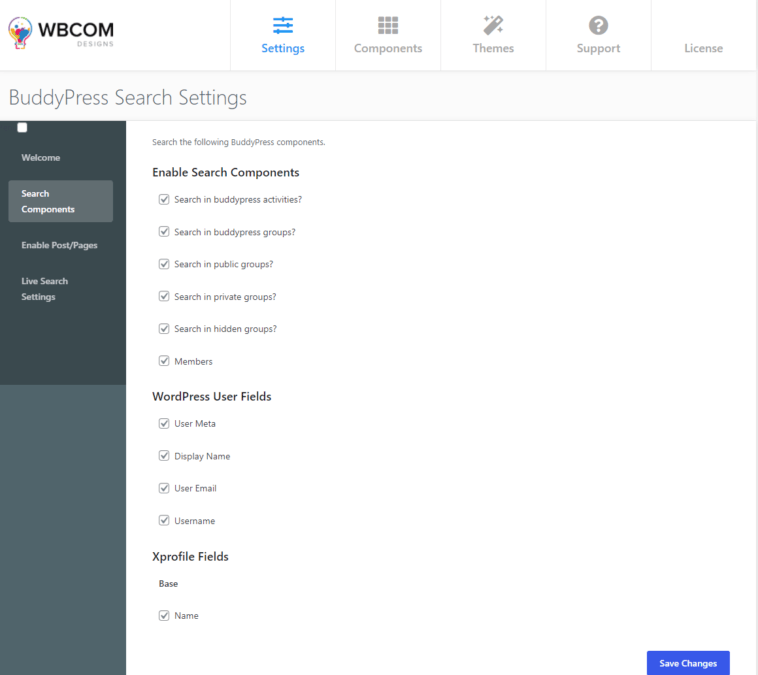
This setting allows you to search the following BuddyPress components:
- Enable Search Components: Allows you to select search components such as BuddyPress activities, groups, members, public groups, private groups, and hidden groups.
- WordPress User Fields: Enables search based on selected WordPress user fields.
- XProfile Fields: Allows you to choose specific profile fields to include in search results.
Also Read: How To Use BuddyPress To Create Social Network On WordPress
Enable Post / Pages Settings
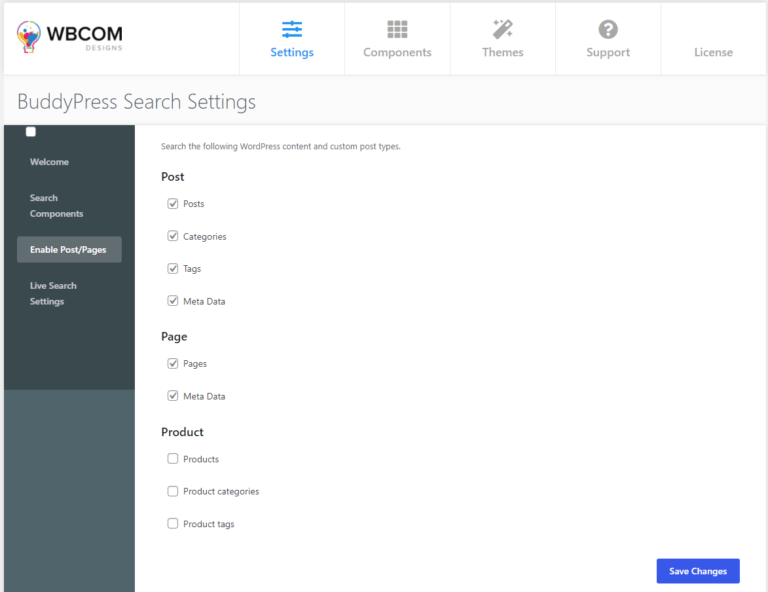
This setting allows you to search WordPress content and custom post types such as WordPress posts, pages, WooCommerce products, Elementor pages, LearnDash courses, and more.
- Post: Allows you to search WordPress posts, post categories, metadata, and tags.
- Page: Allows you to include pages in search results.
- Product: Allows you to search WooCommerce products, product tags, and categories.
Live Search Settings

This setting allows you to enable live searching on the site.
- Enable Autocomplete: Allows you to enable or disable auto-suggestions while typing.
- Number of Results: Allows you to set how many results are displayed in the search form.
Frontend BuddyPress Search Activity Setting
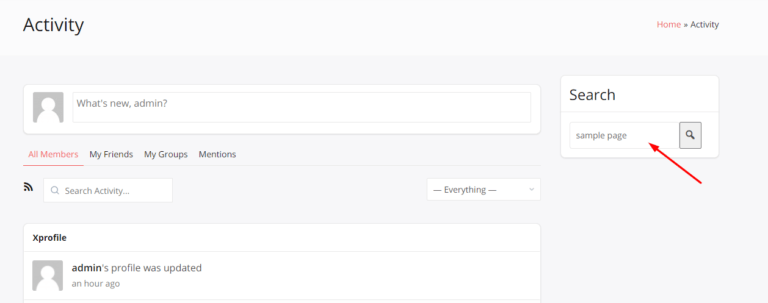

Display the Search Form in the Frontend

To display the BuddyPress search form, go to the WordPress Widgets section and add the BuddyPress Search widget to the right sidebar. You can also customize the widget title.
Once added, the search widget will appear on the right side of your site.
Live Search Settings

Live search settings provide you with two options:
- Enable Autocomplete: Allows you to enable or disable the auto-suggestion feature.
- Number of Results: Lets you define how many results are shown in the search form.
Autocomplete can be enabled from the backend to display suggestions as users type.

Conclusion
BuddyPress Search Plugin allows site members to search BuddyPress profiles using created fields such as age, name, and all XProfile field components. This improves the overall user experience and helps users quickly find what they are looking for. This article should have helped you integrate these powerful features into your WordPress site .
Interesting Reads:
Best Knowledge Management Software

