

GitHub Discussions is free, it ships inside the repo your developers already live in, and for pure open-source collaboration between people who already have GitHub accounts, it genuinely works. The problem shows up the moment your “community” is bigger than your contributor list. A product company selling a dev tool, an API, or a SaaS platform usually has three audiences talking about it: the engineers who’d happily use GitHub, the non-technical buyers and admins who will never create a GitHub account just to ask a billing question, and the search traffic from people who typed their exact error message into Google and never heard of your repo at all. GitHub Discussions serves the first group and quietly loses the other two.
Last updated: 6 November 2026
Quick answer: Keep GitHub Discussions for contributors, but move customer support and product questions to a searchable space. Pick Jetonomy if you already run WordPress, Discourse for a dedicated forum, Discord as a real-time companion, or a support SaaS if you have budget and want zero infrastructure.
This isn’t an anti-GitHub argument. It’s a scope argument. Below is an honest comparison of what to use instead, or alongside, GitHub Discussions when the community you’re building has outgrown “a place for contributors to talk.”
GitHub’s own 2024 Octoverse report counted more than 150 million developers on the platform and over 518 million public and private repositories. That scale is exactly why Discussions feels native for maintainers, and exactly why it’s the wrong front door for anyone outside that developer population: the entire surface is gated behind a GitHub account and a repo-centric URL structure that search engines and non-developers both struggle to navigate.
Table of Contents
- Market snapshot
- Where GitHub Discussions Actually Breaks Down
- Comparison Table: GitHub Discussions vs. the Alternatives
- Option 1: Discourse
- Option 2: Discord
- Option 3: A Dedicated Support/Community SaaS
- Option 4: Jetonomy on WordPress
- Option 5: Other Self-Hosted Forums
- How to Decide: Match the Tool to the Actual Audience
- Migrating Existing Discussions Content
- Why Findability Compounds Over Time
- Real-World Scenario: A Dev-Tool Company Outgrowing GitHub
- Common Pitfalls
- FAQs
- Sources
Market snapshot
- The online community platform market was valued at about USD 6.5 billion in 2025 and is projected to reach USD 15.2 billion by 2033, a 10.2% annual growth rate (report updated May 2026; definitions vary between research firms), according to Verified Market Research.
Where GitHub Discussions Actually Breaks Down
Three structural limits show up repeatedly once a product community grows past its original contributor base.
It’s gated behind a GitHub account. Every reader who wants to search deeply, reply, or get notified needs a GitHub login. That’s a non-issue for engineers. It’s a real wall for a customer’s billing admin, a designer evaluating your tool, or a product manager who just wants to read an answer without creating an account on a platform they associate with code, not support.
It’s barely indexed and poorly discoverable. Discussions threads do get crawled eventually, but they compete inside a URL structure built for code hosting, not content. There’s no real taxonomy, no categories with their own landing pages, no sitemap control, and no way to shape how a thread ranks for the exact question someone typed into Google. Compare that to a dedicated community living on your own domain, where every thread is a real page you control.
There’s no reputation or trust system. GitHub Discussions has upvotes and a “mark as answer” feature, which is more than nothing, but there’s no trust-level progression, no way to identify and surface your most reliable answerers over time, and no moderation queue built for a support-style flow rather than a code-review flow. A thread from a brand-new account and a thread from your most trusted long-time user look identical.
GitHub Discussions is a contributor tool wearing a community-forum costume. It does the first job well and the second job only by accident.
None of this makes Discussions bad software. It makes it scoped software, built for a specific job, maintainers talking to contributors inside a repo, and stretched past that job the moment a company tries to use it as the entire community layer for a commercial product.
Comparison Table: GitHub Discussions vs. the Alternatives
| Platform | Account required | SEO / own domain | Trust levels | Cost |
|---|---|---|---|---|
| GitHub Discussions | GitHub account | No, lives on github.com | No | Free |
| Discourse | Email signup | Yes, own domain | Yes, trust levels 0-4 | Self-host free, hosted $100-500+/mo |
| Discord | Discord account | No, unsearchable by default | Roles only, not reputation-based | Free |
| Dedicated SaaS community | Platform account | Partial, often a subdomain | Varies by vendor | Often $200-1,000+/mo at scale |
| Jetonomy (WordPress) | Site account | Yes, your own domain | Yes, trust levels 0-5 | Free, forever tier; Pro from $69/yr |
Read this table as a set of trade-offs, not a ranking. The right answer depends entirely on who you’re actually trying to reach, which the next sections dig into.
Option 1: Discourse
Discourse is the most direct like-for-like replacement if what you want is “Discussions, but better.” It’s purpose-built forum software with real categories, trust levels, a mature moderation toolkit, and strong search. Plenty of large open-source and dev-tool projects, Rust, Ember, and dozens of others, run their entire community on Discourse instead of GitHub.
The catch is operational weight. Self-hosting Discourse means running and maintaining a Ruby on Rails application with its own server, database, and update cycle, a real commitment for a small team. The hosted version solves that but starts around $100/month and climbs well past $500/month as the community grows, a recurring cost most GitHub Discussions users aren’t budgeting for today.
Our deeper comparison of Discourse against bbPress and Jetonomy breaks down the hosting costs and feature gaps in more detail if Discourse is the front-runner for your team.
Option 2: Discord
Discord is the honest answer for real-time, social, high-engagement communities, especially around gaming-adjacent or younger developer audiences. It’s free, it’s where a lot of your users already hang out, and the live chat energy is something no forum software replicates.
It’s also the worst option on this list for the exact problem GitHub Discussions has: findability. A Discord server’s content is not indexed by Google, barely searchable even inside the app once a channel has months of history, and the knowledge a long-time member built up by answering the same question forty times is functionally invisible to the forty-first person who asks it. Discord earns a place in a product community’s stack as the real-time layer, rarely as the only layer.
For a side-by-side on this exact trade-off, see the Discord vs. Facebook Groups vs. Jetonomy comparison, which covers the searchability gap in more depth.
Option 3: A Dedicated Support/Community SaaS
Tools built specifically for customer communities, think a hosted help-center-plus-forum product, sit between Discourse and a full help desk. They typically bundle a knowledge base, a Q&A or forum area, and ticket escalation in one subscription, with a polished out-of-the-box design and someone else managing uptime.
The trade-offs are predictable for any hosted SaaS: per-agent or per-tracked-user pricing that climbs as your community succeeds, a subdomain rather than true ownership of your own domain’s SEO equity in some setups, and a vendor lock-in risk if you ever want to move the content elsewhere. For a company that already runs on WordPress or wants to avoid another recurring line item, this is rarely the first choice, but it’s a legitimate option for a team that wants zero infrastructure responsibility and has the budget for it.
Worth flagging specifically: several of these tools price by tracked monthly active users rather than seats, which means a successful launch, the exact outcome you want, is also the trigger for your bill to jump. A community that goes from 2,000 to 20,000 monthly visitors because a popular answer started ranking in Google can see its SaaS invoice multiply in the same month, a dynamic that self-hosted and flat-fee options like Jetonomy simply don’t have.
Option 4: Jetonomy on WordPress
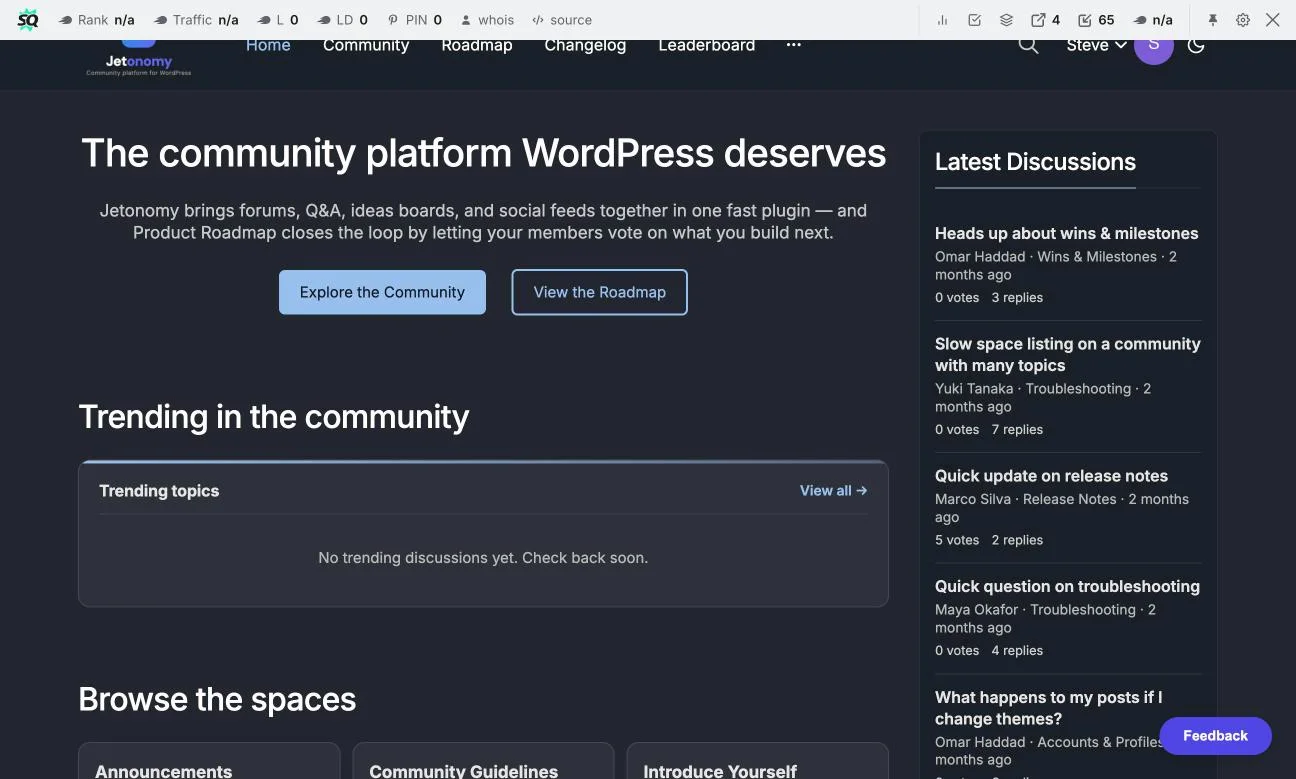
Jetonomy is a forum and Q&A plugin that runs inside WordPress, which makes it the practical choice specifically for product and dev-tool companies that already have a marketing site, docs, or blog on WordPress and want the community to live on that same domain rather than a separate app or subdomain.
What that buys you, concretely:
- No GitHub account required. Anyone can sign up with an email, including the non-technical buyer or admin who would never create a developer-platform account just to ask a question.
- Real SEO on your own domain. Every thread is a normal WordPress page, indexable, categorizable, and linkable from your docs or blog, the exact thing GitHub Discussions structurally can’t offer.
- A Q&A space type built for support, not just open-ended forum threads. Accepted-answer marking, voting, and full-text search are built in, closer to how Stack Overflow structures a question than how a GitHub thread does.
- Trust levels (0-5) that surface your most reliable community answerers over time, something GitHub Discussions doesn’t attempt.
- A free tier that’s actually free, forums, Q&A, an ideas board, and a Show & Tell space, with Pro starting at $69/year per site if you later want private messaging, analytics, or AI moderation.
The honest limitation: Jetonomy doesn’t replicate GitHub’s tight code-review integration, inline diff comments, or issue-linking, because that’s not the job it’s doing. Keep GitHub Issues and Discussions for the engineering conversation your contributors are already fluent in, and run the broader, searchable, non-developer-friendly community layer on Jetonomy. The two aren’t mutually exclusive; they’re solving different halves of the same company’s community needs.
If your product already has a support-ticket volume problem this kind of searchable Q&A space is meant to solve, the guide to building a SaaS customer support community with Jetonomy walks through the setup, seeding, and metrics in more depth than this comparison has room for.
Option 5: Other Self-Hosted Forums
Flarum, NodeBB, and bbPress round out the self-hosted field. Flarum is modern and free but runs as its own standalone PHP application with its own login system, a second app to maintain alongside your main site. NodeBB is similarly capable and similarly separate. bbPress is the WordPress-native veteran, free and stable, but it hasn’t added a Q&A mode, voting, or trust levels in years, and forum data lives awkwardly inside the standard wp_posts table.
Any of these beats staying on GitHub Discussions for a non-developer audience. None of them combines WordPress-native integration with a dedicated Q&A structure the way Jetonomy does, which is the specific gap that matters most for a product company’s support-style questions rather than open-ended discussion threads.
How to Decide: Match the Tool to the Actual Audience
Skip the “best tool” framing and ask who’s actually going to use this.
- If your community is contributors reviewing code and discussing the roadmap, GitHub Discussions is still fine, maybe even ideal, keep it.
- If a meaningful share of your users are non-technical, customers rather than contributors, move the support-and-product conversation to a searchable, account-light space like Jetonomy or Discourse.
- If real-time social energy and events matter more than searchable archives, Discord earns its place as a companion channel.
- If you want zero infrastructure and have budget for it, a dedicated SaaS community product is the path of least resistance.
Most mature dev-tool companies end up running two layers, not one: GitHub for the engineering conversation among contributors, and a separate, discoverable community for everyone else. Treating that as the normal end state, rather than a compromise, tends to produce the best outcome for both audiences.
One more practical filter: look at where your support tickets are actually coming from today. If most repeat tickets trace back to developers who’d have searched GitHub Discussions anyway, the gap is smaller than it feels. If they trace back to dashboard users, billing questions, or onboarding friction from people who never touch your repo, that’s a strong signal the real gap is audience access, not feature depth, and a WordPress-native Q&A space will close it faster than a heavier forum migration would.
Migrating Existing Discussions Content
If you’ve already accumulated years of useful threads in GitHub Discussions, don’t abandon them, mine them. Before launching a new community space, pull your most-upvoted and most-referenced Discussions threads, rewrite the best answers as properly formatted, accepted-answer entries in the new Q&A space, and link back to the original GitHub thread for engineering context where it’s genuinely relevant.
This seeding step matters more than it sounds. An empty new community has nothing for a search engine or a first-time visitor to find. A community that launches with twenty or thirty strong, already-proven answers starts earning search traffic and deflecting repeat questions from day one instead of waiting months for organic content to accumulate.
Why Findability Compounds Over Time
A thread buried inside github.com/org/repo/discussions/1842 competes for search visibility against every other repository on the platform and against Stack Overflow’s enormous existing footprint for the same error messages. A thread on your own domain, properly categorized, with a clean URL and a real page title, competes as your content, for your keywords, building your site’s authority with every new answer.
That compounding effect is the single biggest long-term argument for moving the broader community off GitHub’s domain. It’s slow in month one. By year two, a well-seeded, actively answered Q&A archive is often the single largest source of organic search traffic a dev-tool company’s marketing site has, outperforming blog content that was written once and never revisited.
Real-World Scenario: A Dev-Tool Company Outgrowing GitHub
Picture an API company whose early community lived entirely in GitHub Discussions, which worked fine while every user was a developer integrating the API directly. As the product added a no-code dashboard and picked up non-technical customers, support tickets about the dashboard started repeating weekly, the kind of question a developer would have searched and self-served, but a non-technical admin simply emailed support about instead, because creating a GitHub account to ask a dashboard question felt backwards.
Standing up a Jetonomy Q&A space on the company’s existing WordPress marketing site, seeded with the twenty most common dashboard questions pulled from support tickets and old Discussions threads, gave that non-technical segment a place to search and ask without ever touching GitHub. Engineers kept using GitHub Discussions for API-level conversations exactly as before. Six months in, the Q&A archive was ranking for several of the company’s own error messages in Google, traffic GitHub Discussions had never been able to capture.
Common Pitfalls
- Trying to replace GitHub Discussions entirely instead of adding a second layer: contributors reviewing code still want to stay where the code lives. Don’t force an engineering audience off a tool that’s genuinely working for them.
- Launching a new community with no seed content: an empty forum or Q&A space answers nothing and ranks for nothing. Migrate your best existing Discussions threads first.
- Picking Discord for a problem that needs search, not chat: real-time engagement and searchable archives are different jobs; most teams eventually need both.
- Underestimating hosted Discourse costs: budget for the $100-500+/month range before committing, it climbs with usage.
- Gating the new community behind the same kind of account friction you were trying to remove: if signup still requires a technical platform account, you haven’t actually solved the non-developer access problem.
- No cross-linking between GitHub and the new community: link from your repo’s README and Discussions pinned post to the new space, and vice versa, so neither audience loses track of the other.
Summary
GitHub Discussions isn’t the villain here, it’s just scoped to a job: contributors talking to maintainers inside a repo. The moment a product community includes non-developers, customers who’ll never create a GitHub account, or search traffic you actually want to capture on your own domain, that scope runs out. Discourse, Discord, a dedicated SaaS product, and Jetonomy on WordPress all solve different pieces of what’s missing. For a company that already runs on WordPress and wants an owned, searchable, account-light community without a new recurring SaaS bill, Jetonomy is the realistic middle path, free to start, no GitHub account required, and built to run alongside GitHub Discussions rather than replace it outright.
FAQs
Should we shut down GitHub Discussions entirely?
Usually not. Keep it for engineering and contributor conversation tied directly to the codebase, and add a separate, searchable space for the broader product community.
What’s the single biggest limitation of GitHub Discussions for a product company?
The GitHub account requirement. It filters out every non-technical customer, admin, or evaluator who would otherwise ask or search for an answer.
Is Discourse worth the hosted cost for a small team?
Only if you need its specific feature depth, trust levels, mature moderation, at a stage where $100+/month is a reasonable line item. Many small teams outgrow GitHub Discussions before they’re ready for that spend.
Can Discord content ever be made searchable?
Some third-party tools index public Discord servers, but native search inside Discord remains weak, and none of it is indexed by Google the way a normal web page is.
Does Jetonomy require a separate login system from our main WordPress site?
No. It uses standard WordPress accounts, so anyone who can register on your site can participate, no GitHub account, no separate app login.
How much does Jetonomy cost?
The free tier is $0 forever and includes forums, Q&A with accepted answers, an ideas board, trust levels, and full-text search. Pro adds private messaging, analytics, and AI moderation starting at $69/year per site.
Will moving off GitHub Discussions hurt our existing SEO?
GitHub Discussions threads were never a strong SEO asset to begin with, so there’s little equity to lose. Migrating the best content to your own domain is a net gain, not a loss.
What about a dedicated SaaS community platform instead of self-hosting?
It’s a legitimate option if you want zero infrastructure responsibility and have budget for per-agent or per-user pricing that typically runs $200-1,000+/month as the community scales.
How do we handle contributors who only want to stay in GitHub?
Let them. Cross-link the two spaces so engineering-specific threads stay on GitHub and support/product questions route to the new community, rather than forcing a single audience to switch tools.
How long before a new community space actually reduces support load?
It depends heavily on seed content. A well-seeded launch with 20-30 migrated or newly written accepted answers can start deflecting repeat questions within weeks; an empty launch can take months to build the same archive organically.
Is bbPress a reasonable free alternative if Jetonomy feels like too much?
It’s reasonable for simple forum threads, but it lacks a Q&A mode, voting, and trust levels, features that matter specifically for support-style questions rather than open discussion.
Do we need both a forum and a Q&A space, or just one?
Most product communities need both eventually: a Q&A space for specific, answerable support-style questions, and a forum for open-ended discussion, feature requests, and show-and-tell content that doesn’t fit a single accepted answer.
What happens to old GitHub Discussions links once we migrate content?
Leave the original threads live and add a pinned note pointing to the new community for future questions on the same topic, rather than deleting history that other threads or external sites may already link to.
Sources
Interesting Reads:
Circle vs Discourse vs Jetonomy: Which Community Platform in 2026?
How to Add Code Sharing to a Developer Community on WordPress