
SEO professionals spend their working lives making content findable, then gather in communities where their own best conversations disappear. The sharpest technical answers in the industry live in private Slack channels that most members cannot search after a few months and that no search engine will ever see. If you are building a community for SEO people, the platform decision is also an SEO decision.
This guide compares the software you can use to build a community for SEO professionals, whether that is a paid mastermind, an agency network, a free practitioner community or a membership attached to your course or newsletter. We built a working SEO community for the first entry, checked every competitor claim against the vendor’s own pages in November 2026, and judged each option on what SEO people actually need: searchable answers, code and data in posts, honest moderation of self-promotion, and content that keeps its value after the conversation ends.
Quick answer
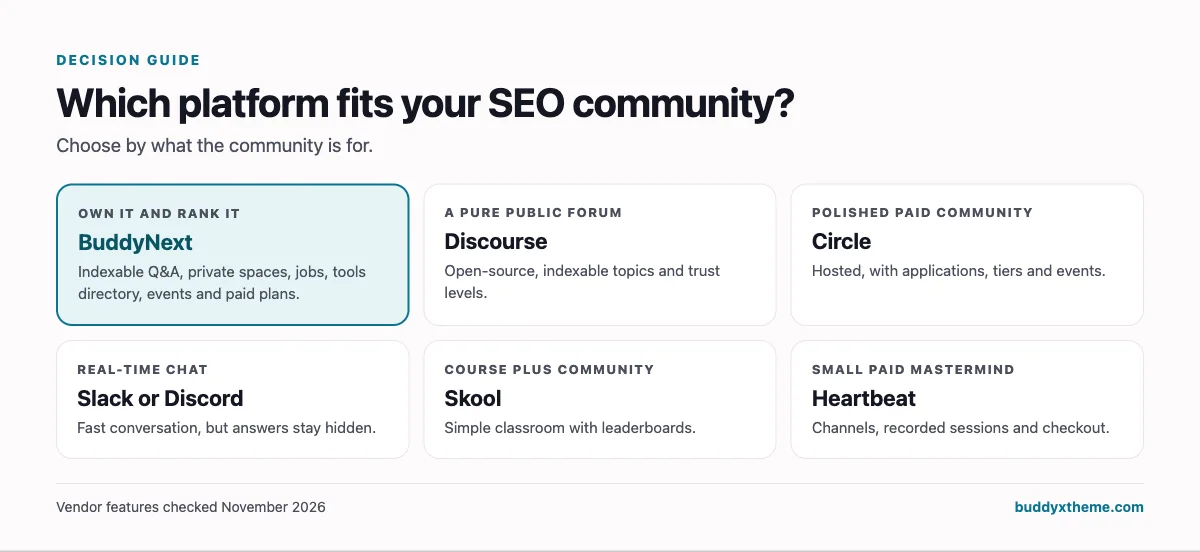
If you want an SEO professionals community you own and control, BuddyNext is the strongest choice: public Q&A threads with code highlighting and discussion schema on your own domain, private spaces for agency owners or paid members, a jobs board, a tools directory, live events and member profiles, all on your WordPress site. Discourse is the strongest open-source forum, Circle suits polished paid communities, and Slack or Discord are easy to start but keep your best answers out of search.
In this guide
- The SEO community paradox
- Three ways SEO communities are built
- What an SEO community platform has to get right
- 1. BuddyNext: best for an SEO community you own and can rank
- 2. Discourse: best open-source forum for public SEO answers
- 3. Circle: best for a polished paid SEO community
- 4. Slack: best for real-time chat when members already live in it
- 5. Discord: best for free, chat-first communities with voice
- 6. Skool: best for a simple course-plus-community with gamification
- 7. Mighty Networks: best for an app-first SEO membership
- 8. Heartbeat: best lightweight all-in-one for small paid groups
- 9. Facebook Groups: best for reaching people who are already there
- 10. LinkedIn Groups: best as a professional side channel
- SEO community platforms compared
- Public or private: deciding what to index
- House rules that keep an SEO community useful
- Launching an SEO community: the first six weeks
- More community platform comparisons
- How we built and checked this list
- Frequently asked questions
- The bottom line
The SEO community paradox
Most of the best-known SEO communities run on chat. Traffic Think Tank describes itself as a private Slack community with 21 channels and more than 1,200 members (Traffic Think Tank). The SEO Community describes itself as “a Slack community with 5377 of the kindest & smartest search practitioners” (The SEO Community). Chat works well for the real-time part of community life: reacting to a core update, sharing a quick screenshot, asking a fast question.
It works badly for everything after that. Three problems come up again and again:
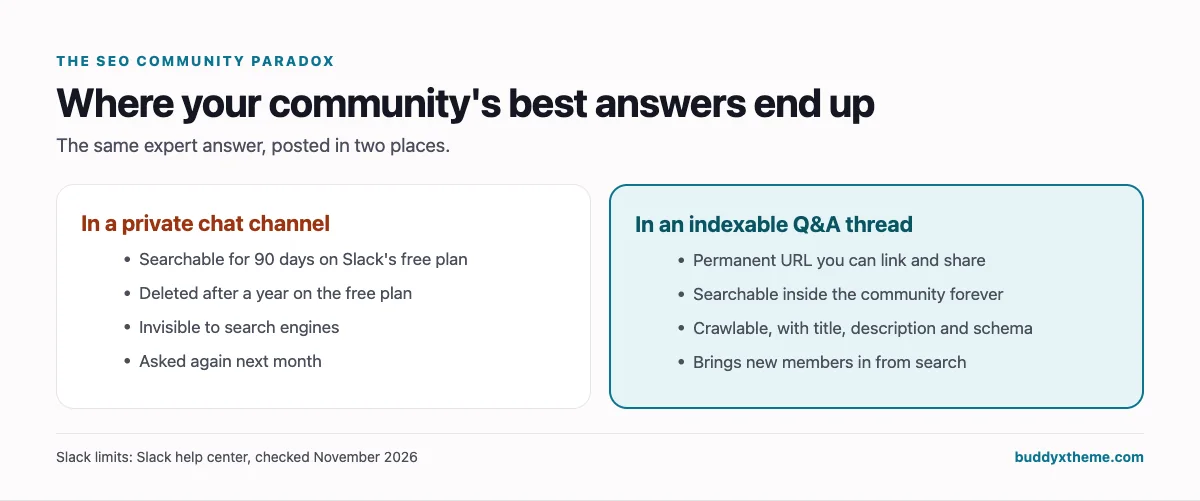
- Answers expire. On Slack’s free plan, messages are searchable for 90 days, and Slack’s help center says content in a free workspace more than a year old is permanently deleted (Slack). A brilliant thread on hreflang from last spring is gone.
- Answers stay invisible. Private chat content is never indexed, so the expertise your members produce never brings anyone new to the community.
- Answers repeat. Without a searchable archive, the same canonical, redirect and migration questions get asked every month, and your most experienced members get tired of answering them.
That is the same reason owned audiences beat rented ones in marketing generally. The fix is not to abandon chat. It is to choose a platform where the questions worth keeping become permanent, searchable, linkable pages, and where the conversations that should stay private, such as agency pricing or client problems, really do stay private. AI framework teams face the same problem with Discord; see how they handle it in our AI agent developer community guide.
Three ways SEO communities are built
| Model | How it works | Examples | Good for | Weak at |
|---|---|---|---|---|
| Chat-first | Channels and threads in a chat app | Slack, Discord | Real-time reaction, low friction | Search, archives, indexability |
| Forum-first | Topics with permanent URLs | Discourse, Reddit | Searchable answers, public visibility | Live events, member experience, monetisation |
| Community platform | Feeds, spaces, Q&A, events, profiles and payments together | BuddyNext, Circle, Mighty Networks, Skool, Heartbeat | One home for everything | Varies: indexability and ownership differ a lot |
Reddit’s r/SEO and LinkedIn groups are where SEO discussion already happens at scale, but you do not own either. They are audiences to participate in, not homes to build on.
What an SEO community platform has to get right
Use this as a checklist when you evaluate any option, including ones not on this list.
| Requirement | Why SEO people care | What good looks like |
|---|---|---|
| Searchable, permanent answers | Algorithm and technical questions repeat | Every Q&A thread has its own URL and stays searchable forever |
| Public indexing, by choice | Community answers can rank and bring in members | Public threads are crawlable, with titles, descriptions and structured data; private areas are not |
| Code and data in posts | Robots.txt, schema, regex, log lines | Code blocks with syntax highlighting; images and tables |
| Private spaces | Agency pricing and client issues are confidential | Private (approval) and secret spaces with their own moderators |
| Self-promotion control | SEO attracts tool and link sellers | Post approval, a dedicated directory for vendors, clear rules |
| Expert reputation | Members want to know whose advice to trust | Profiles with specialties, points for helpful answers, best-answer marking |
| Jobs and careers | Hiring is a top reason SEOs join | A jobs board with filters and alerts |
| Live sessions | Update debriefs and office hours drive retention | Events with RSVPs, reminders and recordings |
| Ownership and export | The community is a business asset | Full export or your own database |
1. BuddyNext: best for an SEO community you own and can rank
BuddyNext is a complete community platform that runs on your own WordPress site. Spaces, feeds, Q&A discussions, member profiles, messaging, events, a jobs board, a business directory, courses, paid plans and gamification all work together in one product. For an SEO audience it has one decisive advantage: discussions can be public, indexable pages on your own domain, with the technical SEO already handled.
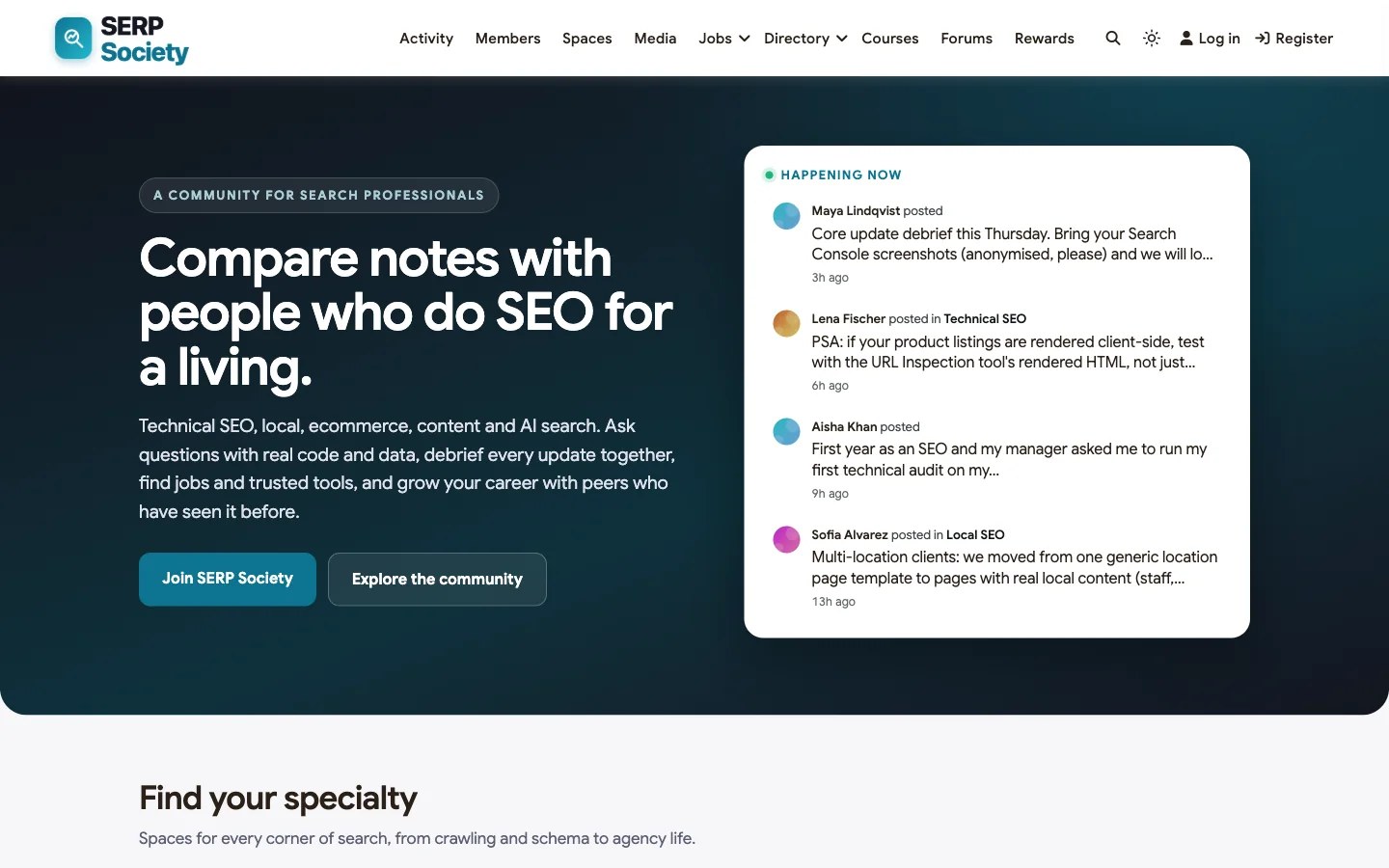
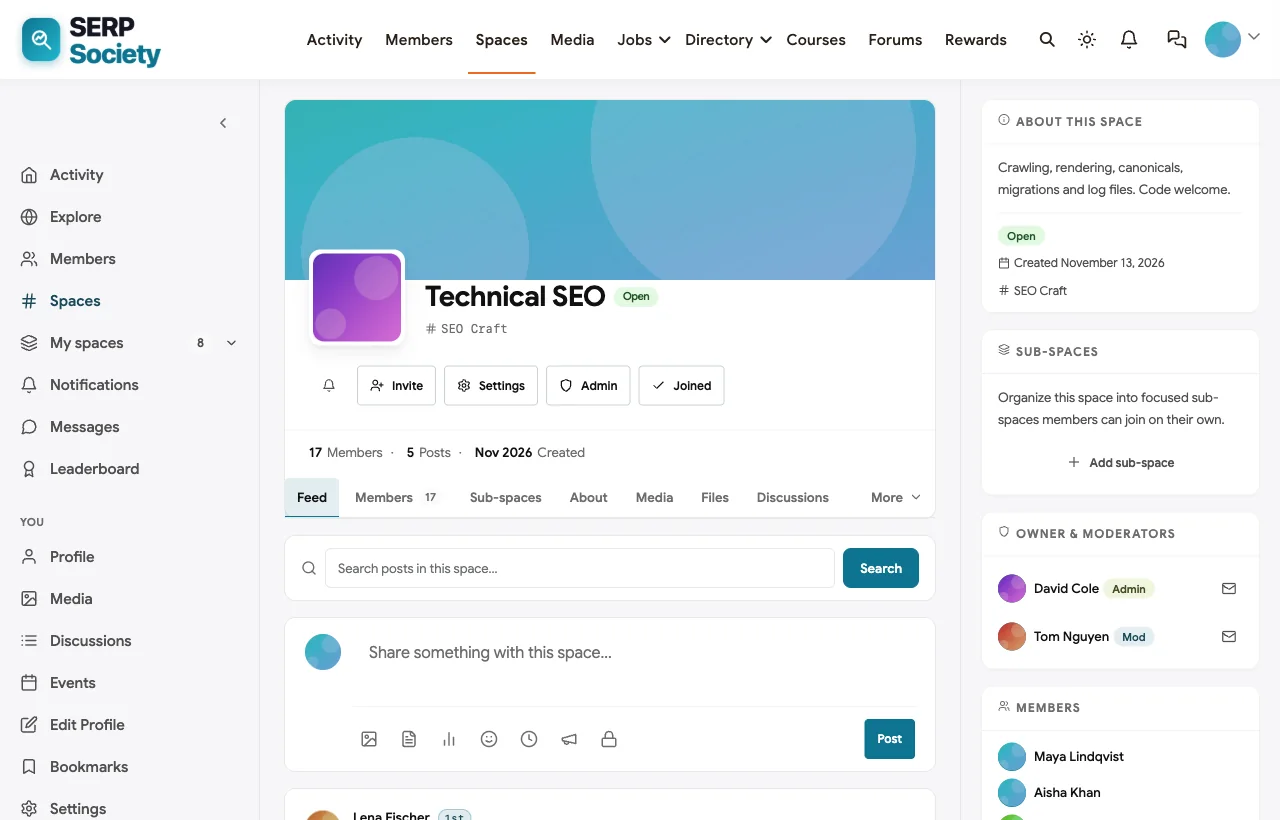
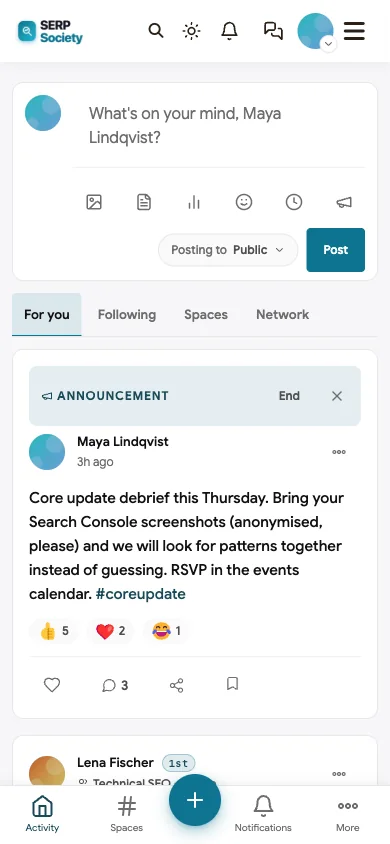
To show it in context, we built SERP Society, a demo community for search professionals with 20 fictional members, spaces for technical, local and ecommerce SEO, a private agency owners circle, a jobs board and a tools directory.
| Verdict | The strongest option if you want community answers to work as search assets and the business to stay yours |
|---|---|
| Best for | SEO course creators, newsletter writers, agencies, SEO tool companies and independent practitioner communities |
| Strengths | Indexable Q&A with schema, code highlighting, private spaces, jobs, tools directory, events, paid plans, full data ownership |
| Weaknesses | Self-hosted, so you run WordPress or use a host that does; chat is not as instant as Slack |
Q&A that works as content. Members ask questions in topic spaces such as Technical SEO, and the discussion becomes its own page with a clean URL. In the demo, a junior SEO asks why Google chose a different canonical than the one they set; experienced members reply with a checklist and a log command, and the asker confirms the fix. Code blocks are syntax-highlighted, so robots.txt rules, JSON-LD and shell commands stay readable.
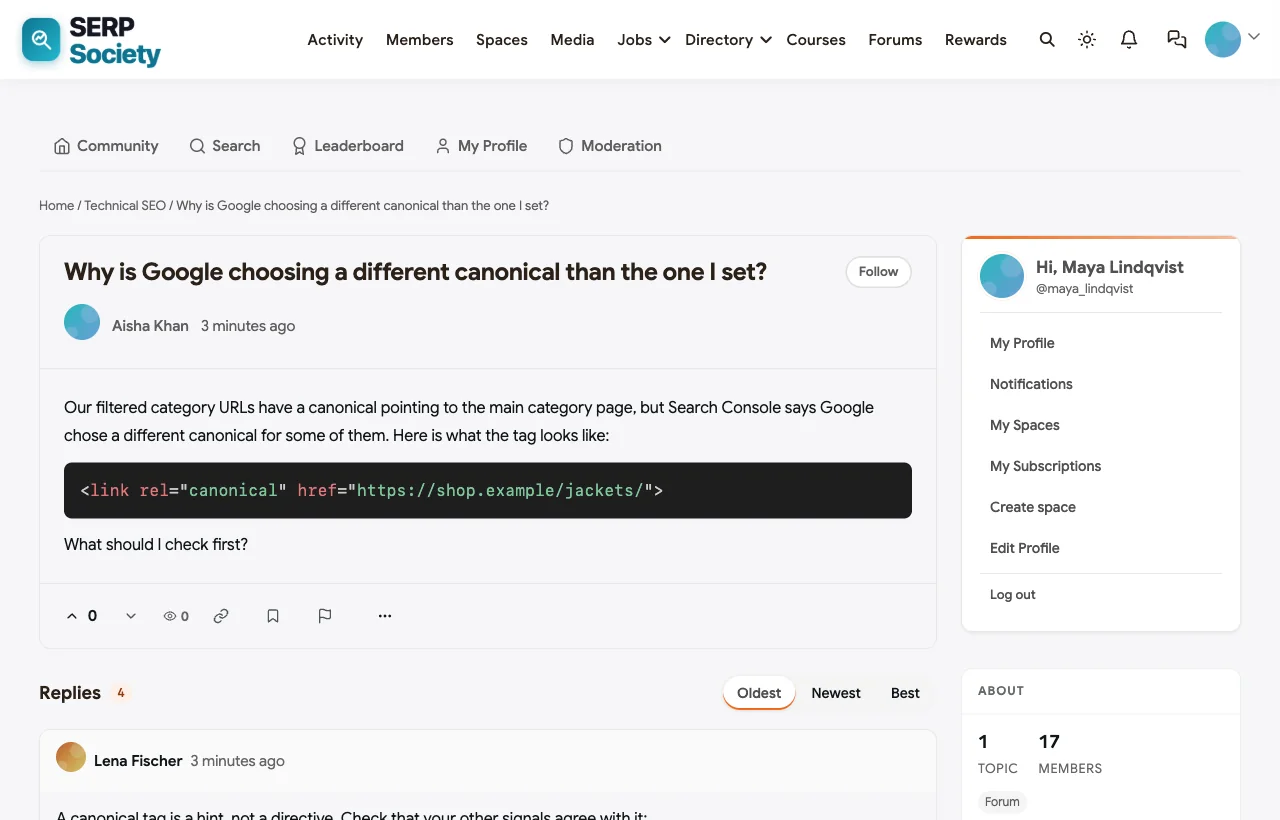
We checked the thread page logged out. It is fully server-rendered, so the replies are in the HTML a crawler receives, with a title built from the thread and space name, a meta description, a self-referencing canonical and structured data: DiscussionForumPosting for the thread and BreadcrumbList for navigation. The forum also generates a sitemap, and member profiles and search results are set to noindex by default so thin pages stay out of the index. (Our demo runs on a local site with search engines discouraged, so it shows noindex everywhere; on a public site the threads are indexable.)
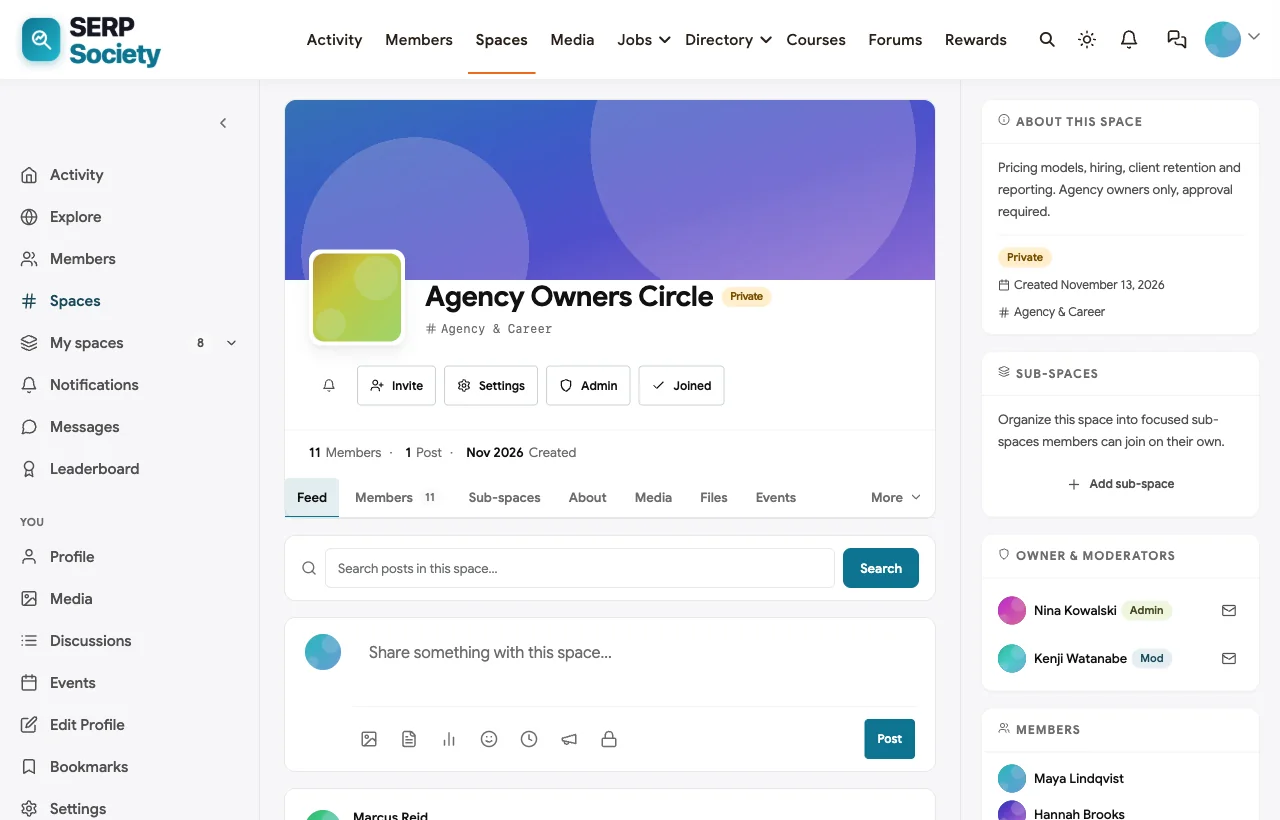
Spaces for every specialty. Technical SEO, Local SEO, Ecommerce SEO and Search Updates each have their own space, feed, moderators and events. The Agency Owners Circle is private: owners request to join and a moderator approves them, so conversations about pricing and client problems stay inside.
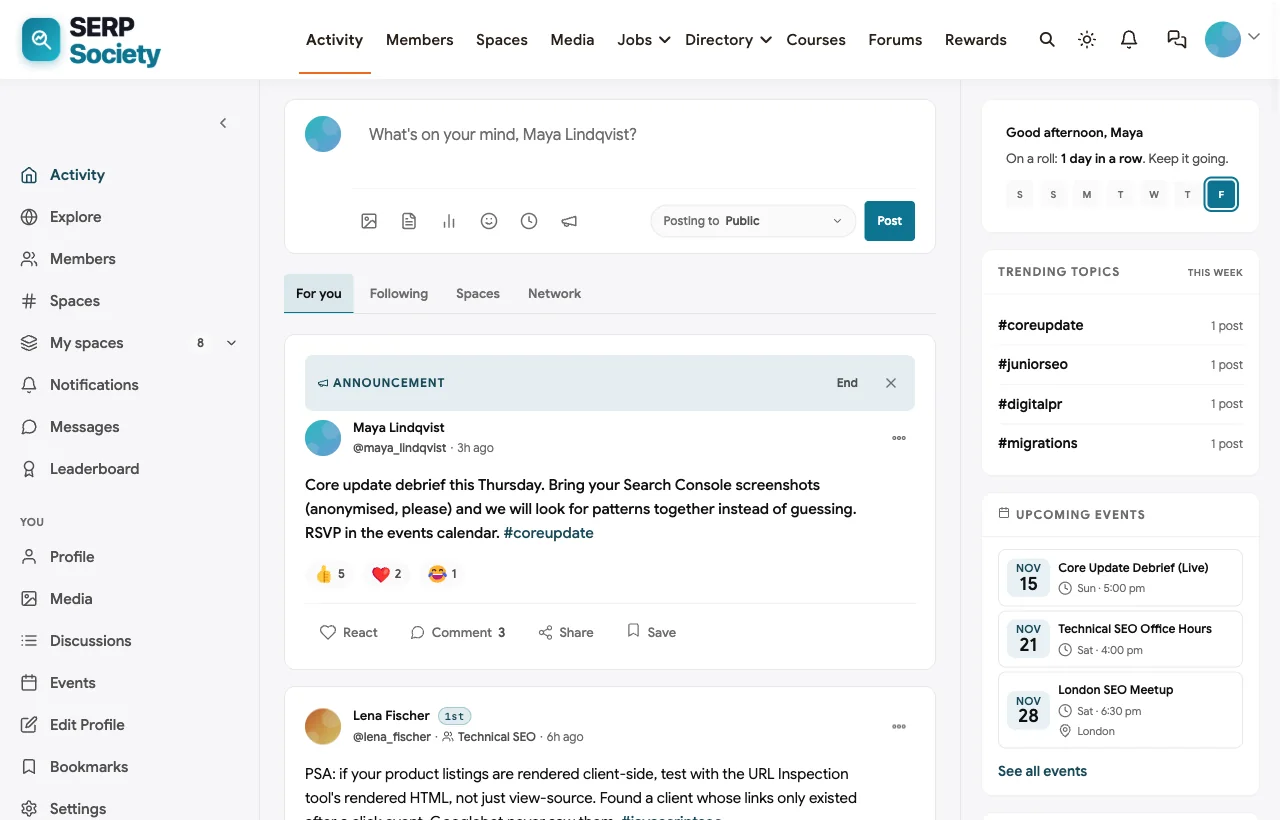
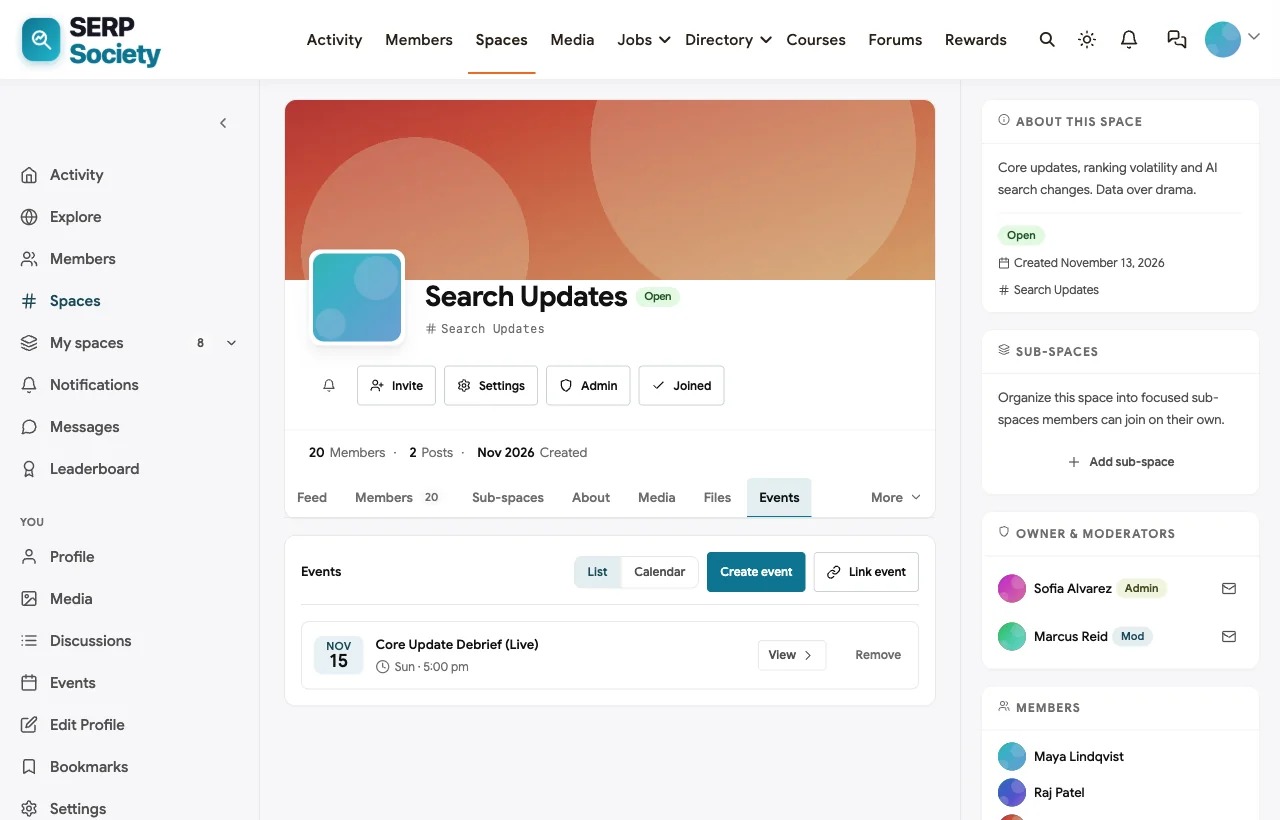
Update debriefs and office hours. When a core update lands, the host posts a pinned announcement and schedules a live debrief. Events appear in the space, on the homepage and in members’ feeds, with RSVPs. The demo also runs weekly technical office hours, a local SEO clinic and an in-person London meetup.
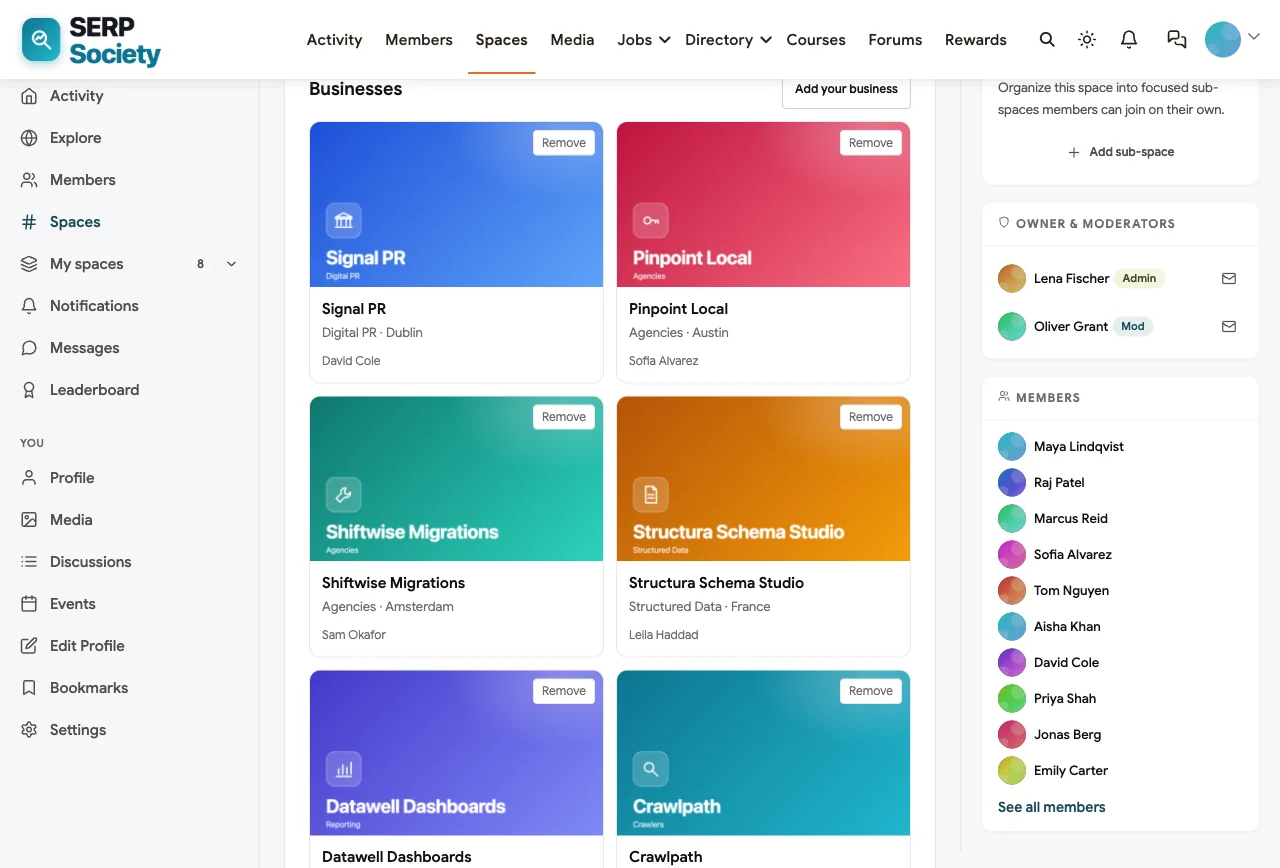
A tools and agencies directory that contains self-promotion. SEO communities attract tool vendors and link sellers. Instead of policing every post, SERP Society gives vendors one place to be: a Tools & Agencies Directory space with business listings for crawlers, reporting dashboards, schema tools and specialist agencies, each added by a member. The house rule is simple: no self-promotion anywhere else.
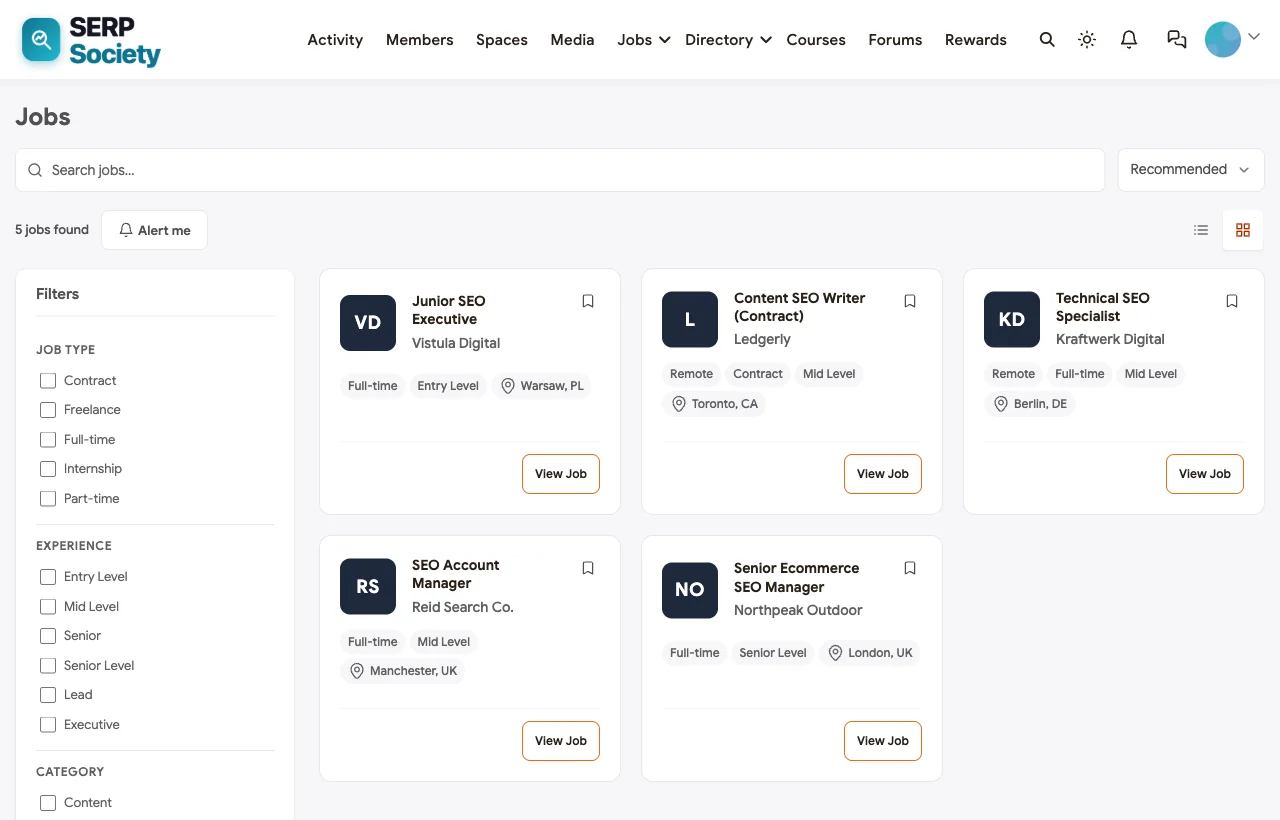
A jobs board for SEO roles. Members who are hiring post roles directly, from junior SEO executive to senior ecommerce SEO manager. Job seekers filter by type and experience level and set alerts, and new jobs also appear in the community feed.
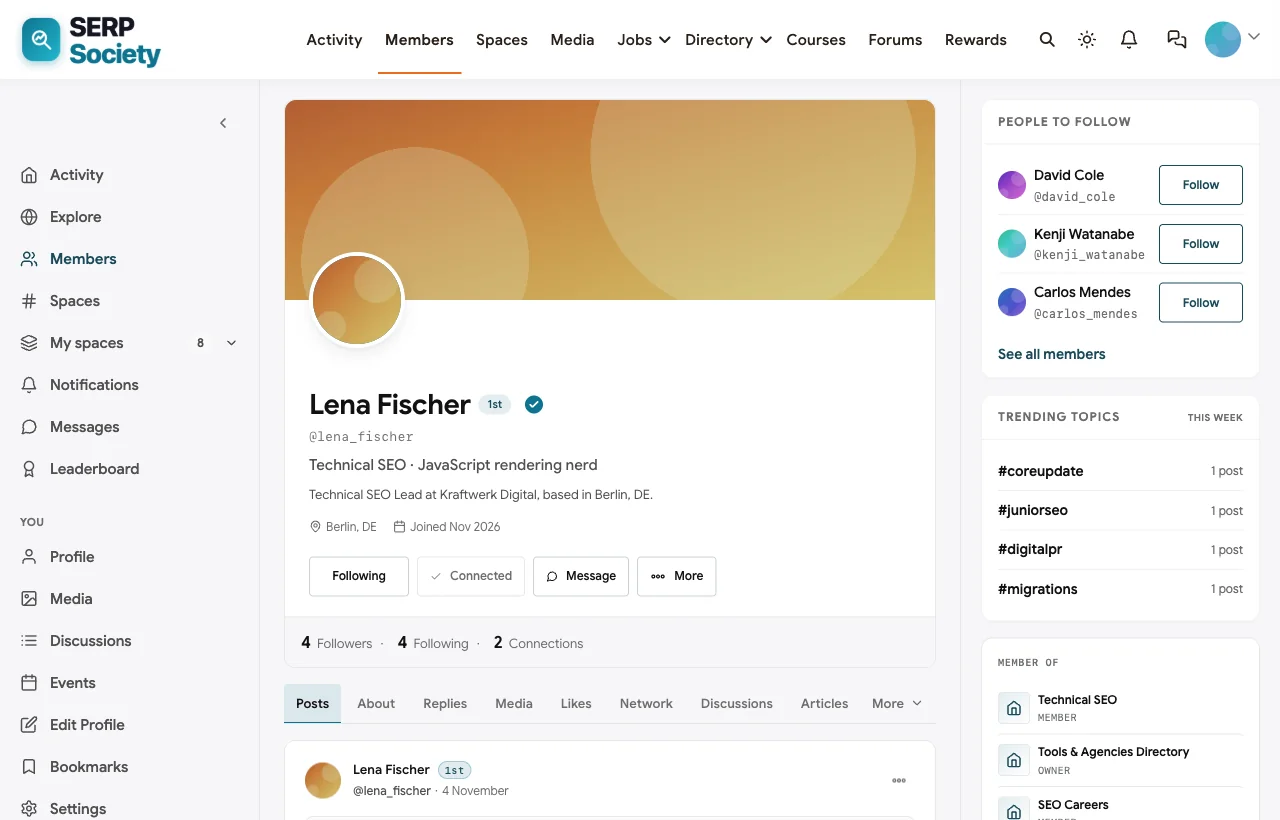
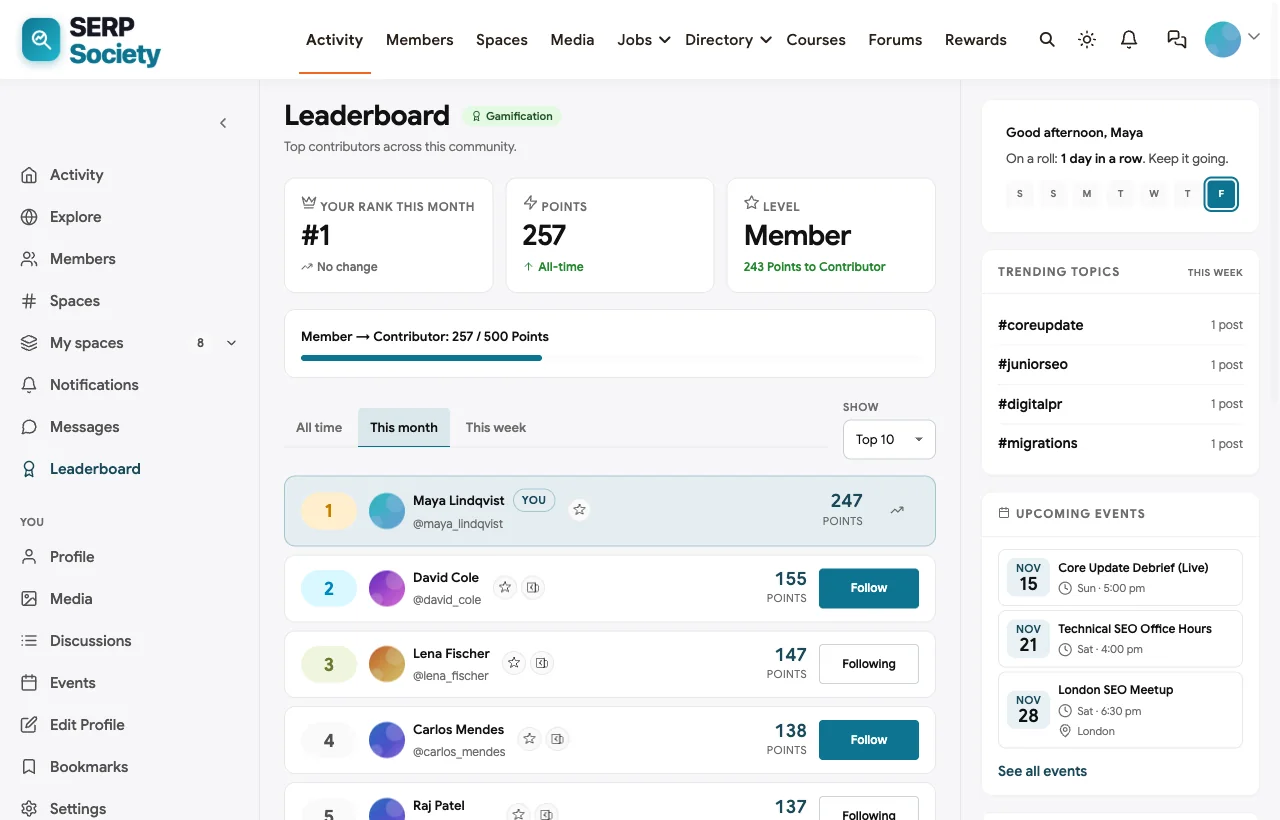
Reputation members can see. Profiles show each member’s specialty, company and location, and points reward helpful answers, events attended and posts. The leaderboard makes it obvious who the trusted experts are, which matters in an industry full of confident opinions.
Also built in. Direct messages for mentoring and CV reviews, polls, hashtags such as #coreupdate and #aisearch, notifications, courses for training programs, paid plans with trials and coupons for a paid tier, and a mobile layout that works without an app download.
The honest trade-offs. You run BuddyNext on your own WordPress hosting, so someone needs to keep the site updated, or you choose a managed host. Real-time chat is handled through messages and live events, not a Slack-style always-on channel. If your members want instant chat above all, some communities pair BuddyNext with a small chat channel and move every answer worth keeping into the Q&A.
What’s included, and how it is delivered
BuddyNext is one platform made of a core and add-on platform modules. Everything shown in the demo above runs on the BuddyNext platform. This table shows which parts come with the core, which are platform modules you install and activate alongside it, and which need a third-party plugin, another system or custom work.
| Capability | How it is delivered |
|---|---|
| Open, private and secret spaces | Core platform |
| Activity feed, pinned announcements and hashtags | Core platform |
| Member profiles and searchable member directory | Core platform |
| Direct messages | Platform module, installed alongside |
| Paid plans with trials and coupons | Platform module, installed alongside |
| Q&A with accepted answers and code highlighting | Platform module, installed alongside |
| Business and partner directory listings | Platform module, installed alongside |
| Jobs board with filters and alerts | Platform module, installed alongside |
| Events with RSVPs, online or in person | Platform module, installed alongside |
| Points, badges, streaks and leaderboards | Platform module, installed alongside |
Want to click around yourself? The SERP Society community in this guide was built on a private test site, so it is not public. The BuddyNext live demo is a general community you can open in your browser and explore without installing anything.
2. Discourse: best open-source forum for public SEO answers
Discourse is open-source forum software, available self-hosted or as managed hosting. Its features page lists “SEO optimized for Google indexing and searching”, a comprehensive API, automatic backups, single sign-on and social login (Discourse).
| Verdict | The best pure forum if public, searchable answers are your main goal |
|---|---|
| Best for | Technical SEO communities and tool companies running a support or user forum |
| Strengths | Indexable topics with permanent URLs, trust levels that hand moderation to experienced members, strong spam tools, open source |
| Weaknesses | A forum rather than a full community platform; events, paid tiers and a jobs board need plugins or other tools |
Discourse’s trust system is a real advantage for an SEO community: members earn more abilities as they participate, which helps police self-promotion without a big moderation team. Its replies are deliberately flat rather than threaded. The trade-off is that Discourse is built around topics; if you also want a social feed, member directory, events, jobs and courses in one place, you will be adding pieces around it.
3. Circle: best for a polished paid SEO community
Circle is a hosted community platform for creators and businesses. Its professional communities page highlights a searchable member directory with rich profiles, membership tiers and paid subscriptions, event pages with RSVPs and reminders, moderation tools, member applications and vetting, Circle APIs and Zapier triggers (Circle).
| Verdict | A strong hosted choice for paid masterminds and creator-led SEO communities |
|---|---|
| Best for | SEO educators and newsletter writers selling community access |
| Strengths | Clean member experience, member applications, tiers, events, branded apps |
| Weaknesses | Hosted only; public indexability of discussions is not a headline feature, so most Circle communities stay gated |
Circle’s member applications are useful for SEO communities that want to keep out link sellers before they join. If your business model is a paid community and you do not care whether discussions are public, Circle is a comfortable, fast way to launch. If you later want your discussions on your own domain, see how to move a Circle community to WordPress.
4. Slack: best for real-time chat when members already live in it
Slack is a work chat tool that many SEO communities adopt because members already have it open all day. Slack says it connects with more than 2,600 other services and includes Workflow Builder for automations (Slack).
| Verdict | Excellent for conversation, poor as a knowledge base |
|---|---|
| Best for | Small, high-trust groups where real-time chat matters most |
| Strengths | Familiar, fast, great integrations, easy AMAs in threads |
| Weaknesses | Free plan search limited to 90 days and older content deleted after a year; nothing indexable; no payments, directory or jobs board |
Traffic Think Tank and The SEO Community both show that Slack can host a thriving SEO community. They also show the workarounds: membership and payments handled elsewhere, and valuable answers that new members cannot easily find.
5. Discord: best for free, chat-first communities with voice
Discord combines text channels, voice and video rooms and forum channels, and is popular with younger SEO and marketing audiences.
| Verdict | A capable free option for chat and live voice sessions |
|---|---|
| Best for | Free communities, SEO learners and tool user groups |
| Strengths | Forum channels for longer topics, voice and stage rooms, strong automated moderation, big bot ecosystem |
| Weaknesses | Not indexable; feels informal for agency and in-house audiences; you do not own the platform |
Discord’s forum channels are a step closer to a searchable archive than Slack, but the content still lives inside Discord, invisible to search engines and impossible to move cleanly if you ever leave.
6. Skool: best for a simple course-plus-community with gamification
Skool combines a community feed, a classroom for courses, a calendar and gamification. According to Skool’s help center, members earn a point for each like on their posts and comments, climb through nine levels, and appear on 7-day, 30-day and all-time leaderboards, and courses can be unlocked at specific levels.
| Verdict | Easy to launch and engaging for SEO training communities |
|---|---|
| Best for | SEO course creators who want one simple product |
| Strengths | Simple setup, built-in courses, leaderboards that drive participation |
| Weaknesses | Opinionated layout with little customisation; hosted on Skool’s domain; not built for public, indexable Q&A |
7. Mighty Networks: best for an app-first SEO membership
Mighty Networks combines community, courses and events, built around configurable spaces. Its site says events show in each member’s local time, repeat on a schedule, collect RSVPs and send reminders, and native apps are a core part of the product (Mighty Networks).
| Verdict | Good for memberships where mobile engagement matters |
|---|---|
| Best for | SEO educators running cohorts and global events across time zones |
| Strengths | Native apps, courses, events in local time, AI assistance for hosts |
| Weaknesses | Hosted only; no public, indexable Q&A; branded apps sit on higher tiers |
For more options, see our roundup of Mighty Networks alternatives.
8. Heartbeat: best lightweight all-in-one for small paid groups
Heartbeat offers organized channels and threaded discussions, direct and group messaging, live events with RSVPs, calendar sync and automatic recordings, courses, documents, and subscriptions with built-in checkout (Heartbeat).
| Verdict | A practical, chat-flavoured platform for smaller SEO masterminds |
|---|---|
| Best for | Consultants running a small paid group with recorded sessions |
| Strengths | Recordings and replays for office hours, simple payments, Zoom and Zapier connections |
| Weaknesses | Hosted only; indexability and data export are not documented on its homepage |
9. Facebook Groups: best for reaching people who are already there
Facebook groups remain a free way to gather local SEO and small business marketing audiences. Admins can use membership questions, post approval and automated admin assistance to manage spam.
| Verdict | Reach without ownership |
|---|---|
| Best for | Local SEO and small business audiences that already use Facebook |
| Strengths | Free, familiar, decent moderation tools |
| Weaknesses | No searchable knowledge base, no directory or jobs board, no export of members, and the algorithm decides who sees each post |
10. LinkedIn Groups: best as a professional side channel
LinkedIn groups tie membership to real professional identities, which is useful for B2B and in-house SEO audiences. A group can hold up to 3 million members (LinkedIn Help), and admins can require approval for posts.
| Verdict | Useful for visibility, weak as a community home |
|---|---|
| Best for | Promoting your community to in-house and B2B SEO professionals |
| Strengths | Real identities, professional context |
| Weaknesses | Group posts compete with the main feed for attention, no Q&A archive, no events or jobs inside the group, no member export |
What about Reddit? r/SEO is one of the largest SEO discussion spaces anywhere and its threads often rank in Google. It is a great place to contribute and to learn what people are asking, but you cannot own it, brand it, charge for it or keep its members. Treat it as an audience, not a platform.
SEO community platforms compared
| Platform | Indexable public Q&A | Code in posts | Private spaces | Jobs | Directory for vendors | Events | Paid tiers | Ownership |
|---|---|---|---|---|---|---|---|---|
| BuddyNext | Yes, with discussion schema and sitemap | Yes, highlighted | Private and secret | Yes | Business listings | Yes | Built-in plans | Self-hosted, you own the data |
| Discourse | Yes | Yes | Yes | Via plugins or categories | Via categories | Via plugin | Via plugins | Self-hosted or managed |
| Circle | Not a headline feature | Yes | Yes | No | No | Yes | Yes | Hosted |
| Slack | No | Yes | Yes | Channel only | No | No | No | Hosted |
| Discord | No | Yes | Yes | Channel only | No | Yes | Server subscriptions | Hosted |
| Skool | No | Basic | Private groups | No | No | Calendar | Yes | Hosted |
| Mighty Networks | No | Basic | Yes | No | No | Yes | Yes | Hosted |
| Heartbeat | Not documented | Basic | Yes | No | No | Yes | Yes | Hosted |
| Facebook Groups | Limited | No | Group-level | No | No | Yes | No | Facebook’s platform |
| LinkedIn Groups | No | No | Group-level | No | No | No | No | LinkedIn’s platform |
Public or private: deciding what to index
An SEO community that publishes everything is a content farm; one that hides everything wastes its best work. A simple rule of thumb that most SEO community owners can agree on:
| Content | Visibility | Why |
|---|---|---|
| How-to Q&A threads (canonicals, redirects, schema) | Public, indexable | Evergreen answers that help searchers and bring in members |
| Search update debriefs | Members only, with a public summary | Members share client data; the summary still earns visibility |
| Agency and pricing discussions | Private | Confidential business information |
| Client screenshots and audits | Private, anonymised | Client confidentiality |
| Member profiles | Noindex | Thin pages that add little to search |
| Search results and tag archives | Noindex | Duplicate, low-value pages |
| Job posts | Public | Useful to job seekers and good for the community’s reach |
The same logic applies to merchant communities; see how a Shopify sellers community keeps public answers and private masterminds apart.
On BuddyNext, spaces are open, private or secret, and the discussion area handles titles, canonical tags, structured data and noindex defaults for profiles and search. Whatever platform you use, review the indexed pages in Search Console a month after launch and prune anything thin. SaaS teams use the same public-versus-private split for help answers and admin spaces; see the SaaS customer community comparison.
House rules that keep an SEO community useful
SEO communities have specific failure modes: link sellers, tool spam, rank-guarantee pitches and “great post!” replies that bury real answers. These rules, adapted from how well-run practitioner communities operate, keep the signal high:
- No self-promotion outside the directory. Tools and agencies get one listing each in the directory space. Everywhere else, share expertise, not offers.
- No link selling or guest post requests. Remove on sight and do not debate it.
- Show your data. Claims about ranking factors or updates need a screenshot, a test or a source. Opinions are welcome when they are labelled as opinions.
- Anonymise client data. Blur domains and numbers unless the client has agreed.
- Mark the answer. When your question is answered, say so. It helps the next person who searches.
- Be kind to beginners. Today’s junior SEO is next year’s best answerer.
Pin the rules in a Start Here space, make them part of onboarding, and give two or three experienced members moderator rights in each specialty space.
Launching an SEO community: the first six weeks
Weeks 1 and 2: seed with experts. Invite 15 to 25 practitioners you respect across technical, local, content and agency work. Ask each to answer two real questions and post one thing they learned recently. A community launches on the quality of its first answers.
Weeks 3 and 4: run something live. Schedule an office hours session or an update debrief. Live sessions give people a reason to join on a specific date and create threads that keep going afterwards.
Weeks 5 and 6: open the doors and publish. Invite your newsletter, course or client list. Make your best Q&A threads public, link to them from your blog and social posts, and let them start earning search visibility.
If you are starting from scratch on WordPress, our step-by-step guide to setting up a community space covers installation, spaces, messaging and moderation.
More community platform comparisons
Building a different kind of community, or one that overlaps with this one? These guides use the same method: a working demo community and vendor claims checked at the source.
- Best platforms for an affiliate marketing training community: courses, site teardowns, accountability pods and moderation against hype.
- Best software for a Shopify sellers community: store teardowns, masterminds and app spam control.
- Best software for a freelancer networking community: referrals, jobs and member directories.
- Best software for an AI agent developer community: code Q&A, roadmaps and hackathons.
- Best software for a SaaS customer community: Q&A, ideas boards and public roadmaps.
- Best software for a professional association community: chapters, committees, CPD and member directories.
- How to set up a community space on WordPress: the step-by-step setup guide behind every demo in this series.
How we built and checked this list
We built the SERP Society demo on a local WordPress site running BuddyNext, with fictional members, spaces, discussions, jobs, events and directory listings created for this guide; every BuddyNext screenshot comes from it. We checked a demo thread page logged out to confirm the server-rendered content, canonical, meta description and structured data described above. Competitor features come from each vendor’s own website or help center, checked in November 2026 and linked where we quote them. Community examples come from the communities’ own websites. We did not run paid accounts on every competitor, and features change, so confirm anything critical with the vendor. buddyxtheme.com is published by the team behind BuddyNext, which is why it is listed first; we have tried to be fair about its trade-offs as well as its strengths.
Frequently asked questions
What is the best software to create an SEO professionals community?
BuddyNext is the best choice for an SEO community you own, because its Q&A threads can be public, indexable pages with discussion schema on your own domain, alongside private spaces, jobs, a tools directory, events and paid plans. Discourse is the strongest open-source forum, and Circle is a polished hosted option for paid communities.
Is Slack good for an SEO community?
Slack is excellent for real-time conversation, and well-known SEO communities run on it. Its limits are the archive and visibility: on the free plan messages are searchable for 90 days and content older than a year is deleted, and nothing in Slack is indexable by search engines.
Can community discussions rank in Google?
Yes, if they are public pages on your own domain with good titles and real answers. Forums such as Discourse and community platforms such as BuddyNext publish discussions as crawlable pages. Content inside Slack, Discord or most gated communities cannot rank.
Should an SEO community be free or paid?
Both work. Free communities grow faster and attract beginners; paid communities attract experienced practitioners who value quieter, higher-signal conversation. Many communities run a free public Q&A with a paid private tier for masterminds, office hours and agency owners.
How do I stop tool vendors and link sellers spamming the community?
Give vendors one legitimate place to be, such as a tools and agencies directory, and ban promotion everywhere else. Add post approval for new members, member applications if you need them, and moderators in each specialty space who remove link selling on sight.
What spaces should an SEO community have?
Start with a welcome space, a search updates space, and one space per major specialty: technical, local, ecommerce and content. Add a careers space with a jobs board, a tools directory, and private spaces for agency owners or paid members.
Can I run an SEO course and community together?
Yes. BuddyNext, Skool, Circle and Mighty Networks all combine courses with community. BuddyNext can also connect a course to its own community space so learners discuss lessons with each other.
Is Discord or Slack better for SEO professionals?
Slack suits professionals who already use it for work and want a quieter, business-like tone. Discord suits free communities and younger audiences, with voice rooms and forum channels. Neither makes your community’s answers searchable on the web.
Should member profiles be indexed?
Usually not. Profiles are thin pages that add little for searchers. Index your best discussion threads and keep profiles, tag archives and internal search results out of the index.
How do I measure whether the community is working?
Track active members each week, questions answered and how quickly, event attendance, and, for public communities, impressions and clicks to your discussion pages in Search Console. A healthy SEO community answers most new questions within a day.
The bottom line
An SEO community should practise what its members preach: useful answers, organised well and findable for years. Chat tools make a community feel busy, but they quietly throw away its best work. If you want a community where the answers become an asset, the private conversations stay private and the business stays yours, BuddyNext is the strongest foundation. If you only need a forum, Discourse is excellent; if you want a polished hosted paid community, choose Circle.
And build an seo community whose best answers keep working.