

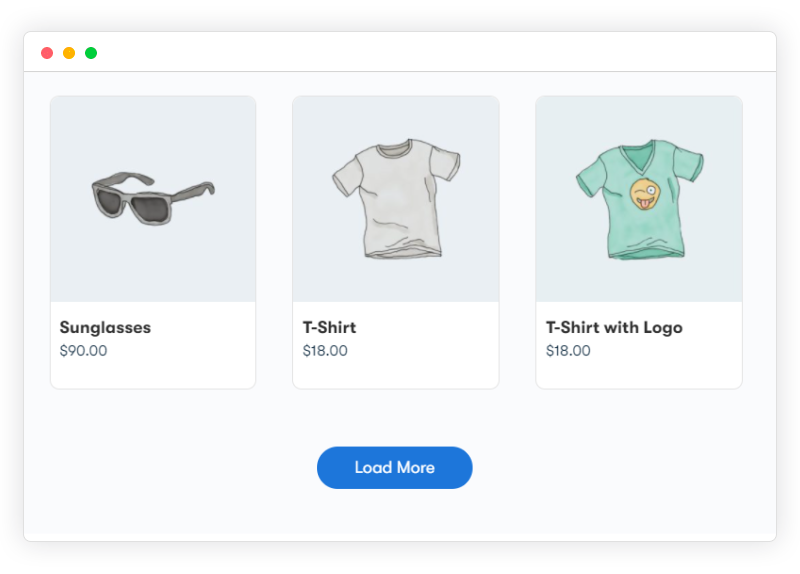
Default WooCommerce pagination means a click to “Next Page” every time a shopper wants to see more products, and that click is a real drop-off point. Load More Products for WooCommerce (free, BeRocket, 459,000+ downloads, updated within the last two weeks) replaces that with infinite scroll or a “Load More” button, so browsing doesn’t stop at page 1.
It’s worth understanding why that single click matters as much as it does before getting into the plugin itself. Every additional action a shopper has to take between “browsing” and “buying” is a point where attention can wander, a notification pulls them away, a kid interrupts, they simply lose the thread of what they were looking at. Standard numbered pagination isn’t just a minor inconvenience, it’s a repeated decision point: click again, or stop here. Multiply that decision across a category with ten pages of products and you’re asking a shopper to actively choose to keep browsing nine separate times. Removing that friction doesn’t guarantee a sale, but it removes one of the more avoidable reasons a shopper who was genuinely interested simply stops scrolling.
Why It Actually Helps
Keeps the browsing flow intact. Pagination interrupts the moment a shopper is scanning products. Infinite scroll or a load-more button keeps them in the same continuous view, so they see more products per session without a forced page reload.
Works better on touchscreens. Thumb-scrolling is a more natural mobile gesture than tapping a small pagination link, particularly useful given how much shopping traffic comes from phones.
More products seen per visit, in theory more chances to convert. This is the honest version of the claim: more scrolling doesn’t guarantee more sales, but it does remove one concrete piece of friction between a shopper and the product they’d actually buy.
Why This Kind of Friction Gets Overlooked
Pagination is one of those default behaviors that’s easy to stop noticing once a store’s been running for a while, it’s just how the category pages have always worked, and nobody on the team is actively browsing their own store the way a first-time shopper does. That’s a common blind spot across a lot of store-owner UX decisions, not just this one: the person setting up the store already knows the catalog, already knows roughly where things are, and doesn’t experience the friction a genuinely new visitor does clicking through page after page of unfamiliar products. Periodically browsing your own category pages the way a first-time visitor would, ideally on a phone, with fresh eyes, catches this kind of overlooked friction better than staring at analytics dashboards alone.
Infinite Scroll vs. Load More Button: Which to Actually Pick
The plugin supports both, and it’s worth thinking through which fits your specific store rather than defaulting to whichever sounds more modern. Pure infinite scroll, where new products load automatically as the shopper nears the bottom of the page, maximizes browsing continuity but has a real downside: it makes reaching the footer, and anything you’ve put there, effectively impossible without the page continuing to load more content underneath the shopper’s cursor. If your footer holds anything important, contact information, policy links, a newsletter signup, pure infinite scroll can bury it. A load-more button gives the shopper explicit control over when to load more, which is slightly more friction than automatic infinite scroll but preserves a normal, reachable footer and generally feels more predictable to a shopper who’s used to knowing where the “end” of a page is.
What to Look For in One of These Plugins
- Button customization. Custom button text and styling so it matches your store rather than looking bolted on.
- One-click setup. Most of these plugins genuinely don’t need configuration beyond activating them.
- Confirmed WooCommerce compatibility. Not every scroll/pagination plugin is built specifically for WooCommerce’s product loop, check this before installing.
SEO Trade-offs Worth Knowing About
This is the part of the infinite-scroll conversation that gets skipped a lot, and it’s a real consideration for a store that cares about organic search traffic. Standard numbered pagination produces individually crawlable, individually linkable pages, page 2 of a category has its own URL a search engine can index directly. Infinite scroll and load-more implementations that load content via JavaScript without updating the URL can make later pages of products invisible to search engine crawlers, or at least much harder for them to reach and index. A well-built implementation should update the URL or provide a fallback crawlable pagination structure alongside the JavaScript-driven loading, so search engines still have a path to every product regardless of how a human shopper is browsing. If organic search traffic to deeper category pages matters to your store, it’s worth specifically testing how your search console data looks after switching, rather than assuming a UX improvement is automatically SEO-neutral.
Setting It Up
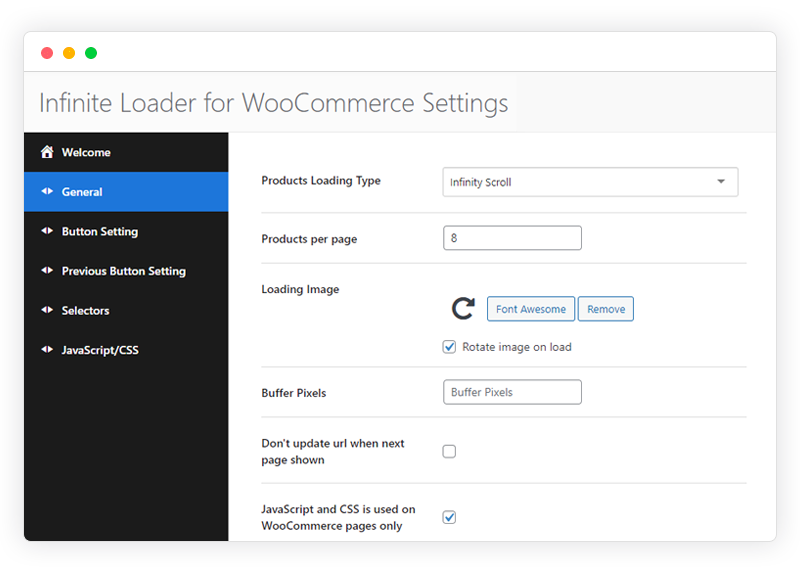
Load More Products for WooCommerce is free and installs like any other plugin, no license key. Once active, the settings panel lets you choose the loading type (infinite scroll vs. a manual load-more button), customize the button label, and set buffer/trigger distance for when the next batch loads.
A quick correction on the record: an earlier version of this post attributed this plugin to Wbcom. It’s actually built and maintained by BeRocket, not Wbcom Designs, we’ve corrected that here.
Performance Considerations on a Large Catalog
Infinite scroll and load-more both mean the browser is holding more DOM elements in memory the longer a shopper keeps scrolling, since previously loaded products generally stay rendered rather than getting unloaded as new ones appear. On a catalog with a few hundred products this is a non-issue. On a genuinely large catalog, several thousand SKUs in a single category, a shopper who scrolls extensively can end up with a noticeably heavier page than they’d have hit with traditional pagination, which caps how much content loads at once by design. If your store runs large categories, it’s worth testing actual scroll-depth performance on a mid-range phone rather than just a desktop, since that’s where memory constraints show up first and most visibly as sluggish scrolling or a delayed load response.
How This Compares to Native WooCommerce Block Themes
Newer WooCommerce setups built around the block-based Product Collection block have some native pagination options, including a load-more pattern, built into core rather than requiring a separate plugin. If you’re running a modern block theme and Products block-based category pages, it’s worth checking what your theme and WooCommerce version already offer natively before adding a third-party plugin on top, since overlapping pagination logic from two sources can occasionally conflict or produce inconsistent behavior across different parts of the same site. For a more traditional (non-block) product loop setup, which is still the majority of active WooCommerce sites, a dedicated plugin like this one remains the more straightforward route.
Rolling This Out on an Active Store
Rather than flipping numbered pagination off sitewide the moment the plugin’s activated, it’s worth a staged approach on a store with meaningful existing traffic. Test on staging first with real product data and real category sizes, not a handful of sample products, since behavior at scale can differ from a small test catalog. If your platform supports it, roll out to a single high-traffic category first and watch behavior for a few days before applying it sitewide, that gives you a chance to catch a configuration issue or an unexpected theme conflict on a limited scope rather than discovering it across your entire catalog at once.
A Few Store Types Where This Matters More
Fashion and apparel
Browsing behavior here is often closer to casual scrolling through a lookbook than a targeted search, shoppers frequently don’t know exactly what they want and are browsing to be inspired. Continuous scroll fits that browsing pattern more naturally than numbered pages, which impose a more deliberate, search-like structure on what’s often a more impulsive shopping mode.
Large catalogs with heavy filtering
Stores where shoppers apply multiple filters, size, color, price range, before browsing benefit from keeping the results view continuous after filtering, rather than resetting to page 1 of a numbered result set every time a filter changes. Confirm your specific setup handles the interaction between filtering and infinite loading correctly, since that combination is one of the more common places a poorly integrated plugin shows visible bugs.
Digital or low-consideration purchases
For lower-priced, low-consideration items, digital downloads, small accessories, impulse-buy categories, the continuous browsing experience tends to support the kind of quick, low-friction decision-making these purchases already involve. High-consideration purchases, where a shopper is doing careful comparison across a smaller set of options, arguably benefit less from infinite scroll and more from clear, deliberate navigation between a smaller number of well-organized pages.
Combining This With Other Product-Discovery Improvements
Pagination behavior is one piece of a broader product-discovery experience, and it’s worth thinking about it alongside the rest rather than treating it as a standalone fix. Strong filtering and sorting options matter just as much as how additional products load, a shopper who can’t narrow a large catalog down to relevant results won’t benefit much from smoother scrolling through irrelevant ones. Clear product imagery and consistent grid spacing matter too, since a visually cluttered or inconsistent grid undermines the smooth-browsing benefit infinite loading is supposed to provide. Treating this plugin as one improvement within a broader category-page audit, rather than a single fix that solves browsing friction on its own, tends to produce a better overall result than installing it in isolation and expecting it to carry the whole experience.
Testing After Installation
Before considering the setup finished, run through a few specific checks rather than trusting that activation alone means it’s working correctly. Confirm the load trigger actually fires reliably at the bottom of the page or button click, rather than intermittently, on both desktop and a real mobile device, not just a resized desktop browser window. Check that any active filters or sort order persist correctly as additional products load in, since a filter that silently resets partway through a scroll session is a confusing and easy-to-miss bug. And confirm the behavior when a category runs out of products, does it show a clear “no more products” state, or does the load-more button just sit there doing nothing, which reads as broken rather than complete.
Accessibility Considerations
Infinite scroll specifically has a documented history of accessibility problems worth being aware of, particularly for keyboard and screen-reader users. Content that loads dynamically as a sighted user scrolls doesn’t always get announced properly to a screen reader, and a keyboard-only user tabbing through a page can lose their place entirely when new content inserts itself into the DOM mid-navigation. A load-more button is generally the more accessible of the two options by default, since it’s a discrete, focusable, clearly labeled action rather than an ambient scroll-triggered event, a screen reader user can navigate to the button, activate it, and expect new content in a predictable way. If accessibility compliance matters for your store, and given the general direction of web accessibility expectations it increasingly should for most stores, lean toward the load-more button implementation over pure infinite scroll, or confirm your specific plugin version has addressed these known infinite-scroll accessibility gaps directly.
Analytics Implications
Standard pagination generates a natural page-view event for each page a shopper visits, page 1, page 2, and so on, which most analytics setups are built to track cleanly out of the box. Infinite scroll and load-more content loading via JavaScript doesn’t automatically generate that same page-view signal unless it’s specifically configured to fire an event each time new content loads. Without that configuration, your analytics can understate genuine engagement, a shopper who scrolled through six “pages” worth of products looks identical in your reporting to one who only saw the first page, since no additional page-view events fired. Setting up proper scroll-depth or load-event tracking in your analytics platform closes this gap and gives you an accurate picture of how far shoppers are actually browsing, which matters for any decision about whether the plugin is genuinely improving engagement or not.
Caching Interactions
If your site runs a page caching plugin, and most reasonably optimized WooCommerce stores should, confirm the dynamically loaded product batches are being served correctly rather than serving a stale cached snapshot of only the first batch. This is usually handled correctly by well-built caching plugins that understand AJAX-loaded content, but it’s worth a direct test after setup: clear cache, load a category page, scroll or click to load more, and confirm fresh product data (not a cached duplicate of the first batch) actually appears. A caching misconfiguration here shows up as products repeating or new content simply failing to load, which reads to a shopper as the store being broken rather than a caching edge case.
Alternatives Worth Knowing About
Load More Products for WooCommerce isn’t the only plugin in this space, and it’s worth knowing the landscape briefly even if this one covers most stores’ needs well. A handful of premium page-builder-integrated options, particularly ones bundled with specific page builders like Elementor’s WooCommerce widgets, offer similar infinite-scroll or load-more functionality baked directly into their product grid widgets, which can be a simpler route if you’re already committed to that page builder for the rest of your site design. The tradeoff is usually less flexibility outside that specific builder’s ecosystem and, in some cases, a paid tier requirement for the feature that this dedicated free plugin provides without one. For a store not already locked into a specific page builder’s product display widgets, a standalone, purpose-built plugin like this one tends to be the more portable, less entangled choice.
A/B Testing the Change
Since the actual conversion impact of switching away from standard pagination varies by store, product type, and audience behavior, it’s worth treating this as a testable change rather than a change you install and simply assume improved things. If your store has enough traffic to run a meaningful A/B test, comparing conversion rate, average session duration, and products-viewed-per-session between numbered pagination and the new load-more or infinite-scroll behavior gives you real evidence rather than an assumption borrowed from general UX best-practice advice. For a smaller store without enough traffic for a statistically meaningful split test, watching your existing analytics before and after the change, over a comparable time window and accounting for seasonality, at least gives a directional read even without full A/B rigor.
Frequently Asked Questions
Will this slow down my site’s initial page load?
The initial page load should only render the first batch of products, the same as standard pagination would show on page 1, with subsequent batches loading only as triggered by scroll or button click. If you’re seeing a slower initial load after activating the plugin, that’s worth investigating as a specific configuration or conflict issue rather than an inherent tradeoff of the plugin itself, since a well-built implementation shouldn’t front-load anything beyond what a normal first page would already show.
Does it work with custom product grid layouts from my theme?
This depends on how standard your theme’s product loop markup is. A theme that follows WooCommerce’s standard template hooks and structure should work without issue; a heavily customized theme with a non-standard product grid implementation is worth testing specifically on staging before rolling out, since the plugin needs to correctly identify where and how to insert newly loaded products into your existing grid structure.
Can I set a maximum number of products that load before switching back to a “view all” link?
Worth checking the plugin’s current settings panel directly for this, some implementations of infinite scroll and load-more offer a cap after which they switch to a link to a full category view, which is a reasonable middle ground for very large catalogs where truly unlimited scrolling could create the performance and accessibility concerns discussed above.
Interesting Reads:
5 Best WordPress Plugins to Create a Multi-Vendor Marketplace
BuddyPress WooCommerce Integration: Start Selling on Your Community Site