How to Speed Up Sales with WooCommerce One Page Checkout


In eCommerce, the checkout process can make or break a sale. Studies show that nearly 70% of shoppers abandon their carts—and one of the biggest reasons is a long and complicated checkout process. Customers don’t want to jump between multiple pages, fill endless forms, or deal with confusing steps.
This is where WooCommerce One Page Checkout steps in.
Combining product selection and checkout on a single page creates a frictionless buying experience. Shoppers can add products, manage quantities, and pay without leaving the page. Let’s dive in and see how you can speed up sales with this simple yet game‑changing extension.
What is WooCommerce One Page Checkout?
WooCommerce One Page Checkout is a premium extension designed to simplify the shopping experience by displaying both product selection and checkout forms on a single page. Instead of navigating through multiple steps, customers can conveniently add or remove products, view their order details instantly, and complete payment—all without leaving the page.
This streamlined process reduces friction, keeps shoppers engaged, and decreases cart abandonment, resulting in smoother transactions and higher conversion rates.
Why Use WooCommerce One Page Checkout?
The WooCommerce One Page Checkout plugin is a must-have for any online store looking to boost sales and improve the shopping experience. It enables faster purchases by eliminating unnecessary page reloads and redirects, allowing customers to complete their orders more efficiently. By keeping the entire process on a single page, it greatly reduces cart abandonment, since shoppers can finish their purchase right where they start.
This streamlined checkout also leads to higher conversions, with studies indicating that simplified processes can increase sales by up to 35%. Beyond efficiency, it enhances the overall user experience—particularly for mobile users who prefer quick, hassle-free navigation.
Plus, its flexible design lets you implement it using shortcodes, templates, or per-product settings, giving store owners complete control. If your goal is to speed up sales and simplify checkout, this extension is the perfect solution.
Also Read: How to Offer Flexible Delivery Dates During Checkout in WooCommerce
How to Install WooCommerce One Page Checkout
Before you can use it, purchase and install the plugin using the steps below.
Step 1: Purchase the Plugin
- Go to the official product page: WooCommerce One Page Checkout.
- Add the extension to your cart and complete the purchase.
- Download the
.zipfile from your WooCommerce account dashboard.
Step 2: Install the Plugin
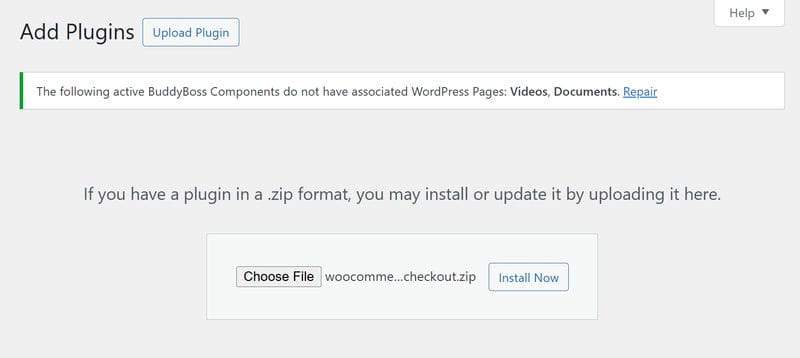
- Log in to your WordPress Admin dashboard.
- Navigate to Plugins > Add New.
- Click Upload Plugin, select the downloaded .zip file.
- Click Install Now and then Activate.
Step 3: Verify Installation
- After activation, look for the One Page Checkout options within WooCommerce.
- You’re now ready to create your first single‑page checkout experience.
Tip: Keep the plugin updated to ensure compatibility with your theme, payment gateways, and WooCommerce core.
How to Use WooCommerce One Page Checkout
There are three main ways to set up One Page Checkout in your store.
1) Enable One-Page Checkout Per Product
- Edit any product in WooCommerce.
- In the Product Data panel, check the option for Enable One Page Checkout.
- Once enabled, the checkout form appears directly on the product page.
Example: Perfect for selling a single product like an ebook, membership, or ticket. Customers see the checkout form right below the product details.
2) Use the Shortcode Method
You can manually insert the shortcode into any page, post, or custom post type:
[woocommerce_one_page_checkout]Common shortcode attributes
- product_ids – Display selected products only.
Example:[woocommerce_one_page_checkout product_ids="30,45,12"] - category_ids – Display products from specific categories.
Example:[woocommerce_one_page_checkout category_ids="27,11,45"] - template – Choose how the checkout looks (list, table, pricing, etc.).
Example:[woocommerce_one_page_checkout template="pricing-table"]
Use case: Ideal for building a custom landing page with checkout included.
3) Use the Graphical Interface (Classic Editor Only)
- Go to Pages > Add New or Posts > Add New and switch to Visual mode.
- Click the One Page Checkout icon.
- Choose the products and the template, then click Create Shortcode.
Note: The visual interface is available with the Classic Editor. On the Block Editor (Gutenberg), use the shortcode method.
Features of WooCommerce One Page Checkout
- Single Page Shopping: Customers can choose products, view order details, and check out on one page.
- Flexible Setup: Enable it for specific products, categories, or create custom checkout pages.
- Shortcode Support: Use the
[woocommerce_one_page_checkout]shortcode to add checkout anywhere. - Built-In Templates: Choose from different layouts such as product lists, product tables, or pricing tables.
- Custom Templates: Developers can create tailored templates for unique designs.
- Extension Compatibility: Works seamlessly with many WooCommerce extensions like Subscriptions, Smart Coupons, and Checkout Field Editor.
- Auto-Scroll Option: Automatically scrolls customers to important checkout messages.
Built‑in Templates in WooCommerce One Page Checkout
- Product Table – Rows with images, titles, prices, and add-to-order controls; great when visuals help decision‑making.
- Product List – A clean, radio‑button style list for quick choices when images/descriptions aren’t essential.
- Single Product – Mimics a standard product page (short description, gallery, meta) with checkout embedded.
- Pricing Table – Multi‑column comparison for bundles or tiers; shows attributes, dimensions, and weights.
- Easy Pricing Table – Works with the Easy Pricing Tables plugin for advanced layouts and toggles.
Each template suits different business needs—whether you’re selling multiple products, bundles, or a single flagship item.
Pro Tips for Optimizing One-Page Checkout
To make the most of WooCommerce One Page Checkout, it’s important to optimise the experience with a few smart strategies. Start by keeping the page clean—remove unnecessary distractions and minimise form fields so the checkout flow remains smooth and quick.
Build trust by adding security badges, testimonials, a clear returns policy, and guarantees near the payment area to reassure customers.
You can also highlight urgency with limited-stock notices or countdown timers, which work especially well for time-sensitive offers. Since many shoppers buy on mobile, ensure inputs are thumb-friendly and place important CTAs above the fold for easy access.
Finally, track performance using Google Analytics or GA4 events and heatmaps to understand customer behaviour, and don’t forget to run A/B tests comparing templates like Product List versus Pricing Table to see which layout drives the highest conversions.
Also Read: How to Improve Customer Experience with WooCommerce Order Tracking
Common Use Cases
- Single Product Stores – Perfect for selling ebooks, online courses, or memberships. Instead of sending customers through multiple steps, you can display the product and checkout form together on one page. This makes the buying process quick and convenient, especially for digital products that require instant access.
- Event Registrations – Ideal for selling tickets to conferences, workshops, or webinars. Customers can browse available ticket types, select their preferred option, and complete payment on the same page. This reduces drop‑offs and ensures a smooth registration process, which is crucial for time‑sensitive events.
- Bundles and Packages – Great for businesses offering curated collections of products. With WooCommerce One Page Checkout, you can showcase a bundle in a pricing table layout, allowing customers to compare product features and purchase multiple items at once. This setup is especially useful for subscription boxes, gift packages, or seasonal deals.
- Flash Sales & Landing Pages – Perfect for running limited‑time promotions or creating focused landing pages. By combining promotional content, product highlights, and the checkout process on a single page, you create a sense of urgency while removing distractions. This streamlined experience encourages customers to complete their purchase quickly.
Extension Compatibility
WooCommerce One Page Checkout is highly flexible and integrates seamlessly with many popular WooCommerce extensions, making it even more powerful for store owners. For instance, it works perfectly with WooCommerce Subscriptions, allowing you to sell recurring memberships or subscription products on a single‑page checkout.
If you’re running events or scheduling services, its compatibility with WooCommerce Bookings ensures that customers can reserve and pay for appointments or tickets without navigating multiple pages. It also integrates with Smart Coupons, enabling you to offer discounts, gift cards, or store credit right within the streamlined checkout process.
With the Checkout Field Editor, you can further customize the checkout fields to capture only the information you need. For more complex products, extensions like Composite Products and Product Bundles work smoothly with One Page Checkout, letting you sell customizable packages or grouped items with ease. Together, these integrations give you the flexibility to create a tailored, efficient, and conversion‑focused checkout experience for any type of business.
Create a Seamless Checkout Experience with WooCommerce One Page Checkout
A fast, simplified checkout is no longer optional—it’s essential for modern eCommerce. With WooCommerce One Page Checkout, you can reduce cart abandonment, boost conversions, and create a smooth buying journey for your customers. If you’re looking to customize One Page Checkout or integrate it with other advanced WooCommerce features, expert help can make the process seamless and tailored to your business needs.
Get Custom WooCommerce Development Services for One Page Checkout and speed up your sales today by creating a checkout experience your customers will love.
Interesting Reads
How to Allow Customers to Add Tips in WooCommerce

Shashank is a seasoned digital marketing and WordPress expert who specializes in SEO, software tools reviews, and cutting-edge strategies for boosting online presence. With a passion for simplifying complex topics, Goutham crafts engaging blog posts that help readers optimize their websites, improve search engine rankings, and stay ahead in the ever-evolving digital landscape.