
Coaching businesses have a platform problem that course businesses don’t: the product isn’t content, it’s transformation, and transformation runs on structure plus accountability plus belonging. A coach’s stack usually reflects that painfully, a course tool here, a group chat there, a scheduling app, a payment link, an email list, none of them sharing a login or a member record. Clients feel the seams, and seams are where clients quietly leave.
This comparison ranks LMS options for coaches, life, business, fitness, career, and every practice in between, against coach-shaped criteria: program delivery (courses as structured coaching programs, dripped by week), client accountability (visible progress you and they can act on), group coaching spaces (cohorts that hold each other up between calls), renewal-worthy community (the belonging clients stay subscribed for), and ownership (your client base on your platform, not an algorithmic feed you rent). We built the full architecture for this in how to build a free online coaching platform you actually own, this article is the LMS-choice layer of that decision.
Table of Contents
- Quick comparison
- What a coaching practice needs from an LMS
- 1. Learnomy, the complete coaching platform core
- 2. MemberPress Courses, for subscription-first practices
- 3. LifterLMS, accountability automation
- 4. Tutor LMS, polished program delivery
- 5. LearnDash, for certification-style programs
- 6. Sensei LMS, the light-touch option
- 7. Skool, the hosted community benchmark
- 8. Thinkific, the hosted course benchmark
- The accountability architecture: cohorts, streaks, and visible progress
- How we evaluated these platforms
- Three coaching program patterns and how to build them
- Three coaches, three different right answers
- Common mistakes coaches make choosing a platform
- FAQ
- Verdict
Quick comparison
| Platform | Program Delivery (Drip) | Client Progress Visibility | Group Coaching Spaces | Ownership |
|---|---|---|---|---|
| Learnomy | Yes, built in | Per-client, per-lesson analytics | Via BuddyPress/BuddyX composition | Full, self-hosted |
| MemberPress Courses | Yes, by membership level | Basic | Limited | Full, self-hosted |
| LifterLMS | Via add-ons | Moderate | Social learning add-on | Full, self-hosted |
| Tutor LMS | Higher tiers | Basic to moderate | Q&A only | Full, self-hosted |
| LearnDash | Yes, mature | Via separate tooling | Third-party connectors | Full, self-hosted |
| Sensei LMS | Via add-on | Basic | Limited | Full, self-hosted |
| Skool | Basic courses | Basic | Yes, core strength | Rented |
| Thinkific | Yes | Moderate | Built-in (higher plans) | Rented |
What a coaching practice needs from an LMS
A coaching program is a course with a heartbeat. Drip scheduling isn’t a luxury feature, it’s the program: week two unlocks after week one, homework lands between calls, and the pacing is the pedagogy (the mechanics are in our drip content guide). Progress visibility is your session prep: walking into a call knowing exactly which client stalled on which exercise changes the conversation from “how’s it going?” to coaching. Group spaces carry the program between calls, the cohort that celebrates and nudges each other is doing half your retention work. Community is the renewal engine: clients finish programs, but they stay subscribed to belonging. And ownership is the business-model point: your client relationships, content, and revenue on your own platform, with no fees skimmed and no feed algorithm deciding whether clients see your posts.
1. Learnomy, the complete coaching platform core
Learnomy tops the coaching ranking because it covers the program-delivery half completely and composes cleanly with the community half. Programs build as dripped courses in the drag-and-drop builder, week-by-week unlocks, prerequisites, homework as lessons and quizzes, and the AI course and quiz generation turns your existing framework (worksheets, session outlines, the method in your head) into structured program drafts fast, per our AI creation guide. Client accountability is where it shines for coaches specifically: per-client, per-lesson progress means you open each call already knowing who did the work and where they stalled, the reading workflow is in course analytics in WordPress.
The business side is native: Stripe and PayPal checkout built in (no commerce stack, no platform fees on coaching revenue), coupons for launch promotions, and automated certificates, which in coaching double as completion rituals clients share, unprompted marketing for your next cohort. And architecturally it’s a clean WordPress plugin, so the community half of the practice composes without seams: BuddyPress groups as coaching cohorts, member profiles, activity feeds where wins get posted and celebrated, all wrapped in the BuddyX theme so program and community feel like one product. That composition is exactly the stack we assembled in the coaching platform build. Details at learnomy.app.
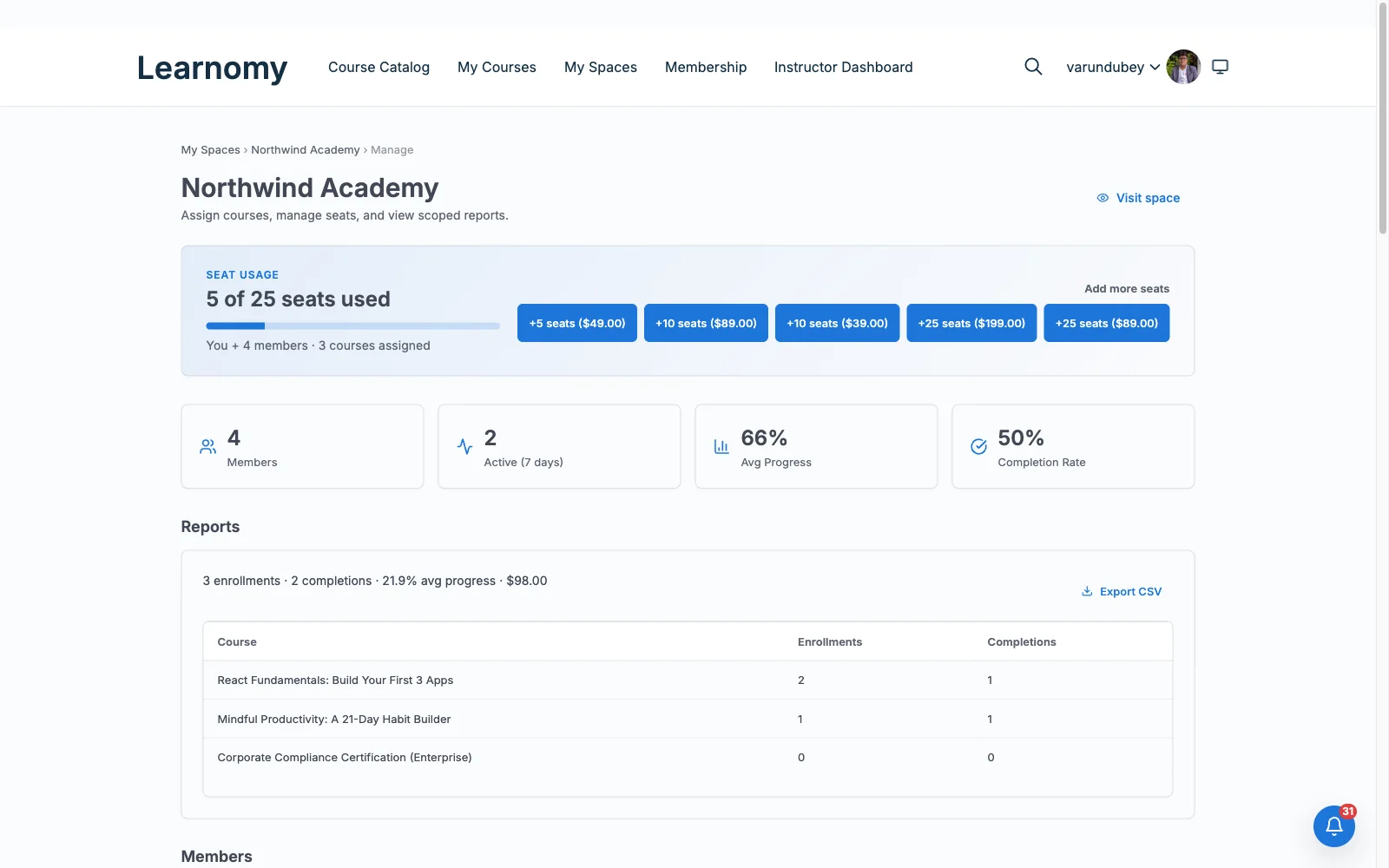
Pros: drip-first program delivery; per-client visibility that changes session prep; native checkout with no fees on revenue; AI drafting from your existing method; composes into a full coaching platform with BuddyPress/BuddyX.
Cons: Learnomy itself has no built-in scheduling, video-call, or 1:1 session-booking tool, coaches still need a separate calendar app for live sessions, and its AI drafting tools require the upgraded tier rather than the base install.
2. MemberPress Courses, for subscription-first practices
If your practice’s economic engine is the recurring subscription, a monthly membership containing programs, office hours, and resources, MemberPress fits the business model natively: the best access rules and subscription billing on this list, checkout included, courses dripped by membership level. Its LMS layer is the trade: quizzes, progress analytics, and program tooling trail the dedicated platforms, so accountability runs on your effort rather than the platform’s. The operational reality of subscription practices, proration, pauses, dunning, is covered in our membership operations guide.
Pros: subscription billing done right; native checkout; level-based access.
Cons: shallow program analytics; community needs third parties.
3. LifterLMS, accountability automation
LifterLMS’s engagement machinery reads like it was designed for coaches: achievements when clients complete milestones, triggered emails when they go quiet, celebrations when streaks hold, automated versions of the nudges a coach sends manually. Its social learning add-on gestures at cohort space. The trade is the add-on bundle model: payments, advanced quizzes, and several accountability pieces arrive as separate components, with WooCommerce for flexible checkout. Details in our LifterLMS review.
Pros: the best automated-nudge toolkit here; mature builder.
Cons: bundle assembly; WooCommerce dependency.
4. Tutor LMS, polished program delivery
Tutor’s frontend builder makes program creation pleasant, and its student-facing screens present your program professionally without design work. For coaching specifically, the boundaries matter: drip and certificates sit in higher tiers, progress reporting is serviceable rather than session-prep grade, and social features stay course-scoped. A solid delivery layer for a coach who’ll build community elsewhere; our Tutor LMS review has the full picture.
Pros: pleasant building; polished client-facing screens.
Cons: drip by tier; WooCommerce for checkout; thin accountability.
5. LearnDash, for certification-style programs
Coaches who certify, train-the-trainer programs, accredited methods, practitioner certifications, need assessment rigor, and LearnDash’s engine (question banks, granular grading, prerequisite chains) is the deepest in WordPress LMS, with mature drip. The costs are the familiar assembly (WooCommerce, separate reporting, connectors for community) and a platform feel built for course businesses rather than coaching intimacy. Right when the certificate is the product; see our LearnDash alternatives guide for when it isn’t.
Pros: certification-grade assessment; mature drip.
Cons: assembly-heavy; accountability tooling is DIY.
6. Sensei LMS, the light-touch option
A coach whose online component is modest, a resource library, pre-work modules before calls, a self-paced foundations course, can run it on Sensei with almost no platform overhead: block-native lessons, Automattic stewardship, WooCommerce for the occasional sale. Accountability, drip depth, and community are all thin, which is acceptable precisely when the coaching itself happens on calls and the platform is supporting material. Our Sensei LMS review maps the ceiling.
Pros: minimal overhead; easy authoring.
Cons: thin everything a program-led practice needs.
7. Skool, the hosted community benchmark
Skool deserves its place in every coaching conversation because it proved the thesis this article is built on: community plus light courses retains clients better than courses alone. Its group spaces, leaderboards, and simplicity are genuinely good. The structural costs are equally real: a permanent subscription, a deliberately shallow course layer, clients who belong to Skool’s ecosystem as much as yours, and a business built on rented land. We compared it and its rivals at length in best Skool alternatives, the WordPress composition above delivers the same thesis on property you own.
Pros: community-first design proven in coaching; dead simple.
Cons: rented; shallow programs; your clients on their platform.
8. Thinkific, the hosted course benchmark
Thinkific is the hosted mirror image: strong structured-course delivery, native checkout, community spaces on higher plans, zero maintenance, for a permanent subscription and the customization and ownership ceilings that come with hosted platforms. For a coach certain they never want to touch WordPress, it’s the honest hosted pick; for a practice built on owning the client relationship, the trade runs the wrong way.
Pros: polished delivery; zero maintenance.
Cons: permanent rent; lock-in; community on their terms.
The accountability architecture: cohorts, streaks, and visible progress
Accountability isn’t a feature you buy, it’s an architecture you compose, and on WordPress every piece is available. Cohorts: each program intake becomes a BuddyPress group, its own space, feed, and membership, so clients move through together. Visible progress: program milestones post to the group feed (and gamification adds streaks and badges), turning private effort into public momentum. Coach visibility: the LMS analytics layer tells you who’s stalled before the call, so accountability is specific, not generic. Ritual: completion certificates close each program with an artifact clients share. This is the loop, structure from the LMS, belonging from the community layer, and it’s why the platform choice above weights composition so heavily: the LMS that plays cleanly with BuddyPress gives you the whole loop on owned infrastructure, per our engagement playbook.
How we evaluated these platforms
This comparison is based on each platform’s own documentation and pricing pages as of September 2026, read through coaching-practice criteria: drip mechanics, progress reporting, and publicly stated limitations. Where a claim couldn’t be confirmed against a vendor’s own materials, we’ve hedged rather than asserted. Capabilities change with releases; verify against your own program design before committing.

Three coaching program patterns and how to build them
The cohort program (fixed-length, group intake): a dripped course paced to the call schedule, a BuddyPress group per intake, homework as lessons with completion tracked, and a certificate ritual at the end. The platform load-bearers: drip and per-client analytics.
The evergreen membership (join anytime, stay for the room): a foundations course plus a monthly-themed drip, a single always-on community with gamified streaks, and office-hours threads. Load-bearers: subscription handling and community vitality.
The certification track (practitioners licensing your method): rigorous assessment with question banks, proctored-style exams (requirements here), branded certificates, and an alumni community that becomes your referral network. Load-bearers: assessment depth and credential credibility.
Three coaches, three different right answers
The coach leaving the tool-sprawl stack (course app + group chat + payment links) should build the owned composition: Learnomy plus BuddyPress plus BuddyX, one login, one member record, one platform, per the full build guide.
The subscription-model coach whose revenue is the monthly membership should weigh MemberPress’s billing engine against Learnomy-plus-membership-layer, choosing by whether billing sophistication or program analytics matters more day to day.
The Skool-curious coach should steal the thesis, not the tenancy: community-first retention works, and the owned alternatives deliver it without the permanent rent or the platform holding your client list.
Common mistakes coaches make choosing a platform
Buying a course tool for a transformation business. Content delivery is a third of the job; accountability and belonging are the rest. Score platforms on the whole loop, not the lesson player.
Renting the community. The community is your renewal engine and your moat, on rented platforms, it’s also your biggest churn risk and your landlord’s asset. Own it.
Skipping progress visibility. If you can’t see who stalled where before a call, the platform is hiding your most valuable coaching signal. Test this specifically during evaluation.
Launching programs into silence. Seed the cohort space before day one, welcome thread, introductions, your own first post. An empty room teaches clients not to show up.
FAQ
What is the best WordPress LMS for coaches? Learnomy, dripped program delivery, per-client progress visibility, native checkout with no fees on coaching revenue, and clean composition with BuddyPress/BuddyX for the cohort and community layer that carries retention.
Can I run group coaching on WordPress? Yes, and it’s the architecture’s sweet spot: each cohort becomes a BuddyPress group alongside its dripped program, with activity feeds and gamification doing the between-calls accountability work. The full build is in our coaching platform guide.
Is Skool better than WordPress for coaches? Skool is simpler to start and proves the community-first thesis; WordPress delivers the same thesis with deeper programs, real analytics, and ownership of the client relationship. If the practice is your long-term business, owned wins, our Skool alternatives comparison runs the full argument.
How do I drip coaching content between sessions? Build the program as a course with time- or prerequisite-based unlocks matched to your call cadence, the patterns (date, days-after-enrollment, prerequisite chains) are in our drip guide.
Do coaches need certificates? More than most, completion rituals cement transformation narratives, and shared certificates market the next cohort. Prefer platforms that automate them natively.
What does the platform switch cost if I’m on LearnDash, Tutor, or LifterLMS already? Those three are exactly the paths Learnomy’s migration wizard covers, courses, enrollments, and progress move in a guided flow, with the staging-rehearsal discipline from our migration guide.
Verdict
Coaching platforms live or die on the loop, structure, accountability, belonging, and the strongest 2026 answer on WordPress is composed, not bought whole: Learnomy for dripped programs, per-client visibility, and fee-free checkout, BuddyPress and BuddyX for cohorts and the community clients renew for, gamification for the streaks between calls. MemberPress remains the pick when subscription billing is the business, LifterLMS when automated nudges are the differentiator, and Skool the rented benchmark whose thesis you should keep and whose tenancy you should skip. Build the loop on land you own, your future client list will thank you.