
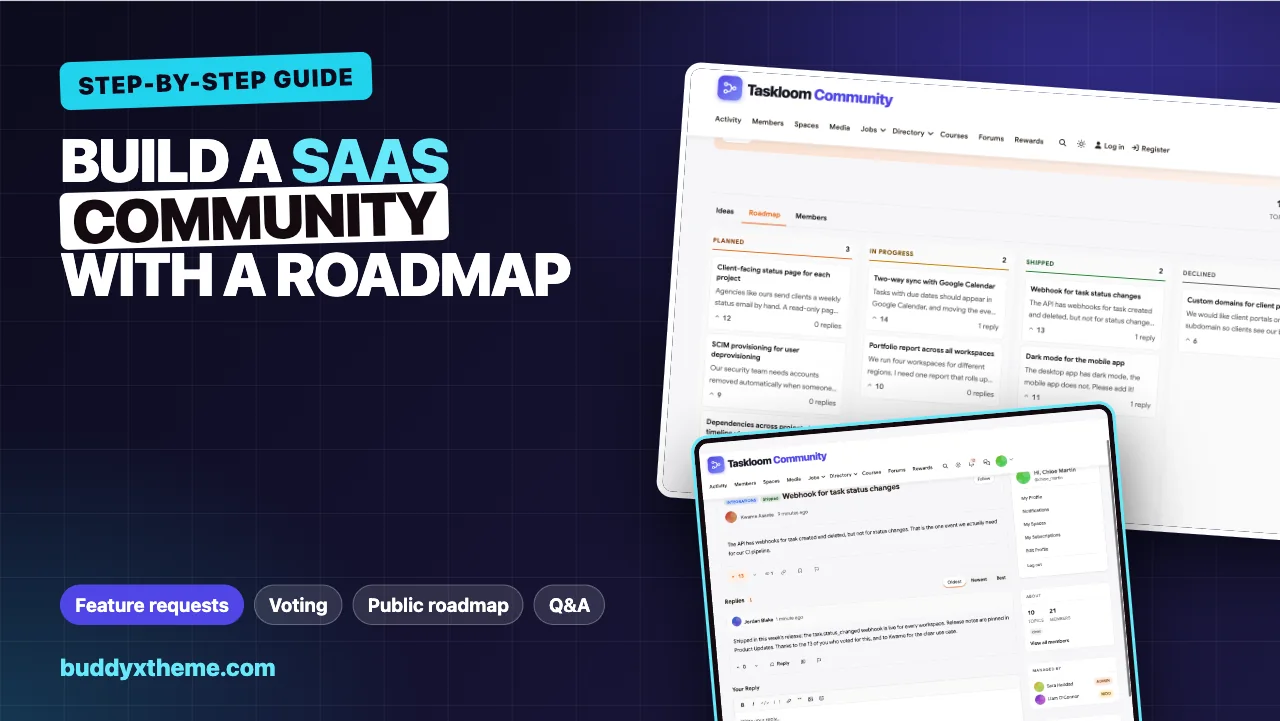
Every SaaS company collects feature requests. Most collect them badly: a spreadsheet fed by support tickets, a sales call note that says “customer wants X”, a Slack channel where the product team argues about which customer shouted loudest. Customers who ask for something never hear back, so they ask again, louder, or stop asking.
A customer community with a proper feature request space fixes that. Requests arrive in one place, customers vote instead of repeating themselves, duplicates are merged, the product team sets a status, a public roadmap shows what is coming, and every shipped idea gets a reply that closes the loop. This guide shows how to build that on your own WordPress site, step by step, using Taskloom Community, a demo we built for a fictional project management product. Every screenshot comes from that demo.
Quick answer
To build a SaaS customer community with feature requests and a public roadmap, install the BuddyX theme, BuddyNext and Jetonomy on WordPress. Create a Q&A space for support and an ideas space for feature requests with voting and product-area prefixes. Triage weekly by merging duplicates and setting each idea to planned, in progress, shipped or declined, and share the roadmap view publicly. Close the loop on every status change with a reply on the idea, a pinned release post and an email to the customers who care.
In this guide
- What a feature request system has to do
- Step 1: Plan the community and its owners
- Step 2: Install the stack
- Step 3: Set up customer accounts and profiles
- Step 4: Create the support Q&A space
- Step 5: Create the ideas space
- Step 6: Triage every week
- Step 7: Publish the roadmap
- Step 8: Close the loop
- Step 9: Run a beta program and an advisory board
- Step 10: Connect the community to your product tools
- A worked example: one idea from post to shipped
- Measure whether it is working
- Common mistakes
- Mobile
- Related guides
- How we built this guide
- Frequently asked questions
- The bottom line
What a feature request system has to do
A feature request board is not just a voting widget. To be worth running, it has to do six things well, and each one is a step in this guide:
| Job | What customers see | What the product team gets | Step |
|---|---|---|---|
| Collect requests in one place | A clear place to post an idea | No more requests lost in tickets and call notes | 5 |
| Rank demand | Upvotes instead of “+1” comments | A sortable list of what customers want most | 5 |
| Keep it clean | One idea per need, not ten duplicates | Merged votes that reflect real demand | 6 |
| Show the plan | A public roadmap with statuses | Fewer “is this coming?” tickets | 7 |
| Close the loop | A reply when an idea moves | Customers who trust the process | 8 |
| Connect to product tools | Nothing; it happens behind the scenes | New ideas and votes flowing into Slack or your tracker | 10 |
It also needs context. A request from a 400-seat workspace admin and one from a free trial user may deserve different weight. That is why customer profiles (step 3) come before the ideas space.
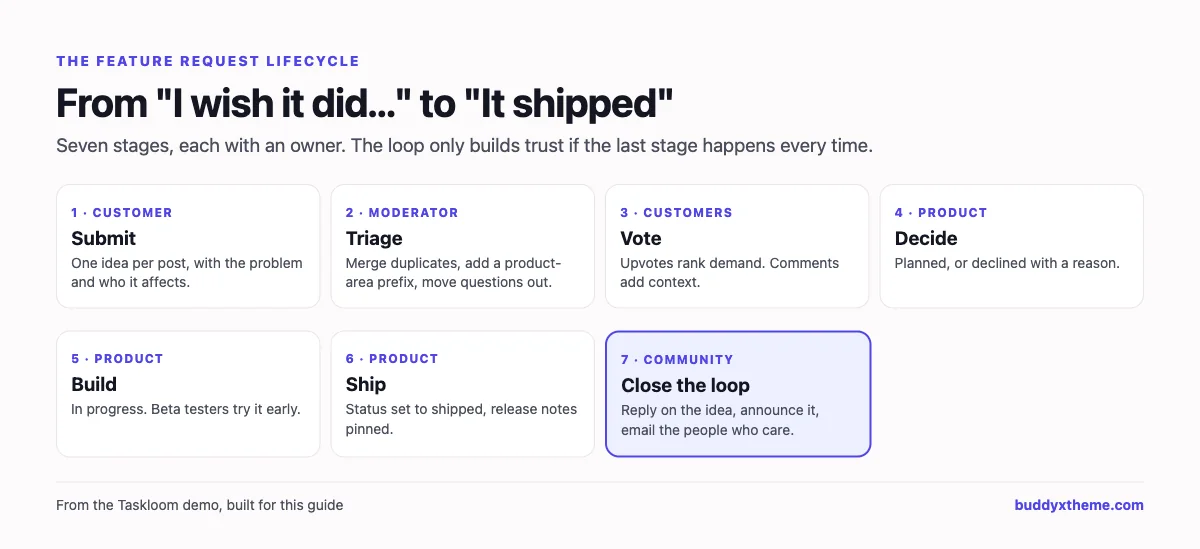
Step 1: Plan the community and its owners
Decide three things before you install anything.
What the community is for. Most SaaS communities do two jobs: peer support (customers answering each other’s questions) and product feedback (feature requests and the roadmap). This guide covers both, with most of the detail on feedback. Search makes the support side valuable: Zapier’s community team, in a case study published by its vendor Gainsight, reports that 90% of its community visits come from search engines (Gainsight). Public answers bring customers in; the roadmap keeps them.
Who owns what. Name a community manager who runs moderation and the weekly triage, a product manager who sets statuses and writes the “why” on declined ideas, and a support lead who moves feature requests out of support tickets and into the ideas space. Without a product manager who shows up, a public roadmap does more harm than good.
How public it is. The usual answer is: answers and the roadmap are public (they help with search and with sales), posting and voting need an account, and a few spaces are private for beta testers, workspace admins or your customer advisory board.
Step 2: Install the stack
Everything runs on a normal WordPress site:
- The BuddyX theme for the community design, including dark mode.
- BuddyNext, the community platform: member profiles with custom fields, member types, the member directory, spaces, the activity feed, announcements, notifications, moderation and social login.
- MediaVerse, the companion plugin that powers direct messages and media uploads.
- Jetonomy, the discussion engine: Q&A spaces with accepted answers and ideas spaces with voting, statuses, topic prefixes, merging and the roadmap view. BuddyNext connects to it automatically, so every BuddyNext space can have a Discussions tab backed by a Jetonomy space.
Optional additions that matter for a SaaS community:
- BuddyNext Pro for email broadcasts to segments of members, onboarding drip emails, more webhook endpoints and spaces gated by membership tier.
- Jetonomy Pro for custom fields on ideas, webhooks for discussion events, email digests and advanced moderation rules.
- Eventonomy for webinars and office hours, Learnomy for a customer academy, Listora for a partner directory and WB Gamification for points and badges that reward helpful customers.
Step 3: Set up customer accounts and profiles
Sign-in
Customers should not need a separate password for your community. BuddyNext includes social login for Google, GitHub, Discord, Facebook and Apple under BuddyNext > Members > Registration & Login. If your product uses Google sign-in, turning on Google here gives most customers a one-click join.
On the same screen, keep registration open for a public community. If you are running a closed pilot with a few enterprise customers, the Allowed email domains field restricts sign-up to the domains you list, one per line.

Profile fields that give requests context
Open BuddyNext > Members > Profile Fields and add a group called Your workspace:
| Field | Type | Shown at sign-up | Why the product team wants it |
|---|---|---|---|
| Company | Text | Yes | See which accounts are asking |
| Your role | Dropdown: workspace admin, team lead, team member, developer, partner | Yes | Admins and developers ask for different things |
| Team size | Dropdown: 1-10, 11-50, 51-200, 201-1000, over 1000 | No | Weight requests by account size |
| Main use case | Dropdown: project delivery, client work, operations, product and engineering, marketing, other | No | Spot patterns by segment |
Set these to visible to members only. When a product manager reads an idea, one click on the author’s profile, or on anyone who commented, shows who they are, how big their team is and how they use the product.

Member types and labels
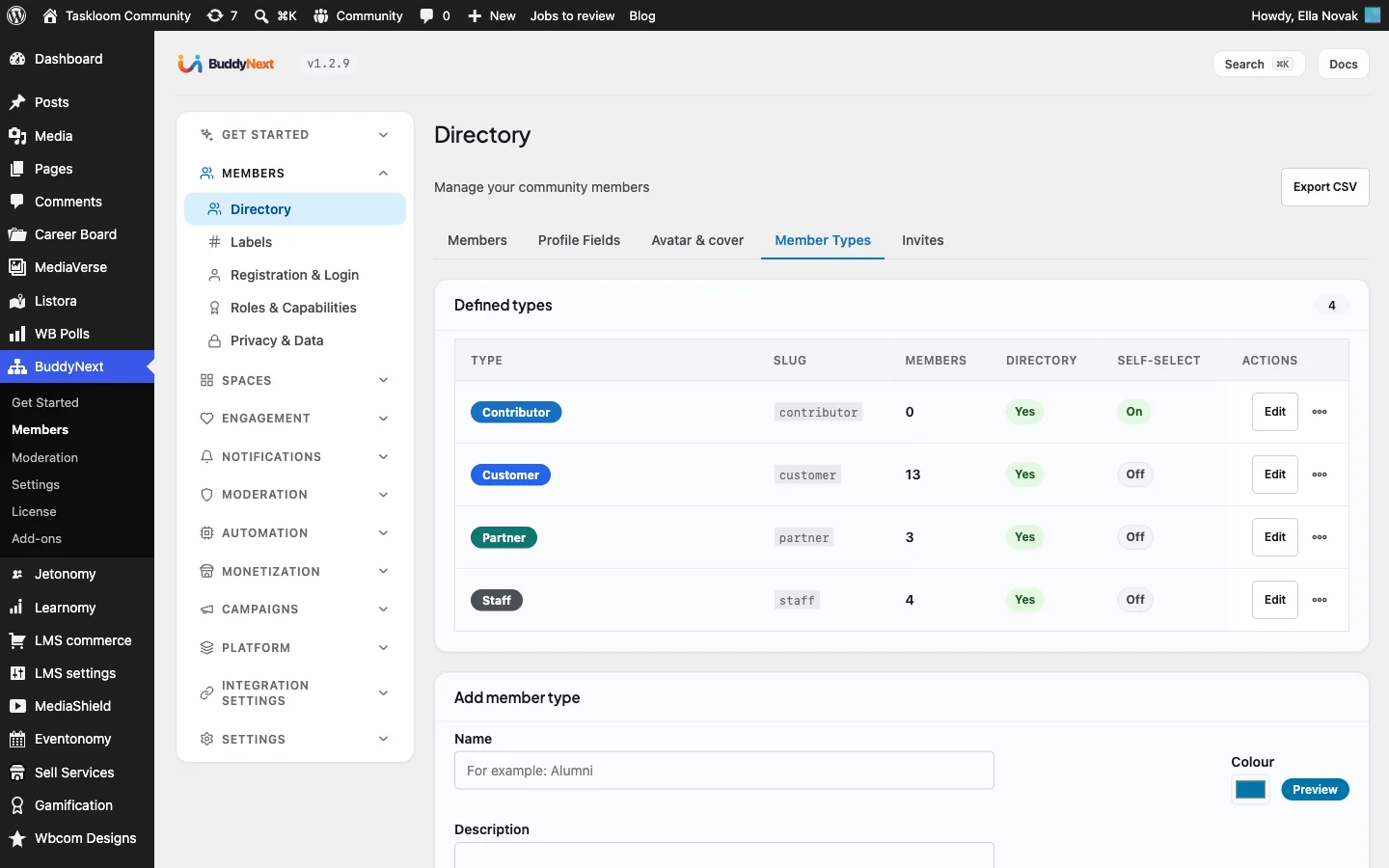
Create member types for Customer, Partner and Staff under Member Types, with self-select off so only administrators assign them. A Staff badge on every reply from your team makes official answers easy to spot.
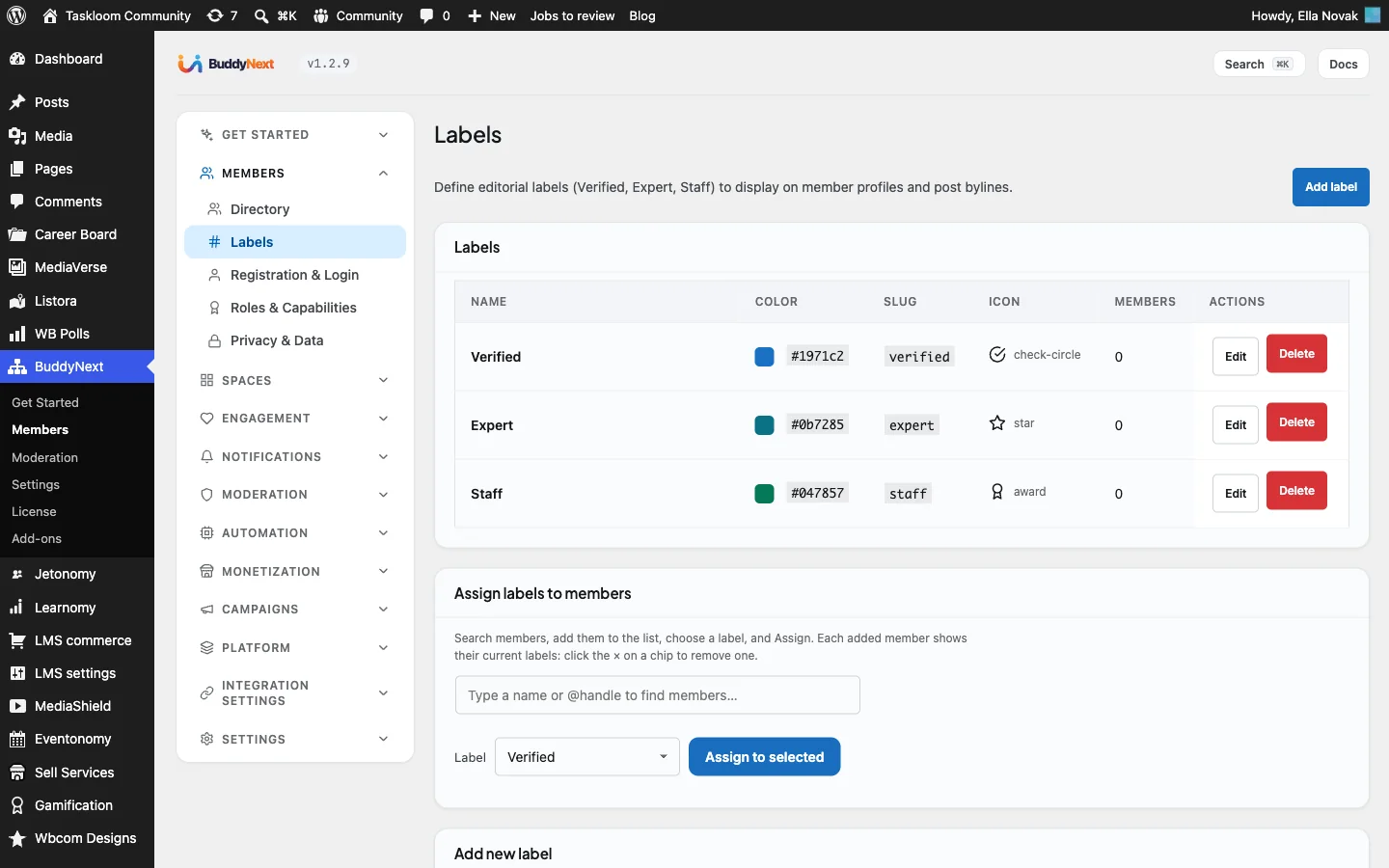
With BuddyNext Pro, use Labels for roles that cut across types, such as “Champion” for your most helpful customers or “Beta tester” for people in your early-access program. Labels matter later, because broadcasts can target everyone with a given label.
Step 4: Create the support Q&A space
Feature requests usually start as support questions: “Can Taskloom do X?” The answer is either “yes, here is how” or “not yet”. So the Q&A space comes first.
Create a BuddyNext space called Help & How-to, open its Discussions tab so a Jetonomy space is created, then in Jetonomy > Spaces set its type to Q&A. Customers ask questions, anyone can answer, votes push the best answers up and the person who asked (or a moderator) marks the answer that worked.
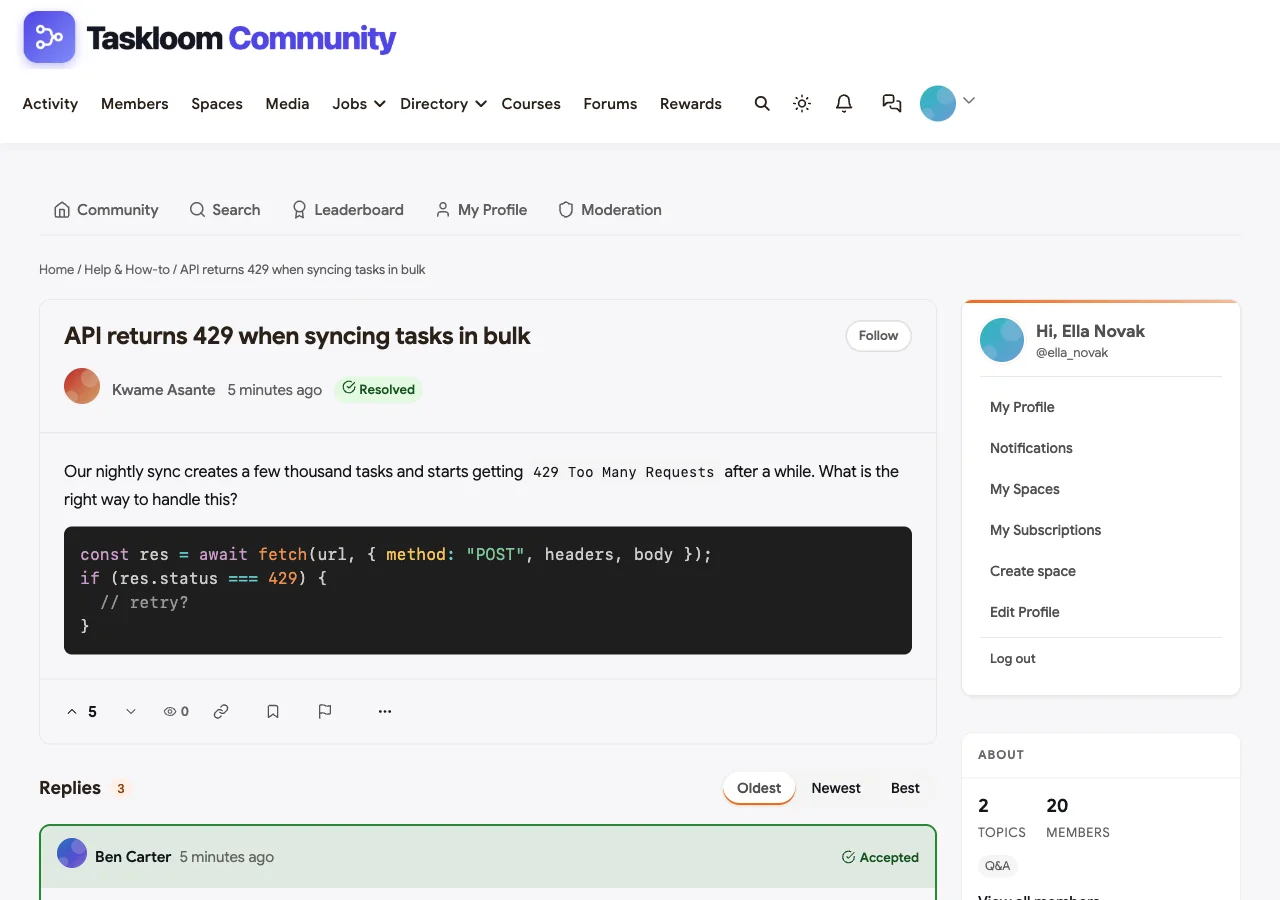
When a question turns out to be a feature request (“Can I do X?” “Not yet.”), a moderator either asks the customer to post it as an idea or moves the thread to the ideas space. Jetonomy’s Move action, in the thread’s moderation menu, does this without losing replies.
For a deeper walkthrough of Q&A spaces, code blocks, trust levels and reputation, see our guide to creating a developer community with Q&A, which uses the same tools.
Step 5: Create the ideas space
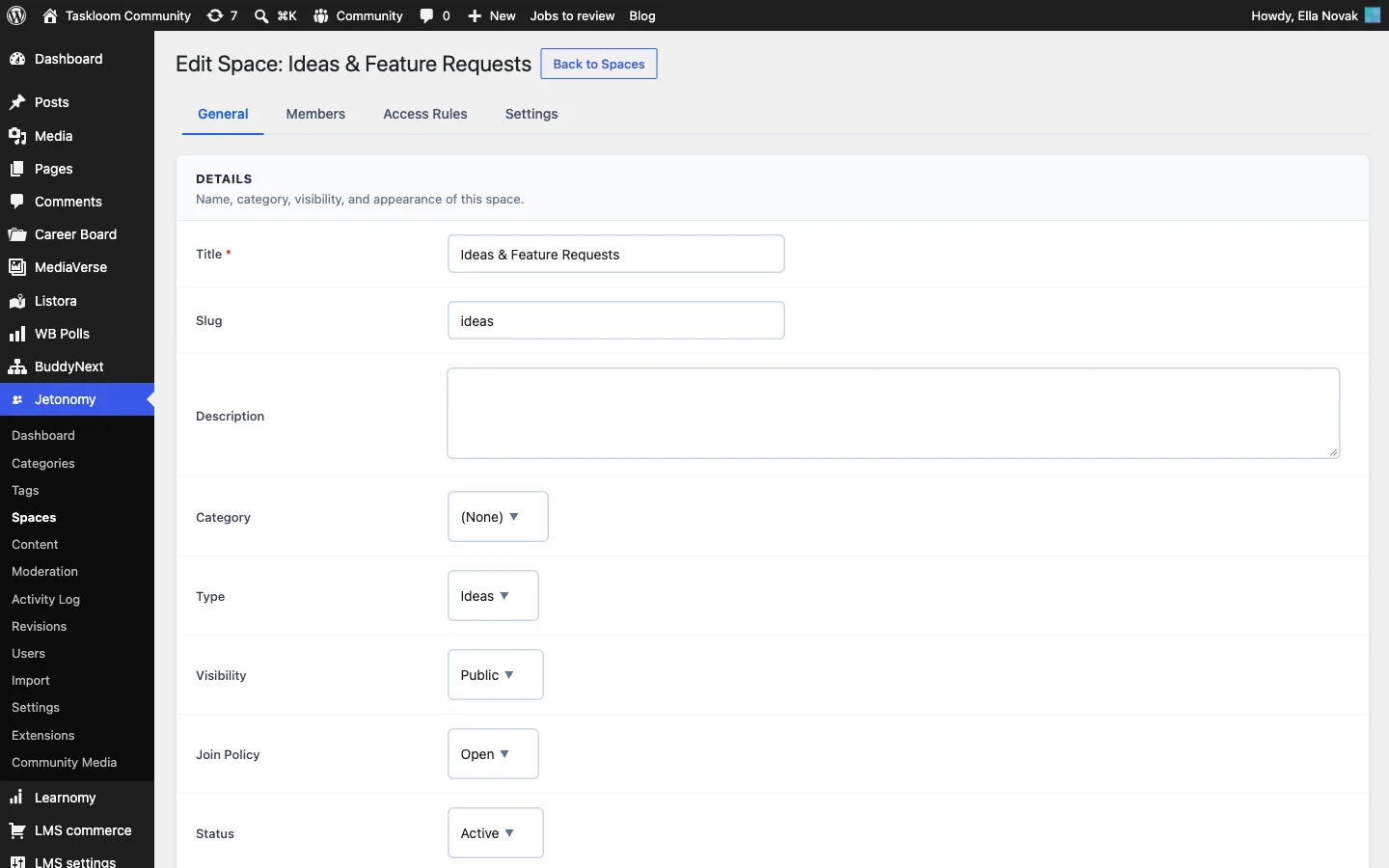
This is the feature request board. Create a BuddyNext space called Ideas & Feature Requests, open its Discussions tab, then edit the matching space in Jetonomy > Spaces:
- On the General tab, set Type to Ideas. Ideas spaces add voting, statuses and the roadmap view.
- Keep Visibility public so the roadmap can be shared, and Join Policy open.
- On the Settings tab, leave Allow Voting on and turn on Enable topic prefixes for this space. Add one prefix per product area, each with a colour. In the demo we used Integrations, Reporting, Mobile and Admin & security.
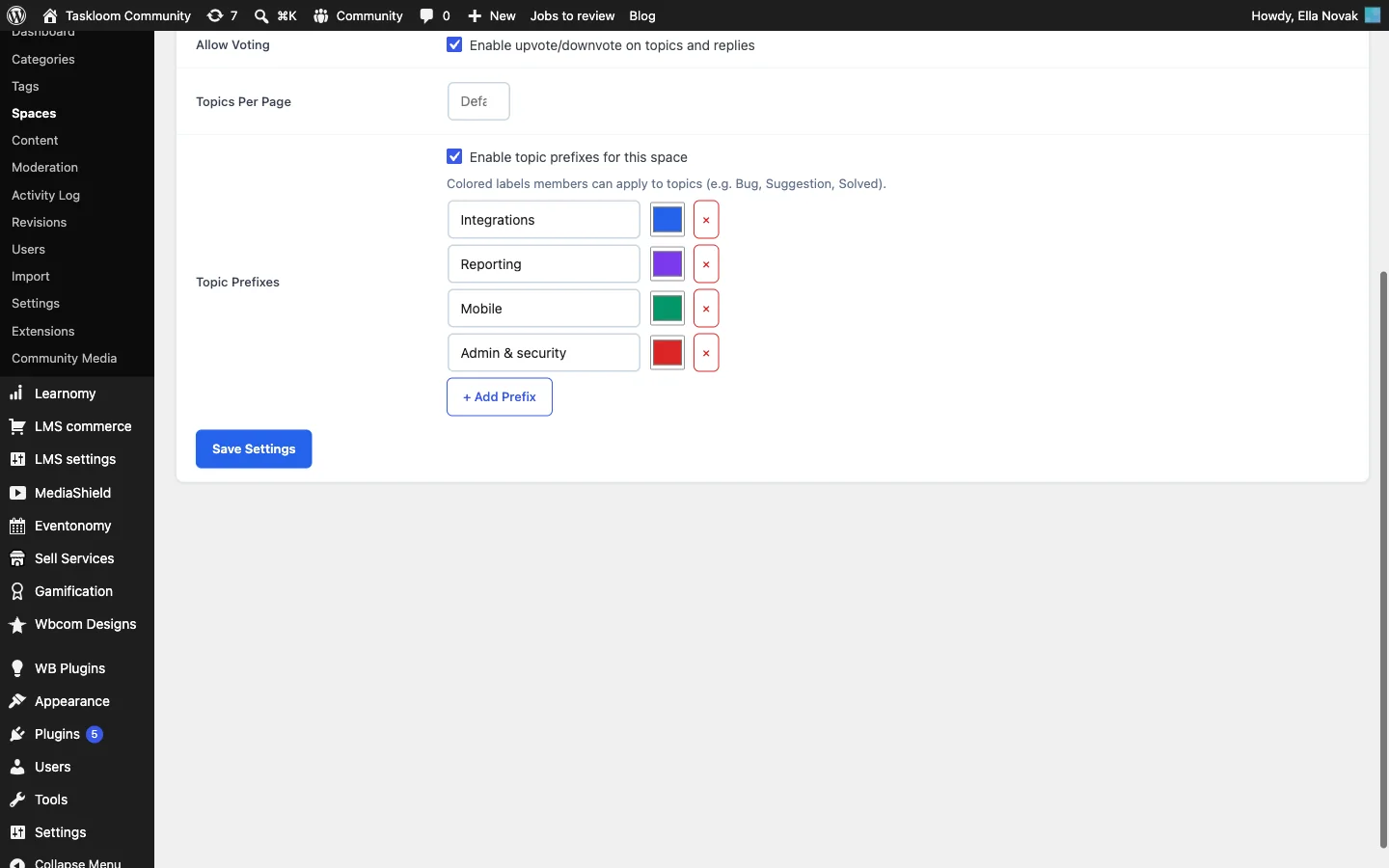
Prefixes are the simplest way to route ideas to the right product manager. When customers post an idea they pick a prefix from an optional dropdown, and the coloured label shows on the idea everywhere it appears.
A posting template that produces useful ideas
The quality of your ideas depends on what you ask for. Pin a short “How to post an idea” thread at the top of the space and ask for:
- The problem, not the solution. “We miss month-end tasks” tells you more than “add recurring tasks”.
- Who it affects. One person, a team or the whole company.
- What you do today instead. The workaround shows how painful the gap is.
- One idea per post. Three requests in one post cannot be voted on separately.
Here is what posting an idea looks like for a customer, with a prefix chosen and the problem described:

How customers browse ideas
The ideas list has three sort options: Latest, Popular (by votes, then replies) and Unanswered. Popular is the view product managers live in. Each idea shows its prefix, its status and its vote count.

If you want structured data on each idea, such as which plan the requester is on or which module it affects, Jetonomy Pro adds custom fields to posts in a specific space, with text, number, select, checkbox, radio and date types.
Step 6: Triage every week
A feature board without triage turns into a graveyard of duplicates. Block 30 minutes a week for the community manager and one product manager.
Merge duplicates
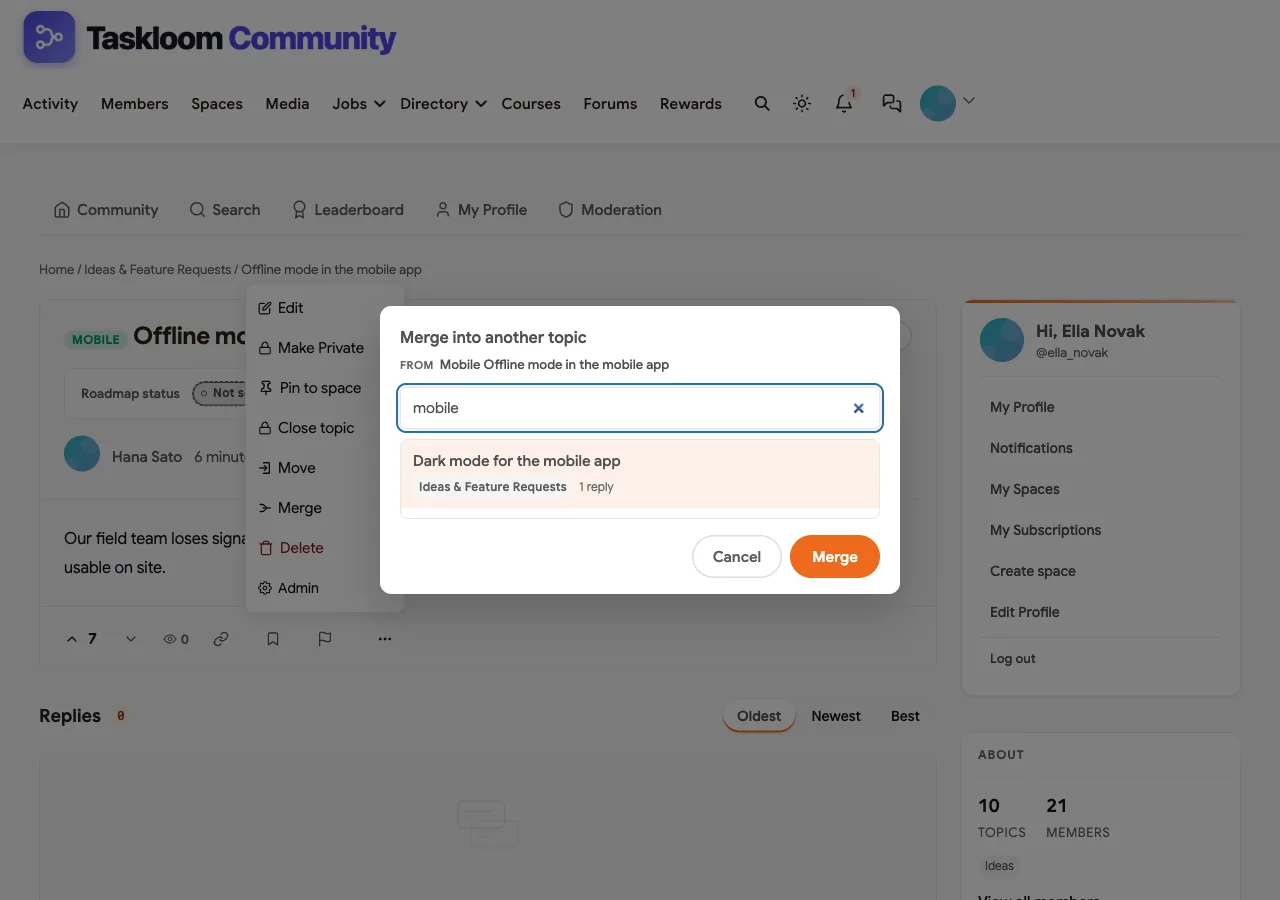
Customers will post the same idea in different words. When you find a duplicate, open it, use Merge in the moderation menu and pick the original idea. Merging does exactly what you want:
- Replies move to the original idea.
- Votes, followers and bookmarks move too, and a customer who voted on both is only counted once.
- The duplicate’s text is added to the original as a reply headed “Merged from”, so no context is lost.
- The duplicate is removed from the list.
Tidy and route
- Add a prefix if the customer did not choose one.
- Retitle vague ideas so they match how others will search (“Calendar sync” becomes “Two-way sync with Google Calendar”).
- Move support questions out to the Q&A space, and move ideas posted in Q&A into the ideas space.
- Close or lock ideas that have been fully answered or are off-topic.
Decide on the top ideas
Sort by Popular and look at the ideas without a status. For each one the product manager either sets a status or leaves it open for more votes, with a short reply explaining what would change the decision. The status definitions in the next step are what you are committing to.
Step 7: Publish the roadmap
Every ideas space has a roadmap view at /community/s/your-space/roadmap/. It shows four columns, Planned, In Progress, Shipped and Declined, with ideas ordered by votes and each card showing its vote count. Ideas without a status stay in the list for voting and do not appear on the roadmap.
If the space is public, the roadmap is public too: logged-out visitors can see it, which makes it something you can link from your product, your website or your sales emails. If the space is private or hidden, only members can see it.
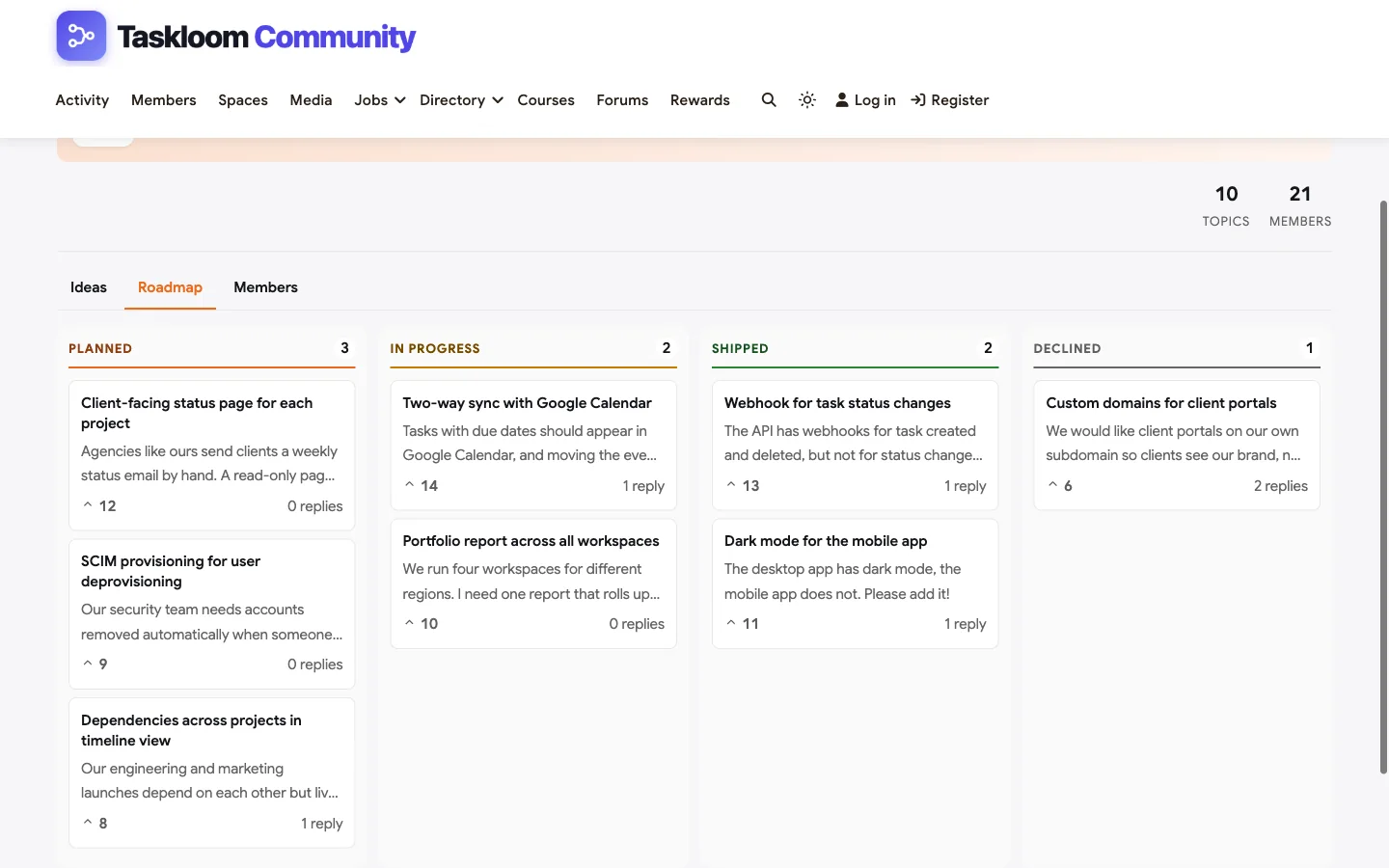
Moderators and space administrators set statuses from the idea page. Publish what each status means, so customers read “planned” the way you intend:
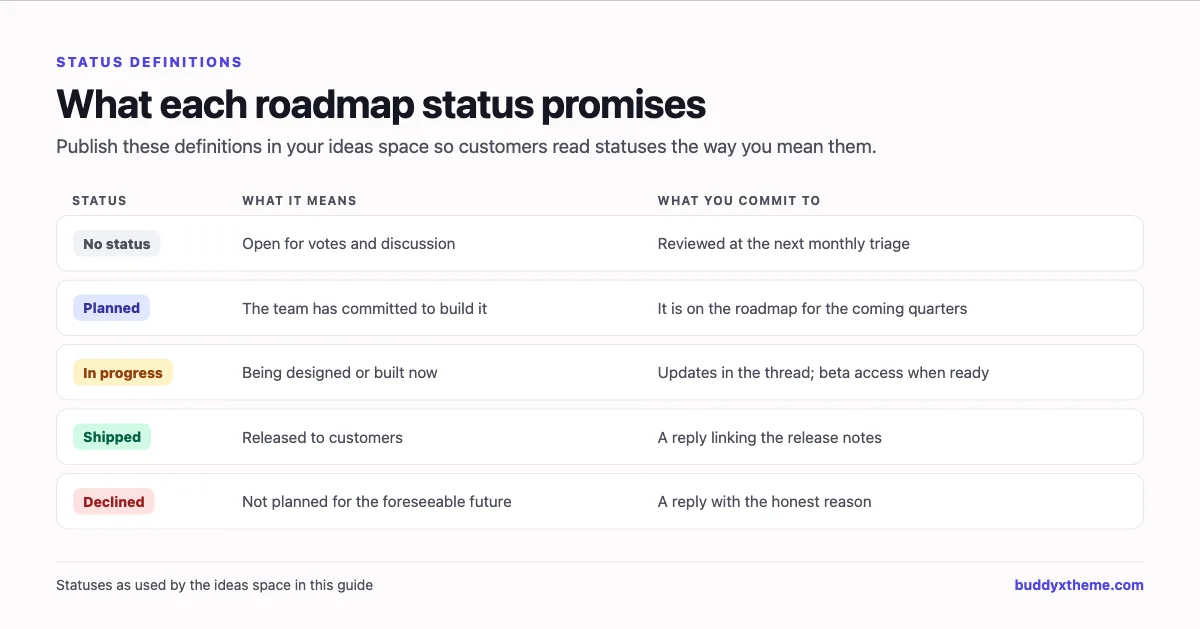
Two rules keep a roadmap trustworthy:
- Only mark ideas as planned when the team has committed. A “planned” idea that sits for two years does more damage than no status at all.
- Decline with a reason. Declining is not failure. An honest reason, such as “it would slow down X, which more customers asked for”, earns more respect than silence.

Step 8: Close the loop
This is where most feature boards fail, and where yours can stand out. Customers forgive slow roadmaps; they do not forgive silence.
Be clear about what happens automatically and what you have to do yourself:
- The idea’s author is notified automatically whenever its status changes, for example “Your idea is now Shipped”.
- Followers are notified of new replies. The author follows their own idea automatically, and any customer can click Follow on an idea to get updates.
- Voters are not notified of status changes on their own. Voting does not subscribe anyone to the idea. So the loop needs a reply and an announcement from you.
The routine that works:
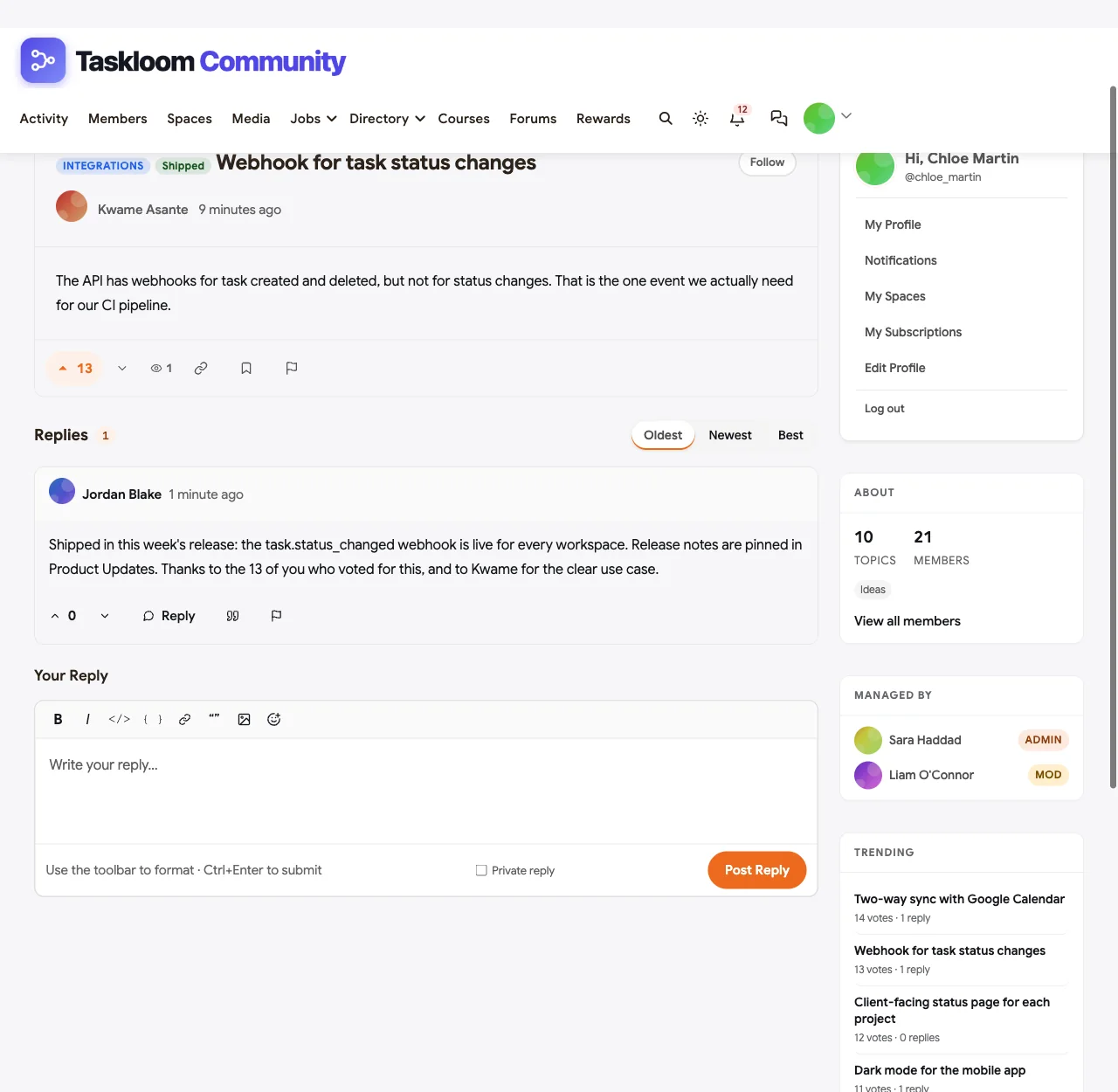
- Reply on the idea every time its status changes. One or two sentences: what changed, why, and a link to release notes or the beta. Everyone following the idea gets the reply.
- Ask voters to follow. Add a line to your pinned “How to post an idea” thread: “Click Follow on any idea you want updates on.”
- Pin the release post. In your Product Updates space, pin the release notes and link each shipped idea.
- Feature an announcement. Under BuddyNext > Engagement > Announcements, feature a short site-wide announcement for big releases, so it sits at the top of the home feed until it expires.
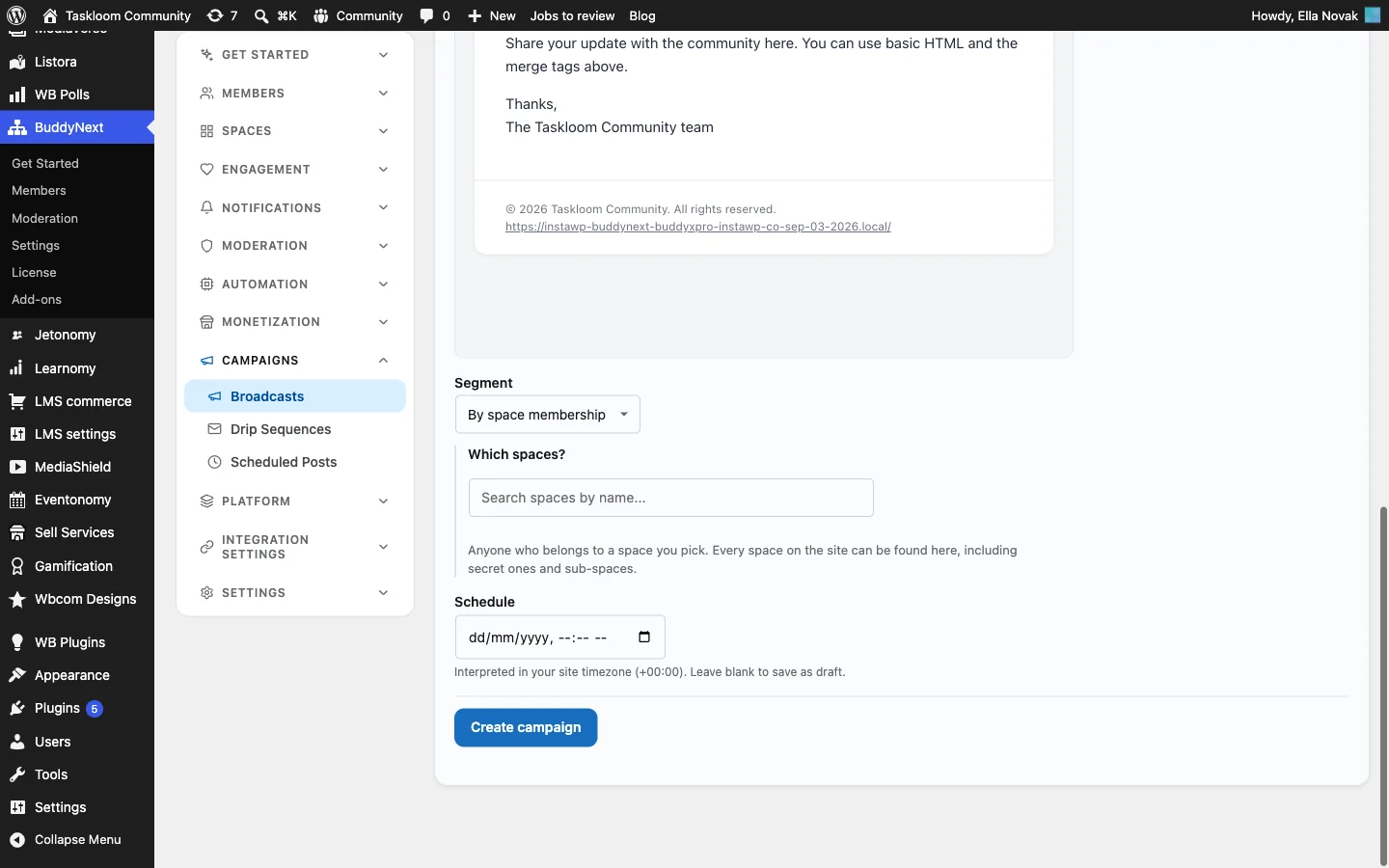
- Email the people who care. With BuddyNext Pro, send a broadcast to everyone who belongs to the ideas space, or everyone with a “Beta tester” label, under Campaigns > Broadcasts.


Step 9: Run a beta program and an advisory board
Two private spaces turn your most engaged customers into partners in the roadmap.
A beta program space (private, approval required). When an idea moves to In Progress, invite the customers who voted for it into the beta space, let them try the feature early and collect feedback in one thread per feature. Give them a “Beta tester” label so you can email them as a group.
A customer advisory board (secret). Ten to twenty customers, chosen for range, not just size, who see roadmap drafts before they are public. A secret space is hidden from the directory and from search; members join by invitation only.
The same pattern works for any group that needs its own room, such as workspace administrators who want to discuss permissions, security and rollouts with each other and your team:
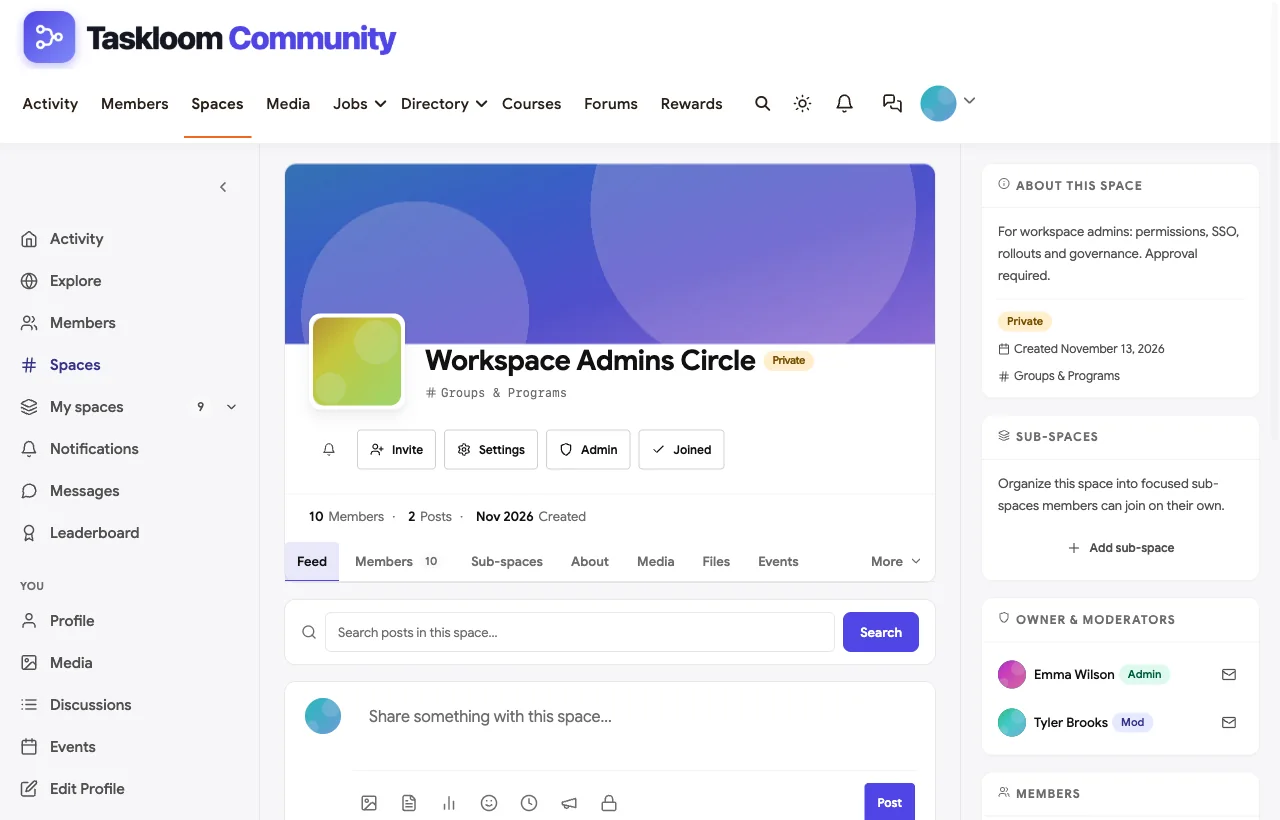
If your community has paid tiers, BuddyNext Pro can gate a space by membership tier, so a space for your top plan’s customers opens automatically for anyone on that plan.
Step 10: Connect the community to your product tools
Product managers live in Slack, Linear, Jira or a product management tool, not in a community admin. Webhooks bring the community to them.
BuddyNext webhooks (free for one endpoint, more with Pro) live under BuddyNext > Platform > Webhooks once the Webhooks feature is turned on in Platform > Features. Choose the events to forward, such as new members, new posts and comments, space joins and follows. Each request is JSON with an event, a timestamp and data, signed with an X-BuddyNext-Signature header your receiver can verify.
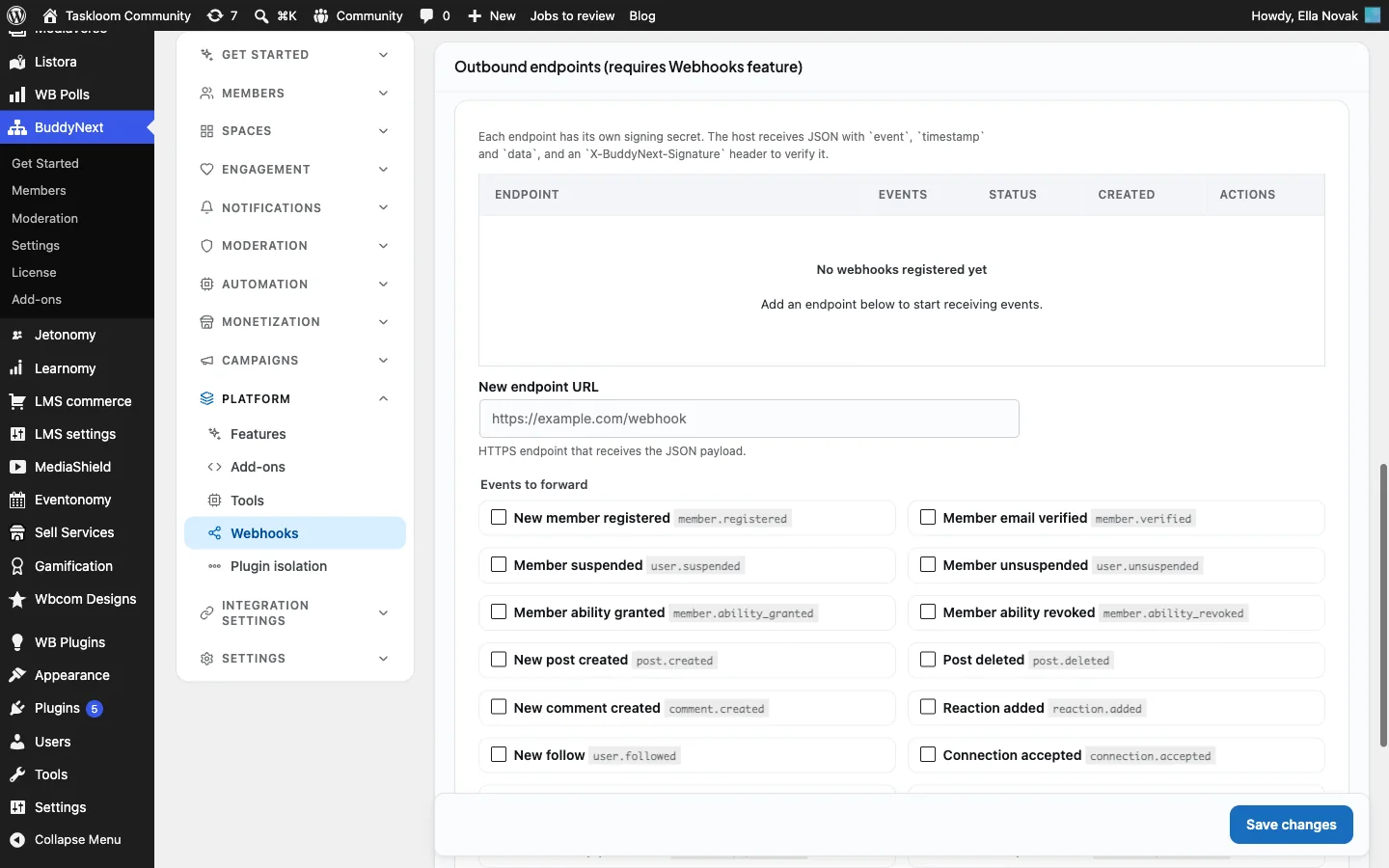
Jetonomy Pro webhooks cover the discussion side, including new topics and replies, votes cast, flags and trust level changes. Pointing post.created at a Zapier, Make or n8n workflow that filters for your ideas space is a simple way to post every new idea into a product Slack channel or create a triage ticket in your tracker.
One limit to know: neither plugin sends a webhook when an idea’s status changes. Set statuses in the community, where customers see them, and treat your tracker as the place the build happens.
A worked example: one idea from post to shipped
Here is how one request moved through the Taskloom demo, end to end.
Week 1: posted. Kwame, a developer at a customer building on the Taskloom API, posts “Webhook for task status changes” in the ideas space with the Integrations prefix. He explains the problem in two sentences: the API has webhooks for tasks being created and deleted, but not for status changes, which is the one event his CI pipeline needs. He follows his own idea automatically.
Week 2: triaged. During the weekly triage, the community manager finds a second post, “Notify my server when a task moves to Done”, from another developer. She merges it into Kwame’s idea. Both posts’ votes now count on one idea, the second post’s text is kept as a reply, and the second author becomes a follower.
Weeks 2 to 6: voted. Thirteen customers vote. The product manager checks the profiles of the people commenting: two workspace administrators at 200-plus seat accounts and several developers. She replies on the idea: “We are looking at this for next quarter. If you use a no-code tool such as Zapier or Make, tell us which, so we test with it.”
Week 7: planned, then in progress. The idea moves to Planned and, a few weeks later, In Progress. Kwame is notified each time automatically. The product manager invites the commenters into the private beta space and asks them to follow the idea.
Week 12: shipped and closed. The release ships. The product manager sets the status to Shipped and replies on the idea: what shipped, a link to the release notes pinned in Product Updates, and a thank-you to the 13 voters. Everyone following the idea gets the reply. A featured announcement runs on the home feed for a week, and a broadcast goes to members of the ideas space.
Total extra work for the team: a merge, three short replies, two status changes, one announcement and one email. That is what closing the loop costs, and it is why customers keep posting ideas instead of opening tickets.
Measure whether it is working
Check these monthly:
| Metric | What it tells you | Healthy direction |
|---|---|---|
| Share of ideas with a status | Whether product is engaging | Rising; most popular ideas should have one |
| Median days from posting to first status or reply | Whether customers feel heard | Falling |
| Duplicates merged | Whether triage is happening | Steady, not zero |
| Votes per idea | Whether customers vote rather than post | Rising |
| Shipped ideas with a closing reply | Whether the loop is closed | Every one |
| Support questions answered by customers | Whether peer support scales | Rising |
Common mistakes
- Treating votes as the roadmap. Votes measure demand from the customers who showed up. Weigh them against strategy, account size and effort, and say so publicly.
- No triage. Without merging, ten duplicates split the votes and hide real demand.
- Silent declines. An idea left open for years is worse than an honest no.
- Promising dates. Planned means committed, not scheduled. Dates on a public roadmap become commitments sales will quote.
- Assuming voters are notified. They are not, by default. Reply on the idea and announce releases.
- A roadmap nobody links to. Link it from your product’s help menu, your release notes and your support macros.
Mobile
Customers check the roadmap and reply to threads from their phones. BuddyX and BuddyNext are responsive, so ideas, the roadmap, Q&A threads and profiles work on a small screen.

Related guides
- Best software for a SaaS customer community: how BuddyNext compares with Gainsight, Discourse, Khoros, Higher Logic Vanilla, Bettermode and others.
- How to create an AI agent developer community with Q&A: Q&A, code blocks, GitHub sign-in, reputation and spam controls in depth.
- How to build a university alumni network on WordPress: the same platform set up for alumni, with profiles, chapters and mentoring.
- How to set up a community space on WordPress with free plugins: the general setup guide behind every community in this series.
Want to click around first? The live demo is a full BuddyNext community you can explore in your browser.
How we built this guide
We built Taskloom Community on a local WordPress site running the BuddyX theme, BuddyNext, BuddyNext Pro, Jetonomy and the other modules named above, with fictional customers, questions and ideas created for this guide. Every screenshot comes from that site, taken in November 2026. Notification and webhook behaviour was checked against the plugins’ code at the time of writing and may change in later versions. The Zapier figure comes from a case study published by Gainsight, Zapier’s community vendor. buddyxtheme.com is published by the team behind BuddyNext.
Frequently asked questions
How do I collect feature requests from SaaS customers?
Create an ideas space in your customer community where customers post one idea per thread, describe the problem and who it affects, and vote on each other’s ideas. Move feature requests from support tickets and Q&A into the same space so all demand is in one place.
How do I build a public roadmap?
On WordPress with BuddyNext and Jetonomy, an ideas space has a built-in roadmap view with Planned, In Progress, Shipped and Declined columns. Set each idea’s status from the idea page. If the space is public, logged-out visitors can see the roadmap, so you can link it from your product and website.
Should a SaaS roadmap be public?
For most SaaS products, yes, with care. A public roadmap reduces “is this coming?” tickets and builds trust. Avoid dates, only mark ideas as planned when you have committed, and explain declines.
How do I handle duplicate feature requests?
Merge them. In Jetonomy, a moderator merges the duplicate into the original; replies, votes, followers and bookmarks move to the original, a customer who voted on both is counted once, and the duplicate’s text is kept as a reply.
Do voters get notified when an idea ships?
Not automatically. The idea’s author is notified when its status changes, and anyone following the idea is notified of new replies. Reply on the idea whenever its status changes, ask customers to follow ideas they care about and announce releases in the community and by email.
How should we decide which ideas to build?
Use votes as one input, alongside account size, strategic fit and effort. Profile fields such as role and team size show who is asking. Explain the reasoning publicly, especially for declined ideas.
Can I keep some feedback private?
Yes. Create a private beta space with approval required, or a secret advisory board space that only invited customers can see. With BuddyNext Pro you can also gate a space by membership tier.
Can new ideas go into Slack or our issue tracker?
Yes. Jetonomy Pro sends webhooks for new topics, replies and votes, which you can route through Zapier, Make or n8n into Slack, Linear or Jira. BuddyNext also sends webhooks for community events. There is no webhook for status changes, so set statuses in the community.
How do I stop the ideas board filling with support questions?
Pin a “How to post an idea” thread with a short template, keep a separate Q&A space for support and move misplaced threads during weekly triage.
The bottom line
A feature request board earns trust when every idea is heard, duplicates are merged, statuses mean something and every shipped idea gets a reply. On WordPress, BuddyX with BuddyNext and Jetonomy gives you Q&A, an ideas space with voting and product-area prefixes, merging, a public roadmap and the announcement and email tools to close the loop, on your own domain with your own customer data.
And give your customers a roadmap they can trust.