

If you maintain an agent framework, an SDK or a developer tool built on large language models, your users already have questions: why the agent loops on the same tool, how to stream tool calls, which version broke their memory module. Right now those questions are probably scattered across a Discord server, GitHub issues and direct messages to whoever on the team answers fastest. The answers disappear into chat history, and the same question comes back next week.
This guide shows how to build a proper home for those developers on your own WordPress site: a Q&A space where answers are voted on and accepted, code that is readable with syntax highlighting, GitHub sign-in, developer profiles, a public roadmap, reputation that rewards the people who answer, and controls that keep AI-generated noise out. Every screenshot comes from Relay Builders, a demo community we built for a fictional open-source agent framework.
Quick answer
To create an AI agent developer community, install the BuddyX theme with BuddyNext and the Jetonomy discussion plugin on WordPress. Turn on GitHub sign-in, add developer profile fields, then create a Q&A space with voting and accepted answers, where code blocks get syntax highlighting. Add an ideas space for a public roadmap, use reputation and trust levels to reward good answers and rate-limit new accounts, and add CAPTCHA and content safeguards to keep spam and untested AI-generated answers out.
In this guide
- Why agent developers need more than a chat server
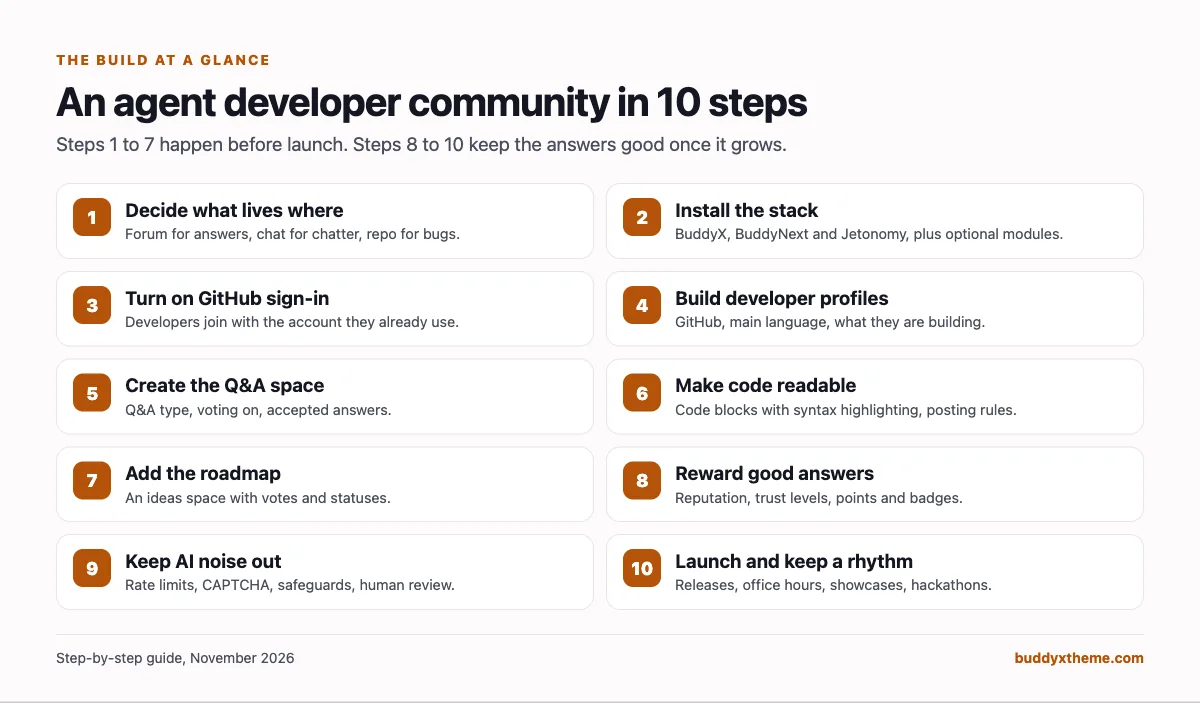
- Step 1: Decide what lives where
- Step 2: Install the stack
- Step 3: Let developers sign in with GitHub
- Step 4: Build developer profiles
- Step 5: Create the Q&A space
- Step 6: Make code readable
- Step 7: Add a public roadmap
- Step 8: Reward the people who answer
- Step 9: Keep spam and AI-generated noise out
- Step 10: Launch and keep a rhythm
- Common mistakes
- Mobile
- Related guides
- How we built this guide
- Frequently asked questions
- The bottom line
Why agent developers need more than a chat server
Agent developers are a moving target. In the Stack Overflow 2025 Developer Survey, 84% of respondents said they use or plan to use AI tools in their development process, yet 52% either do not use agents or stick to simpler AI tools (Stack Overflow). The people building with agents today are early adopters working with tools that change every few weeks. They ask hard, code-heavy questions, and the right answer for version 0.8 can be wrong for 0.9.
Chat is good for quick back-and-forth, but it is a poor system of record. Nothing gets accepted, nothing gets voted up, and search engines cannot find it. That is why most large AI developer communities we checked, including the OpenAI Developer Community, the Hugging Face forums and the LangChain forum, keep their long-lived Q&A on a forum. Our comparison of AI agent developer community platforms covers who uses what.
A developer community that works has five jobs:
| Job | What developers see | Where it is set up |
|---|---|---|
| Answer questions once, well | Q&A threads with code, votes and an accepted answer | Steps 5 and 6 |
| Show what is coming | A roadmap of planned, in progress and shipped ideas | Step 7 |
| Recognise the people who help | Reputation, trust levels, points and badges | Step 8 |
| Keep the signal high | Rate limits for new accounts, spam checks, review queues | Step 9 |
| Bring people together | Showcases, office hours, hackathons and jobs | Step 10 |
Step 1: Decide what lives where
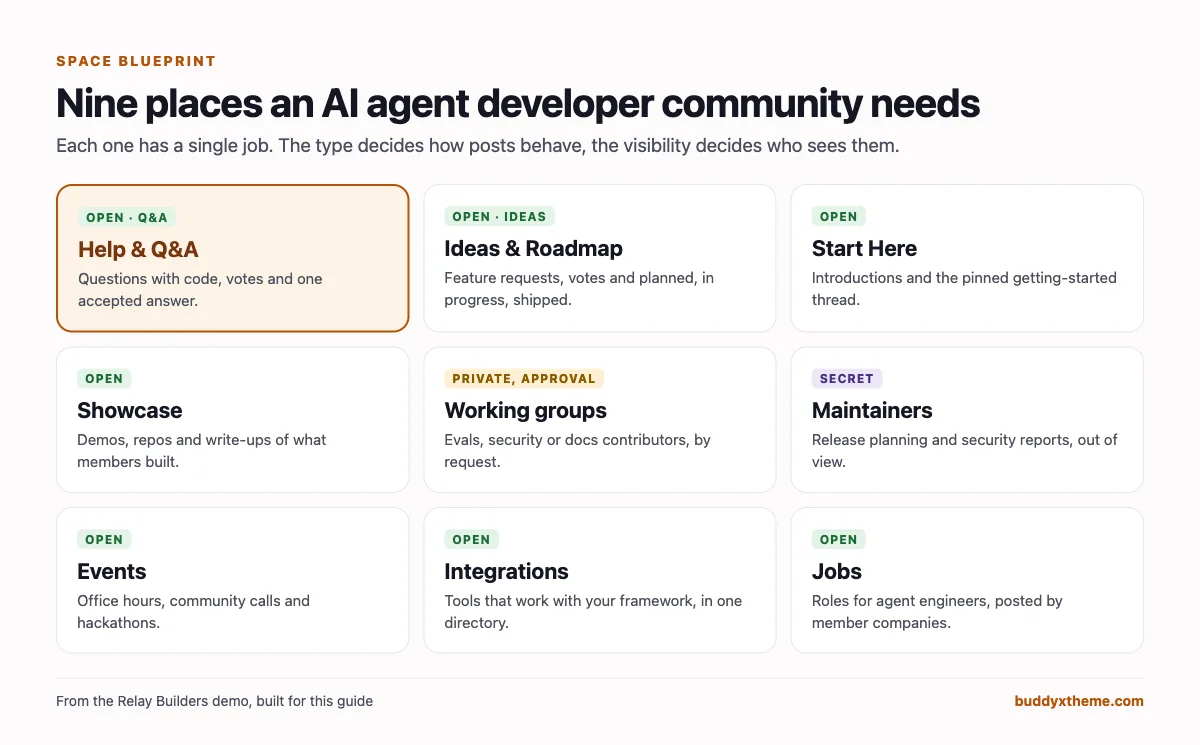
Before installing anything, decide which questions belong in the community and which belong somewhere else. Developer communities get messy when the same conversation happens in three places.
A rule that works for most framework teams:
- GitHub issues for confirmed bugs with a reproduction. If a Q&A thread turns out to be a bug, a maintainer opens an issue and links it from the thread.
- The community Q&A for “how do I” and “why does this happen” questions. These are the answers future users will search for.
- The roadmap for feature requests. Votes replace “+1” comments on issues.
- Chat, if you keep one, for real-time help and social conversation, with a pinned message that points to the forum for anything worth keeping.
- A private maintainers space for release planning and security reports.
Then name the people who will run it: a developer relations lead who owns the community, two or three maintainers who commit to answering questions in their area each week, and a few early users you can ask to help with answers from day one.
Step 2: Install the stack
Everything runs on a normal WordPress site. Here is what each part does:
- The BuddyX theme gives the community a finished design, including dark mode, which developers will thank you for.
- BuddyNext is the community platform: member profiles with custom fields, member types, the member directory, spaces, the activity feed, polls, hashtags, notifications, moderation tools and social login.
- MediaVerse, the companion plugin that powers direct messages and media uploads.
- Jetonomy is the discussion engine. It provides forum, Q&A, ideas and feed spaces, voting, accepted answers, code blocks with syntax highlighting, trust levels and reputation. BuddyNext connects to it automatically, so every BuddyNext space can have a Discussions tab backed by a Jetonomy space.
Optional modules, each of which plugs into BuddyNext’s navigation, feed and search:
- WB Gamification for points, badges and a leaderboard that mirror Jetonomy reputation.
- Eventonomy for office hours, community calls and hackathons.
- WP Career Board for a jobs board where companies hire agent engineers.
- Listora for an integrations directory of tools that work with your framework.
- Learnomy if you want to run tutorials or a structured academy as courses.
Free versions cover everything in steps 1 to 8. BuddyNext Pro and Jetonomy Pro add extra moderation rules, email broadcasts and a few other tools mentioned where they come up.
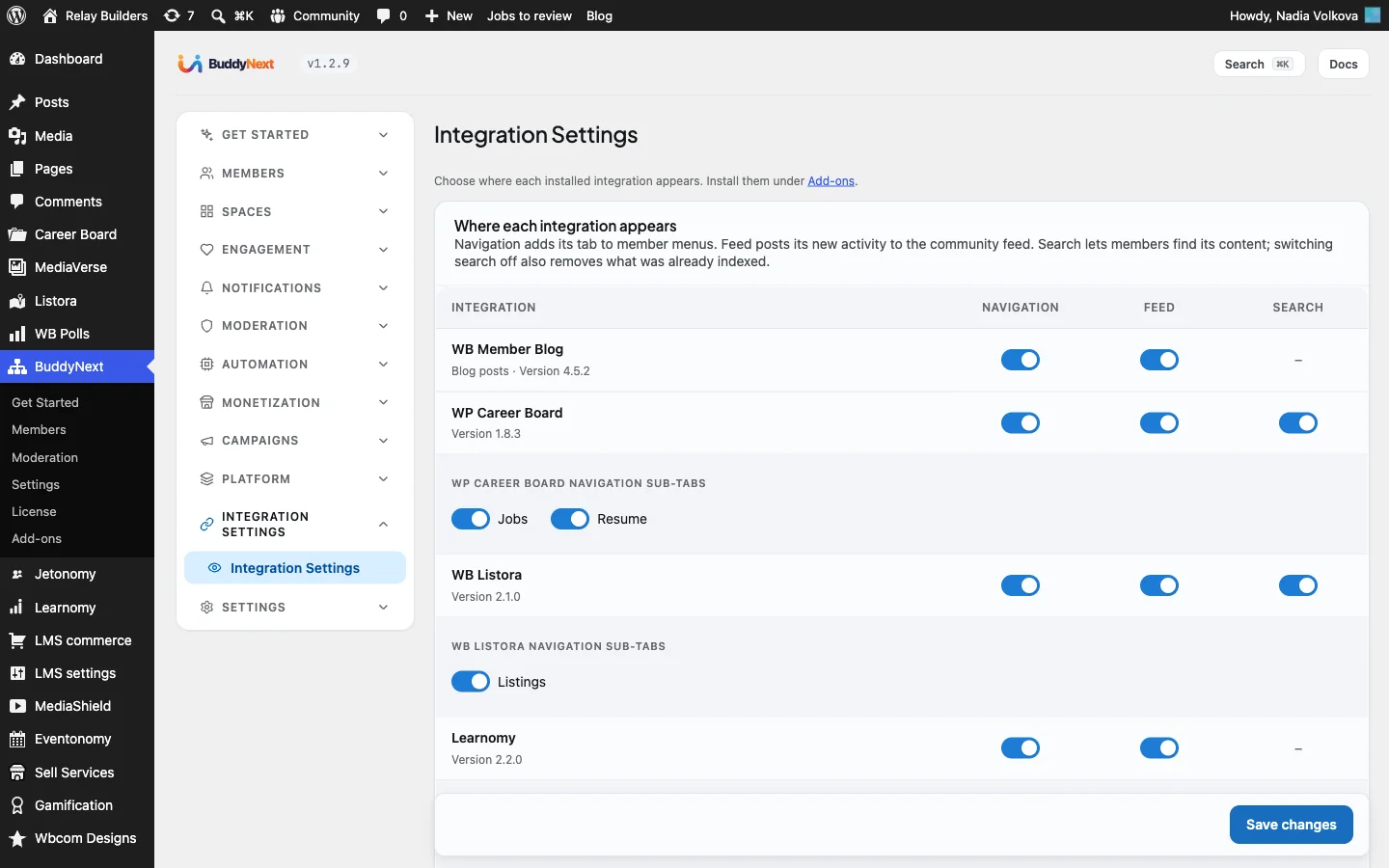
After installing, open BuddyNext > Integration Settings and choose, for each module, whether it appears in the community navigation, posts to the activity feed and is included in search.
Step 3: Let developers sign in with GitHub
Developers do not want another password. BuddyNext has built-in social login for GitHub, Google, Discord, Facebook and Apple, so you can let people join with the account they already use for your repository.
To set up GitHub sign-in:
- In GitHub, open Settings > Developer settings > OAuth Apps > New OAuth App. Use your community’s name and homepage URL.
- In WordPress, open BuddyNext > Members > Registration & Login and scroll to Social login. Open Keys and setup under GitHub and copy the redirect URI shown there into the GitHub app’s Authorization callback URL.
- Copy the GitHub app’s Client ID and Client Secret back into BuddyNext, turn the provider on and tick Show this button.
- Repeat for Google and Discord if your users live there too.
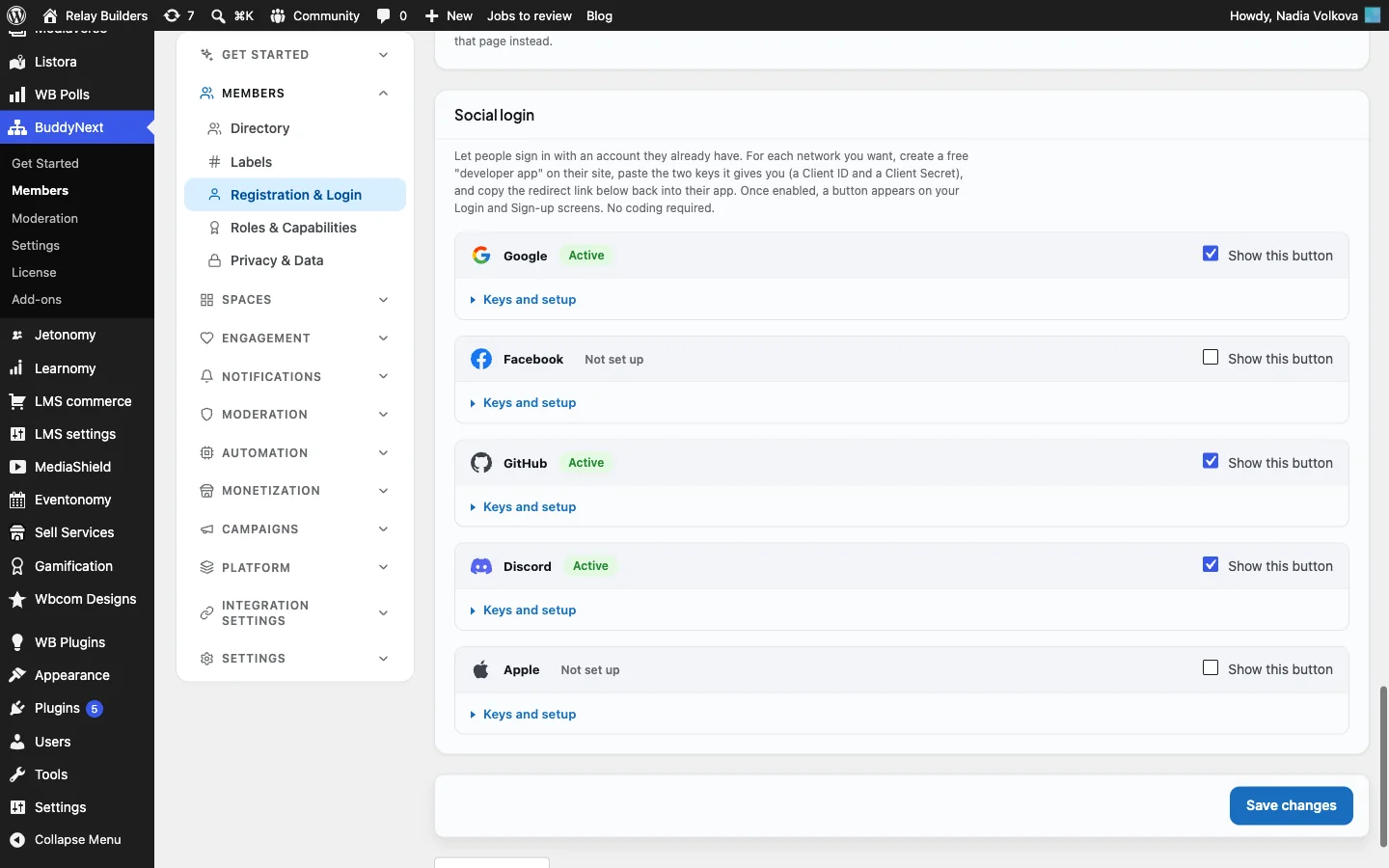
The sign-in page then shows a button for each provider under the normal email form:

On the same Registration & Login screen, leave registration open. A developer community grows by being easy to join; you will handle spam with trust levels and safeguards in step 9 rather than an approval queue. If your community is for paying customers only, you can restrict sign-up to allowed email domains on the same screen.
Step 4: Build developer profiles
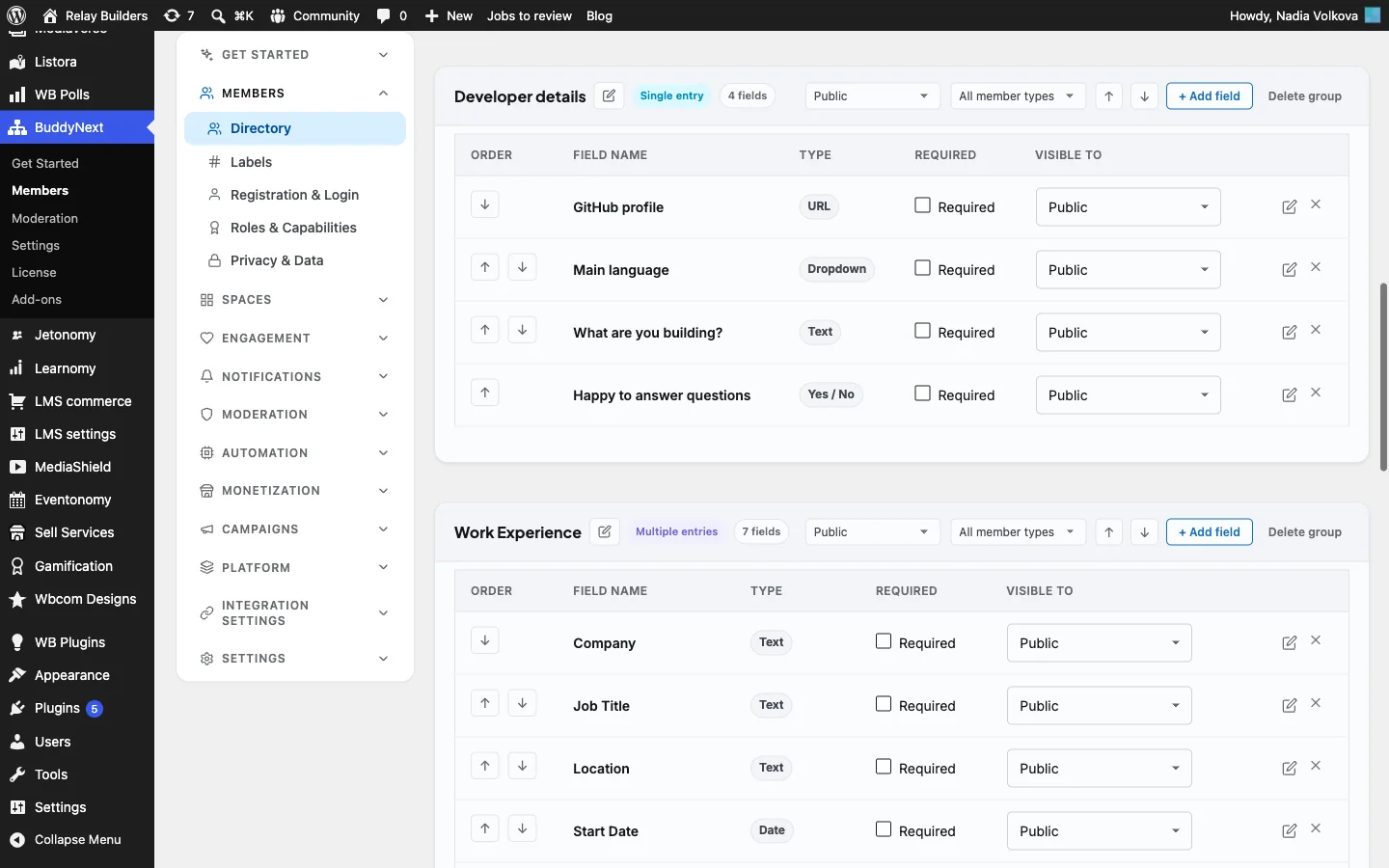
A developer profile should answer three questions at a glance: who is this, what do they work with, and can they help me? Open BuddyNext > Members > Profile Fields and add a field group called Developer details:
| Field | Type | Shown at sign-up | Why it matters |
|---|---|---|---|
| GitHub profile | URL | No | Lets others see real work and builds trust in answers |
| Main language | Dropdown (Python, TypeScript, Go, Rust, Java, Other) | Yes | Makes the directory filterable by stack |
| What are you building? | Text | Yes | Starts conversations and helps maintainers understand use cases |
| Happy to answer questions | Yes / No | No | Shows newcomers who to ask |
Mark Main language and What are you building as searchable, so a member can type “TypeScript” or “voice agent” into the directory and find people working on the same thing.
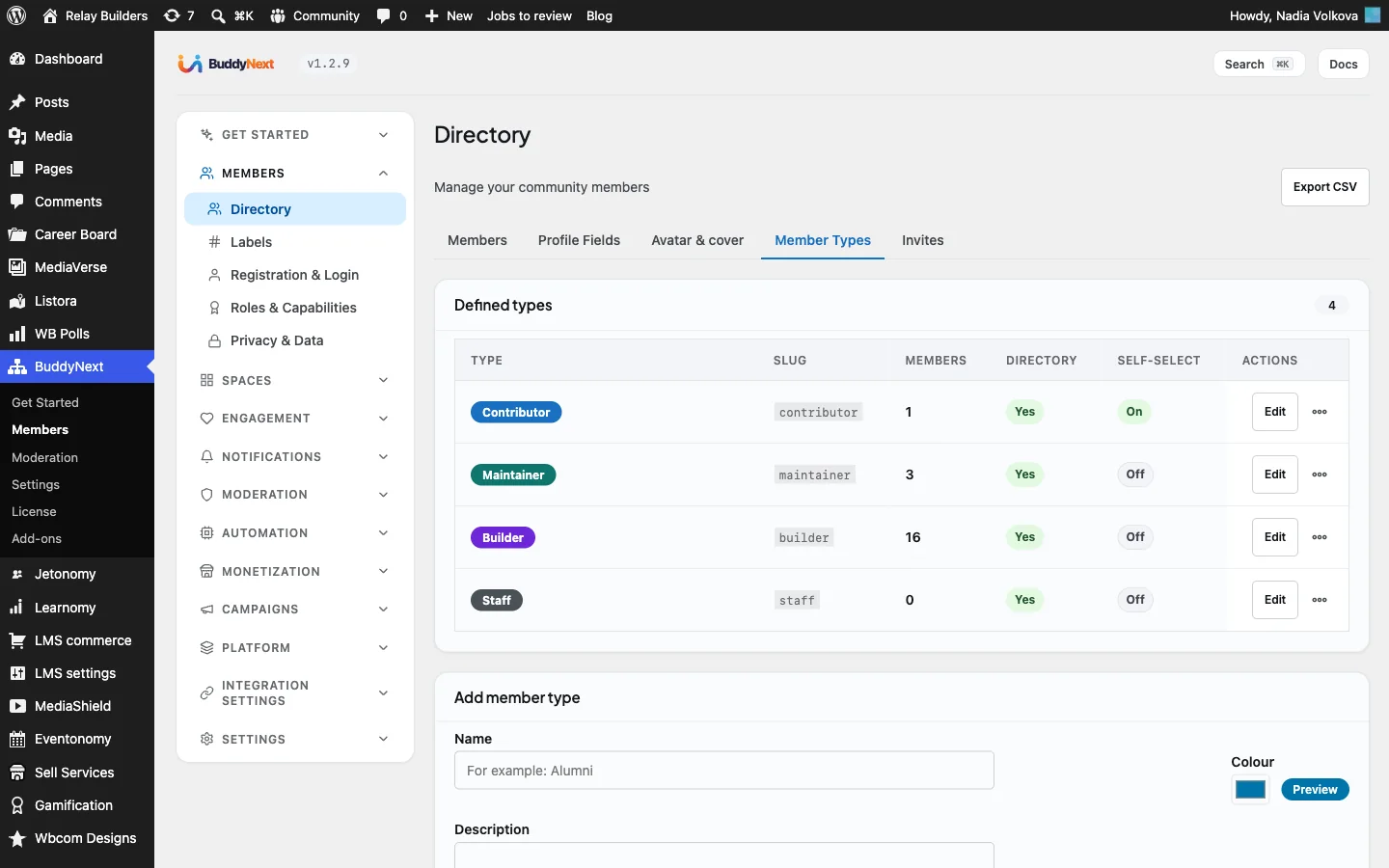
Next, open Member Types and create types that reflect roles in the project: Maintainer, Contributor and Builder. Each type gets a coloured badge on profiles and member cards and can be filtered in the directory. Set self-select to Off for Maintainer and Contributor, so only an administrator assigns them; a maintainer badge has to mean something.
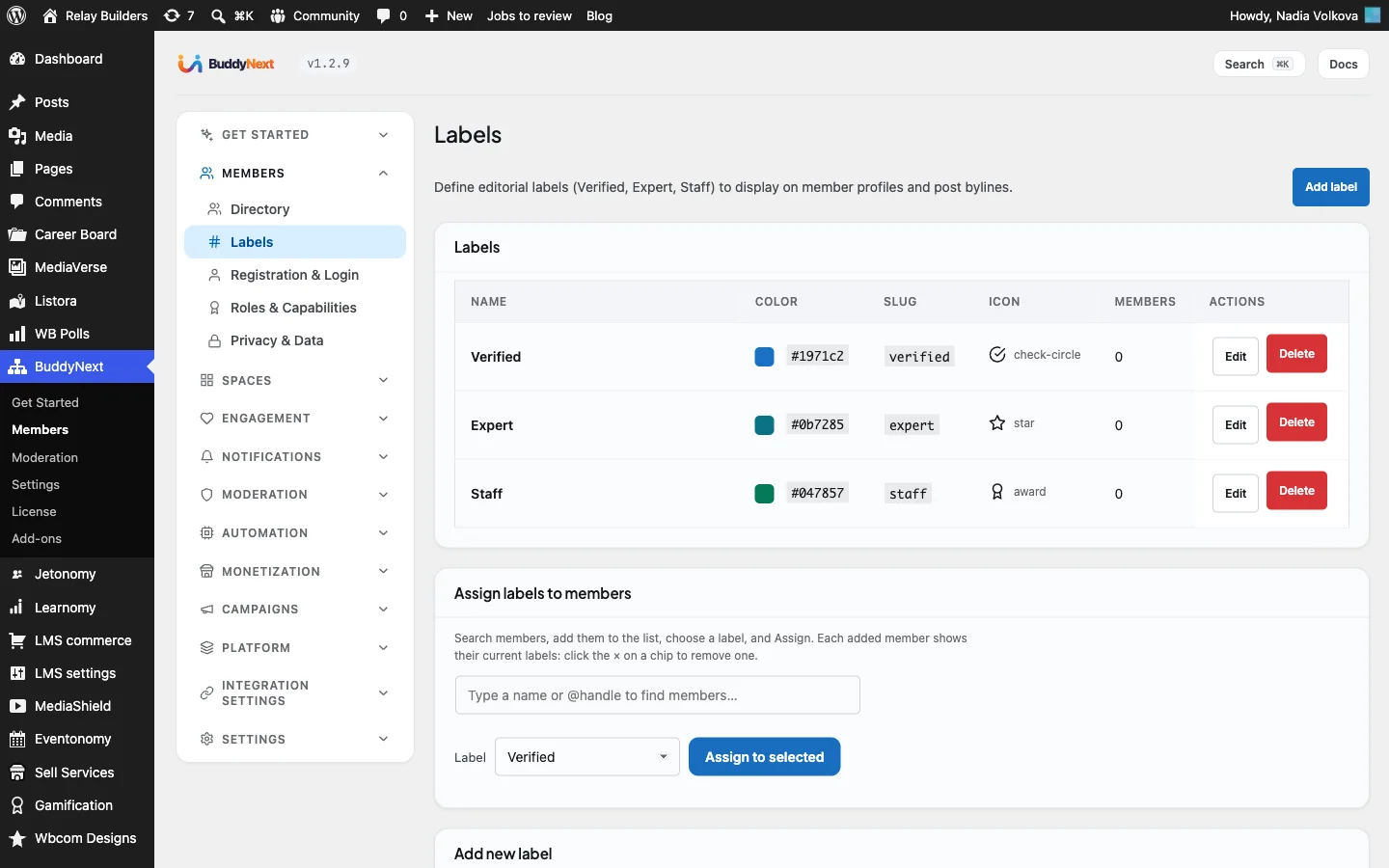
With BuddyNext Pro, use Labels for marks that sit alongside the type, such as “Verified” for people you have confirmed or “Expert” for community members whose answers are consistently good. A member can have several labels.
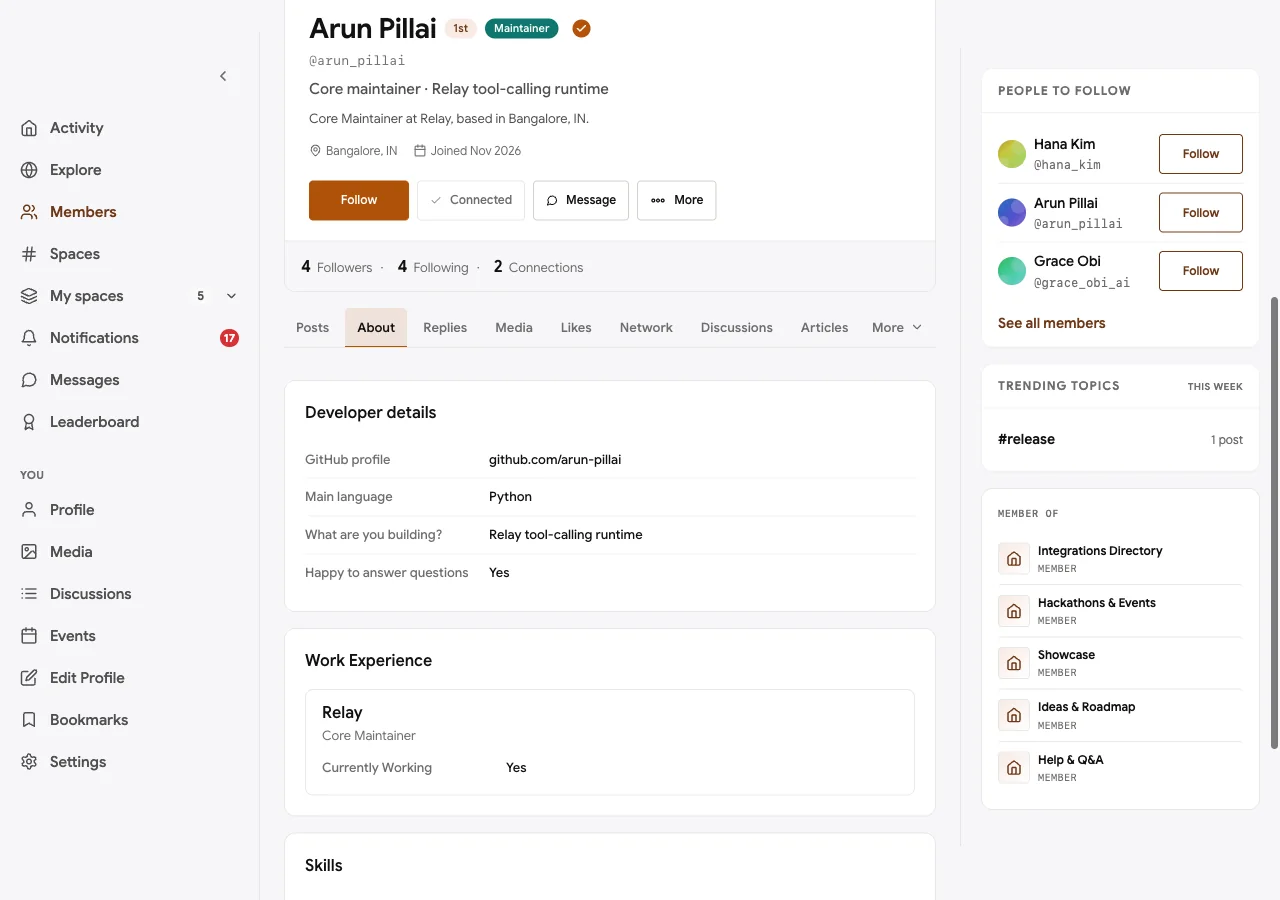
Here is a maintainer’s profile in the demo, with the Developer details group on the About tab and the Maintainer badge next to the name:
Step 5: Create the Q&A space
This is the heart of the community. In BuddyNext, create a space called Help & Q&A in a Build category, set it to open, and write a description that sets expectations: “Ask about tools, memory, orchestration and deployment. Include code and versions. Mark the answer that solved it.”
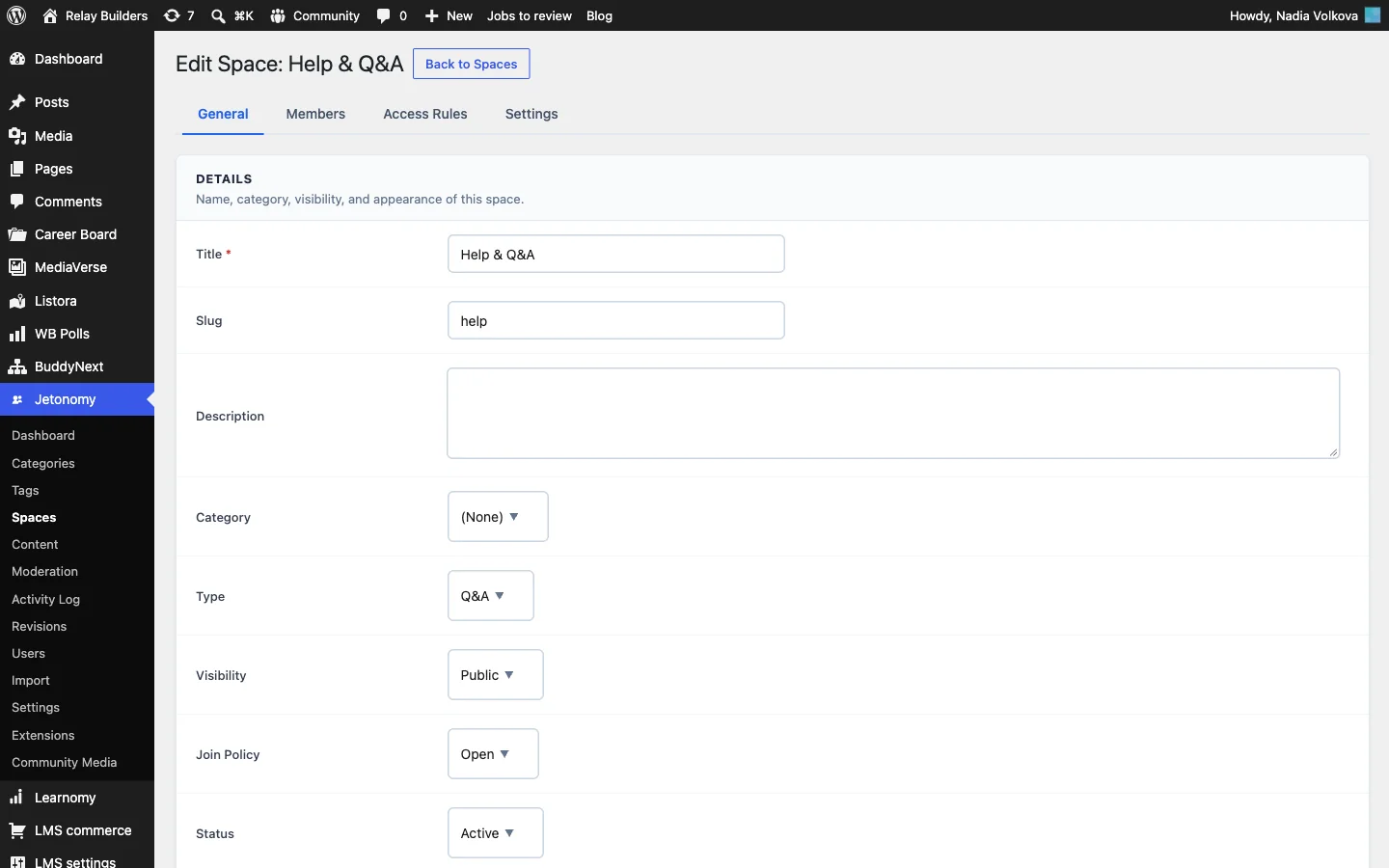
Every BuddyNext space has a Discussions tab. The first time it is used, BuddyNext creates a matching space in Jetonomy and links the two, so threads appear in both places and replies stay in sync. Now open Jetonomy > Spaces, edit the space and set it up for questions:
- On the General tab, set Type to Q&A. The four types are Forum, Q&A, Ideas and Feed; Q&A adds an Accept button to answers and highlights the accepted one.
- Keep Visibility public and Join Policy open, so anyone can find answers and newcomers can ask without waiting.
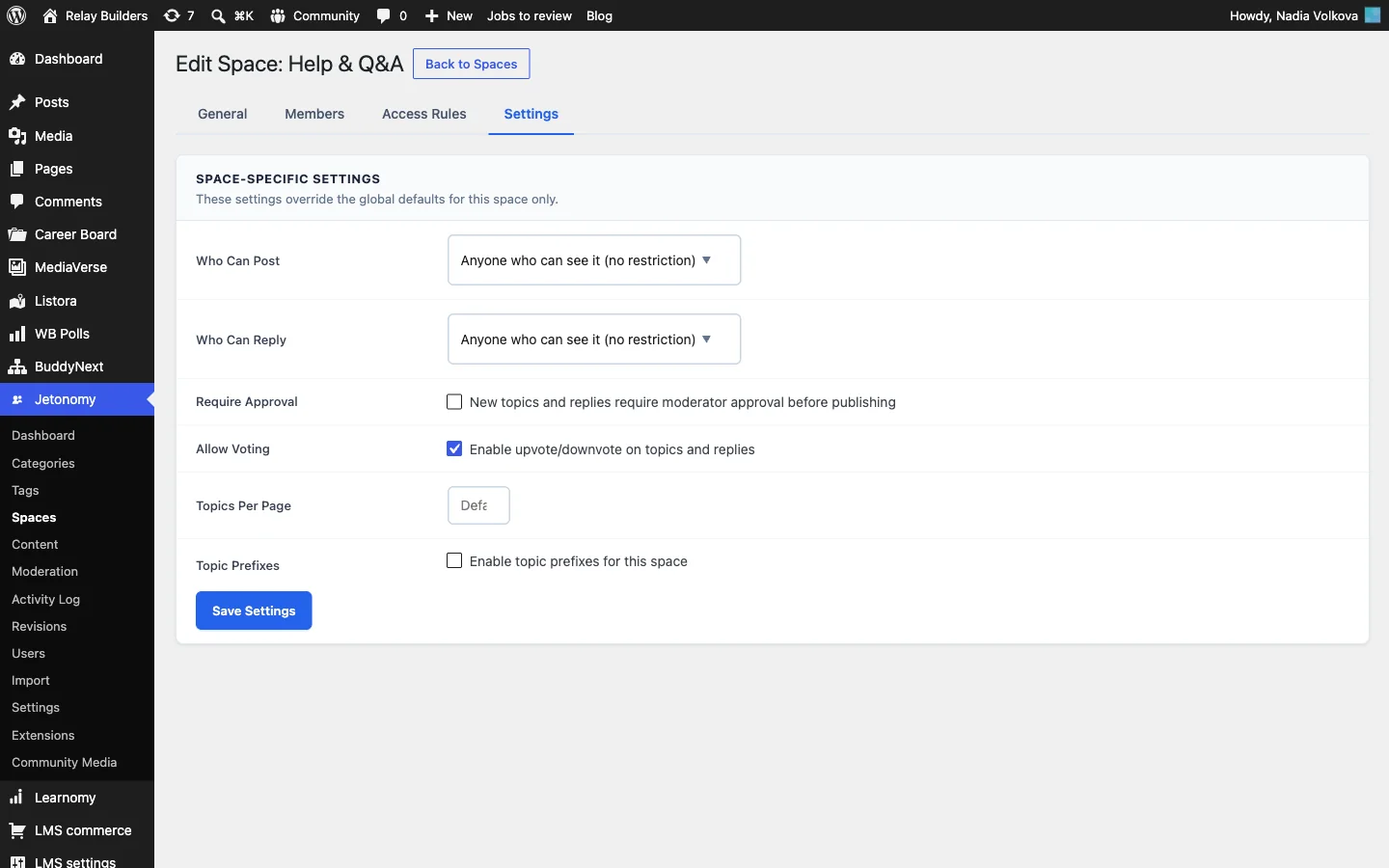
- On the Settings tab, leave Allow Voting on so members can upvote and downvote questions and answers. Leave Require Approval off unless you are under a spam attack; held questions frustrate developers who need help now.
- On the Access Rules tab you can grant Read, Participate or Full access to everyone, logged-in members, a WordPress role, a capability, a trust level or a membership. For a public Q&A, the defaults are fine. Access rules are more useful for gated spaces, such as a contributors’ working group that only members at trust level 2 or above can join.

How accepted answers work
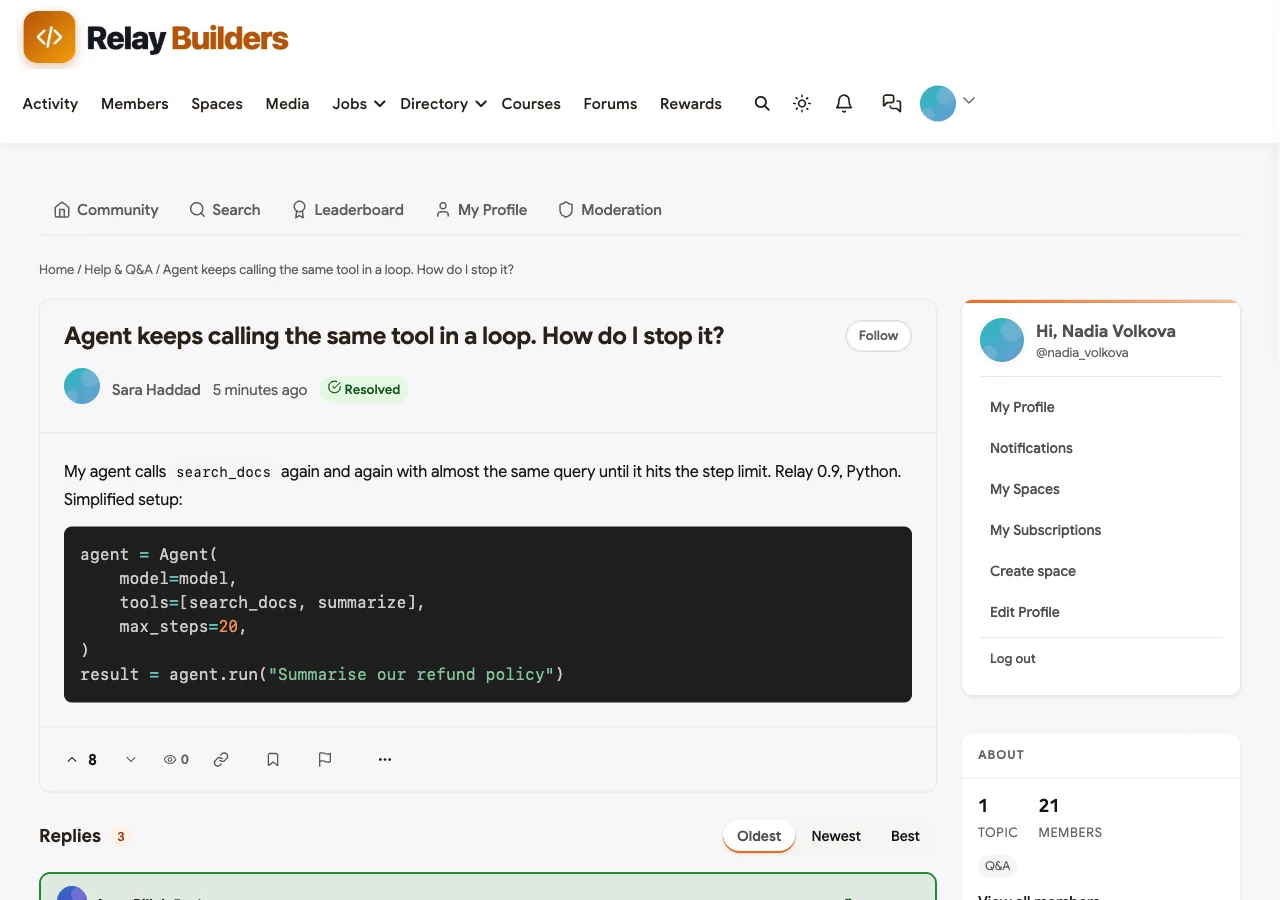
In a Q&A space, the person who asked the question can mark one reply as the accepted answer, and so can space moderators and administrators. The accepted reply gets an Accepted tag with a check mark. If the thread runs to several pages, a callout at the top shows the accepted answer so readers do not have to scroll. Accepting can be undone if a better answer arrives.
Here is a resolved thread in the demo. A developer asks why their agent keeps calling the same search tool; a core maintainer answers with a loop guard in Python; the asker accepts it:
The Q&A space list shows which questions are answered, so developers find a solution before they post a duplicate:

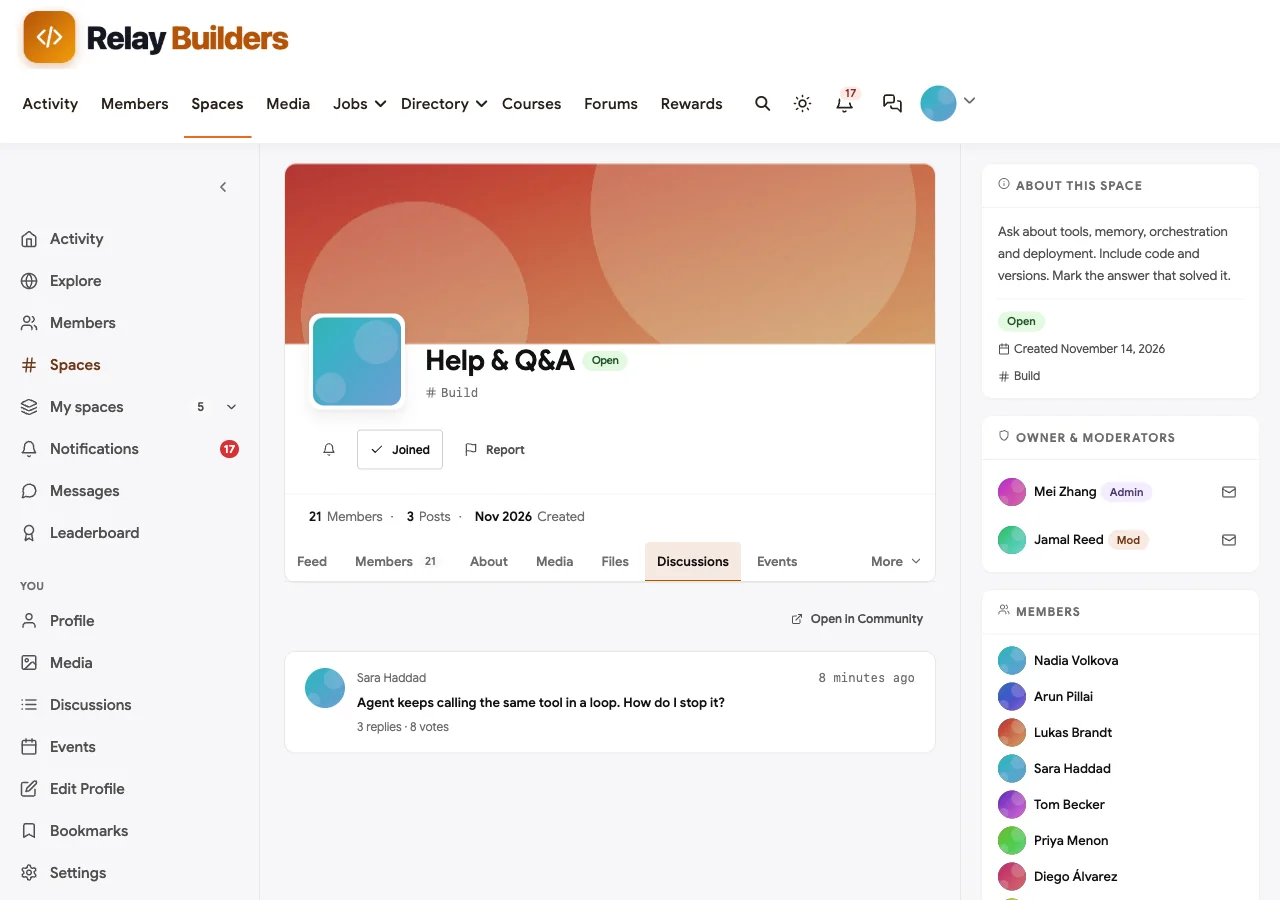
The same threads appear inside the BuddyNext space, on its Discussions tab, so members who browse spaces see recent questions without leaving the community:
Step 6: Make code readable
Code is how developers ask and answer. Jetonomy’s composer has two code buttons in the toolbar: Code for an inline snippet such as a function name, and Code block for a multi-line sample. Code blocks are syntax-highlighted automatically on the published thread, using the Prism library, with no setting to turn on.
Two practical notes:
- Use the toolbar, not Markdown. Typing triple backticks does not create a code block; the toolbar button does. Say so in your posting guidelines.
- Keep long code in Q&A, not the feed. The BuddyNext activity feed supports short inline code with backticks, which is fine for a one-line tip. Anything longer belongs in a Q&A thread, where it is highlighted, searchable and can be accepted.
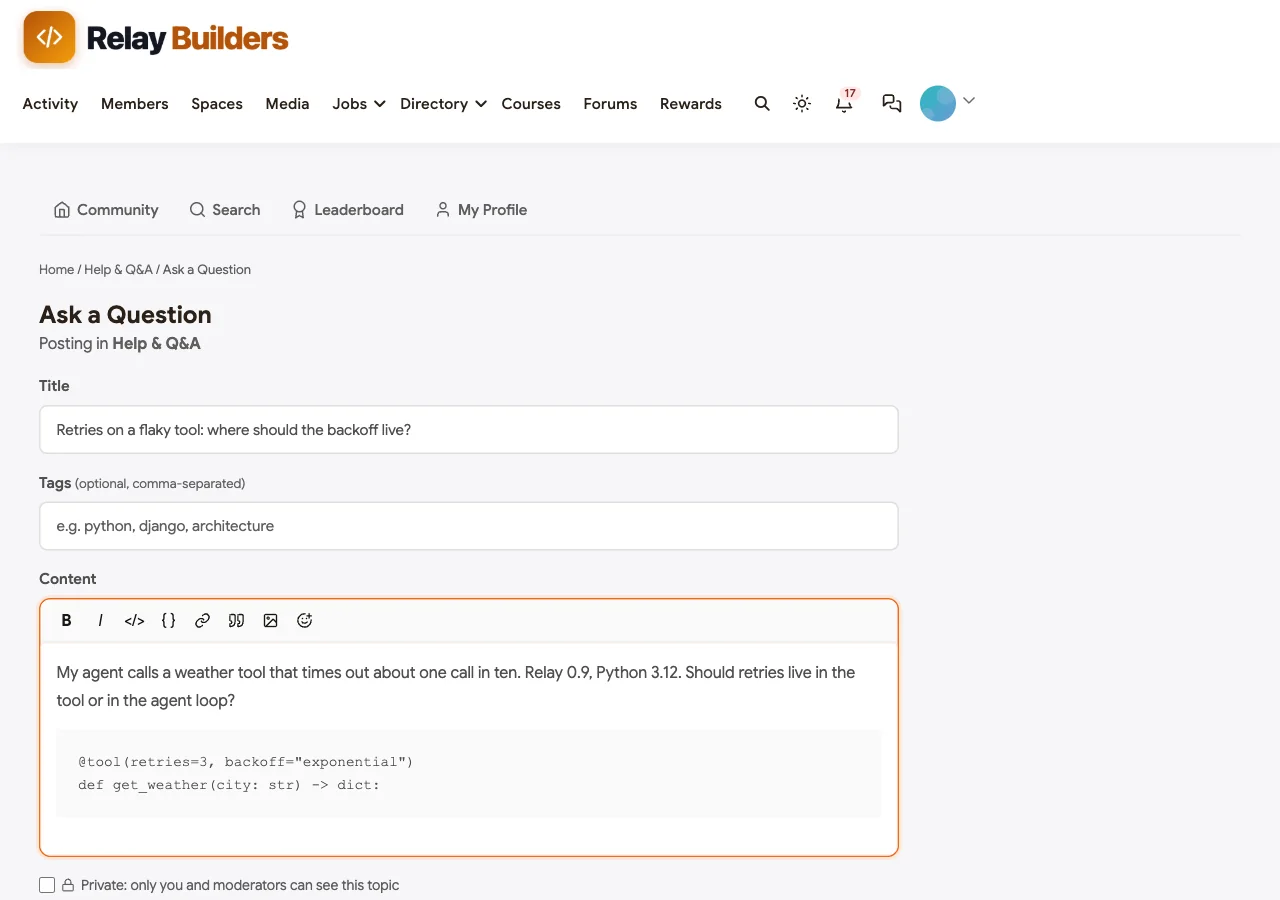
The question form also has a Tags field. Ask developers to tag every question with the framework version, such as v0.9, and the language. Version tags are the simplest way to keep old answers from misleading new users: when a breaking release ships, maintainers can find every thread tagged with the old version.
There is also a Private option on each new topic, which hides it from everyone except the author and moderators. Point developers to it when a question needs a stack trace that might contain customer data.
A posting template that gets good answers
Pin a short “How to ask” post at the top of the Q&A space:
- Framework version, model and provider, and language version.
- A minimal code sample that shows the problem, in a code block.
- The full error or trace, with keys and customer data removed.
- What you expected, what happened and what you already tried.
Questions that follow it get answered faster, and the answers are more useful to the next person.
Step 7: Add a public roadmap
Feature requests in GitHub issues turn into long threads of “+1” comments. An ideas space turns them into votes and statuses.
Create a second BuddyNext space called Ideas & Roadmap and set its Jetonomy type to Ideas. Members post ideas and vote on them. Moderators and maintainers set each idea’s status to planned, in progress, shipped or declined. Ideas with no status stay in the list for voting; ideas with a status appear on the roadmap view, at /community/s/your-space/roadmap/, in columns.
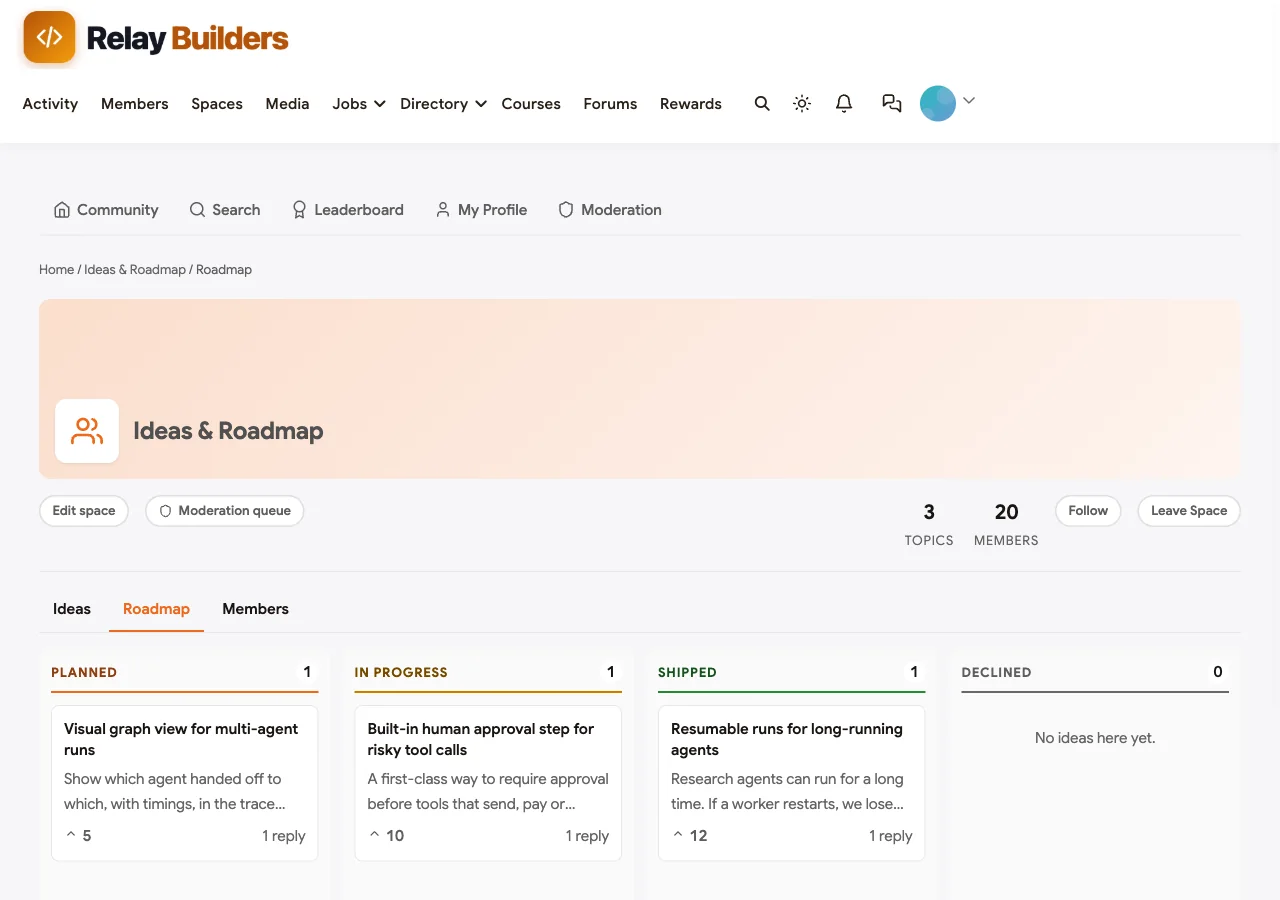
Three habits make a roadmap trustworthy:
- Decline with a reason. A declined idea with a one-line explanation earns more goodwill than an idea left open forever.
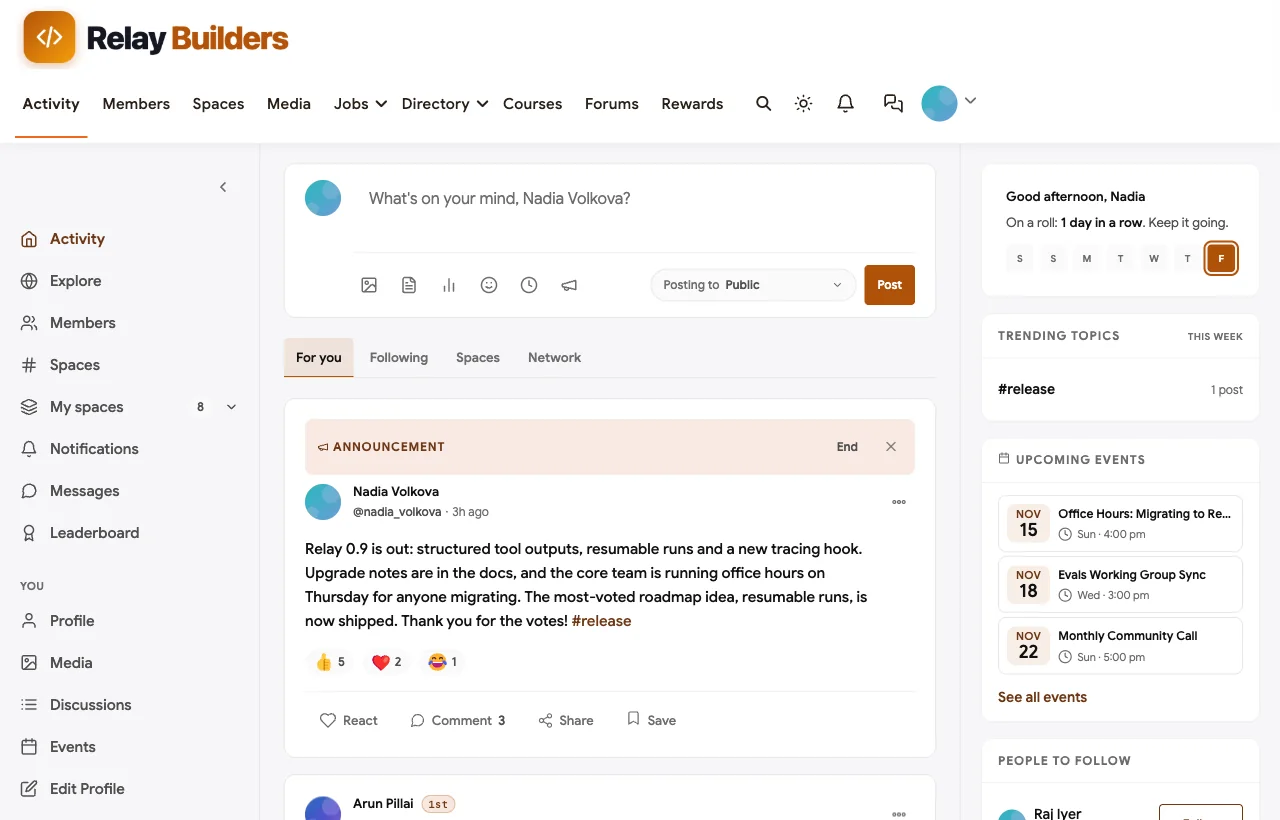
- Close the loop on release. When an idea ships, set it to shipped and reply with a link to the release notes. The member who proposed it is notified automatically; the release announcement below reaches everyone else.
- Keep the plan honest. Only mark ideas as planned when the team has actually committed to them.
When a release ships, pin an announcement in the activity feed with upgrade notes and a link to migration office hours:
Step 8: Reward the people who answer
A developer community lives or dies by its answerers. Jetonomy tracks reputation and trust levels automatically, and WB Gamification turns them into visible points, badges and a leaderboard.
Reputation
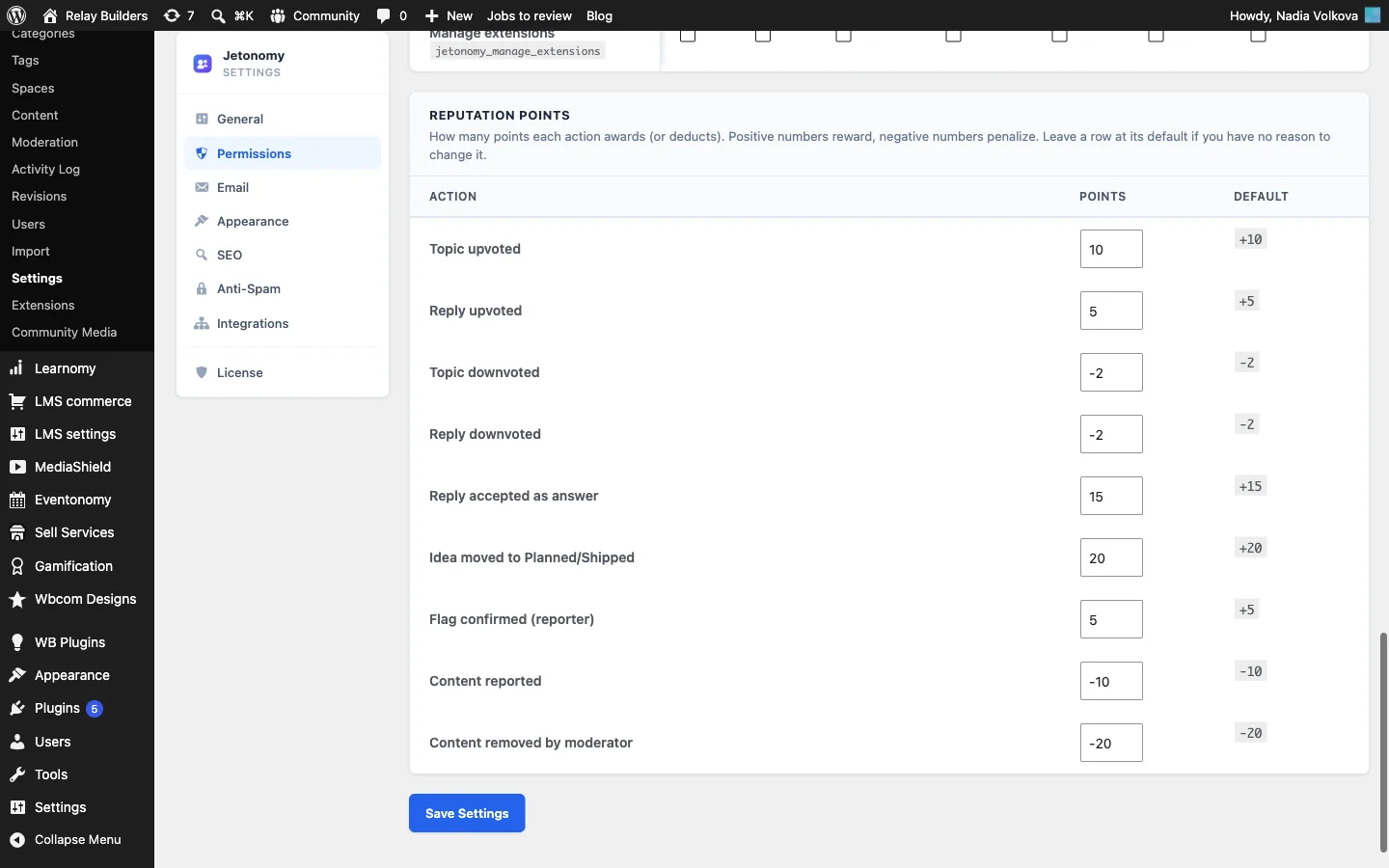
Every member earns reputation from what others think of their contributions. These are Jetonomy’s default values, all editable under Jetonomy > Settings > Permissions > Reputation Points:
| Action | Default reputation |
|---|---|
| Your answer is accepted | +15 |
| Your topic is upvoted | +10 |
| Your reply is upvoted | +5 |
| You start a topic | +2 |
| You reply | +1 |
| Your idea is moved to planned | +20 |
| A flag you raised is confirmed | +5 |
| Your content is downvoted | -2 |
| Your content is reported | -10 |
| Your content is removed by a moderator | -20 |
The weighting matters: an accepted answer is worth fifteen replies, so the system rewards solving problems, not posting volume.
Trust levels
Reputation feeds trust levels, which control what a member can do. There are six: Newcomer (0), Member (1), Regular (2), Trusted (3), and Leader (4) and Veteran (5), which you assign by hand. The defaults:
- Level 0, Newcomer: a brand-new account, limited to 3 topics, 10 replies and 5 votes a day.
- Level 1, Member: after 5 posts, 3 days active and 10 replies received. Daily limits are lifted.
- Level 2, Regular: after 30 posts, 20 days active and 50 reputation. Skips the CAPTCHA.
- Level 3, Trusted: after 100 posts, 60 days active and 200 reputation. Can help moderate others’ content, where your role settings allow it.
You can change every threshold and rename the levels under Jetonomy > Settings > Permissions.
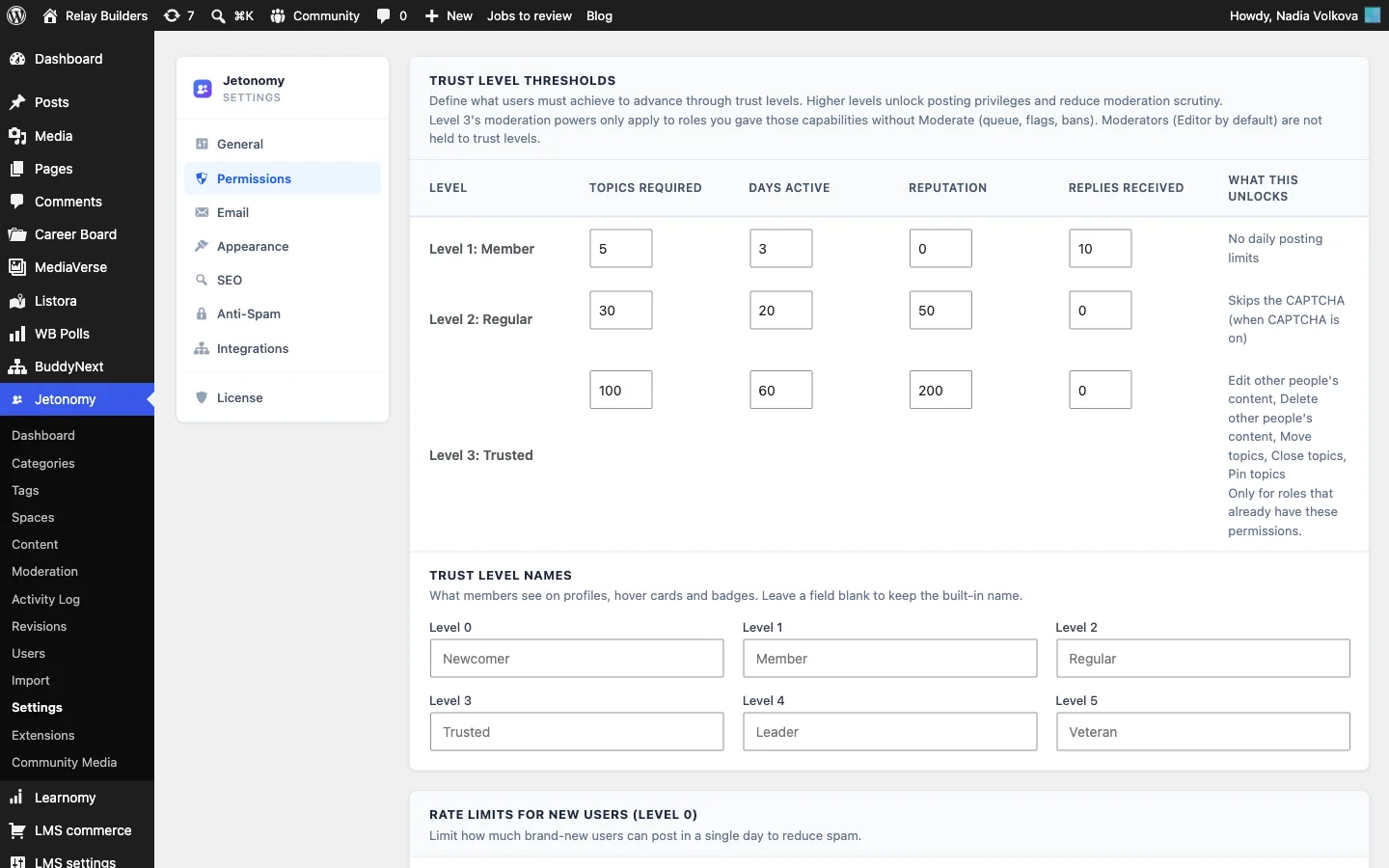
Trust levels do two jobs at once. They give helpful members more freedom as they earn it, and they keep brand-new accounts, where most spam comes from, on a short leash.
Points, badges and a leaderboard
With WB Gamification installed, every reputation change in Jetonomy is copied into the points ledger, with labels such as “Your answer was accepted” and “Your forum post was upvoted”. It also awards points for joining a space, being approved into a gated space and being promoted to a higher trust level. Members see their points on their profile, earn badges for milestones and appear on the community leaderboard.
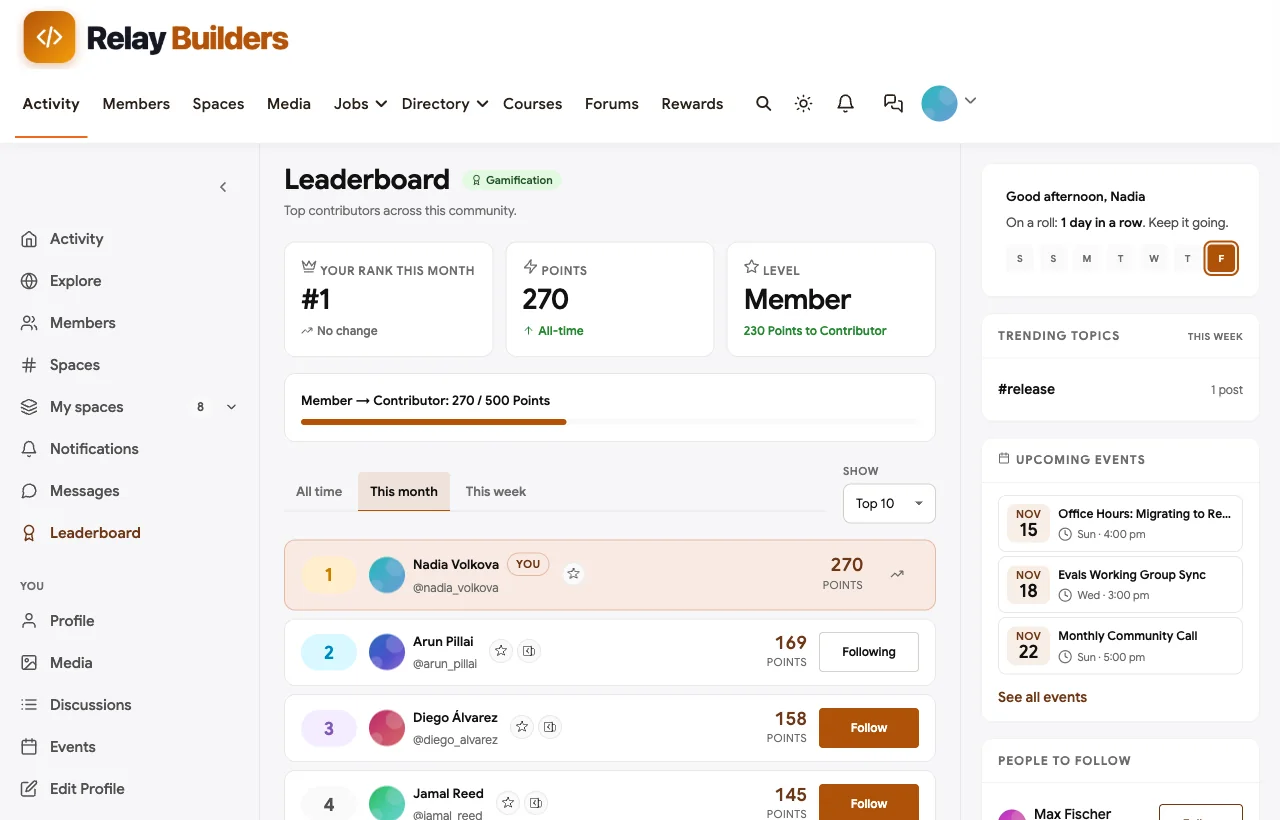
Mention the top answerers in your monthly community call and invite the best of them to the Contributor type. Recognition costs nothing and is the main reason volunteers keep answering.
Step 9: Keep spam and AI-generated noise out
Agent communities attract a new kind of noise: plausible answers generated by a model and pasted without being run, and promotional posts for thin wrappers. Layer your defences so most of it never reaches members, and the rest is caught quickly.
Layer 1: CAPTCHA and spam checks on sign-up and posting
Open Jetonomy > Settings > Anti-Spam and choose a CAPTCHA provider: reCAPTCHA v3 or Cloudflare Turnstile. Members at trust level 2 or above skip it automatically, so regulars are never bothered. If you use Akismet on the site, Jetonomy checks posts with it too.
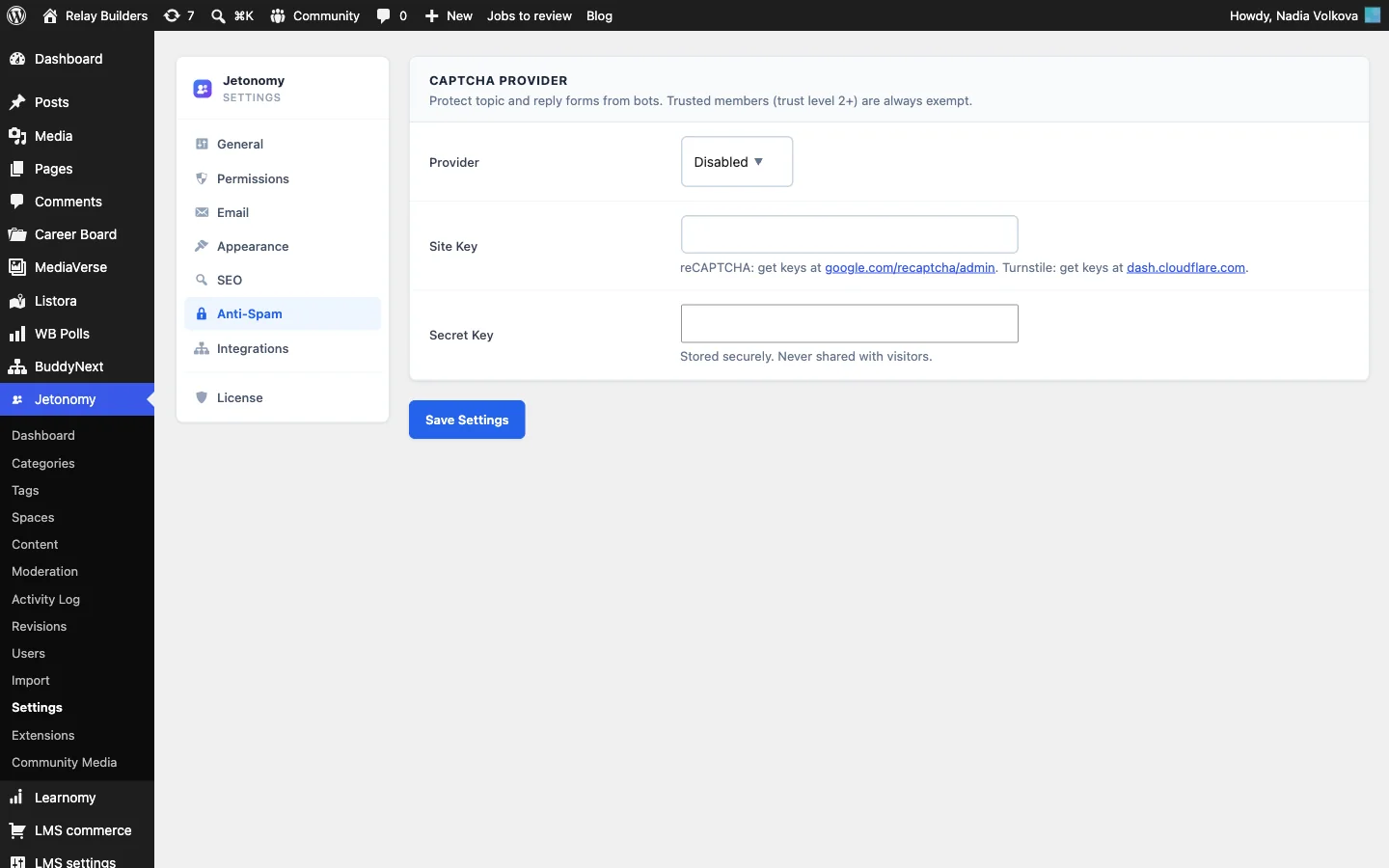
Layer 2: Content safeguards
Open BuddyNext > Automation > Controls. The content safeguards apply across the community:
- Banned words and banned hashtags, one per line, with
*to catch variants (“spam*” also blocks “spammer”). - Blocked link domains, for the spam domains you see repeatedly.
- Blocked IP addresses.
- Post and comment rate limits per minute, and a duplicate post window that stops the same message being posted twice.
- New member review threshold, which holds a new member’s posts for review until they have a set number of published posts.

With BuddyNext Pro, the Rules tab adds automatic rules on top: keyword blocks with a severity of block, flag or warn; link blocks; hourly rate limits; and automatic removal once a post gets a set number of reports. A Test a phrase box shows which rule would catch a given sentence before you turn it on.
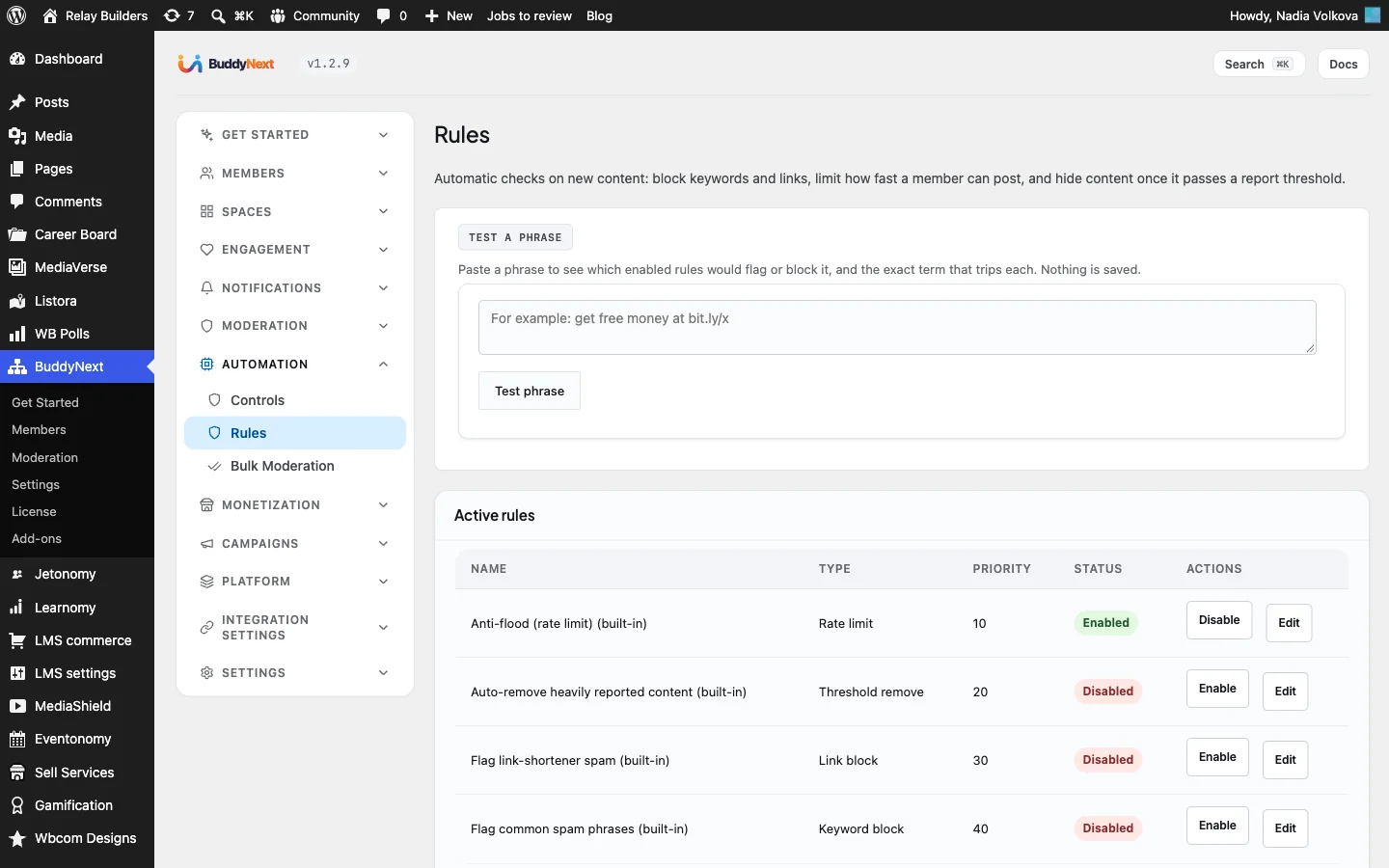
Jetonomy Pro adds an Advanced Moderation extension for discussions specifically, with keyword, regular expression, link limit, new user and spam score rules, each of which can flag, hold, block or mark as spam.
Layer 3: Rules people can see
Tools catch spam; written rules catch everything else. Add these to the pinned “How to ask” post and your community guidelines:
- Test before you answer. Answers with code must say which version they were tested on.
- Disclose generated text. If a model drafted your answer, say so and confirm you ran the code.
- One place for promotion. Tools and services go in the integrations directory. Showcases must include something others can learn from.
- Never paste secrets. Remove API keys, tokens and customer data from code and traces.
Layer 4: People
Give your maintainers moderator rights in the Q&A and roadmap spaces. Reports go to BuddyNext > Moderation and Jetonomy > Moderation, and a downvote plus a short reply (“this does not work on 0.9 because…”) is often the best moderation of all, because it teaches as well as corrects.
Step 10: Launch and keep a rhythm
Seed before you open the doors
Two weeks before launch, ask maintainers and a handful of trusted users to join and post:
- Twenty real questions from your GitHub issues, Discord history and support inbox, each with an accepted answer. New visitors should land on a forum that already solves problems.
- A getting-started thread in Start Here: the quickstart, how to ask, where things go and how to get involved.
- Five to ten roadmap ideas with honest statuses.
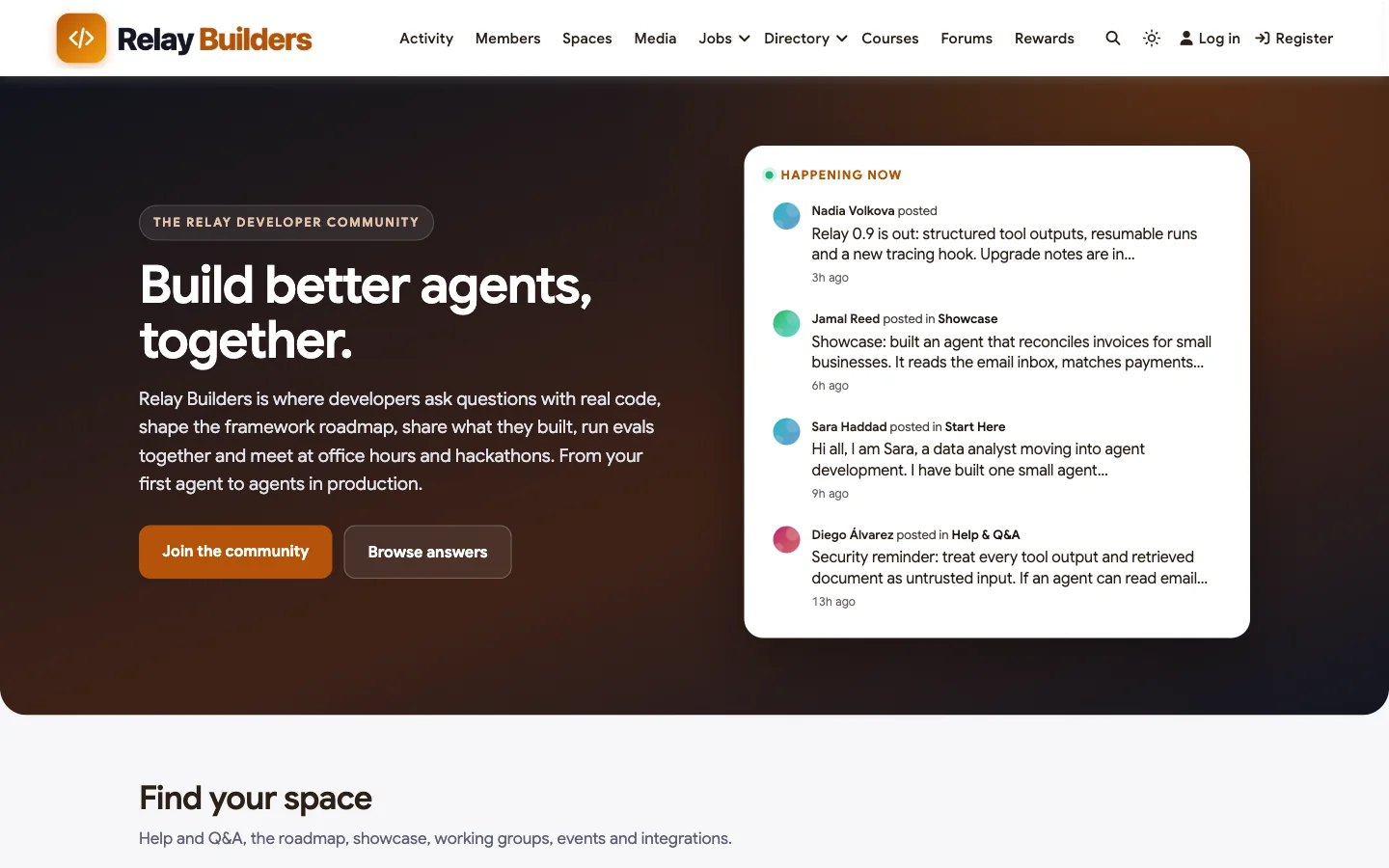
- Two or three showcases of real projects.
Add the rest of the community
With the core working, add the spaces that make it a community rather than a help desk:
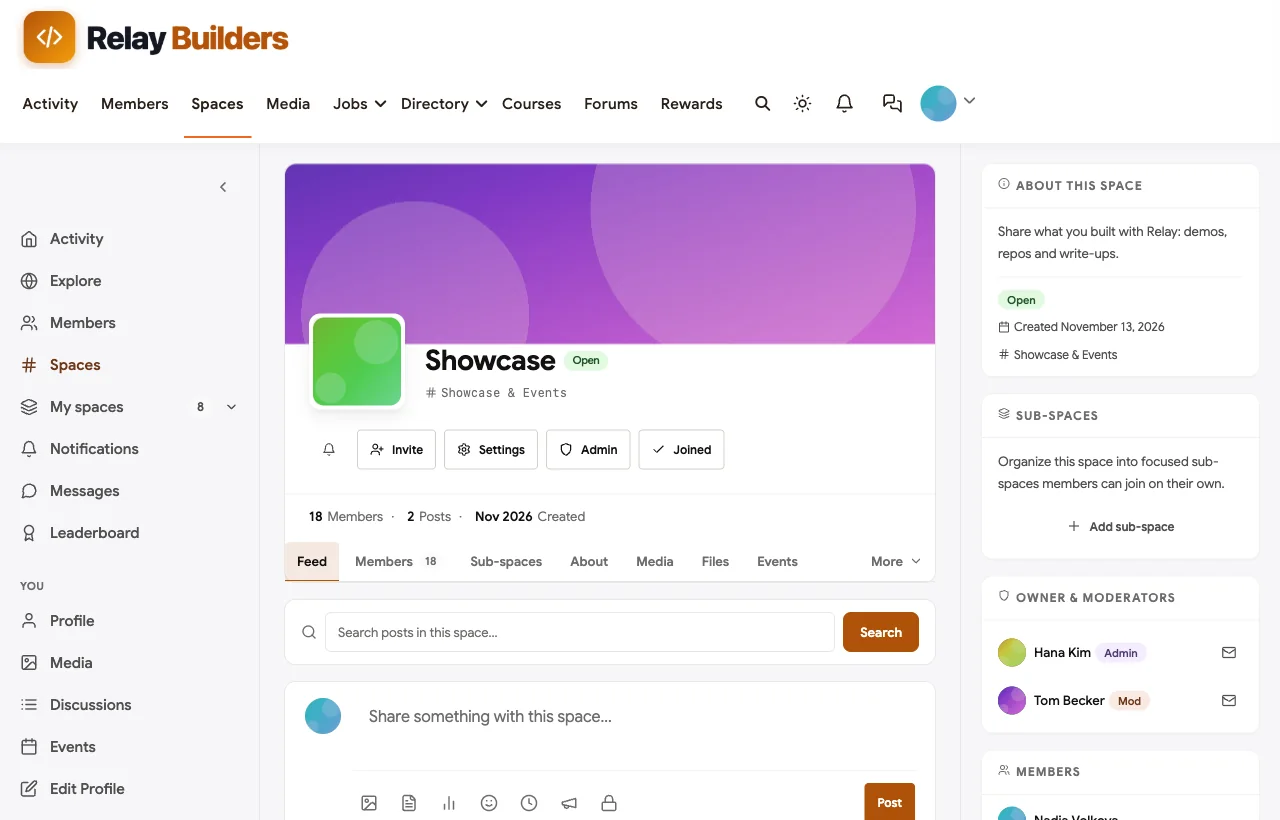
- A Showcase space where members post what they built, with repos and demos.
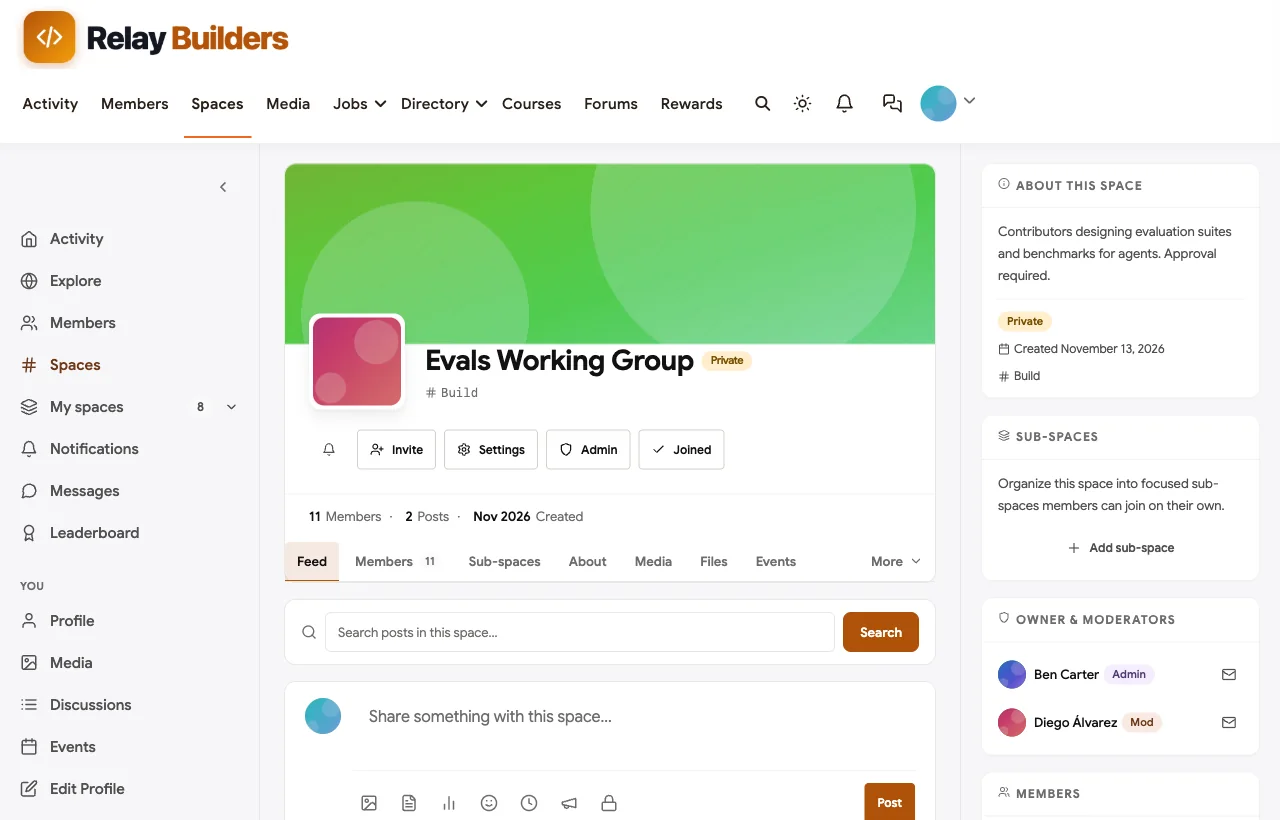
- A private working group with approval required, for contributors on evals, security or docs.
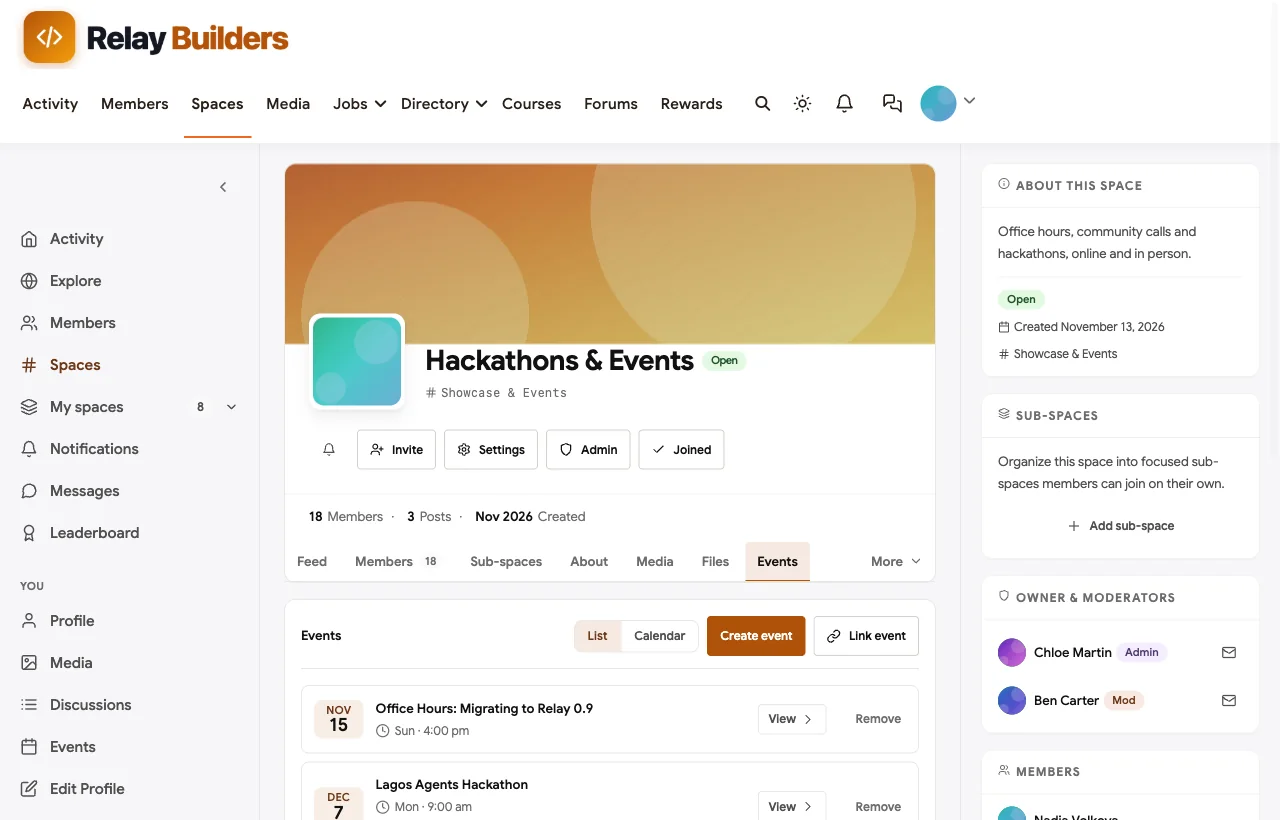
- An events space with Eventonomy for weekly office hours, a monthly community call and a quarterly hackathon.
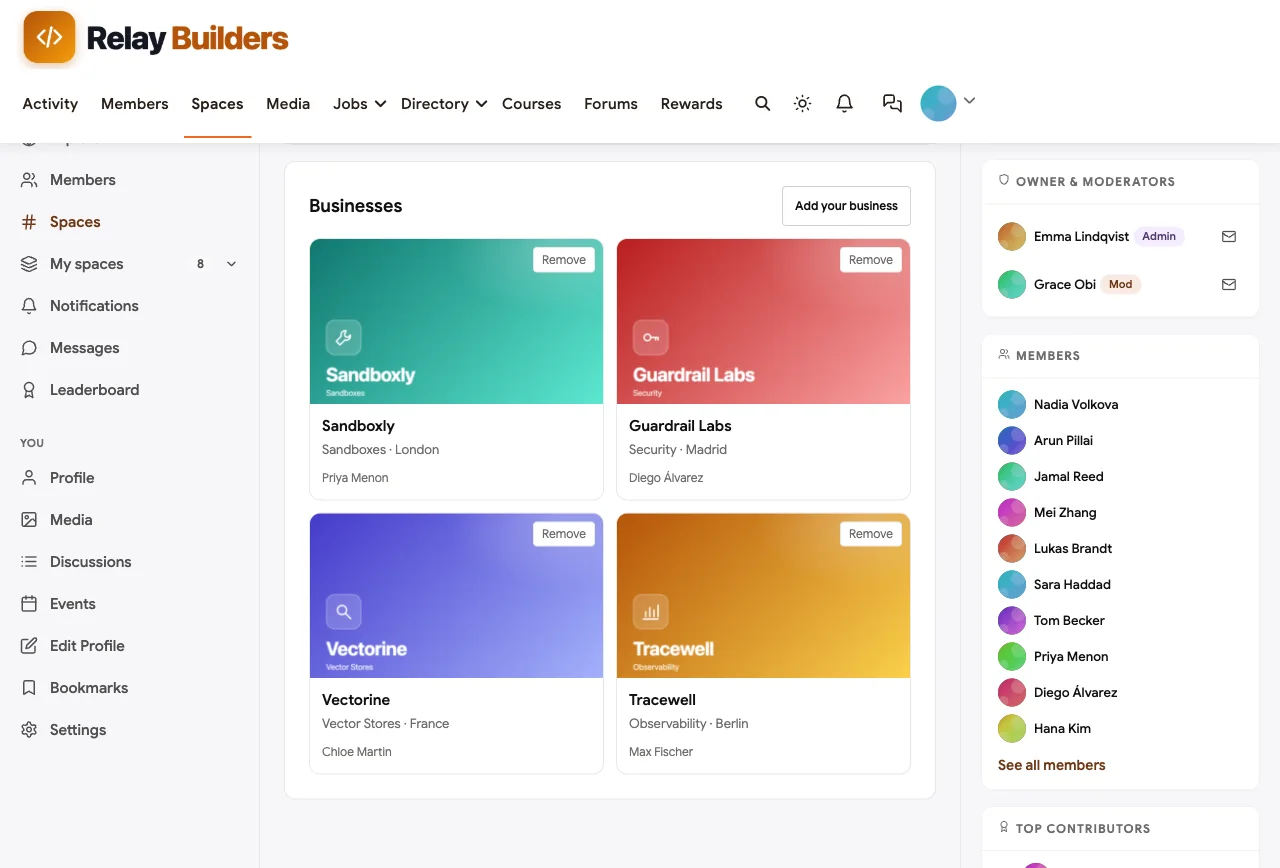
- An integrations directory with Listora, so tools that work with your framework have one place to be listed instead of promoting themselves in Q&A.
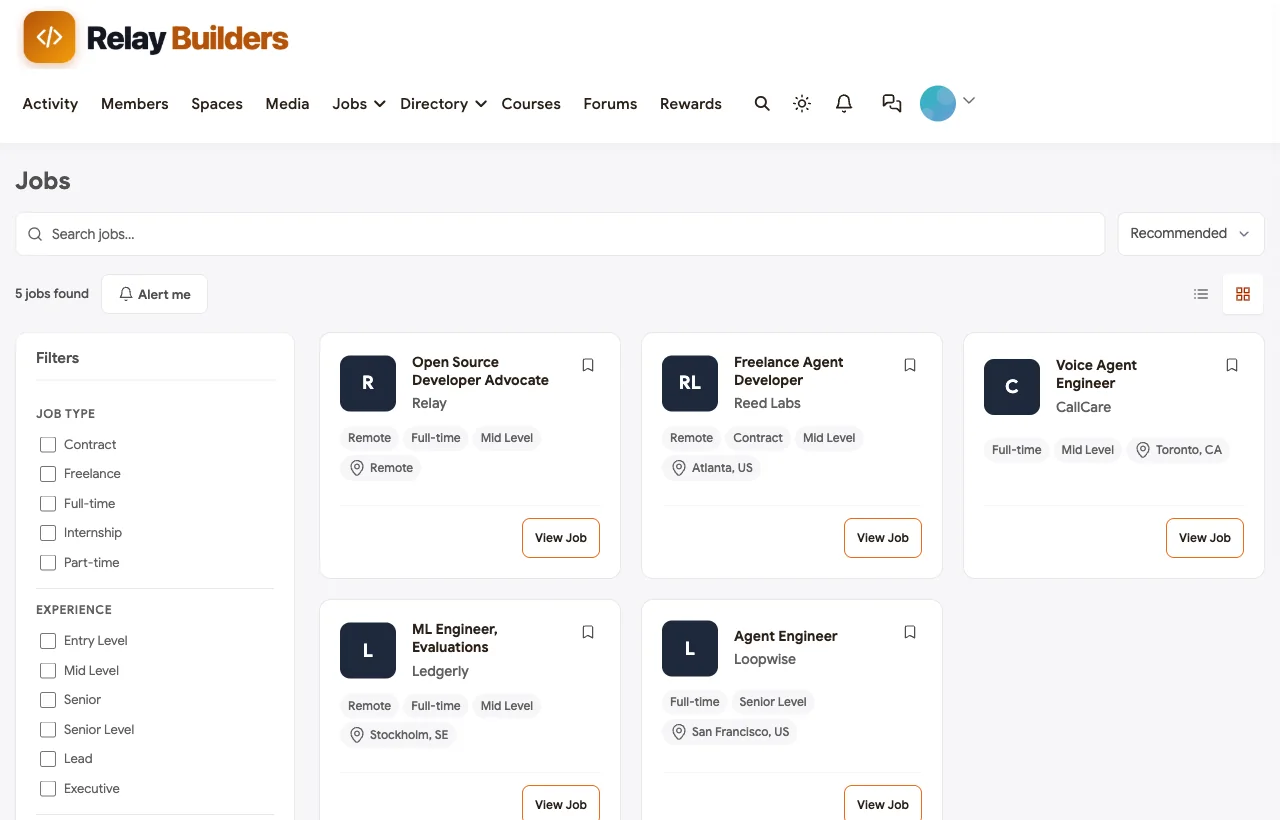
- A jobs board with WP Career Board, where companies building on your framework hire.
Then keep a rhythm
| Cadence | What to do |
|---|---|
| Every release | Pin an announcement with upgrade notes, update roadmap statuses, tag threads affected by breaking changes |
| Weekly | Maintainer office hours; each maintainer answers unanswered questions in their area |
| Monthly | Community call with two member demos; recognise top answerers |
| Quarterly | Hackathon; review trust thresholds and moderation rules |
Measure what matters
Track a few numbers monthly: the share of questions with an accepted answer, median time to first reply, how many answers come from people outside the core team, and how many roadmap ideas moved status. The third number is the one to watch. A community where only maintainers answer is a support desk; one where users answer each other is a community.
Common mistakes
- Starting with chat only. Chat answers vanish. Start with Q&A and add chat as a real-time layer.
- Requiring approval for every post. Developers with a broken build will not wait a day. Use trust levels and safeguards instead.
- Letting the roadmap go stale. An ideas space with no status changes for months tells users nobody is listening.
- No version tags. Without them, a correct answer from last year becomes a wrong answer today and nobody can tell.
- Rewarding volume. Points for every reply invite low-effort and generated answers. Weight accepted answers and upvotes, as Jetonomy’s defaults do.
- Maintainers answering everything. Leave easy questions for a day so community members can answer and earn reputation.
Mobile
Many developers will check notifications and answer quick questions from a phone. BuddyX and BuddyNext are responsive, so threads, code blocks, profiles and the roadmap all work on a small screen.

Related guides
- Best platforms for an AI agent developer community: how BuddyNext compares with Discourse, GitHub Discussions, Discord and others, with notes on which large AI communities use which.
- Best software for a SaaS customer community: useful if your agent framework also has a paid product and customers.
- How to build a university alumni network on WordPress: the same platform set up for a very different audience.
- How to set up a community space on WordPress with free plugins: the general setup guide behind every community in this series.
Want to click around before building your own? The live demo is a full BuddyNext community you can explore in your browser.
How we built this guide
We built Relay Builders on a local WordPress site running the BuddyX theme, BuddyNext, BuddyNext Pro, Jetonomy, WB Gamification, Eventonomy, WP Career Board and Listora, with fictional members, questions, ideas and events created for this guide. Every screenshot comes from that site, taken in November 2026. Default values for reputation and trust levels are those shipped with Jetonomy at the time of writing and may change in later versions. The GitHub, Google and Discord sign-in buttons were configured with placeholder keys for the screenshot. Survey figures come from Stack Overflow’s 2025 Developer Survey. buddyxtheme.com is published by the team behind BuddyNext.
Frequently asked questions
How do I create a developer community with Q&A on WordPress?
Install the BuddyX theme, BuddyNext and Jetonomy. Create a space in BuddyNext, open its Discussions tab so a matching Jetonomy space is created, then set that space’s type to Q&A in Jetonomy. Members can then ask questions, vote and accept the answer that solved their problem.
Can developers sign in with GitHub?
Yes. BuddyNext includes social login for GitHub, Google, Discord, Facebook and Apple. Create an OAuth app in GitHub’s developer settings, then paste its Client ID and Client Secret into BuddyNext’s Registration & Login settings.
Does the forum support code blocks and syntax highlighting?
Yes. Jetonomy’s composer has inline code and code block buttons, and code blocks are syntax-highlighted automatically on published threads. Typed Markdown is not converted, so use the toolbar buttons.
Who can mark an answer as accepted?
The person who asked the question, plus space moderators and administrators. Accepting an answer gives its author 15 reputation by default, and it can be undone if a better answer arrives.
How do I stop AI-generated answers flooding the forum?
Combine trust levels that rate-limit brand-new accounts, a CAPTCHA, content safeguards such as banned words and blocked domains, and written rules that require tested code and disclosure of generated text. Weight reputation towards accepted and upvoted answers so volume is not rewarded.
Should we use Discord or a forum for an AI developer community?
Use a forum for questions and answers that should last and be searchable, and keep Discord or another chat tool only if your users want real-time conversation. Point chat users to the forum for anything worth keeping.
How do I run a public roadmap?
Create an ideas space where members post and vote on feature requests. Maintainers set each idea to planned, in progress, shipped or declined, and the roadmap view shows them in columns. Update statuses on every release.
What are trust levels?
Levels from Newcomer to Veteran that members earn through posts, days active and reputation. Newcomers have daily posting limits; regulars skip the CAPTCHA; trusted members can help moderate. Thresholds and names are editable.
Can I reward people who answer questions?
Yes. Jetonomy awards reputation for accepted and upvoted answers, and WB Gamification copies every reputation change into points, badges and a community leaderboard.
How do I handle questions that need a stack trace with private data?
Ask developers to remove keys and customer data first. For anything that cannot be cleaned, Jetonomy lets the author mark a new topic as private, so only the author and moderators can see it.
The bottom line
A good AI agent developer community answers each question once and well, shows users where the project is going and rewards the people who help, while keeping untested and promotional noise out. On WordPress, BuddyX with BuddyNext and Jetonomy gives you Q&A with accepted answers, highlighted code, GitHub sign-in, a public roadmap, reputation and trust levels and layered spam controls, on your own domain with your own data.
And give your developers a place where answers last.