
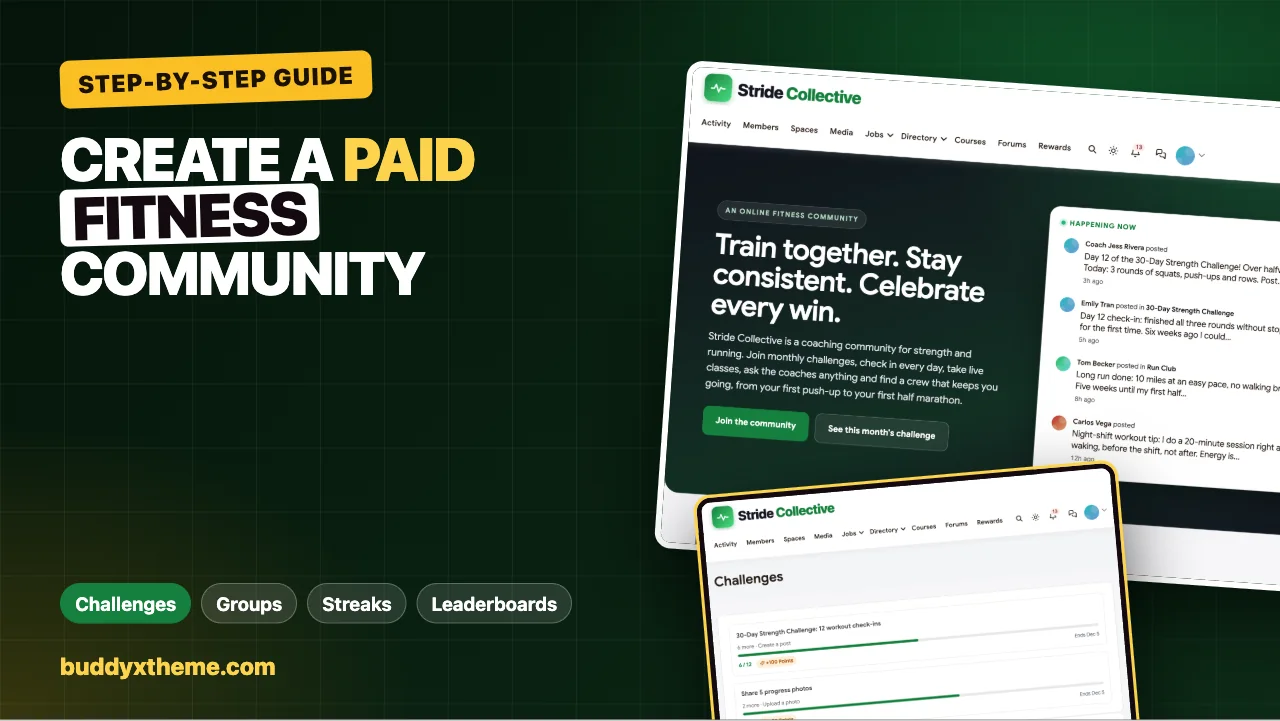
Most online fitness programs do not fail because the workouts are bad. They fail in week three, when motivation dips and nobody notices. Members who train alone quietly stop opening the app; members who have a group, a challenge with a finish line and someone who asks “did you train today?” keep going. That is why the most successful coaches sell community, not just programming.
This guide shows how to build a paid fitness community on your own WordPress site, step by step: membership plans with trials, program groups, a monthly 30-day challenge with progress bars, community goals, streaks, leaderboards, badges, private check-in spaces, accountability pods, live classes and courses. Every screenshot comes from Stride Collective, a demo coaching community we built for this article.
Quick answer
To create a paid fitness community, install the BuddyX theme and BuddyNext on WordPress, add BuddyNext Pro for membership plans with free trials and members-only spaces, and add WB Gamification for challenges, streaks, points, badges and leaderboards. Create open spaces for each program and the monthly challenge, private spaces for progress check-ins and accountability pods, then set up a 30-day challenge that counts workout check-ins. Add Eventonomy for live classes and Learnomy for structured programs, and run a simple weekly rhythm of kick-offs, check-ins and shout-outs.
In this guide
- What makes a fitness community worth paying for
- Step 1: Plan the offer
- Step 2: Install the stack
- Step 3: Set up memberships and trials
- Step 4: Create the spaces
- Step 5: Profiles that help coaches coach
- Step 6: Run a 30-day challenge
- Step 7: Streaks, points, badges and leaderboards
- Step 8: Accountability pods, live classes and programs
- Challenge ideas by level
- A worked example: one member’s first 30 days
- Step 9: Run the weekly rhythm
- Step 10: Launch
- Measure what matters
- Common mistakes
- Mobile
- Related guides
- How we built this guide
- Frequently asked questions
- The bottom line
What makes a fitness community worth paying for
Members pay for five things that a free app or a YouTube channel does not give them:
| What members pay for | What it looks like in the community | Step |
|---|---|---|
| Accountability | Daily check-ins, pods, streaks, a coach who notices | 5 and 7 |
| A finish line | 30-day challenges with progress bars and rewards | 6 |
| Belonging | Program groups, local crews, shout-outs, leaderboards | 4 and 7 |
| Expert guidance | Coach Q&A, live classes, structured programs | 8 |
| Visible progress | Badges, streak milestones, progress photos | 6 and 7 |
The rest of this guide builds each of those. If you are still choosing a platform, our comparison of online fitness community platforms covers the hosted options; this guide is the build on WordPress.

Step 1: Plan the offer
Before installing anything, decide four things.
Who it is for. “Busy parents getting back to strength training” builds a better community than “anyone who wants to get fit”. A clear audience makes every post more relevant and every challenge easier to design.
What members get. List it plainly: the monthly challenge, program groups, coach Q&A, live classes, a structured program, progress check-ins. This becomes your sales page and your plan structure.
How membership works. Most fitness communities sell a monthly or yearly membership with a short free trial, sometimes with a lighter free tier that shows the community without the coaching. Decide which spaces and courses each level opens.
Who coaches. Name the head coach, any assistant coaches and the volunteers who will captain accountability pods. A coach who answers within a day is the main reason people renew.
Step 2: Install the stack
Everything runs on a normal WordPress site:
- The BuddyX theme for the design, including dark mode.
- BuddyNext for member profiles, the member directory, spaces, the activity feed, polls, hashtags, notifications and moderation.
- BuddyNext Pro for membership plans, free trials, coupons, members-only spaces, renewals, email broadcasts and welcome email sequences.
- WB Gamification for challenges, community challenges, streaks, points, badges, levels and leaderboards.
Add the modules that fit your offer:
- MediaVerse for direct messages and for photo and video uploads in posts and spaces, such as progress photos and form checks.
- Eventonomy for live classes and in-person meetups, including recurring weekly classes.
- Learnomy for structured programs such as a 12-week strength plan.
- Jetonomy if you want a coach Q&A where the best answer is marked.
Step 3: Set up memberships and trials
This step needs BuddyNext Pro.
Under BuddyNext > Monetization > Plans, create your plans:
- A recurring plan billed monthly, and optionally a yearly plan for members who want to commit.
- Trial days on recurring plans, so new members can try the community before they are charged. A 7-day trial covers the first week of a challenge, which is usually when people decide to stay.
- An optional free tier that lets people into the Start Here space and the monthly challenge feed but not the coaching spaces, so they can see the community working before they pay.
Each plan opens specific spaces. Map the paid plan to the private spaces (progress check-ins, pods, coach Q&A), and a non-member who tries to open one sees a blurred preview with a Become a Member button. Under Monetization > Paywall, set that button’s label, where it goes and a short line about what membership includes.
Coupons take a percentage or a fixed amount off, can be limited to certain plans, capped at a number of uses and given an expiry date, which suits a January launch offer or a referral code for existing members. Payments run through Stripe or PayPal.
Renewals run themselves: reminder emails go out 30, 7 and 1 day before a plan ends, a failed payment gets a 7-day grace period by default, and access is removed when a membership expires. If you sell a structured program as a course, a plan can enrol members in mapped Learnomy courses automatically and remove access if the membership lapses.
Step 4: Create the spaces
Spaces are where members spend their time. In the demo, Stride Collective has eight:
| Space | Type | Who runs it | Purpose |
|---|---|---|---|
| Start Here | Open | Head coach | Welcome, how it works, first check-in |
| 30-Day Strength Challenge | Open | Head coach | The current challenge, daily prompts, shout-outs |
| Strength Training | Open | Coach | Program discussion and form questions |
| Run Club | Open | Run coach | Training plans, race reports, run events |
| Progress Check-ins | Private | Coaches | Progress photos, measurements, weekly notes |
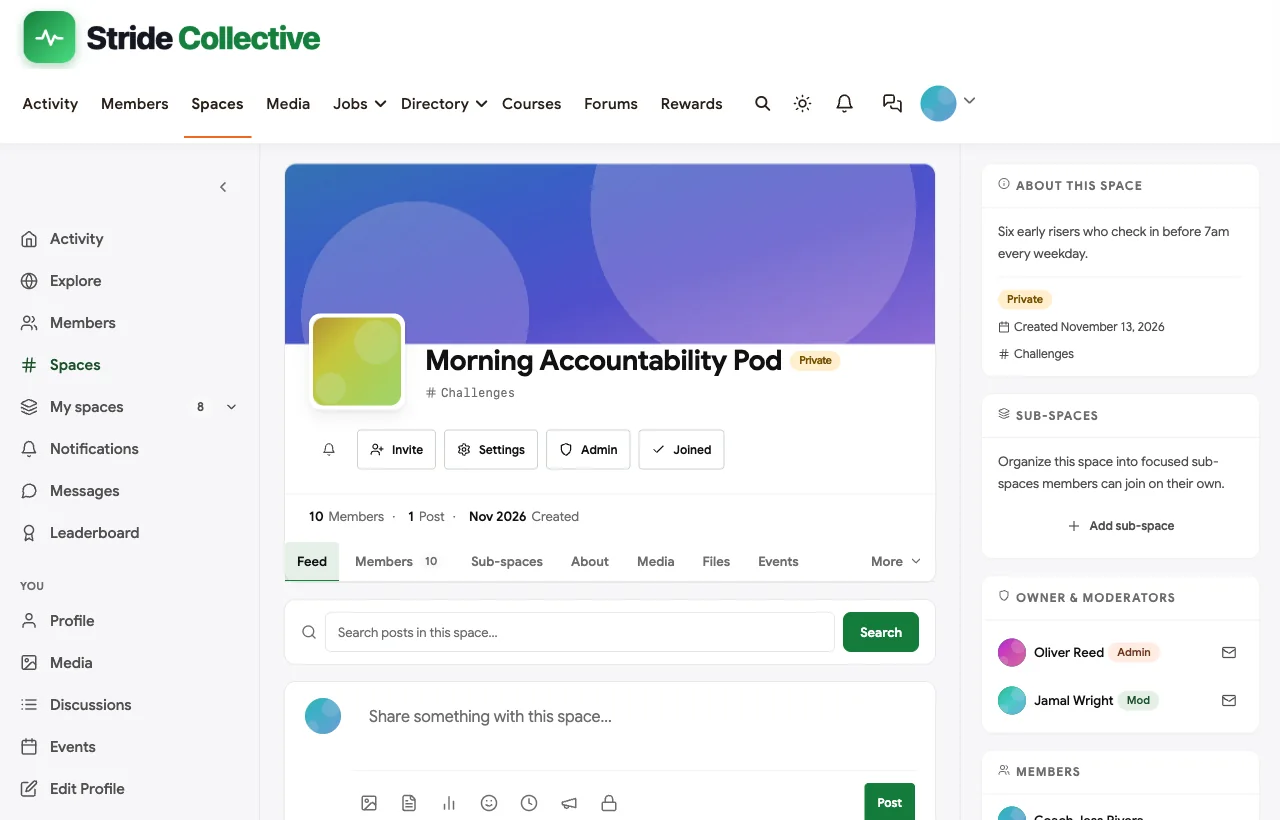
| Morning Accountability Pod | Private | Pod captain | Six to ten members who check in daily |
| Austin Crew | Open | Local volunteer | Weekend runs and meetups |
| Trusted Partners | Open | Admin | Physios, nutritionists and other professionals |
Open spaces are where people see the community working. Private spaces need approval to join and hide posts from non-members, which matters for progress photos and personal notes.
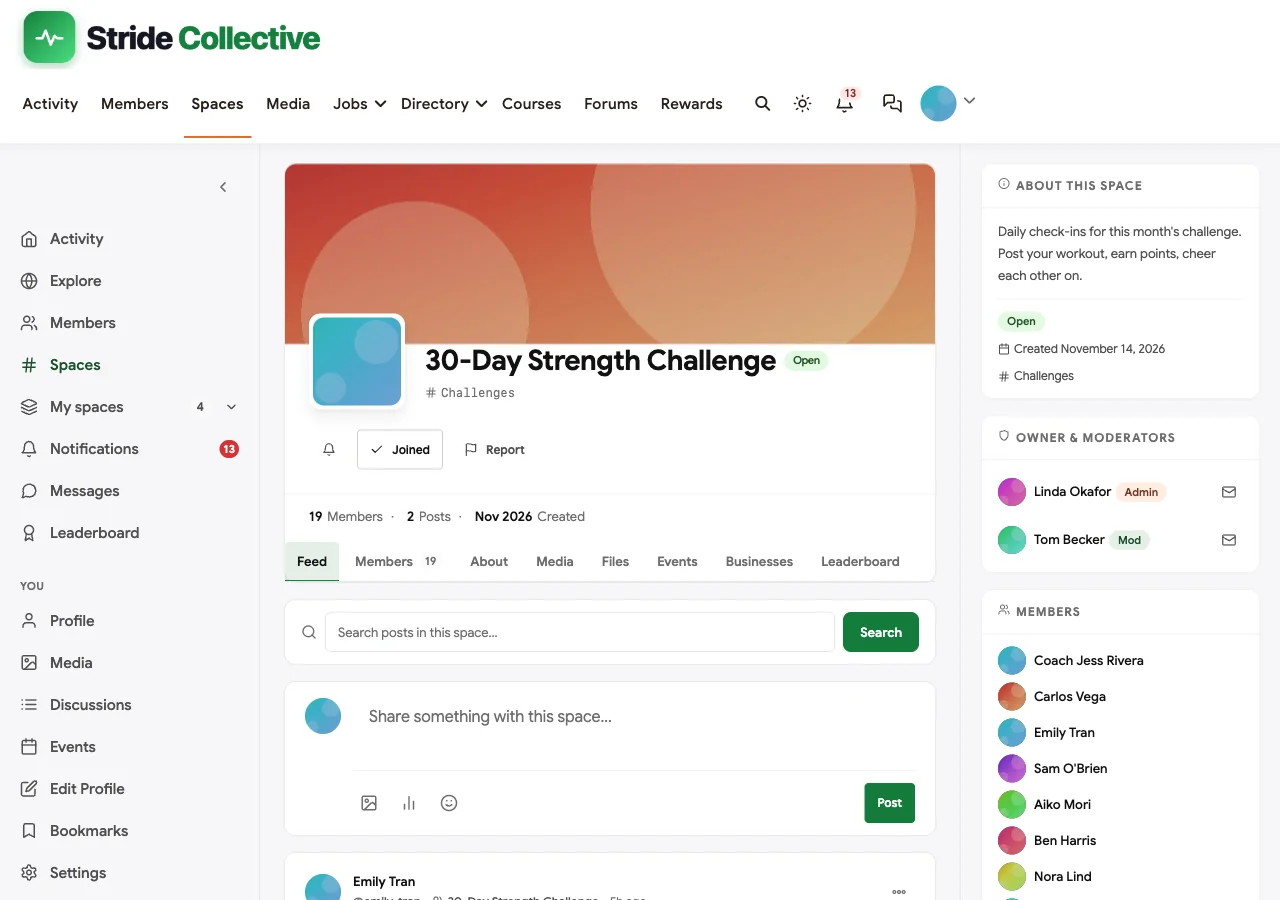
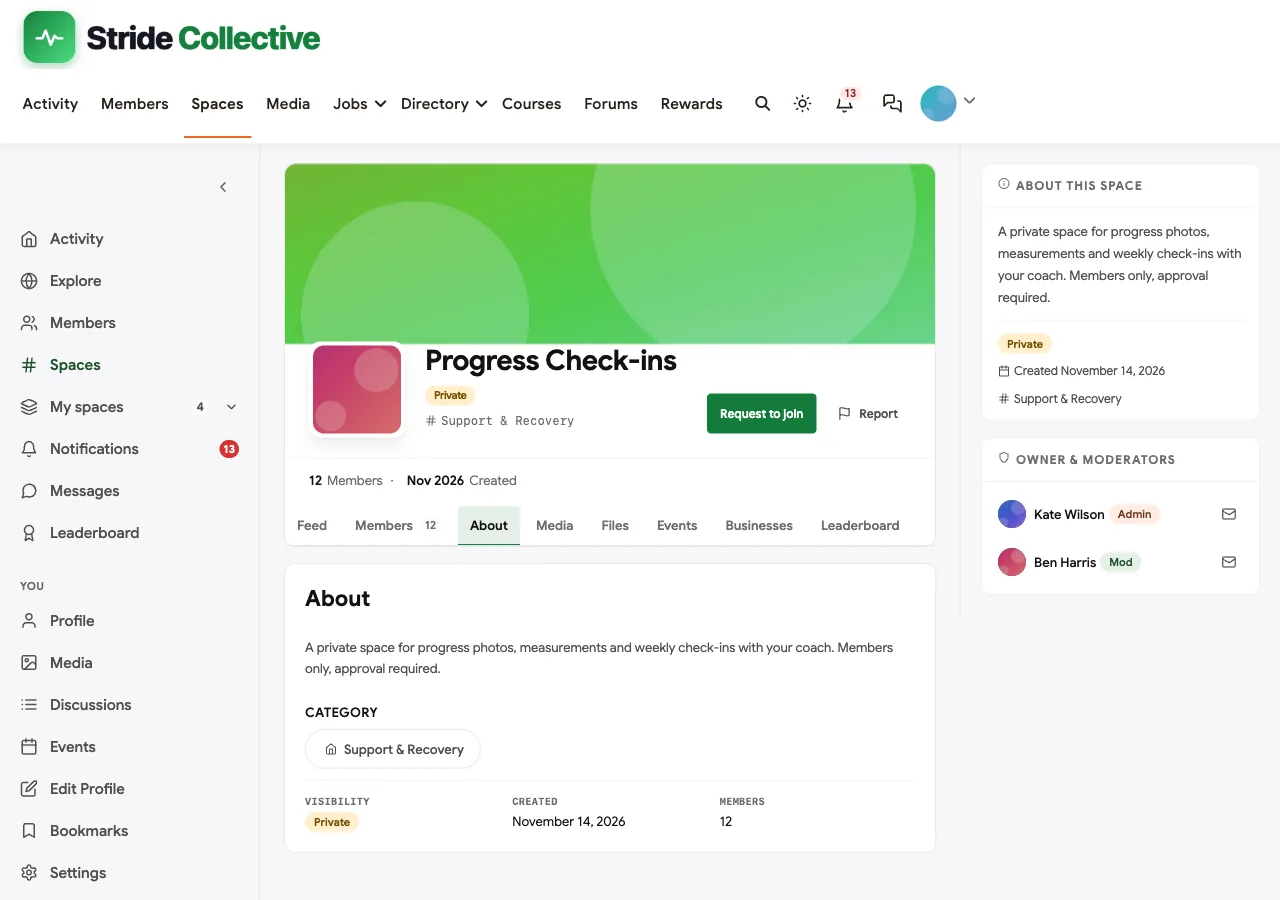
Pin a welcome post in each space with three lines: what this space is for, what to post, and who runs it.
Step 5: Profiles that help coaches coach
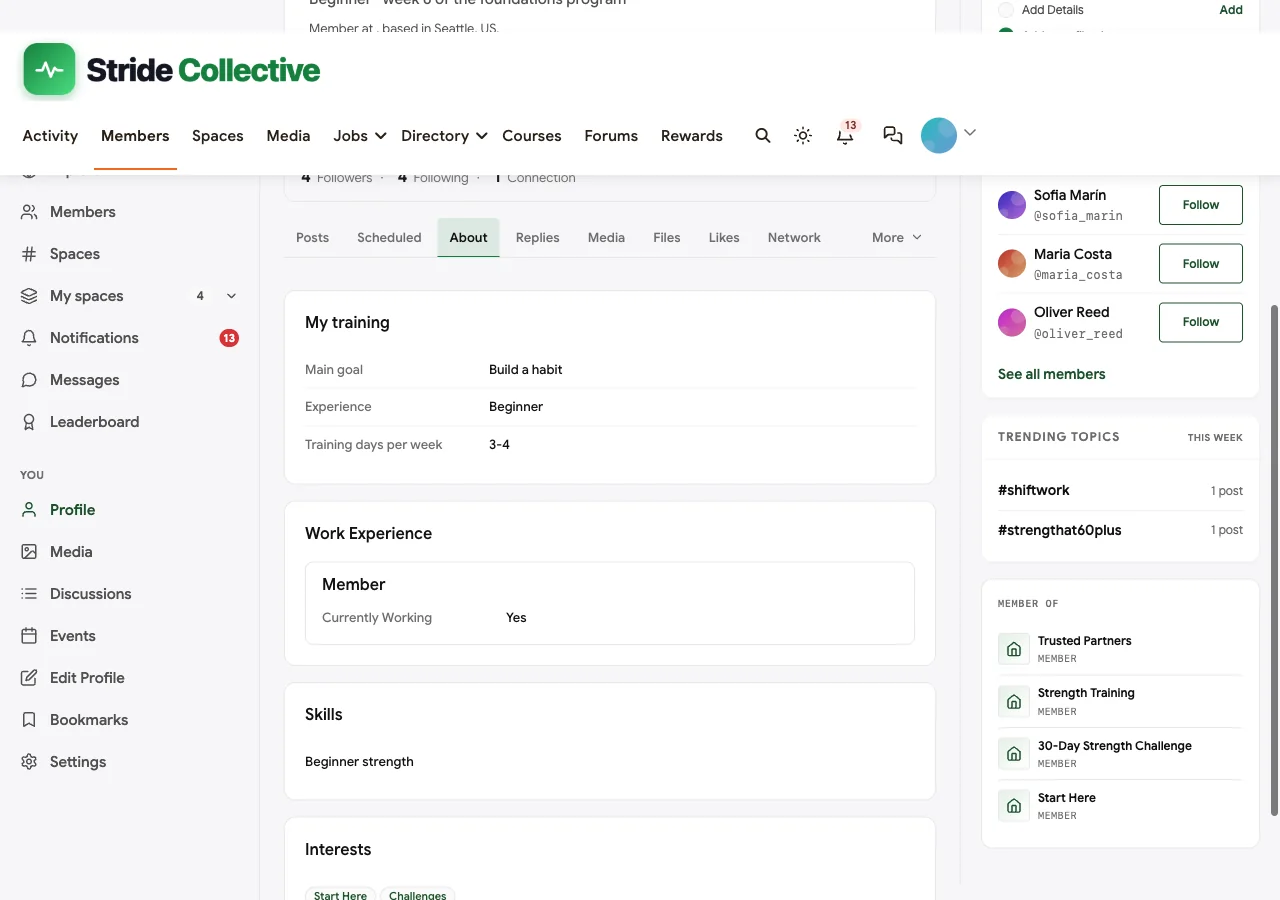
Coaches need to know who they are talking to. Under Members > Profile Fields, add a group called My training:
| Field | Type | At sign-up | Visible to |
|---|---|---|---|
| Main goal | Dropdown (get stronger, run a race, build a habit, feel better, return after injury or pregnancy) | Yes | Members only |
| Experience | Dropdown (beginner, intermediate, advanced) | Yes | Members only |
| Training days per week | Dropdown (1-2, 3-4, 5 or more) | No | Members only |
Goal and experience at sign-up let coaches welcome each new member with the right program, and let members find training partners at their level in the member directory.

Keep health information out of public profile fields. If a member has an injury or medical condition a coach should know about, ask them to send it in a direct message, and remind members that the community does not replace advice from their own doctor or physiotherapist.
Create two member types, Member and Coach, with self-select off, so a coach badge appears on every coach’s posts and members can tell expert advice from peer advice at a glance.
Step 6: Run a 30-day challenge
Challenges are the engine of a fitness community: a clear goal, a start and end date, a progress bar and a reward. WB Gamification has two kinds.
Individual challenges
Under Gamification > Challenges, create a challenge with:
- Title, for example “30-Day Strength Challenge: 12 workout check-ins”.
- Action, the activity that counts, such as creating a post (a workout check-in) or uploading a photo.
- Target count, how many times the member must do it, such as 12 check-ins in 30 days.
- Bonus points awarded on completion.
- Start and end dates.
In the demo we run two: 12 workout check-ins, and 5 progress photos.

Community challenges
A community challenge sets one shared goal for everyone, such as “500 workouts this month”, with a description and a single progress bar that every member’s activity moves forward. When the community reaches the target, everyone who contributed gets the bonus points. Community goals are powerful for members who are not competitive: they help the group rather than chasing a leaderboard.

What members see
Put the challenges block, or the [wb_gam_challenges] and [wb_gam_community_challenges] shortcodes, on a Challenges page and link it from the menu. Each member sees their own progress bar, what is left and when the challenge ends, plus the community goal.

When a member completes a challenge they get the bonus points, a notification, an email and a post in the activity feed, which is a natural moment for the coach to reply with congratulations.
Two things to know when designing challenges
- Actions count across the whole community. A challenge counts the action wherever it happens; it cannot be limited to one space. Tell members to post their check-ins in the challenge space so the conversation stays in one place, but expect every post to count.
- Rewards are points, not badges. A challenge awards bonus points. For a badge, create one in the badge library with a condition such as “did this action 12 times” or “reached a 30-day streak”, as described below.
Run a new challenge every month with a different focus (strength, steps, mobility, sleep) so there is always a finish line in sight.
Step 7: Streaks, points, badges and leaderboards
Streaks
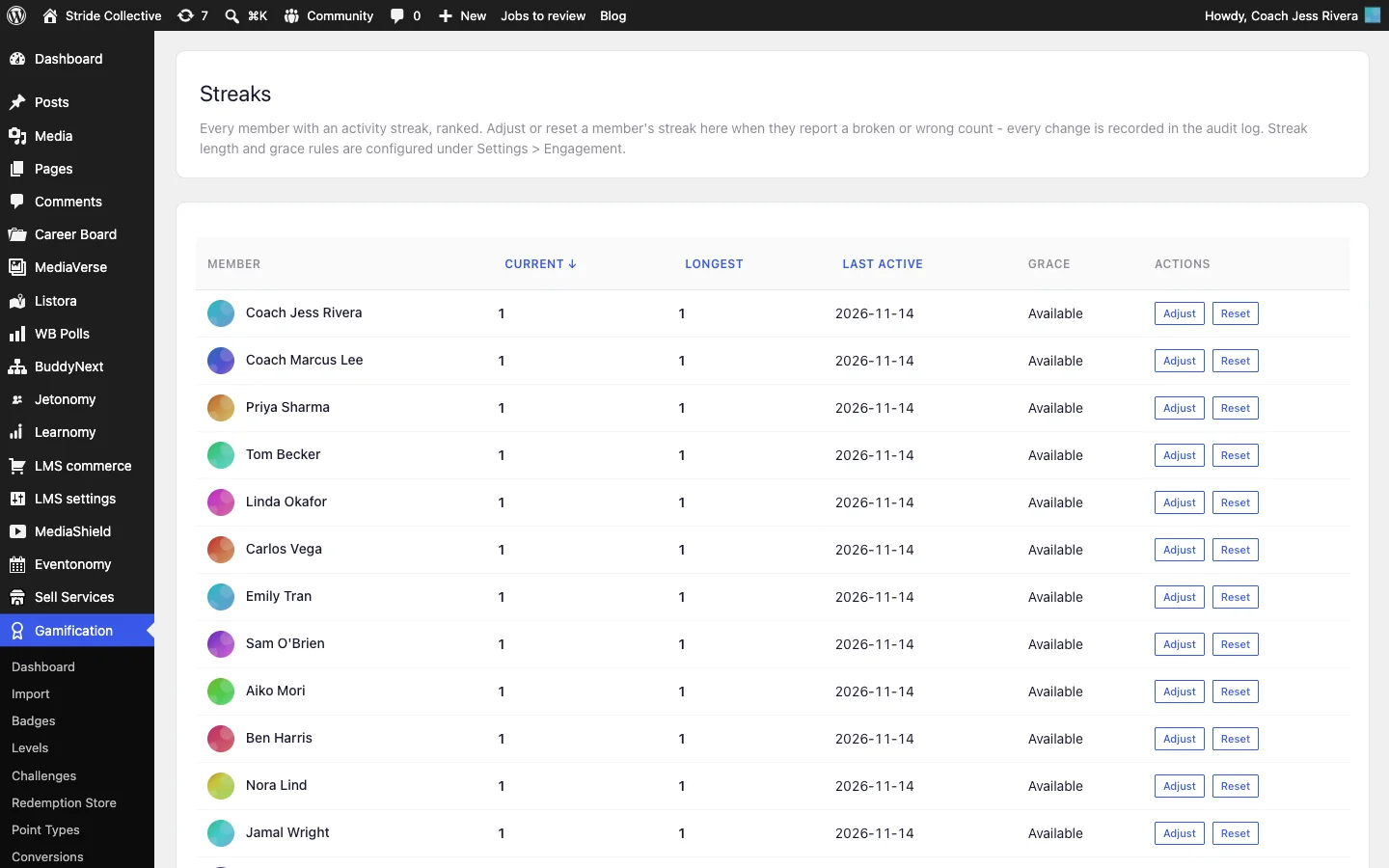
WB Gamification counts a streak day as any day a member earns points, from posting, commenting, uploading or anything else that earns points, in the member’s own timezone. Under its settings you can allow grace days (one by default), so a single missed day does not wipe out a month of effort, and award bonus points at milestones of 7, 14, 30, 60, 100, 180 and 365 days. Coaches can adjust or reset a member’s streak from Gamification > Streaks, for example after an illness.
If you use MediaVerse Pro, it has its own upload streak, counting days with a photo or video upload, with freeze tokens. Pick one streak to promote so members are not confused.
Points
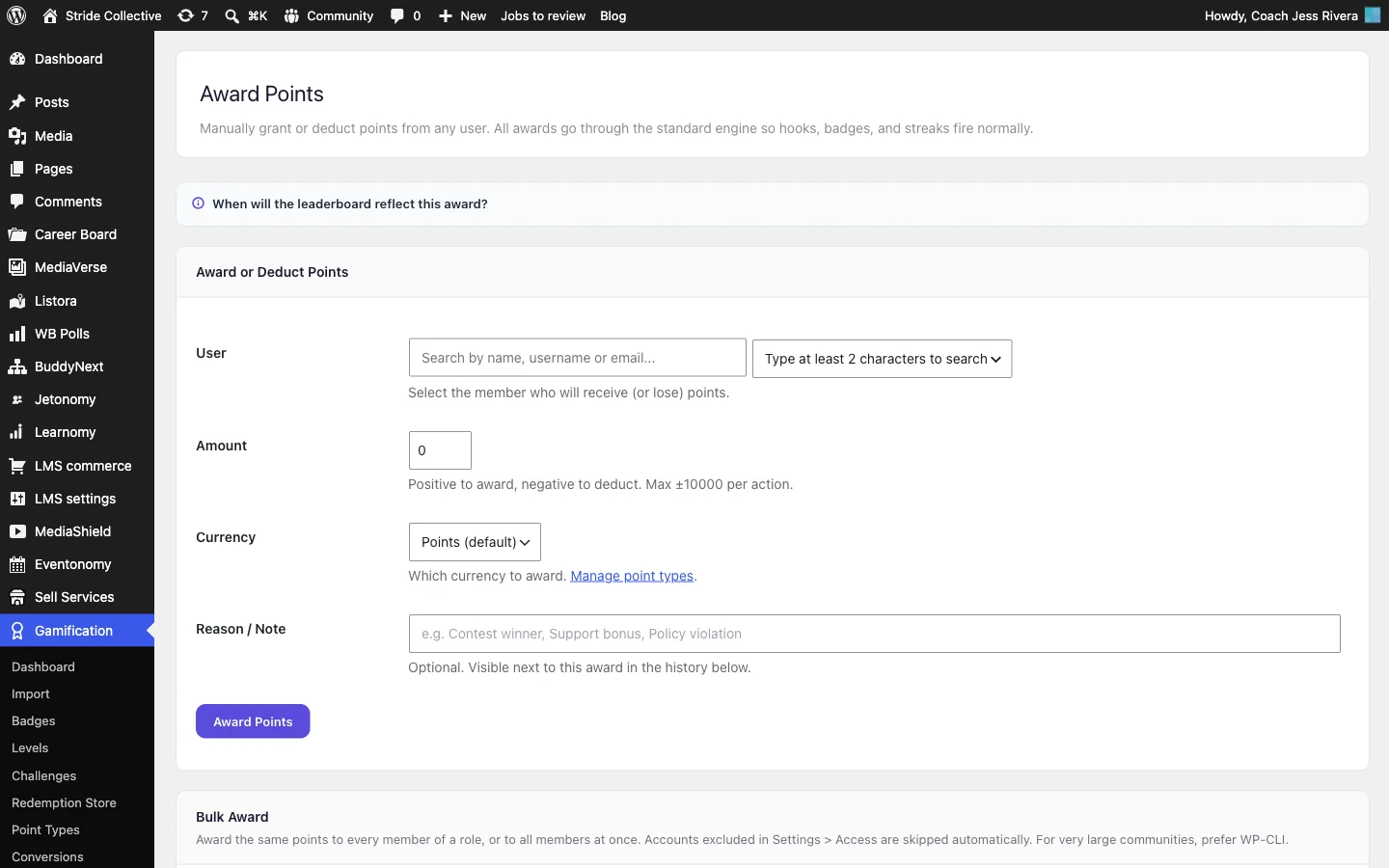
Every action has an editable point value in WB Gamification’s settings, so you can reward what matters to your program: posting a check-in, uploading a progress photo, joining a space, registering for a live class, attending one (with Eventonomy Pro check-in), completing a lesson or a whole course. Coaches can also award points by hand from Gamification > Award Points, to one member or in bulk, for things software cannot see, such as a personal best at a meetup.
Badges
The badge library under Gamification > Badges lets you create badges with your own image and description, and award them automatically when a member reaches a point total, does an action a number of times, reaches a level, earns another badge, keeps a streak for a number of days or has been a member for a number of days. Conditions can be combined with “all” or “any”, and a badge can be awarded to members who already qualify.
Good fitness badges are about consistency, not performance: “First check-in”, “7-day streak”, “Challenge finisher”, “100 workouts”, “Helped a pod-mate”.

Leaderboards
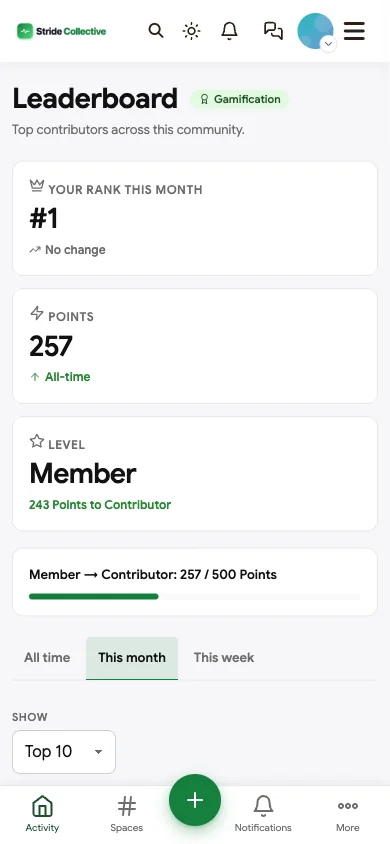
The community leaderboard shows the most active members this week, this month or all time, with each member’s own rank, points, level and streak alongside. Each space also has a Leaderboard tab listing that space’s members by points, which suits a challenge space or a local crew; the space owner can turn it off.
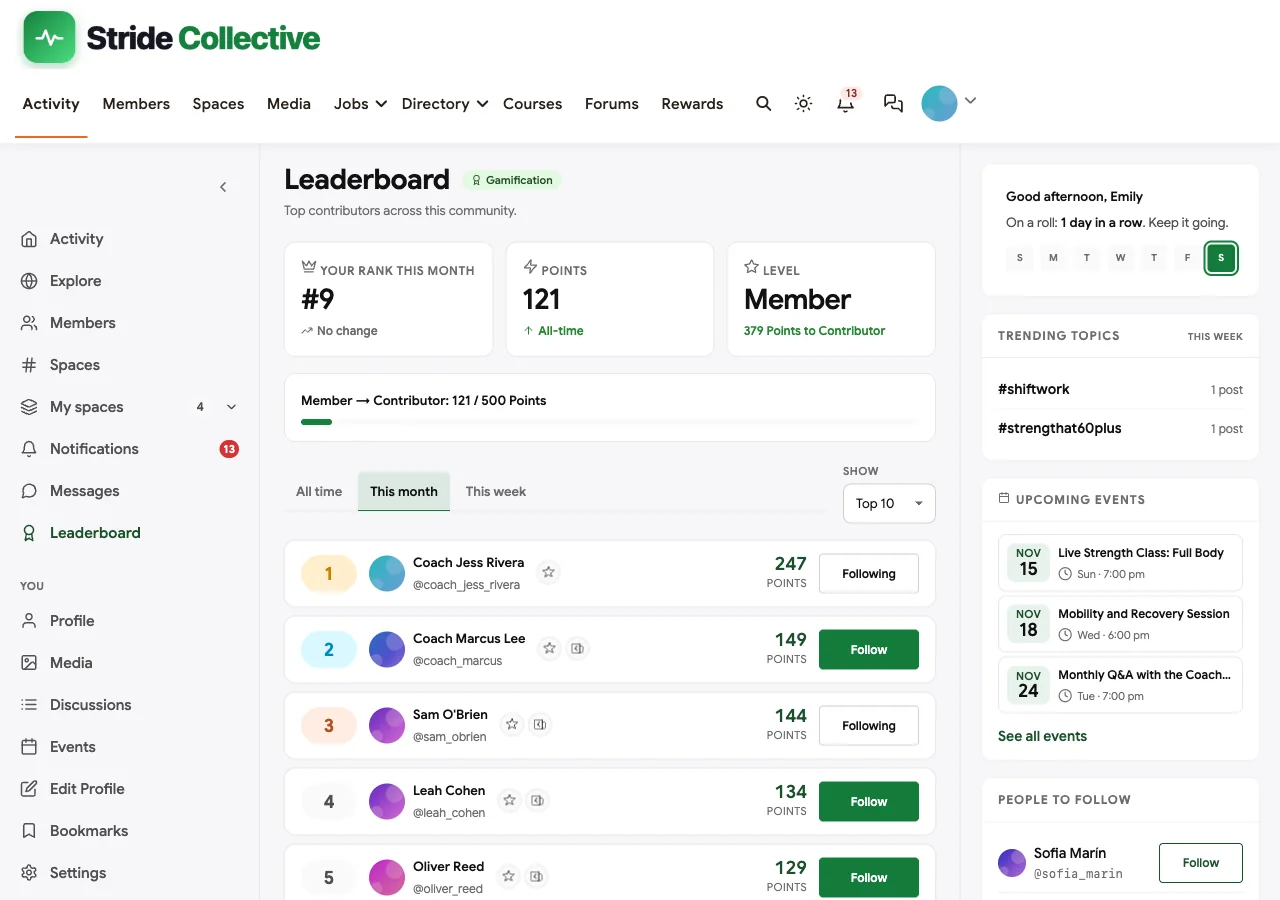
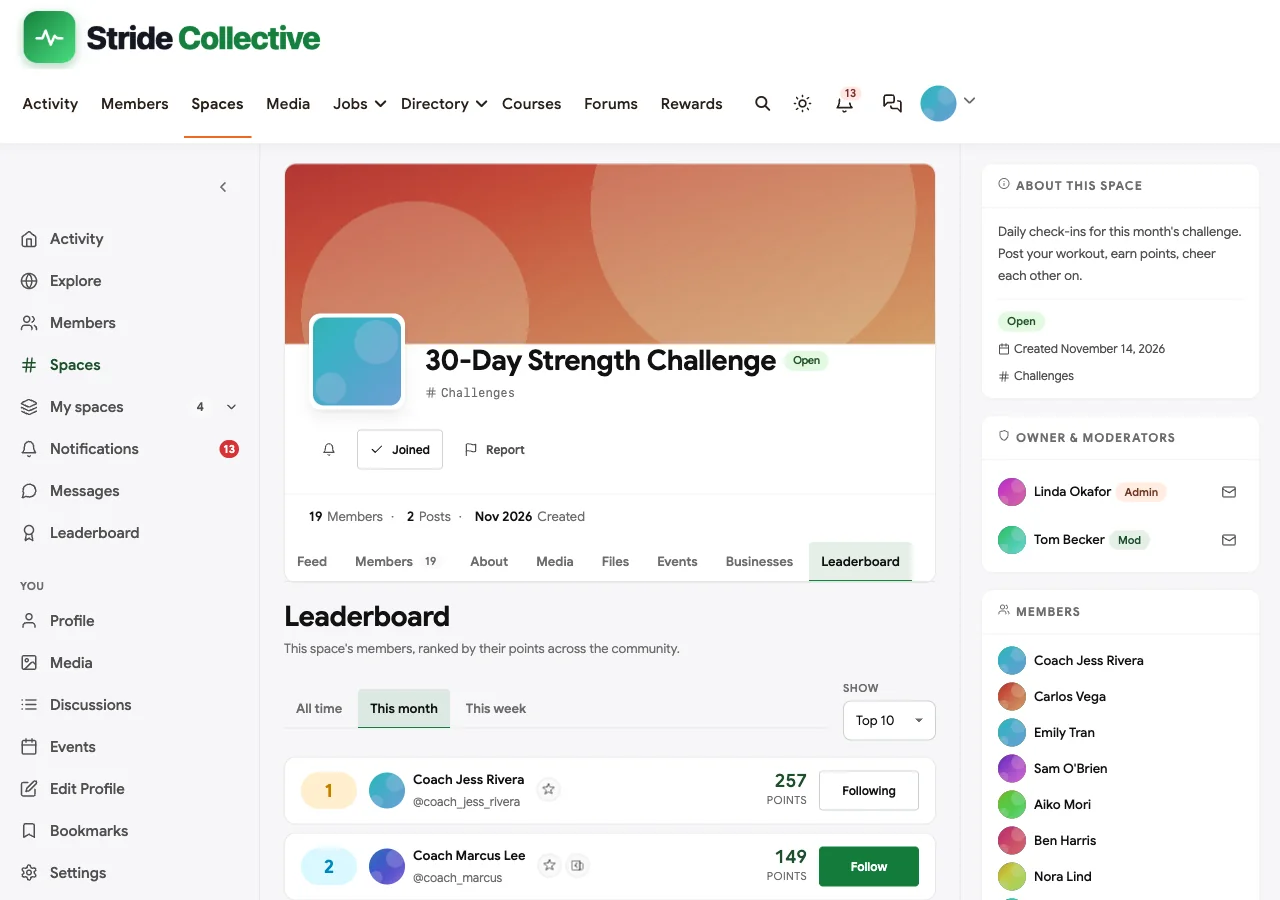
Leaderboards motivate some members and put others off. Keep the emphasis on consistency (points come from showing up, not from lifting the most) and celebrate the most improved as loudly as the top of the table.
Step 8: Accountability pods, live classes and programs
Accountability pods
A pod is a private space for six to ten members who check in with each other every day, with a volunteer captain who chases anyone who goes quiet. Pods are the single most effective retention tool in a fitness community, because members show up for people they know. Create one pod per cohort or time zone, and let members request to join.
Live classes
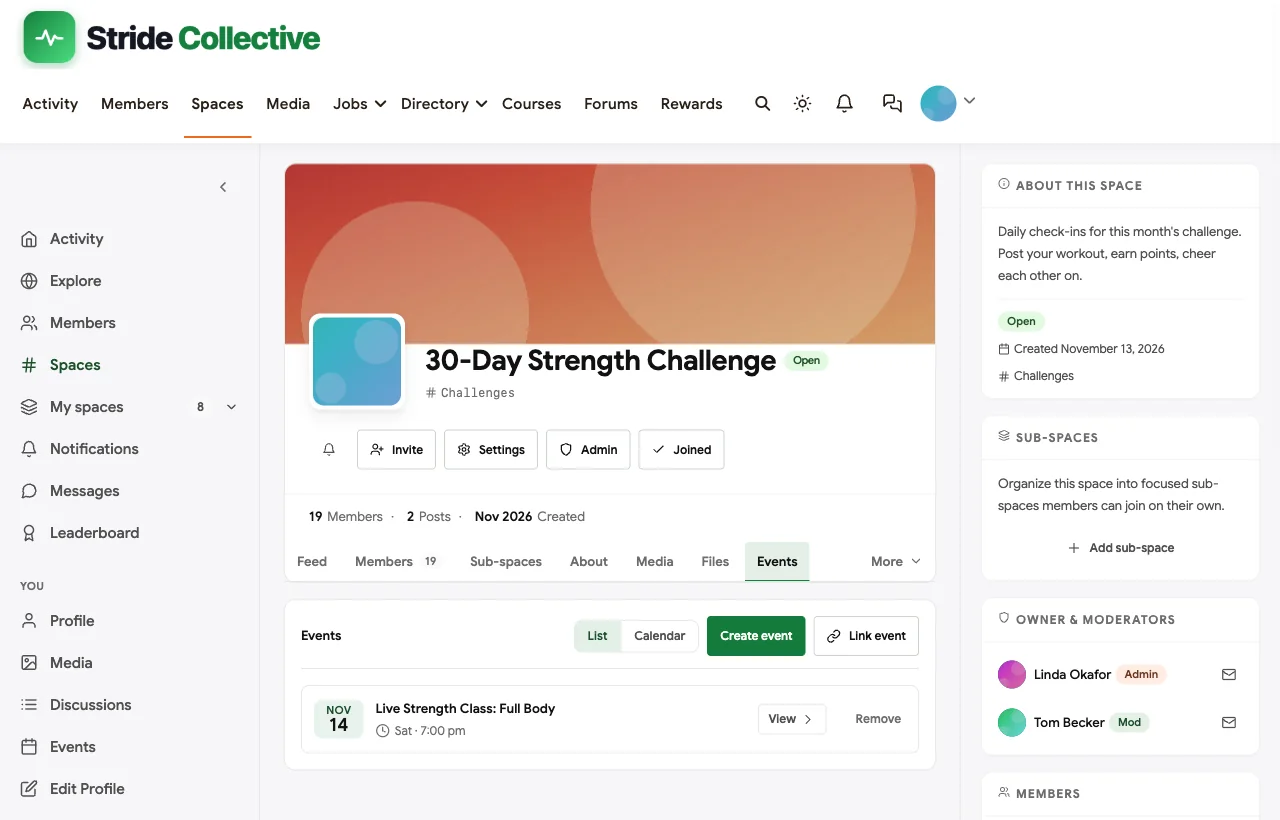
With Eventonomy, schedule live classes as events inside the right space. Online events have a meeting link that is never shown publicly: each registered member gets their own personal link. Classes can repeat daily, weekly or monthly, have a capacity with a waitlist that promotes people automatically, and send reminders a day and an hour before they start.
Structured programs
For a 12-week plan or a beginner foundations program, use Learnomy. A course has modules and lessons, tracks each member’s progress and can award a certificate on completion. With Learnomy Pro, lessons can unlock a set number of days after a member enrols, under each lesson’s Release schedule, so a 30-day program releases one workout a day instead of overwhelming people on day one. Link the course to a space so learners have a place to talk about it.
Challenge ideas by level
Rotate the focus every month and set targets your least experienced members can reach. A few that work well:
| Challenge | Action that counts | Target over 30 days | Best for |
|---|---|---|---|
| Show up | Posting a workout check-in | 12 | Everyone, especially new members |
| Picture the progress | Uploading a photo | 5 | Members who like visible change |
| Never miss twice | Any point-earning activity (streak) | A 14-day streak, with one grace day | Habit builders |
| Learn the basics | Completing a lesson | 10 lessons of the foundations program | Beginners |
| Turn up live | Registering for a live class | 4 classes | Members who need structure |
| Community 500 | Posting a check-in (community challenge) | 500 across all members | Groups that prefer co-operation |
Keep one personal challenge and one community goal running at the same time, so competitive members and co-operative members both have a reason to post.
A worked example: one member’s first 30 days
Here is how the pieces fit together for Emily, a beginner in the Stride Collective demo.
Day 1. Emily starts a 7-day trial and, at sign-up, picks “Build a habit” and “Beginner”. The welcome email points her to Start Here, where the coach has pinned “Post your first check-in”. She posts a short note about a 20-minute walk. Coach Jess replies within the hour, and Emily’s first badge, “First Update”, lands in her notifications.
Day 3. The second welcome email suggests joining a pod. Emily requests to join the Morning Accountability Pod; the captain approves her the same day and introduces her to the group.
Day 7. Her trial ends. By now she has six check-ins, a 6-day streak, a pod that expects to hear from her and a progress bar on the 30-Day Strength Challenge that says “6 more”. She stays.
Day 12. Emily misses a day. Her streak survives thanks to the grace day, and her pod captain sends a short “all good?” message. She posts the next morning.
Day 21. She joins the Wednesday live class with her personal join link, and registering earns her points towards the leaderboard. She is now 9th this month, mostly from showing up.
Day 30. Emily completes the challenge: 12 check-ins and 3 of 5 progress photos. She gets the bonus points, a notification and a post in the feed, and the coach’s Sunday shout-out names her as one of the month’s finishers. The next challenge starts on Monday.
None of this needed custom code. It is a trial, two welcome emails, a pod, a challenge, a grace day and a coach who replies.
Step 9: Run the weekly rhythm
Software does not keep a community alive; a rhythm does. This is the week we used in the demo:

- Monday: the coach posts the week’s workouts and one focus in the challenge space.
- Every day: members post a short check-in. Coaches and pod captains react to every one in the first two weeks.
- Wednesday: a live class or Q&A.
- Thursday: pod captains message anyone who has not checked in.
- Friday: optional progress photos in the private check-in space.
- Saturday: local crews meet.
- Sunday: shout-outs for streaks, completed challenges and the most improved.
A short welcome sequence with BuddyNext Pro’s drip emails helps new members find this rhythm: day one, how to post your first check-in; day three, join a pod; day seven, the live class schedule. Announcements under Engagement > Announcements keep the current challenge at the top of everyone’s feed.
Step 10: Launch
- Seed with founding members. Invite 20 to 30 people from your email list or existing clients for a free founding month. Ask each to complete their profile and post a first check-in.
- Launch with a challenge. A start date gives your marketing a deadline: “The January 30-day challenge starts Monday.”
- Use the trial. Let new members start the challenge in their trial week. By the time the trial ends, they have a streak and a pod to lose.
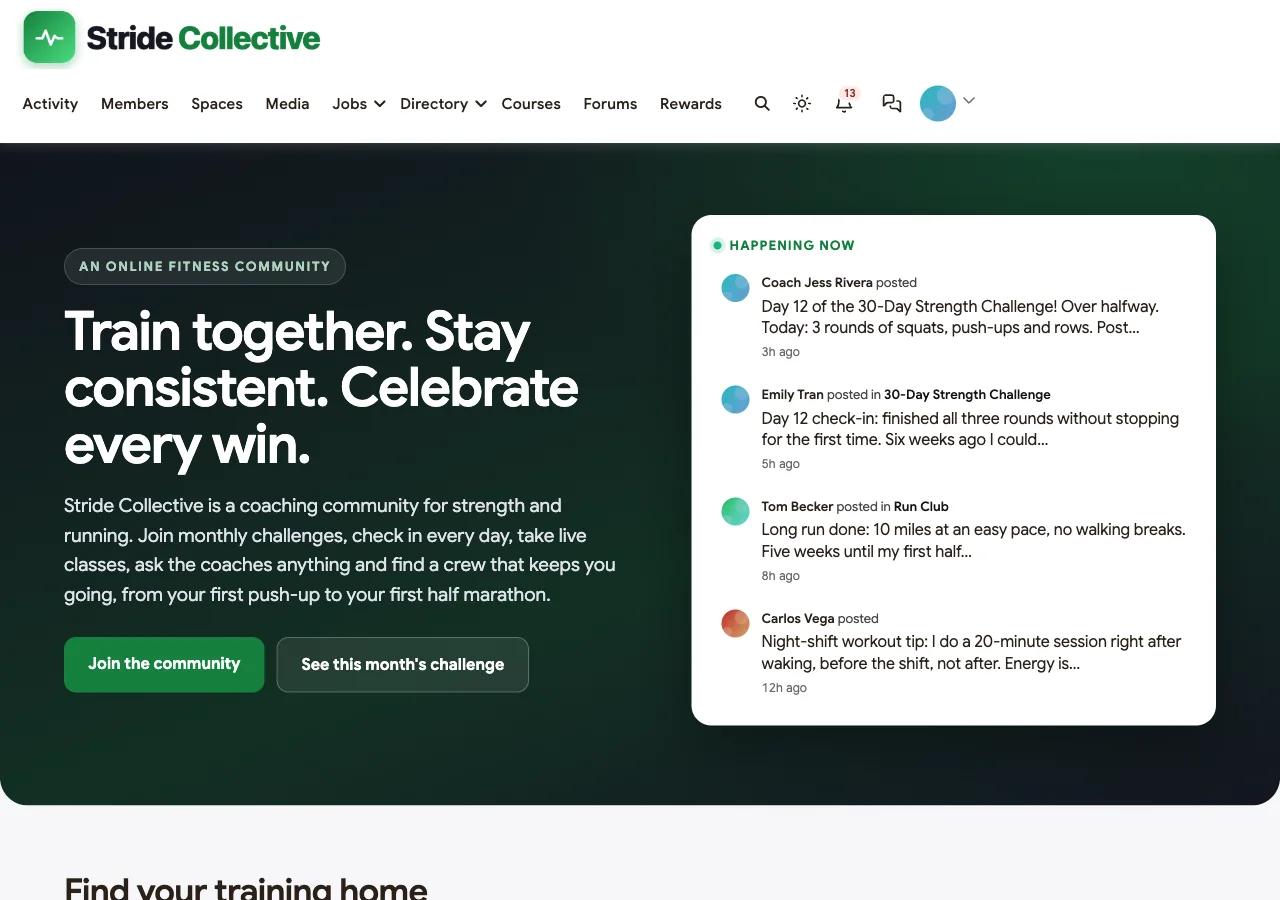
- Show the community on the homepage. Recent check-ins and the current challenge sell the membership better than a feature list.
Measure what matters
| Metric | What it tells you | Healthy direction |
|---|---|---|
| Members who check in at least 3 times a week | Whether the habit is forming | Rising |
| Challenge completion rate | Whether the target is realistic | Most active members finishing |
| Trial-to-paid conversion | Whether the first week works | Rising |
| Members still active in week 4 | Whether the week-three dip is handled | Rising |
| Pod membership | Whether accountability is spreading | Most members in a pod |
| Renewals | Whether the community is worth paying for | Steady or rising |
Common mistakes
- Targets that are too hard. A challenge only half the members can finish teaches the other half to quit. Start easy and raise the bar next month.
- Rewarding performance instead of consistency. Points for showing up keep beginners engaged; points for heavy lifts do not.
- Everything public. Progress photos and personal notes belong in private spaces.
- Coaches who disappear. Members can forgive slow replies on Sunday; they cannot forgive silence in week one.
- No finish line. A community without a current challenge drifts. Always have one running.
- Health advice in the feed. Coaches give training guidance; medical questions go to a doctor or physiotherapist.
Mobile
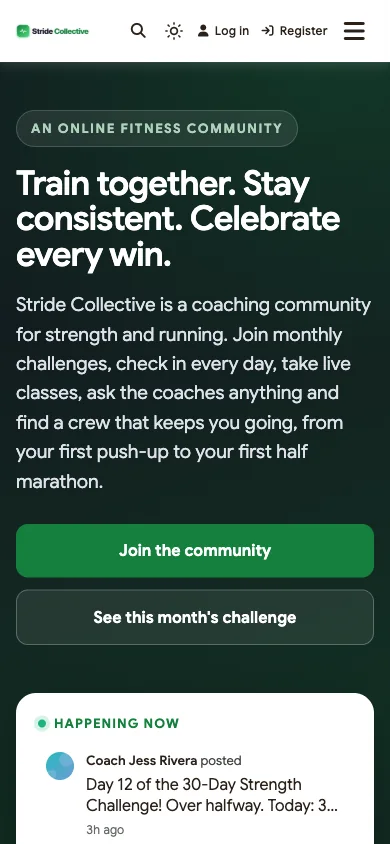
Members check in from the gym, the trail and the kitchen. BuddyX and BuddyNext are responsive, so check-ins, challenges, leaderboards and messages all work on a phone without an app download.
Related guides
- Best platforms for an online fitness community: how BuddyNext compares with hosted fitness and coaching platforms.
- Best platforms for a paid coaching membership community: if you coach beyond fitness.
- How to start a private professional association community: membership plans, renewals and gated spaces in depth.
- How to set up a community space on WordPress with free plugins: the general setup guide behind every community in this series.
Want to try a BuddyNext community first? The live demo runs in your browser.
How we built this guide
We built Stride Collective on a local WordPress site running the BuddyX theme, BuddyNext, BuddyNext Pro, WB Gamification, MediaVerse, Eventonomy and Learnomy, with fictional members, spaces, challenges and events created for this guide. Every screenshot comes from that site, taken in November 2026. Challenge, streak and points behaviour was checked against the plugins’ code at the time of writing and may change in later versions. We have not shown or quoted any membership prices. buddyxtheme.com is published by the team behind BuddyNext. Nothing in this guide is medical advice.
Frequently asked questions
How do I create a paid fitness community?
Install the BuddyX theme and BuddyNext on WordPress, add BuddyNext Pro for membership plans with trials and members-only spaces, and add WB Gamification for challenges, streaks and leaderboards. Create spaces for each program, the monthly challenge, private check-ins and accountability pods.
How do I run a 30-day fitness challenge online?
In WB Gamification, create a challenge with an action (such as posting a workout check-in), a target count, bonus points and start and end dates. Members see a progress bar on a Challenges page and get points, a notification and a feed post when they finish.
Can I offer a free trial?
Yes. BuddyNext Pro plans that renew monthly or yearly can include trial days, so new members can join the current challenge before they are charged.
Can the whole community work towards one goal?
Yes. Community challenges in WB Gamification set one shared target, such as 500 workouts this month, with a single progress bar. Everyone who contributed earns the bonus when the goal is reached.
How do streaks work?
A streak day is any day a member earns points. Grace days stop a single missed day from resetting a streak, milestones at 7, 14, 30 and more days can award bonus points, and coaches can adjust streaks by hand.
Can each group have its own leaderboard?
Each space has a Leaderboard tab that lists its members by points, and the space owner can turn it off. Points themselves are earned across the whole community.
Can I keep progress photos private?
Yes. Put progress photos in a private space that members must request to join; posts in private spaces are only visible to their members.
Can I run live classes?
Yes, with Eventonomy. Online classes give each registered member a personal join link, can repeat weekly, have capacity limits with a waitlist and send reminders before they start.
Can I sell a structured program?
Yes, with Learnomy. Build the program as a course, link it to a space and, with BuddyNext Pro, enrol members automatically when they join a plan. Learnomy Pro can release lessons a set number of days after enrolment.
The bottom line
A paid fitness community earns its renewals through accountability, a finish line and belonging. On WordPress, BuddyX with BuddyNext, BuddyNext Pro and WB Gamification gives you memberships with trials, program groups, private check-ins and pods, monthly and community challenges, streaks, badges and leaderboards, plus live classes and structured programs, on your own domain with your members’ data in your own database.
And give your members a reason to show up tomorrow.