

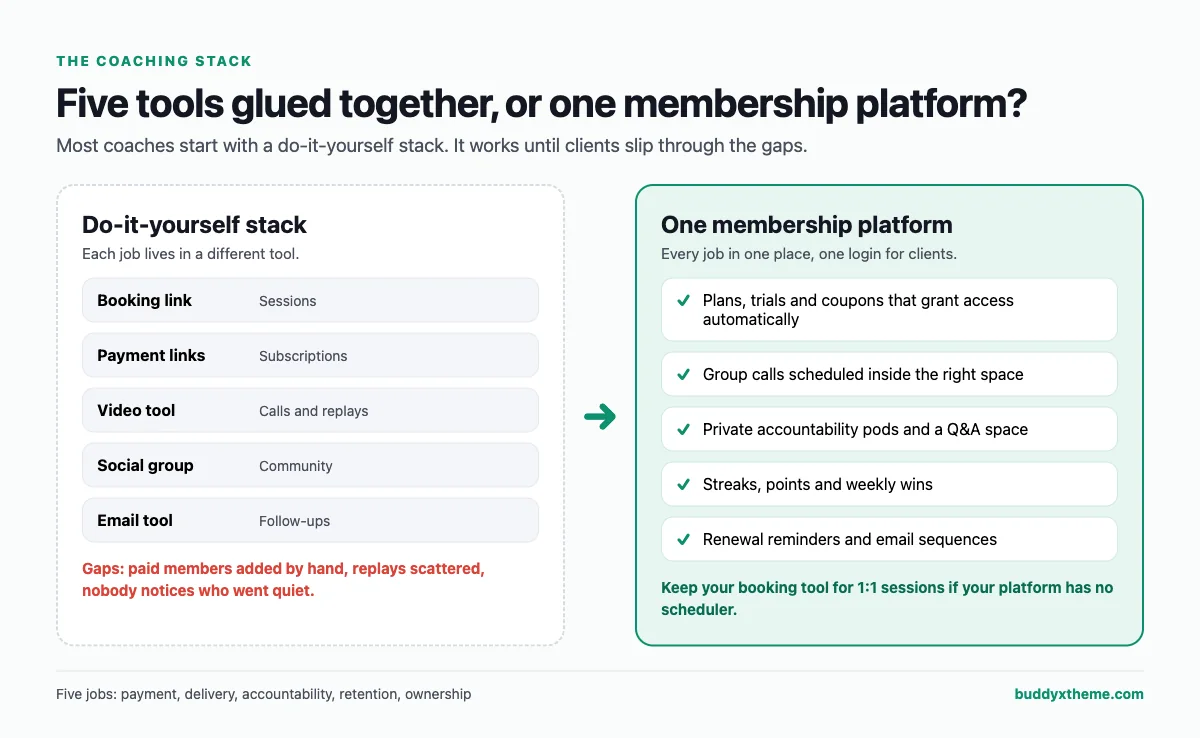
Most coaches start a paid membership the same way: a booking link, a payment link, a Zoom room, a Facebook group and an email tool, glued together with hope. It works until it does not. Payments fail silently, a new client never gets added to the group, replays live in three places, and nobody notices the member who quietly stopped showing up until they cancel.
This guide compares the platforms coaches actually use to run a paid membership, judged on the five jobs a coaching membership has to do, not on generic feature counts. We built a working coaching community for the first entry so you can see it, checked every competitor claim against the vendor’s own pages in November 2026, and named the gaps honestly, including our own.
Quick answer
If you want a paid coaching membership you own and control, BuddyNext is the strongest choice: paid plans with trials and coupons, private accountability spaces, group call scheduling, Q&A, email sequences and engagement streaks on your own WordPress site. Kajabi is the strongest hosted all-in-one with built-in 1:1 scheduling, Circle suits premium branded communities, and Skool is the simplest way to launch a group-coaching community.
In this guide
- The five jobs of a paid coaching membership
- Paid coaching platforms compared on the five jobs
- What successful coaching communities run on
- 1. BuddyNext: best for a coaching membership you fully own
- 2. Kajabi: best hosted all-in-one with built-in 1:1 scheduling
- 3. Circle: best for premium, branded coaching communities
- 4. Skool: best for the fastest group-coaching launch
- 5. Mighty Networks: best for cohort programs with streaks
- 6. Heartbeat: best for group-first coaches who want workflows
- 7. Podia: best for simple coaching products with built-in email
- 8. Thinkific: best for course-led coaching with a community
- 9. Teachable: best for 1:1 coaching packages, not community
- 10. Paperbell: best for 1:1 coaching admin
- 11. Patreon: best for creators turning fans into members
- 12. Facebook Groups with payment links: best for testing demand
- How to structure coaching membership tiers
- How to keep coaching members paying
- Which platform fits your coaching model?
- More community platform comparisons
- How we built and checked this list
- Frequently asked questions
- The bottom line
The five jobs of a paid coaching membership
Before comparing tools, it helps to be clear about what the platform is actually for. A paid coaching membership has five jobs. Most “best community platform” lists only check the first one.
- Take payment without friction. Monthly and annual plans, free trials, coupons for alumni, and more than one tier, so clients can start small and upgrade.
- Deliver the coaching. Group calls, replays, structured programs and, for many coaches, a way for clients to book 1:1 sessions.
- Keep clients accountable. Small groups, weekly goals, check-ins and streaks. Accountability is the product most clients are actually paying for.
- Keep clients paying. Renewal reminders, progress reviews and a reason to stay after the first program ends. In a membership business, retention is the business.
- Own the relationship. Your client list, their history and your content should not depend on someone else’s policy, branding or pricing changes.
Paid coaching platforms compared on the five jobs
| Platform | Payments and tiers | 1:1 booking | Group calls and programs | Accountability tools | Self-hosted |
|---|---|---|---|---|---|
| BuddyNext | Plans, trials, coupons, Stripe and PayPal | Via your scheduling tool | Group call events per space, courses | Private pods, streaks, points, leaderboard | Yes |
| Kajabi | Offers, tiers via access groups, upsells | Built in | Live video, programs with milestones | Leaderboard, challenges | No |
| Circle | Tiers, trials, one-time payments | Via integrations | Live sessions, drip courses | Gamification, activity scores | No |
| Skool | Subscriptions and one-time courses | Not offered | Skool Call live video, courses | Points, levels, leaderboards | No |
| Mighty Networks | Tiers, bundles, promo codes, installments | Via integrations | Live streaming, cohort courses | Streaks, points | No |
| Heartbeat | Tiers and subscriptions | Not offered (links out) | Events, cohort courses | Badges, workflows | No |
| Podia | Paid and free tiers | Via integrations | Coaching products, courses | Badges, follow-up emails | No |
| Thinkific | Coupons, bundles, community by course | Not documented | Courses with community | Not documented | No |
| Teachable | Tiers, coupons, upsells | Built into coaching product | Coaching milestones, courses | Milestones | No |
| Paperbell | Packages, plans, coupons | Built in | Group coaching via Zoom or Meet | Reminders | No |
| Patreon | Tiers, trials, promo codes | Not offered | Live video in limited test | Not documented | No |
| Facebook Groups + payment links | Through the payment tool | Not offered | Facebook Live | None | No |
“Not documented” means the vendor’s own pages did not describe the feature when we checked in November 2026. Every platform except BuddyNext is a hosted service.
What successful coaching communities run on
Real coaching businesses have already tested these platforms at scale. A few examples you can verify on the communities’ own pages:
| Coaching community | Platform |
|---|---|
| SPI Pro, Pat Flynn’s membership community | Circle (Smart Passive Income) |
| ARC Alumni and coaching groups from ADHD reWired | Mighty Networks (community site) |
| The Skool Games, Alex Hormozi’s program | Skool (Skool) |
The market is still growing. The International Coaching Federation’s 2025 Global Coaching Study, fielded by PwC, counts 122,974 coach practitioners worldwide, up 15% since 2023, and reports that most coaches expect higher earnings next year (ICF). More coaches are competing for clients, and the ones who keep clients longest are the ones with a real membership behind their coaching.
1. BuddyNext: best for a coaching membership you fully own
Best for: coaches and consultants who run group programs and want payments, accountability, calls and community in one place, on their own site, without a platform taking a cut of membership revenue.
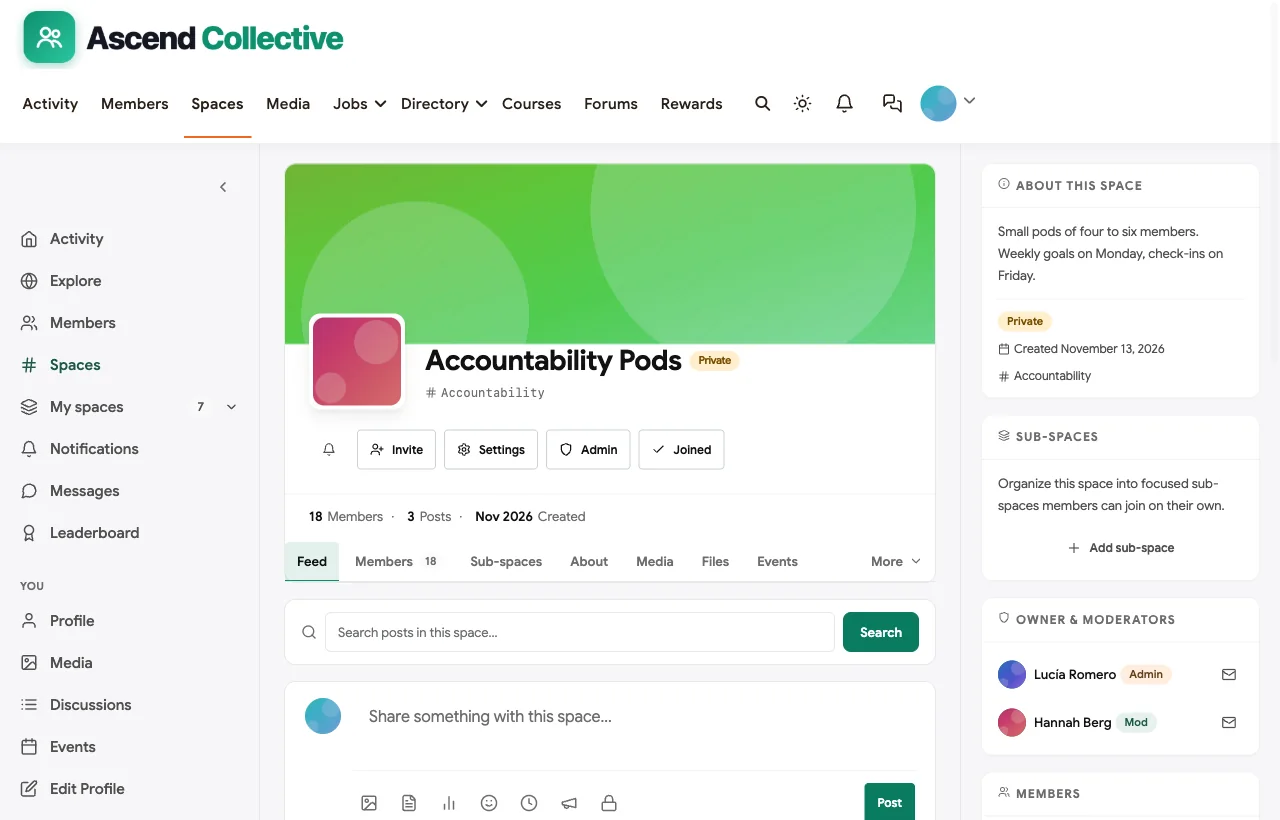
BuddyNext is a complete community platform that runs on your own WordPress site, with the BuddyX theme as its design layer. To show it in a coaching context, we built Ascend Collective, a demo membership for independent coaches. Every screenshot below comes from it. The members and their results are fictional, but every screen is real product behaviour.

What coaches get
Paid membership plans. Monthly and annual plans, free trials, coupons, plan upgrades and downgrades, invoices with tax handling, and renewal reminders, with Stripe and PayPal checkout. Spaces and messaging can be gated by plan, so a VIP tier can include a mastermind that standard members never see.
Accountability pods. Private spaces work as small pods: members request to join, you approve, and each pod gets its own feed for Monday goals and Friday check-ins.
Group calls where clients already are. Every call is scheduled as an event inside the right space, so members see this week’s group coaching call, hot seat and masterclass without hunting through emails. Calls themselves run on your video tool, such as Zoom or Google Meet.

Q&A between calls. An “Ask the Coach” space with a discussion forum keeps answers in one searchable place, so the next client with the same question finds it without waiting for the next call.

Engagement that rewards showing up. Streaks, points and a leaderboard reward members who post wins, answer questions and attend calls.

Direct messages for the personal touch. Coaches can check in privately, and you control who can message whom.
Email that follows up for you. Broadcasts to segments of members and drip sequences, such as a five-email onboarding series, run from the same place.
Courses alongside the community. Programs with lessons live on the same login as the calls and pods.
Members-only by default. One setting makes the whole community and its data visible only to logged-in members, and registration can be by invitation or approval.
Good fit if
- You run group coaching, cohorts or a membership and want everything under one roof.
- You want to own your client list and content, on hosting you control.
- You do not want a platform taking a percentage of every membership payment.
- You may later add courses, events, a directory or a job board without switching platforms.
Not a fit if
- You mainly sell 1:1 sessions. BuddyNext has no built-in appointment booking. Use your scheduling tool for private sessions, or choose Kajabi or Paperbell.
- You need a branded app in the app stores. Members use the responsive site, which can be installed as a web app, not a native iOS or Android app.
- You want zero technical responsibility. Self-hosting means updates and backups are yours, although good managed WordPress hosting covers most of it.
Pricing model: self-hosted, with no per-member or platform transaction fees. You pay for hosting and your payment processor’s standard fees.
Verdict: the best choice for a group-coaching membership you intend to run for years, especially if accountability and retention are central to what you sell.
What’s included, and how it is delivered
BuddyNext is one platform made of a core and add-on platform modules. Everything shown in the demo above runs on the BuddyNext platform. This table shows which parts come with the core, which are platform modules you install and activate alongside it, and which need a third-party plugin, another system or custom work.
| Capability | How it is delivered |
|---|---|
| Open, private and secret spaces | Core platform |
| Activity feed, pinned announcements and hashtags | Core platform |
| Member profiles and searchable member directory | Core platform |
| Direct messages | Platform module, installed alongside |
| Paid plans with trials and coupons | Platform module, installed alongside |
| Q&A with accepted answers and code highlighting | Platform module, installed alongside |
| Courses and certificates | Platform module, installed alongside |
| Events with RSVPs, online or in person | Platform module, installed alongside |
| Points, badges, streaks and leaderboards | Platform module, installed alongside |
| Live video streaming | Your streaming tool (events link to it) |
Want to click around yourself? The Ascend Collective community in this guide was built on a private test site, so it is not public. The BuddyNext live demo is a general community you can open in your browser and explore without installing anything.
2. Kajabi: best hosted all-in-one with built-in 1:1 scheduling
Best for: coaches who sell 1:1 and group coaching, courses and community, and want one hosted tool for all of it.
Kajabi covers coaching, courses, communities and memberships under one brand (Kajabi). Its coaching product includes built-in session scheduling and live video, structured programs with milestones, coach and client notes, and automated reminders. Communities are sold through access groups tied to offers, and the email tool handles broadcasts and automated sequences.
Good fit if
- You sell a mix of private sessions, programs and a community.
- You want scheduling, video, email and checkout without connecting separate tools.
Not a fit if
- You want your community to look entirely like your brand on the entry plan, where Kajabi’s own branding still appears (Kajabi pricing).
- You need a white-label app on a lower plan. The fully branded app is reserved for the top plan.
- You want to own the platform rather than rent it.
Pricing model: tiered paid plans, with payment processing that varies by plan.
Verdict: the most complete hosted toolkit for coaches who do a lot of 1:1 work.
3. Circle: best for premium, branded coaching communities
Best for: established coaches and educators building a polished, premium community and client portal.
Circle has a dedicated coaching page focused on growing “beyond 1-on-1 coaching” into group programs, with membership tiers, trials, one-time payments, live sessions, self-paced and drip courses, and automated onboarding and re-engagement (Circle). Member lists can be exported to CSV (Circle help).
Good fit if
- You want a premium look, a custom domain and a branded client destination.
- You run cohorts and courses alongside discussion and live sessions.
Not a fit if
- You need native 1:1 booking. Circle relies on scheduling integrations.
- You want a fully branded mobile app below its top tier.
- You want to avoid transaction fees, which apply and decrease on higher plans (Circle pricing).
Pricing model: tiered paid plans with transaction fees that fall on higher tiers.
Verdict: a strong premium choice, as Pat Flynn’s SPI Pro shows, if you are comfortable on a hosted platform.
4. Skool: best for the fastest group-coaching launch
Best for: coaches who want to launch a group-coaching community this week and keep it simple.
Skool combines a feed, courses, events and payments, with built-in Skool Call live video and a points, levels and leaderboard system that keeps members active (Skool pricing). Paid groups can export members, including emails, to CSV.
Good fit if
- You run group coaching and want members engaging from day one.
- You value speed and simplicity over customization.
Not a fit if
- You sell 1:1 coaching. Skool is built around groups, without native session booking.
- You want multiple membership tiers and private client spaces inside one community, which Skool does not document.
- You want to avoid a fee on every paid sale, which applies on both of its plans.
Pricing model: paid plans, with a transaction fee on member payments that is lower on the higher plan.
Verdict: hard to beat for a simple, high-engagement group program, less suited to layered memberships.
5. Mighty Networks: best for cohort programs with streaks
Best for: coaches running cohort programs who want members on a mobile app and motivated by streaks.
Mighty Networks lets you sell access to a community, spaces, events and courses in any combination, with tiers, bundles, promo codes and installment plans (Mighty Networks). Courses can be cohort-based with dripped content, and its native Streaks and Points features reward daily participation (Mighty Networks docs). ADHD reWired’s alumni coaching groups run on it.
Good fit if
- You run cohorts and want habit-building features such as streaks built in.
- Flexible pricing options matter, including installments.
Not a fit if
- You need 1:1 booking without an outside tool.
- You want a fully branded app or branded in-app payments below its custom tier.
Pricing model: tiered paid plans, with transaction fees lowest at the top tier.
Verdict: an excellent cohort platform for habit-driven coaching programs.
6. Heartbeat: best for group-first coaches who want workflows
Best for: coaches whose business starts from the group rather than individual sessions.
Heartbeat describes itself as a platform for creators and coaches to run a coaching, course or membership business in one place, with tiered memberships, cohort courses, events and workflow automations (Heartbeat). Its own help center recommends linking an external scheduler such as Calendly for 1:1 sessions (Heartbeat help).
Good fit if
- Your offer is group coaching and cohorts.
- You want automations and landing pages included.
Not a fit if
- You need native 1:1 booking.
- You want a branded app below its top tier.
Pricing model: paid plans only, with a transaction fee that decreases on higher tiers.
Verdict: a capable group-coaching platform that is honest about leaving 1:1 scheduling to other tools.
7. Podia: best for simple coaching products with built-in email
Best for: solo coaches selling coaching packages, a few products and a modest community.
Podia combines courses, community, coaching, downloads, email and a website (Podia). Coaching is paid upfront before a client books, booking runs through integrations such as Calendly or SavvyCal, and email covers broadcasts, automations and sequences.
Good fit if
- You want a simple storefront plus email and a light community.
- You are happy to book sessions through a scheduling integration.
Not a fit if
- You need a native mobile app, which Podia does not document.
- Your community is the main product rather than an add-on.
Pricing model: paid plans, with a Podia transaction fee on the lower tier only.
Verdict: a tidy option for coaches whose community is a supporting feature.
8. Thinkific: best for course-led coaching with a community
Best for: coaches whose main product is a course, with community as a place to discuss it.
Thinkific Communities are gated areas that can be sold on their own or bundled with courses, with access assigned by course, bundle or group, plus coupons and direct messages (Thinkific).
Good fit if
- Courses come first and community supports them.
Not a fit if
- You need native 1:1 booking, cohorts or gamification inside the community, none of which Thinkific documents for Communities.
- You want community on its entry plan. Communities start on a mid tier.
Pricing model: paid plans after a free trial, with no permanent free plan.
Verdict: fine for course businesses, thin for community-led coaching.
9. Teachable: best for 1:1 coaching packages, not community
Best for: coaches selling 1:1 or small-group coaching packages alongside courses.
Teachable’s coaching product covers scheduling, video calls, milestones, messaging and client progress (Teachable). However, Teachable’s own documentation says its Community feature is in maintenance mode: no new features, and it is no longer available to new schools (Teachable support).
Good fit if
- 1:1 coaching packages and courses are the core of your business.
Not a fit if
- Community is central to your membership, or you are starting a new school that cannot add Teachable’s community at all.
Pricing model: paid plans, with a Teachable transaction fee on the entry plan.
Verdict: a solid coaching-and-courses tool, but not a community platform going forward.
10. Paperbell: best for 1:1 coaching admin
Best for: private-practice coaches who need booking, packages and contracts more than a community.
Paperbell bills itself as “the simple way to sell coaching online,” with native scheduling and calendar sync, packages, payment plans, coupons and a no-login client portal (Paperbell). Payments go directly to your own Stripe or PayPal account.
Good fit if
- Your business is mostly private sessions.
- You want booking, contracts and payments handled in one simple tool.
Not a fit if
- You want a real community. Paperbell is a client-management tool first.
- You need a mobile app. Its FAQ confirms there is no standalone app (Paperbell FAQ).
Pricing model: paid plans, with no extra Paperbell fee on payments.
Verdict: pairs well with a community platform rather than replacing one.
11. Patreon: best for creators turning fans into members
Best for: coaches with a large audience who want a simple fan membership.
Patreon offers paid tiers, monthly, annual or per-creation billing, free trials and promo codes (Patreon). It is built for fan memberships rather than coaching, with no native scheduling or course engine, and its live video is still in limited testing.
Good fit if
- You publish content to an audience and want a simple paid tier.
Not a fit if
- You need calls, programs or accountability tools.
Pricing model: a platform fee on member payments, plus processing fees.
Verdict: good for fan support, not for structured coaching.
12. Facebook Groups with payment links: best for testing demand
Best for: validating that people will pay before you choose a real platform.
Many coaches start with a free Facebook Group and a payment link from a tool like Stripe (Stripe Payment Links). It is free to try and familiar to clients.
Good fit if
- You want to test an offer this month with almost no setup.
Not a fit if
- You want automatic access when someone pays. Adding and removing paid members is manual or needs a connector.
- You want to own the group or move it later.
Pricing model: free group, plus payment processing fees.
Verdict: useful for a pilot, fragile as a business.
How to structure coaching membership tiers
Most coaching memberships settle on three tiers. The exact prices depend on your market, but the shape is remarkably consistent, and it decides which platform features you need.
| Tier | What members get | Platform features it needs |
|---|---|---|
| Community | The member feed, weekly wins, the Q&A space and call replays | Paid plans, gated spaces, searchable discussions |
| Group coaching | Everything above, plus live group calls, hot seats and an accountability pod | Scheduled events per space, private spaces, reminders |
| Inner circle | Everything above, plus a small mastermind and a few private sessions a year | Secret spaces, direct messages, a scheduling tool |
A few rules make this structure work:
- Make the middle tier the obvious choice. Most members should land in group coaching, because that is where accountability lives and where results come from.
- Keep the top tier small on purpose. An inner circle of eight to twelve people feels exclusive and stays manageable for one coach.
- Let members move up without starting over. Upgrades should keep their history, posts and pod, so moving up feels like progress rather than switching products.
- Gate by space, not by page. It is far easier to give each tier its own spaces than to protect individual pages, and members always know where they belong.
This is exactly how the Ascend Collective demo is organised: open spaces for the whole membership, private Accountability Pods and an Offer & Pricing Lab for the group tier, and a secret Inner Circle Mastermind that only invited members can see.
Teaching real estate investing specifically? See the best platforms for a real estate investor community, including chapters, deal rooms and vendor directories.
If your coaching is delivered mostly through courses, compare the best platforms for an online course community.
How to keep coaching members paying
Choosing the platform is half the job. The other half is designing a membership that clients renew. These are the patterns we built into the Ascend Collective demo, and they work on any platform with private spaces, events and email.
Run a progress review before the program ends
Clients decide whether to renew in the last few weeks, not on the renewal date. Schedule a progress review call two to three weeks before a program finishes, show them what has changed, and invite them into the next stage. Moving the review earlier gives you time to fix what is not working before the client decides.
Put every member in a small pod
Large groups let people disappear. Pods of four to six members, with Monday goals and Friday check-ins, create the peer pressure and friendship that keep people showing up. Make pods private spaces so members can be honest. Fitness coaches can see this in action in our guide to the best platforms for an online fitness community, where daily check-ins and accountability pods do the retention work.
Give members a reason to post every week
A weekly wins thread, a monthly theme and visible streaks or points turn attendance into a habit. Recognise wins publicly, as members almost always value recognition more than another worksheet.
Offer annual plans after trust is earned
Start with monthly plans so new clients can try without a big commitment. After their third month, when they have seen results, invite them to switch to annual.
Make leaving a conversation
A renewal reminder before each billing date, followed by a short check-in when someone cancels, recovers members who were drifting rather than unhappy, and tells you what to fix when they were.
Which platform fits your coaching model?

- Mostly 1:1 sessions: Kajabi or Paperbell, adding a community only when clients ask for one.
- Group programs and cohorts: BuddyNext for ownership, or Mighty Networks, Circle or Heartbeat for hosted options.
- Fastest possible group launch: Skool.
- Courses first, community second: Kajabi, Thinkific or Podia.
- Audience you want to monetize lightly: Patreon.
- Testing whether anyone will pay: a Facebook Group with payment links, then move.
If you choose BuddyNext, our step-by-step guide explains how to set up a community space on WordPress, including members-only access and moderation. Coaches who also sell courses can compare options in our guide to the best WordPress LMS plugins, and if you plan a founders’ group, see how to build a mastermind community with BuddyNext.
More community platform comparisons
Building a different kind of community, or one that overlaps with this one? These guides use the same method: a working demo community and vendor claims checked at the source.
- Best platforms for a yoga and wellness membership community: live classes, 30-day challenges, teacher Q&A and retreats.
- Best platforms for a writers and authors membership community: writing sprints, private critique circles, beta readers and query help.
- Best platforms for a career coaching membership community: group coaching, teardowns, interview practice, pods and a job board.
- Best platforms for a financial education community: money courses, a 30-day budget challenge, accountability pods and strong moderation.
- Best software to run a paid entrepreneur mastermind: peer-led groups where members advise each other, rather than a coach-led program.
- Best software for an online fitness community: challenges, streaks and private check-ins.
- Best software for an online course community: course creators who want learners to finish.
- Best software for a content creator community: fan challenges, voting and supporter tiers.
- Best software for a startup founder community: confidential pods, intros and fundraising rooms.
- Best software for a freelancer networking community: referrals, jobs and member directories.
- How to set up a community space on WordPress: the step-by-step setup guide behind every demo in this series.
How we built and checked this list
We built the Ascend Collective demo on BuddyNext for this guide: 22 fictional members, seven spaces including private accountability pods, real posts, a Q&A discussion, scheduled calls and a leaderboard. We did not run paid accounts on the other platforms. Every competitor claim comes from the vendor’s own website, pricing page, help center or community, checked in November 2026 and linked above. Where a vendor did not document a feature, we say so rather than assume it. We do not list prices because they change often and differ by region and plan.
Disclosure: BuddyNext and the BuddyX theme are made by Wbcom Designs, the team behind this site. We have aimed to be fair, including about where BuddyNext is not the right fit.
Frequently asked questions
What is the best platform for a paid coaching membership?
For a membership you want to own long term, BuddyNext is the strongest choice: paid plans with trials and coupons, private accountability spaces, scheduled group calls, Q&A, email sequences and engagement features on your own site. Kajabi is the best hosted all-in-one if you also sell a lot of 1:1 sessions.
Which coaching platforms include 1:1 session booking?
Kajabi, Teachable’s coaching product and Paperbell include native scheduling. Circle, Mighty Networks, Podia and BuddyNext work with scheduling tools such as Calendly, and Heartbeat’s own help center recommends linking one.
Do coaching community platforms take a cut of my membership revenue?
Many do. Skool, Circle, Mighty Networks and Heartbeat charge transaction fees that vary by plan, Podia and Teachable charge one on their lower plans, and Patreon takes a platform fee. BuddyNext and Paperbell add no platform fee, so you pay only your payment processor’s standard fees.
Can I offer a free trial on my coaching membership?
Yes on several. BuddyNext plans, Circle memberships and Patreon tiers support free trials, and Stripe payment links can include them too. Check each platform’s member trial options before you plan around them.
Is Skool or Kajabi better for coaches?
Skool is better for a simple, fast, group-coaching community with strong engagement. Kajabi is better if you also sell 1:1 sessions, courses and email marketing and want them in one hosted tool. If you want to own the platform and avoid revenue fees, BuddyNext is the alternative to both.
Should I start my coaching membership in a Facebook Group?
Only to test demand. Facebook Groups have no built-in paywall, so you have to add and remove paying members by hand, and you cannot take the group with you. Move to a real membership platform once people are paying.
Can I move my coaching members to another platform later?
Usually, if you can export them. Skool, Circle, Kajabi, Podia and Patreon document member or contact exports. On a self-hosted platform such as BuddyNext, the members are already in your own database.
How big should accountability groups be?
Four to six members per pod works well. It is small enough that everyone notices when someone goes quiet, and large enough to keep going when one member has a busy week.
The bottom line
A paid coaching membership succeeds when payments are easy, coaching is easy to find, members hold each other accountable and clients have a reason to renew. If you want all of that in one place you own, without handing a percentage of every payment to a platform, BuddyNext is the strongest foundation. If you mostly coach 1:1, start with Kajabi or Paperbell and add a community when your clients ask for one.
And launch a coaching membership you own.