
Communities have always formed the same way: people with something in common find each other and start interacting around it. What’s changed is the medium. Online communities just move that same process onto a platform you control, and building one well comes down to a handful of decisions made in the right order.
Most failed community launches don’t fail because of a bad plugin choice or a weak theme. They fail because someone skipped straight to setup before answering a question that should have come first: why would anyone actually show up. Get that part right and the technical decisions become almost mechanical. Skip it and no amount of feature polish saves the launch.
This isn’t a theoretical problem. It plays out the same way over and over: a founder spends weeks perfecting the theme, the color scheme, the onboarding flow, launches to genuine excitement, and watches activity taper off within a month because nobody was ever entirely sure what the space was for beyond “a place to hang out.” The seven items below exist specifically to prevent that pattern.
Why Bother Building One
Before picking a platform or a plugin, figure out what the community is actually for. Communities and social networks aren’t the same thing, and the purpose you pick shapes everything downstream, information sharing, brand building, or customer support each pull the design in a different direction. Once you know why members should join, figuring out what to give them gets a lot easier.
This groundwork feels slow compared to jumping straight into plugin selection, and that’s exactly why most people skip it. But every decision downstream, moderation policy, feature priorities, even how you word the welcome message, depends on knowing precisely what this community exists to do.
Seven Things to Get Right
Get Specific About Your Reason for Building It
“Build community engagement” isn’t specific enough to design around. Brand awareness, customer support, and peer-to-peer knowledge sharing each need different features, different moderation, and a different pitch to members. Members join because they see something in it for them, not because a company decided a community would be good for marketing. Nail the reason first and the rest of the list gets easier.
Write the reason down in one sentence you could say out loud to a stranger. If it takes a paragraph to explain why someone should join, the purpose isn’t sharp enough yet. “A place for freelance designers to trade client-management advice” is specific. “A community for creative professionals” is not, and the vague version is the one most launches start with.
Know Who You’re Actually Building It For
A community works because it’s made of people, not because it exists. Once you know your goal, define who fits it, not everyone interested in your product is interested in a community around it, and trying to serve everyone tends to serve no one well. Filter for the people whose interests genuinely overlap with your goal, then give them a real reason to stick around.
This is where a lot of otherwise well-planned communities lose momentum in month two. The founder opens membership to everyone who’s ever bought the product, member counts climb fast, and engagement flatlines because most of those members never had a real reason to participate beyond curiosity. A smaller group of genuinely interested people produces more activity than a large group of passive ones every time.
Pick the Platform
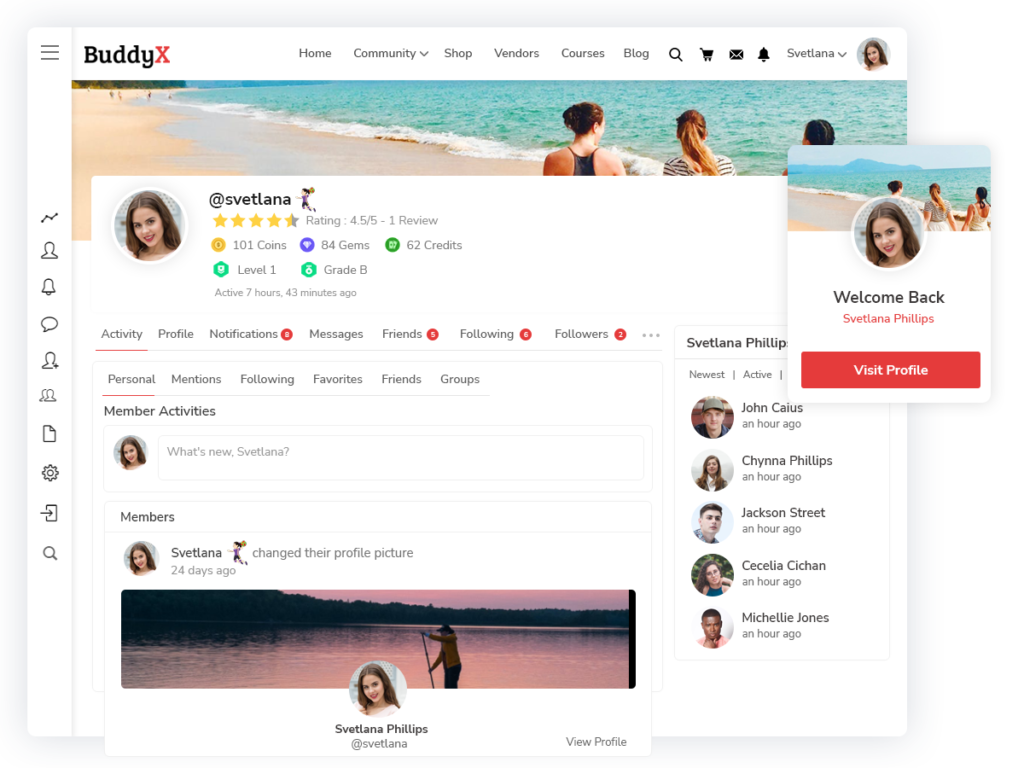
Facebook Groups or LinkedIn are the easy default, but you don’t own that audience or the data, and the platform can change the rules under you at any time. Running your community on WordPress keeps ownership with you. BuddyPress and BuddyBoss remain the two most common ways to add community features to WordPress, and BuddyX is a free theme built for both. If you outgrow the free version, BuddyX Pro adds more layout options and integrations, currently $79/year and up.
The platform-ownership question feels theoretical until it isn’t. A Facebook Group with an algorithm change can bury your posts in front of members who followed you specifically to see them. A community you host yourself doesn’t have that problem, members who show up see the content, full stop. That control is worth the extra setup effort for anyone planning to run a community for years rather than months.
Write the Rules Down Before You Need Them
Spam and bad-faith behavior show up in every community eventually. Having guidelines in place before launch, not after the first incident, gives members a clear standard to meet and gives you something concrete to point to when enforcing it. It also makes moderation faster since you’re applying a rule instead of making a judgment call each time.
Keep the initial rule set short. A wall of legalistic guidelines nobody reads is worse than no rules at all, since it creates a false sense that behavior is covered when in practice nobody’s actually absorbed the document. Five or six clear, specific rules beat twenty vague ones, and you can always add a rule later once a real situation calls for it.
Staff Moderation Before You Need It, Not After
Community management doesn’t run itself once you pass a certain size. Assign roles, who approves posts, who handles reports, who answers support questions, before volume makes it unmanageable. A team with clear responsibilities also frees you up to focus on growth instead of firefighting every thread.
Even a community of a few hundred active members generates enough daily activity that one person checking in occasionally isn’t enough once things pick up. Recruit a moderator or two from your earliest, most engaged members if budget doesn’t allow for a hire. People who already care about the community’s health often make better moderators than an outside hire with no context anyway.
Launch
Domain, hosting, plugin, theme, at this point it’s mostly execution. Set up BuddyPress or BuddyBoss with a BuddyX theme and you have a working community platform without custom development. Before you open the doors, check that the experience actually reflects how you want members to interact with your brand, not just that the pages load.
Seed the community with some initial content and activity before inviting the broader audience. An empty forum with zero posts feels dead even to someone genuinely interested in joining, and first impressions here matter enormously. A handful of genuine discussion threads, even ones you started yourself or recruited a few early supporters to kick off, make the difference between a community that feels alive and one that feels abandoned before it’s even begun.
Promotion Doesn’t Stop at Launch
Launching is the easy part. Getting your target audience to actually show up is the harder, ongoing one. Push it through whatever channels already reach your audience, email, social, existing customers, rather than treating launch day as the finish line.
Ongoing promotion doesn’t mean constant hard-selling the community every week. It means weaving mentions of it naturally into content you’re already producing, a newsletter footer, a support ticket resolution that points to a relevant discussion thread, a social post highlighting an interesting conversation happening inside. Consistent, low-pressure visibility outperforms sporadic big pushes over the life of a community.
How Long Before You See Real Traction
Set expectations honestly before launch, because most communities take longer to build momentum than founders anticipate going in. The first month usually feels slow no matter how well the groundwork was done, since a handful of early members are still figuring out what the space is for and how they’re expected to participate. Somewhere between month two and month four is typically when a critical mass of regulars starts forming, assuming the founder stayed present and kept seeding discussion during that stretch.
Communities that hit real self-sustaining momentum, where members start threads and answer each other without prompting, usually take six months to a year to get there, sometimes longer depending on niche size and how active the founder stays during the early period. Anyone expecting viral growth in the first few weeks is setting themselves up for a discouraging launch, even when the fundamentals are genuinely solid.
Choosing Features Without Overbuilding
It’s tempting to launch with every feature BuddyPress or BuddyBoss supports, groups, forums, private messaging, activity feeds, badges, all switched on from day one. Resist that urge. A brand new community with fifteen members doesn’t need six different ways to interact, it needs one or two clear paths that match how those fifteen people actually want to engage.
Start minimal, a single discussion space and basic profiles, and add features as real demand surfaces. If members keep asking for a way to message each other privately, that’s your signal to turn on private messaging. If nobody’s forming subgroups around specific topics, groups functionality can wait. Building ahead of actual demand usually means building features nobody uses, which just adds clutter to an experience that should feel simple for new members finding their footing.
Handling the Inevitable Slow Period
Every community, even a well-run one, hits a stretch where activity dips. Holiday seasons, a founder’s temporary absence, a shift in the broader conversation happening outside the community, any of these can cause a visible slowdown. The instinct is often to panic and start over-promoting or drastically changing direction. Resist that too.
A short slow period is normal and rarely a sign the whole project failed. What actually matters is the trend over months, not any single quiet week. If engagement has been declining steadily for an extended stretch despite consistent founder presence and promotion, that’s worth investigating seriously. A two-week lull around a holiday is not the same signal, and treating it that way tends to produce overcorrections that do more harm than the slow week itself ever would have.
Frequently Asked Questions
Do I need a large existing audience before starting a community?
No, but you do need a genuinely interested core, even if it’s small. A tightly focused community of thirty engaged people produces more real activity and value than a loosely defined one with a thousand passive members. Start with whoever’s genuinely interested, however few, and let word of mouth grow it from there rather than waiting for a large audience that may never materialize before an actual space exists for them to join.
Should I charge for access to the community?
It depends entirely on the purpose defined in step one. A community built around customer support or brand awareness usually works better free, since the goal is broad participation. A community built around premium peer knowledge sharing, mentorship, or exclusive access can support a paid model, provided the value clearly justifies the cost to the specific audience you’re serving. Testing free first and introducing a paid tier later, once the value is proven, is often a safer path than charging from day one before anyone’s seen what the community actually offers.
How much time should I expect to spend on moderation each week?
This scales with size and activity level, but even a small community benefits from daily check-ins during the early months, catching questions that need a response and modeling the tone you want the space to have. As moderators get recruited from the member base, that time commitment spreads out rather than falling entirely on one person indefinitely. Budget more time up front than you think you’ll need, since the early presence is exactly what determines whether a community reaches self-sustaining activity at all.
What’s the biggest reason communities fail in the first six months?
Founder disengagement after the initial launch excitement fades is the most common cause. A community needs consistent presence and content seeding for longer than most founders budget for, and stepping back too early, before member-driven activity can carry real weight, is what kills momentum more often than any technical or platform issue. Plan for the ongoing effort from the start rather than treating the launch itself as the finish line, because in practice the launch is closer to the starting gun.
Signs the Community Is Actually Working
Member count is the easiest metric to track and the least useful one on its own. A community with five thousand registered accounts and twelve active posters isn’t healthy no matter how impressive the headline number looks. Watch instead for members starting their own threads without prompting, replies coming from other members rather than only from you, and people returning days or weeks after their first visit rather than posting once and disappearing.
Another good signal: members answering each other’s questions before a moderator gets to them. That’s the point where a community stops depending entirely on the founder’s attention and starts sustaining itself, which is ultimately the goal of the whole exercise. Track this alongside raw activity counts, since a community can look busy on the surface while still depending almost entirely on the founder to keep every conversation moving.
Common Mistakes in the First Few Months
Going quiet after launch is the most common one. The founder puts real energy into the setup and opening weeks, then attention drifts to other priorities once the initial excitement fades, and the community’s activity fades right along with it. Early communities need consistent founder presence for longer than most people expect, often several months before member-driven activity can carry real weight on its own.
Over-moderating is a subtler mistake. A founder nervous about the community’s reputation sometimes polices tone and content so tightly that genuine conversation feels risky to participate in. Rules exist to stop bad-faith behavior and spam, not to sand down every disagreement or unpolished opinion. A community that feels like it’s being watched too closely doesn’t feel like a community at all.
Where This Gets You
None of these seven steps is complicated on its own. What’s hard is doing them in order instead of skipping to “pick a platform” before you’ve figured out why anyone would join. Get the reason and the audience right first, and the platform, rules, and moderation decisions mostly fall into place.
Building a community that lasts years rather than months isn’t about finding a clever growth hack. It’s about doing these unglamorous fundamentals in order and staying present long enough for the community to start carrying itself.
If you’re weighing whether it’s worth the effort at all, look honestly at whether your audience already congregates somewhere informally, a hashtag, a shared subreddit, a recurring conversation in your support inbox. That’s usually the clearest signal that a dedicated space would get real use rather than sitting empty. Building a community where the demand doesn’t yet exist is a much harder, slower project than giving structure to a conversation that’s already happening in scattered form.
Whichever stage you’re at, the underlying principle repeats across all seven steps: clarity before setup, presence before promotion, and patience before judging whether it’s working. Communities that follow that order tend to outlast the ones that chase quick wins from day one.
Interesting Read:
The Ultimate Guide to Social Share WordPress Plugin for 2022
5 Reasons to Choose Check-In Plugins for WordPress Communities
WordPress Search Plugin: Adding Search Feature to Your Website