

Every social feed you scroll is really just a mix of updates from people you’ve connected with. On a BuddyPress community, that connection layer doesn’t build itself, members need help finding each other, which is what a friends-and-follow suggestions plugin like BuddyPress Friend & Follow Suggestion is for. A community with a hundred members and no way to surface who’s active or relevant to each individual visitor is effectively a hundred islands, everyone technically present, nobody actually connected.
This is a problem large social platforms solved out of necessity a long time ago, Facebook’s “People You May Know,” LinkedIn’s connection suggestions, Instagram’s suggested-follows carousel, all exist because none of those platforms could rely on users to organically discover every relevant connection on their own at scale. A BuddyPress community, even a modest one with a few hundred members, runs into the same discovery bottleneck, just without the massive engineering team behind it. A dedicated suggestions plugin is essentially bringing that same proven mechanic down to a scale a single community owner can configure and maintain.
Friends vs. followers isn’t just semantics
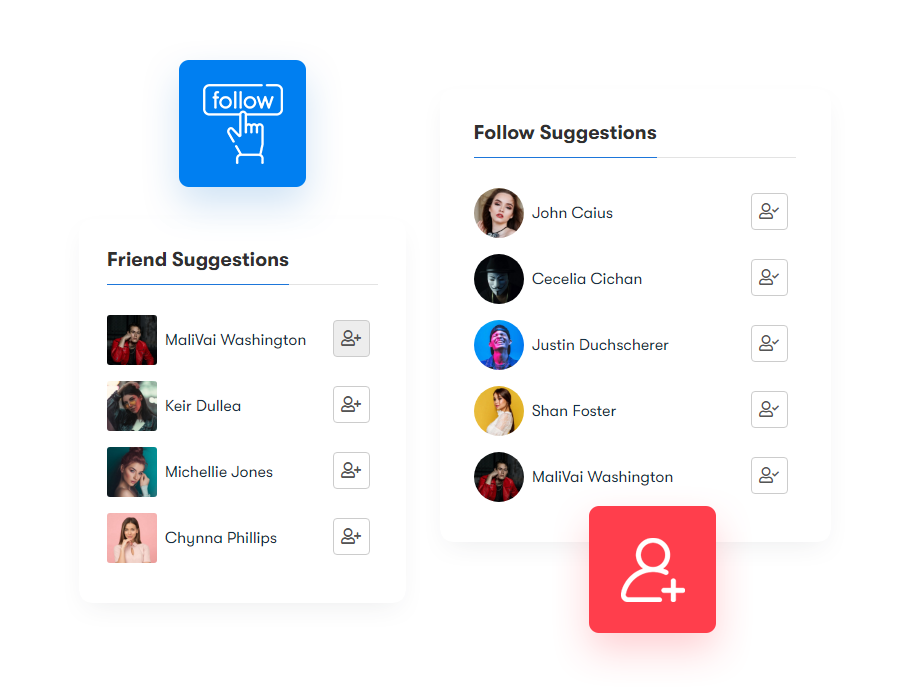
A friend connection is mutual, both people have to accept it, and it implies a closer, two-way relationship. A follow is one-directional, and platforms handle the distinction differently: Facebook auto-follows anyone you friend, Instagram is follow-only with no separate friend tier, and LinkedIn reserves following for companies and public figures. Which model fits your community depends on what kind of interaction you’re trying to encourage, friend requests work better for peer communities, while follow-only suits communities built around a smaller number of prominent members or creators.
There’s a third option worth naming too: running both models side by side, which is what BuddyPress supports natively and what the plugin builds suggestions on top of. A creator-style community can let members follow public figures one-directionally while still supporting mutual friend connections between regular members, so a fan can follow a popular contributor without that contributor needing to reciprocate, while two peer members can still form a genuine mutual connection. Deciding which model, or which mix, fits your community is worth doing deliberately before configuring the suggestions engine, since the matching logic behaves differently depending on which relationship type you’re optimizing for.
Also read: GIF Plugin: Why You Should Add to Your Community Website?
Why suggestions matter, not just the connection feature itself
Having a friend/follow system is one thing. Getting members to actually use it is another, and that’s where suggestions come in.
It gets new members moving faster
A member who joins and sees an empty feed usually doesn’t come back. Surfacing relevant people to connect with immediately gives them a reason to. This is the single highest-leverage moment for a suggestions feature to intervene, the first five minutes after signup, before a new member has had a chance to decide the community isn’t for them. A well-tuned onboarding flow that prompts three to five relevant connections during signup itself, rather than waiting for the member to discover the suggestions widget on their own later, meaningfully improves day-one activation.
It drives the interactions that keep a community alive
Comments, likes, and replies mostly happen between people who are already connected. More connections, sourced automatically instead of left to chance, means more of that baseline activity. This compounds over time in a way that’s easy to underestimate: a member with ten connections generates roughly proportionally more passive activity-feed engagement than one with two, simply because they have more people’s updates showing up in their feed to react to in the first place.
It surfaces people members wouldn’t have found on their own
Left to search alone, most members only connect with people they already know. Suggestions based on shared profile data, work history, interests, location, surface people they’d never have searched for directly. This is genuinely the harder problem to solve well, and it’s where the quality of the matching logic separates a useful suggestions feature from a token one; a plugin that just recommends the newest signups or the most active members, regardless of actual relevance, produces suggestions members quickly learn to ignore.
Also read: BuddyPress Search Plugin Review 2026
What BuddyPress Friend & Follow Suggestion actually does
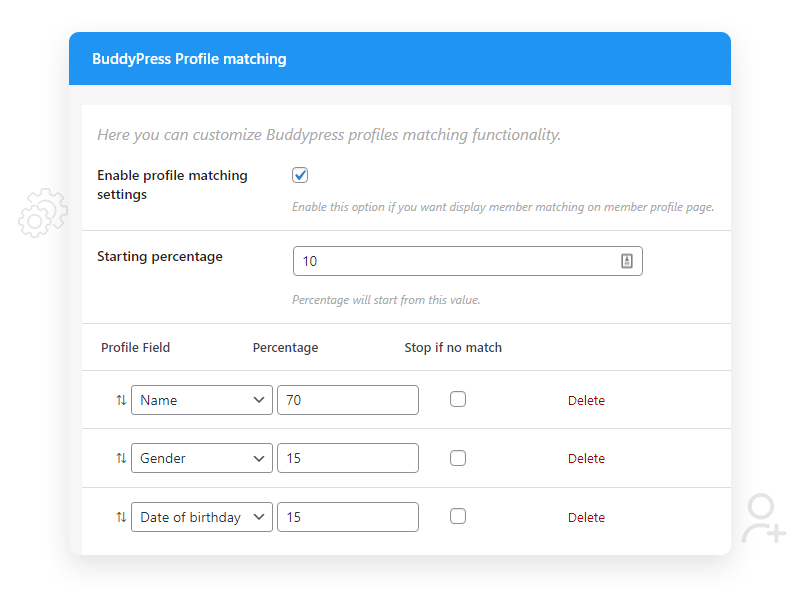
The current version goes further than a basic “people you may know” widget. It runs a match-scoring engine that weights different profile fields against each other, and shows members why a suggestion was made, shared work history, similar interests, overlapping location, whatever criteria you’ve configured.
- Swipe-card interface, members can accept or dismiss suggested connections with a swipe, similar to a dating app.
- Widgets, a Gutenberg block, and eight shortcodes for placing suggestions anywhere on the site.
- Match-percentage display in each profile header, showing how closely a member matches the person viewing.
- Configurable matching rules, set from the backend, to control what counts as a strong match.
- Automated notifications, welcome emails, daily and weekly digests, and hot-match alerts to bring members back.
It requires BuddyPress with Extended Profiles active, and works with BuddyX, Reign, Youzify, and SocialV. Pricing runs $49/year for one site up to $129/year for unlimited sites, on version 1.7.5.
The Swipe-Card Interaction, Why It Works
It’s worth spending a moment on why the swipe-card interface specifically tends to outperform a static list of suggested profiles, since the underlying data driving both is identical. A list presents every suggestion at once, which invites comparison and hesitation; a member scanning ten profiles in a grid is implicitly asking themselves which is “best” rather than simply reacting to each one. A swipe-card interface presents one suggestion at a time and asks for a single binary decision, connect or skip, which lowers the cognitive load of the interaction considerably. This is the same underlying mechanic that made dating apps so effective at driving through-put on decisions people would otherwise agonize over, and it translates directly to community connection-building, where the actual decision, “is this person worth connecting with,” is genuinely low-stakes but can still feel effortful when presented as an open-ended browsing task.
The practical implication for community owners: even if you already have a member directory or search feature that technically lets people find each other, the swipe interface is worth adding as a separate, lower-friction entry point specifically because it changes the psychology of the interaction, not just the visual layout.
Configuring the Matching Rules Well
The default matching configuration works reasonably out of the box, but the communities that get the most value out of this kind of plugin usually spend an hour tuning which profile fields actually drive the score. A professional networking community should weight industry and job title heavily and location lightly, since the value of a connection there is career-relevant, not geographic. A local interest or hobby community should flip that weighting, location and shared interests matter more than professional background. Leaving every field weighted equally by default tends to produce suggestions that feel generically plausible rather than genuinely relevant, and members notice the difference even if they can’t articulate why a suggestion feels off.
It’s also worth revisiting the matching configuration periodically as your member base grows and its composition shifts. A community that started as a small niche group and later broadened into a larger, more general audience may need its matching weights adjusted to reflect the new mix, since the profile fields that distinguished members in the early, homogeneous group may no longer be the most useful signal once the audience diversifies.
Rolling It Out Without Overwhelming Members
A common mistake when first enabling a suggestions feature on an established community is surfacing it too aggressively, a large widget on every page, frequent notification emails, a persistent banner. This tends to feel intrusive to existing members who weren’t asking for it, even if the underlying feature is genuinely useful. A gentler rollout, introducing the swipe-card interface on the member directory and profile pages first, then expanding placement based on actual usage data, tends to build adoption more sustainably than a full-court-press launch across every page at once.
Notification frequency deserves the same restraint. The plugin’s daily and weekly digest options exist precisely because not every community wants the same cadence; a highly active daily-use community can sustain a daily digest without it feeling like spam, while a slower-paced community, people checking in a few times a week, is usually better served by the weekly option, since a daily email into an inbox that only gets opened occasionally starts to read as noise rather than a helpful nudge.
“Hot-match” alerts, notifications triggered by an unusually strong match score, deserve a slightly different treatment than routine digests. Because these are meant to signal genuine rarity, a suggestion meaningfully better than the member’s typical recommendations, sending them too frequently defeats the purpose; if every member gets a hot-match alert every few days, the label stops meaning anything and members start ignoring it the same way they’d ignore any other notification. Setting a genuinely high threshold for what counts as a hot match, even if that means the alert fires rarely, preserves the signal value that makes members actually open it when it does arrive.
Privacy and Trust Considerations
Matching logic that pulls from profile fields, work history, location, interests, only works well if members have actually filled those fields in, which raises a design question worth thinking through: how much profile completion do you require or incentivize before a member can participate in suggestions at all? Communities that leave profile fields fully optional often end up with a suggestions engine working off sparse data for a meaningful chunk of the member base, producing weaker matches for exactly the members who’d benefit most from a nudge toward connection.
A reasonable middle ground is a lightweight, guided profile-completion prompt during onboarding, three or four fields that directly feed the matching algorithm, framed as “help us find people you’ll want to connect with” rather than a generic, unexplained profile form. Members are more willing to fill in details when they understand the direct payoff, better suggestions, rather than filling out a profile in the abstract with no clear reason why it matters.
It’s also worth being transparent about what drives a match. The plugin’s “why this suggestion” display, shared work history, overlapping interests, and so on, does real trust-building work here, since members are generally more comfortable with a suggestion system when they can see the reasoning rather than receiving an unexplained recommendation that feels like an opaque algorithm made a decision about them. This transparency also gives members a sense of agency over their own visibility, since understanding what data drives suggestions naturally clarifies what filling in or leaving blank on their own profile actually controls.
Where Match-Based Suggestions Fit With Other Growth Tactics
Suggestions work best as one piece of a broader activation strategy rather than a standalone fix for a quiet community. If your community’s core problem is that too few members are active at all, connection suggestions accelerate the value new members get from the people who are there, but they don’t manufacture activity that doesn’t otherwise exist. Pairing a suggestions feature with regular content, discussion prompts, events, or member spotlights gives the newly-suggested connections something to actually interact around, rather than a connection that sits static because there’s nothing happening in the community to prompt further engagement.
A useful sequence for a community launching or relaunching this kind of feature: get regular content and activity flowing first, even a modest weekly cadence, then layer suggestions on top once there’s something for new connections to actually engage with. Suggestions introduced into a genuinely dead feed will connect people who then find nothing to talk about, which undermines confidence in the feature faster than simply waiting to launch it until the community has some baseline pulse.
Is it worth adding
If your community is bigger than a few dozen active members, a manual “search and add” approach to connections doesn’t scale. Suggestions built on real profile-matching logic do most of that work automatically, and the swipe-card interface in particular makes discovering new connections feel like something to do, not a chore. The plugins and themes it’s built to work alongside, BuddyX, Reign, Youzify, SocialV, cover most of the common BuddyPress-based community setups, so compatibility is rarely the blocker; the real work is in tuning the match weighting and rollout pace so the feature earns its place rather than becoming another ignored widget in the sidebar.
For communities still under that threshold, it’s not a wasted investment either, it just pays off differently. A smaller community benefits more from the onboarding-moment version of suggestions, helping brand-new members find their first two or three connections quickly, than from the ongoing discovery engine larger communities lean on. Either way, the underlying principle holds: members who connect early stick around longer, and a plugin built specifically to accelerate that first connection is solving a real, well-documented retention problem rather than adding a feature for its own sake.
Frequently Asked Questions
Does this plugin work if my community only supports one-directional following, not mutual friending?
Yes. The suggestions engine surfaces recommended connections regardless of which relationship model, mutual friend requests, one-directional follows, or both, your community runs on. The underlying matching logic is agnostic to which BuddyPress connection type your site uses; it’s recommending people, and the accept/connect action just triggers whichever relationship type is configured on your site.
How does the plugin handle members with very sparse or empty profiles?
Match quality degrades gracefully but does weaken. A member with no filled-in profile fields beyond their name will still receive suggestions, typically falling back to broader signals like recent activity or shared groups, but the suggestions won’t be as precisely targeted as for a member with a fully completed profile. This is exactly why encouraging profile completion during onboarding meaningfully improves the feature’s value across the whole community, not just for individual members who bother to fill theirs in, since sparse profiles also weaken the quality of the suggestions those members appear in for other people, not only the ones they receive themselves.
Can I exclude certain member types from appearing in suggestions, like inactive accounts?
The backend matching rules give you control over which criteria feed the scoring, and most community-focused suggestion plugins in this category, this one included, let admins set activity or recency thresholds so long-dormant accounts don’t get surfaced as fresh recommendations. It’s worth checking this setting specifically if your community has a meaningful number of inactive or abandoned accounts, since suggesting a connection to someone who never logs in again is a wasted suggestion slot that could have gone to an active member.
Will enabling suggestions slow down my site on a larger community?
Match-scoring calculations do add some processing overhead, particularly on communities with thousands of active profiles being cross-referenced against each other. Most plugins in this category cache computed match scores rather than recalculating them on every page load, which keeps the performance impact manageable, but it’s worth monitoring server response times after enabling the feature on a larger site and confirming the caching behavior is actually working as expected rather than assuming it out of the box. A quick before-and-after check with a page speed tool on the member directory and profile pages, where suggestion widgets typically render, is a cheap way to catch a caching gap before it becomes a noticeable slowdown for real visitors.
Interesting Read:
Private Community Groups on Facebook: Everything to Know About
How Private Communities Can Promote Healthy Nutrition and Physical Fitness?
Top 25 Photography Websites to Follow for News, Reviews, Learning and Discussion