

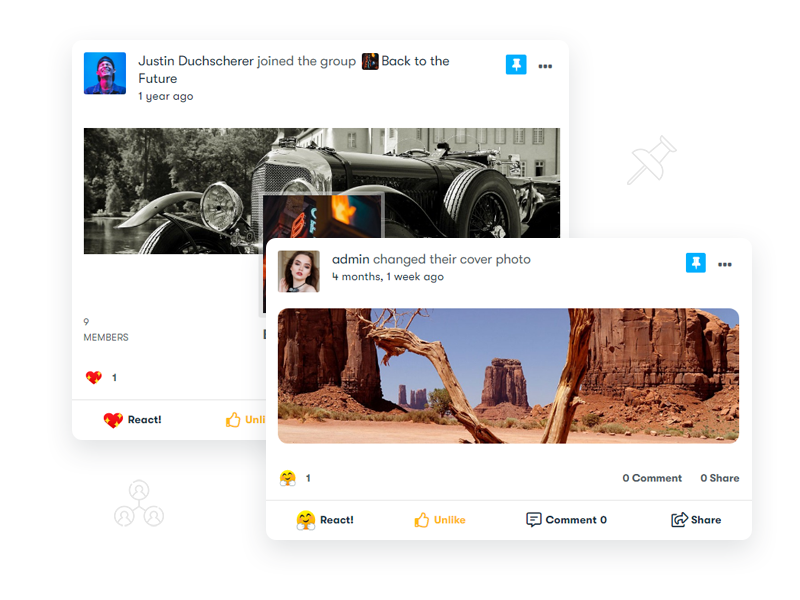
Activity streams are reverse-chronological by default, which means anything you post gets buried the moment someone else posts after it. Post something at 9am about a community event happening Friday, and by 9:15 it could already be three screens deep if your members are active. BuddyPress doesn’t include a way to pin a post above that flow on its own, that’s what a sticky post plugin adds, and for BuddyPress communities specifically, BuddyPress Sticky Post is the plugin built for it.
What it’s actually for
An important announcement, a limited-time offer, an event with a deadline, none of that is useful buried three pages into an activity feed. Pinning keeps it visible at the top until you unpin it, on either the sitewide activity stream or inside individual groups. It’s a small mechanical fix for a problem every reverse-chronological feed shares: recency beats relevance by default, and sometimes relevance needs to win instead.
Also read: Adding Community Reactions and Status Plugin to Your Website
How activity stream ordering actually works in BuddyPress
It helps to understand what the plugin is overriding before getting into how it does it. BuddyPress stores every activity item, a status update, a group join, a forum reply, in the bp_activity database table, and the default activity loop query sorts that table by date_recorded, descending. There’s no priority field, no weighting, no concept of “important” baked into core. A founder’s carefully written community guideline post and a one-line “hey everyone” both get treated identically by the query, ranked purely on timestamp.
A sticky post plugin works by intercepting that query, or by running a separate query for pinned items and merging the result before the feed renders, so pinned activity items get pulled out of strict chronological order and forced to the top regardless of when they were actually posted. This is a meaningfully different mechanism from, say, a WordPress “sticky post” for blog content, which uses a native is_sticky flag WordPress core already understands. BuddyPress activity has no equivalent, so any pinning behavior on an activity stream has to be added by a plugin from scratch rather than toggled on from a setting core already provides.
Where it actually helps
Keeps important content from getting buried
A high-traffic community can push a post off the visible feed within minutes. Pinning it removes that time pressure entirely, members see it whenever they check the feed, not just in the window right after you posted it. On a community running a few hundred posts a day across groups and the main stream, that window can be measured in single-digit minutes, which makes manual timing (trying to post at “peak hours” so more people see it) a losing strategy compared to just pinning the thing and letting visibility take care of itself.
Handles time-limited activities
Events, contests, and giveaways usually have a deadline. Built-in expiration means the post can pin itself for a set window and drop off automatically once it’s over, instead of you remembering to unpin it manually. This matters more than it sounds like on a community run by a small team or a single admin, since manually unpinning content on schedule is exactly the kind of housekeeping task that gets forgotten during a busy week, leaving an expired giveaway pinned at the top of the feed for days after it closed, which reads as sloppy to anyone who notices.
Doubles as a promotional slot
A pinned spot at the top of the activity feed functions like ad real estate you already own. Product launches or offers get guaranteed visibility without paying for it elsewhere. If your community sits alongside a WooCommerce store or a paid membership tier, that pinned slot is genuinely valuable inventory, a launch announcement pinned for 48 hours gets seen by every returning member during that window, which is a meaningfully different reach guarantee than posting once and hoping the timing lines up with when people happen to be browsing.
Works as a reminder system
Anything members are likely to miss, a policy update, a deadline, an event they need to RSVP for, stays visible until it’s no longer relevant, rather than scrolling out of view within the hour. Community guidelines updates are a particularly good fit here: post the update once, pin it for a week, and you’ve meaningfully raised the odds that active members actually saw it, compared to a single unpinned post that a third of your community never scrolls far enough to encounter.
Also read: How Load More Products for WooCommerce Plugin Benefits E-Commerce Sites?
What’s in BuddyPress Sticky Post now
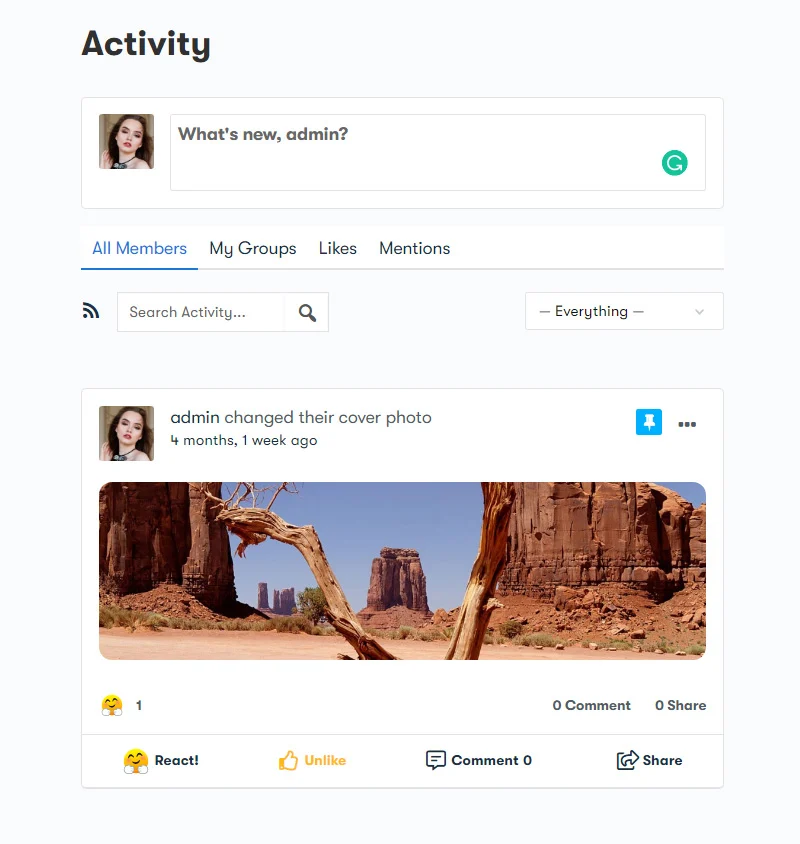
The plugin has picked up several capabilities since its early releases:
- Pinning on both the sitewide stream and individual group activity feeds
- Automatic expiration, so posts unpin themselves on schedule
- Per-user pinning quotas and group-level permission controls
- A shortcode for displaying pinned posts outside the activity stream
- Activity logging with audit trails, stored in dedicated database tables
- REST API and WP-CLI support for developers managing pins programmatically
It works across themes rather than requiring a specific one, supports BuddyPress 5.0+ or BuddyBoss Platform 2.0+, and needs WordPress 6.0 or newer. Pricing runs $49/year for one site up to $129/year for unlimited sites, currently on version 2.3.8.
Setting it up: what actually needs deciding
Installation itself is the easy part, upload, activate, done in under a minute on most sites. The decisions that take real thought happen after activation, in how you configure permissions and quotas:
- Who gets to pin. On a small community, giving every member pinning rights is harmless. On a larger one, that turns into a race to the top of the feed, and the “important announcement” concept collapses once ten different members are all pinning their own posts simultaneously. Restricting pinning to admins, moderators, or a specific role is the standard fix, and it’s worth deciding this before opening registration rather than retrofitting restrictions after members are already used to pinning freely.
- Per-user quotas. If you do allow members or group organizers to pin their own content, a quota (one active pin per user, say) keeps a single enthusiastic poster from monopolizing the top of the feed with five simultaneous pins.
- Expiration defaults. Setting a sensible default expiration window, three days, a week, whatever fits your posting cadence, means an admin who forgets to set a custom expiration still gets reasonable behavior rather than an indefinitely stuck post.
- Group-level versus sitewide pinning. Decide early whether group moderators can pin within their own group independently of sitewide admin permissions. Community-run groups usually want this autonomy; tightly moderated communities may prefer to keep it centralized.
A few things worth testing before relying on it
Pin a test post in a group and confirm it actually surfaces above regular activity in that group’s specific feed, not just the sitewide stream, since group-level and sitewide pinning are handled as separate mechanisms even though they look similar from the admin side. Confirm expiration actually unpins on schedule rather than just hiding the countdown, worth checking a real expiring post rather than trusting the setting blindly the first time you use it. It’s also worth logging in as a regular, non-admin member during this test, since permission-scoped features occasionally behave differently depending on the role viewing the feed, and an admin account can mask a display bug a regular member would actually hit. If you’re running the shortcode to display pinned content outside the normal activity stream, say, in a sidebar widget or a dedicated announcements page, check how it renders on mobile specifically, since a shortcode output built for a full-width activity stream can occasionally look cramped in a narrower sidebar context without some layout adjustment.
How this compares to just editing an old post to bump it
Before a dedicated sticky mechanism existed, the common workaround was re-editing an old announcement so its date_recorded effectively updated, hoping it would resurface near the top. This is a genuinely worse approach for a few reasons: it doesn’t actually keep the post pinned, just briefly bumped, so it drifts back down the moment new activity comes in; it can confuse members who see a “new” post that’s actually days old with no visual indication of the edit; and it depends on database-level timestamp manipulation that most site owners aren’t comfortable doing directly and most plugins don’t expose safely. A proper pin, by contrast, stays fixed regardless of how much new activity happens underneath it, and a well-built plugin visually marks pinned content (a small pin icon, a highlighted background) so members understand why it’s sitting at the top rather than mistaking it for the newest post in the stream.
Performance considerations on larger communities
On a community running thousands of members and a genuinely active feed, it’s worth confirming how the plugin queries pinned content, whether it’s a lightweight join against the existing activity query or a separate, uncached lookup running on every single page load. A poorly optimized pinning mechanism can add real query overhead to what’s already one of the more database-heavy pages on a BuddyPress site, the activity stream itself. If you’re running a community at meaningful scale, checking query performance with a tool like Query Monitor after activating any activity-stream-modifying plugin is a reasonable habit, not just for this specific plugin but for anything that hooks into the activity loop.
Common mistakes worth avoiding
Pinning and forgetting. The single most common failure mode isn’t a plugin bug, it’s a stale pinned post sitting at the top of the feed weeks after it stopped being relevant. A member scrolling into a community for the first time and seeing a pinned announcement about an event that happened two months ago reads as a site nobody’s actively maintaining, even if the rest of the feed is genuinely active underneath it. Setting an expiration date, even a generous one, is a cheap insurance policy against this specific failure.
Treating every announcement as pin-worthy. If everything gets pinned, nothing effectively is, since a feed with five pinned posts stacked at the top just becomes a second feed members have to scroll through before reaching the actual activity stream. Reserve pinning for genuinely time-sensitive or unusually important content, not routine updates that would be fine appearing in normal chronological order.
Not accounting for mobile. A pinned post with a large embedded image or a long block of text that looks fine on desktop can push the entire actual activity feed below the fold on a phone screen, meaning mobile visitors scroll past the pin without ever reaching real content. Keep pinned posts reasonably concise specifically because they’re the first thing every visitor sees regardless of device.
Giving pin permissions too broadly, then having to walk it back. It’s much easier to start restrictive and loosen permissions later, once you’ve seen how members actually use the feature, than to grant broad pinning rights early and then have an awkward conversation about revoking access after someone’s been pinning promotional content for their own group or product. Default to admin-and-moderator-only, and expand deliberately.
Accessibility and how pinned content should read
A pinned post benefits from the same accessibility basics as any other piece of community content, and it’s worth a specific pass here because pinned posts tend to get more eyes than average, which raises the stakes on getting it right. Use genuine heading structure and list markup rather than bolded plain text pretending to be a heading, since screen reader users navigating by heading will miss content that’s only visually styled to look like a heading. If the pinned post embeds an image, a graphic promoting an event or a giveaway, make sure alt text actually describes it rather than being left blank, since a pinned graphic with no alt text is functionally invisible to a screen reader user, which is a particularly bad outcome for content specifically meant to be seen by everyone.
Alternatives if a full plugin feels like overkill
For communities that only occasionally need to highlight something, a widget-based announcement bar or a dedicated “Announcements” page linked from the main navigation can cover a lot of the same ground without touching the activity stream’s query logic at all. This trades away the “surfaces automatically inside the feed members already check” advantage of true pinning, but it’s a reasonable lighter-weight option if your community rarely needs more than one or two announcements live at a time and you’d rather not add another plugin hooking into activity queries. Worth weighing against the dedicated plugin honestly rather than defaulting to the more feature-rich option out of habit, since the simpler approach genuinely fits some smaller communities better.
Frequently Asked Questions
Can I pin more than one post at a time?
Yes, though it’s worth using this sparingly. Multiple simultaneous pins dilute the whole point of pinning, which is guaranteeing visibility for the single most important thing right now. Two or three pinned items still works reasonably well; ten stops meaning anything.
Does pinning affect notification behavior?
No. Pinning changes where a post displays in the feed, not whether or how notifications fire for it. A pinned post follows the same mention, comment, and reaction notification rules as any other activity item.
Will this work with BuddyBoss instead of standalone BuddyPress?
Yes, the plugin explicitly supports BuddyBoss Platform 2.0 and newer alongside BuddyPress 5.0+, since BuddyBoss Platform is itself a fork of BuddyPress and shares the same underlying activity table structure the plugin hooks into.
Is there a way to see how long a post has been pinned?
The plugin’s activity logging and audit trail features track this on the admin side, so you can review pin history rather than relying on memory for how long something has been sitting at the top of the feed.
Does pinning change the order of comments or reactions on the post itself?
No. Pinning only affects where the activity item sits within the overall feed, its own internal comment thread and reaction counts behave exactly as they would for any unpinned post.
What happens if two admins both try to pin something at the same time?
Both pins take effect independently, since pinning isn’t a single global slot but a flag applied per activity item. If your quota settings allow multiple simultaneous pins, both posts display, ordered by whichever pin was applied more recently, which is another reason quotas and clear internal conventions about who pins what matter once more than one admin has access.
Can a pinned post still be edited or deleted normally?
Yes, pinning doesn’t lock the underlying activity item. Whoever has permission to edit or delete a normal post retains that same ability on a pinned one, the pin is a display-layer flag, not a separate content state.
Is it worth adding
For a small, low-traffic community, pinning matters less, most members will see a post regardless. Once your activity stream moves fast enough that important posts disappear within an hour, this stops being a nice-to-have and starts being the only reliable way to guarantee visibility for anything time-sensitive. If you’re already weighing whether your community has outgrown a purely chronological feed, that’s usually the sign it has, and a plugin that costs less than a single hour of admin time per year to set up is a fairly low bar to clear against that problem.
Interesting Reads:
Why Add Coming Soon Courses Plugin to Your e-Learning Platform?
How to Add WooCommerce Quick View Feature? A Comprehensive Guide
WordPress reCaptcha Plugin: Why You Should Add On Your Website?