

LearnPress is many WordPress users’ first LMS. It’s been around for a decade, it installs in minutes, and its core does enough, courses, lessons, basic quizzes, to prove an idea works. The trouble starts when the idea becomes a business: certificates are an add-on, content drip is an add-on, checkout runs through add-ons, assignments are an add-on, and community integration is another add-on again. Somewhere around the fifth separately-versioned extension, most site owners start searching for LearnPress alternatives, not because any one piece failed, but because the pile of pieces has become the job.
This comparison looks at eight LearnPress alternatives through the lens this site applies to every LMS decision: does the platform ship complete, does the site owner keep ownership of their data and revenue, and how well does it support students learning together rather than alone? Each entry covers what’s actually included out of the box, where the tier or add-on boundaries sit, and how the platform composes with a BuddyPress-powered community. For the wider market view beyond LearnPress specifically, our best WordPress LMS plugins comparison is the pillar guide.
Table of Contents
- Quick comparison
- Why site owners outgrow LearnPress
- 1. Learnomy, the complete learning platform
- 2. Tutor LMS, the frontend-builder pick
- 3. LearnDash, the ecosystem heavyweight
- 4. LifterLMS, engagement-focused and modular
- 5. Sensei LMS, the WooCommerce minimalist
- 6. MasterStudy LMS, the design-led option
- 7. MemberPress Courses, billing engine first
- 8. Thinkific, the hosted exit
- The community angle: LearnPress’s quiet strength, done properly
- How we evaluated these platforms
- What leaving LearnPress actually involves
- The complete-platform test
- Three site owners, three different right answers
- Common mistakes when replacing LearnPress
- FAQ
- Verdict
Quick comparison
| Platform | Ships Complete? | Native Payments | Certificates Built In | Community Path |
|---|---|---|---|---|
| Learnomy | Yes, one install | Stripe + PayPal native | Yes, automated | Composes with BuddyPress/BuddyX |
| Tutor LMS | Partially, tiered | Via WooCommerce/add-ons | Higher tiers | Add-on based Q&A |
| LearnDash | No, add-on stack | Via WooCommerce/add-ons | Via separate tooling | Third-party connectors |
| LifterLMS | No, add-on bundles | Via WooCommerce | Add-on | Social learning add-on |
| Sensei LMS | Core only | Via WooCommerce | Add-on | Limited |
| MasterStudy LMS | Partially, tiered | Native + WooCommerce | Higher tiers | Course Q&A only |
| MemberPress Courses | For membership model | Native | Included | Limited |
| Thinkific | Yes, but rented | Native (hosted) | Included | Built-in (hosted terms) |
Why site owners outgrow LearnPress
LearnPress’s model, a light core with a long add-on menu, is genuinely appealing at the start: install only what you need, pay only for what you use. Three things erode that appeal as a course site gets serious. First, the add-on count: a realistic selling site runs checkout, certificates, drip, and assignments extensions at minimum, each updating on its own schedule, and the integration seams between them are where support tickets are born. Second, the depth ceiling: LearnPress’s quiz engine and reporting stay basic even fully extended, which starts to matter the day you want to know why students stop at lesson three rather than just how many enrolled. Third, the polish gap: the student-facing experience needs real theme work to feel modern, which is why so many LearnPress sites live inside the Eduma theme family.
To its credit, LearnPress has one thing many bigger names lack: a BuddyPress integration add-on, a sign its developers understood that learning is social. The platforms below either build on that insight properly or trade it away for other strengths, we flag which is which.
1. Learnomy, the complete learning platform
Learnomy is the cleanest exit from add-on sprawl: one install that ships as a complete learning platform. The drag-and-drop curriculum builder, native Stripe and PayPal checkout, automated certificates with customizable templates, quizzes with question banks, coupons, drip scheduling, and completion analytics are all part of the platform, no extension menu to assemble, no five update streams to reconcile. You self-host it on your own WordPress site, so you own the student data and the revenue outright, and no platform fees are taken from your sales.
Where the upgrade from LearnPress is most tangible is depth. Learnomy’s quiz system supports question banks and the assessment structures that LearnPress needs extensions to approximate, we covered what serious assessment requires in WordPress quizzes for serious exams. Its analytics answer the questions LearnPress’s reporting can’t: per-course and per-lesson completion, where students stall, and what’s actually converting, the workflow is in course analytics in WordPress. And its AI course and quiz generation drafts a structured curriculum, lesson content, and assessments from a topic prompt, a first draft to edit rather than a blank page, walked through in our AI course creation guide.
On the community front, Learnomy takes the same position LearnPress gestured at and executes it architecturally: it’s a clean, standard WordPress plugin that composes with BuddyPress and the BuddyX theme, member profiles, groups, and activity feeds from the community layer, curriculum, checkout, progress, and certificates from the LMS. Multi-instructor support with commission splitting covers the marketplace growth path. Current details are on learnomy.app.
Worth doing before reading the rest of this comparison: InstaWP runs a free Learnomy sandbox that spins up a live WordPress install with Learnomy pre-configured, no signup required, four hours to click through the curriculum builder, checkout flow, and certificate automation yourself before weighing it against the add-on stack you’re leaving.
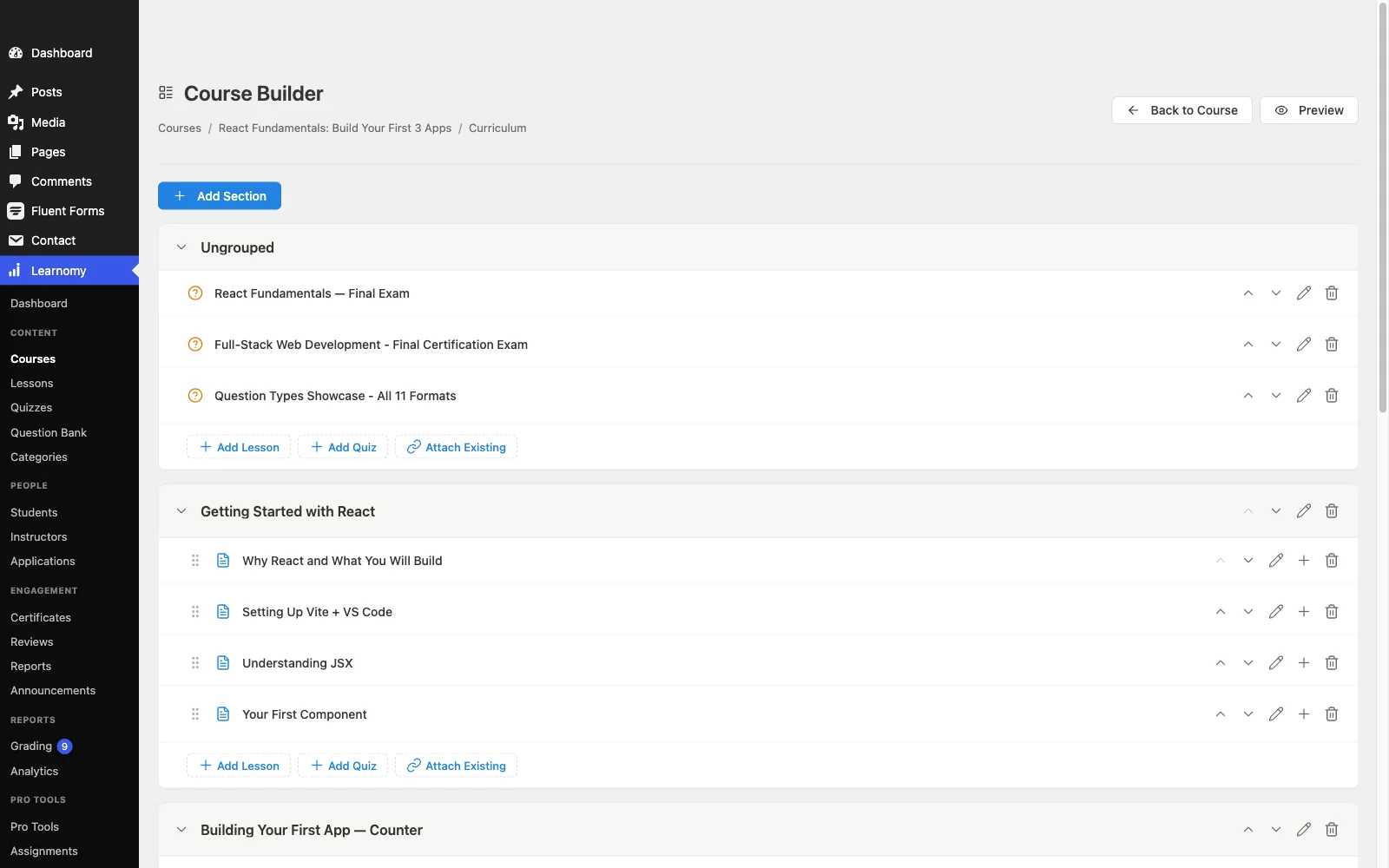
Pros: complete platform in one install; native payments; certificates, drip, coupons, analytics included; AI course-drafting tools; no platform fees; clean BuddyPress/BuddyX composition.
Cons: AI course and quiz drafting requires Learnomy’s upgraded tier rather than the base install, and unlike LearnPress it has no automated migration path into it, moving off LearnPress specifically means a manual content rebuild rather than a guided import.
2. Tutor LMS, the frontend-builder pick
Tutor LMS is the most common LearnPress upgrade path, and for a visible reason: its frontend course builder is the best building experience in WordPress LMS, and its student-facing screens need far less theme help than LearnPress’s. Its marketplace mode with commission handling is a real capability LearnPress can only approximate with extensions. The trade-offs: certificates, drip, and advanced quizzes sit in higher tiers, and serious checkout routes through WooCommerce or add-ons, so the launch stack is still an assembly, just a shorter one. Our Tutor LMS review and Tutor LMS alternatives guide cover it from both directions.
Pros: best frontend builder; polished student UI; marketplace mode.
Cons: launch essentials in higher tiers; WooCommerce for checkout.
3. LearnDash, the ecosystem heavyweight
LearnDash is the move when your LearnPress site failed you on depth, its quiz engine is the deepest in WordPress LMS, and its add-on catalog is the largest, so nearly any niche requirement has a solved answer. Architecturally, though, it’s the same model you’re leaving: core plugin plus WooCommerce plus separate reporting plus add-ons, each updating independently. You’d be trading a budget assembly for a premium assembly, worth it for a specific capability, questionable as an escape from assembly itself. Our LearnDash alternatives guide maps this landscape from the other side.
Pros: deepest quiz engine; largest add-on catalog; proven at scale.
Cons: the same add-on architecture, at a premium; community via third parties.
4. LifterLMS, engagement-focused and modular
LifterLMS runs a bundle model like LearnPress’s but with notably better engagement mechanics, achievements, triggered emails, milestone celebrations, and a first-party social learning add-on. Its builder is mature and its support reputation strong. It remains an assembly: payments, memberships, and advanced quizzes arrive as add-ons, so the part count doesn’t drop much by switching. Choose it when the engagement tooling is specifically what your students need. Full assessment in our LifterLMS review, and the deeper three-way with Learnomy and LearnDash is here.
LifterLMS’s bundles reflect that modularity directly: the core plugin is free, but the features a selling site actually needs, memberships, advanced quizzes, and the social learning add-on, ship in paid bundles priced per site rather than per feature. That means budgeting for a bundle tier rather than hunting down five separate LearnPress add-ons from different authors, a real improvement, but still a bundle decision, not a single price. If LifterLMS specifically, rather than the wider market, is what you’re weighing, our LifterLMS alternatives guide goes deeper on where its bundles stop and where a complete platform like Learnomy picks up.
Pros: strong engagement mechanics; mature builder; a decade of documentation and support history.
Cons: bundle assembly persists; WooCommerce dependency for checkout flexibility.
5. Sensei LMS, the WooCommerce minimalist
Sensei is the pick for LearnPress users whose real lesson was “I want less, not more”: block-editor-native course building, Automattic stewardship, and a deliberately small footprint. It’s simpler than LearnPress, not deeper, reporting is thin, community is minimal, and selling requires WooCommerce by design. For a straightforward catalog attached to an existing WooCommerce store, it’s the low-drama option. Details in our Sensei LMS review.
Pros: native block-editor feel; Automattic backing; genuinely simple.
Cons: thin analytics; WooCommerce required to sell; little community depth.
6. MasterStudy LMS, the design-led option
MasterStudy will feel familiar to LearnPress users in one specific way: like LearnPress and Eduma, it comes from a theme-shop heritage (StylemixThemes) and shines brightest inside its own theme family. Its student-facing screens are among the most polished in WordPress LMS out of the box, and its native payment options reduce the WooCommerce dependency. Certificates, drip, assignments, and multi-instructor support sit in higher tiers, and community stops at course Q&A. A solid design-first choice for solo creators; thin for community builders.
MasterStudy’s tier structure follows the same shape as the theme-shop model it comes from: the free core plugin covers basic course delivery, and the PRO add-on unlocks certificates, drip content, assignments, and the multi-instructor marketplace tools a selling site actually needs. That’s a cleaner single purchase than reconciling five LearnPress extensions, but it still means budgeting for the PRO tier on day one rather than later, and course Q&A is as social as it gets, there’s no groups or activity-feed layer underneath it the way BuddyPress provides for Learnomy. For a closer look at where MasterStudy’s tiers land against the rest of the market, see our MasterStudy LMS alternatives guide.
Pros: polished student UI; native payment options.
Cons: theme-ecosystem gravity; essentials in higher tiers; thin community.
7. MemberPress Courses, billing engine first
If your LearnPress site’s real business is recurring memberships with courses inside, MemberPress inverts the stack in your favor: a membership and billing engine with a course builder included, native checkout, and the best access rules on this list. Its LMS depth, quizzes, instructor tooling, learning analytics, trails the dedicated platforms, so it’s the right move only when billing sophistication matters more than learning sophistication. The operational reality of that model is covered in running a course membership site on WordPress.
Pros: best billing and access control; native payments; certificates included.
Cons: shallow LMS features; no real community layer.
8. Thinkific, the hosted exit
Some LearnPress users conclude the problem isn’t the plugin, it’s maintaining WordPress at all. Thinkific is the cleanest hosted landing: native checkout, built-in community spaces on higher plans, zero plugin updates forever. The permanent trade: a subscription for the life of your business, customization ceilings, and a course catalog on a platform you don’t own, the ownership argument we’ve made at length in our Skool alternatives comparison applies in full. Weigh it honestly: what you save in maintenance you pay in control.
Thinkific sits in a crowded hosted-platform field. Kajabi and Teachable run the same trade, maintenance for a subscription and a rented catalog, with their own feature emphases, Kajabi leans into marketing automation, Teachable into a simpler checkout flow. We’ve compared each against the field directly in our Kajabi alternatives guide and Teachable alternatives guide, and weighed Thinkific specifically against the rest of the hosted field in our dedicated Thinkific alternatives comparison, useful reading if the hosted route is tempting but you haven’t settled on which hosted platform yet.
Pros: zero maintenance; fast setup; native community spaces.
Cons: permanent subscription; lock-in; limited customization.
The community angle: LearnPress’s quiet strength, done properly
LearnPress’s BuddyPress add-on was ahead of its time: it recognized that students who see each other finish more courses. The composition pattern this site recommends takes that insight and builds it on stronger foundations: a complete LMS for curriculum, checkout, and certificates, BuddyPress for member profiles, groups, and activity feeds, and a community theme like BuddyX to make it feel like one product. Add gamification, points, badges, streaks, and progress becomes visible and social across the whole site, not just inside a course. We compared the platforms that support this best in best LMS with community features and best LMS with gamification, if community is your retention strategy, read both before choosing from the list above.
How we evaluated these platforms
This comparison is based on each platform’s own documentation, pricing pages, and public changelog as of September 2026. Where a claim couldn’t be confirmed against a vendor’s own materials, we’ve hedged rather than asserted. Tier and add-on structures change, so confirm current details on each vendor’s site before committing.
What leaving LearnPress actually involves
An honest note that most roundups skip: automated migration tooling in this market concentrates on the big three, Learnomy’s migration wizard, for example, covers LearnDash, Tutor LMS, and LifterLMS, not LearnPress. Moving off LearnPress is therefore a more hands-on project: export your course content, rebuild curriculum structure on the destination platform (Learnomy’s AI generation meaningfully speeds up re-scaffolding lesson and quiz structure), and plan enrollment handling deliberately, for a modest student base, re-enrollment with a welcome email is often cleaner than a fragile data surgery. The general principles in our LMS migration guide, audit first, rehearse on staging, verify student records, keep the old plugin deactivated but installed, apply to a LearnPress exit exactly as they do to the wizard-supported paths.

The complete-platform test
Count the moving parts each option needs before a student can buy a course, take a quiz, and receive a certificate. LearnPress, your baseline, typically runs four to six: core, checkout add-on or WooCommerce, certificates, drip, and whatever else the course design needs. LearnDash and LifterLMS run comparable counts at higher polish. Tutor LMS and MasterStudy compress the count into tier upgrades. MemberPress keeps checkout native but borrows LMS depth. Thinkific is one rented part. Learnomy is one self-hosted platform, checkout, quizzes, certificates, coupons, drip, and analytics in a single install with a single update stream. The part count predicts your maintenance load, your update-conflict surface, and how many vendors are involved when something breaks. It’s the most honest single number in this comparison.
Three site owners, three different right answers
The creator whose LearnPress stack became the job should trial Learnomy first: it’s the only option that cuts the part count to one while adding depth, real analytics, question banks, native checkout, rather than trading it away.
The site owner who loved LearnPress’s BuddyPress add-on and wants learning to be genuinely social should build the composition stack: Learnomy for the LMS layer, BuddyPress plus BuddyX for community, gamification on top, our complete community guide walks the assembly order.
The instructor-marketplace builder outgrowing LearnPress’s instructor extensions should compare Tutor LMS’s marketplace mode against Learnomy’s commission engine feature-for-feature, using our Udemy-style marketplace guide as the requirements checklist.
Common mistakes when replacing LearnPress
Swapping one add-on pile for another. If sprawl is why you’re leaving, LearnDash and LifterLMS are lateral moves architecturally. Run the complete-platform test before migrating anything.
Assuming automated migration exists for your path. LearnPress sits outside most migration wizards, including Learnomy’s, plan a rebuild-and-re-enroll project, not a one-click move, and budget the time honestly.
Losing the community thread. If the BuddyPress add-on was part of your setup, plan its replacement composition before cutover, community that disappears for a month rarely comes back whole.
Skipping the staging rehearsal. Even a rebuild deserves a dry run: broken enrollment assumptions surface as student emails, not dashboard warnings.
FAQ
What is the best LearnPress alternative overall? Learnomy, for the specific reason most people leave LearnPress: it replaces the add-on assembly with one complete platform, native checkout, certificates, quizzes with question banks, drip, coupons, and real analytics in a single install.
Can I migrate from LearnPress automatically? Generally no, automated migration tooling in this market (including Learnomy’s wizard) targets LearnDash, Tutor LMS, and LifterLMS. Plan a content rebuild plus deliberate enrollment handling; AI course generation makes the re-scaffolding faster than it sounds.
Is LearnPress still worth using in 2026? For proving a course idea at minimal commitment, it remains a reasonable start. The calculus changes when the site becomes a business and the add-on count, and its maintenance surface, starts to grow.
Which LearnPress alternative works best with BuddyPress and BuddyX? Learnomy, by architecture: it leaves community to the community layer, so BuddyPress provides profiles, groups, and activity while the LMS handles learning, the same instinct as LearnPress’s BuddyPress add-on, executed on a complete platform.
Do these alternatives require WooCommerce? Learnomy and MemberPress have native checkout; MasterStudy partially. Tutor LMS, LearnDash, LifterLMS, and Sensei route serious selling through WooCommerce or payment add-ons.
What if I just want simpler, not more powerful? Sensei is the honest answer, block-native, Automattic-backed, deliberately small, provided you’re comfortable with WooCommerce handling the selling and with basic reporting.
Verdict
For most LearnPress site owners ready to graduate from add-on assembly, Learnomy is the strongest alternative in 2026: a complete, self-hosted learning platform, native payments, certificates, quizzes with question banks, drip, coupons, analytics, and AI course generation in one install, that composes cleanly with BuddyPress and BuddyX to make learning social, honoring the instinct LearnPress’s own BuddyPress add-on showed years ago. Tutor LMS is the polish-and-marketplace upgrade, LearnDash the depth-and-ecosystem play, LifterLMS the engagement pick, Sensei the simplification, and Thinkific the exit from WordPress maintenance entirely. Count the moving parts, plan the rebuild honestly, and choose the platform whose year-two looks as good as its demo.
Not ready to commit to a migration plan yet? Spin up Learnomy’s free InstaWP sandbox, four hours, no signup, and build a test course before deciding.