

Most people who take up photography hit the same wall. After a few months the camera stops being the problem. The real question becomes “why does this photo not work?”, and a tutorial cannot answer it, because the tutorial has never seen the photo. Someone has to look at your actual frame and tell you what to change. Photographers improve when other photographers look at their work, which is why camera clubs, workshop groups and critique circles have outlasted every photo app.
This guide compares the platforms photography educators, workshop companies and camera clubs use to run a learning community online: photo critique, weekly challenges, courses, photo walks, live editing sessions, gear questions, portfolio review and protection for members’ images. We built a working photography learning community for the first entry and checked every competitor claim on the vendor’s own pages in November 2026.
Quick answer
If you teach photography and want a learning community you own, BuddyNext is the strongest choice: photo posts with critique in a private space, a weekly challenge space, a foundations course with assignments, photo walks and live editing sessions as events, a gear Q&A with accepted answers, a workshop roadmap members vote on, a job board for paid gigs and location data removed from uploads, all on your own website. Flickr, 500px and Glass are photo-sharing communities, SmugMug and Format are portfolio and client tools, Domestika sells photography courses, Meetup covers local walks, Patreon covers memberships and Circle is a general community option.
In this guide
- The critique loop: what a photography community has to do
- Three kinds of photography platform
- The photography learning community scorecard
- 1. BuddyNext: best for a photography learning community you own
- 2. Flickr: best for joining the wider photography world
- 3. 500px: best for exposure and licensing
- 4. SmugMug: best for client galleries and selling photos
- 5. Format: best for a photographer’s portfolio site
- 6. Domestika: best for buying photography courses
- 7. Meetup: best for organising local photo walks
- 8. Patreon: best for supporting a photographer you follow
- 9. Glass: best for a calm, critique-friendly photo feed
- 10. Circle: best hosted community with courses and events
- Running critique people actually want to receive
- Running a weekly challenge that lasts
- Photo walks: in person and online
- Questions to ask before you choose
- A 30-day launch plan
- Which platform fits your photography community?
- More community platform comparisons
- How we built and checked this list
- Frequently asked questions
- The bottom line
The critique loop: what a photography community has to do
Photography is a practical skill. You learn a concept, you go out and shoot, and then you find out whether it worked. The step that most self-taught photographers skip is the last one: showing the result to someone who can explain what they see. A good learning community is built around that loop.
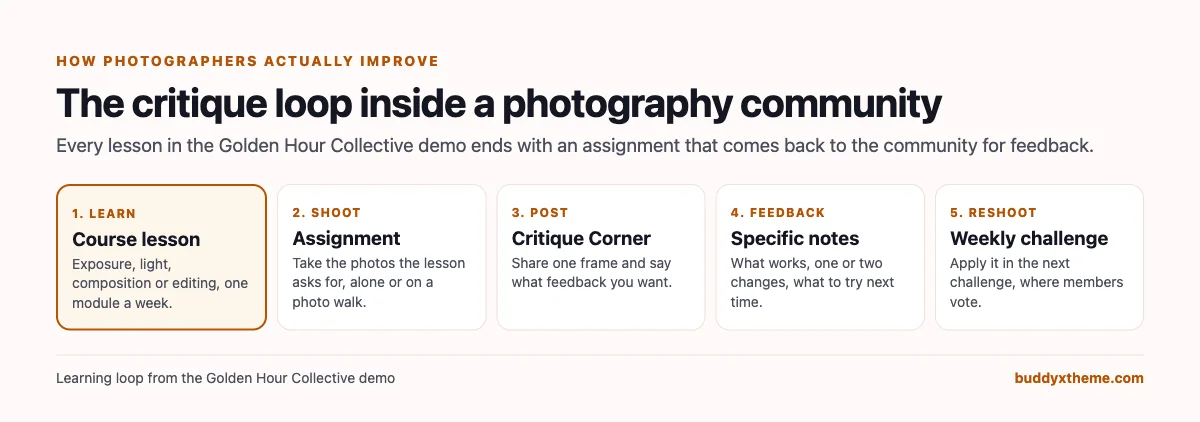
| Stage | What members need | What the platform needs |
|---|---|---|
| Learn | A structured path through exposure, light, composition and editing | A course with modules and assignments |
| Shoot | A reason to go out with the camera this week | Weekly challenges and photo walks |
| Post | A safe place to show unfinished work | Photo posts in a private critique space |
| Feedback | Specific notes from people who know more | Comments, coaches and clear critique etiquette |
| Reshoot | A chance to apply the feedback | The next challenge, with members voting |
| Ask | Answers to gear and technique questions | Q&A with accepted answers |
| Grow | A portfolio and, for some, paid work | Portfolio review and a job board |
There is also a reason to keep it inside a community rather than a public feed. The US occupational database O*NET counts “145,000 employees” working as photographers in 2025 and projects “Decline (-1% or lower)” in employment from 2025 to 2035, and lists “10,700” under projected job openings for 2025 to 2035 (O*NET OnLine). Paid photography work is competitive, so most people learning photography are hobbyists, career changers or side-project photographers. They want feedback and friends who share the hobby more than an audience of strangers.
The appetite is large. Domestika, which teaches photography alongside other creative skills, says its “community is home to millions of people from around the world who are curious and passionate about exploring and expressing their creativity” (Domestika). SmugMug says “photographers on every continent (yep, even Antarctica) run their hobbies, side-hustles, and businesses” on its platform (SmugMug).
Three kinds of photography platform
Photographers often use several platforms at once, and they solve different problems. It helps to sort them before comparing.
| Kind | What it does | Examples |
|---|---|---|
| Photo-sharing communities | Share photos with the wider photography world, follow photographers, join groups | Flickr, 500px, Glass |
| Portfolio and client tools | Show finished work, deliver galleries to clients, sell prints | SmugMug, Format |
| Learning and community platforms | Teach, critique, challenge and gather a group you run | BuddyNext, Circle, Domestika, Meetup, Patreon |
A photography educator usually wants the third kind for their students, while those students keep using the first two kinds for their own audience and clients. The question in this guide is which platform gives you the learning loop, under your own name.
The photography learning community scorecard
How each option handles what matters most. “Not found” means we could not confirm it on the vendor’s own pages, not that it is impossible.
| Platform | Photo critique | Challenges | Courses | Events and walks | Q&A | Portfolio | Image protection |
|---|---|---|---|---|---|---|---|
| BuddyNext | Photo posts in private spaces | Challenge spaces, polls, photo challenges | Yes, with assignments and certificates | Events, in person and online | Accepted answers | Portfolio review space, media library | Location removed, watermarks, private spaces |
| Flickr | Groups with comments | Not found | Not found | Not found | Group discussions | Photostream, galleries | Not found |
| 500px | Not confirmed | Quests | Blog tutorials | Not found | Not found | Profile | Licensing |
| SmugMug | Not found | Not found | Not found | Not found | Not found | Yes | Watermarks, download protection |
| Format | Not found | Not found | Not found | Not found | Not found | Yes, themes | Not found |
| Domestika | Feedback on projects | Not found | Yes | Not confirmed | Course questions | Projects section | Not found |
| Meetup | Not found | Not found | Not found | Yes, local groups | Not found | Not found | Not found |
| Patreon | Not found | Not found | Not found | Not found | Not found | Not found | Not found |
| Glass | Feedback culture | Not found | Not found | Not found | Not found | Profile, camera and lens feeds | Not found |
| Circle | Discussions | Not found | Yes | Events, live streams | Not found | Not found | Not found |
1. BuddyNext: best for a photography learning community you own
BuddyNext is a complete community platform that runs on your own WordPress site. Open, private and secret spaces, photo and media posts, events, Q&A with accepted answers, courses with certificates, a job board, direct messages, polls, leaderboards and paid memberships work together. A photography educator can run critique, challenges, a course, photo walks and editing sessions in one community under their own brand.
To show it in practice, we built Golden Hour Collective, a demo photography learning community run by a photographer and educator in Lisbon. It has 20 members: beginners just off auto mode, a retired teacher learning street photography, a travel photographer in Paris, an architect shooting cityscapes in Florence, a night and long exposure specialist, a food photographer shooting for her own cafe, a phone-only photographer, a film enthusiast, a photojournalism student, a wedding second shooter, a critique lead, an editing coach, a walk leader in London, a documentary mentor and an event producer who hires members for paid work.

The homepage tells a visitor what the community is for and shows it working: the Blue Hour challenge brief, a member’s entry from the rooftops of Paris and a Leading Lines entry from Florence.
The weekly challenge
Every Monday the host posts a theme with a short brief and one technical tip. Members post their best frame in the Weekly Challenge space by Sunday, comment on each other’s entries and vote; the winner chooses next week’s theme. A theme gives beginners a reason to pick up the camera this week, and it gives everyone a shared set of photos to learn from.
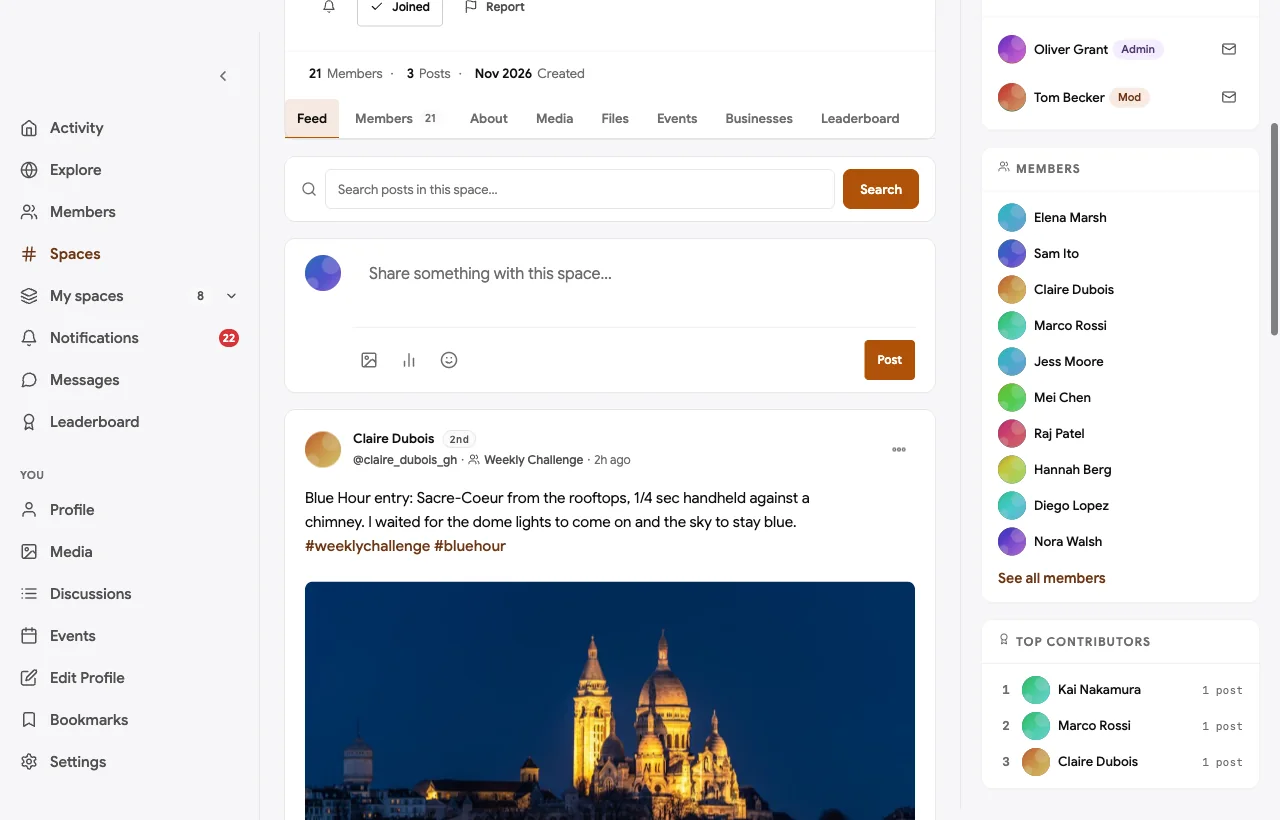
In the demo, the Blue Hour entry explains the settings and the trick behind them (a quarter-second exposure braced against a chimney), and the host turns that into a teaching moment. Past themes such as Leading Lines and Looking Up stay in the space as a library of examples.
Critique Corner
Critique Corner is a private space. Only members see what is posted there, so beginners can share photos they would never put on a public feed. Each request says what feedback the photographer wants.
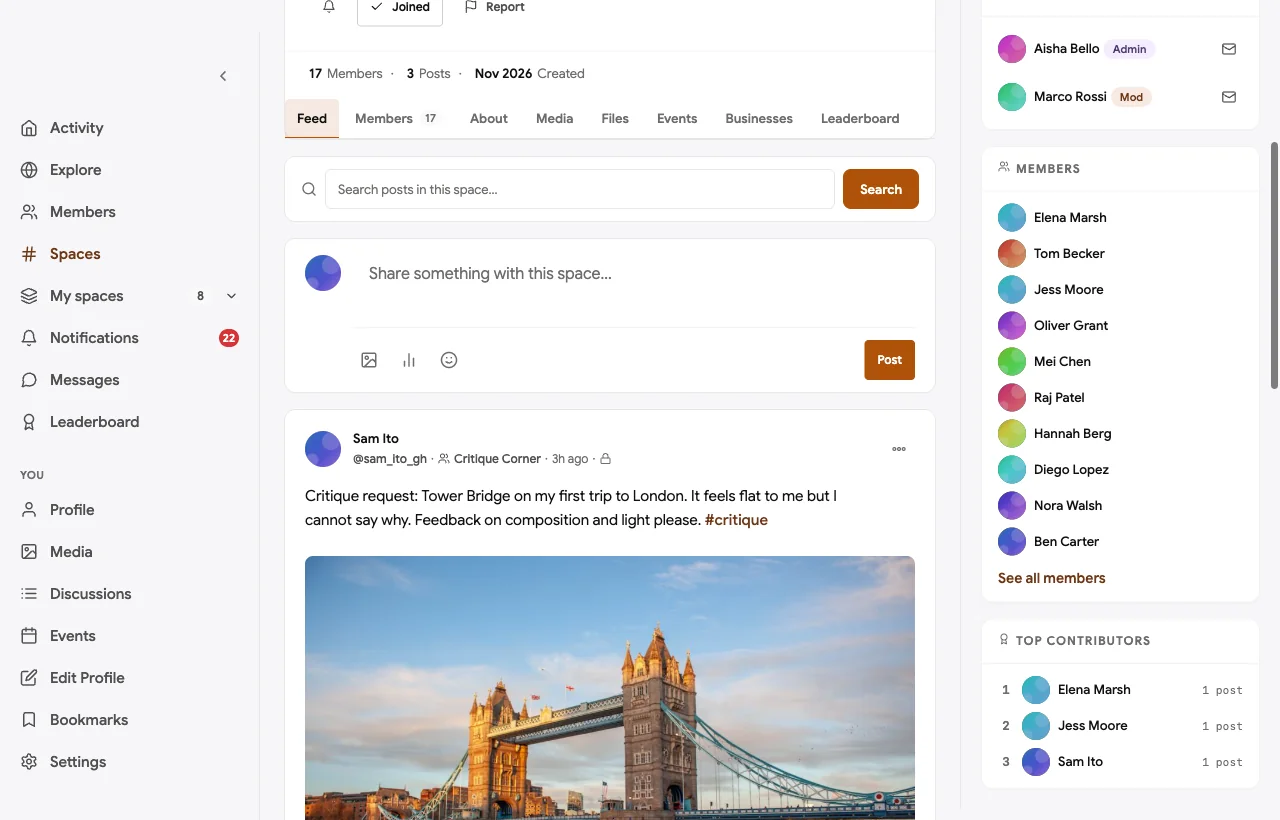
A beginner posts a Tower Bridge frame that “feels flat” without knowing why. The critique lead explains that midday light is even, so nothing pulls the eye, and suggests shooting an hour before sunset; the architect suggests lowering the horizon. The beginner books the next London photo walk to reshoot it. That is the whole loop in one thread. A food photographer asks the same kind of question about a dark background for a cafe menu, and gets two concrete suggestions about shadows and a fill card.
Photo walks
Photo walks are events, attached to the Photo Walks space. Some are in person and led by members in their own cities; some are online, where members spend half an hour shooting their own street and half an hour sharing on the call.
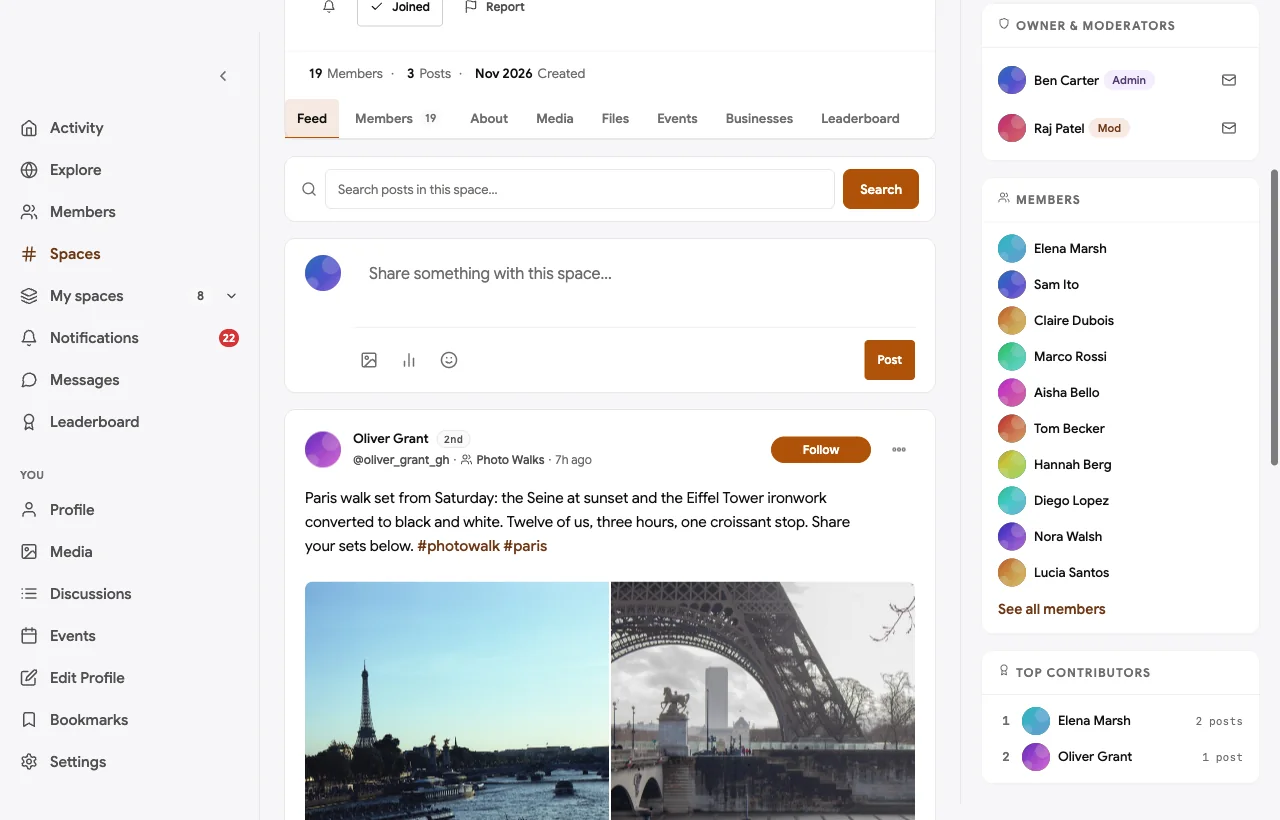
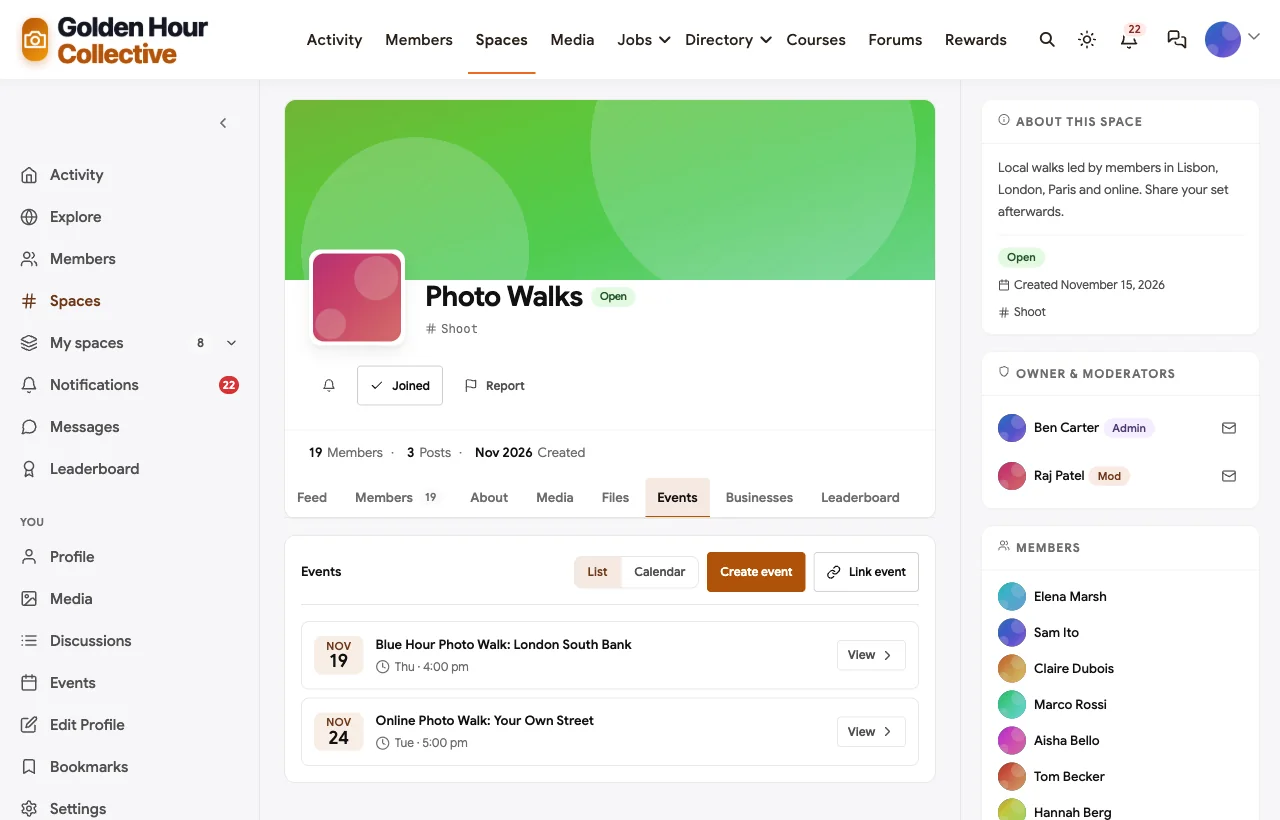
After a walk, the leader posts a set and members add their own. A new member who joined their first walk says they “learned more in three hours than three months alone”, which is the effect a walk is designed to have.
Editing Lab
Editing is half of modern photography, and it is where many learners get stuck. The Editing Lab space holds before and after posts, colour questions and a monthly live editing session with the editing coach.

The night photographer’s question about a magenta sky gets a specific answer (a local mask, not a global white balance change) and a reply confirming it worked. Answers like that are what members come back for.
Gear and technique Q&A
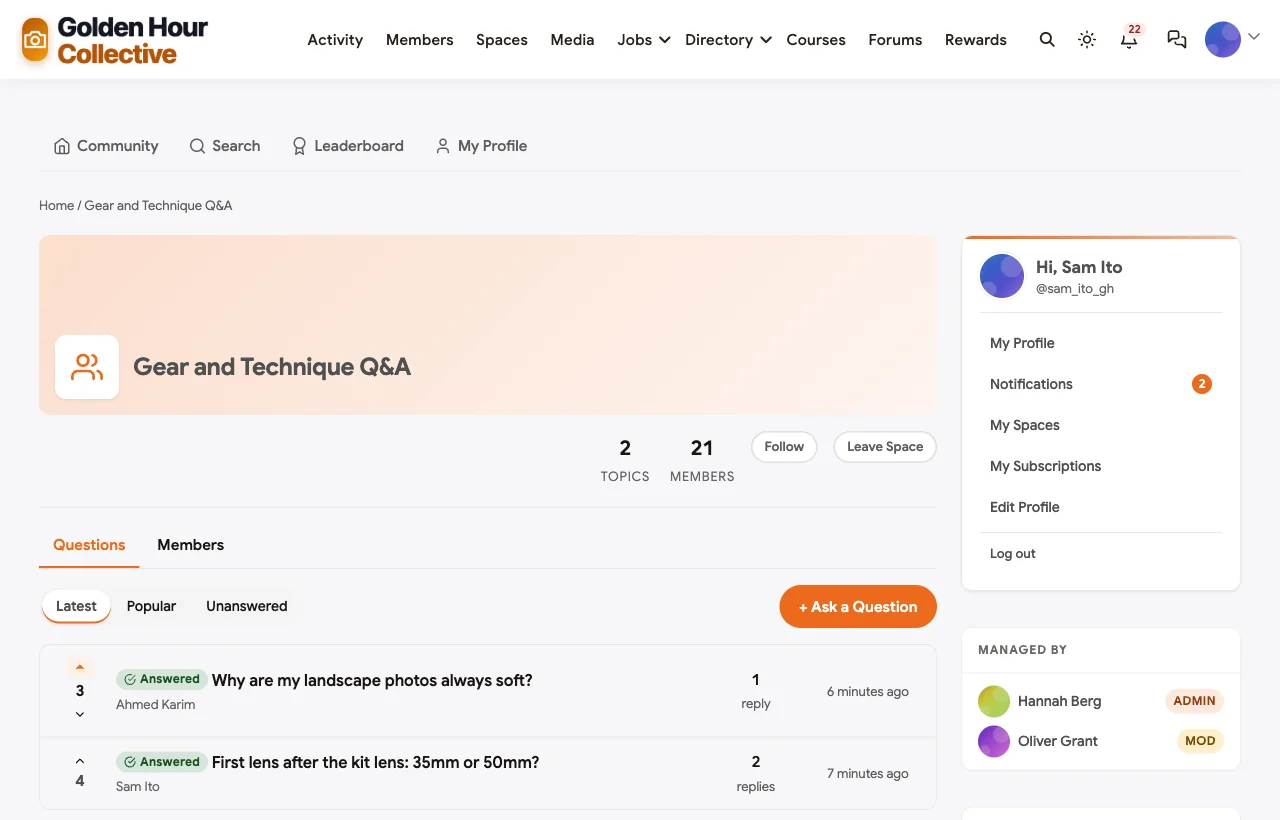
Gear questions are the most repeated questions in any photography group. The Gear and Technique Q&A space is a discussion forum where the best answer is marked accepted, so the next person who asks finds it straight away.
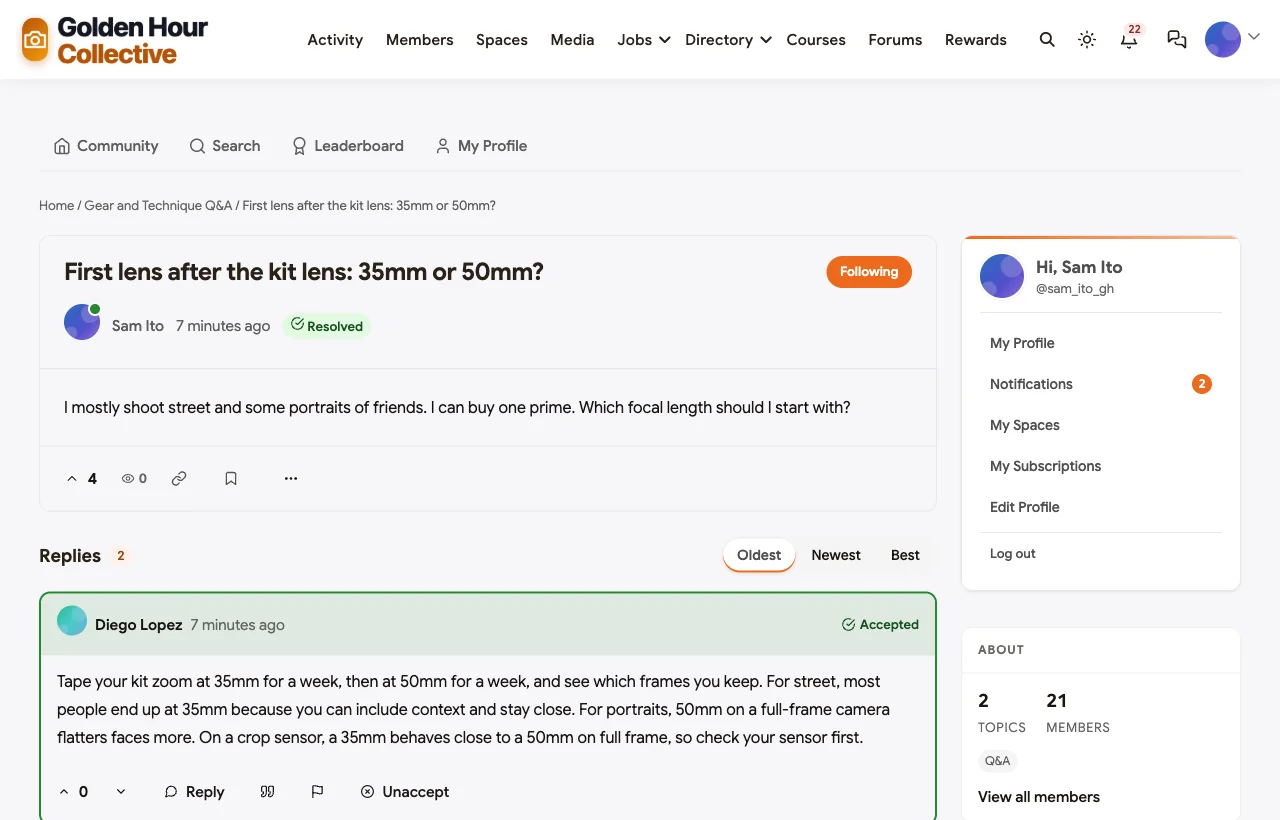
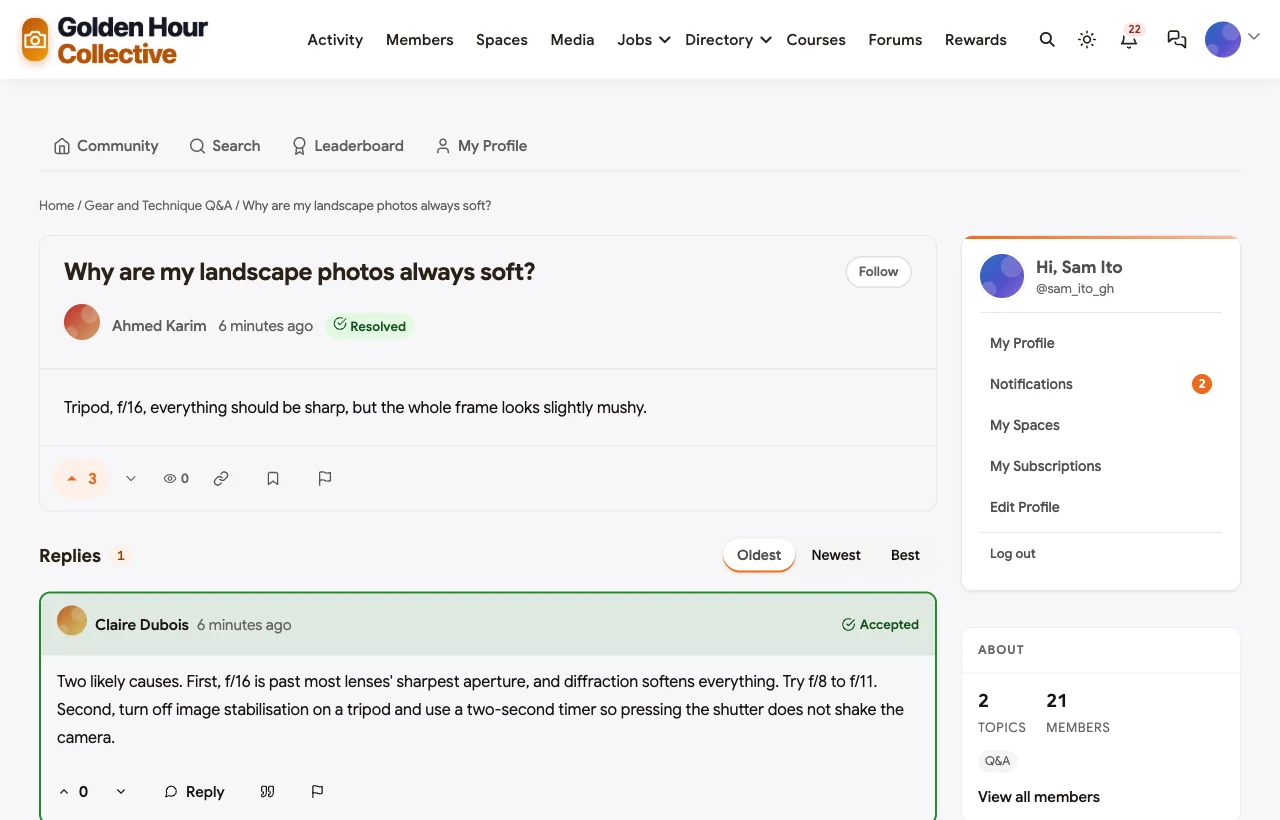
The first lens question gets a practical answer instead of a brand argument: tape your kit zoom at 35mm for a week, then at 50mm, and see which frames you keep. The landscape question about soft photos gets two likely causes and the fixes for each.
The foundations course
Seeing Light is a six-module course: your camera beyond auto mode, seeing light, composition, street and travel, editing and building a portfolio. Each module ends with an assignment that members post to Critique Corner, which turns the course into the start of the critique loop rather than a set of videos watched alone.
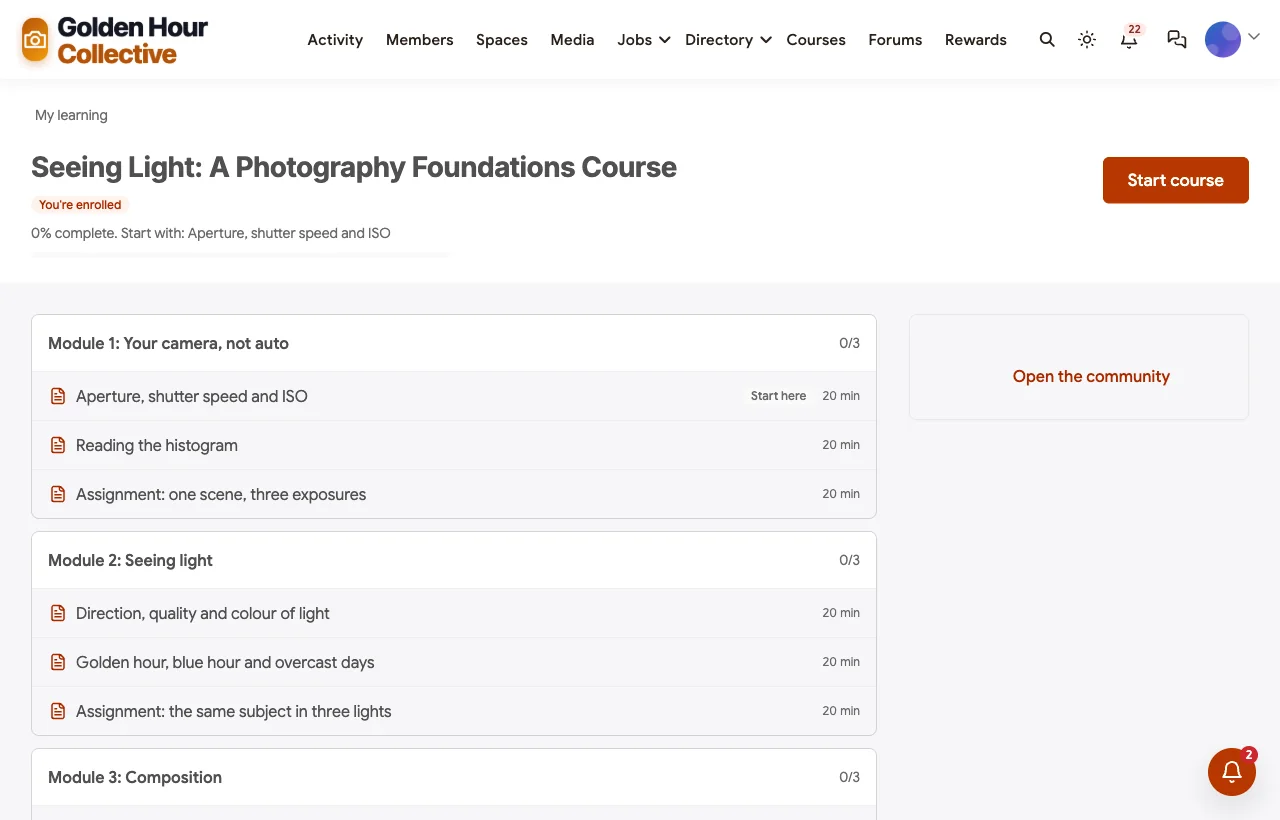
Members who finish receive a certificate. One review says posting every assignment for critique “is where the learning really happened”, which is the case for pairing a course with a community.
Workshop ideas and the roadmap
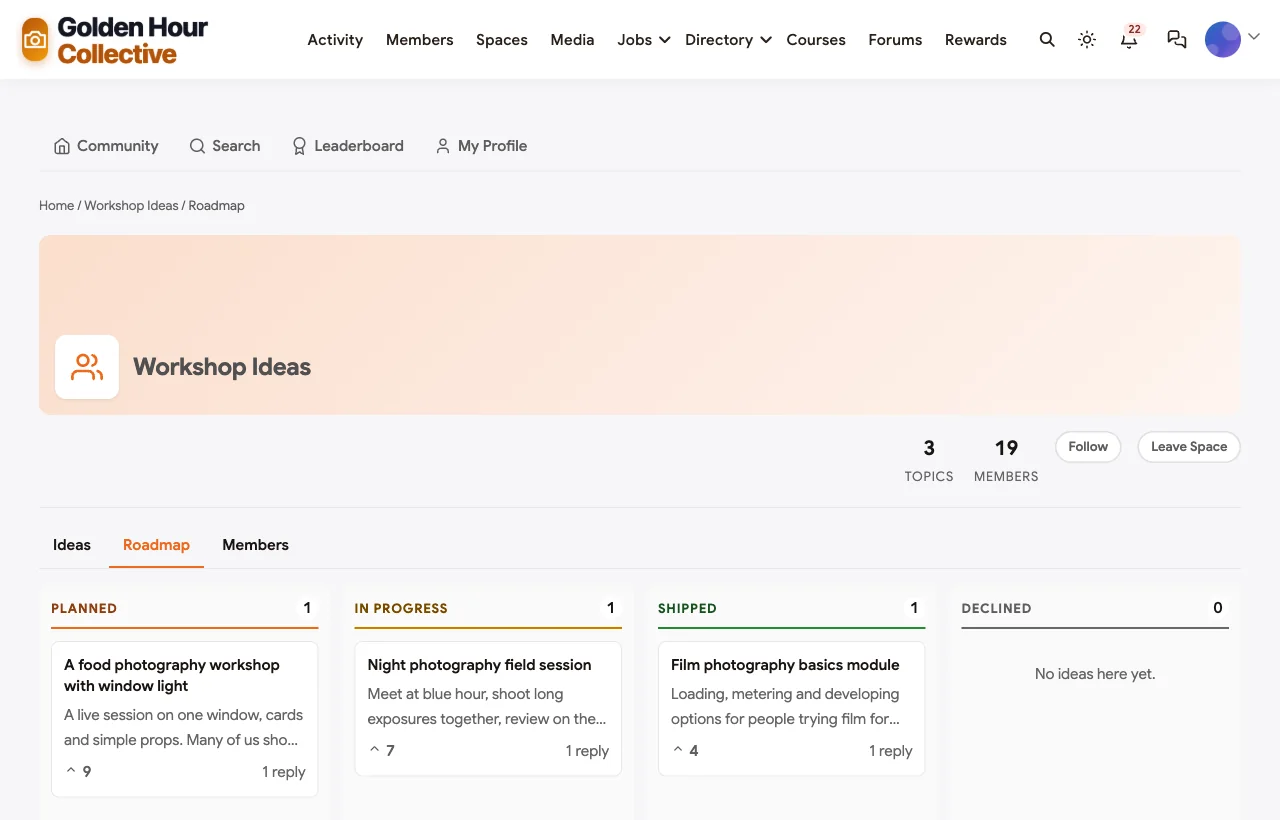
Members suggest workshops and course modules and vote on them. The host marks ideas as planned, in progress or shipped, and the roadmap shows all three columns.
Paid gigs and portfolios
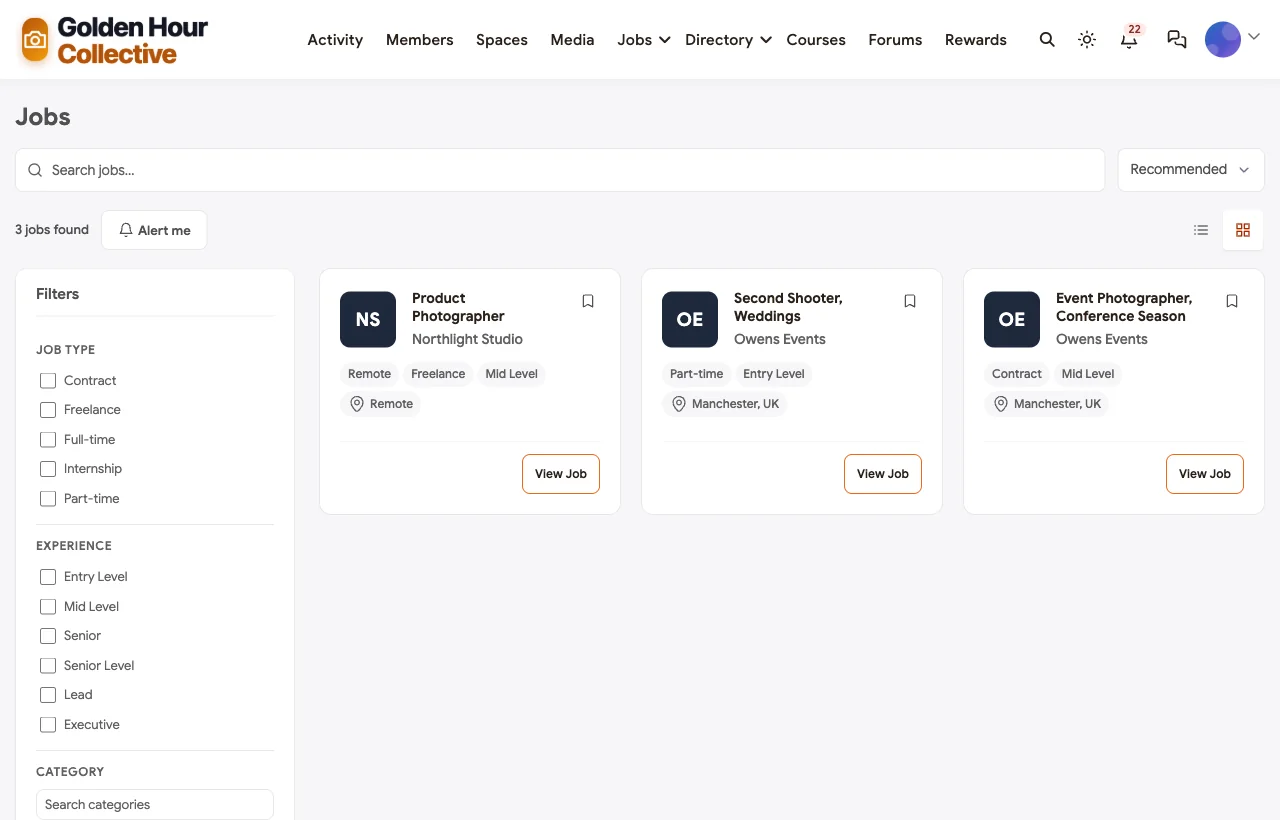
Some members want paid work. The job board carries gigs from partner businesses, here an event agency looking for a conference photographer and a wedding second shooter, and a studio looking for a product photographer. The private Portfolio Review space is where members preparing for clients, galleries or applications get a twelve-image set reviewed by mentors.
Members, messages and recognition
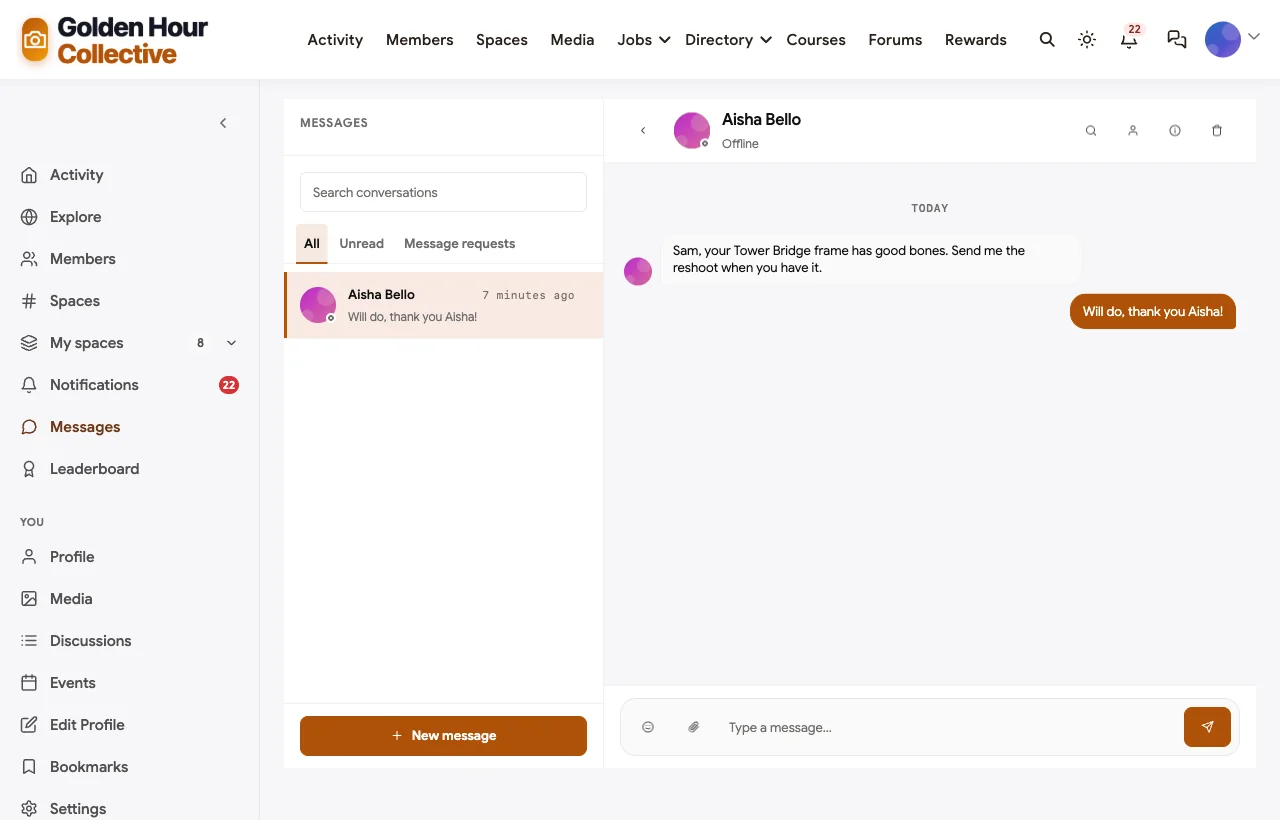
Profiles show what each member shoots and where they are based, which is how a beginner in Oslo finds the other members in Oslo. Direct messages handle follow-ups, like the critique lead asking a beginner to send the reshoot.
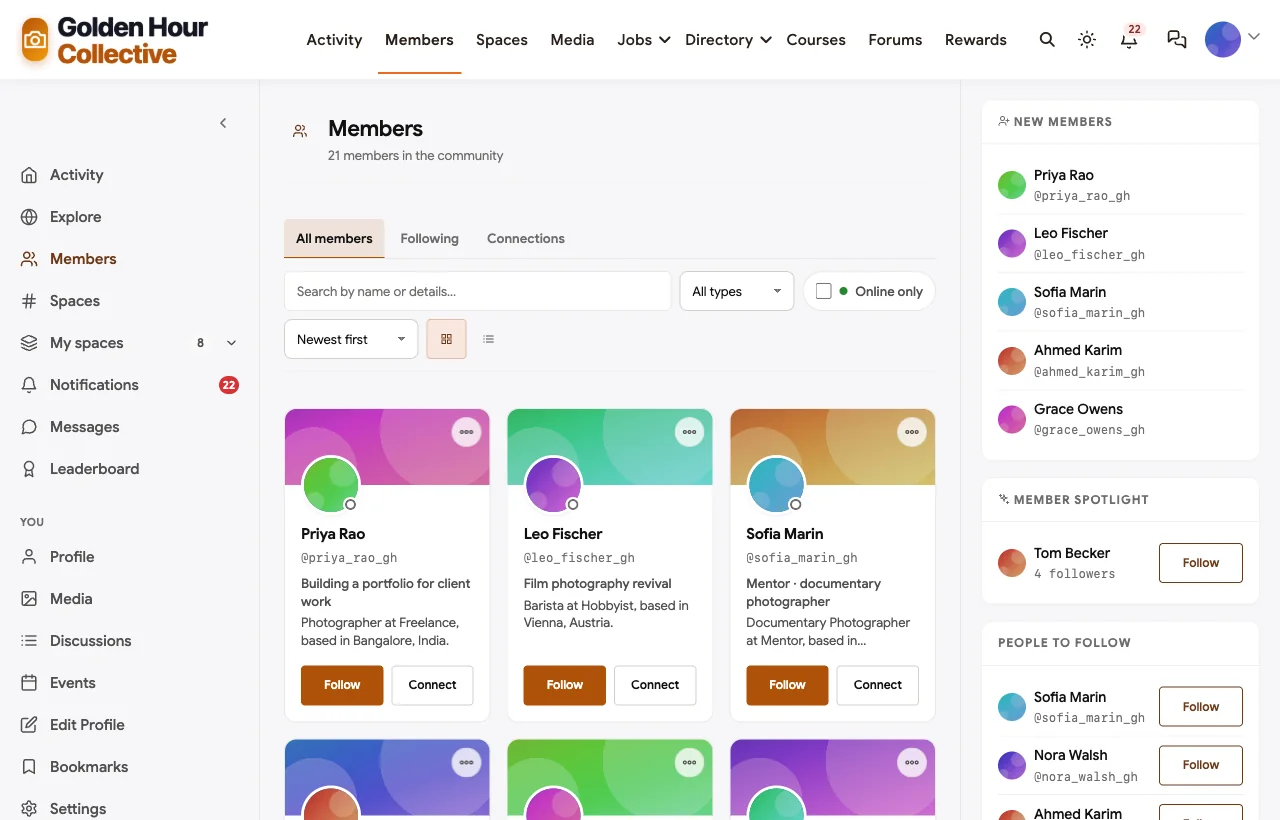
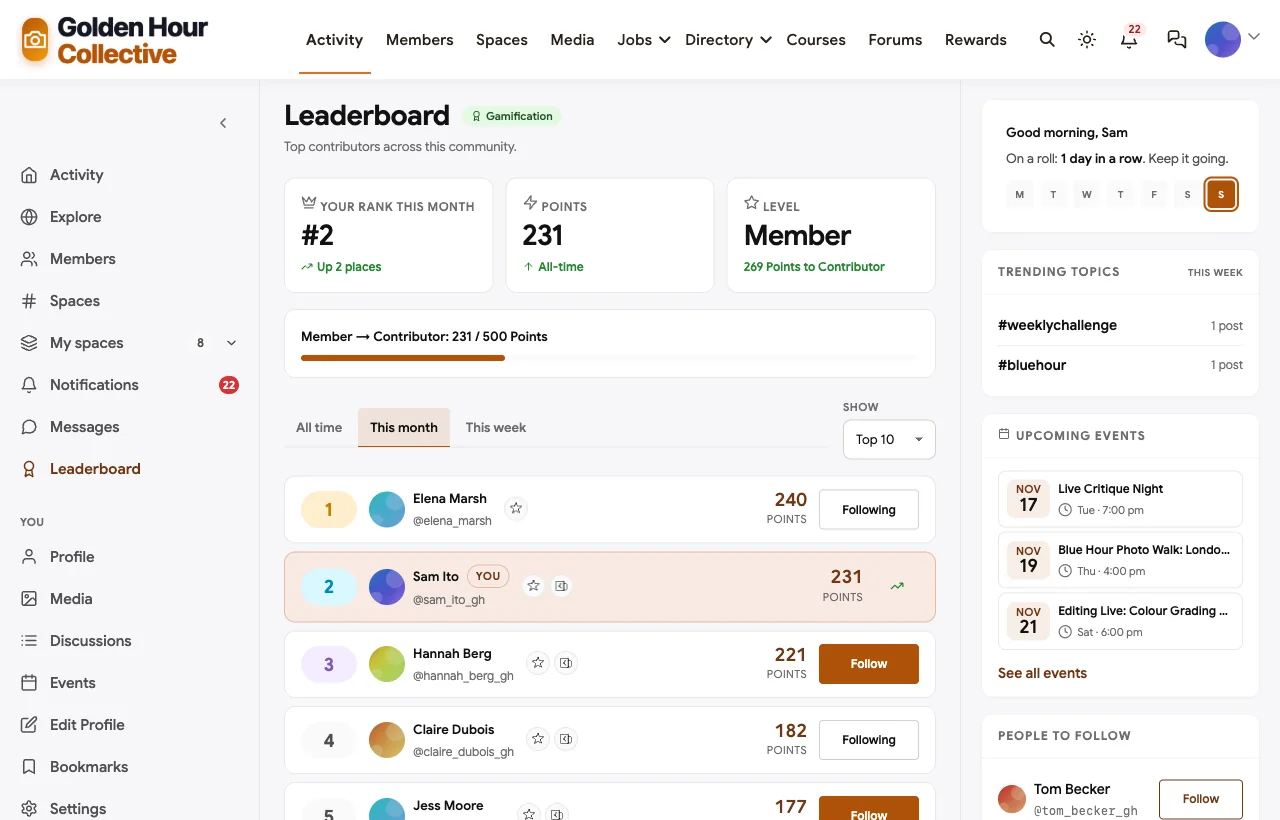
Points and a leaderboard reward the behaviour that keeps a critique community alive: giving feedback, not only asking for it.
Protecting member photos
Photographers are protective of their work, and they are right to be. A learning community has to make posting feel safe, or the most useful photos (the unfinished ones) never appear.
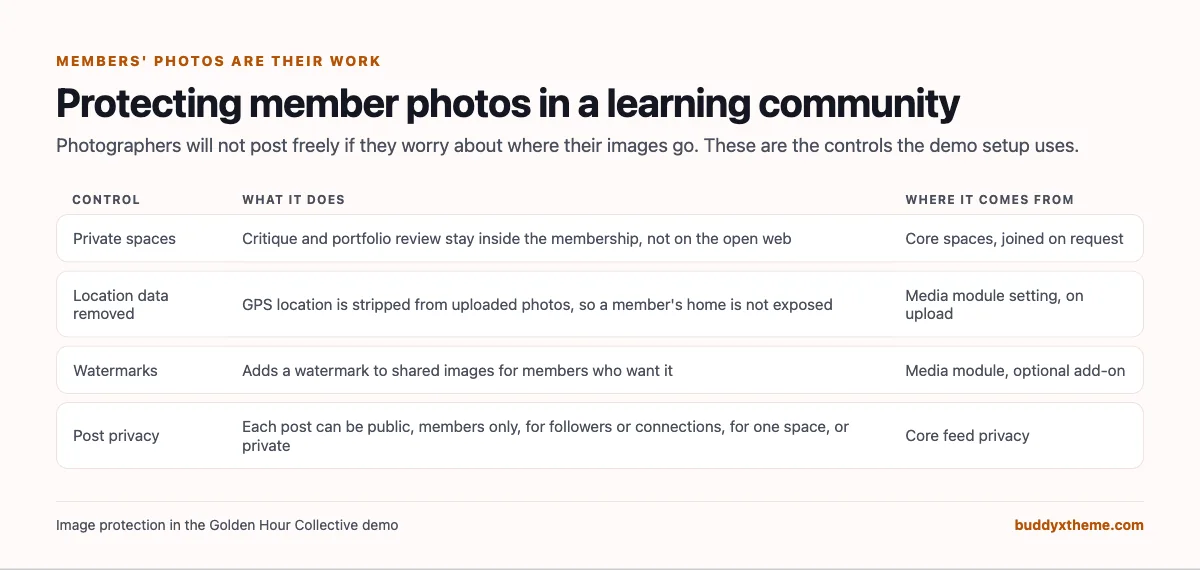
In the demo, critique and portfolio review are private spaces. The media module removes GPS location from uploaded photos by default, so a member who shoots from their balcony does not publish their address. Watermarks can be added to shared images, and each post can be public, limited to members, followers or connections, kept to one space or kept private.
On a phone
Members shoot on location, so they check the community on their phones. The whole community works in the mobile browser without an app download.

Also built in. Polls for workshop topics and gear surveys, hashtags, a member directory, notifications, moderation and reporting, points and badges, and paid memberships with trials and coupons.
Not built for: delivering client galleries, selling prints or licensing images. Keep SmugMug, Format or a licensing marketplace for those. Raw photo editing happens in your editing software, not in the community. It is self-hosted, so you run WordPress or use a managed host.
What’s included, and how it is delivered
BuddyNext is one platform made of a core and add-on platform modules. Everything shown in the demo above runs on the BuddyNext platform. This table shows which parts come with the core, which are platform modules you install and activate alongside it, and which need a third-party plugin, another system or custom work.
| Capability | How it is delivered |
|---|---|
| Open, private and secret spaces for critique, challenges and portfolio review | Core platform |
| Activity feed, pinned announcements, polls and hashtags | Core platform |
| Per-post privacy (public, members, followers, connections, one space, private) | Core platform |
| Member profiles and directory | Core platform |
| Reporting and moderation queue | Core platform |
| Photo posts, albums and media library | Platform module, installed alongside |
| Location data removed from uploaded photos | Platform module, installed alongside |
| Watermarks, photo challenges and photo battles | Platform module, installed alongside |
| Direct messages | Platform module, installed alongside |
| Photo walks, critique nights and editing sessions as events | Platform module, installed alongside |
| Gear Q&A with accepted answers and a workshop roadmap | Platform module, installed alongside |
| Foundations course with assignments and certificates | Platform module, installed alongside |
| Job board for paid gigs | Platform module, installed alongside |
| Points, badges and leaderboards | Platform module, installed alongside |
| Paid memberships with trials and coupons | Platform module, installed alongside |
| Client gallery delivery and print sales | Another system (SmugMug, Format) |
| Live video for critique nights and editing sessions | Third-party video tool (Zoom, Google Meet) |
Want to click around yourself? The Golden Hour Collective community in this guide was built on a private test site, so it is not public. The BuddyNext live demo is a general community you can open in your browser and explore without installing anything.
2. Flickr: best for joining the wider photography world
Flickr describes its purpose as “Connecting people through photography” and says “Flickr groups are a great way to share photos, post comments, and hold discussions around a common theme” (Flickr). Members can let contacts “organize your stuff - not just to add comments, but also notes and tags” (Flickr). Flickr is now run by SmugMug, which calls itself the “Rescuer of Flickr, the world’s favorite photography community” (SmugMug).
Strengths: a large, long-running photo community with themed groups.
Gaps: groups live on Flickr’s site, not yours; no courses, events or challenge mechanics found.
3. 500px: best for exposure and licensing
500px’s blog calls itself “your go-to source for everything photography,” featuring “the stories behind the photos you see on 500px” (500px). Its content covers “Photo Licensing 101” and “Selling Your Photography”, and the site runs Quests, its themed photo challenges.
Strengths: challenges through Quests and a licensing path for photographers who want to sell.
Gaps: the main site is app-rendered and we could not confirm how critique or Quest judging works from its pages; no courses or private groups found.
4. SmugMug: best for client galleries and selling photos
SmugMug says it “powers your photography - and your business” (SmugMug). Its features include “Private, password-protected galleries,” “Easy photo selection and favoriting,” “Personal watermarks” and “Right-click download protections” (SmugMug).
Strengths: strong image protection and client delivery.
Gaps: no community, critique, challenges, courses or events found. It is the tool students graduate to, not a place to learn together.
5. Format: best for a photographer’s portfolio site
Format is “The Portfolio Builder for Photographers,” with “90+ themes” and “branded client galleries, seamless file transfers, and secure contracts” (Format).
Strengths: polished portfolio websites and client workflow.
Gaps: a tool for one photographer, not a group; no community, critique or challenges found.
6. Domestika: best for buying photography courses
Domestika calls itself “the largest creative community,” with courses in “design, illustration, photography, marketing” and more, and invites students to “Ask questions, request feedback, or offer solutions” (Domestika). A Projects section shows student work.
Strengths: a large catalogue of photography courses with student projects.
Gaps: you join Domestika’s marketplace rather than running your own community; no challenges, walks or private critique groups of your own found.
7. Meetup: best for organising local photo walks
Meetup is “The people platform. Where interests become friendships,” and says “Since 2002, members have used Meetup to make new friends, meet like-minded people, spend time on hobbies, and connect with locals over shared interests” (Meetup). Photography has its own topic page, and anyone can “Create your own Meetup group” (Meetup).
Strengths: local discovery for in-person walks and meetups.
Gaps: no courses, critique spaces, challenges or portfolio review found. Many camera clubs use Meetup for walks and another platform for everything else.
8. Patreon: best for supporting a photographer you follow
Patreon invites creators to “Build a membership for your fans and get paid to create on your own terms,” and has a landing page aimed at photographers (Patreon).
Strengths: a known way to run a paid membership around your photography.
Gaps: no photography-specific features found on its pages: no galleries, critique, challenges, courses or events.
9. Glass: best for a calm, critique-friendly photo feed
Glass says it “is a community, not an audience,” and “a place where photography is treated like a craft, not content” (Glass). It promises “Thoughtful discussion, meaningful feedback, and members who are really excellent to each other,” a “chronological feed and no public counts,” and “photos organized by camera and lens” (Glass).
Strengths: a thoughtful culture and a feed without algorithms or public counts.
Gaps: you join Glass’s community rather than running your own; no challenges, courses, events or private groups found.
10. Circle: best hosted community with courses and events
Circle helps you “Build a home for your community, events, and courses - all under your own brand,” and to “Customize your spaces, prompt discussions, host live events, and launch your course” (Circle).
Strengths: courses, events, discussions and live streams in one hosted product.
Gaps: no photography-specific features found: no photo challenges, critique workflow, image protection or job board.
Running critique people actually want to receive
Critique is the most valuable thing a photography community offers, and the easiest to get wrong. One harsh comment can stop a beginner posting for months. In the demo, the critique lead pins the same three-part etiquette in every space:
- Say what works first. Be specific. “The balance between the sky and the dome is spot on” teaches more than “nice shot”.
- Then one or two changes. Not ten. Pick the changes that would make the biggest difference to this photo.
- Then what to try next time. Turn the critique into a reason to go out and shoot again.
Two more rules help. Ask the photographer what feedback they want, because “is the background too dark?” is easier to answer well than “thoughts?”. And keep critique private by default: a private Critique Corner gets more honest posts than a public one.
Running a weekly challenge that lasts
Challenges keep a photography community active between courses and events, but they fade if the themes get stale. These habits keep them going:
- Post the brief at the same time every week, with one technical tip, so beginners know how to start.
- Mix technical and creative themes. Blue Hour teaches exposure; Looking Up teaches seeing.
- Let the winner choose the next theme. It spreads ownership beyond the host.
- Keep the archive. Past challenges become a library of worked examples for new members.
- Use a poll when entries pile up, so voting stays quick.
Photo walks: in person and online
A photo walk is the moment an online community becomes real friends. Keep walks short (two or three hours), give each one a theme, and ask the leader to post a set afterwards so the people who could not come still see the results. Online walks work too: thirty minutes shooting your own street and thirty minutes sharing on a call removes the travel barrier and gives remote members the same experience.
Questions to ask before you choose
- Is this a community you run, or one you join? Flickr, 500px, Glass and Domestika are communities you join; BuddyNext and Circle are ones you run.
- Where does critique happen? Look for private spaces, not only a public feed.
- Can you teach? Courses with assignments turn critique into a curriculum.
- Can you meet? Events for walks, critique nights and editing sessions.
- How are photos protected? Location data, watermarks, privacy per post and private spaces.
- Will members get paid work? A job board or gig list helps members who want to go professional.
- Who owns the members and the archive? On your own site, the challenge library and critique history are yours.
A 30-day launch plan
- Week one: foundations. Create Start Here, Critique Corner, Weekly Challenge and Gear Q&A, and pin the critique etiquette.
- Week two: the first challenge. Post a simple theme, enter it yourself and comment on every entry.
- Week three: teach and meet. Open the first course module and run a first photo walk, online or in person.
- Week four: grow. Add the Editing Lab and a live editing session, open workshop ideas for voting and invite local partners to post gigs.
Which platform fits your photography community?
| If you… | Choose |
|---|---|
| Want critique, challenges, a course, walks and editing sessions in a community you own | BuddyNext |
| Want to share photos with the wider photography world | Flickr, 500px or Glass |
| Need client galleries, print sales or a portfolio site | SmugMug or Format |
| Want to buy or sell photography courses on a marketplace | Domestika |
| Only need local walks | Meetup |
| Want a paid membership for an existing following | Patreon |
| Want a general hosted community with courses | Circle |
More community platform comparisons
Running a different kind of creative or learning community? These guides use the same method: a working demo community and vendor claims checked at the source.
- Best platforms for a music teaching community: practice logs, feedback on recordings, group classes, recitals and a parents space.
- Best platforms for a content creator community: creators, challenges and memberships.
- Best platforms for an online course community: courses with discussion and support.
- Best platforms for a paid language learning community: practice, feedback and live sessions.
- Best platforms for a cohort-based learning community: learning together on a schedule.
- How to set up a community space on WordPress: the step-by-step setup guide behind every demo in this series.
How we built and checked this list
We built the Golden Hour Collective demo on a local WordPress site running BuddyNext, with fictional members, coaches, mentors, a course, challenges, walks and gigs created for this guide. The photos in the demo are stock images used for illustration. Every BuddyNext screenshot is from that demo. Competitor features were checked against each vendor’s own website in November 2026, and the employment figures come from O*NET OnLine. We left out DPReview’s forums because they focus on gear reviews rather than learning, and Vero because we could not confirm relevant features on its own pages. Where we could not confirm a feature on a vendor’s own pages, the scorecard says “Not found” or “Not confirmed”. We did not run a hands-on trial of every product, so features can change; confirm anything critical with the vendor. buddyxtheme.com is published by the team behind BuddyNext, which is why BuddyNext is listed first; we have tried to be fair about its gaps as well as its strengths.
Frequently asked questions
What is the best platform for a photography learning community?
BuddyNext is the best choice for a photography learning community you own, with private critique, weekly challenges, a course with assignments, photo walks and editing sessions as events, gear Q&A and a job board. Circle is a hosted alternative, and Flickr or Glass suit photographers who want to join an existing community.
How do I run photo critique online without discouraging beginners?
Keep critique in a private space, ask photographers what feedback they want, and pin a simple etiquette: what works, one or two changes, and what to try next time.
How do weekly photo challenges work?
The host posts a theme and a tip each week, members post one frame by the deadline, everyone comments and votes, and the winner picks the next theme.
How do I protect members’ photos in a community?
Use private spaces for critique, remove location data from uploads, offer watermarks for shared images and let members set the privacy of each post.
Can I run photo walks through an online community?
Yes. Create each walk as an event with a time and place, or run online walks where members shoot their own street and share on a call afterwards.
Do I still need a portfolio site like SmugMug or Format?
If members deliver client galleries or sell prints, yes. A community handles learning and feedback; a portfolio tool handles clients.
Can members use the community on their phones?
BuddyNext works in the mobile browser without an app download, so members can post from a walk.
The bottom line
Photographers improve when other photographers look at their work. If you want critique, challenges, a course, walks and editing sessions in a community you own, BuddyNext is the strongest foundation, alongside a portfolio tool for client work. For joining the wider photo world, Flickr and Glass lead.
And give your students a place to keep learning between lessons.