
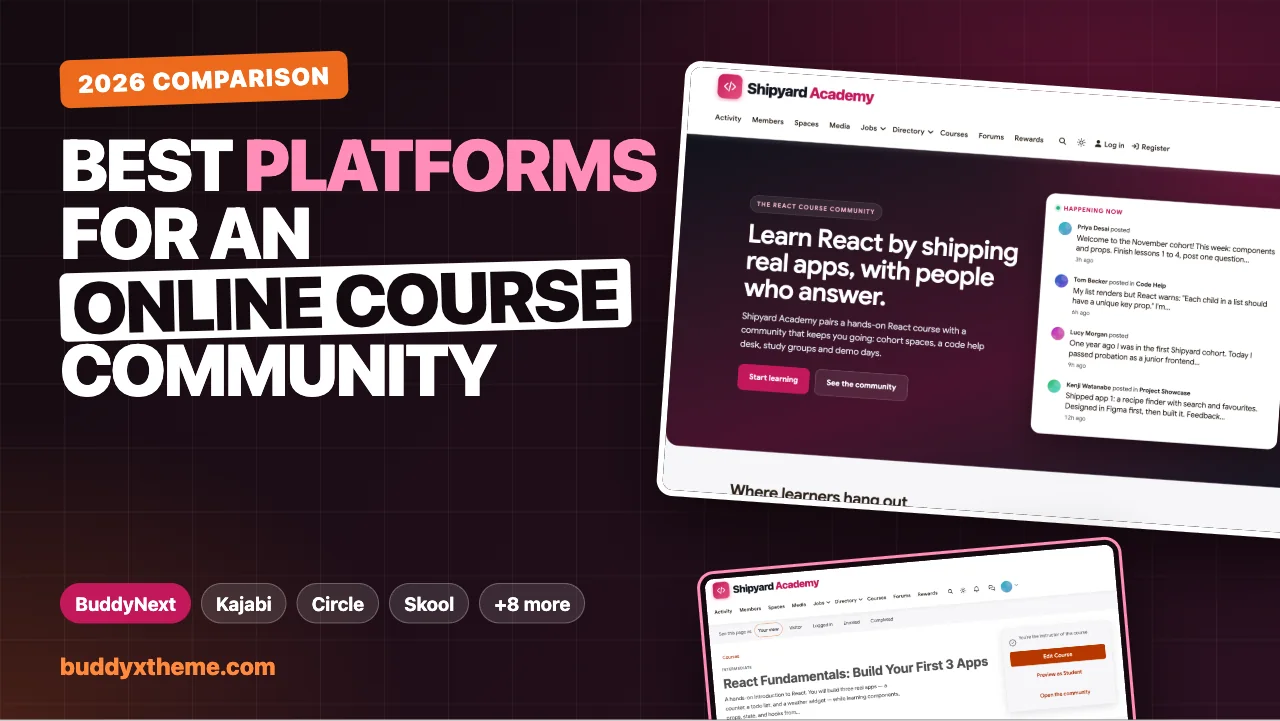
Most online courses are finished by a small minority of the people who start them. Videos are not the problem. Learners get stuck on lesson 4, nobody notices, and by week three the course is just another tab they meant to come back to. The creators who beat that pattern almost always do the same thing: they put a community around the course, so learners have people to ask, peers to keep pace with and a reason to show up.
This guide compares the platforms you can use to build that kind of online course community, judged on how well the course and the community actually work together, not on how many video formats each one supports. We built a working course community for the first entry so you can see it, checked every competitor claim against the vendor’s own pages in November 2026, and kept the trade-offs honest.
Quick answer
If you want an online course community you own and control, BuddyNext is the strongest choice, because enrolling in a course automatically adds learners to that course’s community space, and completions, certificates, Q&A, study groups and live sessions all live in one place on your WordPress site. Kajabi is the strongest hosted all-in-one, Circle and Mighty Networks suit community-first creators, and Skool is the simplest course-plus-community launch.
In this guide
- Why online courses need a community
- Course-first, community-first or integrated?
- Seven questions to ask before you choose
- Online course community platforms compared
- What successful course communities run on
- 1. BuddyNext: best for a course community you fully own
- 2. Kajabi: best hosted all-in-one for course businesses
- 3. Circle: best for community-first creators adding courses
- 4. Mighty Networks: best for cohort programs with streaks
- 5. Skool: best for the simplest course-plus-community launch
- 6. Thinkific: best for course-first teaching with a community add-on
- 7. LearnWorlds: best for interactive courses with social learning
- 8. Podia: best for simple bundles of courses and community
- 9. Disco: best for academies and customer education
- 10. Maven: best for selling live cohorts on a marketplace
- 11. LearnDash with BuddyBoss: best for WordPress sites already using both
- 12. Teachable: best for course sales, not community
- A cohort playbook that keeps learners finishing
- Setting up a Q&A space that scales
- Which platform fits your course?
- More community platform comparisons
- How we built and checked this list
- Frequently asked questions
- The bottom line
Why online courses need a community
The numbers behind self-paced courses are sobering. Katy Jordan’s peer-reviewed study of 221 massive open online courses (MOOCs) found completion rates ranging from 0.7% to 52.1%, with a median of just 12.6% (IRRODL). Most people who start an open course never finish it.
Structure and people change that. Ruzuku, a cohort-course platform, reports that scheduled cohort courses on its platform completed at 53.4%, compared with 41.9% for open-access courses, across 26,632 courses and 1.3 million enrollments (Ruzuku). That is a vendor’s analysis of its own platform, so treat it as a claim rather than a controlled study, but it points the same way as most instructors’ experience: learners finish more often when they learn alongside other people.
That is why the platform question matters. A course with a community bolted on somewhere else gets a fraction of the benefit of a course whose community is part of the learning.
Course-first, community-first or integrated?
Every platform in this guide falls into one of three designs. Knowing which one you are looking at explains most of its strengths and gaps.
| Design | How it works | Examples |
|---|---|---|
| Course-first | A course platform with community features added on | Thinkific, Teachable, LearnWorlds, Podia, Kajabi |
| Community-first | A community platform that also hosts courses | Circle, Mighty Networks, Skool, Disco |
| Integrated | Courses and community share one data model, so enrolment, progress and community membership are linked | BuddyNext, LearnDash with BuddyBoss, Maven’s cohort portal |
Course-first platforms usually have the strongest teaching tools (quizzes, certificates, assessments) and the thinnest community. Community-first platforms are the opposite. Integrated platforms aim to give you both, with the learner’s enrolment deciding which community spaces they see.
Seven questions to ask before you choose
Use these to test any platform, including the ones in this guide:
- Does enrolling in a course give the learner access to its community automatically? If you have to add people by hand, you will fall behind within a month.
- Can each course or cohort have its own space? Mixing every cohort into one feed buries questions.
- Can learners discuss a specific lesson where they are stuck? Lesson comments or a linked Q&A space make help findable.
- Do completions and certificates show up socially? Seeing peers finish is one of the strongest nudges to keep going.
- Can you run live sessions inside the community? Live code-alongs, office hours and demo days are where cohorts bond.
- Will answers still be findable next cohort? A searchable Q&A space turns this month’s questions into next month’s documentation.
- Do you own the student list? If your course is a business, its learners are its most valuable asset.
Online course community platforms compared
| Platform | Enrolment grants community access | Per-cohort spaces | Certificates | Gamification | Self-hosted |
|---|---|---|---|---|---|
| BuddyNext | Yes, automatic for linked courses | Yes | Built in, shown in the feed | Points, streaks, leaderboard | Yes |
| Kajabi | Community tied to course products | Cohort courses | Not documented | Leaderboard, challenges | No |
| Circle | Via access settings | Reported (drip by date) | Reported via integrations | Listed | No |
| Mighty Networks | Courses and community in one network | Cohort courses | Via integrations | Points, streaks | No |
| Skool | One community with its classroom | No | Not documented | Points, levels, leaderboards | No |
| Thinkific | Communities sold with courses | Live cohorts | Built in | Not documented | No |
| LearnWorlds | Course communities and forums | Not documented | Built in on higher tiers | Points, badges, leaderboards | No |
| Podia | “Customers join the moment they buy” | Spaces by tier | Not documented | Not documented | No |
| Disco | Academy with groups and subgroups | Cohort programs | Not documented | Leaderboards | No |
| Maven | Each cohort gets its own channels | Yes, one portal per cohort | Not documented | Not documented | No |
| LearnDash + BuddyBoss | Course groups sync to social groups | Yes | Built in | Badges and points | Yes |
| Teachable | Community closed to new schools | Not applicable | Built in on higher tiers | Not documented | No |
“Not documented” means the vendor’s own pages did not describe the feature when we checked in November 2026.
What successful course communities run on
| Course community | Platform |
|---|---|
| SPI Community, Pat Flynn’s learning community | Circle (Circle customer story) |
| Mindbody One, about 16,000 members | Mighty Networks (Mighty Networks case study) |
Both are well-known examples published by the platforms themselves, so read them as the vendors’ best cases, but they show what is possible when the course and the community are designed together.
1. BuddyNext: best for a course community you fully own
Best for: course creators, academies and training teams who want courses, cohort spaces, Q&A, live sessions and certificates in one community on their own site.
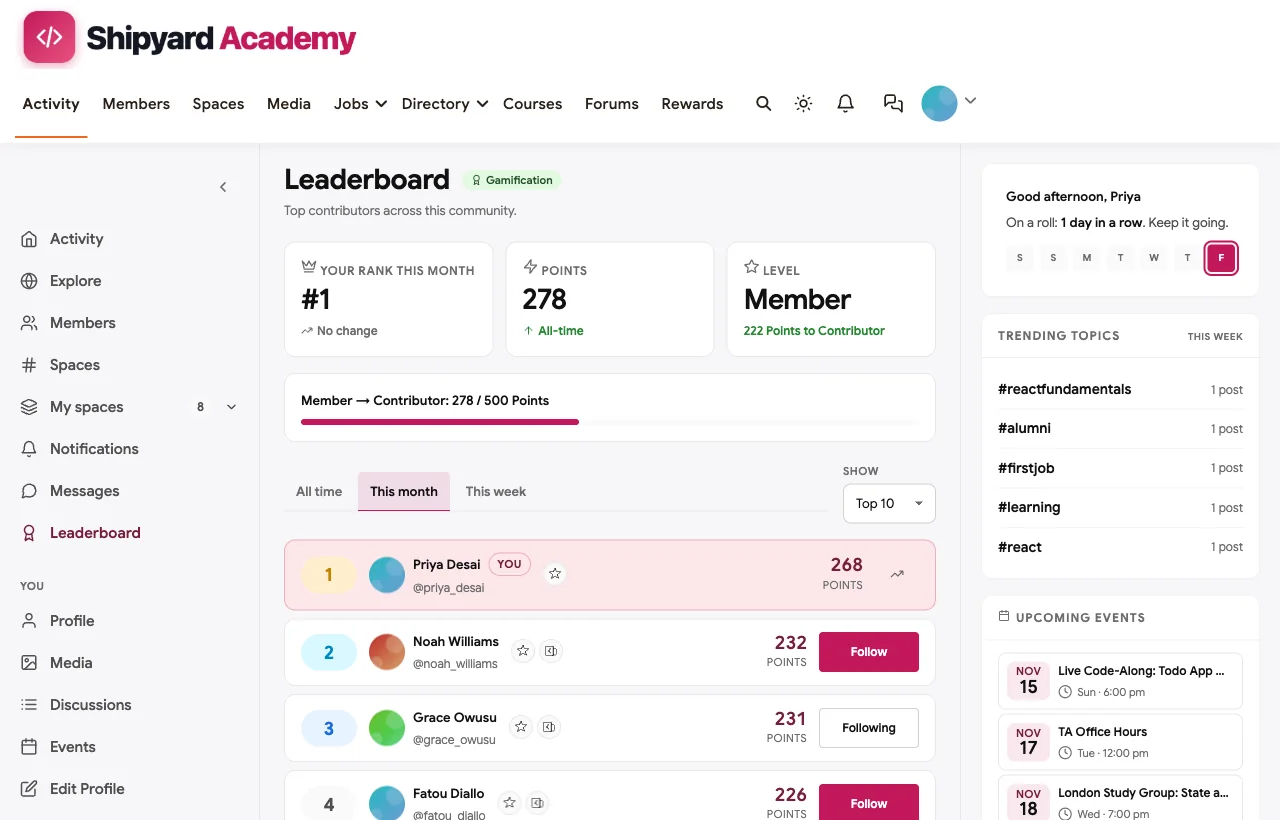
BuddyNext is a complete community platform with built-in courses, running on your own WordPress site with the BuddyX theme as its design layer. To show how it works for course creators, we built Shipyard Academy, a demo community around a hands-on React course. Every screenshot below comes from it. The learners are fictional, but every screen is real product behaviour.

How course and community connect. A course can be linked to a community space. When a learner enrols, they are added to that space automatically, and if their access ends, through unenrolment or expiry, they are removed. The course page links straight to its community, so learners always know where to ask questions.

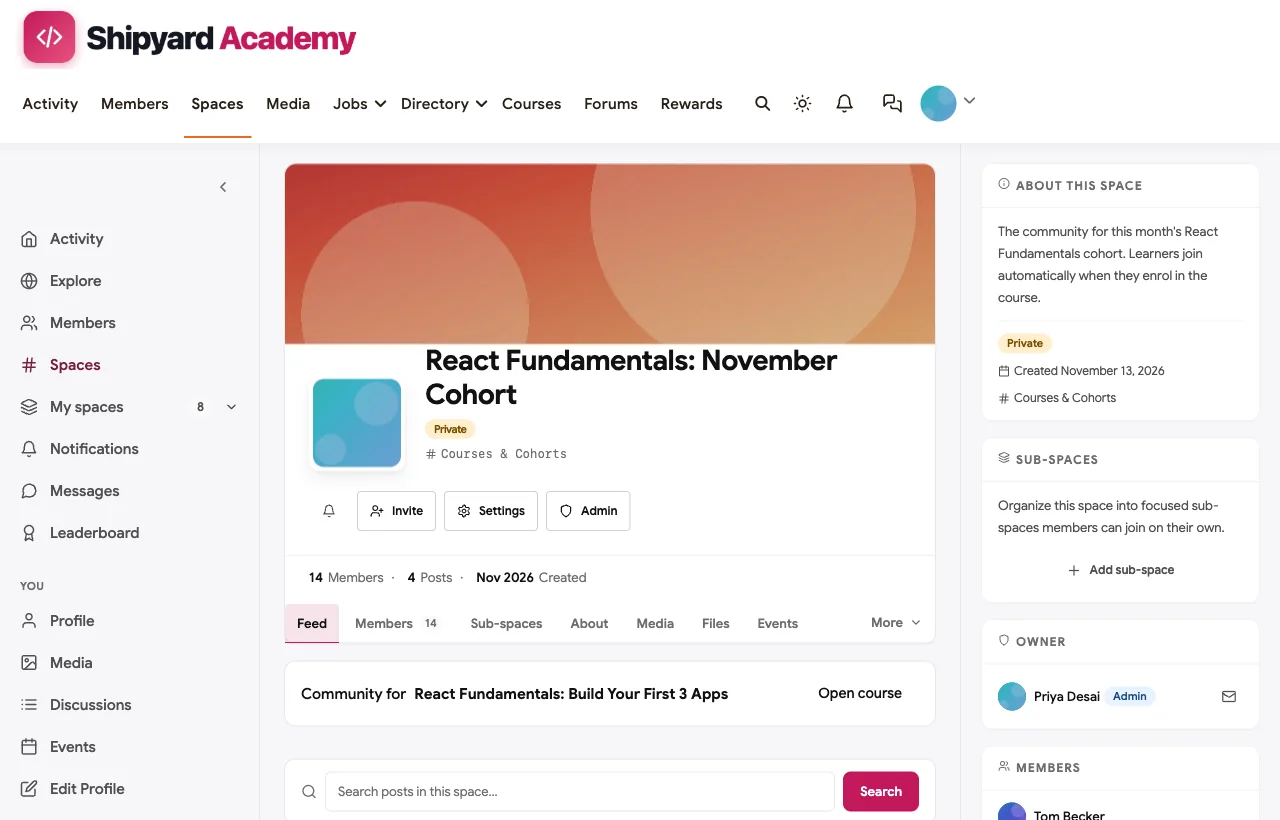
Per-cohort spaces. Each cohort gets its own private space with its own feed, members, calendar and files. In our demo, the November cohort’s space fills automatically as people enrol.
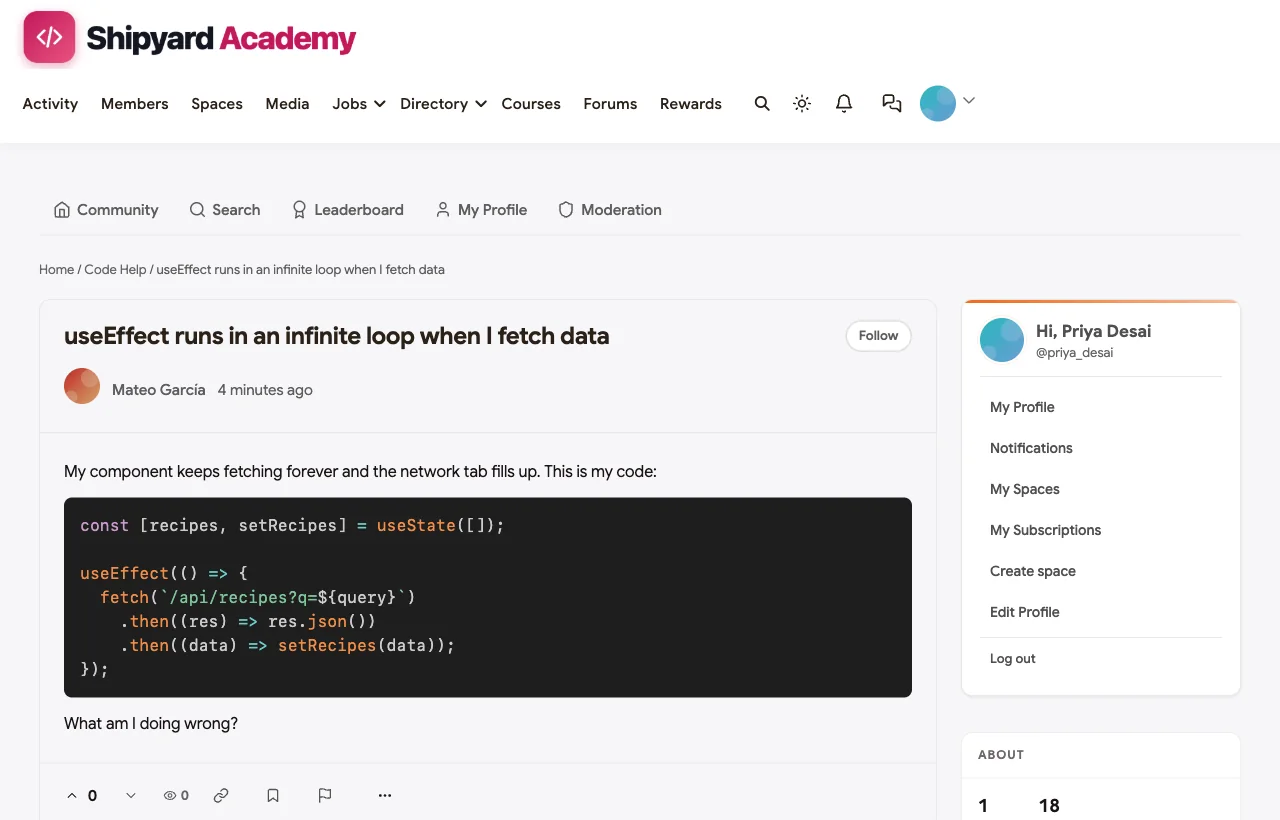
Q&A that stays findable. A Code Help space with a discussion forum lets learners post the code they are stuck on, with syntax highlighting, and teaching assistants answer in threads that the next cohort can search.
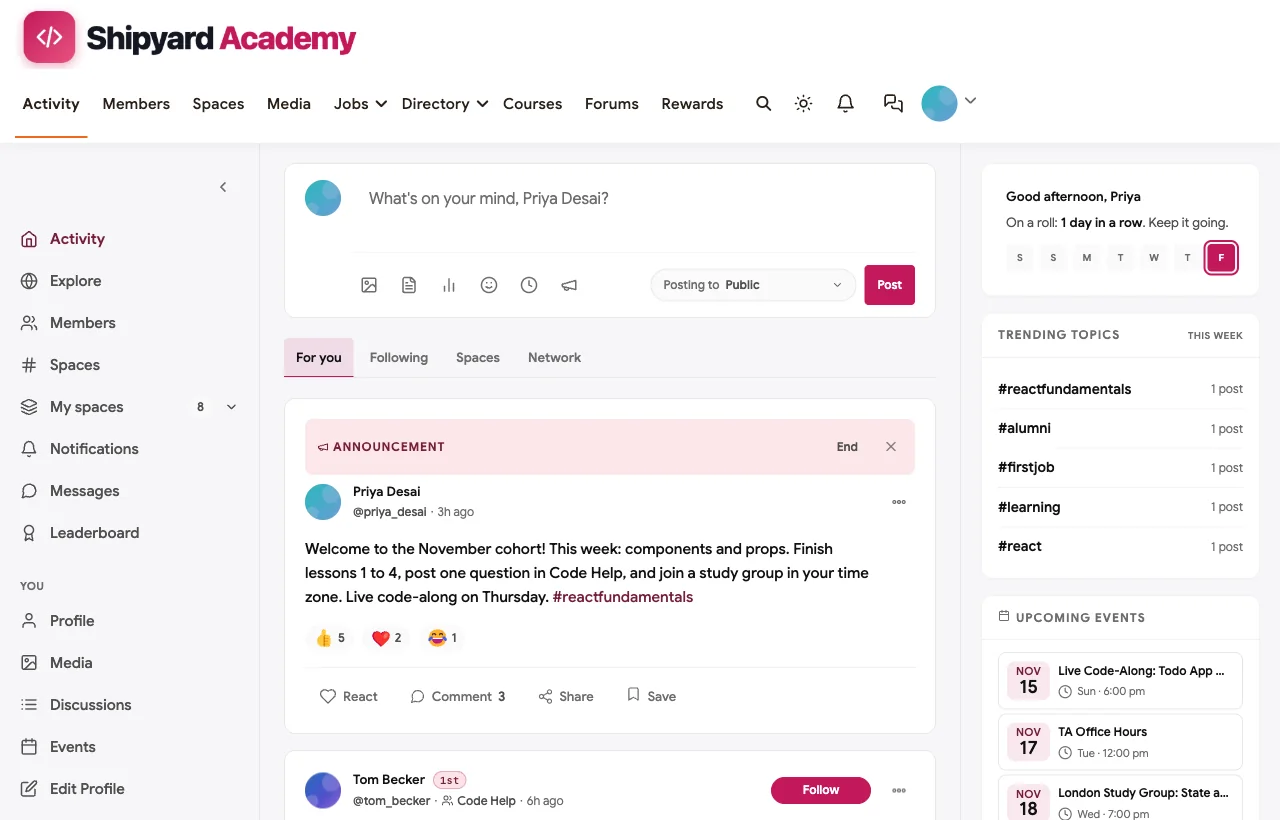
Completions that inspire others. When a learner completes the course and earns a certificate, a card appears in the activity feed, so peers see progress happening.
Live sessions in context. Code-alongs, office hours, study groups and demo days are scheduled inside the space they belong to, and members RSVP without leaving the community.
Motivation built in. Points, streaks and a leaderboard reward the learners who help others, which keeps experienced learners answering beginners’ questions.
Course features learners expect. Quizzes, assignments, certificates, cohorts and drip schedules, plus course reviews and progress, with paid plans or free enrolment.
Watch out for: the course-to-space link is set up from the course side, not from the space’s own settings. Members use the responsive site, which can be installed as a web app, rather than a native app-store app. And self-hosting means updates and backups are yours to manage.
Pricing model: self-hosted, with no per-member or platform transaction fees. You pay for hosting and your payment processor’s fees.
Verdict: the strongest choice if the community is central to how your course works, and you want to own the platform, the learners and the data.
What’s included, and how it is delivered
BuddyNext is one platform made of a core and add-on platform modules. Everything shown in the demo above runs on the BuddyNext platform. This table shows which parts come with the core, which are platform modules you install and activate alongside it, and which need a third-party plugin, another system or custom work.
| Capability | How it is delivered |
|---|---|
| Open, private and secret spaces | Core platform |
| Activity feed, pinned announcements and hashtags | Core platform |
| Member profiles and searchable member directory | Core platform |
| Direct messages | Platform module, installed alongside |
| Courses and certificates | Platform module, installed alongside |
| Q&A with accepted answers and code highlighting | Platform module, installed alongside |
| Events with RSVPs, online or in person | Platform module, installed alongside |
| Points, badges, streaks and leaderboards | Platform module, installed alongside |
| Paid plans with trials and coupons | Platform module, installed alongside |
Want to click around yourself? The Shipyard Academy community in this guide was built on a private test site, so it is not public. The BuddyNext live demo is a general community you can open in your browser and explore without installing anything.
2. Kajabi: best hosted all-in-one for course businesses
Best for: course creators who want courses, marketing and a branded community in one hosted product.
How course and community connect: “You can connect a Community Channel directly inside a Course product,” and community spaces can be tied to a specific product or tier (Kajabi). Kajabi supports both evergreen and cohort courses (Kajabi help).
What learners get: challenges, announcements, meetups with a built-in live room, and a leaderboard.
Watch out for: the number of communities is limited by plan, and a fully branded app is reserved for the top plan (Kajabi pricing).
Pricing model: paid plans, with card processing rates that improve on higher tiers.
Verdict: a polished, complete hosted option for course businesses that also sell coaching and email.
3. Circle: best for community-first creators adding courses
Best for: creators whose community is the main product, with courses as part of the membership.
How course and community connect: “Circle Courses lets you build, sell, and scale your online course alongside a thriving community” (Circle). Pat Flynn’s SPI Community is a well-known example.
What learners get: a personalised feed, live events and streams, a member directory, search and gamification (Circle).
Watch out for: course-completion certificates are reported to need an outside integration, so check before you rely on them. Transaction fees fall on higher tiers (Circle pricing).
Pricing model: tiered paid plans.
Verdict: an excellent premium community that teaches well, though not the deepest course tooling.
4. Mighty Networks: best for cohort programs with streaks
Best for: creators running cohorts who want courses, events and community as equal parts of one network.
How course and community connect: courses can be on-demand, cohort-based or live, inside the same network as the community. Mindbody One runs its community of about 16,000 members on it.
What learners get: private groups and cohorts, activity feeds, questions and polls on every tier (Mighty Networks pricing), plus streaks and points.
Watch out for: a fully branded app is limited to its top tier, and certificates are reported to rely on integrations on most plans.
Pricing model: tiered paid plans, with transaction fees lowest on the top tiers.
Verdict: a strong hosted choice for cohort-driven learning.
5. Skool: best for the simplest course-plus-community launch
Best for: solo creators who want a classroom and a community in one simple product.
How course and community connect: courses live inside the community itself, with unlimited courses, members and live calls on both plans (Skool pricing).
What learners get: a single community feed, a classroom and a points-and-levels leaderboard that can unlock content.
Watch out for: there are no separate cohort spaces, so every cohort shares one feed, and quizzes and certificates are not documented on its pricing page.
Pricing model: paid plans, with a higher transaction fee on the entry plan.
Verdict: the fastest way to launch, best for a single course with one community.
6. Thinkific: best for course-first teaching with a community add-on
Best for: creators whose courses need strong assessments, with a community alongside.
How course and community connect: communities can be sold “as a standalone product, bundled with a course, or as a membership,” inside the Learner Hub (Thinkific). Courses support live cohorts, self-paced and blended formats (Thinkific features).
What learners get: quizzes, assignments and completion certificates.
Watch out for: gamification is not mentioned on its communities page, and a branded mobile app is a paid add-on (Thinkific pricing).
Pricing model: paid plans after a free trial.
Verdict: strong teaching tools, with community as a supporting feature.
7. LearnWorlds: best for interactive courses with social learning
Best for: creators who want interactive video, assessments and a built-in social layer.
How course and community connect: course communities, dedicated discussion spaces and social activities embedded in courses (LearnWorlds).
What learners get: points, badges, leaderboards and achievement levels, plus certificates on higher tiers (LearnWorlds pricing).
Watch out for: the branded mobile app is a paid add-on on every tier.
Pricing model: paid plans after a free trial.
Verdict: a capable course-first platform with more social features than most.
8. Podia: best for simple bundles of courses and community
Best for: creators selling a few courses, downloads and a community together.
How course and community connect: “Include community access in any course, download, coaching package, or event. Customers join the moment they buy” (Podia).
What learners get: group chats, direct messages, spaces by topic or tier and member profiles.
Watch out for: cohorts, certificates and gamification are not documented, so it suits light communities rather than structured cohorts.
Pricing model: paid plans, with a Podia transaction fee on the entry tier only (Podia pricing).
Verdict: simple and tidy for smaller course businesses.
9. Disco: best for academies and customer education
Best for: training businesses and teams running branded learning academies.
How course and community connect: self-paced or cohort programs with groups and subgroups, live events and chat, and an “Ask AI” agent for learners (Disco).
What learners get: leaderboards and social progress, courses, assignments and quizzes.
Watch out for: it is aimed at organisations rather than solo creators, and its pricing page was not available when we checked.
Pricing model: not published on the pages we could reach.
Verdict: worth a look for customer education and employee academies.
10. Maven: best for selling live cohorts on a marketplace
Best for: experts who want to teach live cohorts and benefit from a marketplace audience.
How course and community connect: each cohort gets its own set of channels for announcements, introductions, questions, submissions and reflections, inside a student portal with the calendar and syllabus (Maven help).
What learners get: a structured cohort experience with automated nudges and instructor feedback on submissions.
Watch out for: courses run on Maven’s marketplace rather than your own site, and Maven keeps a share of every paid enrolment as its platform fee (Maven).
Pricing model: no upfront fee, with a revenue share on paid enrolments.
Verdict: a strong cohort format, at the cost of owning the brand and the student relationship.
11. LearnDash with BuddyBoss: best for WordPress sites already using both
Best for: WordPress site owners who already run LearnDash and want a social layer.
How course and community connect: “LearnDash Groups sync directly to BuddyBoss Social Groups, giving each course or cohort its own private space” (BuddyBoss), and achievements post to activity feeds.
What learners get: quizzes, assignments, certificates, badges and points, with full self-hosting and no transaction fee on LearnDash sales (BuddyBoss pricing).
Watch out for: it is two separate products kept in sync through an integration setting, and the native mobile app is a separate subscription.
Pricing model: licences for each product, plus hosting.
Verdict: a proven self-hosted pairing. BuddyNext offers the same ownership with courses and community designed as one platform.
12. Teachable: best for course sales, not community
Best for: creators who sell courses and do not need a community.
How course and community connect: they increasingly do not. Teachable’s own documentation says its Community feature is in maintenance mode, with no new features or bug fixes, and it is no longer available to new schools. Teachable recommends lesson comments or tools such as Discord or Slack instead (Teachable support).
What learners get: lesson comments, quizzes, drip content and certificates on higher tiers (Teachable pricing).
Watch out for: if community matters to your course, you will need a second platform.
Pricing model: paid plans, with a transaction fee on the entry tier only.
Verdict: fine for selling courses, not for building a course community.
A cohort playbook that keeps learners finishing
Whatever platform you choose, the structure of the cohort matters as much as the software. This is the rhythm we built into the Shipyard Academy demo.
Before week one. Open the cohort space a few days early. Post a welcome, a short checklist (set up your tools, introduce yourself, join a study group) and the first live session. An introduction is a small first action, and every later action is easier after the first one.
Week one: early wins. Make the first lesson finishable in one sitting and celebrate everyone who finishes it. Ask every learner to post one question in the Q&A space, even a small one. Asking the first question is the hardest.
Weeks two to three: the dip. This is where most learners stall. Run a live code-along or workshop, pair people in study groups by time zone, and have teaching assistants check in on anyone who has gone quiet.
Middle of the course: show work. Ask learners to share what they have built in a showcase space. Feedback from peers is motivating, and seeing others’ projects pulls stragglers forward.
Final week: demo day. Finish with a live session where learners present. A public finish line is one of the best completion tools there is, and certificates appearing in the feed give everyone else a nudge.
After the course: alumni. Move graduates into an alumni space where they mentor the next cohort. Alumni who answer questions are your best teaching assistants, and they bring proof that the course works.
Setting up a Q&A space that scales
A Q&A space is the part of a course community that does the most teaching, and the part that most often turns into chaos. A few conventions keep it useful from the first cohort to the tenth.
Ask for the lesson number in the title. “Lesson 7: useEffect runs in a loop” is instantly findable by the next learner who reaches lesson 7, and it tells your teaching assistants where the confusion is.
Pin a question template. Ask learners to include what they expected, what happened instead, and the smallest piece of code or the exact step that shows the problem. Many learners solve their own problem while filling it in, and the rest get faster, better answers.
Set a response promise, then keep it. “Every question gets a reply within one working day” is more reassuring than a promise of instant answers you cannot keep. Teaching assistants and alumni can share the load with a simple rota.
Answer in public, not in direct messages. A private answer helps one learner. A public answer helps everyone who reaches that lesson after them, so gently move private questions into the Q&A space.
Turn repeat questions into course improvements. Once a month, look at the questions that came up most often. If several people got stuck on the same lesson, the lesson needs a clearer explanation, an extra example or a short follow-up video. The community becomes your course’s feedback loop.
Celebrate good answers. Points, badges or a monthly shout-out for the most helpful learners keep experienced students answering, which is exactly the behaviour you want as cohorts grow.
Which platform fits your course?
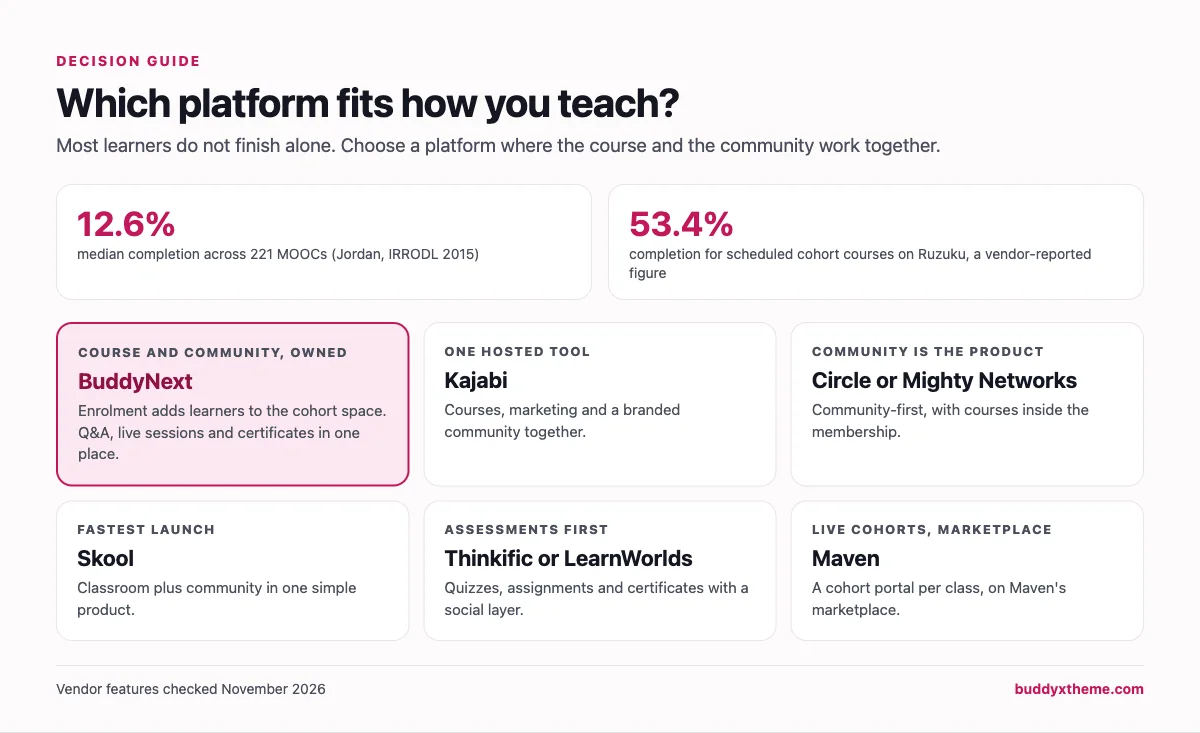
- Courses and community are equally important, and you want to own them: BuddyNext.
- You want one hosted tool for courses, marketing and community: Kajabi.
- The community is the product and courses support it: Circle or Mighty Networks.
- You want the fastest possible launch: Skool.
- Assessments and certificates matter most: Thinkific or LearnWorlds.
- You teach live cohorts and want a marketplace audience: Maven.
If you choose BuddyNext, our step-by-step guide shows how to set up a community space on WordPress, and our roundup of the best WordPress LMS plugins goes deeper into the course side. If you also sell coaching, compare the best platforms for a paid coaching membership.
More community platform comparisons
Building a different kind of community, or one that overlaps with this one? These guides use the same method: a working demo community and vendor claims checked at the source.
- Best platforms for a photography learning community: critique, weekly challenges, photo walks and a foundations course with assignments.
- Best platforms for a financial education community: money courses, a 30-day budget challenge, accountability pods and strong moderation.
- Best platforms for a paid language learning community: clubs by level, speaking practice, corrections and live sessions across time zones.
- Best software for professional certification training: exam prep, verifiable certificates with expiry, recertification and study groups.
- Best platforms for cohort-based learning: live, dated courses for professionals with peer pods, feedback and repeat cohorts.
- Best software for a coding bootcamp community: private cohorts, code Q&A, Demo Day, careers and an alumni network for immersive bootcamps.
- Best software for a paid coaching membership: coaches selling group programs and memberships.
- Best software for a content creator community: fan challenges, voting and supporter tiers.
- Best software for an online fitness community: challenges, streaks and private check-ins.
- Best software for a university alumni network: class spaces, chapters, mentoring and alumni jobs.
- Best software for a SaaS customer community: Q&A, ideas boards and public roadmaps.
- How to set up a community space on WordPress: the step-by-step setup guide behind every demo in this series.
How we built and checked this list
We built the Shipyard Academy demo on BuddyNext for this guide: 18 fictional learners, teaching assistants and alumni, eight spaces including a private cohort space linked to a real course, a Q&A discussion with code, course reviews, certificates and scheduled live sessions. We did not run accounts on the other platforms. Every competitor claim comes from the vendor’s own website, pricing page or help center, checked in November 2026 and linked above. Where something could only be found in third-party sources, we say it is reported rather than state it as fact. We do not list prices because they change often.
Disclosure: BuddyNext and the BuddyX theme are made by Wbcom Designs, the team behind this site. We have aimed to be fair, including about where BuddyNext is not the right fit.
Frequently asked questions
What is the best platform for an online course community?
For a course community you own, BuddyNext is the strongest choice, because course enrolment automatically adds learners to the right community space and completions, Q&A, live sessions and certificates all live together. Kajabi is the best hosted all-in-one, and Circle or Mighty Networks suit community-first creators.
Why do online courses need a community?
Because most learners do not finish self-paced courses on their own. A peer-reviewed study of 221 MOOCs found a median completion rate of 12.6%. A community gives learners people to ask, peers to keep pace with and a reason to come back.
Does Teachable still have a community feature?
Teachable’s community feature is in maintenance mode and is no longer available to new schools, according to Teachable’s own support documentation. It recommends lesson comments or tools like Discord and Slack instead.
Can each course cohort have its own community space?
Yes on BuddyNext, Maven, Mighty Networks and LearnDash with BuddyBoss. BuddyNext adds learners to a cohort’s space automatically when they enrol in the linked course.
Should I use Discord for my course community?
Discord works for real-time chat, but it is separate from your course, so you have to manage access by hand and answers get buried. An integrated course community keeps enrolment, Q&A and progress in one place.
Can learners show their certificates in the community?
On BuddyNext, course completions and certificates appear as cards in the activity feed. LearnDash with BuddyBoss also posts achievements to activity feeds.
Do I need a separate LMS if I use a community platform?
Not with platforms that include courses. BuddyNext, Kajabi, Skool, Circle and Mighty Networks all host courses, but they differ in assessment depth, so compare quizzes, assignments and certificates against what your course needs.
How do I keep learners engaged after the course ends?
Move graduates into an alumni space where they mentor new learners, share wins and get access to advanced sessions. The same structure scales up to a full alumni network with chapters, jobs and events. It keeps them connected and gives new learners proof that the course works.
How big should a course cohort be?
Big enough that the space feels alive, small enough that learners notice each other. Many instructors find that a few dozen learners per cohort, split into study groups of five or six, keeps discussion busy without anyone getting lost. Larger courses can run several cohorts side by side, each with its own space.
What is the difference between a course community and a membership community?
A course community is built around a specific course or cohort and has a natural end, usually followed by an alumni space. A membership community is ongoing, with members paying for continued access to content, people and events. Many creators run both: courses feed graduates into a membership.
The bottom line
The best online course community is one where the course and the community are the same experience: enrol and you are in the right space, get stuck and someone answers, finish and everyone sees it. If you want that on a platform you own, BuddyNext is the strongest foundation. If you prefer a hosted tool, Kajabi, Circle and Mighty Networks each do it well in their own way.
And build a course community learners finish.