
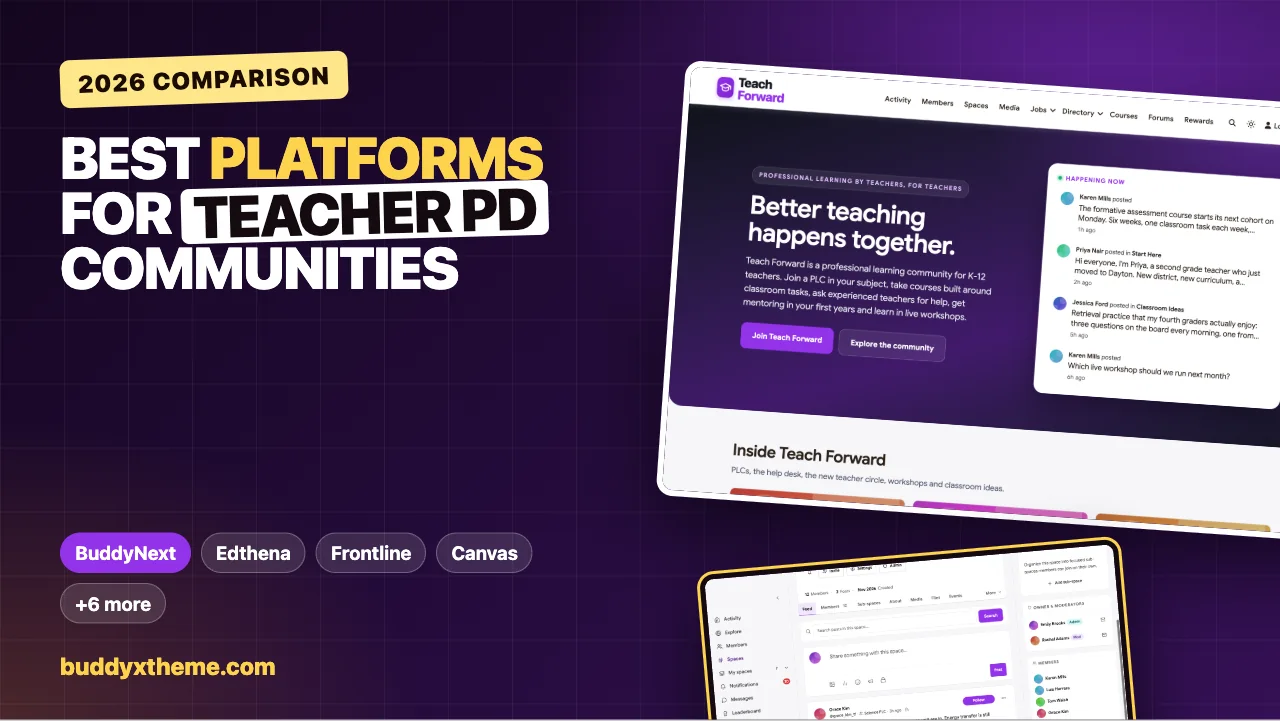
Ask teachers about the professional development that changed their practice, and few will name a training day. They will name a colleague: the teacher down the hall who let them watch a lesson, the department that tried one new questioning technique together for a month, the mentor who sat with them after a hard seventh period. Good professional learning is ongoing, collaborative and close to the classroom. The challenge for districts, education nonprofits and subject associations is making that kind of learning happen at scale.
This guide compares the platforms you can use to run a teacher professional development community: professional learning communities (PLCs) by subject or grade, courses with classroom tasks and certificates, live workshops with recordings, mentoring for new teachers, a help desk for everyday teaching questions and clear rules about student privacy. We built a working teacher community for the first entry and checked every competitor claim on the vendor’s own pages in November 2026.
Quick answer
If you want an ongoing professional learning community on your own website, BuddyNext is the strongest choice: private PLC spaces by subject or grade, courses with classroom tasks and certificates, live workshops as events, a private new teacher circle with mentors, a help desk where experienced teachers answer and the best answer is marked, and Google sign-in. For district-wide PD records and credit hours, Frontline Professional Growth and KickUp lead; for video coaching, Edthena; and Canvas and Moodle suit organisations that already run an LMS.
In this guide
- What a teacher professional learning community needs
- Two kinds of PD software
- The teacher PD scorecard
- 1. BuddyNext: best for a professional learning community you own
- 2. Edthena: best for video coaching and peer observation
- 3. Frontline Professional Growth: best for district PD management and credit
- 4. KickUp: best for PL, coaching and walkthroughs in one system
- 5. Canvas: best for districts already using Canvas
- 6. Moodle: best open-source LMS for PD courses
- 7. Microsoft Learn for Educators: best for Microsoft schools
- 8. ISTE+ASCD Connect: best professional network to join, not to run
- 9. Circle: best hosted community with live rooms
- 10. Mighty Networks: best for cohort courses with certifications
- Running PLCs that keep working between meetings
- Supporting new teachers through the year
- Student privacy in a teacher community
- Questions to ask before you choose
- A 60-day launch plan for a professional learning community
- Which platform fits your professional learning program?
- More community platform comparisons
- How we built and checked this list
- Frequently asked questions
- The bottom line
What a teacher professional learning community needs
Professional learning for teachers has a few needs most community platforms were not designed for:
| Need | Why it matters | What the platform needs |
|---|---|---|
| PLCs by subject or grade | Teachers improve fastest with colleagues who teach the same content | Private groups with their own feed, events and members |
| Learning tied to classroom practice | Ideas only matter if teachers try them | Courses with weekly classroom tasks and reflection |
| Live workshops | Teachers need short sessions that fit after school | Events with RSVPs, recordings and slides |
| New teacher support | Early-career teachers need a safe place to ask | A private circle, mentors and direct messages |
| Everyday questions | The same planning and behaviour questions recur | Q&A with accepted answers |
| Recognition of learning | Teachers and schools want evidence of PD | Certificates of completion |
| Student privacy | Teachers discuss real classrooms | Clear rules, private spaces and moderation |
| Easy sign-in | Teachers have little time | Sign-in with existing accounts such as Google |
Two kinds of PD software
| Kind | What it does well | Examples |
|---|---|---|
| PD management | Course catalogues, registration, credit hours, approvals, compliance records, observation and coaching workflows | Frontline Professional Growth, KickUp, Edthena |
| Learning community | PLCs, conversation, mentoring, shared ideas, courses and workshops teachers return to between sessions | BuddyNext, Circle, Mighty Networks, ISTE+ASCD Connect |
LMSs such as Canvas and Moodle sit between the two. Districts that must report credit hours for relicensure usually keep a PD management system, and many add a learning community for the collaboration those systems were not built for.
The teacher PD scorecard
How each option handles what matters most. “Not found” means we could not confirm it on the vendor’s own pages, not that it is impossible.
| Platform | PLC groups | Courses | Certificates | Credit hours | Live workshops | Mentoring | Q&A |
|---|---|---|---|---|---|---|---|
| BuddyNext | Private and secret spaces | Yes, with classroom tasks | Yes | Not built in | Events with RSVPs | Private circle, messages | Accepted answers |
| Edthena | PLC sharing | Not found | Not found | Per coaching cycle | Not found | Peer observation, mentoring | Not found |
| Frontline Professional Growth | Collaborative discussions | Yes | Not found | Yes | In-district workshops | Mentor supports | Not found |
| KickUp | Not found | Self-paced courses | Not found | Yes | Sessions and events | Coaching cycles | Not found |
| Canvas | Not found | Course catalog | Badges and certificates | Not found | Not found | Not found | Not found |
| Moodle | Groups and forums | Yes | Badges and certificates | Not found | Video-conferencing integrations | Not found | Forums |
| Microsoft Learn for Educators | Educator community programs | Learning paths | Certifications | PD hours | Not found | Not found | Not found |
| ISTE+ASCD Connect | Member groups | Certifications | Certifications | Program hours | Webinars and events | Certification coaching | Not found |
| Circle | Spaces | Yes | Not found | Not found | Live events and rooms | Not found | Not found |
| Mighty Networks | Not confirmed | Yes | Quizzes and certifications | Not found | Not confirmed | Not found | Not found |
1. BuddyNext: best for a professional learning community you own
BuddyNext is a complete community platform that runs on your own WordPress site. Private and secret spaces, courses with quizzes and certificates, events with RSVPs, Q&A with accepted answers, member profiles, direct messages, polls and leaderboards all work together, so PLCs, courses, workshops and mentoring live in one place under your organisation’s brand.
To show it in practice, we built Teach Forward, a demo professional learning community run by a fictional education nonprofit. It has 20 members: elementary, middle and high school teachers, a special education teacher, ESL and bilingual teachers, a first-year math teacher, a second-year English teacher, a student teacher, a mentor teacher, instructional, literacy and edtech coaches, and an assistant principal.

Good at: PLCs that keep working between meetings, PD tied to real classroom tasks, and support for new teachers.
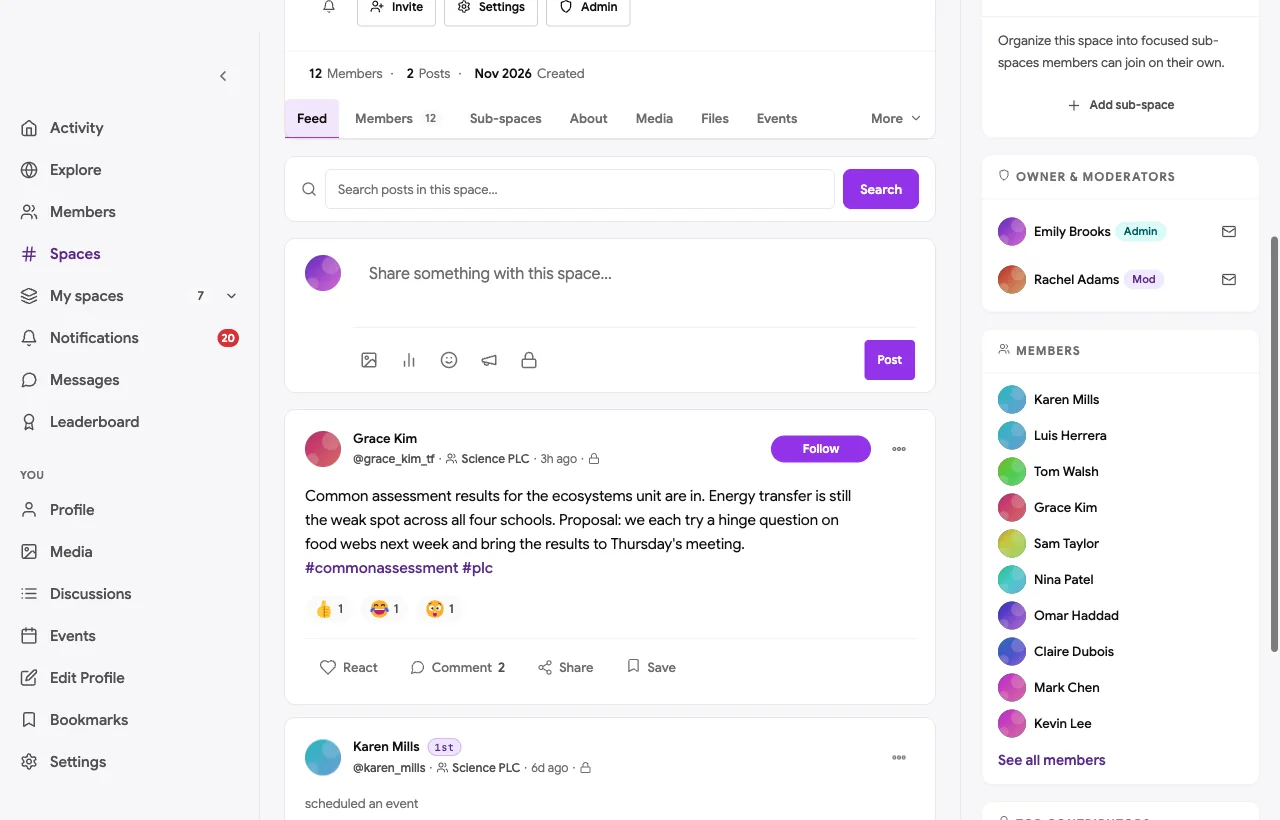
Private PLCs by subject or grade. Each PLC has its own private space with a feed, members and events. In the demo, the Science PLC shares common assessment results across four schools and agrees to try a hinge question on food webs before the next meeting:
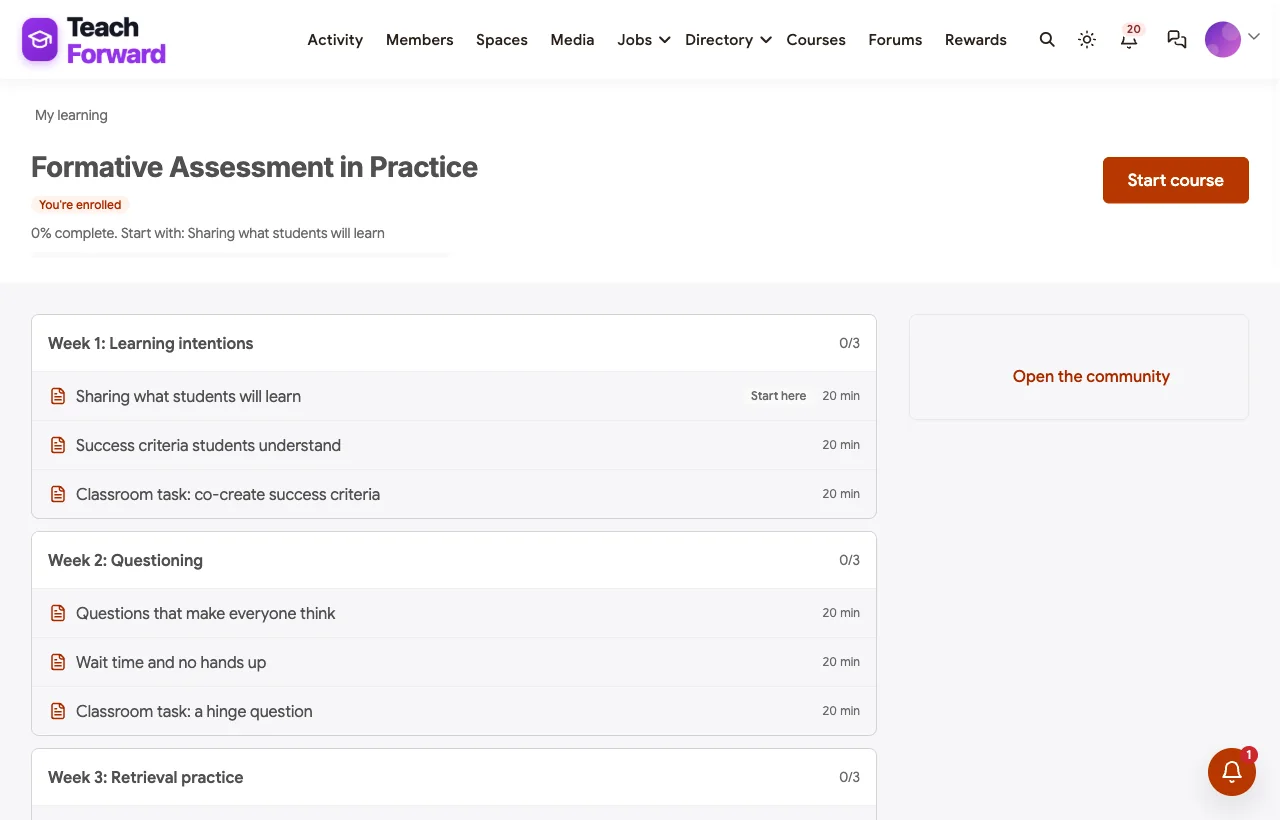
Courses built around classroom tasks. The formative assessment course runs for six weeks, each with a short lesson and a classroom task teachers try and then discuss in their PLC. Teachers who finish receive a certificate of completion:
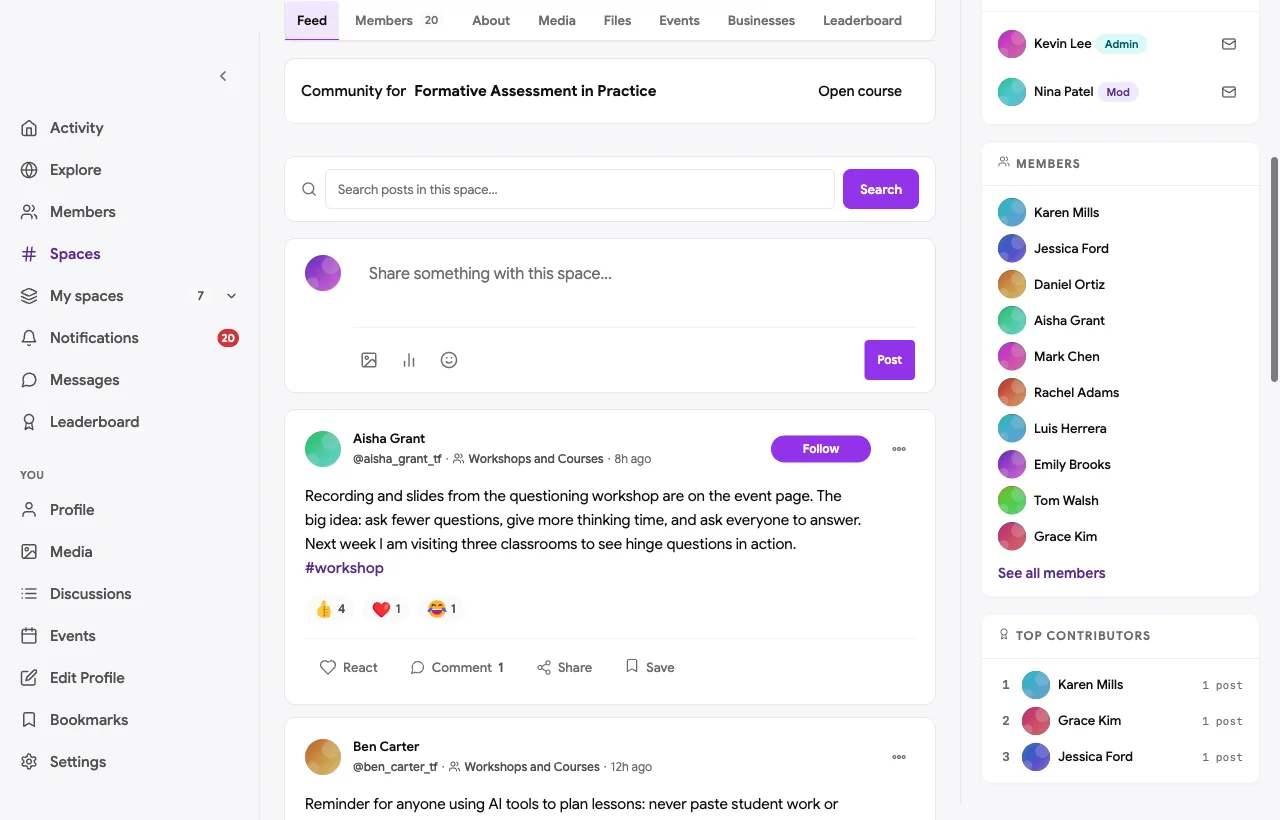
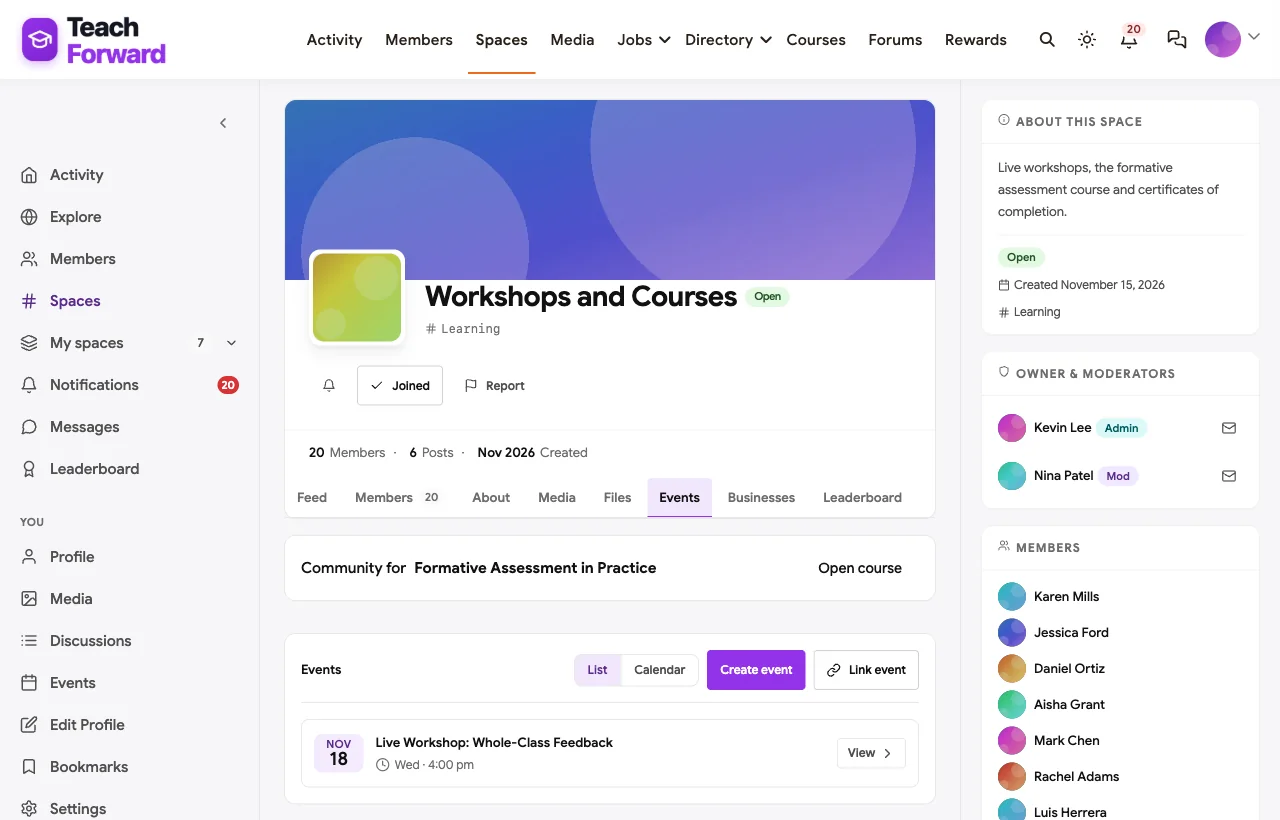
Live workshops with recordings. After-school workshops are events with RSVPs, and recordings and slides are posted afterwards for teachers who cannot attend live:
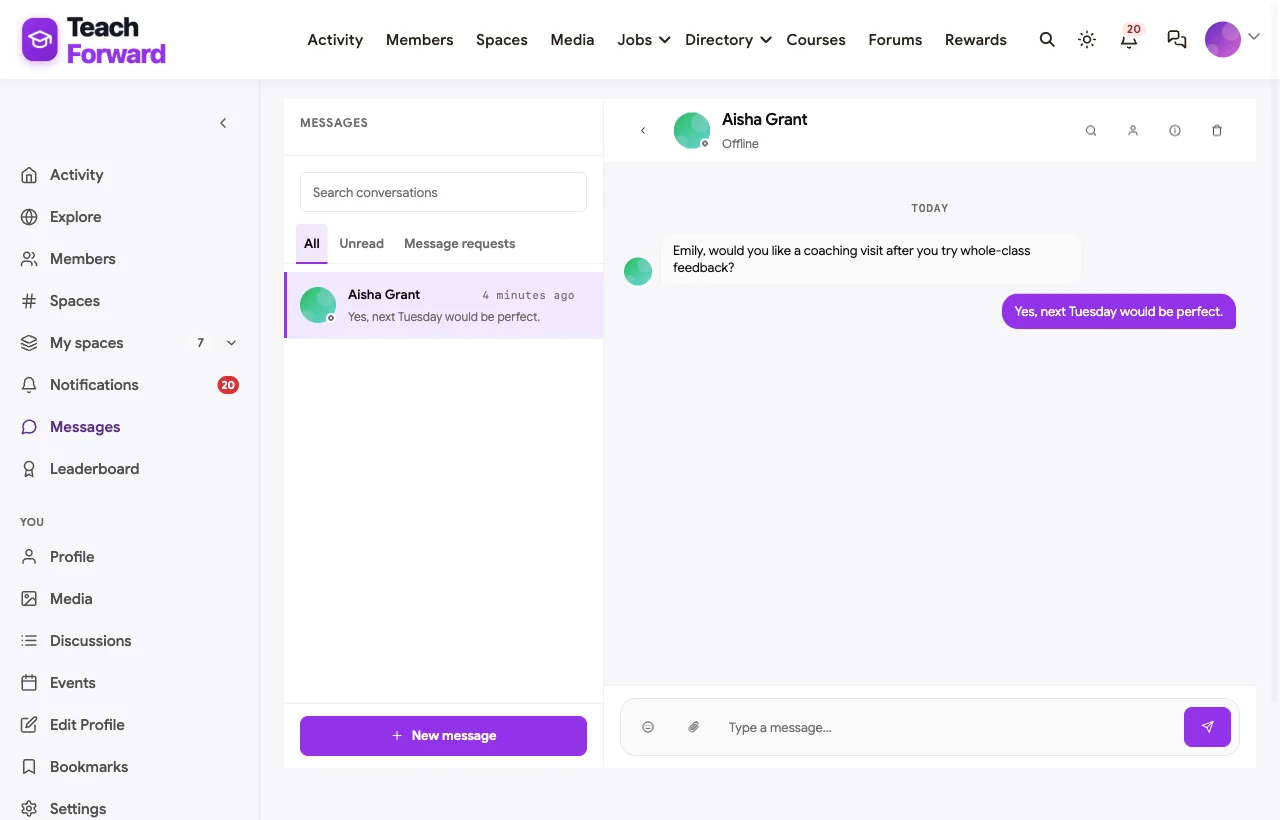
A New Teacher Circle. First and second-year teachers have a private space with their mentors. In the demo, a first-year math teacher asks for help with a difficult last period, and a mentor offers to plan the lesson together:

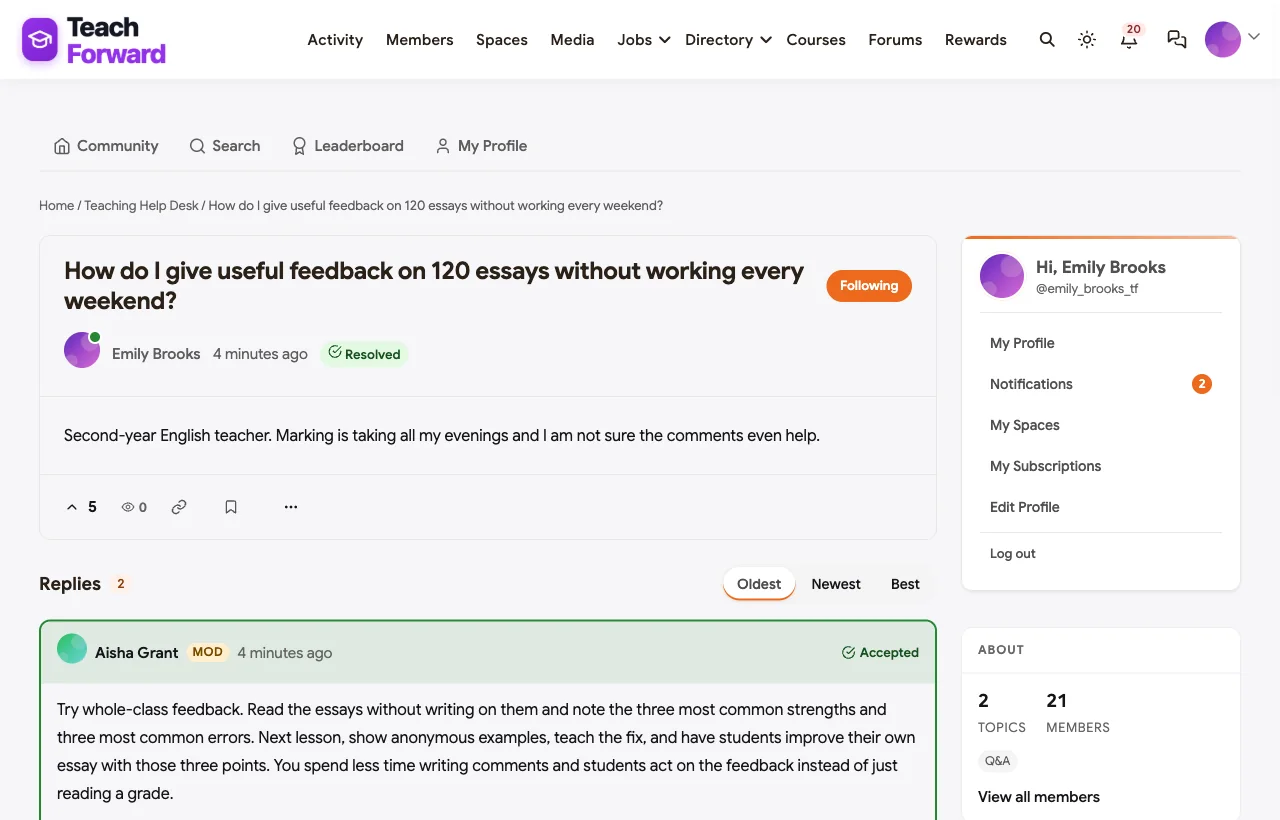
A help desk with accepted answers. Teachers ask about planning, assessment, behaviour and differentiation, and experienced teachers and coaches answer. In the demo, a second-year English teacher asks how to give feedback on 120 essays without losing every weekend, and a coach’s whole-class feedback approach becomes the accepted answer:
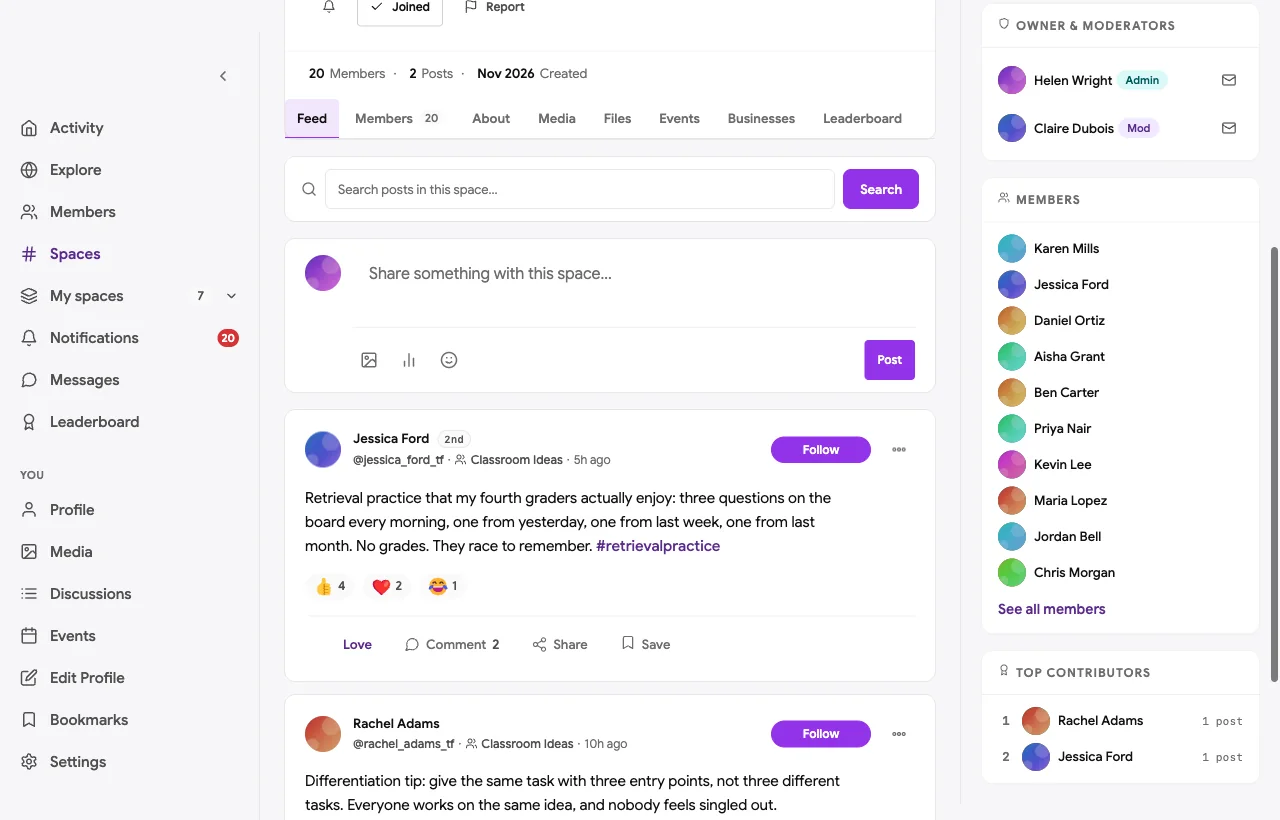
Classroom ideas. Teachers share routines and lessons that worked, with what they would change next time:
Also built in. Polls to choose workshop topics, a member directory, notifications, moderation and reporting, points and a leaderboard for helpful answers, a secret coaching team space, sign-in with Google and other social accounts, and a mobile layout that works on a phone between classes.
Not built for: district credit-hour records, relicensure reporting or video observation. Keep a PD management or video coaching tool for those and link to it. It is self-hosted, so you run WordPress or use a managed host.
What’s included, and how it is delivered
BuddyNext is one platform made of a core and add-on platform modules. Everything shown in the demo above runs on the BuddyNext platform. This table shows which parts come with the core, which are platform modules you install and activate alongside it, and which need a third-party plugin, another system or custom work.
| Capability | How it is delivered |
|---|---|
| Open, private and secret spaces for PLCs | Core platform |
| Member profiles and searchable member directory | Core platform |
| Activity feed, pinned announcements, polls and hashtags | Core platform |
| Sign-in with Google and other social accounts | Core platform |
| Moderation and reporting | Core platform |
| Direct messages | Platform module, installed alongside |
| Courses with quizzes and certificates | Platform module, installed alongside |
| Workshops and PLC meetings as events | Platform module, installed alongside |
| Help desk Q&A with accepted answers | Platform module, installed alongside |
| Points, badges and leaderboards | Platform module, installed alongside |
| Live video for workshops | Third-party video tool (Zoom, Google Meet, Teams) |
| Credit-hour and relicensure records | Another system (a PD management tool) |
Want to click around yourself? The Teach Forward community in this guide was built on a private test site, so it is not public. The BuddyNext live demo is a general community you can open in your browser and explore without installing anything.
2. Edthena: best for video coaching and peer observation
Edthena offers “AI coaching for every K-12 teacher” (Edthena). Teachers record lessons on any device, “upload video and securely share to their coach or PLC,” and coaches “mark key moments, exchange time-stamped feedback, and track growth over time” (Edthena video coaching). It supports “peer-peer observation, mentoring programs,” and teachers “can earn PD clock hours for completing the coaching cycle” (Edthena for districts).
Strengths: the strongest video observation and coaching workflow.
Gaps: no course catalogue, certificates or live workshops found; it is a coaching tool rather than a community.
3. Frontline Professional Growth: best for district PD management and credit
Frontline helps districts “plan, deliver, and track professional learning for every role - events, online courses, credit, and approvals, all in one place,” and “track participation, credit hours, and compliance automatically” (Frontline). It offers online courses, in-district workshops, tracking of “hours and credits for annual requirements or relicensure,” and collaborative discussions where teachers “share resources, ideas, and feedback” (Frontline collaborative learning).
Strengths: credit hours, approvals and compliance at district scale.
Gaps: no named PLC groups, certificates or mentoring workflow found.
4. KickUp: best for PL, coaching and walkthroughs in one system
KickUp is “the modern PL, Coaching, Walks, and Evaluation system” (KickUp). It lets you “run all PL in one place,” “log credits automatically,” supports “single sign-on services like Google and Azure,” self-paced courses and “in-person sessions, series, conference-style events” (KickUp learning), and coaching cycles and classroom walks (KickUp coaching).
Strengths: PD records, coaching and walkthroughs with Google and Azure sign-in.
Gaps: no PLC community, resource sharing or certificates found.
5. Canvas: best for districts already using Canvas
Canvas is “the world’s most-loved LMS” (Instructure). Canvas Credentials offers “digital badges and micro-credentials” for teacher PD (Instructure), Canvas Catalog can “create programs or course bundles needed for certification or badging” with automated certificates (Canvas Catalog), and Canvas Studio lets learners give “feedback on peers’ video submissions” (Canvas Studio).
Strengths: courses, credentials and video feedback inside a widely used LMS.
Gaps: no PLC community or mentoring features found.
6. Moodle: best open-source LMS for PD courses
Moodle LMS is “made by educators, for educators” (Moodle). It offers “badges, certificates, leaderboards,” “web conferencing, forums and assignments,” peer review in workshops (Moodle features), and a mobile app with courses and messages.
Strengths: flexible courses, badges and forums with a large plugin ecosystem.
Gaps: groups and forums are general LMS tools rather than a PLC community; no mentoring features found.
7. Microsoft Learn for Educators: best for Microsoft schools
Microsoft’s Educator Center lets teachers “earn professional development hours, acquire certifications and find programs that help meet your goals” (Microsoft Learn). The Microsoft Elevate Educator Community, “previously MIE Expert,” supports “educator capacity building with community.”
Strengths: learning paths and certifications aligned to Microsoft tools, with community programs.
Gaps: a programme around Microsoft products rather than a platform to run your own PLCs.
8. ISTE+ASCD Connect: best professional network to join, not to run
ISTE+ASCD offers “Connect, our online professional learning network, where they can find exclusive member groups for peer-to-peer problem solving” (ISTE+ASCD), plus books, webinars, events and certifications with “expert coaching” (ISTE+ASCD credentials).
Strengths: a large professional network and recognised certifications.
Gaps: a membership network you join, not a platform to host your own district or organisation’s PLCs.
9. Circle: best hosted community with live rooms
Circle lets you “customize your spaces, prompt discussions, host live events, and launch your course” (Circle), with event pages, reminders and replays, and live rooms for “coaching calls, workshops, or summits” (Circle events).
Strengths: polished spaces, courses and live rooms.
Gaps: no certificates, credit hours, school sign-in or education-specific features found.
10. Mighty Networks: best for cohort courses with certifications
Mighty Networks offers “Community. Courses. Events.” with “Quizzes & Certifications,” progress tracking, drip scheduling and cohorts where “members see others in the same course, same lesson, same cohort” (Mighty Networks courses).
Strengths: cohort courses with certifications and native apps.
Gaps: no credit hours, school sign-in or PLC-specific features found.
Running PLCs that keep working between meetings
Most PLC meetings are short and infrequent. The work that makes them useful happens in between: sharing evidence, trying something in class and bringing results back.
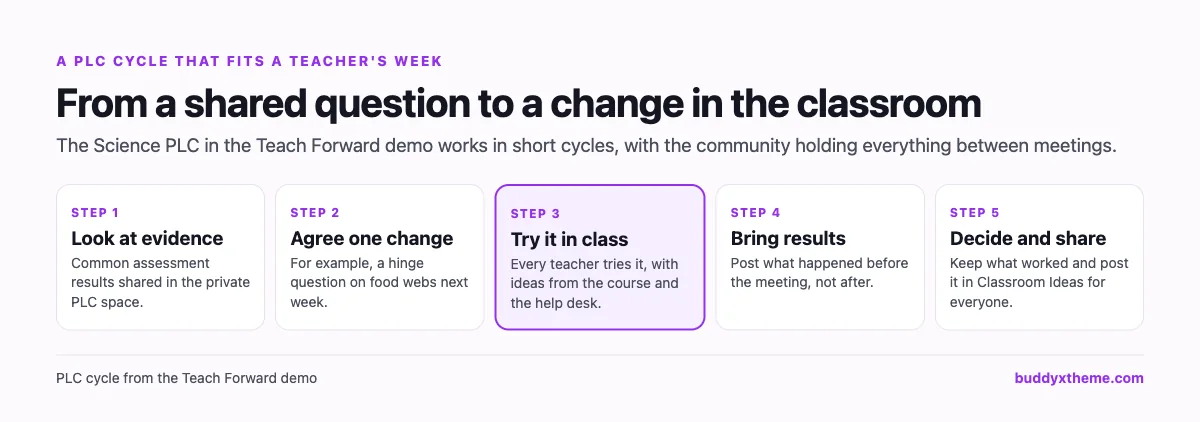
A community gives that in-between work a home. Results are posted before the meeting, so meeting time goes to decisions rather than catching up. What works is shared beyond the PLC, so one department’s discovery helps the whole network.
Supporting new teachers through the year
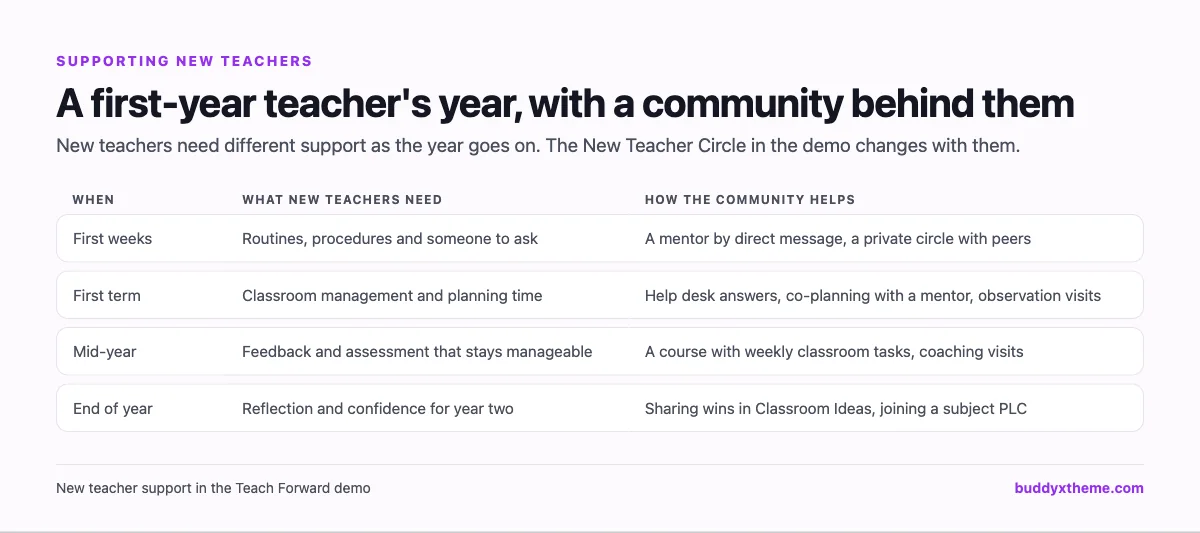
| Practice | Why it works |
|---|---|
| A mentor reachable by message | Questions get answered the same day |
| A private circle with other new teachers | They see they are not the only one struggling |
| Co-planning before hard lessons | Support arrives before the problem, not after |
| An open invitation to observe | Watching a colleague teach is powerful PD |
| Celebrating wins publicly | Confidence matters as much as technique |
Student privacy in a teacher community
| Rule | Why it matters |
|---|---|
| No student names, photos or identifying details | Teachers discuss real classrooms; students did not agree to be discussed |
| Talk about patterns, not individuals | “Several students confused energy and matter” not a named student |
| Sensitive topics in private spaces | PLC data conversations stay with the PLC |
| Check district guidance before using new tools | Especially AI tools with student work |
| Moderators who know the rules | Mistakes are corrected quickly and kindly |
Questions to ask before you choose
- Do you need to report credit hours? If yes, keep or add a PD management system for records.
- Where will PLCs work between meetings? Look for private groups with their own feed and events.
- Is PD tied to classroom practice? Courses with weekly tasks beat slide decks.
- How will new teachers get support? A private circle and easy messaging with mentors matter.
- Can teachers sign in with accounts they already have? Every extra password reduces participation.
- Who owns the community and its data? A self-hosted community stays on your organisation’s website.
A 60-day launch plan for a professional learning community
- Weeks one and two: structure. Create Start Here with the student privacy rule, a help desk, one or two pilot PLCs, a new teacher circle and a workshops space.
- Weeks three and four: first PLC cycle. Ask each pilot PLC to agree one classroom change, try it and post results before their next meeting.
- Weeks five and six: first course and workshop. Open a short course with weekly classroom tasks and run one after-school workshop with a recording.
- Weeks seven and eight: grow. Invite more PLCs, pair every new teacher with a mentor, and share the best classroom ideas network-wide.
Which platform fits your professional learning program?
| If you… | Choose |
|---|---|
| Want PLCs, courses, workshops, mentoring and a help desk on your own website | BuddyNext |
| Need video observation and coaching | Edthena |
| Need district PD records, credit hours and approvals | Frontline Professional Growth or KickUp |
| Already run Canvas | Canvas with Canvas Credentials |
| Want an open-source LMS for PD courses | Moodle |
| Are a Microsoft school | Microsoft Learn for Educators |
| Want teachers to join a national network | ISTE+ASCD Connect |
| Want a hosted community or cohort courses | Circle or Mighty Networks |
More community platform comparisons
Running a different kind of learning community? These guides use the same method: a working demo community and vendor claims checked at the source.
- Best platforms for an online tutoring community: study groups, homework help, parent updates and group sessions.
- Best platforms for cohort-based learning: live, dated courses with peer pods and feedback.
- Best software for professional certification training: courses, exams and verifiable certificates.
- Best platforms for a professional association community: chapters, committees and member directories.
- Best software for an online course community: course creators who want learners to finish.
- How to set up a community space on WordPress: the step-by-step setup guide behind every demo in this series.
How we built and checked this list
We built the Teach Forward demo on a local WordPress site running BuddyNext, with fictional teachers, coaches, PLCs, a course, workshops and questions created for this guide. Every BuddyNext screenshot is from that demo. Competitor features were checked against each vendor’s own website in November 2026. We left out Schoology because its website blocked our checks, and Edmodo because it no longer operates. Where we could not confirm a feature on a vendor’s own pages, the scorecard says “Not found” or “Not confirmed”. We did not run a hands-on trial of every product, so features can change; confirm anything critical with the vendor. buddyxtheme.com is published by the team behind BuddyNext, which is why BuddyNext is listed first; we have tried to be fair about its gaps as well as its strengths.
Frequently asked questions
What is the best platform for a teacher professional development community?
BuddyNext is the best choice for an ongoing professional learning community on your own website, with private PLC spaces, courses with classroom tasks and certificates, live workshops, a new teacher circle and a help desk. For credit hours and relicensure records, Frontline Professional Growth and KickUp lead.
What is a PLC and how does a platform support it?
A professional learning community is a group of teachers, often by subject or grade, who look at evidence of student learning, try changes together and share results. A platform supports it with a private space, events for meetings and a place to post results between meetings.
Can teachers earn certificates in a community?
Yes. BuddyNext issues certificates of completion for courses. Formal credit hours for relicensure usually need your district’s PD management system.
How do we protect student privacy?
Make a clear rule against student names, photos and identifying details, talk about patterns rather than individuals, keep data conversations in private PLC spaces, and moderate actively.
Can teachers sign in with their school Google accounts?
BuddyNext supports sign-in with Google and other social accounts. If your school uses another identity provider, check single sign-on options with your IT team.
How do we support new teachers online?
Create a private circle for early-career teachers and their mentors, make mentors easy to message, and encourage new teachers to ask in a help desk where experienced colleagues answer.
Should we use our LMS or a community platform for PD?
An LMS is good for structured courses. A community platform is better for PLCs, conversation and mentoring between courses. Many organisations use both.
The bottom line
Professional learning works when it is ongoing, collaborative and close to the classroom. If you want PLCs that keep working between meetings, courses built around classroom tasks, workshops, mentoring and a help desk on your own website, BuddyNext is the strongest foundation, alongside a PD management system if you report credit hours. For video coaching, Edthena leads, and for district PD records, Frontline and KickUp.
And help teachers get better together.