
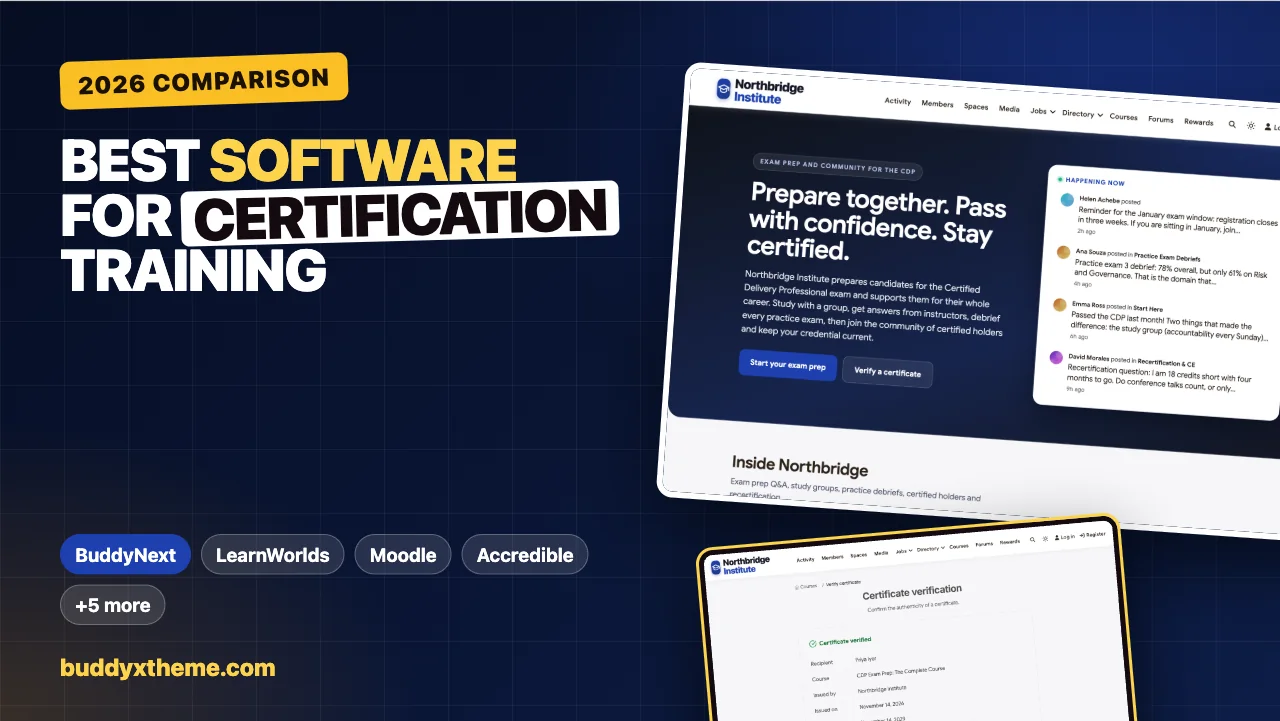
A professional certification is a promise to employers: this person has been tested against a standard and is keeping up with it. For the training provider or professional body behind it, that promise has three parts. Candidates need to prepare well and pass. Certified holders need a credential anyone can verify. And the credential has to stay current, through continuing education and recertification, for years after the exam.
Most software handles one of those parts well. Learning systems run courses and practice exams, credentialing platforms issue and verify certificates, and community tools handle study groups and the network of certified holders. This guide compares the options for running certification training end to end. We built a working certification community for the first entry, checked every competitor claim against the vendor’s own pages in November 2026, and say plainly which part of the job each one covers.
Quick answer
If you want certification training you own and control, BuddyNext is the strongest choice: exam prep courses with quizzes and attempt limits, certificates issued on completion with a public verification page and an expiry date, instructor Q&A with accepted answers, private study groups, a network for certified holders, continuing education events and a careers board, all on your own WordPress site. LearnWorlds has the most complete hosted certification management, Moodle offers question banks and a lockdown browser for secure exams, and Accredible is the specialist for issuing and verifying digital credentials alongside another learning platform.
In this guide
- What certification training software has to do
- Three layers of certification software
- Why verifiable credentials matter
- The certification software scorecard
- 1. BuddyNext: best for certification training you own, from first study session to recertification
- 2. LearnWorlds: best hosted platform for certification management
- 3. Moodle: best for secure exams on your own infrastructure
- 4. Accredible: best specialist for issuing and verifying credentials
- 5. Absorb LMS: best for compliance-driven recertification at scale
- 6. LearnDash: best WordPress LMS for exam prep courses
- 7. Thinkific: best for selling exam prep courses
- 8. iSpring Learn: best for corporate certification programs on a private network
- 9. Docebo: best for enterprises already standardised on Docebo
- Running exam prep as a community
- Recertification without the panic
- One platform or several?
- Which software fits your certification program?
- More community platform comparisons
- How we built and checked this list
- Frequently asked questions
- The bottom line
What certification training software has to do
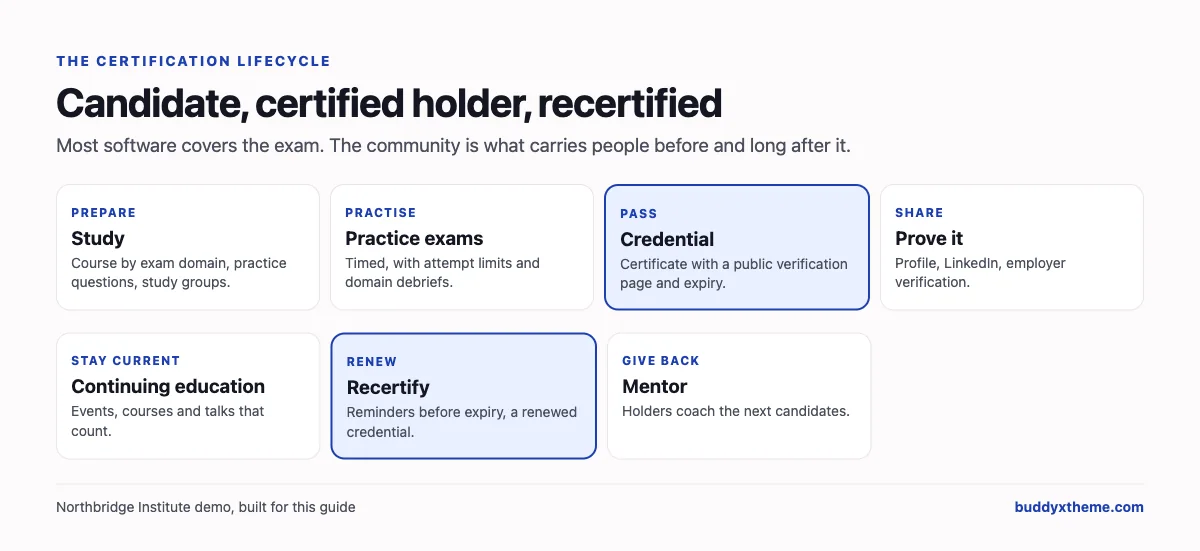
The job runs from the first study session to the third recertification, and each stage needs something different:
| Stage | What candidates and holders need | What the software needs |
|---|---|---|
| Prepare | Structured study by exam domain | Courses organised by domain, practice questions |
| Practise | Realistic practice exams | Question banks, timed exams, randomisation, attempt limits |
| Get help | Answers to hard scenarios | Instructor Q&A, study groups |
| Pass | A credential that proves it | Certificates issued automatically, with a unique ID |
| Prove | Employers checking the credential | Public verification, sharing to LinkedIn |
| Stay current | Continuing education | Courses and events that count, a record of activity |
| Recertify | Renewal before expiry | Expiry dates, reminders, renewed credentials |
| Belong | A network of certified peers | A community for holders, mentoring, careers |
Three layers of certification software
It helps to know which layer each product is built for before comparing them:
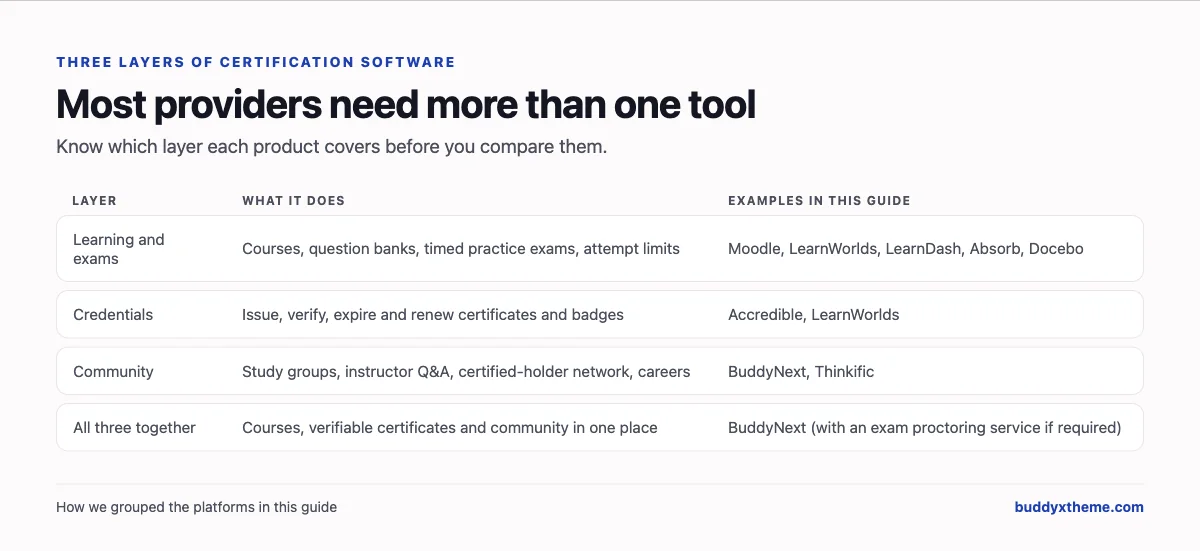
Many certification bodies end up with a learning system for courses and exams, a credentialing service for certificates and badges, and a separate forum or chat group for candidates. Each extra tool means another login and another place where candidate data lives.
Why verifiable credentials matter
Credentials are multiplying. Credential Engine’s Counting Credentials report identified “1,076,358 unique credentials in the U.S.” in its 2022 edition, across universities, online course providers, non-academic providers and schools (Credential Engine). In a market that crowded, a certificate is only as valuable as an employer’s ability to check it.
That is why digital credential standards exist. 1EdTech’s Open Badges specification “describes a method for packaging information about a single recognition or achievement,” with badges that are “information-rich visual tokens of verifiable achievements” describing “who earned it, who issued it, and the criteria required” (1EdTech). Whatever platform you choose, make sure every certificate has a public verification link that shows its current status, including whether it has expired.
The certification software scorecard
How each option handles the parts that matter most. “Not found” means we could not confirm it on the vendor’s own pages, not that it is impossible.
| Platform | Practice exams | Secure exams | Public verification | Expiry and renewal | Study groups and Q&A | Hosting |
|---|---|---|---|---|---|---|
| BuddyNext | Quizzes, attempt limits, timed questions | Third-party proctoring | Yes, with status and expiry | Expiry dates | Yes | Self-hosted |
| LearnWorlds | Question pools, timed, attempt limits | Server-side timing | Yes, with status | Yes, recertification cycles | Not found | Hosted |
| Moodle | Question bank, random questions, limits | Safe Exam Browser | Plugin-dependent | Not found | Forums | Self-hosted |
| Accredible | Not an exam tool | Not an exam tool | Yes | Yes | Credential holder directory | Hosted |
| Absorb LMS | Not confirmed | Not found | Not confirmed | Yes, automated re-enrollment | Social learning | Hosted |
| LearnDash | Quizzes, 8 question types | Not found | Yes, with QR code | Not found | Via other plugins | Self-hosted (WordPress) |
| Thinkific | Quizzes | Not found | Not found | Not found | Communities | Hosted |
| iSpring Learn | Assessments | Not found | Not confirmed | Re-enrollment | Chat and newsfeed | Cloud or private network |
| Docebo | Assessments | Not found | Not confirmed | Not confirmed | Communities add-on | Hosted |
1. BuddyNext: best for certification training you own, from first study session to recertification
BuddyNext is a complete community platform that runs on your own WordPress site. Courses with quizzes and certificates, private and secret spaces, Q&A with accepted answers, member profiles and a searchable directory, direct messages, events with RSVPs, a jobs board, polls, points and leaderboards all work together, so exam prep, the credential and the holders’ network live in one place.
To show it in context, we built Northbridge Institute, a demo training provider for a fictional certification, the Certified Delivery Professional (CDP), with 20 fictional members: candidates preparing for the January exam window, certified holders (one recertifying this year), instructors, an exam coach, a credentials manager and employers who sponsor candidates.
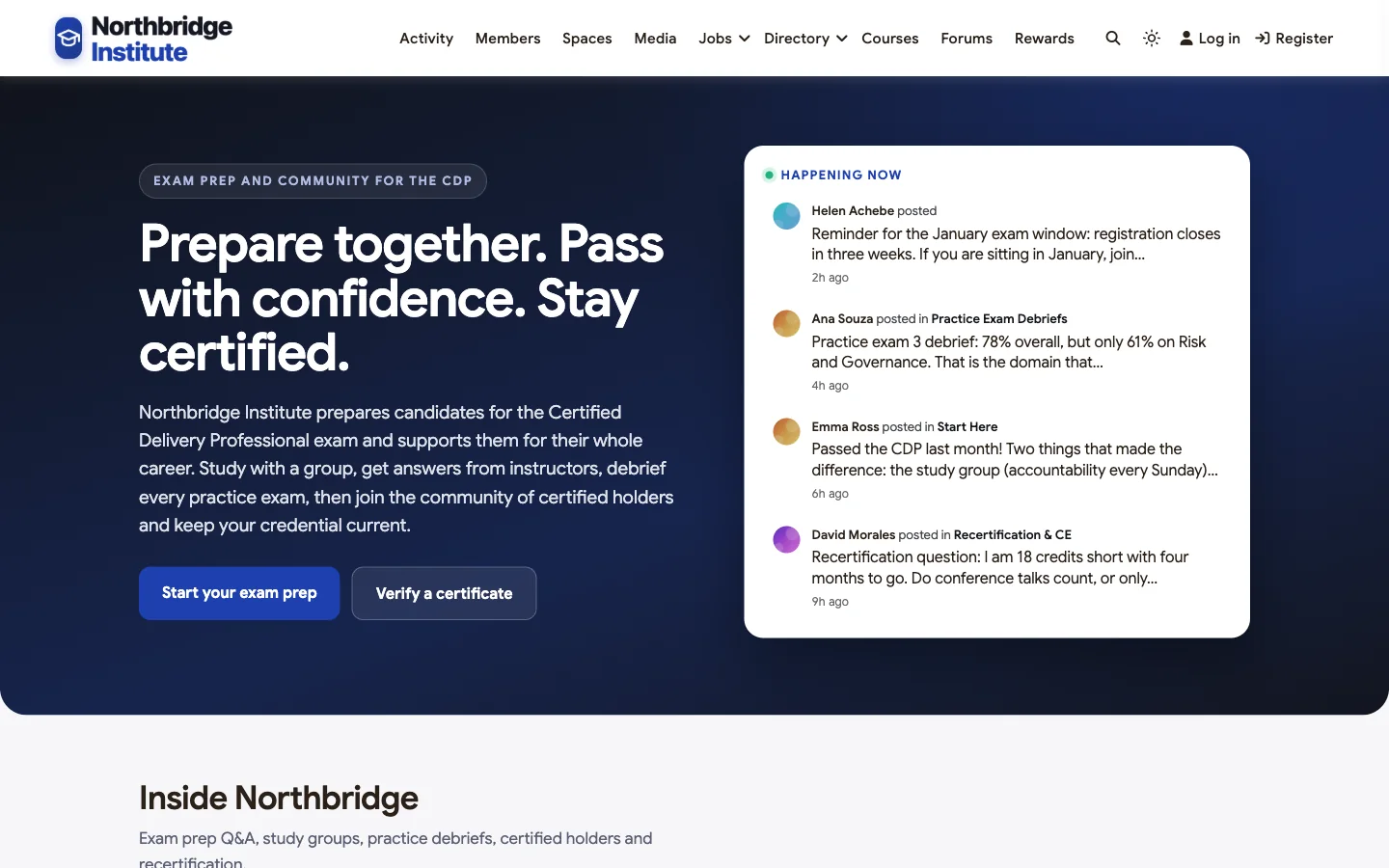
Good at: keeping candidates studying together, verifiable certificates with expiry, and a network of certified holders that lasts.
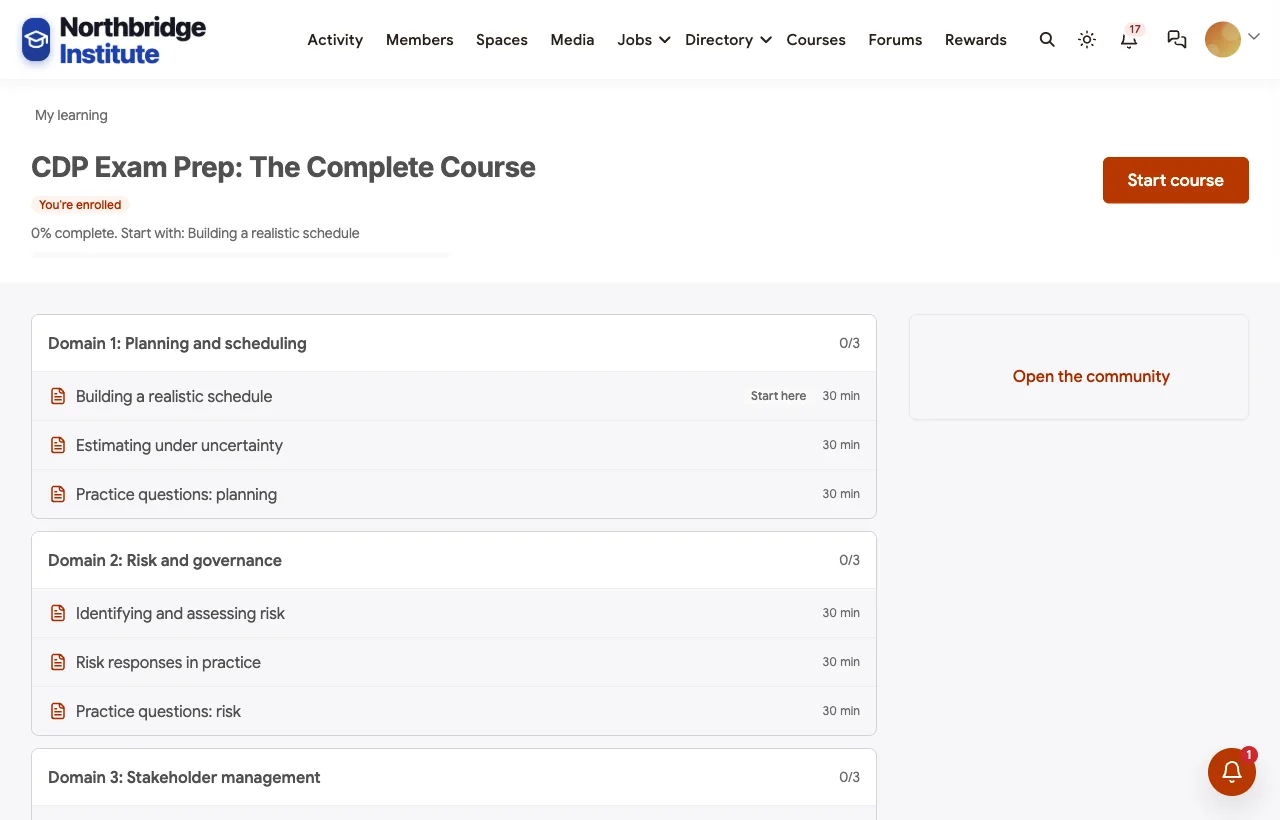
Exam prep courses. The CDP Exam Prep course is organised by exam domain, with practice questions after each module and four full-length timed practice exams. Quizzes support attempt limits and cool-down periods between attempts; advanced quiz features add timed questions, random question pools and more question types. Learners see their progress through every module:
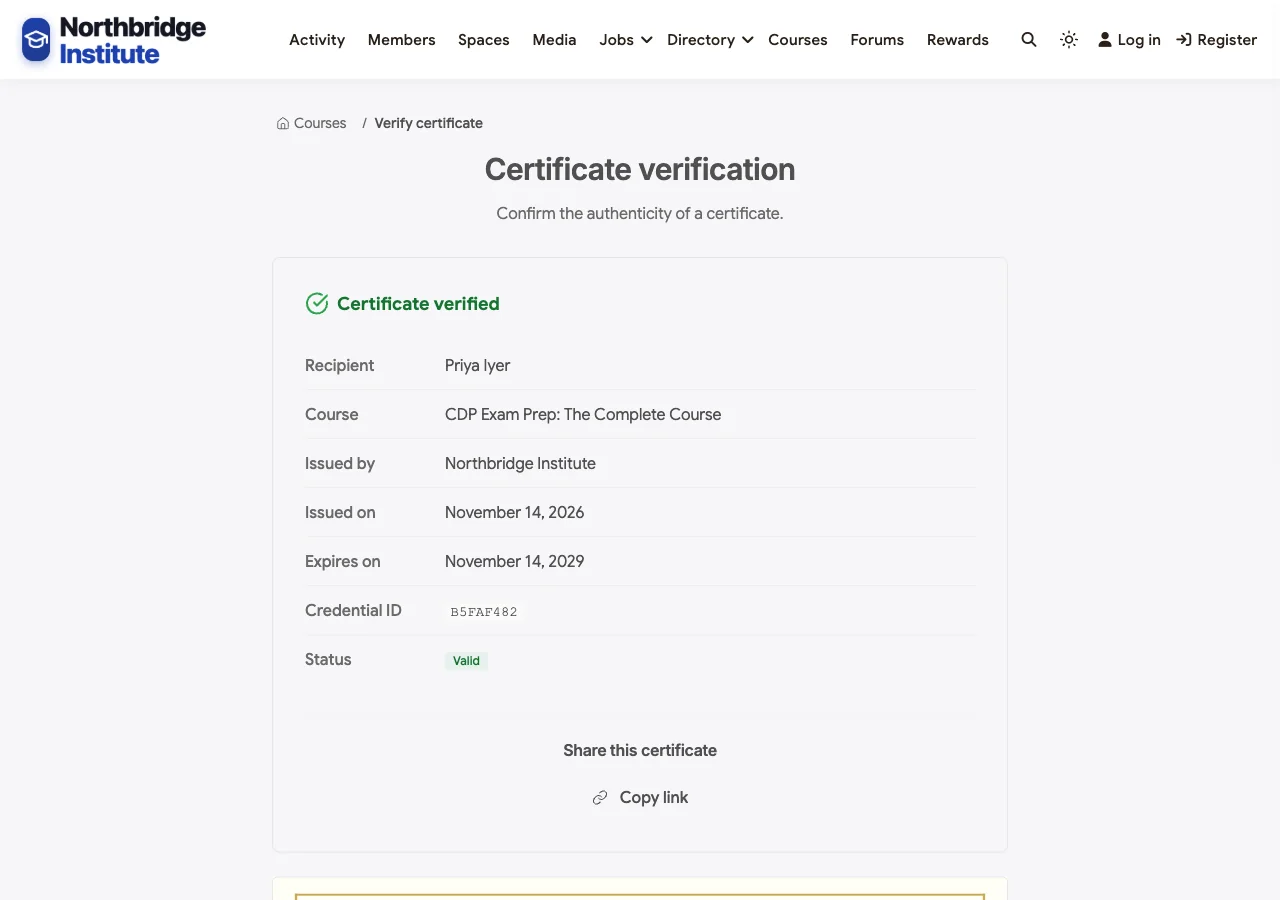
Certificates anyone can verify. When a candidate completes the course, a certificate is issued automatically as a PDF with a unique credential ID. Every certificate has a public verification page showing the recipient, course, issuer, issue date, expiry date and current status, which is what an employer needs before an interview. Certificate templates can carry an expiry, so a credential lapses unless it is renewed, and holders can add it to LinkedIn. Open Badges and Credly credentials are also supported.
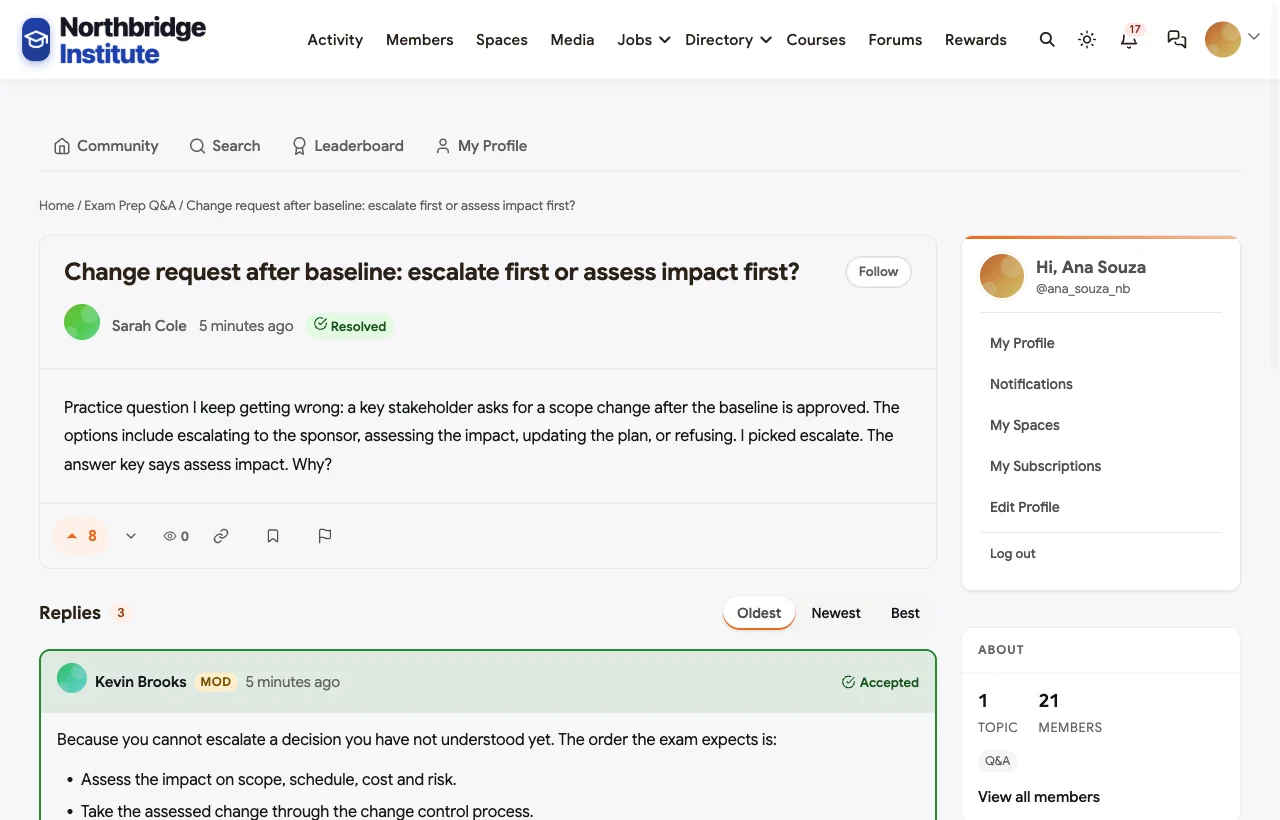
Instructor Q&A with accepted answers. Candidates ask about tricky exam scenarios in an Exam Prep Q&A space. In the demo, a candidate asks why the answer key says to assess a change request before escalating; the lead instructor explains the order the exam expects, a certified holder adds the real-world view, and the answer is marked accepted for the next candidate:
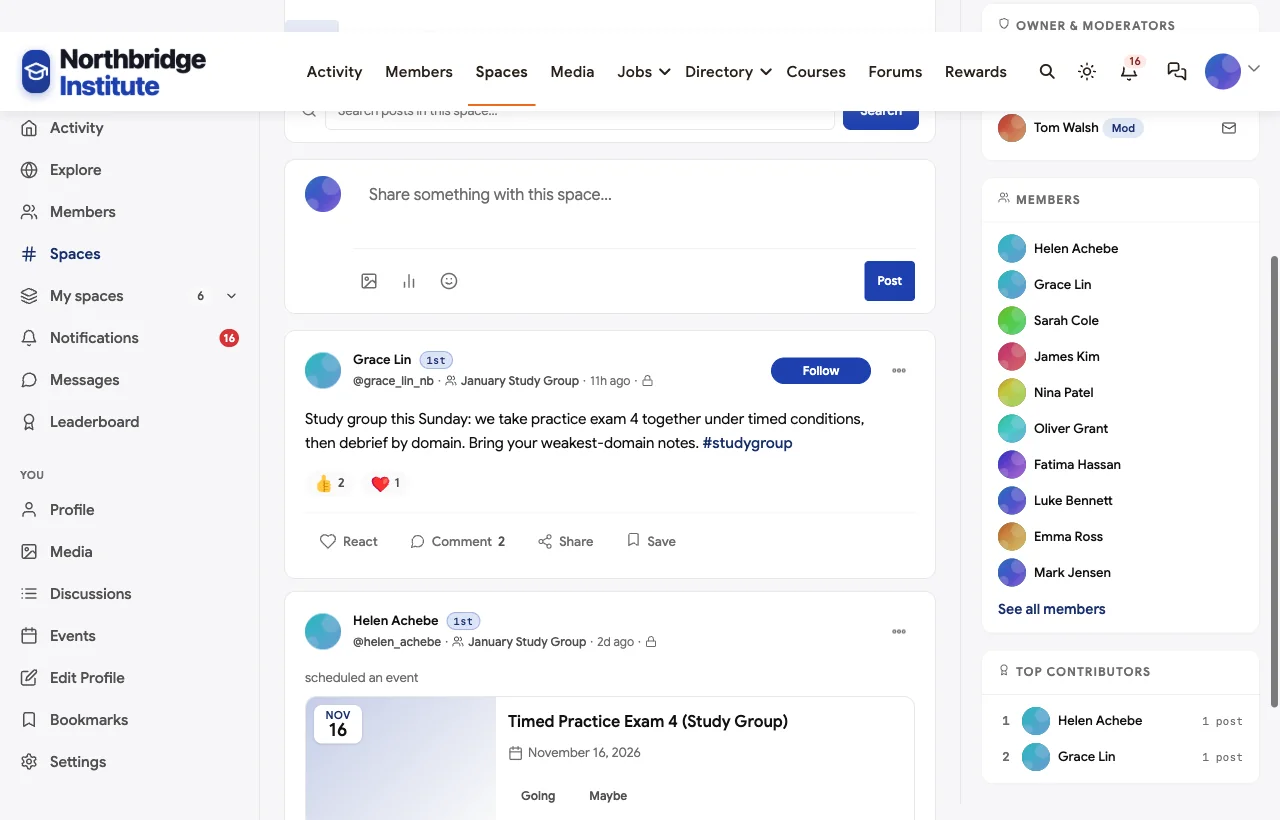
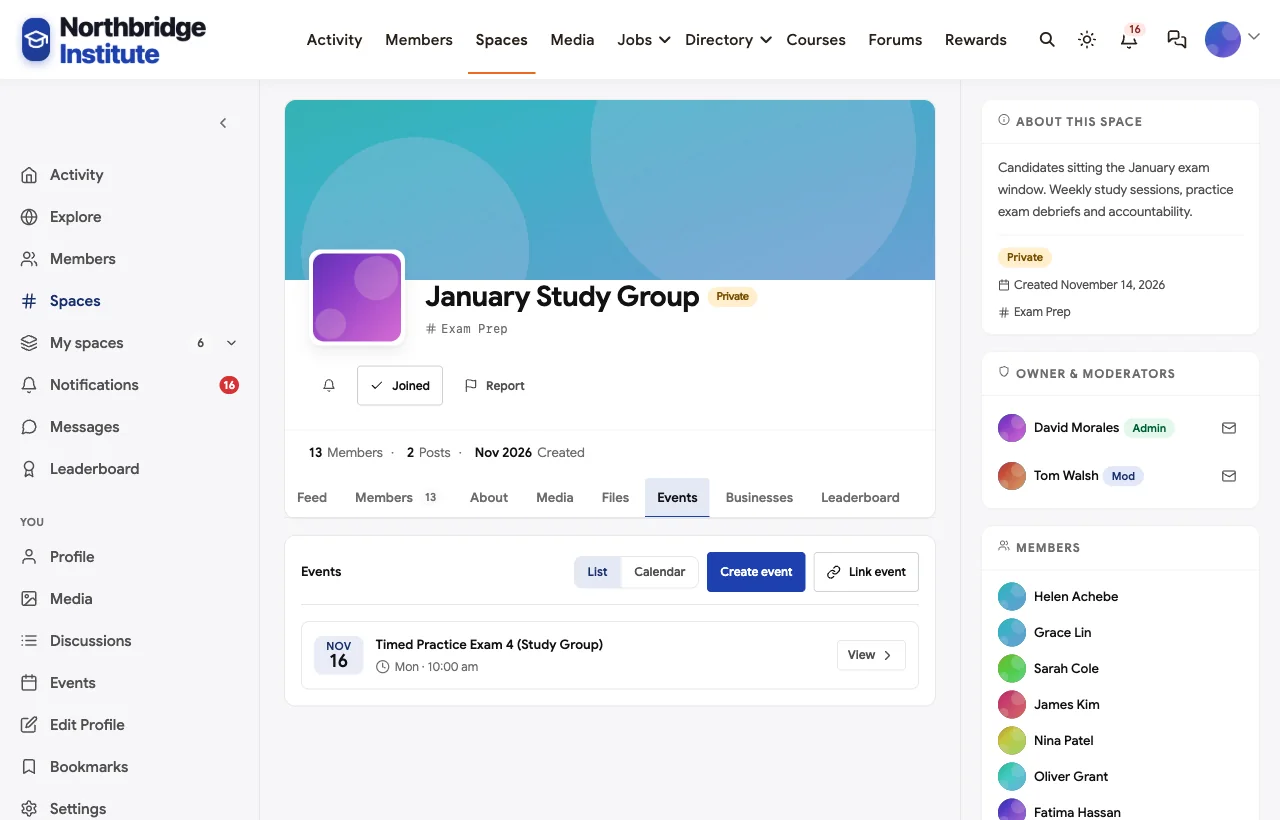
Private study groups. Candidates sitting the same exam window join a private study group with weekly timed practice exams and debriefs:
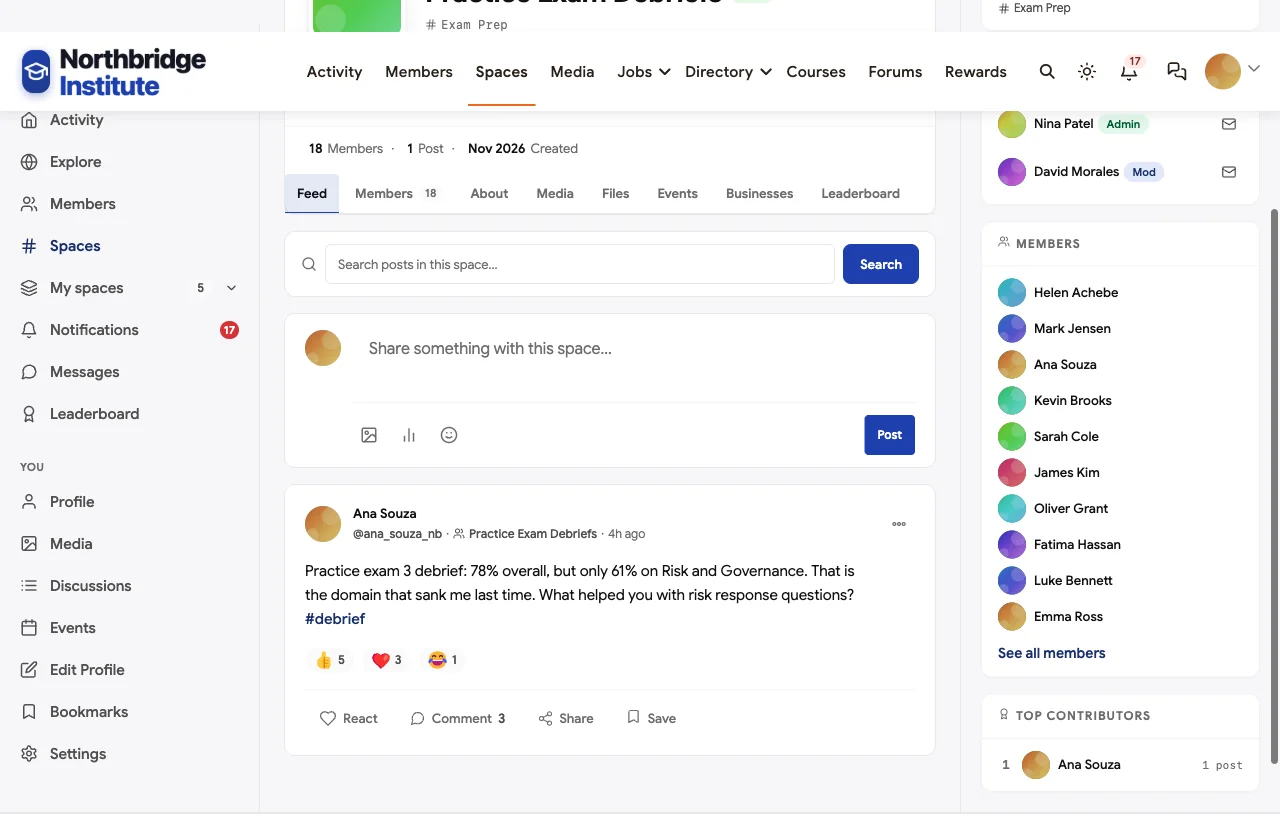
Practice exam debriefs. An open space where candidates share their practice scores by domain and get help with their weakest areas, without ever sharing real exam questions:
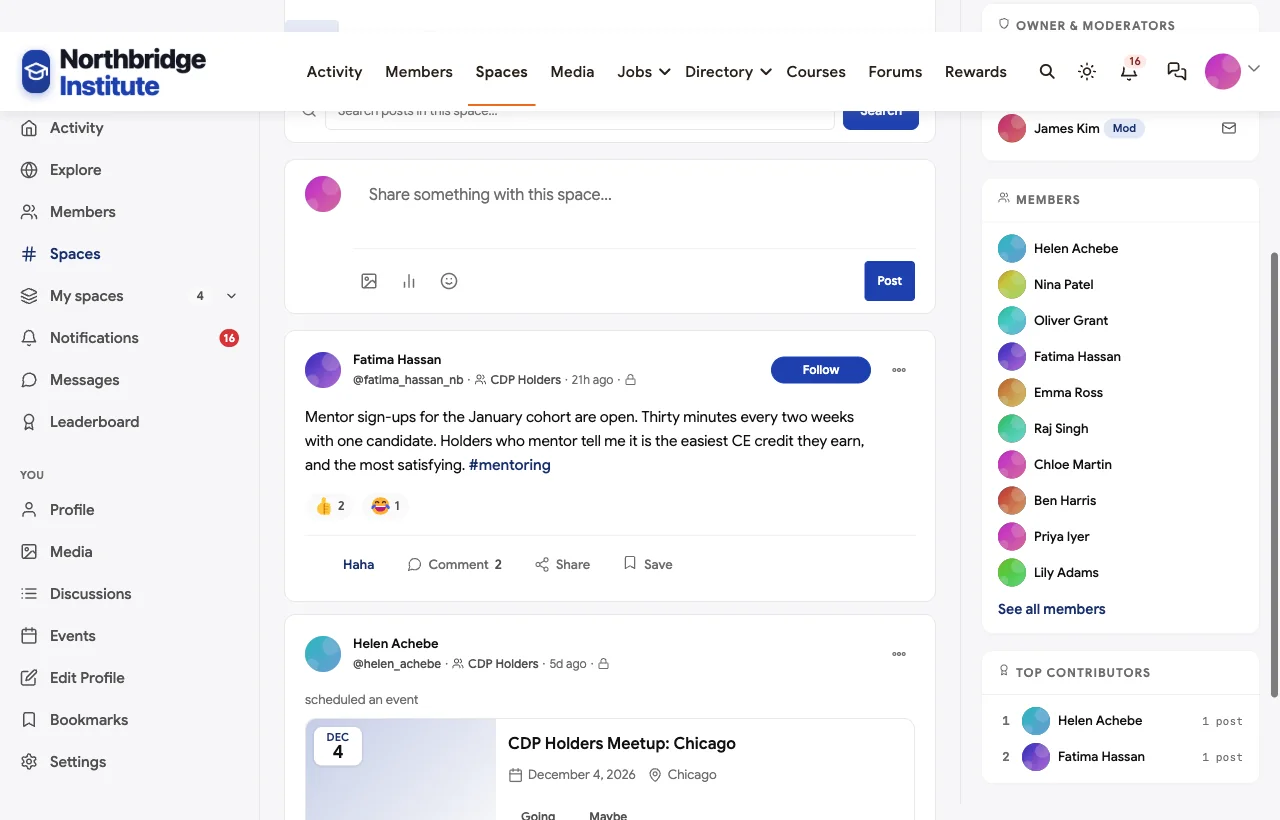
A network for certified holders. Certified professionals join a private holders’ space for case discussions, mentoring sign-ups and meetups that count towards continuing education:
Recertification and continuing education. An open space covers what counts towards continuing education, renewal deadlines and how to log activity. In the demo, a holder four months from expiry asks whether conference talks count, and the credentials manager answers:

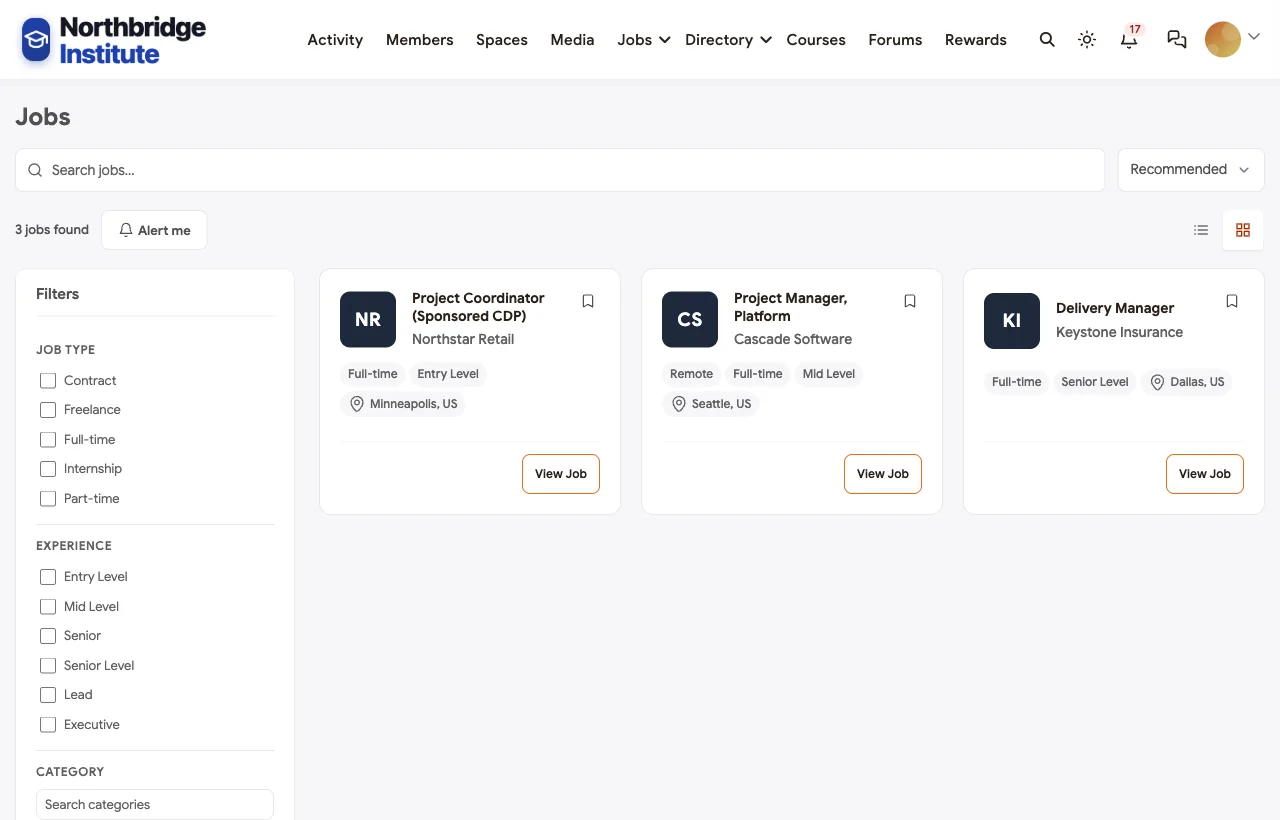
Careers and employers. Employers who value the credential post roles, and some sponsor candidates through their prep:
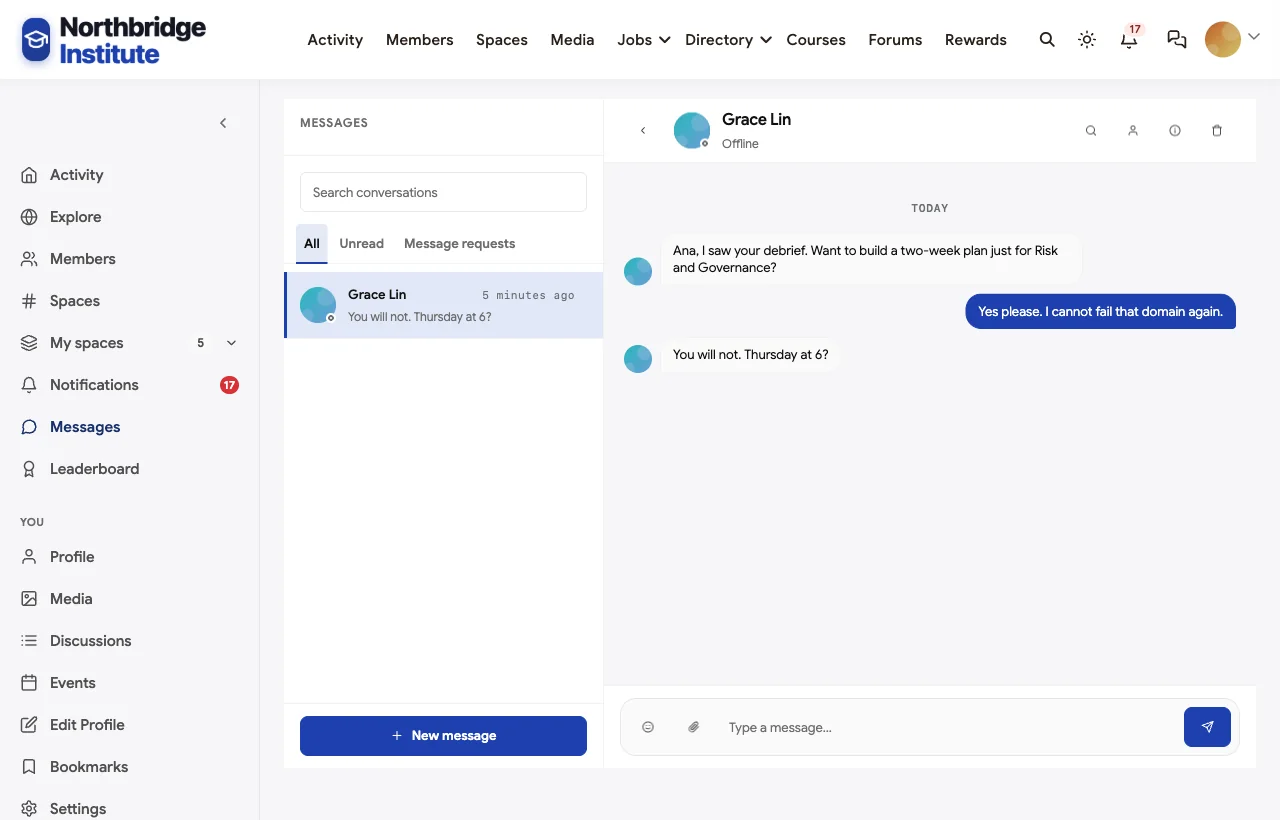
Also built in. Member profiles and a directory, direct messages for coaching (in the demo, the exam coach builds a two-week plan for a candidate’s weakest domain), polls (which exam domain worries you most), a leaderboard, notifications and a mobile layout that works without an app download.
Not built for: remote proctoring of high-stakes exams or a lockdown browser; if your certification exam must be proctored, run it with a proctoring service or testing centre and use the community for everything around it. There is no dedicated continuing education credit ledger; holders log activity and you track it with certificates, events and records. It is self-hosted, so you run WordPress or use a managed host.
What’s included, and how it is delivered
BuddyNext is one platform made of a core and add-on platform modules. Everything shown in the demo above runs on the BuddyNext platform. This table shows which parts come with the core, which are platform modules you install and activate alongside it, and which need a third-party plugin, another system or custom work.
| Capability | How it is delivered |
|---|---|
| Open, private and secret spaces | Core platform |
| Member profiles and searchable member directory | Core platform |
| Direct messages | Platform module, installed alongside |
| Activity feed, pinned announcements and hashtags | Core platform |
| Members-only mode, admin approval, invites and email verification | Core platform |
| Polls | Core platform |
| Courses, quizzes and attempt limits | Platform module, installed alongside |
| Timed questions and random question pools | Platform module, installed alongside |
| Certificates with public verification and expiry | Platform module, installed alongside |
| Open Badges and Credly credentials | Platform module, installed alongside |
| Q&A with accepted answers | Platform module, installed alongside |
| Events with RSVPs, online or in person | Platform module, installed alongside |
| Jobs board with filters and alerts | Platform module, installed alongside |
| Paid plans with trials and coupons | Platform module, installed alongside |
| Remote exam proctoring | Third-party proctoring service |
Want to click around yourself? The Northbridge Institute community in this guide was built on a private test site, so it is not public. The BuddyNext live demo is a general community you can open in your browser and explore without installing anything.
2. LearnWorlds: best hosted platform for certification management
LearnWorlds positions itself as “the #1 AI-powered LMS built for learning businesses” (LearnWorlds). Its Assessment Builder lets you “create a pool of test questions that you can reuse,” “deliver a unique set of questions for each respondent in a random order,” measures time “server-side” and lets you “set a specific attempt limit” (LearnWorlds). Its certification management issues “branded certificates linked to course completion or a graded assessment,” with “a public verification link and certificate ID” showing “whether it has expired or been revoked,” recertification cycles that start “on a recurring due date, at certificate expiry, or on re-enrollment,” and email reminders covering “certificate expiration, renewal, and retraining.” It keeps “Credly and Accredible credentials aligned with certificate updates and revocation” (LearnWorlds).
Strengths for certification: the most complete hosted mix of exam features and certificate lifecycle management, including recertification.
Gaps: no proctoring partner named on its pages; no continuing education credit tracking found; we could not confirm a dedicated discussion or study group feature.
3. Moodle: best for secure exams on your own infrastructure
Moodle, “the world’s most customisable and trusted learning management system,” can be “deployed on a private cloud or server for full control” (Moodle). Its quiz questions “are created and stored separately in a question bank and can be reused,” random questions can be drawn from a category, and time limits and attempts are configurable (Moodle docs). For secure exams, “the quiz has built in settings to allow secure exams using the Safe Exam Browser,” so “students will only be able to attempt the quiz if they are using Safe Exam Browser” (Moodle docs). Forums support threads, peer rating and private replies (Moodle docs).
Strengths for certification: a mature question bank and a built-in lockdown browser option, open source and self-hosted.
Gaps: certificates come from a plugin rather than core (Moodle Plugins), and we could not confirm expiry or public verification there; native selling is a basic per-course PayPal payment; no continuing education tracking found.
4. Accredible: best specialist for issuing and verifying credentials
Accredible is a credentialing platform, not a learning system: it helps you “create and issue branded digital certificates and badges” with “fraud-proof credentials” that third parties can verify (Accredible). It can add “expiration dates and automatically [expire] credentials, marking them no longer valid,” and its Spotlight feature lets you “promote your learners in a branded directory” of credential holders (Accredible features).
Strengths for certification: purpose-built credential issuing, verification, expiry and a public holders’ directory.
Gaps: you still need a separate platform for courses, exams and the candidate community; we could not confirm its integration list on its own pages at the time of writing.
5. Absorb LMS: best for compliance-driven recertification at scale
Absorb LMS, now published at absorbai.com, describes itself as “the AI-powered LMS that actually knows your business” (Absorb). For compliance training it can “automate certification and recertification course enrollment workflows,” and “tracks every expiry date and re-enrolls the learner before it lapses, with reminders escalating if they go unanswered,” sending reminders “at 30, 60, and 90 days before a deadline.” It keeps “a complete audit trail of completions, certificate dates, policy acknowledgments, and changes” (Absorb).
Strengths for certification: the most detailed automated recertification and audit trail in this list.
Gaps: built for internal compliance training; we could not confirm question banks, timed exams, proctoring or public certificate verification on its pages.
6. LearnDash: best WordPress LMS for exam prep courses
LearnDash, now owned by Liquid Web, lets you “create quizzes with 8 question types” (Liquid Web). Its certificate verification creates “a unique, publicly accessible verification link that anyone can view without logging in,” each certificate “is stored as an immutable permanent record,” and certificates can include “a dynamic QR element linked directly to the public verification URL” (LearnDash docs). It integrates with WooCommerce and can “sell group seats so one sale enrolls a whole company.”
Strengths for certification: strong quizzes, public certificate verification with QR codes, group seat sales for employers, runs on your own WordPress site.
Gaps: we found no certificate expiry, recertification, proctoring or badges in its documentation; discussion and study groups need separate plugins.
7. Thinkific: best for selling exam prep courses
Thinkific is built for “courses, community, commerce” (Thinkific). It supports quizzes and assignments and automatically sends “completion certificates after they finish a course” (Thinkific). Its communities let members “ask questions, share opinions, and contribute ideas,” with workshops, Q&As and office hours (Thinkific), and its commerce tools include one-time, subscription and payment-plan pricing, coupons and B2B invoicing (Thinkific).
Strengths for certification: strong course selling, completion certificates and a community for candidate questions.
Gaps: certificates read as completion certificates rather than time-bound credentials; we found no expiry, recertification, public verification or proctoring.
8. iSpring Learn: best for corporate certification programs on a private network
iSpring describes its LMS as “a powerful corporate LMS for business growth,” covering “onboarding, compliance, assessment, continuous growth, and engagement” (iSpring). Its “intelligent reenrollment system monitors all certificate validities and accurately assigns training in advance,” learners can “connect with course authors or subject experts anytime” through built-in chat and a newsfeed (iSpring features), and while it is cloud-based, iSpring says it “can deploy it on your own network” in an isolated environment (iSpring).
Strengths for certification: certificate validity tracking with re-enrollment, expert chat, and an on-premises option.
Gaps: framed for internal corporate training, not selling certification to the public; we found no public verification, proctoring or continuing education tracking.
9. Docebo: best for enterprises already standardised on Docebo
Docebo is “the AI-powered LMS that creates, delivers, and measures learning at scale” for workforces, customers, partners and members (Docebo). It supports assessments and certifications as content formats (Docebo) and sells a separate Communities product to “turn learning into connection” (Docebo).
Strengths for certification: enterprise scale, a communities add-on, and a broad content catalogue.
Gaps: most exam and certificate details are in a help center we could not access; we could not confirm question banks, proctoring, public verification or recertification on Docebo’s public pages. Ask for a demo focused on these.
Running exam prep as a community
The difference between candidates who pass first time and those who do not is rarely the content. In our demo, the posts that helped most were a study group running timed practice exams together, a holder explaining how to read the phase in a risk question, and an exam coach building a two-week plan for one weak domain. Practices that work:
- Group candidates by exam window. Everyone sitting in January studies together, with a timed practice exam every week.
- Debrief by domain, not overall score. “78% overall” hides a failing domain. Ask candidates to post domain scores.
- Never share real exam items. Make this a pinned rule. Debrief the reasoning, not the questions.
- Let certified holders mentor. Holders who mentor candidates stay engaged, and in many schemes mentoring counts towards continuing education.
- Answer once, mark it accepted. The same scenario questions come up every exam window.
Recertification without the panic
Most holders remember their renewal deadline a month too late. Make recertification easy:
| Practice | Why |
|---|---|
| Expiry on every certificate | Status is visible on the verification page, so holders and employers both know |
| Reminders well ahead of expiry | 90, 30 and 7 days is a common pattern; the first reminder is the one that matters |
| Count community activity | Meetups, mentoring and talks run in your community can count towards continuing education |
| A public “what counts” post | The same questions come up every cycle |
| A renewed certificate, not just a record | Holders want a fresh credential to share |
One platform or several?
A certification body can run on one platform or stitch several together. The trade-off is simple:
- One platform keeps candidate data, certificates and community in one place, with one login. It works best when your exam can be delivered online, or when the exam itself runs at a testing centre and everything else (prep, certificates, community, continuing education) happens on your platform.
- Several tools make sense when you need a specialist piece the main platform lacks, such as a lockdown browser, a proctoring service or an existing credentialing contract. Connect them with single sign-on and make sure certificates still land somewhere holders and employers can find them.
Whichever route you choose, write down who owns the candidate record. When a holder asks “what do I need to renew?”, the answer should come from one place.
Which software fits your certification program?
| If you… | Choose |
|---|---|
| Want exam prep, verifiable certificates and a holders’ network in one place you own | BuddyNext |
| Want the most complete hosted certification management | LearnWorlds |
| Need secure exams with a lockdown browser on your own servers | Moodle |
| Already have a learning platform and need credential issuing and verification | Accredible |
| Run compliance-driven recertification across a large workforce | Absorb LMS |
| Run exam prep courses on WordPress and sell seats to employers | LearnDash |
| Sell exam prep courses with a simple community | Thinkific |
| Run internal certification on a private network | iSpring Learn |
| Are an enterprise already using Docebo | Docebo |
More community platform comparisons
Running a different kind of learning or professional community? These guides use the same method: a working demo community and vendor claims checked at the source.
- Best platforms for a private sales training community: onboarding, call reviews, roleplay and private team rooms.
- Best platforms for a teacher professional development community: PLCs, courses with classroom tasks, workshops and new teacher mentoring.
- Best software for an accounting professionals community: peer Q&A with accepted answers, firm owner groups, busy season support and a job board.
- Best customer education platforms: customer academies with onboarding courses, admin certification, live training and community Q&A.
- How to start a private professional association community: CPD courses with verifiable certificates, memberships and renewals, step by step.
- Best software for a professional association community: chapters, committees and member directories.
- Best platforms for cohort-based learning: live, dated courses with peer pods and feedback.
- Best software for an online course community: course creators who want learners to finish.
- How to set up a community space on WordPress: the step-by-step setup guide behind every demo in this series.
How we built and checked this list
We built the Northbridge Institute demo on a local WordPress site running BuddyNext, with a fictional certification, institute, candidates, holders, a course, certificates, study groups and events created for this guide. Every BuddyNext screenshot is from that demo; the CDP is not a real credential. Competitor features were checked against each vendor’s own website, documentation or pricing page in November 2026, and industry figures come from Credential Engine and 1EdTech. Where we could not confirm a feature on a vendor’s own pages, the scorecard says “Not found” or “Not confirmed”; several vendors keep detailed documentation behind help center logins. We left out TalentLMS because we could not verify enough of its certification features on its public pages at the time of writing. We did not run a hands-on trial of every competitor, so features can change; confirm anything critical with the vendor. buddyxtheme.com is published by the team behind BuddyNext, which is why BuddyNext is listed first; we have tried to be fair about its gaps as well as its strengths.
Frequently asked questions
What is the best software for professional certification training?
BuddyNext is the best choice for certification training you own, with exam prep courses, quizzes with attempt limits, certificates with public verification and expiry, instructor Q&A, study groups and a certified holders’ network on your own WordPress site. LearnWorlds is the most complete hosted alternative for certification management.
Can certificates be verified by employers?
Yes on BuddyNext, LearnWorlds, LearnDash and Accredible: each certificate has a public verification page or link. Check that the page shows current status, including expiry or revocation.
How do I handle certificate expiry and recertification?
Set an expiry on each certificate, remind holders well before it lapses and issue a renewed certificate when they recertify. LearnWorlds and Absorb automate recertification cycles; BuddyNext shows expiry on every certificate’s verification page.
Do I need exam proctoring?
For high-stakes certification exams, usually yes. Moodle supports the Safe Exam Browser lockdown browser. Most other platforms, including BuddyNext, rely on a separate proctoring service or testing centre for the exam itself.
What is the difference between a certificate and a digital badge?
A certificate is typically a document, often a PDF. A digital badge following the Open Badges standard packages who earned it, who issued it and the criteria, so it can be verified and shared online. Many platforms issue both.
How do I track continuing education?
Few platforms have a full continuing education ledger. Common approaches are certificates for CE courses, attendance at events, and a record holders submit. Run CE-eligible meetups and courses in your community so activity is easy to document.
Should candidates study in groups?
Yes. Study groups organised by exam window, with weekly timed practice exams and domain debriefs, keep candidates accountable and surface weak areas early.
Can employers buy seats for their staff?
Yes on platforms with group or B2B selling: LearnDash sells group seats through WooCommerce, Thinkific supports B2B invoicing, and BuddyNext supports paid plans and gated spaces for sponsored candidates.
The bottom line
Certification training is more than an exam. Candidates need to prepare together, holders need a credential anyone can verify, and everyone needs a reason to stay current until the next renewal. If you want exam prep, verifiable certificates with expiry and a network of certified holders on your own domain, with your own candidate data, BuddyNext is the strongest foundation. If you need a hosted certification engine, LearnWorlds leads; for secure exams on your own servers, Moodle; and for credentials alone, Accredible.
And build a certification community your holders stay part of.