
WordPress has one of the largest developer ecosystems on the web, and much of it runs on community. A plugin company’s best bug reports come from its users. An agency’s best hires come from people it met at a meetup. A junior developer’s first block plugin works because someone took ten minutes to explain block deprecations. The question for anyone building that community is where it should live, and for a WordPress business the answer is often closer to home than a third-party platform.
This guide compares the platforms you can use to run a WordPress developer community, whether you are a plugin or theme company, a host, an agency network or an independent organiser. It covers Q&A with code blocks and accepted answers, product ideas with a public roadmap, showcases, agency directories, job boards, meetups and courses, and whether the community runs on WordPress itself so it can share accounts with your product site. We built a working developer community for the first entry and checked every competitor claim on the vendor’s own pages and the WordPress.org plugin directory in November 2026.
Quick answer
If you want a developer community on your own WordPress site, BuddyNext is the strongest choice: Q&A with syntax-highlighted code blocks and accepted answers, an ideas space with votes and a public roadmap, showcases, an agency directory, a job board, meetups and courses, all sharing the same WordPress accounts as your product site. BuddyBoss Platform is the closest WordPress alternative with a branded app, wpForo is the strongest pure forum with accepted answers and code highlighting, and BuddyPress and bbPress are the long-standing open-source building blocks. Stack Internal and Meetup suit narrower jobs outside WordPress.
In this guide
- Why WordPress developers need a community built for code
- The WordPress developer community scorecard
- 1. BuddyNext: best for a developer community on your own WordPress
- 2. BuddyBoss Platform: best WordPress community with a branded app
- 3. wpForo: best WordPress forum with accepted answers and code
- 4. BuddyPress: best open-source foundation for a custom build
- 5. bbPress: best lightweight forum from the WordPress project
- 6. PeepSo: best social network plugin with a native app
- 7. Ultimate Member: best for member profiles and directories
- 8. Asgaros Forum: best simple discussion board
- 9. Stack Internal: best for private technical knowledge inside a company
- 10. Meetup: best for local in-person groups
- Close the product feedback loop in public
- One WordPress, one login
- Support, documentation and community: how they fit together
- Running a healthy developer community
- Questions to ask before you choose
- A 60-day launch plan for a WordPress developer community
- Which platform fits your WordPress developer community?
- More community platform comparisons
- How we built and checked this list
- Frequently asked questions
- The bottom line
Why WordPress developers need a community built for code
WordPress powers a huge share of the web. W3Techs reports at the time of writing that “WordPress is used by 57.6% of all the websites whose content management system we know,” which “is 38.6% of all websites” (W3Techs). Its in-person community is just as broad: WordCamp Central counts “1,527 WordPress Events” across “422 Cities” in “72 Countries” (WordCamp Central), and the project describes local meetups as “a vital part of the overall WordPress open source project” (Make WordPress).
A developer community needs things a general social community does not:
| Need | Why it matters | What the platform needs |
|---|---|---|
| Code in questions and answers | Most questions are about specific code | Code blocks with syntax highlighting |
| Answers that stay findable | The same block and hook questions recur | Accepted answers, search, resolved status |
| Product feedback | Plugin companies live on user ideas | An ideas space with votes and statuses |
| A public roadmap | Developers plan around your releases | Planned, in progress, shipped and declined columns |
| Showcases | Builders learn from each other’s work | A space for builds and write-ups |
| Work and partnerships | Agencies pass on work and hire | An agency directory and a job board |
| Meetups and office hours | WordPress community is local and live | Events, in person and online |
| Learning | Block development keeps changing | Courses with exercises and certificates |
| One account | Customers should not need a second login | The community on the same WordPress install |
The WordPress developer community scorecard
How each option handles what matters most. “Not found” means we could not confirm it on the vendor’s own pages or WordPress.org listing, not that it is impossible.
| Platform | Runs on WordPress | Code blocks | Accepted answers | Ideas and roadmap | Events | Directory | Job board |
|---|---|---|---|---|---|---|---|
| BuddyNext | Yes | Syntax highlighting | Yes | Votes, statuses, roadmap | Yes | Agencies and members | Yes |
| BuddyBoss Platform | Yes | Not found | Not found | Not found | Yes | Member profiles | Not found |
| wpForo | Yes | Code highlighting | Yes | Not found | Not found | Member directory | Not found |
| BuddyPress | Yes | Not found | Not found | Not found | Not found | Member directory | Not found |
| bbPress | Yes | Not found | Not found | Not found | Not found | Not found | Not found |
| PeepSo | Yes | Not found | Not found | Not found | Not found | Not found | Not found |
| Ultimate Member | Yes | Not found | Not found | Not found | Not found | Member directories | Companion plugin |
| Asgaros Forum | Yes | Not found | Not found | Not found | Not found | Members list | Not found |
| Stack Internal | No | Not confirmed | Validated knowledge | Not found | Not found | Not found | Not found |
| Meetup | No | Not found | Not found | Not found | Yes | Groups | Not found |
1. BuddyNext: best for a developer community on your own WordPress
BuddyNext is a complete community platform for WordPress. Spaces, member profiles and a directory, an activity feed, Q&A with code blocks and accepted answers, ideas with votes and a roadmap, events, a business directory, a job board, courses, direct messages and leaderboards all work together. Because it runs on WordPress, a plugin or theme company can put its community on the same install as its product site and documentation, with one set of user accounts.
To show it in practice, we built Hookline, a demo community run by a fictional block plugin company. It has 20 members: a core contributor, plugin and theme developers, freelancers moving from page builders to blocks, agency owners, an accessibility specialist, a security researcher, a headless developer, a meetup organiser, a student building a first plugin and the Hookline team.
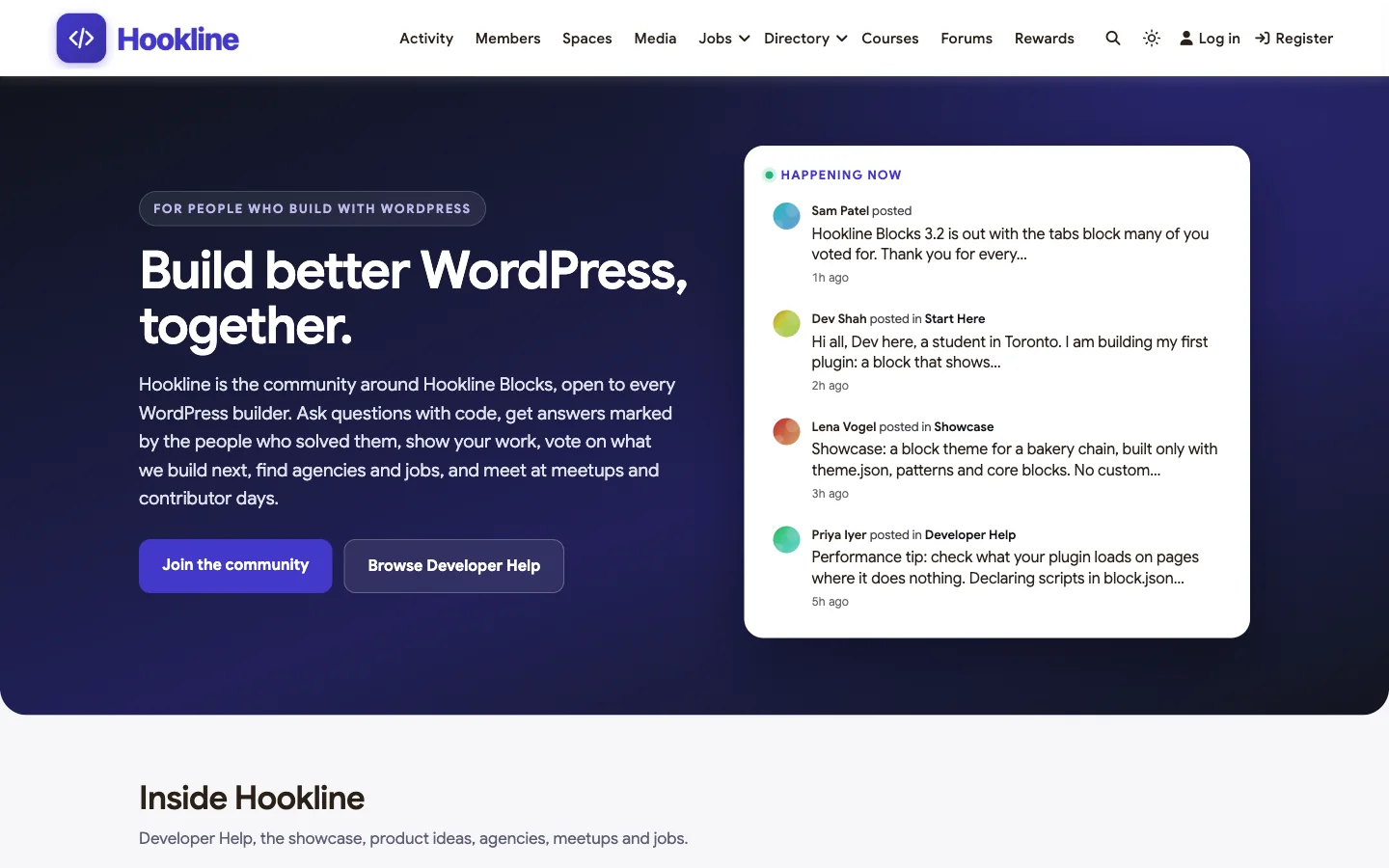
Good at: code-heavy Q&A that stays findable, product feedback with a visible roadmap, and the work side of WordPress: agencies, jobs and meetups.
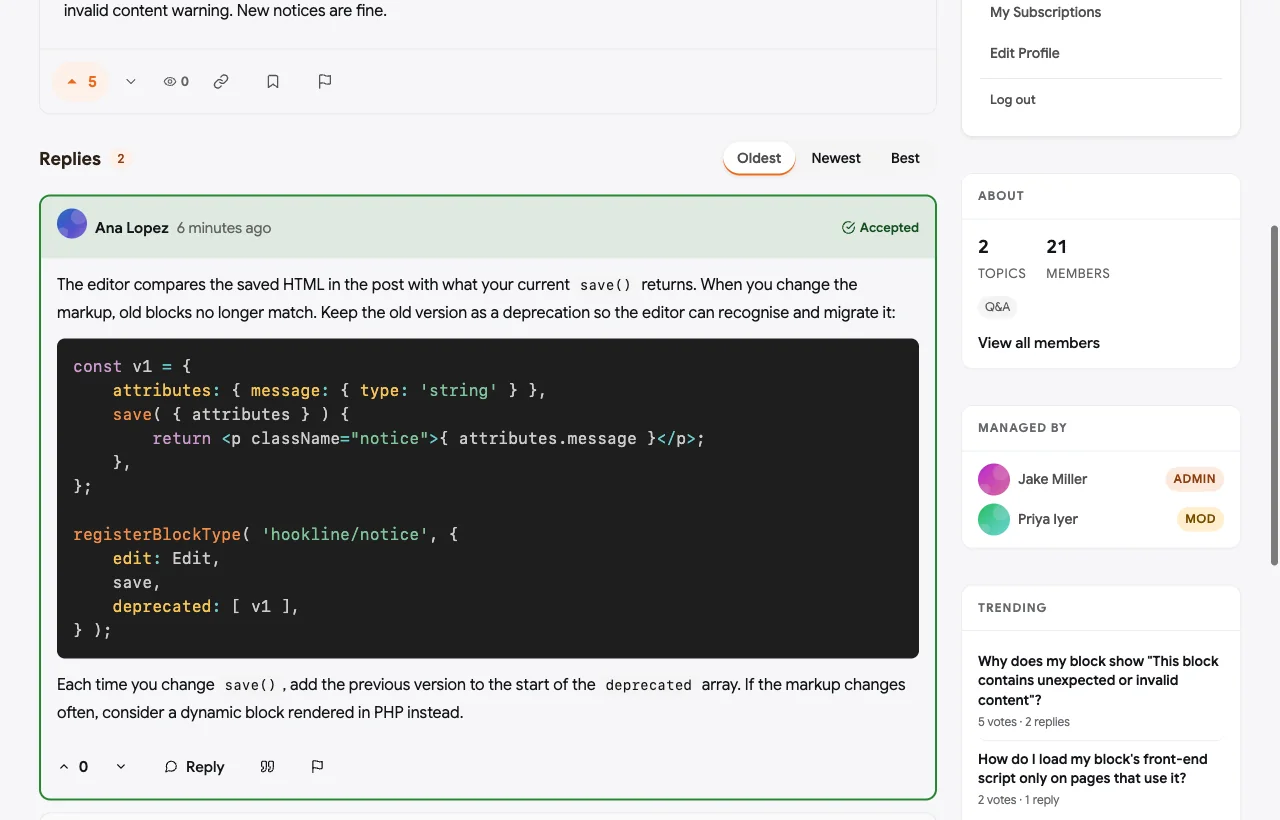
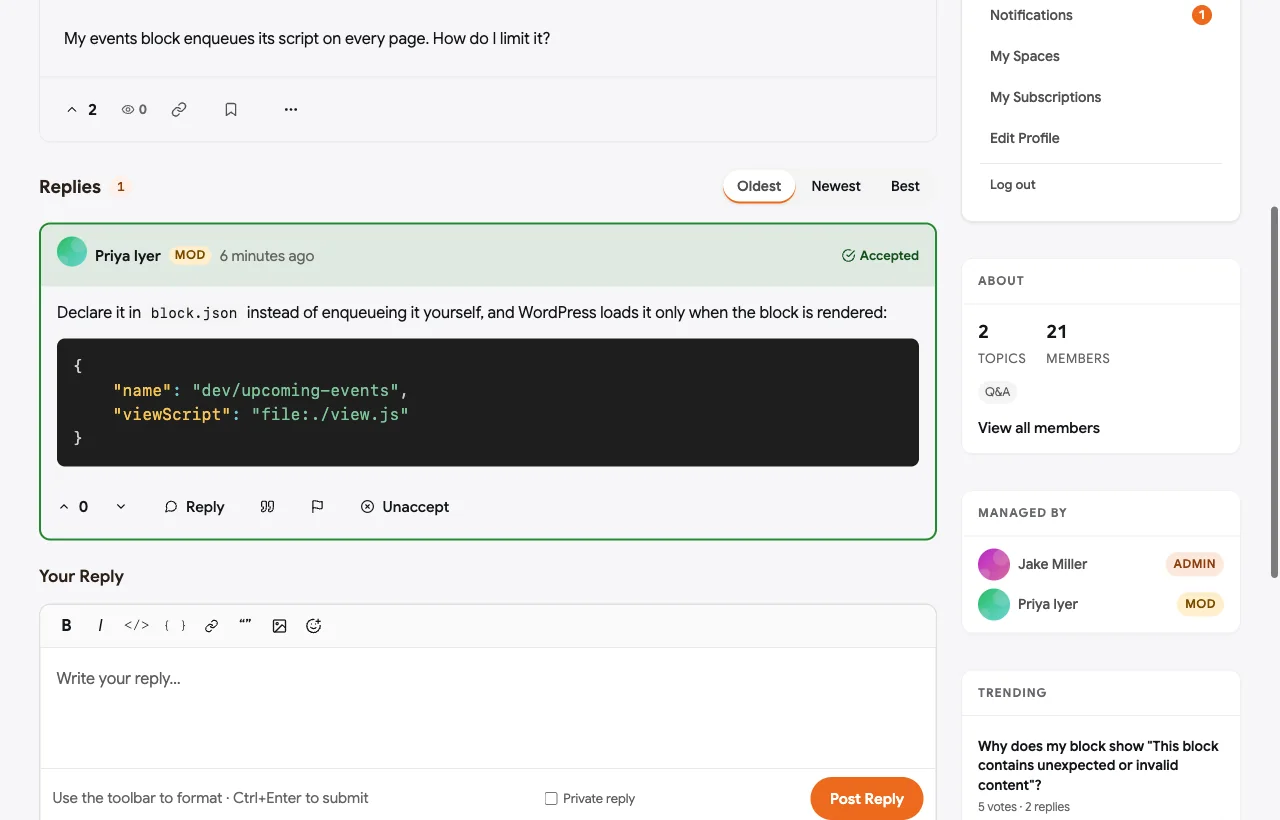
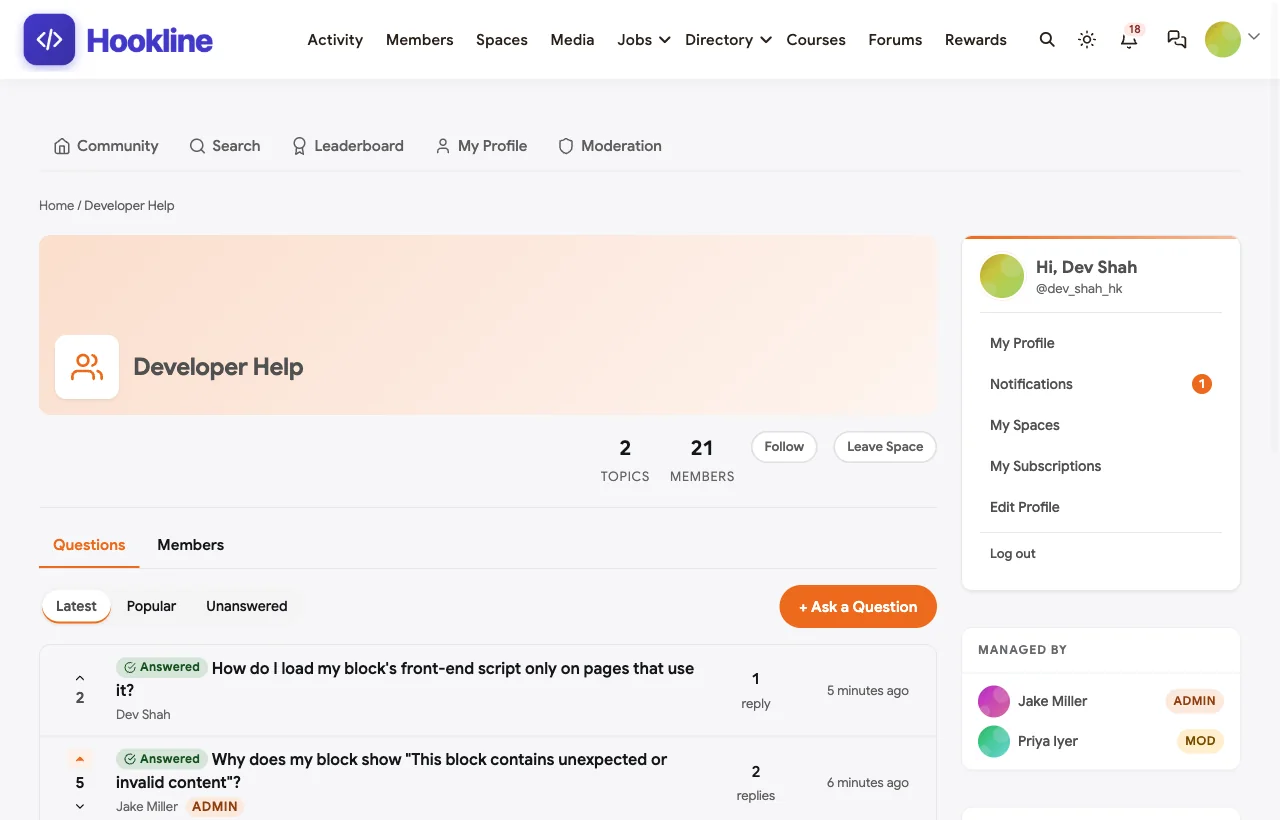
Q&A with code and accepted answers. Developer Help is a Q&A space. The editor has buttons for inline code and code blocks, code is syntax-highlighted, and the answer that solved the problem is marked accepted. In the demo, a developer asks why changing a block’s save function breaks existing content, and a core contributor answers with a deprecation example:
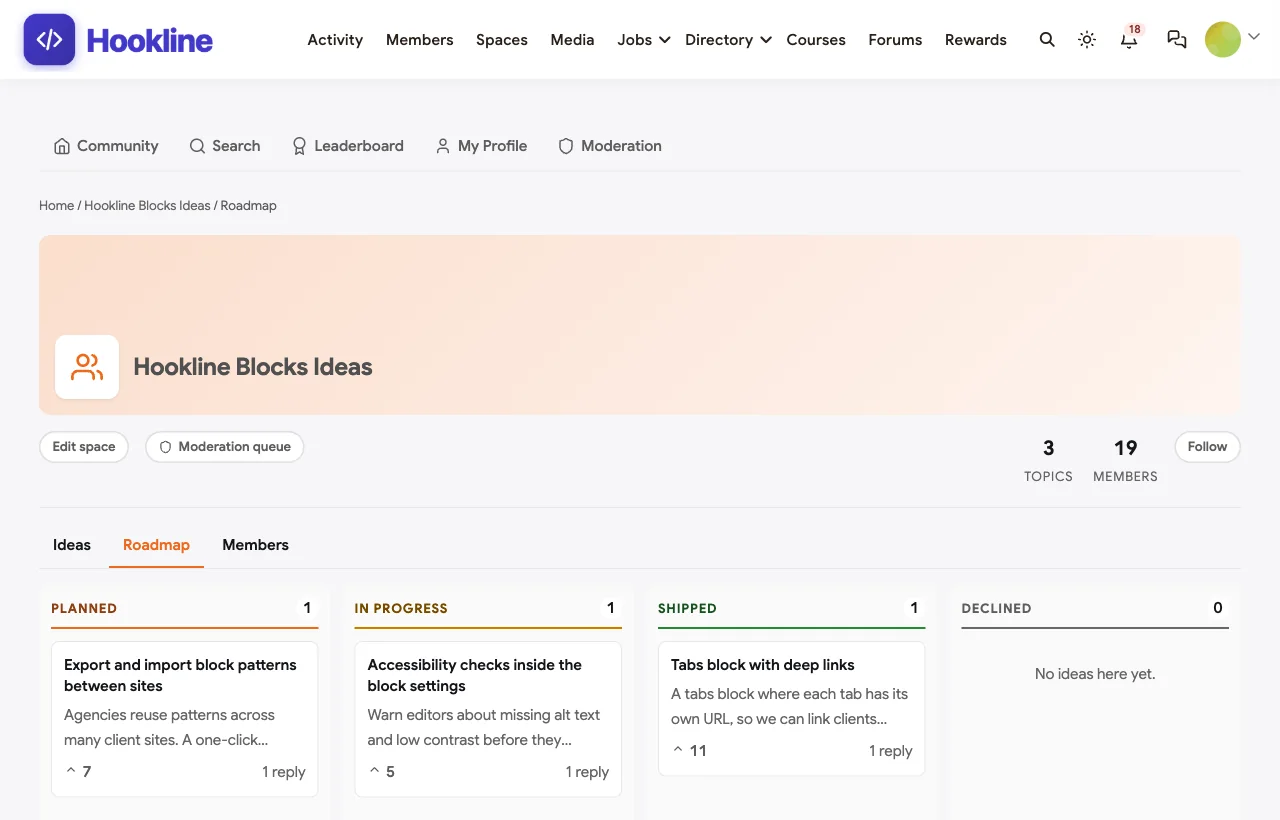
Ideas with votes and a public roadmap. Users suggest features for the company’s product and vote, and the team sets each idea’s status. The roadmap view shows planned, in progress, shipped and declined columns, so developers can plan around releases:

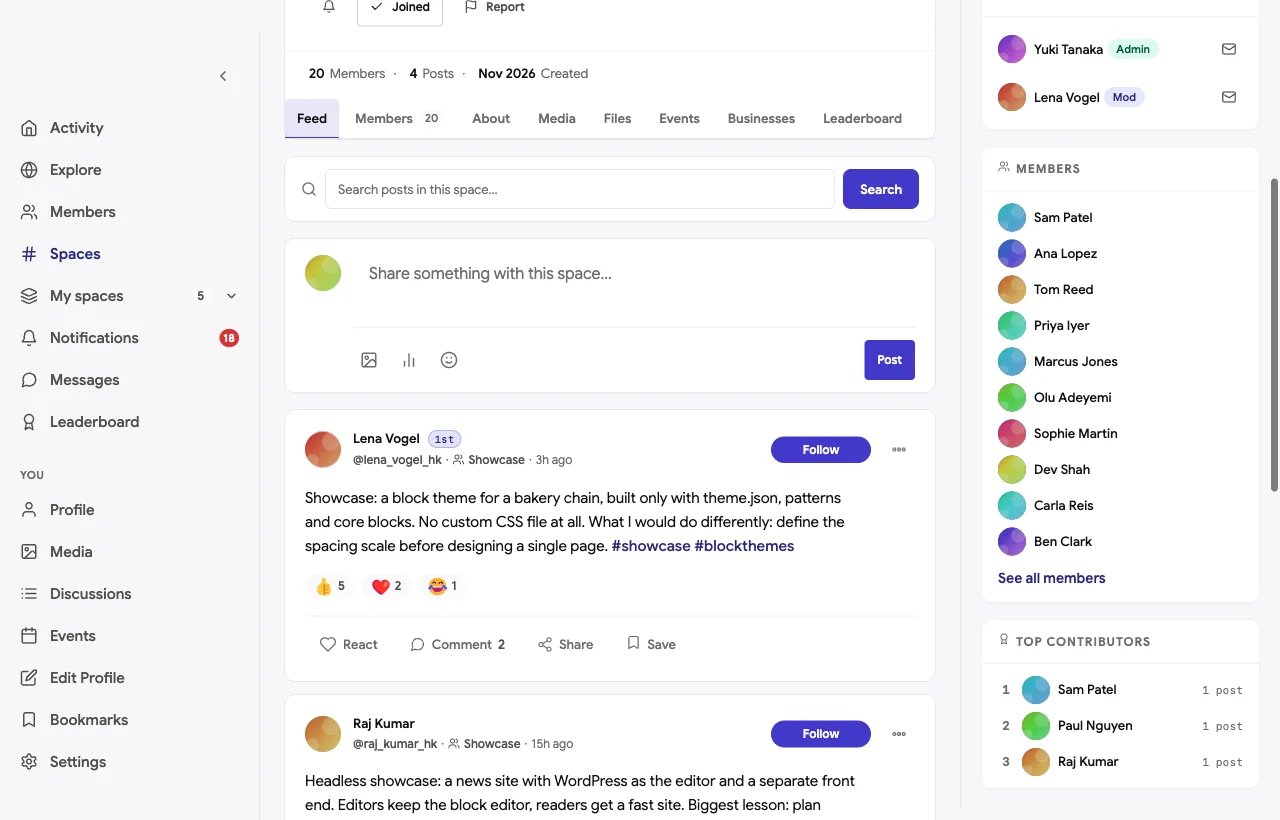
Showcases. Members post what they built and one decision they would make differently, which turns showcases into lessons:
A private group for agency owners. Agency owners and leads discuss maintenance plans, estimating and hiring in a private space:

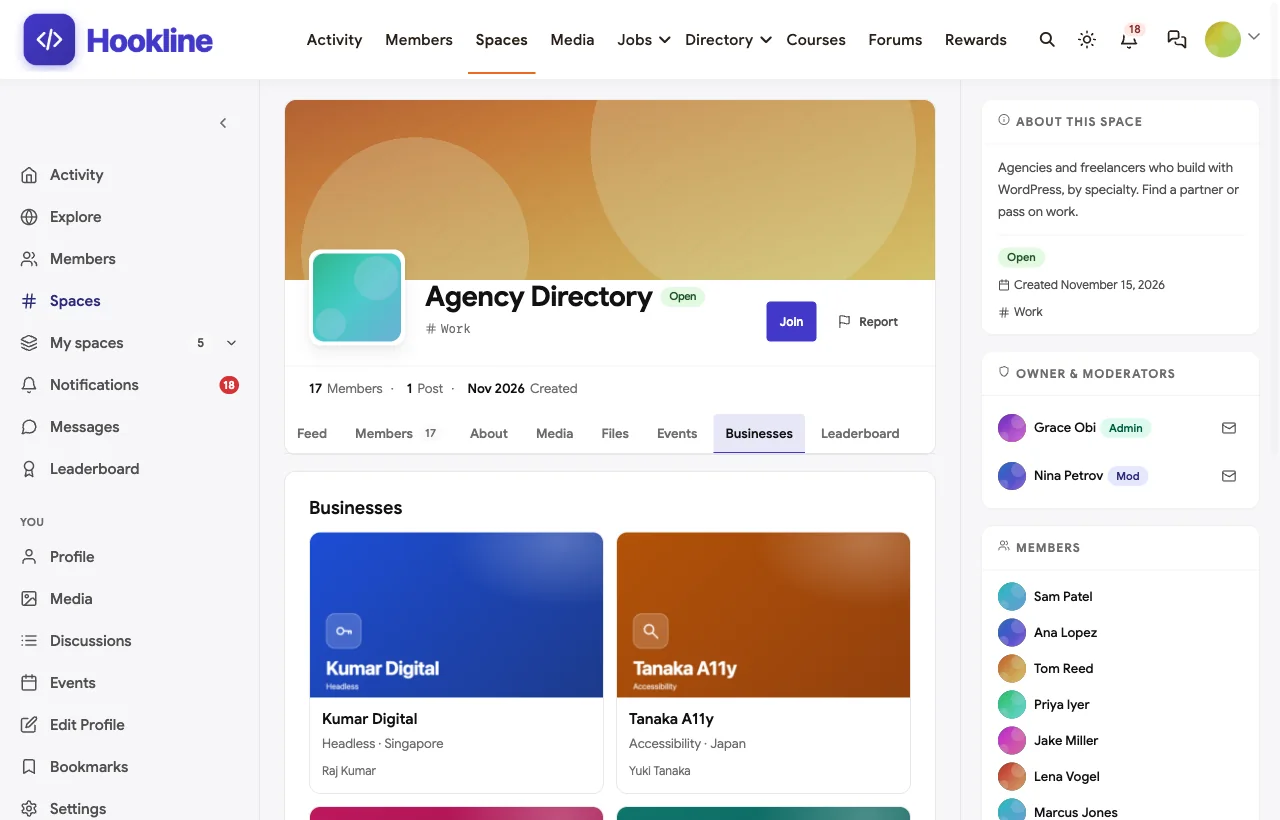
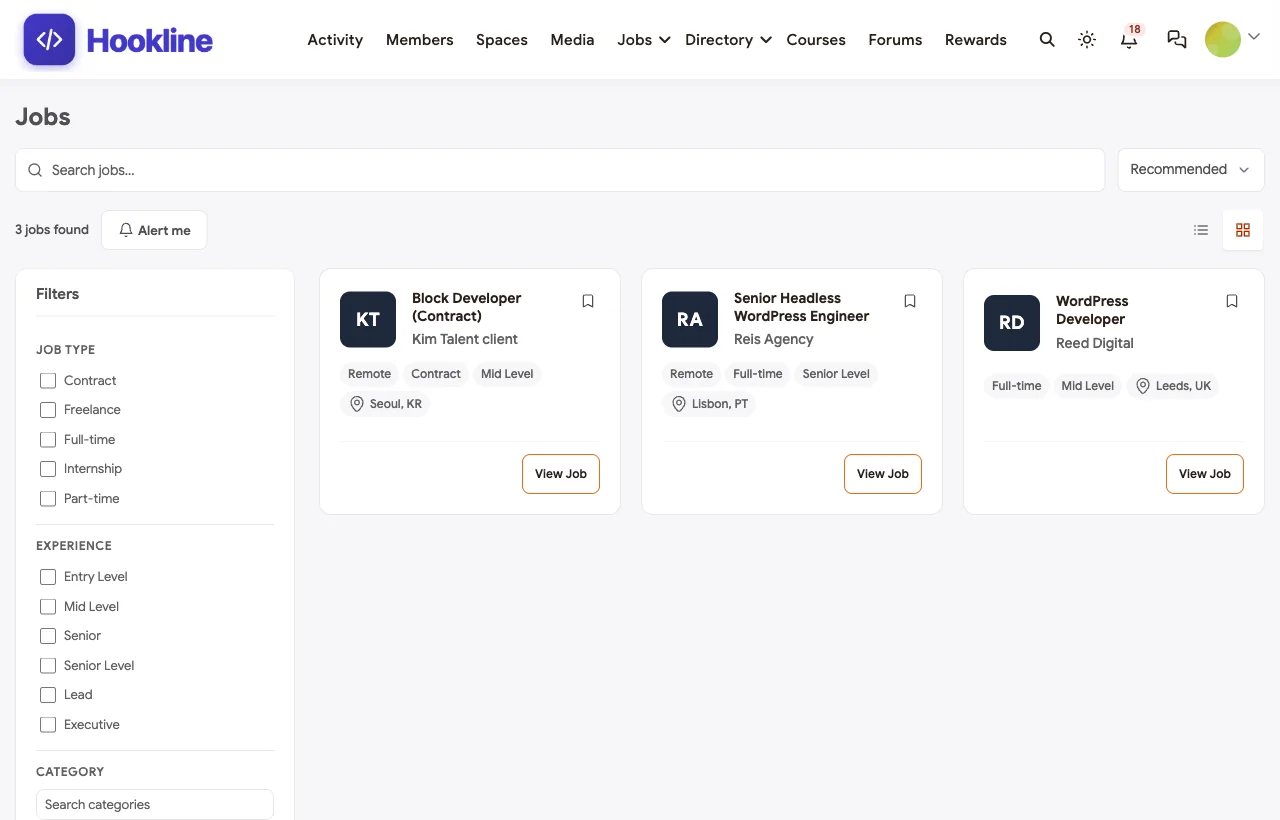
An agency directory and a job board. Agencies list their specialties so members can find partners and pass on work, and agencies and recruiters post roles on the job board:
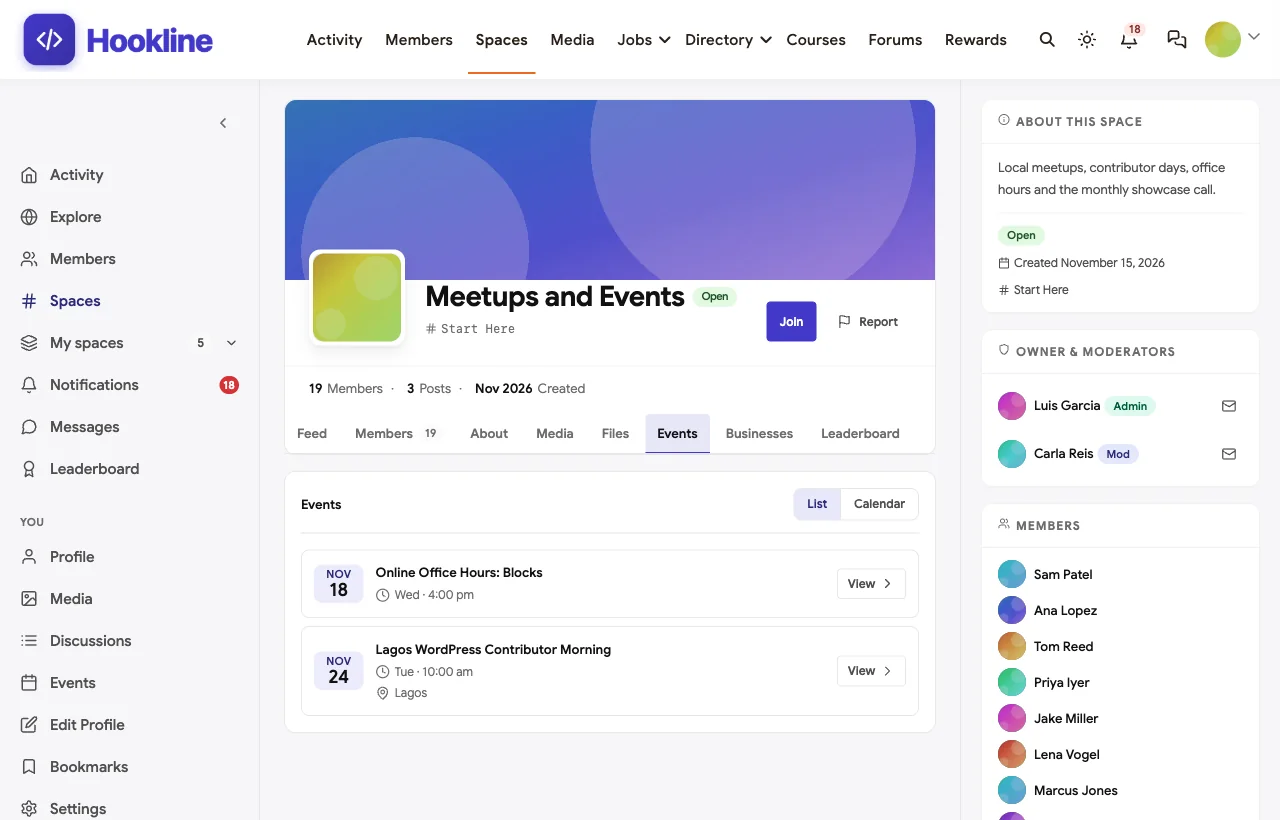
Meetups, office hours and showcase calls. Local meetups, contributor mornings and online office hours are events with RSVPs, in person or online:
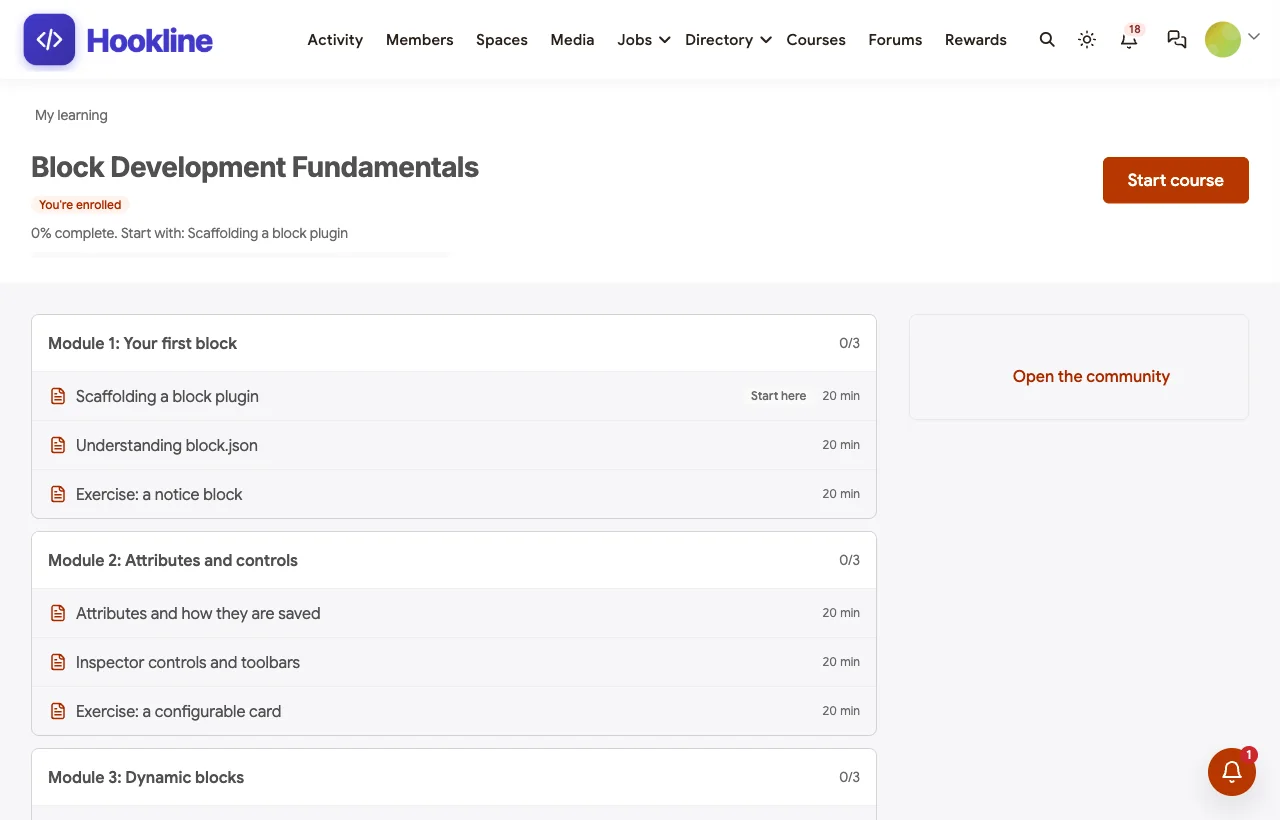
A course on block development. A six-module course takes developers from block.json to the Interactivity API, with each exercise posted in Developer Help for code review:
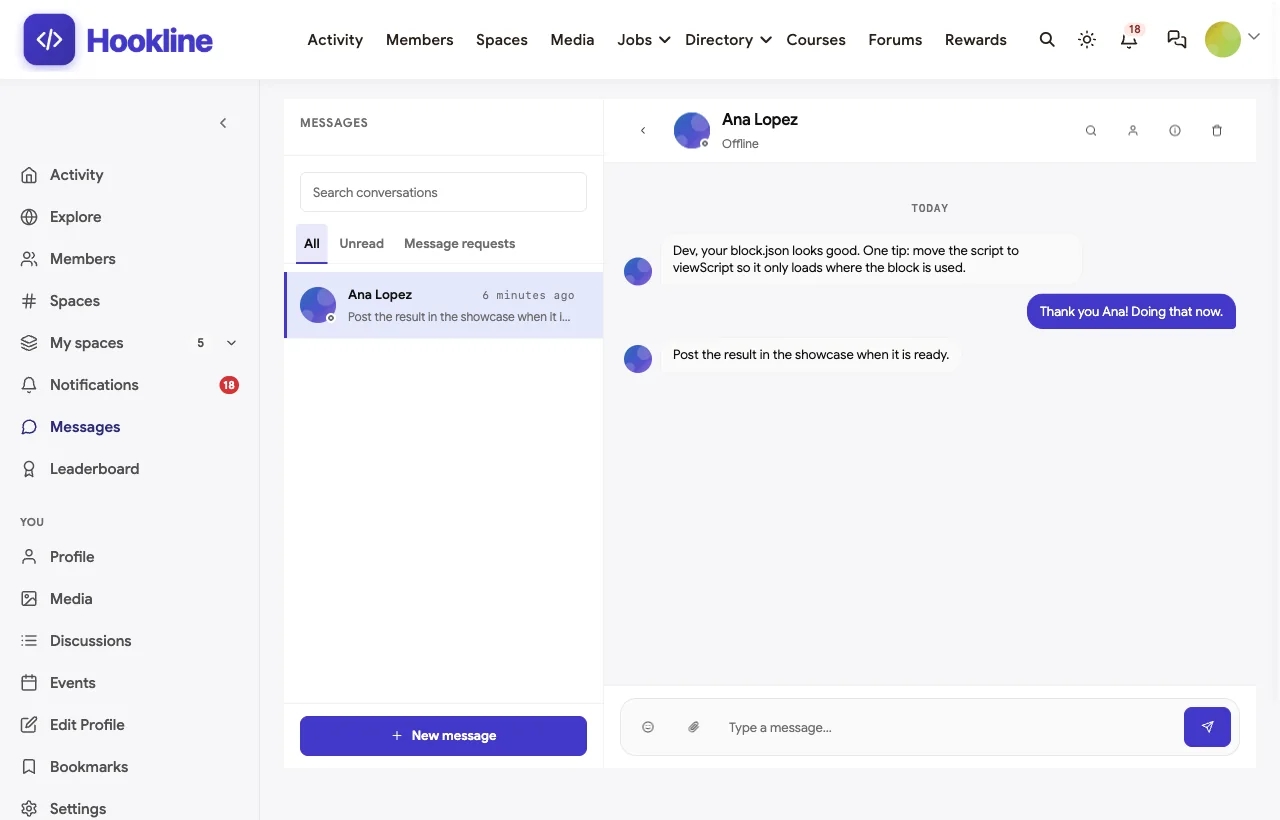
Mentoring in direct messages. Experienced members help newcomers one to one, like a core contributor reviewing a student’s first block:
Also built in. Polls for workshop topics, hashtags, notifications, moderation and reporting, points and a leaderboard for helpful answers, a secret staff space, and a REST API and WordPress hooks for anything custom.
Not built for: hosting code repositories or running continuous integration; link to your Git host for that. It is self-hosted, which for a WordPress company is usually an advantage rather than a cost.
What’s included, and how it is delivered
BuddyNext is one platform made of a core and add-on platform modules. Everything shown in the demo above runs on the BuddyNext platform. This table shows which parts come with the core, which are platform modules you install and activate alongside it, and which need a third-party plugin, another system or custom work.
| Capability | How it is delivered |
|---|---|
| Open, private and secret spaces | Core platform |
| Member profiles and searchable member directory | Core platform |
| Activity feed, pinned announcements, polls and hashtags | Core platform |
| Moderation and reporting | Core platform |
| Direct messages | Platform module, installed alongside |
| Q&A with code blocks and accepted answers | Platform module, installed alongside |
| Ideas with votes, statuses and a roadmap | Platform module, installed alongside |
| Events with RSVPs | Platform module, installed alongside |
| Agency directory | Platform module, installed alongside |
| Job board | Platform module, installed alongside |
| Courses with certificates | Platform module, installed alongside |
| Points, badges and leaderboards | Platform module, installed alongside |
| Code hosting and CI | Another system (your Git host) |
Want to click around yourself? The Hookline community in this guide was built on a private test site, so it is not public. The BuddyNext live demo is a general community you can open in your browser and explore without installing anything.
2. BuddyBoss Platform: best WordPress community with a branded app
BuddyBoss invites you to “create exactly the Online Community you want” (BuddyBoss). It offers a community feed, social groups and discussions, “powerful and customizable member profiles & types,” integrations with LearnDash, Tutor LMS and LifterLMS, events with tickets and RSVPs, and “your own branded app on iOS and Android.”
Strengths: a mature WordPress community with LMS integrations, events and a branded mobile app.
Gaps: no Q&A with accepted answers, code highlighting, ideas board or job board found; we could not confirm a listing in the WordPress.org plugin directory, so it is distributed from its own site.
3. wpForo: best WordPress forum with accepted answers and code
wpForo calls itself “the first AI powered forum plugin for WordPress” (WordPress.org). It offers a “voting system, accepted answers, reputation points, and answer sorting,” an editor with “code highlighting,” member profiles, a “searchable member directory,” and “unlimited user groups with granular permissions” (wpForo). WordPress.org lists 20,000+ active installations.
Strengths: the strongest pure forum in this list for developer Q&A.
Gaps: a forum only: no events, ideas board, job board or agency directory found.
4. BuddyPress: best open-source foundation for a custom build
BuddyPress is “the open source community platform of choice worldwide” (BuddyPress), with “extensible user groups,” activity streams for members and groups, and “custom profile fields” with visibility levels. WordPress.org lists 90,000+ active installations (WordPress.org).
Strengths: a long-standing, open-source, extensible base for developers who want to build their own.
Gaps: no Q&A, code highlighting, events, directory or job board in the core; each needs add-ons or custom work.
5. bbPress: best lightweight forum from the WordPress project
bbPress is “forum software from the creators of WordPress” (bbPress), offering asynchronous discussion, “one central account,” easy moderation and forums for sections of your site. WordPress.org lists 100,000+ active installations (WordPress.org).
Strengths: simple, familiar and closely aligned with WordPress itself.
Gaps: no accepted answers, code highlighting, events or job board found.
6. PeepSo: best social network plugin with a native app
PeepSo says “Your Community. Your Way.” (PeepSo), with groups, activity streams with nested comments, custom profiles, LMS integrations and a native iOS and Android app built for your community. Its core plugin was closed on WordPress.org at the author’s request on November 19, 2024 (WordPress.org), so it is now distributed from its own site.
Strengths: social features and a native app.
Gaps: no Q&A with accepted answers, code highlighting or job board found.
7. Ultimate Member: best for member profiles and directories
Ultimate Member is “the all-in-one membership & community plugin for WordPress” (Ultimate Member) with user profiles, member directories, a groups extension, and forums through its companion plugin ForumWP (ForumWP). WordPress.org lists 200,000+ active installations (WordPress.org).
Strengths: strong profiles and directories with a large install base.
Gaps: discussion and jobs come from separate companion plugins; no accepted answers, code highlighting or events found.
8. Asgaros Forum: best simple discussion board
Asgaros Forum is “a lightweight and feature-rich discussion board” for WordPress (WordPress.org) with profiles and a members list, notifications, reactions, uploads, polls, usergroups and myCRED integration. WordPress.org lists 10,000+ active installations.
Strengths: easy to set up and fast.
Gaps: no accepted answers, code highlighting, events or job board found.
9. Stack Internal: best for private technical knowledge inside a company
Stack Internal is the product “formerly Stack Overflow for Teams,” positioned as “the trusted knowledge layer” (Stack Overflow). Knowledge carries “multiple trust signals” such as authorship, recency and usage, with permissions “for people, teams, and agents.”
Strengths: structured internal knowledge for engineering teams.
Gaps: not a WordPress product and not a public community: no shared WordPress accounts, events, job board or directory found.
10. Meetup: best for local in-person groups
Meetup is “the people platform” where you can “create your own Meetup group, and draw from a community of millions” (Meetup), with events, group discovery and a mobile app.
Strengths: discovery for local in-person events.
Gaps: a separate service with its own accounts; no Q&A, code, ideas or job board.
Close the product feedback loop in public
For a plugin or theme company, the community’s most valuable job is turning user ideas into releases and showing that it happened.
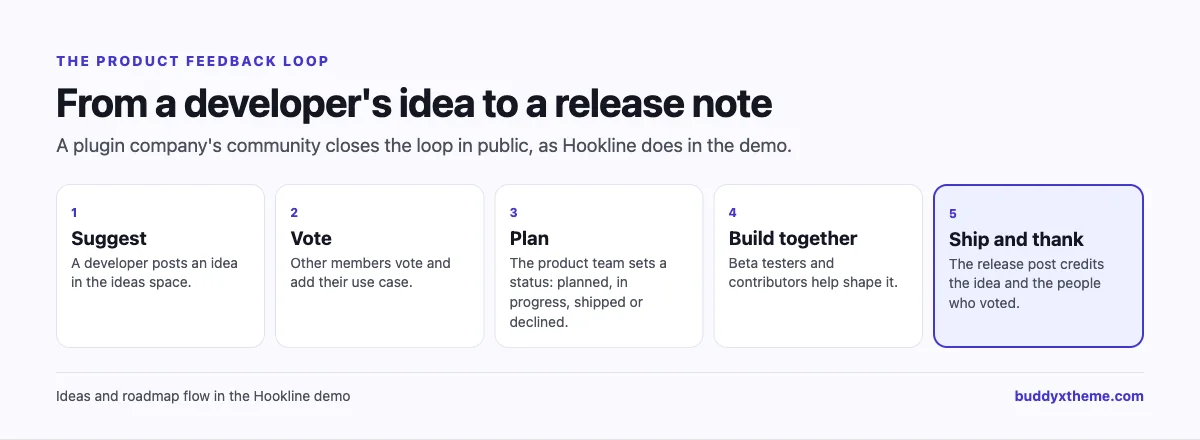
Three habits make the loop credible: update every idea’s status, even when the answer is “declined” with a reason; credit the idea and its voters in the release post; and invite the people who asked for a feature into the beta.
One WordPress, one login
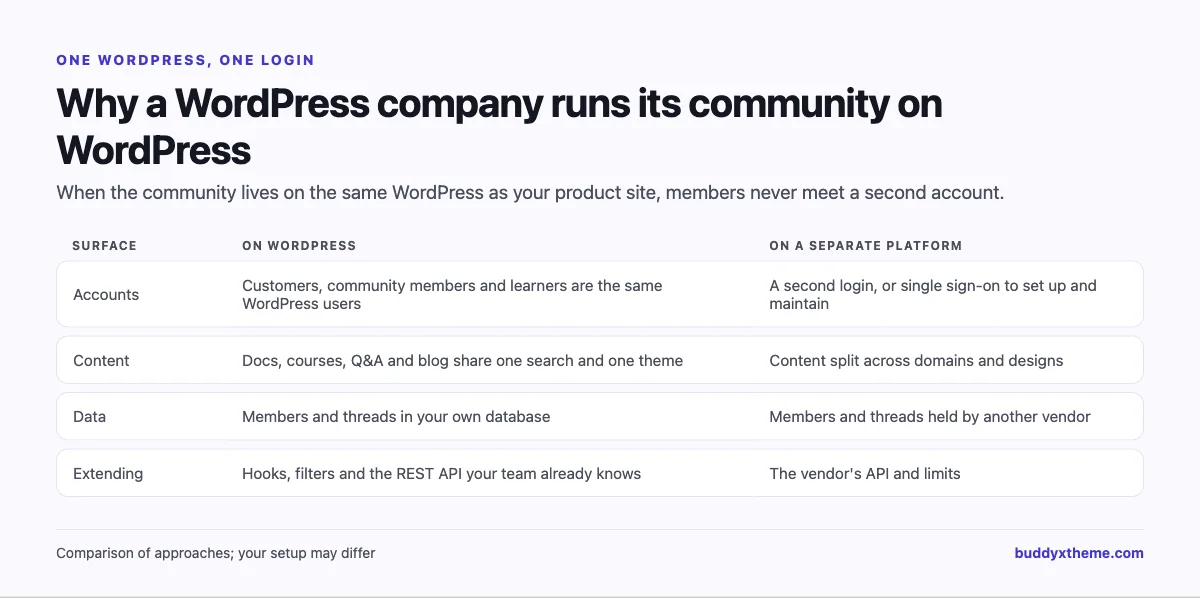
Running the community on WordPress also means your developers extend it with the same hooks, filters and REST API they use every day, and that customers, community members and learners are the same user accounts.
Support, documentation and community: how they fit together
Plugin and theme companies often run three separate channels for developers: a support desk, documentation and a community. They work best when each has a clear job and points to the others.
| Channel | Best for | How it connects |
|---|---|---|
| Support desk | Account, licence and private site issues | Public questions are moved to the community so the answer helps everyone |
| Documentation | The official, maintained reference | Accepted answers that keep recurring become new docs pages |
| Community | Real-world questions, edge cases, ideas and showcases | Answers link to docs; docs link to the community for discussion |
A simple rule keeps them aligned: anything that is not private goes to the community first. Your support team answers there, marks the accepted answer, and once a question has come up three times, someone turns the accepted answer into a docs page and links back to the thread. Over a year, the community becomes the best source of documentation ideas you have, and support volume drops because developers find answers before they open a ticket.
The same applies to bugs. A Developer Help thread that reveals a real bug should be linked to your issue tracker, and the thread updated when the fix ships, so the developer who reported it sees the outcome in public.
Running a healthy developer community
| Practice | Why it works |
|---|---|
| Ask for code and versions | Answers are faster and more accurate |
| Mark the accepted answer | The next developer with the same problem finds it |
| Separate help from ideas | Bug reports and feature requests need different workflows |
| Credit contributors publicly | People who help keep helping |
| Keep promotion to the directory and job board | The help spaces stay useful |
| Hold regular office hours | Live help builds relationships that forums cannot |
| Support local meetups | Many WordPress careers start at a meetup |
Questions to ask before you choose
- Will the community share accounts with your product site? A second login costs participation.
- Can members share code properly? Look for code blocks with syntax highlighting, not just inline formatting.
- Do answers get marked? Accepted answers turn threads into documentation.
- Where will feature requests go? An ideas space with statuses and a roadmap beats requests buried in support threads.
- Does it support the work side? Agency directories and job boards make a community useful to professionals every week.
- Can your team extend it? Hooks, filters and a REST API matter when your users are developers.
A 60-day launch plan for a WordPress developer community
- Weeks one and two: structure. Create Developer Help, a showcase, an ideas space, meetups and events, and Start Here with a code of conduct and code-sharing guidelines.
- Weeks three and four: seed answers. Have your team and five trusted developers answer the ten most common support questions in public and mark accepted answers.
- Weeks five and six: open the roadmap. Move existing feature requests into the ideas space, set statuses, and announce the roadmap in your next release post.
- Weeks seven and eight: the work side. Invite partner agencies to the directory, open the job board, and run the first online office hours.
Which platform fits your WordPress developer community?
| If you… | Choose |
|---|---|
| Want Q&A with code, ideas with a roadmap, agencies, jobs, events and courses on your own WordPress | BuddyNext |
| Want a WordPress community with a branded app and LMS integrations | BuddyBoss Platform |
| Mainly need a WordPress forum with accepted answers and code highlighting | wpForo |
| Want an open-source foundation to build on yourself | BuddyPress or bbPress |
| Want social features and a native app | PeepSo |
| Mainly need member profiles and directories | Ultimate Member |
| Want a simple discussion board | Asgaros Forum |
| Need private technical knowledge for an internal team | Stack Internal |
| Only organise local in-person meetups | Meetup |
More community platform comparisons
Running a different kind of technical community? These guides use the same method: a working demo community and vendor claims checked at the source.
- Best platforms for a no-code developer community: visual Q&A, showcases, weekly build challenges, an agency directory and jobs.
- Best platforms for an AI agent developer community: Q&A with code, showcases and integrations for developer tools.
- Best software for a SaaS customer community: Q&A, ideas and a public roadmap for software companies.
- How to build a SaaS customer community with feature requests and a roadmap: the step-by-step guide.
- Best platforms for a cybersecurity professionals community: vetted access, private rooms and study groups.
- How to set up a community space on WordPress: the step-by-step setup guide behind every demo in this series.
How we built and checked this list
We built the Hookline demo on a local WordPress site running BuddyNext, with fictional developers, agencies, questions, ideas, events, a course and jobs created for this guide. Every BuddyNext screenshot is from that demo. Competitor features were checked against each vendor’s own website and, for WordPress plugins, their WordPress.org listings in November 2026; active installation counts are as shown on WordPress.org at that time. WordPress usage figures come from W3Techs and WordCamp Central. Where we could not confirm a feature on a vendor’s own pages, the scorecard says “Not found” or “Not confirmed”. We did not run a hands-on trial of every product, so features can change; confirm anything critical with the vendor. buddyxtheme.com is published by the team behind BuddyNext, which is why BuddyNext is listed first; we have tried to be fair about its gaps as well as its strengths.
Frequently asked questions
What is the best platform for a WordPress developer community?
BuddyNext is the best choice for a developer community on your own WordPress site, with Q&A that supports highlighted code and accepted answers, an ideas space with a roadmap, showcases, an agency directory, a job board, events and courses. wpForo is the strongest alternative if you only need a forum.
Should a WordPress plugin company run its community on WordPress?
Usually, yes. Customers keep one account, content shares one search and design, member data stays in your database, and your team can extend it with hooks and the REST API.
How do I let members share code in a community?
Use a platform with code blocks and syntax highlighting, ask members to include versions, and mark accepted answers so solutions become reusable.
How do I collect feature requests from developers?
Create an ideas space where members suggest and vote, set a status for every idea, and show a public roadmap. Credit voters when a feature ships.
Can a WordPress developer community include a job board?
Yes. BuddyNext includes a job board module, and Ultimate Member offers a separate job board companion plugin. Most forum plugins do not.
Is BuddyPress enough for a developer community?
BuddyPress is a strong open-source foundation, but Q&A with accepted answers, code highlighting, events and a job board need add-ons or custom development.
Should we use Meetup or our own community for events?
Meetup helps people discover local groups. Your own community keeps attendees, recordings and follow-up conversations in one place; many organisers use both.
The bottom line
A WordPress developer community works when code is easy to share, answers stay findable, ideas visibly turn into releases, and the work side of WordPress, agencies, jobs and meetups, has a home. If you want all of that on your own WordPress, with the same accounts as your product site, BuddyNext is the strongest foundation. If you only need a forum, wpForo leads, with BuddyBoss Platform for a branded app and BuddyPress and bbPress as open-source building blocks.
And give the people who build with wordpress a place to build together.