

A coworking space sells desks, but members renew for people. The designer who becomes your client, the founder who hires the developer two tables away, the accountant who answers a tax question over lunch: those moments are why a member stays for three years instead of three months. The problem is that most of them happen by accident. A member community makes them happen on purpose.
This guide compares the software you can use to run the member community at a coworking space, from a single independent space to a group with several locations. It covers the member directory, the community feed, events, perks, member-to-member introductions, location groups and onboarding. We built a working member community for two fictional Austin locations for the first entry, checked every competitor claim on the vendor’s own pages in November 2026, and explain where each tool fits next to the desk booking, billing and door access systems every space already runs.
Quick answer
If you want a member community you fully own and can shape around your spaces, BuddyNext is the strongest choice: a private group for each location, a searchable member directory with skills, a noticeboard feed, questions answered by members, a member business directory, events at every location and direct messages, all on your own website and domain. If you want community features built into your operations software, OfficeRnD, Nexudus and Optix have the most complete community modules; Spacebring and Coworks are lighter alternatives, Cobot is operations-first, and Circle, Mighty Networks and Slack are general tools many spaces bolt on.
In this guide
- Two layers of coworking software
- Why the community layer matters more than it used to
- The coworking community scorecard
- 1. BuddyNext: best for a member community you own and shape
- 2. OfficeRnD: best all-in-one with a full community module
- 3. Nexudus: best for groups and perks inside an operations platform
- 4. Optix: best for a branded member app with feed and perks
- 5. Spacebring: best for a feed and benefits program in a lighter platform
- 6. Coworks: best for directory-based introductions in a member app
- 7. Cobot: best for operations-first spaces with a branded portal
- 8. Circle: best general community platform for a branded experience
- 9. Mighty Networks: best for an app-first community
- 10. Slack: best for quick chat, not a member community
- The member journey that keeps desks filled
- Running a community across several locations
- Questions to ask before you choose
- A 30-day launch plan for your member community
- Measuring whether the community works
- Which software fits your space?
- More community platform comparisons
- How we built and checked this list
- Frequently asked questions
- The bottom line
Two layers of coworking software
Every coworking space runs two kinds of software, whether or not it thinks of them that way:
| Layer | What it does | Who cares most |
|---|---|---|
| Operations | Desk and room booking, memberships and invoices, door access, visitor sign-in, occupancy reports | The operator and front desk |
| Community | Member profiles and directory, feed and announcements, events, introductions, questions, perks, location groups | Members and the community manager |
Most coworking management platforms started with operations and added community features later. General community platforms started with community and have no operations layer at all. The choice you face is whether you want one product that does both reasonably, or a dedicated community platform that does the community layer deeply and connects to the operations tool you already use.
Neither answer is wrong. A single-location space with a small team often prefers one login for everything. A space whose brand is its community, or a group with several locations and a strong member culture, usually outgrows the community module of an operations tool and wants something it can shape freely.
Why the community layer matters more than it used to
Coworking has become a crowded market, and the desk is now the easy part to copy. Deskmag’s 2025 Global Coworking Space Trends report notes that “while coworking space companies in cities with over a million residents focused primarily on growth, those in smaller towns placed greater emphasis on building supportive communities for their members and making a positive social impact beyond the coworking space itself” (Deskmag).
The practical lesson for any operator: the community is what members cannot get from a cheaper desk down the road. Software will not create that community, but the right tool makes the community manager’s work visible, repeatable and easier to scale across locations.
The coworking community scorecard
How each option handles the community layer. “Not found” means we could not confirm it on the vendor’s own pages, not that it is impossible.
| Platform | Member directory | Feed | Events | Perks | Multiple locations | Operations built in |
|---|---|---|---|---|---|---|
| BuddyNext | Searchable, with skills and filters | Yes, plus location groups | RSVPs, in person and online | Member offers and business directory | A private group per location | No, pair with an operations tool |
| OfficeRnD | Member and company details | Timeline posts | RSVPs | Perks and marketplace | Yes | Yes |
| Nexudus | Yes, with groups | Not confirmed | Registration and RSVP | Perks and benefits | Admin side | Yes |
| Optix | Directory and messaging | Community feed | Not confirmed | Perks and marketplace | Yes | Yes |
| Spacebring | Not found | Community feed and chats | RSVPs | Benefit catalog | Yes | Yes |
| Coworks | Directory with job and interest tags | Events feed | RSVPs | Not found | Yes | Yes |
| Cobot | Not found | Not found | Event ticketing | Not found | Yes | Yes |
| Circle | Directory | Personalized feed | RSVPs | Not found | No | No |
| Mighty Networks | Not confirmed | Member activity | Events | Not found | No | No |
| Slack | Not found | Channels | Not found | Not found | No | No |
1. BuddyNext: best for a member community you own and shape
BuddyNext is a complete community platform that runs on your own WordPress site. It has private and secret groups (called spaces), a member directory with profile fields, an activity feed, questions with accepted answers, a business directory, events with RSVPs, direct messages, polls, points and leaderboards. That gives a coworking space one home for every member, every location and every event, under its own brand and domain.
To show it in practice, we built Common Ground Coworking, a demo community for two fictional locations in Austin, East Side and Downtown, with 20 members: freelancers, a four-person startup, remote employees of companies in Berlin and London, a therapist with a private office, a podcast producer, an accountant and the community team.
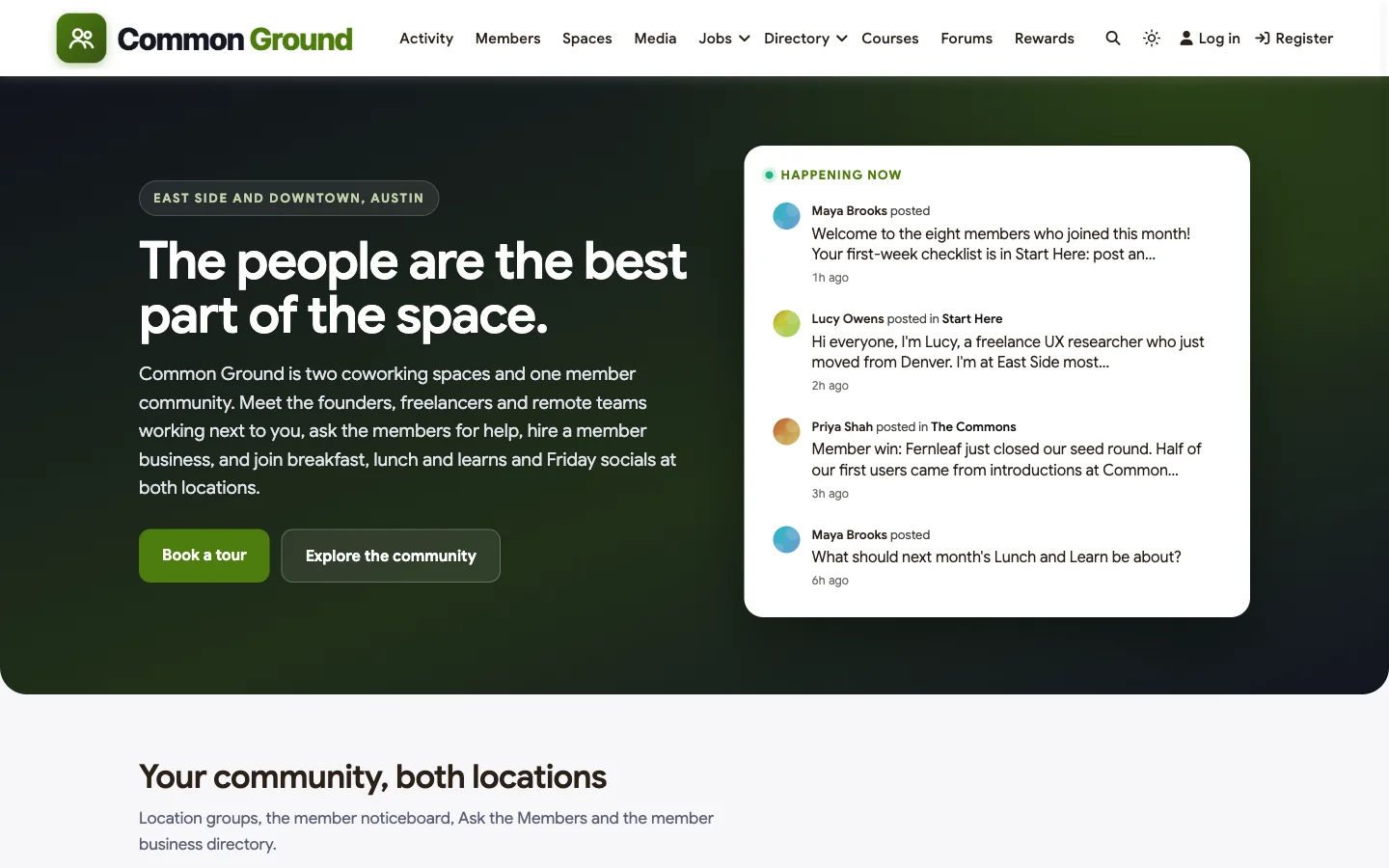
Good at: introductions between members, location groups that stay useful, a member business directory, and a community you can shape completely.
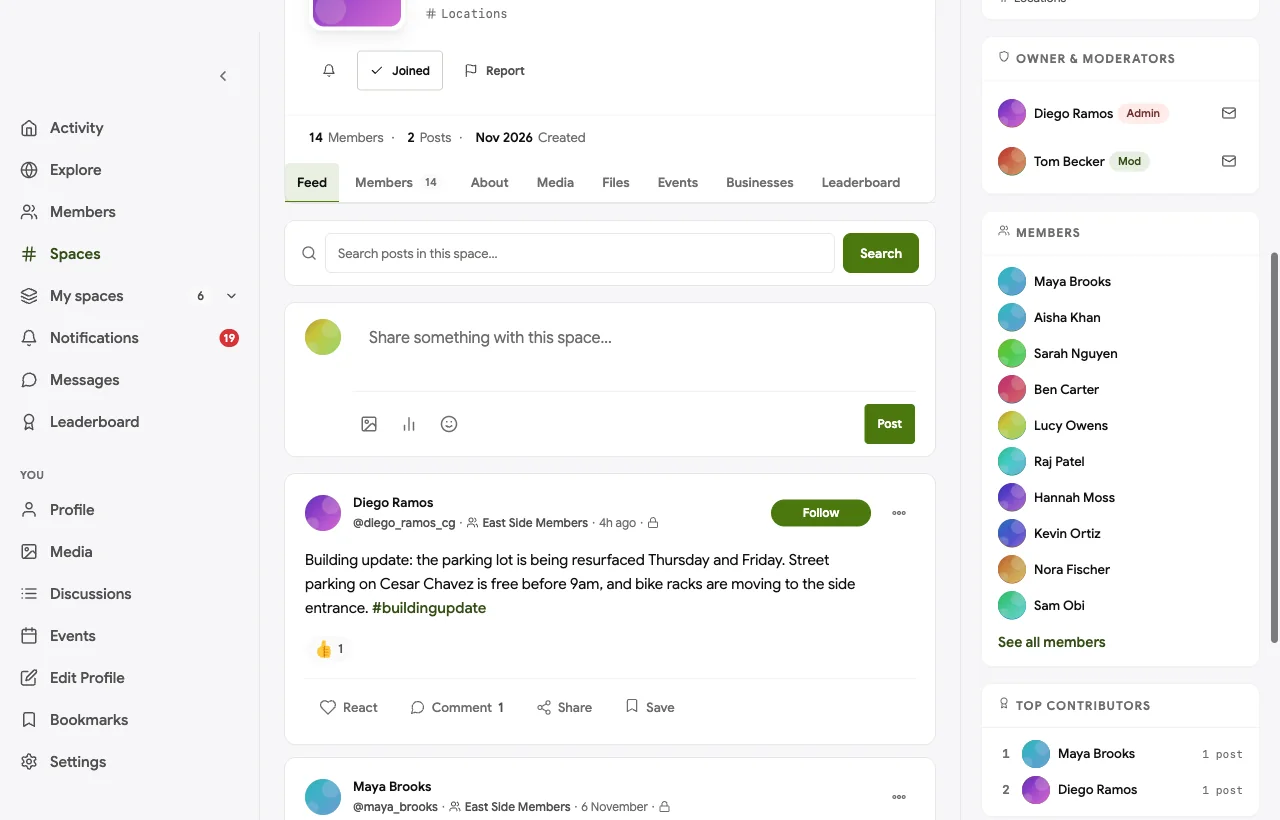
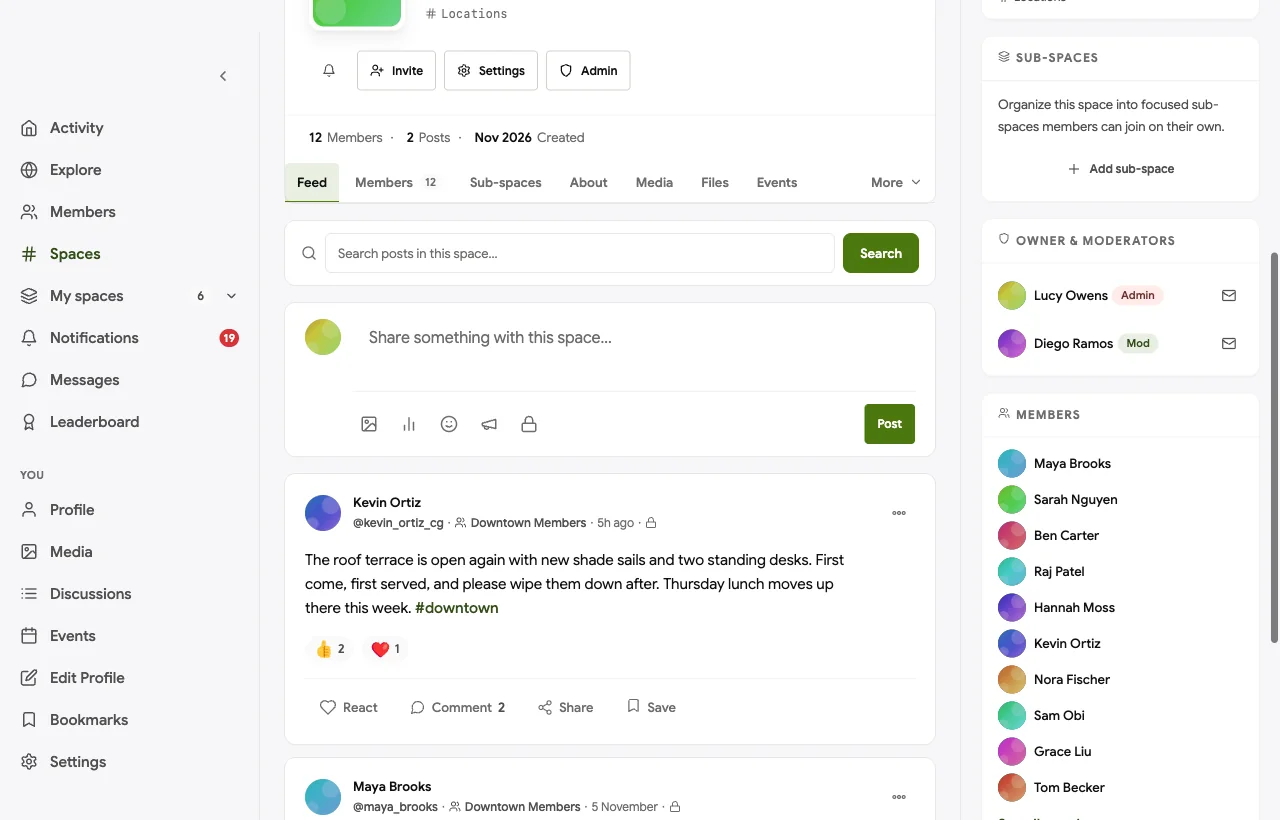
A private group for each location. Members join the group for their location, where the front desk posts building updates and the community lead posts local plans. In the demo, East Side members hear about parking during resurfacing, and the Monday breakfast appears in the same group:
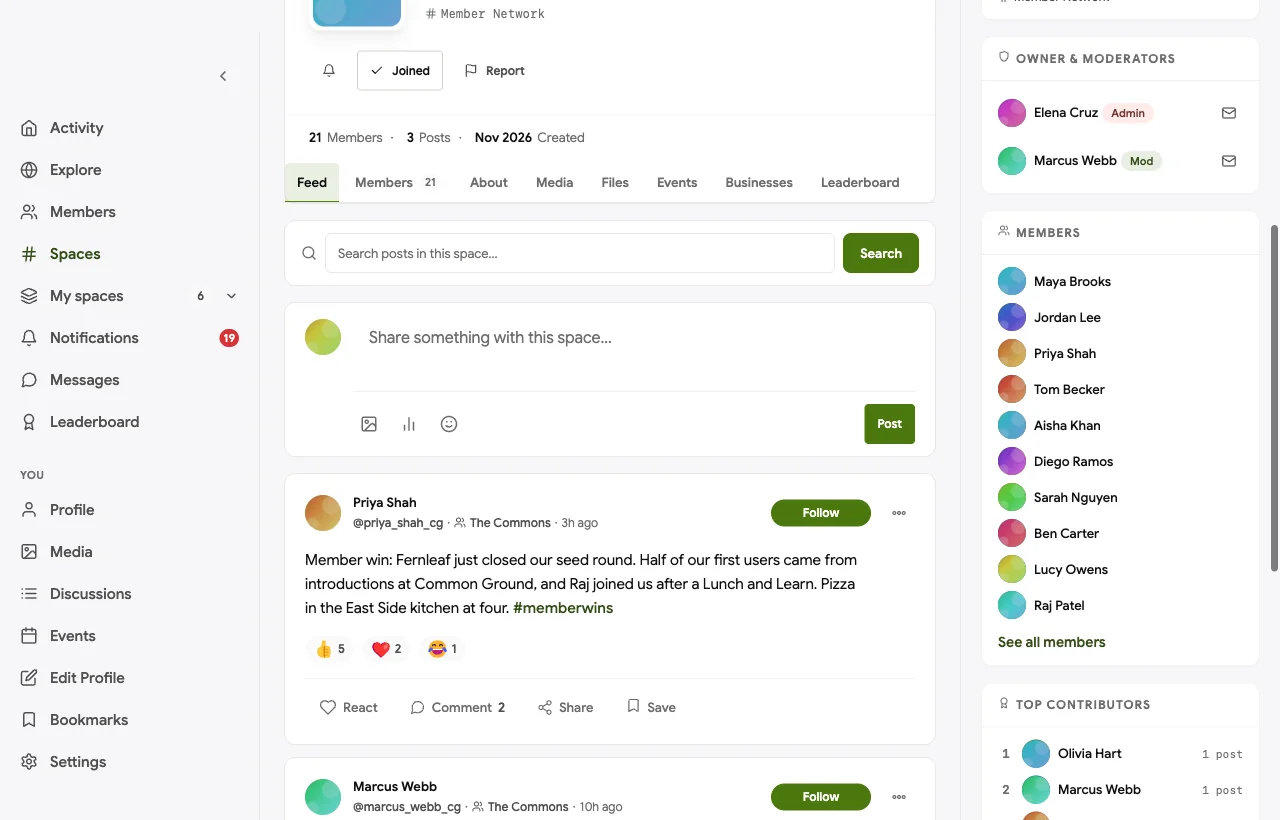
One noticeboard for the whole membership. The Commons is where members from both locations post asks, wins and lunch plans. In the demo, a startup founder celebrates closing a round and credits introductions made at the space:
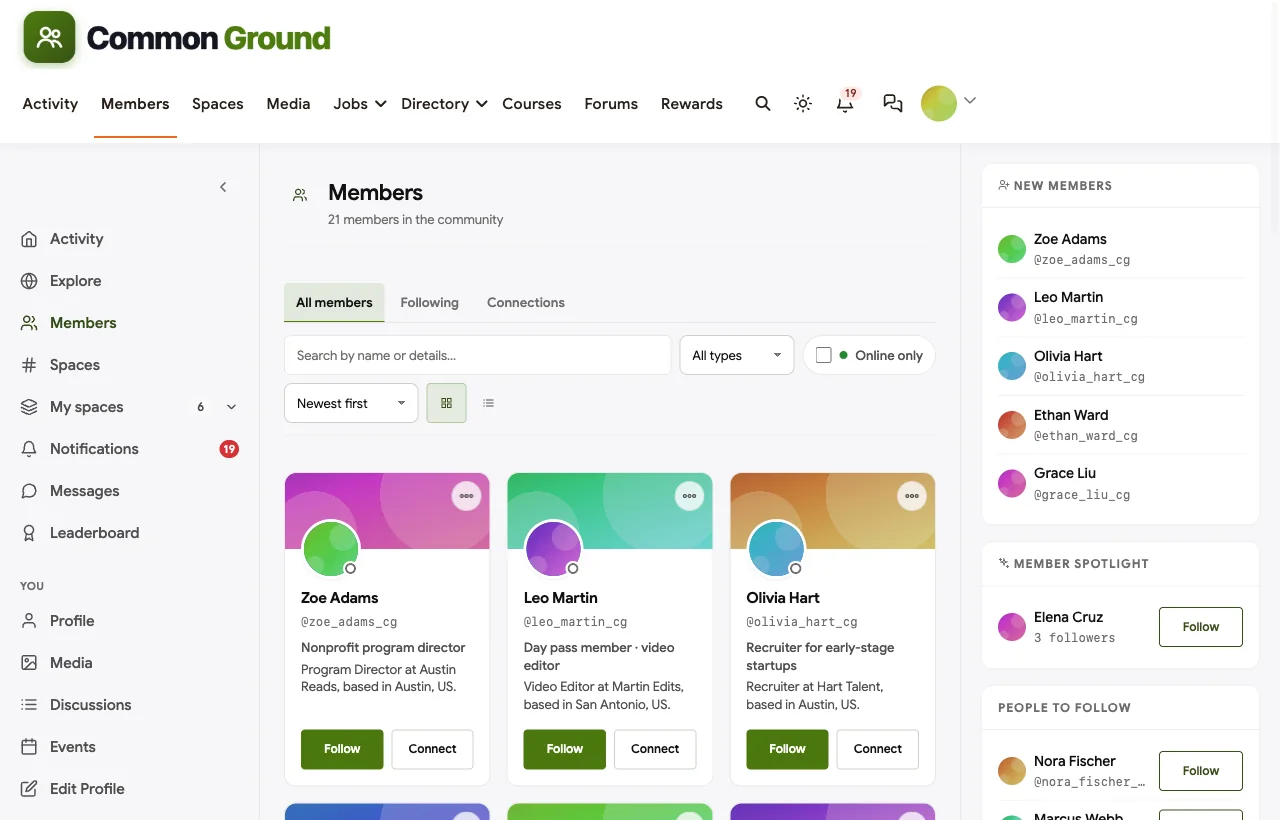
A member directory people actually use. Every member has a profile with a headline, company, role and skills, and the directory can be searched and filtered. A new member can find the accountant, the photographer or the other UX researcher in seconds:
Questions answered by members. In Ask the Members, a question gets answers from the person in the building who knows, and the best answer is marked accepted. In the demo, the podcast producer explains how to get clean audio in the phone booths, and the accepted answer becomes the space’s permanent guide:

A member business directory. Members list their businesses with a cover, category and description, so “hire a member first” becomes easy rather than a slogan:

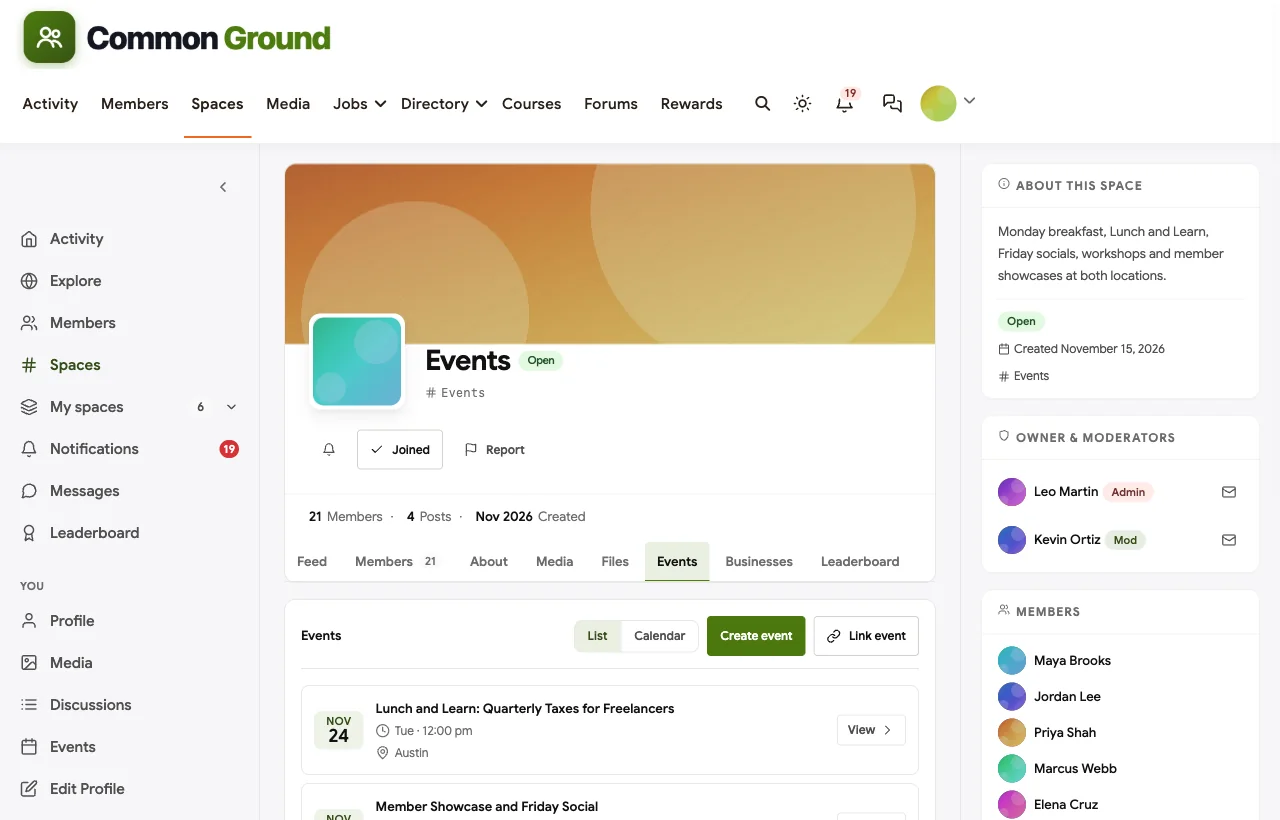
Events at every location. Breakfasts, lunch and learns, socials and showcases are events with RSVPs, reminders and a venue at the right location. Members choose the next lunch and learn topic with a poll in the feed:
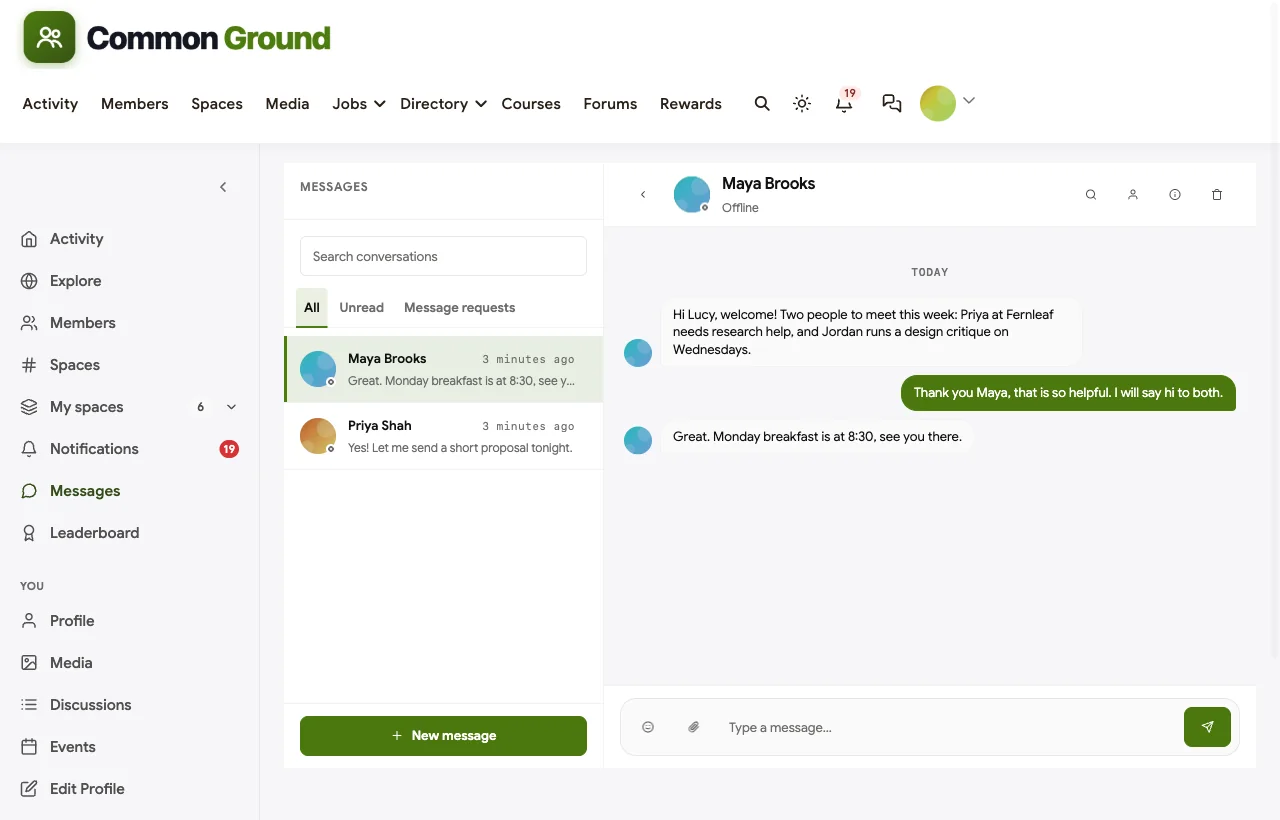
Introductions from the community manager. Direct messages let the community manager welcome each new member personally and introduce them to two people they should know, which is the single most effective onboarding habit in coworking:
Also built in. Pinned announcements for both locations, polls, hashtags, notifications, profile privacy controls, a secret space for the community team, points and a leaderboard for members who help most, and a mobile layout that works in the phone browser without an app download.
Not built for: desk and room booking, invoices or door access. BuddyNext is the community layer, so you pair it with your existing operations tool and link to it from the community. It is self-hosted, so you run WordPress or use a managed host.
What’s included, and how it is delivered
BuddyNext is one platform made of a core and add-on platform modules. Everything shown in the demo above runs on the BuddyNext platform. This table shows which parts come with the core, which are platform modules you install and activate alongside it, and which need a third-party plugin, another system or custom work.
| Capability | How it is delivered |
|---|---|
| Open, private and secret spaces (location groups) | Core platform |
| Member profiles with custom fields and a searchable member directory | Core platform |
| Activity feed, pinned announcements and hashtags | Core platform |
| Direct messages | Platform module, installed alongside |
| Polls | Core platform |
| Questions with accepted answers | Platform module, installed alongside |
| Member business directory | Platform module, installed alongside |
| Events with RSVPs, in person or online | Platform module, installed alongside |
| Points, badges and leaderboards | Platform module, installed alongside |
| Paid plans with trials and coupons | Platform module, installed alongside |
| Desk and room booking, invoices, door access | Another system (your coworking operations tool) |
Want to click around yourself? The Common Ground community in this guide was built on a private test site, so it is not public. The BuddyNext live demo is a general community you can open in your browser and explore without installing anything.
2. OfficeRnD: best all-in-one with a full community module
OfficeRnD describes itself as a “customizable coworking and workplace management platform” (OfficeRnD). Its community features are the most completely documented of the operations platforms we checked. Members get “swift and effortless access to member and company details,” dashboards “that expose timeline posts, show what’s new and upcoming today,” and events where members can RSVP “to measure interest” (OfficeRnD community). Its marketplace lets you “showcase benefits and perks you’ve secured for your community” (OfficeRnD marketplace), and it offers “an entirely customizable, white-label coworking members app” (OfficeRnD apps) and multi-location management. Members can “use in-app messages or integrate with Slack to start a chat with 1 click.”
Strengths: operations and community in one product, perks, a branded app and multi-location support.
Gaps: community features live inside an operations product, so you shape them within its limits; no questions with accepted answers or member business directory found.
3. Nexudus: best for groups and perks inside an operations platform
Nexudus helps you “run and grow your coworking space,” and its community page promises “community management software that connects people” (Nexudus). It includes a directory to “help people find and connect with others in the community,” profiles where members “share relevant information about themselves and what they do,” groups around “interests, industries, locations or other shared attributes,” events for “meetups, workshops, talks,” and “Perks & Benefits” for different customer groups. Its member portal and mobile app can be personalized “so everything reflects your brand” (Nexudus).
Strengths: groups by interest or location, perks by customer group, branded portal and app.
Gaps: no community feed confirmed, and no Slack integration on its apps page.
4. Optix: best for a branded member app with feed and perks
Optix says it helps you “automate your flex space business” (Optix). Its community features include a directory and messaging for “lasting connections between members” (Optix community), a community feed to “broadcast announcements directly to your community” (Optix feed), perks, a marketplace and multi-location management. Its white-labeled apps can be customized “from colors and text, right down to the iconography” (Optix app).
Strengths: a polished branded app with directory, messaging, feed and perks.
Gaps: event features and a Slack integration were not confirmed on the pages we checked.
5. Spacebring: best for a feed and benefits program in a lighter platform
Spacebring offers “coworking space software for superior member service,” and Andcards now redirects to Spacebring (Spacebring). It lets you “connect members through community feed, chats, and organize events,” with event RSVPs (Spacebring events), a benefits program (Spacebring benefits), multiple locations, and a web portal and mobile app “that feel native to your brand.”
Strengths: feed, chats, events and a benefits catalog in a straightforward product.
Gaps: no member directory or member profiles found on its homepage.
6. Coworks: best for directory-based introductions in a member app
Coworks puts it simply: “You build the community. We help them connect” (Coworks). Its member app “includes a member directory that facilitates introductions,” where members “find each other based on job or interest tags,” alongside a feed of “networking, educational, social, and edible events.” You can upgrade “to customize the app with your own brand and color scheme,” and it supports multiple locations.
Strengths: introductions through job and interest tags, an events feed and a branded app.
Gaps: no perks or marketplace found, and no Slack integration among its listed integrations.
7. Cobot: best for operations-first spaces with a branded portal
Cobot is “coworking management software to operate your space, organize your members, automate your billing, grow your community” (Cobot). It offers a white-label member portal where you “customize the colors and logo to match your coworking brand,” event ticketing, visitor management and multi-location management.
Strengths: reliable operations with a branded member portal and events.
Gaps: its features index has no member directory, feed or perks, so most community work would happen elsewhere.
8. Circle: best general community platform for a branded experience
Circle helps you build a home for your community, events and courses under your own brand (Circle). It offers posts and comments with rich media, a personalized feed, a member directory, events with RSVPs (Circle events) and a branded app for iOS and Android.
Strengths: a polished, flexible community product with strong events.
Gaps: no coworking concepts at all: no locations, perks or connection to bookings, billing or access.
9. Mighty Networks: best for an app-first community
Mighty Networks calls itself “the community platform that delivers” and says “84% of activity on Mighty is created by members with other members” (Mighty Networks). Its approach centres on “weekly events, daily questions,” with native mobile apps and fully branded apps on Mighty Pro.
Strengths: member-led activity and native apps.
Gaps: no distinct member directory confirmed, no perks and no multi-location or operations concepts.
10. Slack: best for quick chat, not a member community
Slack is “one operating system for your entire workday” (Slack), with channels, huddles and thousands of integrations. Many spaces run a member Slack because members already use it.
Strengths: fast, familiar real-time chat.
Gaps: no native member directory for a community, no events, no perks and no idea of locations. Conversations scroll away, so the answer to “how do I book the podcast booth?” gets asked every week.
The member journey that keeps desks filled
Whatever software you choose, the community manager’s job follows the same arc:
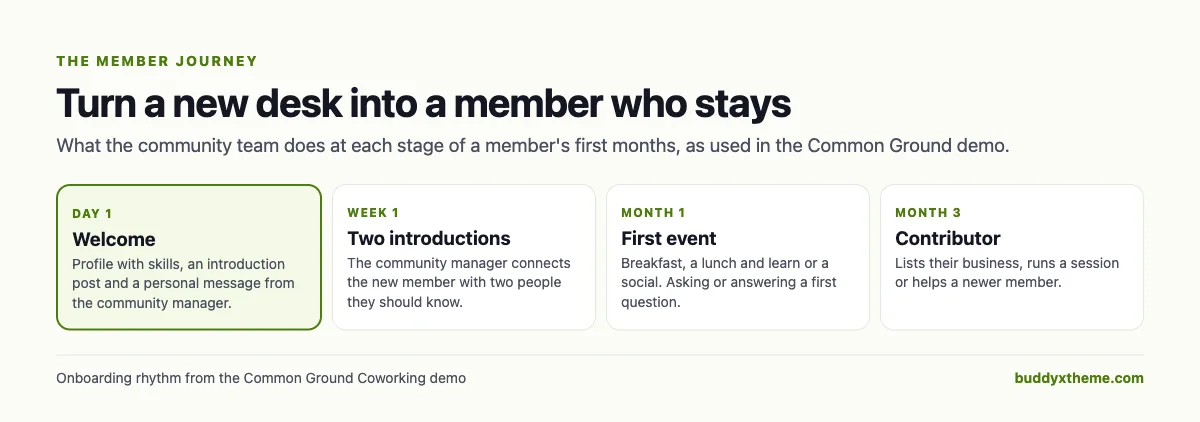
The software matters because each step needs a place to happen. A welcome needs a profile and a message. Introductions need a directory with skills. A first event needs RSVPs and reminders. And a member becomes a contributor when there is somewhere to list their business, answer a question or run a session.
Running a community across several locations
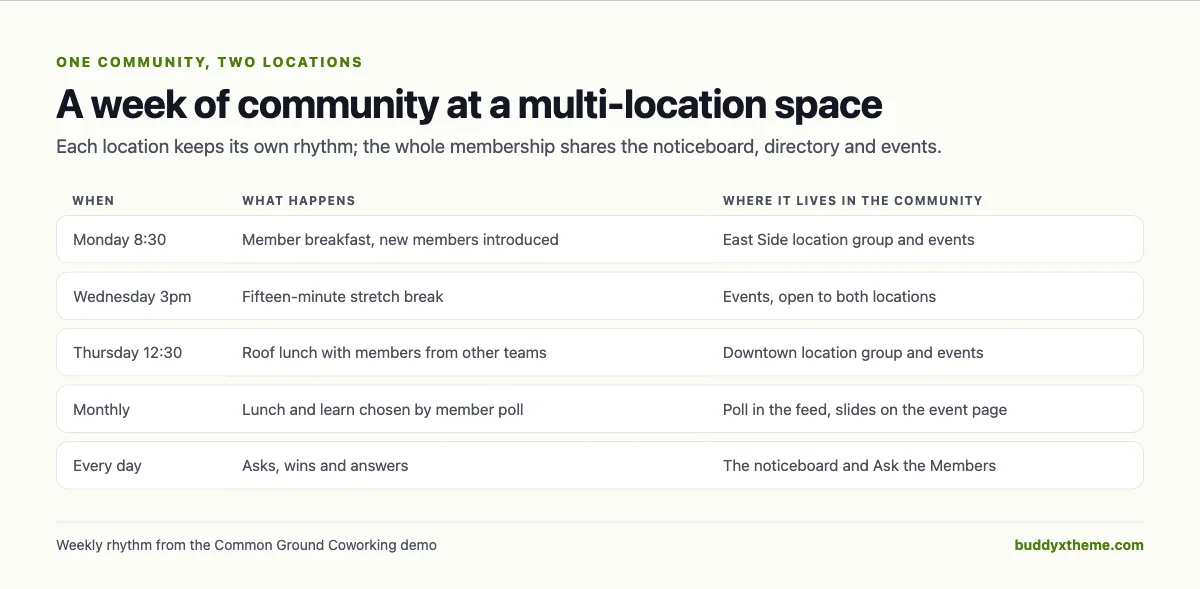
Multi-location spaces have a specific problem: each location has its own daily life, but members want to feel part of something bigger. The demo uses a simple split.
| Belongs to one location | Belongs to the whole membership |
|---|---|
| Building updates, parking, kitchen rules | Asks, wins and member news |
| The local breakfast or lunch | Lunch and learns and showcases |
| Front desk contacts and opening hours | The member directory and business directory |
| Local plans and photos | Questions and accepted answers |
A private group per location keeps local noise out of everyone else’s feed. Shared spaces keep members at different locations meeting each other, which is where many of the best introductions come from.
Questions to ask before you choose
- Do our members need one app or one community? If they mostly book rooms and pay invoices, an operations app is enough. If they come for people, the community layer deserves its own investment.
- Who owns the member relationship and data? Hosted platforms hold your community on their servers; a self-hosted community lives on your domain and server.
- Can members find each other by skill? A directory without skills or tags rarely leads to introductions.
- Do answers stay findable? Chat is good for “anyone around for lunch?” and bad for “how do I connect to the printer?”
- How does it handle locations? Look for location groups members can join, not only admin views by location.
- How will the community connect to bookings and billing? Decide whether you want one product or a community linked from your operations tool.
A 30-day launch plan for your member community
- Week one: structure. Create a group for each location, a shared noticeboard, Ask the Members, a member business directory and an events space. Write the house rules once in Start Here.
- Week two: profiles. Ask existing members to add a headline and skills. Offer a reason: the community manager will use skills to make introductions.
- Week three: seed it. Post the next month’s events, three useful answers (wifi, printing, booking rooms) and one member spotlight. Invite five well-connected members to answer questions first.
- Week four: make it habit. Introduce every new member to two people by message. Announce events only in the community, and share one member win each week.
Measuring whether the community works
| Signal | What it tells you |
|---|---|
| Profiles with skills filled in | Whether introductions are possible |
| New members with a post or answer in their first month | Whether onboarding is working |
| Event RSVPs per location | Which location needs more attention |
| Member businesses listed and contacted | Whether “hire a member first” is real |
| Questions answered by members, not staff | Whether the community helps itself |
| Renewal rate of members who joined an event in month one | Whether community predicts retention at your space |
Which software fits your space?
| If you… | Choose |
|---|---|
| Want a member community you own and can shape around several locations | BuddyNext with your operations tool |
| Want operations and a full community module in one product | OfficeRnD |
| Want groups and perks by customer type inside your operations tool | Nexudus |
| Want a branded app with directory, feed and perks | Optix |
| Want a lighter platform with a feed and benefits | Spacebring |
| Want introductions through job and interest tags | Coworks |
| Mostly need operations and a branded portal | Cobot |
| Already run a general community product | Circle or Mighty Networks |
| Only need quick chat | Slack, ideally alongside a real community |
More community platform comparisons
Running a community for independents or local businesses? These guides use the same method: a working demo community and vendor claims checked at the source.
- Best platforms for a remote workers community: virtual coworking across time zones, city chapters, async Q&A and remote jobs.
- Best platforms for a freelancer networking community: referrals, coworking days and local chapters for independents.
- Best software for a startup founder community: founder circles, investor intros and peer help.
- Best software for a private business networking community: chapters, referral exchange and a member business directory.
- Best software for a private neighborhood community website: local groups, events and a trusted directory.
- How to set up a community space on WordPress: the step-by-step setup guide behind every demo in this series.
How we built and checked this list
We built the Common Ground Coworking demo on a local WordPress site running BuddyNext, with fictional members, locations, businesses, questions and events created for this guide. Every BuddyNext screenshot is from that demo. Competitor features were checked against each vendor’s own website and feature pages in November 2026, and the Deskmag quote comes from its published 2025 trends report. We left out Coworkify because its website shows signs of not being maintained, and Essensys because its current products focus on network and operations infrastructure with no community features. Andcards is included as Spacebring, where its website now redirects. Where we could not confirm a feature on a vendor’s own pages, the scorecard says “Not found” or “Not confirmed”. We did not run a hands-on trial of every product, so features can change; confirm anything critical with the vendor. buddyxtheme.com is published by the team behind BuddyNext, which is why BuddyNext is listed first; we have tried to be fair about its gaps as well as its strengths.
Frequently asked questions
What is the best software for a coworking member community?
BuddyNext is the best choice for a member community you own, with location groups, a searchable member directory, a noticeboard, questions answered by members, a member business directory and events, paired with your existing operations tool. If you want everything in one operations product, OfficeRnD, Nexudus and Optix have the most complete community modules.
Do I need separate software for community and operations?
Not always. Coworking management platforms combine booking, billing and access with community features. Spaces whose brand depends on community often add a dedicated community platform because it can be shaped more freely and holds richer conversations.
How do I get coworking members to use the community?
Make it the only place for things members want: events, building updates, introductions and answers. Welcome every new member personally, introduce them to two people, and share member wins each week.
How should a multi-location space organise its community?
Give each location a private group for local updates and plans, and keep the noticeboard, member directory, questions and events shared across all locations so members meet each other.
Is Slack enough for a coworking community?
Slack is good for quick conversation but has no member directory, events or perks built for a community, and answers scroll away. Many spaces keep Slack for chat and use a community platform for everything that should last.
Should a coworking space have a member business directory?
Yes. A directory of member businesses turns “hire a member first” into something members can act on, and it gives members a reason to keep their profile current.
Does a coworking community need a mobile app?
Members should be able to use the community on their phone. BuddyNext works in the mobile browser without an app download; OfficeRnD, Nexudus, Optix, Spacebring and Coworks offer branded apps.
Can the community be open to day pass and virtual members?
Yes. Open spaces can include every member type, while private location groups stay limited to members based at each location.
The bottom line
Coworking members come for a desk and stay for people. If you want a member community you own and can shape around every location, with a directory members use, answers that stay findable, member businesses and events, BuddyNext is the strongest foundation, alongside the operations tool you already run. If you prefer one product for operations and community, OfficeRnD, Nexudus and Optix lead.
And make the people the best part of your space.