
Every nonprofit coordinator knows the pattern. Someone signs up to volunteer, full of good intentions. They get a confirmation email, a shift time and a building address. They come once, maybe twice, and then they quietly stop. Nobody did anything wrong; the volunteer simply never became part of anything. The organisations that keep volunteers for years do something different: they turn a list of names into a team.
This guide compares the software nonprofits use for that job. Some tools are built to schedule shifts and track hours, others to build a community where volunteers talk, learn and recognise each other. We cover induction training, shifts and events, private team spaces, volunteer stories, recognition, announcements and the privacy that matters when volunteers work with people in difficult situations. We built a working volunteer community for a fictional food bank for the first entry and checked every competitor claim on the vendor’s own pages in November 2026.
Quick answer
If you want an ongoing community for your volunteers on your own website, BuddyNext is the strongest choice: an induction course with quizzes and certificates, shifts and events with registration, private team spaces, a help desk where staff answer procedure and safeguarding questions, volunteer stories, points and leaderboards, and direct messages for buddying new volunteers. If your main need is shift scheduling, hours tracking and background checks, Golden, Bloomerang Volunteer and VolunteerHub are the most complete volunteer management tools, and many nonprofits pair one of them with a community.
In this guide
- Volunteer management or volunteer community?
- The volunteer community scorecard
- 1. BuddyNext: best for a volunteer community you own
- 2. Golden: best all-round volunteer management with recognition
- 3. Bloomerang Volunteer: best for nonprofits already using Bloomerang
- 4. VolunteerHub: best for chapters and branded sign-up pages
- 5. Galaxy Digital: best for multi-location programs with badges
- 6. Better Impact: best for large volunteer programs that need training modules
- 7. VolunteerMatters: best for role-specific training and certifications
- 8. SignUpGenius: best for simple sign-up sheets
- 9. Circle: best hosted community with events and gamification
- 10. Mighty Networks: best app-first community with courses
- Using a volunteer management tool and a community together
- Measuring whether your volunteer community works
- The volunteer journey
- Privacy and safeguarding
- Recognition that keeps volunteers coming back
- Questions to ask before you choose
- A 30-day plan to launch a volunteer community
- Which software fits your volunteer program?
- More community platform comparisons
- How we built and checked this list
- Frequently asked questions
- The bottom line
Volunteer management or volunteer community?
The software in this category does two different jobs, and most products do only one of them well:
| Job | What it covers | Typical tools |
|---|---|---|
| Volunteer management | Shift scheduling, sign-ups, check-in, hours tracking, background checks, reports for funders | Golden, Bloomerang Volunteer, VolunteerHub, Galaxy Digital, Better Impact, VolunteerMatters, SignUpGenius |
| Volunteer community | Onboarding and training, team spaces, conversation between volunteers, stories, recognition, questions answered | BuddyNext, Circle, Mighty Networks |
Volunteer management tools are excellent at getting the right number of people to the right place at the right time. In our research, none of them documented a space where volunteers talk to each other; their messaging was from the organisation to the volunteer. Community platforms are the opposite: strong on conversation and recognition, weaker on shift slots and hours.
That gap matters because of why volunteers stay. NCVO’s Time Well Spent 2023 survey found that “the group/club/organisation they help (46%), the difference they are making (46%), and their commitment to the cause (41%) are volunteers’ top motivators,” and that “81% of satisfied volunteers say they are likely to continue” (NCVO). Belonging to a group and seeing your impact are community jobs, not scheduling jobs.
The volunteer community scorecard
How each option handles what matters most. “Not found” means we could not confirm it on the vendor’s own pages, not that it is impossible.
| Platform | Type | Training | Shifts and sign-ups | Hours tracking | Volunteer-to-volunteer discussion | Team spaces | Recognition |
|---|---|---|---|---|---|---|---|
| BuddyNext | Community | Courses with quizzes and certificates | Events with registration | Not built in | Yes | Private and secret spaces | Points, badges, leaderboards |
| Golden | Management | Onboarding forms | Yes | Yes | Not found | Locations and programs | Badges, leaderboards |
| Bloomerang Volunteer | Management | Not confirmed | Yes | Yes | Not found | Multi-site | Badges, leaderboards |
| VolunteerHub | Management | Not confirmed | Yes | Yes | Not found | Chapters | Rewards and recognition |
| Galaxy Digital | Management | Not found | Yes | Yes | Not found | Multi-location | Badges |
| Better Impact | Management | Online training modules | Yes | Yes | Not found | Not confirmed | Not found |
| VolunteerMatters | Management | Built-in courses | Yes | Yes | Not found | Not confirmed | Certifications |
| SignUpGenius | Sign-up sheets | Not found | Slots | Not found | Not found | Not found | Not found |
| Circle | Community | Courses | Events with RSVPs | Not found | Yes | Spaces | Points, badges, leaderboards |
| Mighty Networks | Community | Courses | Events | Not found | Yes | Groups | Badges, leaderboards |
1. BuddyNext: best for a volunteer community you own
BuddyNext is a complete community platform that runs on your own WordPress site. It brings together private and secret spaces, member profiles, courses with quizzes and certificates, events with registration, Q&A with accepted answers, direct messages, polls, points and leaderboards. A nonprofit can give every volunteer one place to train, sign up, meet their team and feel part of the mission, on the charity’s own website.
To show it in context, we built Harvest Table, a demo volunteer community for a fictional food bank in Sacramento. It has 20 members: warehouse and pantry volunteers, delivery drivers, community garden volunteers, students, a corporate volunteer day organiser, a volunteer who has been coming since 2009, a new volunteer before her first shift, a safeguarding lead, staff and a board member.
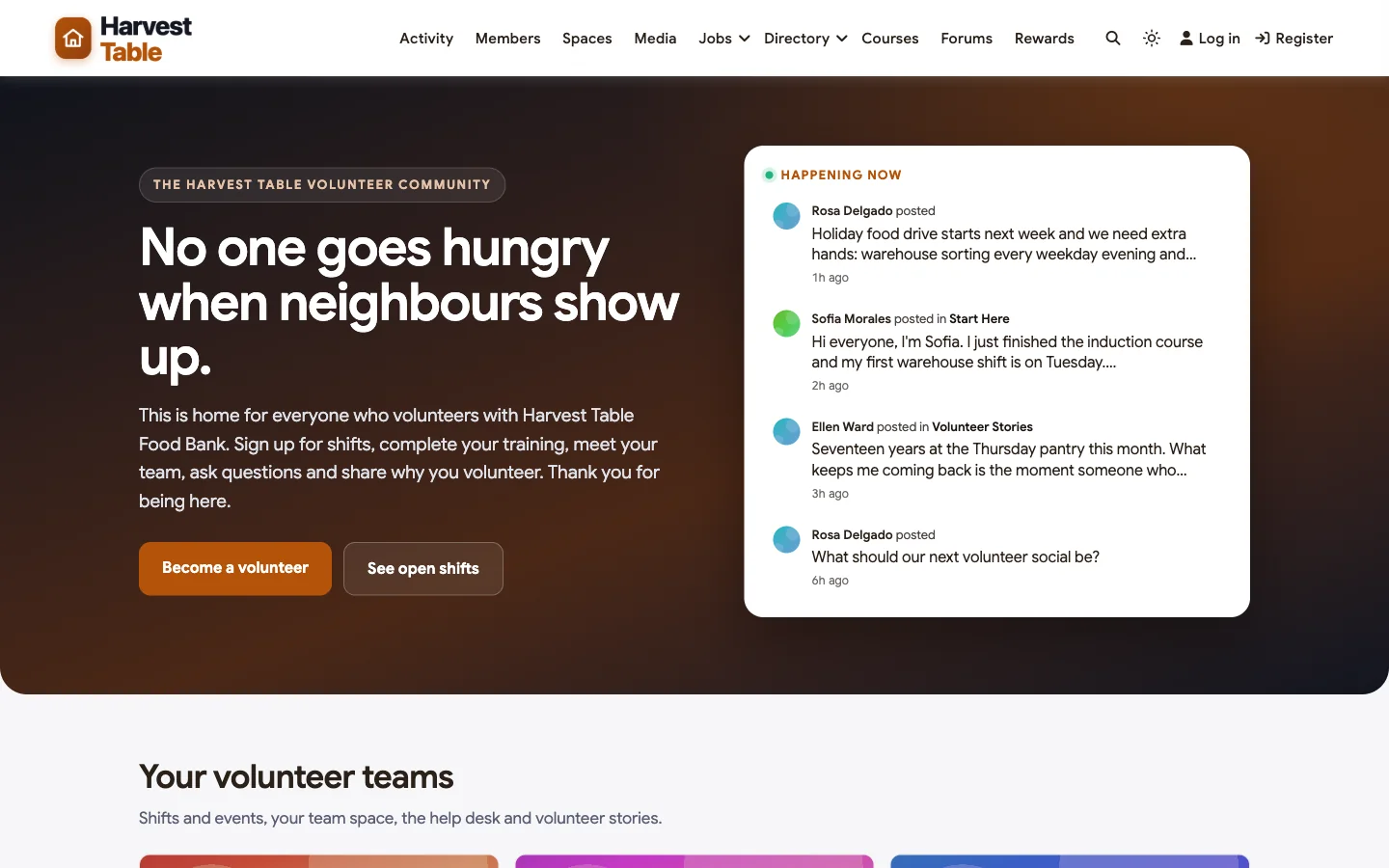
Good at: turning sign-ups into teams, training before the first shift, keeping team conversations private, and recognising volunteers in public.
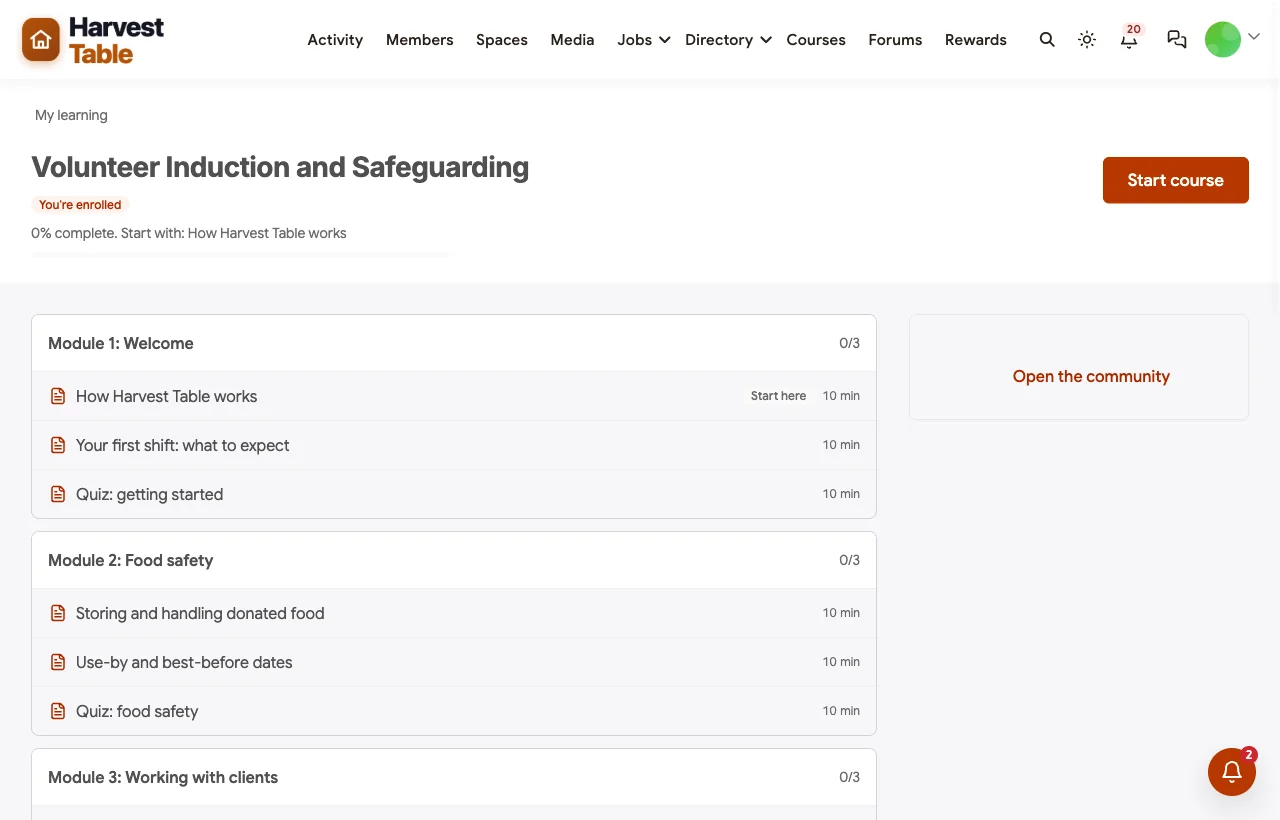
Induction before the first shift. New volunteers complete a short induction course with modules on food safety, working with clients, safeguarding and health and safety, each with a quiz, and receive a certificate when they finish:
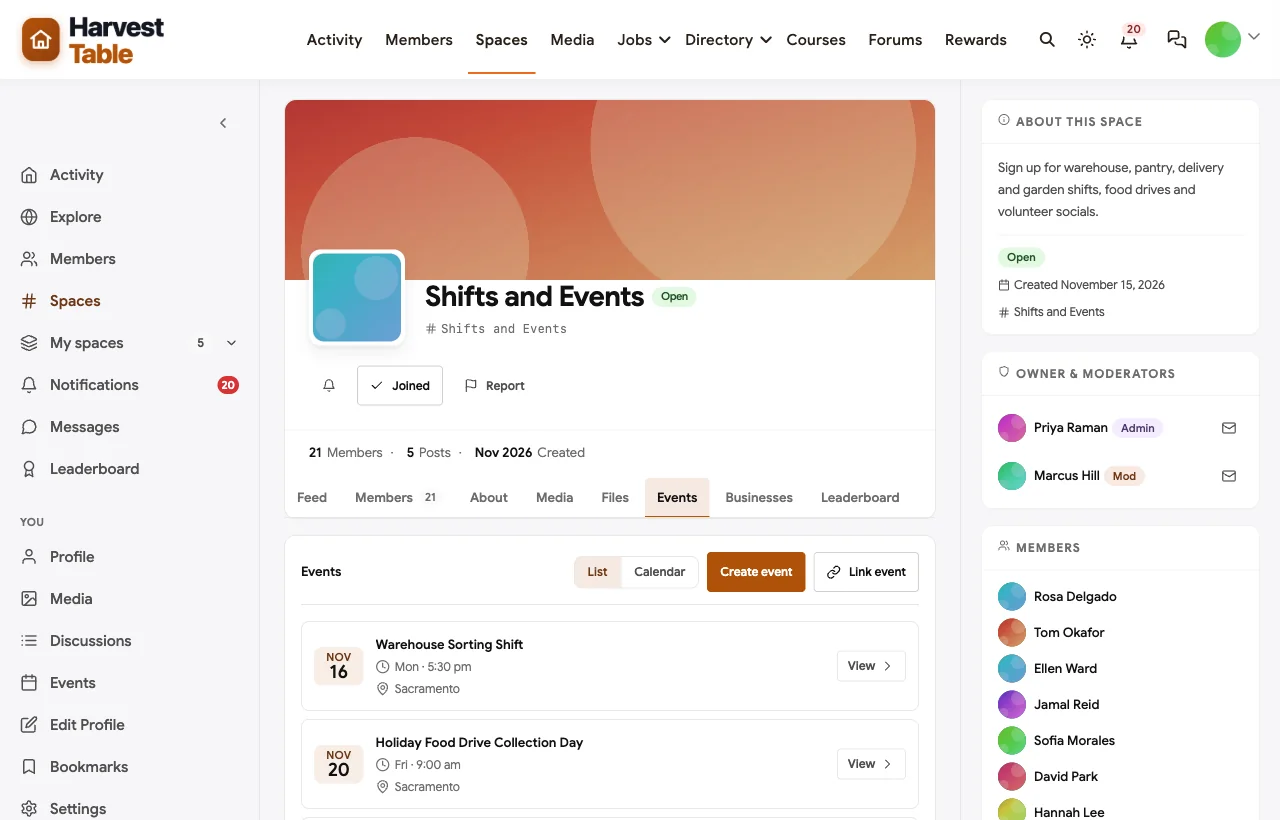
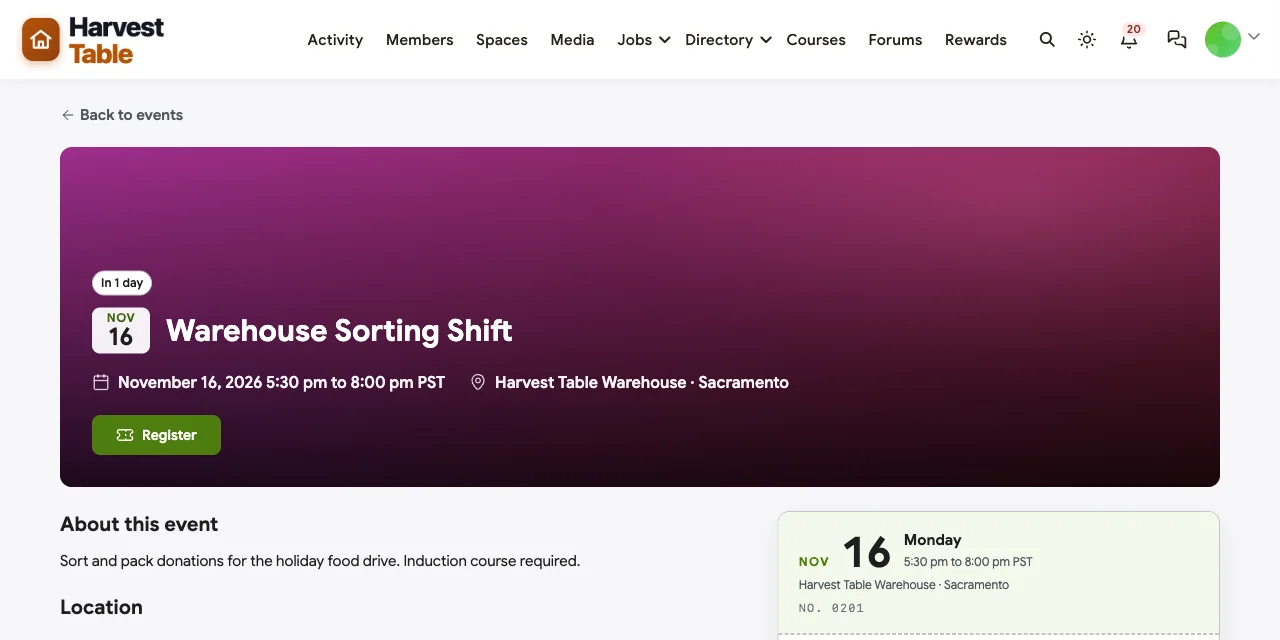
Shifts and events with registration. Warehouse sorting, food drive collection days, home deliveries and garden planting days are events with times, locations and registration, grouped in a Shifts and Events space:
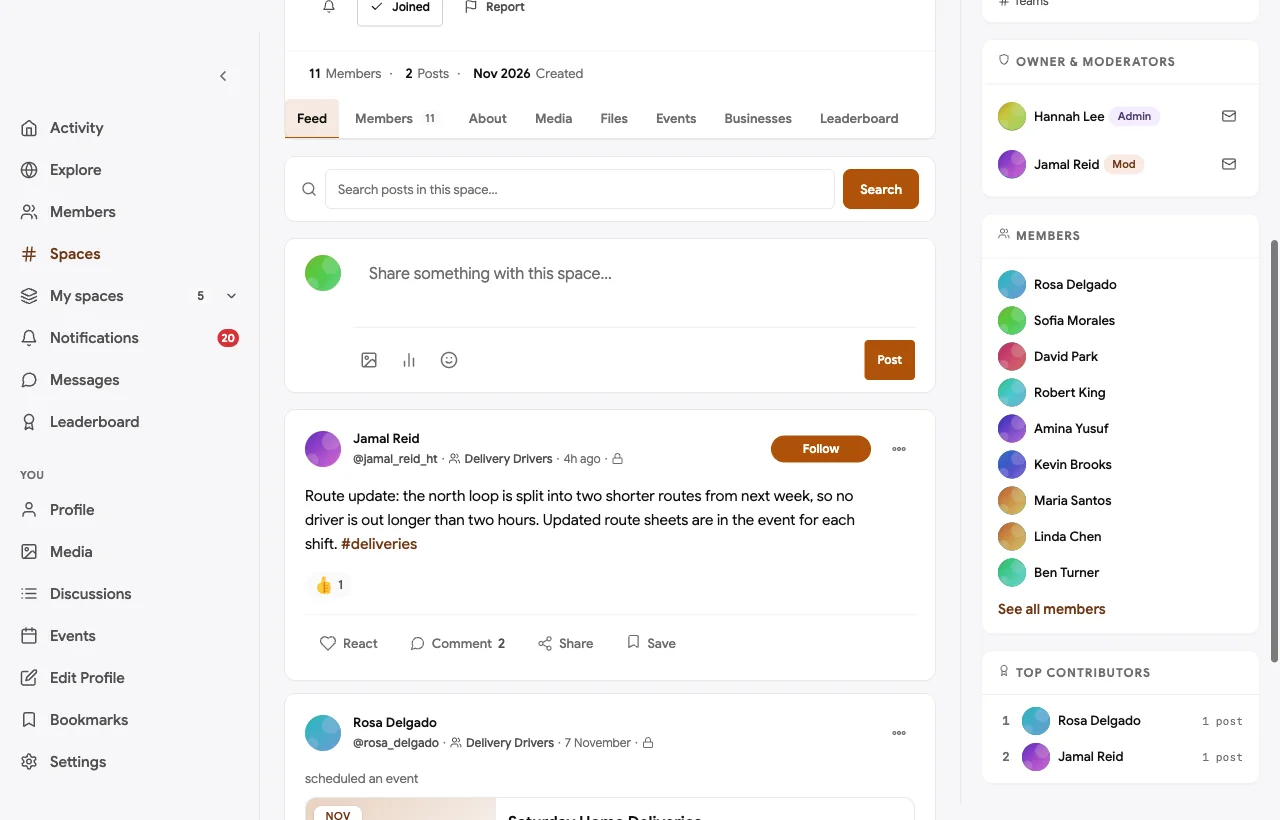
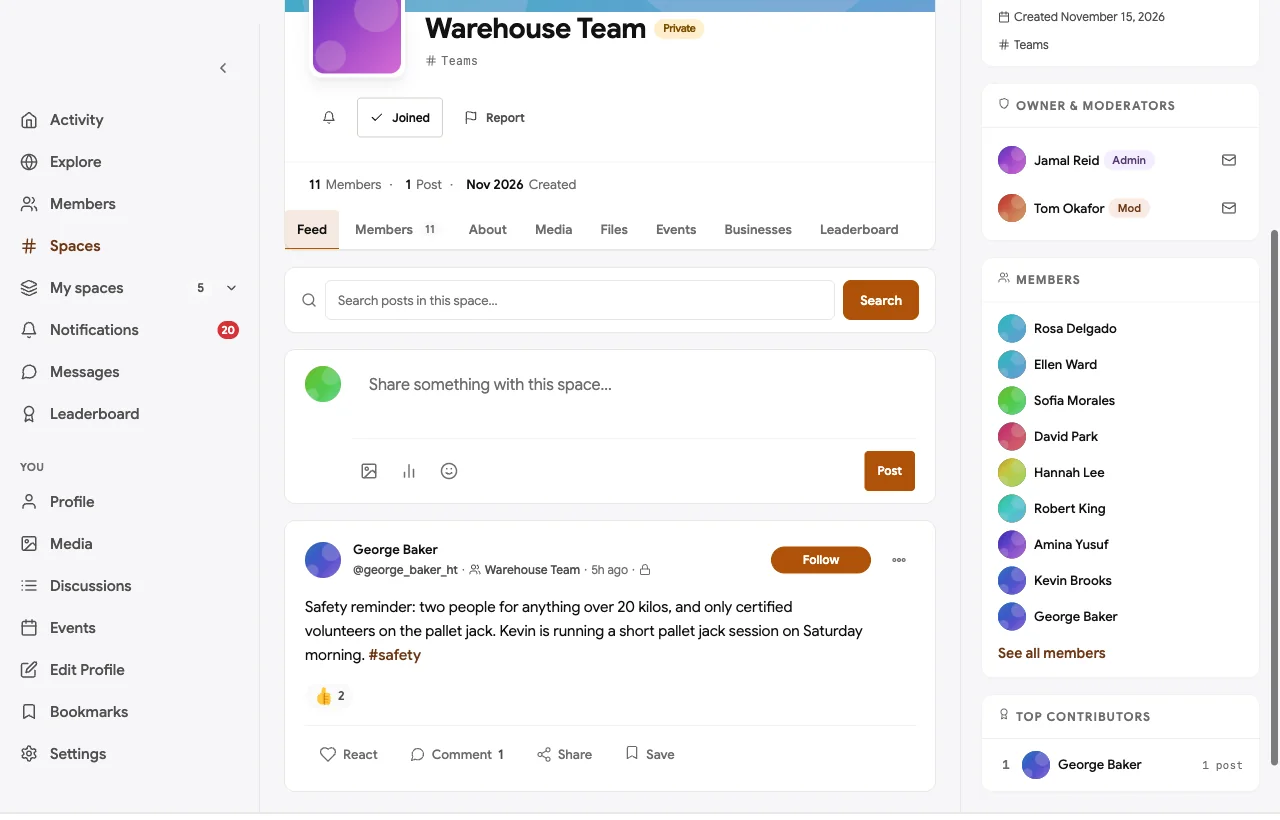
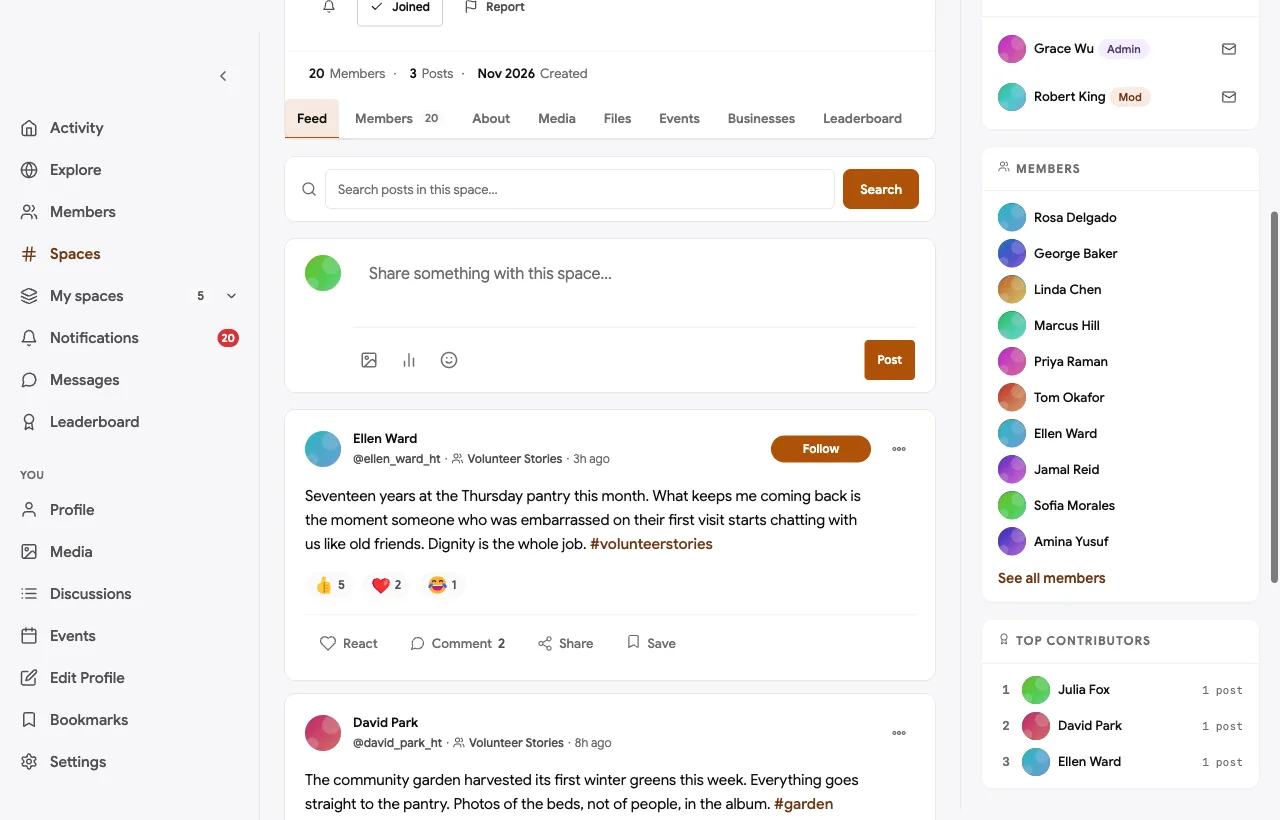
Private team spaces. Each team has its own private space for shift notes, swaps, route changes and safety updates. Client details never go in public spaces:
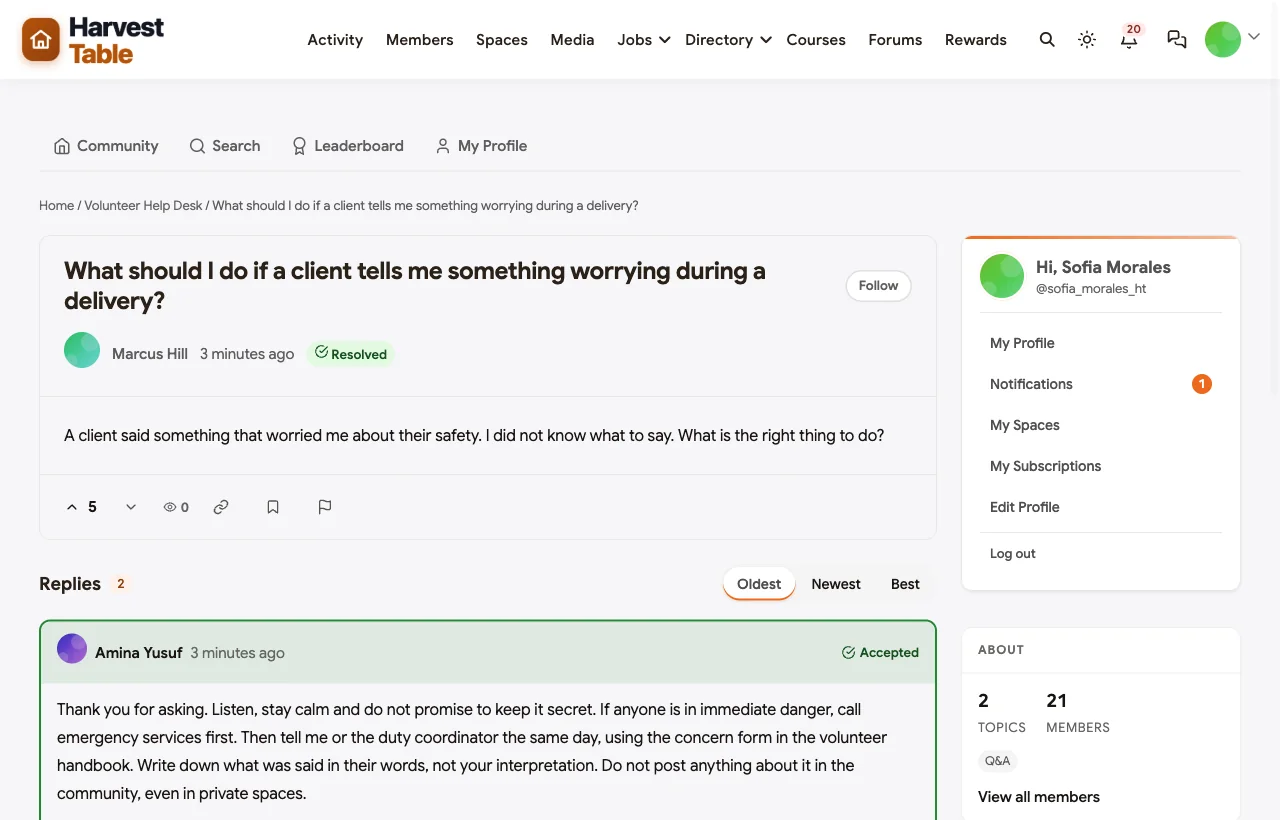
A help desk for procedures and safeguarding. Volunteers ask how to swap a shift or what to do if a client says something worrying, and staff answer. The answer is marked accepted so the next volunteer finds it, while actual concerns go through the formal reporting process:
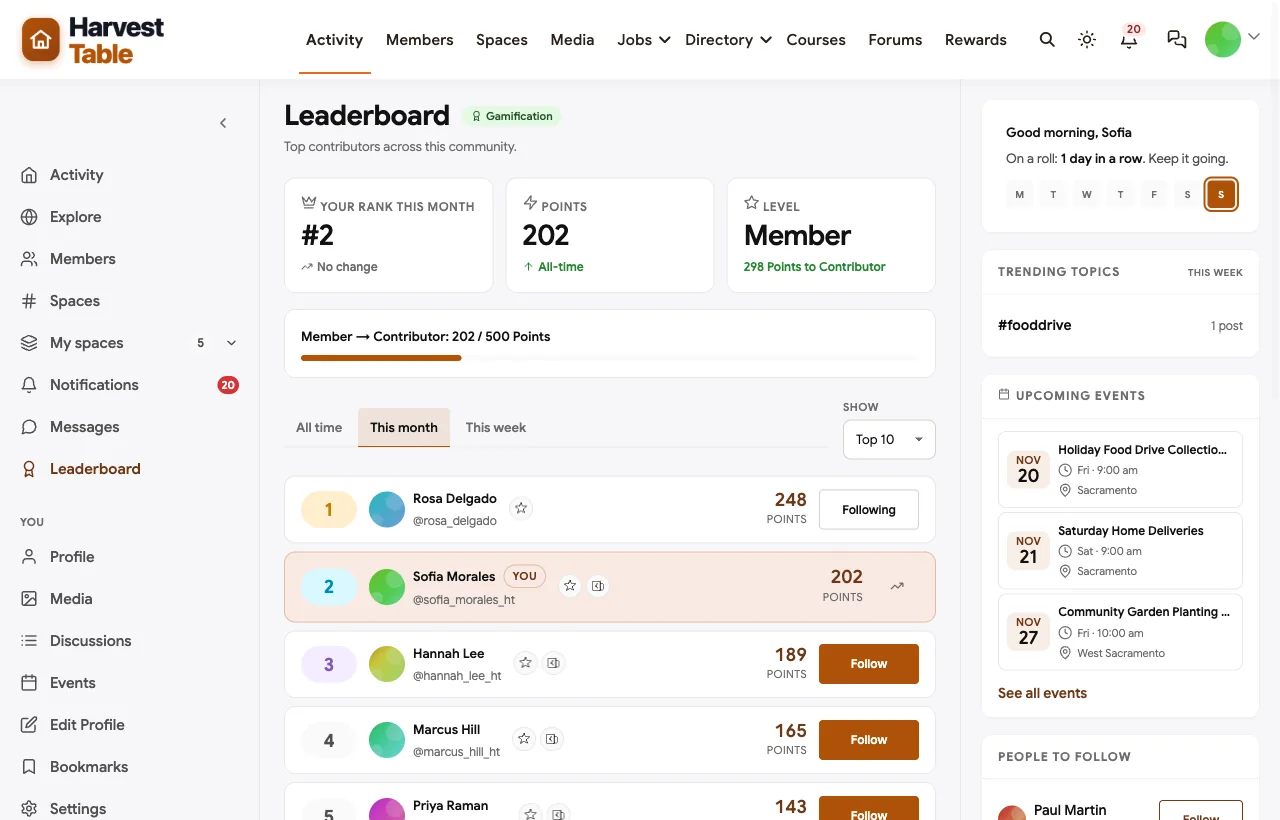
Stories and recognition. In Volunteer Stories, volunteers share why they come, milestones and thank-yous, and the board invites nominations for a recognition breakfast. Points and a leaderboard recognise the volunteers who help most in the community:
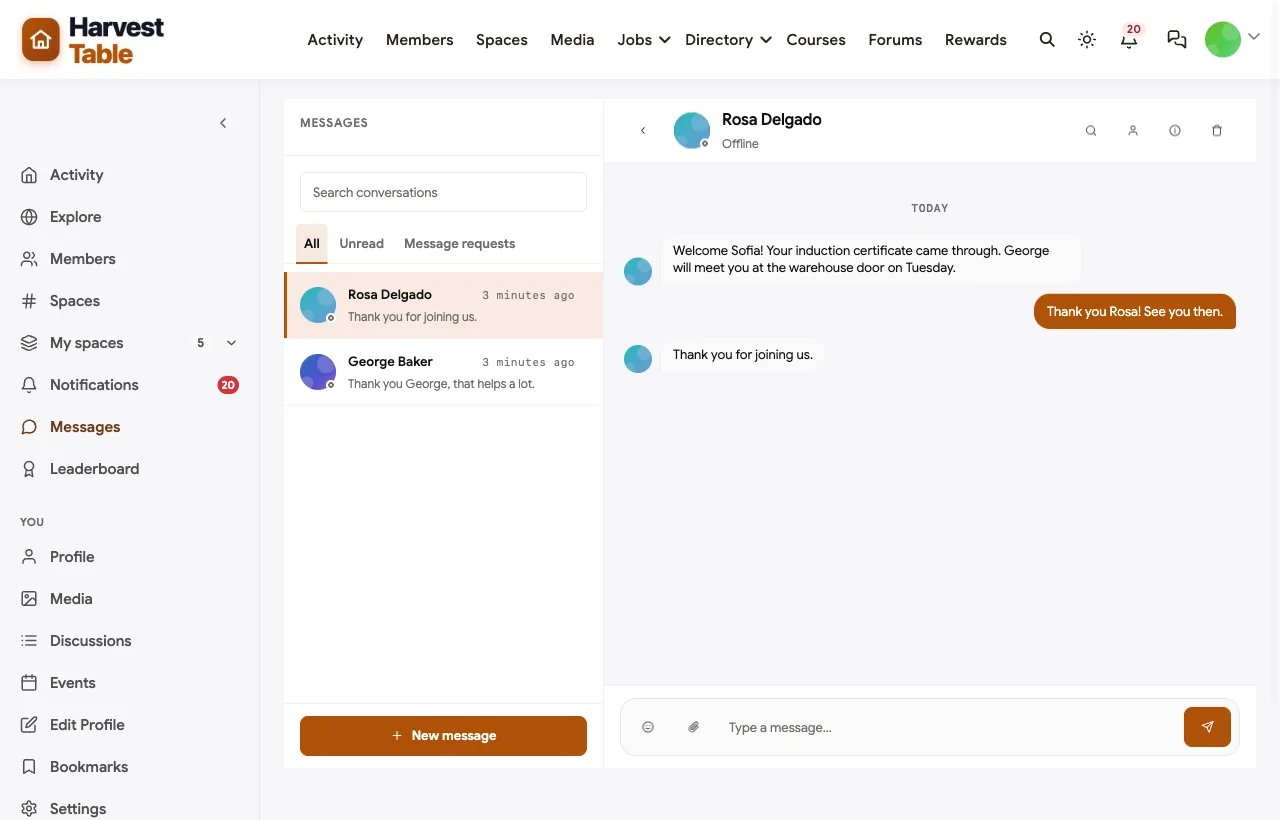
A buddy for every new volunteer. The coordinator welcomes each new volunteer by direct message, and an experienced volunteer offers to meet them on their first shift:
Also built in. Polls to choose volunteer socials, pinned announcements, notifications, a member directory with privacy controls, moderation and reporting, a staff-only secret space, and a mobile layout that works in the phone browser without an app download. Email broadcasts can go to segments such as the members of one team space.
Not built for: volunteer hours tracking, check-in kiosks or background checks. If you report hours to funders, keep a volunteer management tool for that and link to it from the community. It is self-hosted, so you run WordPress or use a managed host.
What’s included, and how it is delivered
BuddyNext is one platform made of a core and add-on platform modules. Everything shown in the demo above runs on the BuddyNext platform. This table shows which parts come with the core, which are platform modules you install and activate alongside it, and which need a third-party plugin, another system or custom work.
| Capability | How it is delivered |
|---|---|
| Open, private and secret spaces | Core platform |
| Member profiles with privacy controls and member directory | Core platform |
| Activity feed, pinned announcements, polls and hashtags | Core platform |
| Moderation and reporting | Core platform |
| Direct messages | Platform module, installed alongside |
| Induction courses with quizzes and certificates | Platform module, installed alongside |
| Shifts and events with registration | Platform module, installed alongside |
| Help desk Q&A with accepted answers | Platform module, installed alongside |
| Points, badges and leaderboards | Platform module, installed alongside |
| Email broadcasts to segments | Platform module, installed alongside |
| Volunteer hours tracking and background checks | Another system (a volunteer management tool) |
Want to click around yourself? The Harvest Table community in this guide was built on a private test site, so it is not public. The BuddyNext live demo is a general community you can open in your browser and explore without installing anything.
2. Golden: best all-round volunteer management with recognition
Golden describes “category-defining volunteer management software” with automation and fundraising AI (Golden). You can “post opportunities, set volunteer limits, track sign-ins, and automate reminders,” see “volunteer hours, attendance, engagement trends,” and “award digital badges, highlight top contributors, or set up leaderboards” (Golden). It automates “onboarding with custom forms, waivers, and background checks” across “multiple locations or program areas” (Golden for nonprofits), and is “SOC2 certified, HIPAA compliant.”
Strengths: scheduling, hours, recognition, background checks and compliance in one product, with a well-rated app.
Gaps: messaging we found is organisation to volunteer; no space for volunteers to talk to each other.
3. Bloomerang Volunteer: best for nonprofits already using Bloomerang
Bloomerang “acquired InitLive and launched Bloomerang Volunteer Management” in 2023 (Bloomerang). It uses “AI-powered scheduling filters” to match volunteers to shifts, tracks hours for impact reports, supports “multi-site or multi-program” organisations, offers “milestone badges, shoutouts, and leaderboards,” a dedicated volunteer app for sign-ups and check-in, and in-platform background checks (Bloomerang Volunteer).
Strengths: strong scheduling and recognition, tied to a donor management system.
Gaps: no volunteer-to-volunteer community found; training was not confirmed as a module.
4. VolunteerHub: best for chapters and branded sign-up pages
VolunteerHub helps organisations “better recruit, engage, and manage volunteers” (VolunteerHub). You can create events with waitlists, track “activity and hours for each volunteer,” send automated emails and texts, and use “Reward and Recognition features.” It supports “custom-branded landing pages for segmented groups, volunteer events, sponsors, multiple chapters and locations” and integrates with Sterling Volunteers for background checks (VolunteerHub features).
Strengths: chapters, branded pages, hours and recognition.
Gaps: messaging found is organisation to volunteer only.
5. Galaxy Digital: best for multi-location programs with badges
Galaxy Digital offers volunteer management “for mission-driven organizations” (Galaxy Digital) with event sign-ups and qualifications, hours tracking, email and text messaging, “Volunteer Badges,” the Get Connected mobile app, and support for “multi-location programs with complex reporting requirements” (Galaxy Digital features).
Strengths: reporting for large, multi-location programs with recognition badges.
Gaps: no training module or volunteer-to-volunteer discussion found.
6. Better Impact: best for large volunteer programs that need training modules
Better Impact’s Volunteer Impact is “trusted by 85,000+ organizations to automate scheduling, track hours, communicate with volunteers” (Better Impact). Volunteers “self-schedule in 2 clicks,” and it includes “online training modules,” automated reminders and mobile access, with ISO 27001 certification.
Strengths: proven scheduling, hours tracking and training at scale.
Gaps: no recognition features or volunteer-to-volunteer community found.
7. VolunteerMatters: best for role-specific training and certifications
VolunteerMatters, now part of Momentive Software (VolunteerMatters), lets volunteers “sign up for shifts,” offers flexible time tracking, “built-in courses” for role-specific requirements, certification tracking with expiry dates, and integrations with “third-party background check providers.”
Strengths: training, certifications and background checks for regulated roles.
Gaps: no badges, leaderboards or volunteer discussion found.
8. SignUpGenius: best for simple sign-up sheets
SignUpGenius helps you “get people to sign up and show up” (SignUpGenius), with slots, participant limits, and automatic confirmation, reminder and text messages (SignUpGenius features).
Strengths: the quickest way to fill slots for an event.
Gaps: no hours tracking, training, recognition, team spaces or community.
9. Circle: best hosted community with events and gamification
Circle helps you “build a home for your community, events, and courses” under your own brand (Circle). It offers posts and comments, events with RSVPs and calendar invites (Circle events), courses, segmentation to “reach the right members at the right time,” badges, points and leaderboards (Circle gamification), and a branded app.
Strengths: a polished community with recognition and events.
Gaps: no shift scheduling, hours tracking or safeguarding features; hosted only.
10. Mighty Networks: best app-first community with courses
Mighty Networks says “84% of activity on Mighty is created by members with other members” (Mighty Networks). Its plans include private groups, online and in-person events, courses, badges, leaderboards and member tags for segmenting (Mighty Networks plans).
Strengths: member-led activity, courses and native apps.
Gaps: no shift scheduling or hours tracking; hosted only.
Using a volunteer management tool and a community together
Many nonprofits end up with both kinds of software, and that is fine as long as each has a clear job. A simple split that works:
| Task | Where it happens |
|---|---|
| Recruiting new volunteers and application forms | Volunteer management tool or your website |
| Background checks and role requirements | Volunteer management tool |
| Shift slots, check-in and hours for funder reports | Volunteer management tool |
| Induction training and refreshers | Community courses |
| Team conversation, swaps and updates | Community team spaces |
| Questions about procedures | Community help desk |
| Stories, milestones and recognition | Community stories and leaderboard |
| Socials and volunteer events | Community events |
The key is a single front door for volunteers. Put a clear link to the shift system in the community’s Start Here space and in every team space, and link back to the community from the confirmation emails your volunteer management tool sends. Volunteers should never wonder where to go next.
Smaller organisations often do not need two systems. If you do not report hours to funders, events with registration in the community cover most food banks, animal shelters, community gardens and youth programs. Add a management tool only when a funder, regulator or insurer asks for hours or checks you cannot produce otherwise.
Measuring whether your volunteer community works
| Signal | What it tells you |
|---|---|
| New volunteers who finish induction before their first shift | Whether onboarding is clear |
| New volunteers who post an introduction | Whether they feel welcome |
| Volunteers still active after three months | Whether the first month is working |
| Shift swaps handled inside team spaces | Whether teams are self-organising |
| Help desk questions answered by volunteers, not only staff | Whether experienced volunteers are mentoring |
| Stories and thank-you posts each month | Whether recognition is part of the culture |
Review these once a quarter with your team leads. The numbers matter less than the conversations they start: which team feels disconnected, which induction module confuses people, and which volunteers deserve a public thank-you.
The volunteer journey
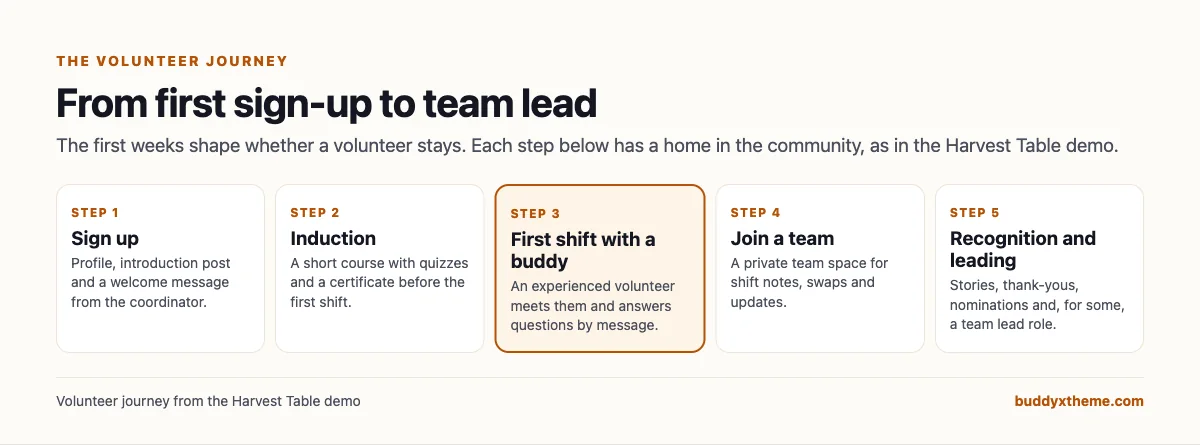
Whatever software you choose, design for the first month. A personal welcome, induction before the first shift, a buddy on day one and a team to belong to do more for retention than any reminder email.
Privacy and safeguarding
Volunteers often work with people in vulnerable situations, so a volunteer community needs rules that everyone understands.
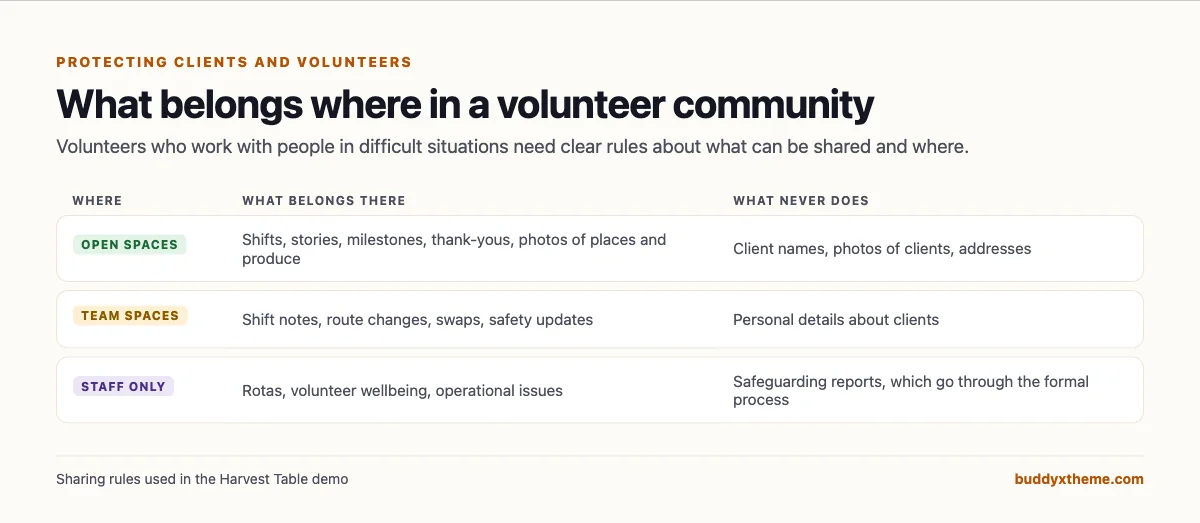
| Practice | Why it matters |
|---|---|
| No client names or photos in the community | Clients did not agree to be part of it |
| Team details stay in private team spaces | Only the people who need them see them |
| Safeguarding concerns go through the formal process | A community post is never the right channel |
| Profile privacy controls | Volunteers choose what others can see about them |
| Moderation and reporting | Anyone can flag something that should not be there |
| Training before access to teams | Volunteers learn the rules before they need them |
Recognition that keeps volunteers coming back
| Recognition | How to do it in a community |
|---|---|
| Milestones | A post when someone reaches a year, or a hundred shifts |
| Stories | Invite volunteers to share why they come |
| Peer nominations | Ask volunteers to nominate a teammate for an award |
| Leaderboards | Recognise helpful contributions, not only hours |
| Thank-yous from staff and board | Public, specific and frequent |
Questions to ask before you choose
- Do you need to report hours to funders? If so, keep or add a volunteer management tool for hours.
- Where do volunteers talk to each other today? If the answer is a personal WhatsApp group, that is a privacy risk you can fix.
- Can you train volunteers before their first shift? Courses with quizzes and certificates make it easy to check.
- How are teams separated? Private team spaces keep route notes and shift details where they belong.
- Who owns the volunteer data? Hosted platforms hold it for you; a self-hosted community keeps it on your own website.
A 30-day plan to launch a volunteer community
- Week one: structure. Create Start Here, Shifts and Events, a Help Desk, Volunteer Stories, one private space per team and a staff-only space. Write the sharing rules.
- Week two: induction. Publish a short induction course with a quiz per module, and ask current volunteers to take it too.
- Week three: invite team leads. Ask each team lead to post the next month’s shifts and a welcome in their team space.
- Week four: open to all volunteers. Invite everyone, post the first story, and welcome every new volunteer personally.
Which software fits your volunteer program?
| If you… | Choose |
|---|---|
| Want an ongoing community with training, shifts, team spaces, stories and recognition on your own website | BuddyNext |
| Want complete volunteer management with recognition and compliance | Golden |
| Already use Bloomerang for donors | Bloomerang Volunteer |
| Run chapters with branded sign-up pages | VolunteerHub |
| Run large multi-location programs | Galaxy Digital |
| Need training modules at scale | Better Impact |
| Need role-specific training and certifications | VolunteerMatters |
| Only need sign-up sheets | SignUpGenius |
| Want a hosted community with events and gamification | Circle or Mighty Networks |
More community platform comparisons
Running a different kind of mission-driven community? These guides use the same method: a working demo community and vendor claims checked at the source.
- Best platforms for a faith-based membership community: small groups, private prayer, serving teams and families.
- Best software for a private neighborhood community website: local groups, events and a trusted directory.
- Best platforms for a professional association community: chapters, committees and member directories.
- Best software for a university alumni network: chapters, mentoring and events.
- Best software for a coworking space member community: location groups, member directories and events.
- How to set up a community space on WordPress: the step-by-step setup guide behind every demo in this series.
How we built and checked this list
We built the Harvest Table demo on a local WordPress site running BuddyNext, with fictional volunteers, staff, teams, an induction course, shifts and stories created for this guide. Every BuddyNext screenshot is from that demo. Competitor features were checked against each vendor’s own website in November 2026, and the volunteering figures come from NCVO’s Time Well Spent 2023 survey. We left out Hivebrite and Mobilize because their websites could not be checked at the time of writing. Where we could not confirm a feature on a vendor’s own pages, the scorecard says “Not found” or “Not confirmed”. We did not run a hands-on trial of every product, so features can change; confirm anything critical with the vendor. buddyxtheme.com is published by the team behind BuddyNext, which is why BuddyNext is listed first; we have tried to be fair about its gaps as well as its strengths.
Frequently asked questions
What is the best software for a nonprofit volunteer community?
BuddyNext is the best choice for an ongoing volunteer community on your own website, with induction courses, shifts and events, private team spaces, a help desk, stories and recognition. If you need shift scheduling with hours tracking and background checks, Golden, Bloomerang Volunteer and VolunteerHub lead, and many nonprofits use one alongside a community.
What is the difference between volunteer management and a volunteer community?
Volunteer management software schedules shifts, tracks hours and runs background checks. A volunteer community gives volunteers a place to train, talk, share stories and feel part of a team.
How do I keep volunteers coming back?
Welcome each one personally, train them before the first shift, pair them with a buddy, give them a team to belong to, and recognise them publicly and often.
Can volunteers be trained in the community?
Yes. BuddyNext includes courses with quizzes and certificates, so a volunteer can complete induction before their first shift.
How do we protect client privacy in a volunteer community?
Never post client names or photos, keep team details in private team spaces, send safeguarding concerns through your formal process, and use moderation and reporting.
Should we replace our volunteer WhatsApp groups?
Many charities move volunteer conversations from personal messaging groups into a community they control, so personal phone numbers stay private and the organisation can moderate and archive conversations.
Can we send updates to only one team?
Yes. Post in the team’s private space, and with BuddyNext you can also send an email broadcast to the members of a specific space.
The bottom line
Volunteers stay when they belong. If you want a community on your own website where volunteers train, sign up for shifts, meet their team, ask questions and see their impact, BuddyNext is the strongest foundation, alongside a volunteer management tool if you report hours. If scheduling and compliance are your main need, Golden, Bloomerang Volunteer and VolunteerHub lead.
And turn your volunteer list into a team.