

A paid mastermind sells one thing: a room of peers who will tell a business owner the truth and then hold them to what they decide. The content, the calls and the retreat are all in service of that room. Software cannot create trust between six owners, but the wrong software can quietly undermine it, by letting a confidential hot seat leak into a public feed, by making every group feel like one big chat, or by leaving the facilitator to stitch together a payment form, a Zoom link, a Google Drive folder and a WhatsApp group.
This guide compares the software you can use to run a paid entrepreneur mastermind: application-only, small facilitated groups of business owners, recurring hot seat calls, accountability between calls, a resource library and occasional retreats. We built a working mastermind for the first entry so you can see how it looks with real groups and hot seats, checked every competitor claim against the vendor’s own pages in November 2026, and say plainly where each option falls short for this specific format.
Quick answer
If you want a paid mastermind you own and control, BuddyNext is the strongest choice: approval before anyone gets in, a private space for each mastermind group and a secret one for facilitators, hot seat requests with accepted answers, recurring calls with RSVPs, accountability check-ins, a resource library, retreat planning and recurring memberships, all on your own WordPress site. Circle and Mighty Networks are the most polished hosted platforms, Heartbeat and Kajabi suit coach-led programs with built-in video, Disco suits application-based cohort programs, and Slack or WhatsApp work only as a chat layer next to other tools.
In this guide
- What a mastermind is, and what the big peer networks do
- The mastermind operating model
- The hot seat test: six questions for any free trial
- The mastermind software scorecard
- 1. BuddyNext: best for a paid mastermind you own
- 2. Circle: best hosted platform for a polished paid mastermind
- 3. Mighty Networks: best for an app-first mastermind with cohorts
- 4. Heartbeat: best for facilitator-led groups with built-in video
- 5. Kajabi: best for a coach-led mastermind with courses
- 6. Disco: best for application-based cohort programs
- 7. Skool: best for a simple mastermind launch with one group
- 8. Slack: best as a chat layer for an existing mastermind
- 9. WhatsApp Communities: best for logistics and reminders only
- Running the hot seat call
- Matching members into groups
- The confidentiality agreement
- Which software fits your mastermind?
- More community platform comparisons
- How we built and checked this list
- Frequently asked questions
- The bottom line
What a mastermind is, and what the big peer networks do
A mastermind is a peer advisory group: a small, fixed group of people at a similar level who meet regularly to work on each other’s problems. The format has been refined for decades by large peer networks, and their published descriptions are a useful benchmark for anyone running a paid mastermind.
- Vistage describes its CEO groups as consisting of “12-16 business leaders (peers) from non-competing companies,” where “local, noncompeting peers meet monthly,” and asks members to sign a confidentiality pledge (Vistage).
- EO (Entrepreneurs’ Organization) describes Forum as “a tight-knit group of 8-12 fellow entrepreneurs,” built around “confidential peer-to-peer learning” (EO).
- YPO describes its forum as “a small, tight-knit group that forges deep, trusting relationships, providing a confidential resource you can rely on unconditionally for honest insight and perspective” (YPO).
Three patterns run through all of them: small fixed groups, non-competing members and confidentiality. A paid mastermind run by an independent facilitator usually adds three more: an application before anyone joins, accountability between meetings, and a library of templates and recordings that makes the membership worth renewing. Those six things are what the software has to support.
The mastermind operating model
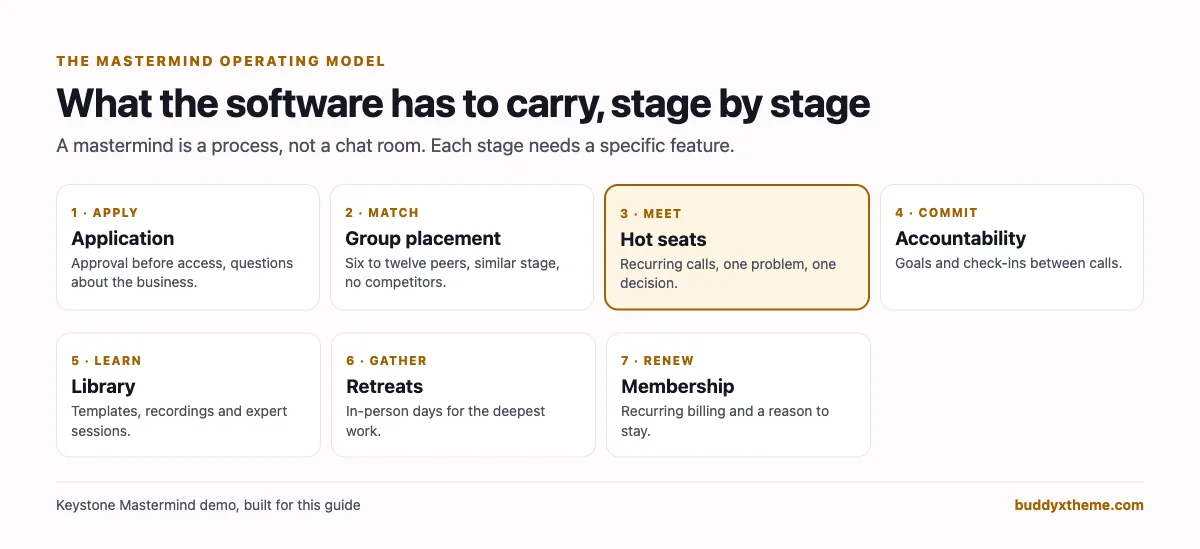
Most masterminds run the same seven-stage cycle. Each stage maps to a specific software feature, and the gaps are where facilitators end up juggling extra tools.
| Stage | What happens | What the software needs |
|---|---|---|
| Apply | An owner applies; the facilitator checks fit | An approval step before access, plus questions at sign-up |
| Match | The facilitator places them in a group of peers | Several private groups inside one community |
| Meet | Recurring hot seat calls, usually every two weeks or monthly | Recurring events with RSVPs and a video link |
| Commit | Each member sets goals and checks in between calls | Posts or check-ins inside the private group, notifications |
| Learn | Templates, frameworks and expert session recordings | A library members can search |
| Gather | An annual or twice-yearly retreat | A private planning space, an event with a venue |
| Renew | Membership continues month to month or year to year | Recurring billing with access tied to membership |
The hot seat test: six questions for any free trial
Before committing, set up a trial with two fake groups and run through these questions. They take an hour and they reveal most of what matters.
- Can you approve every member before they see anything? Payment is not vetting. You want an application or approval step, not just a checkout page.
- Can you run several private groups inside one community? Group A must not see Group B’s hot seats, and neither group should see the facilitators’ notes.
- Can a group be completely hidden? A facilitators’ space or an advisory board should not appear in lists or search at all for non-members.
- Where do accountability check-ins live? Commitments made on a call need a home inside the group, with notifications when someone posts.
- Where do recordings and templates go? If the answer is “a shared drive”, the library is outside the product and outside your membership.
- Who owns the member list and history? If the platform changes its terms or shuts down, what do you keep? This is not hypothetical: Guild, a professional community app, states on its own site that it “closed on 1 October 2024” (Guild).
The mastermind software scorecard
How each option handles the parts of the cycle that matter most. “Confirmed” means we found it on the vendor’s own pages; “Not found” means we could not confirm it, not that it is impossible.
| Platform | Approval before joining | Several private groups | Hidden groups | Live calls | Accountability tools | You own the data |
|---|---|---|---|---|---|---|
| BuddyNext | Yes | Yes | Yes (secret spaces) | Events with RSVPs and video links | Check-in posts, points, streaks | Yes, self-hosted |
| Circle | Not found (payment gate) | Yes (spaces) | Not confirmed | Native live rooms | Not found | Hosted, member CSV export |
| Mighty Networks | Not found | Yes (private groups) | Not confirmed | Native live streaming | Streaks | Hosted |
| Heartbeat | Not found | Channels | Not confirmed | Native live rooms, Zoom sync | Attendance tracking | Hosted |
| Kajabi | Not found | Private channels | Not confirmed | Native coaching video | Session notes, leaderboard | Hosted, contact export |
| Disco | Yes (applications) | Groups and subgroups | Not confirmed | Live events, Zoom | Reminders | Hosted |
| Skool | Not found | Not found | Not found | Native calls | Points and leaderboard | Hosted, member export |
| Slack | Admin approval of invites | Private channels | Private channels | Huddles | Not found | Hosted |
| WhatsApp Communities | Invite links | Groups in a community | Not confirmed | App calls | Not found | Hosted, no export product |
1. BuddyNext: best for a paid mastermind you own
BuddyNext is a complete community platform that runs on your own WordPress site. Approval-based registration, open, private and secret spaces, Q&A with accepted answers, events with RSVPs, member profiles and a searchable directory, direct messages, polls, points and streaks, a business directory, courses and recurring memberships all work together, so the whole mastermind lives in one place.
To show it in context, we built Keystone Mastermind, a demo peer advisory community for established business owners, with 20 fictional members (agency owners, clinic founders, a construction firm, an e-commerce brand, a fractional CFO and two facilitators), two private mastermind groups, a hot seat request space, a resource library, a retreat planning space and a secret facilitators’ room.
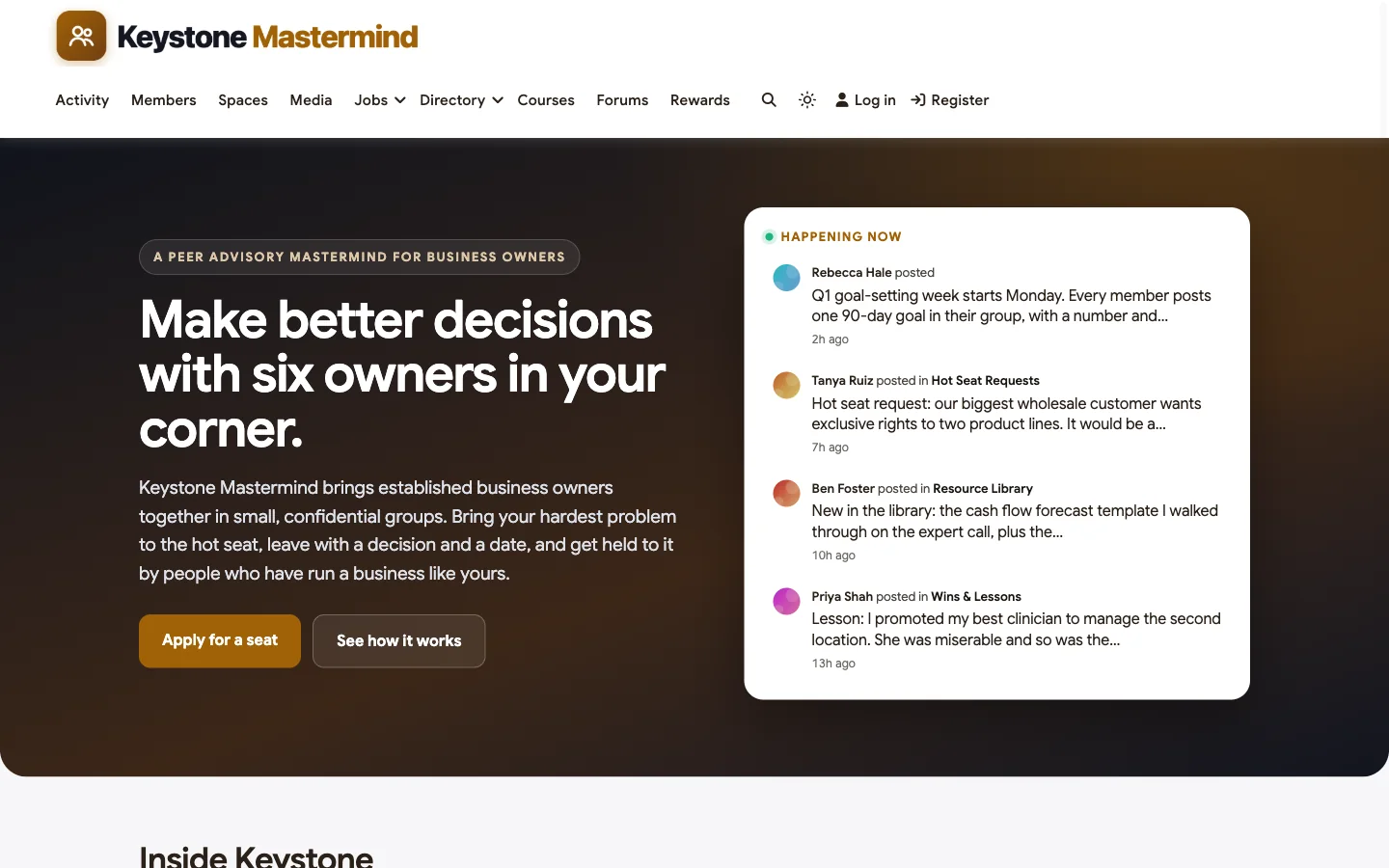
Good at: confidential small groups, the hot seat workflow, accountability between calls and owning your member data.
Applications and approval. Registration can be set to admin approval, so applicants fill in the sign-up form and wait in a queue until the facilitator approves them. Custom profile fields can ask for the business, the team size and the main challenge at sign-up, which gives the facilitator what they need to decide on fit and on group placement.
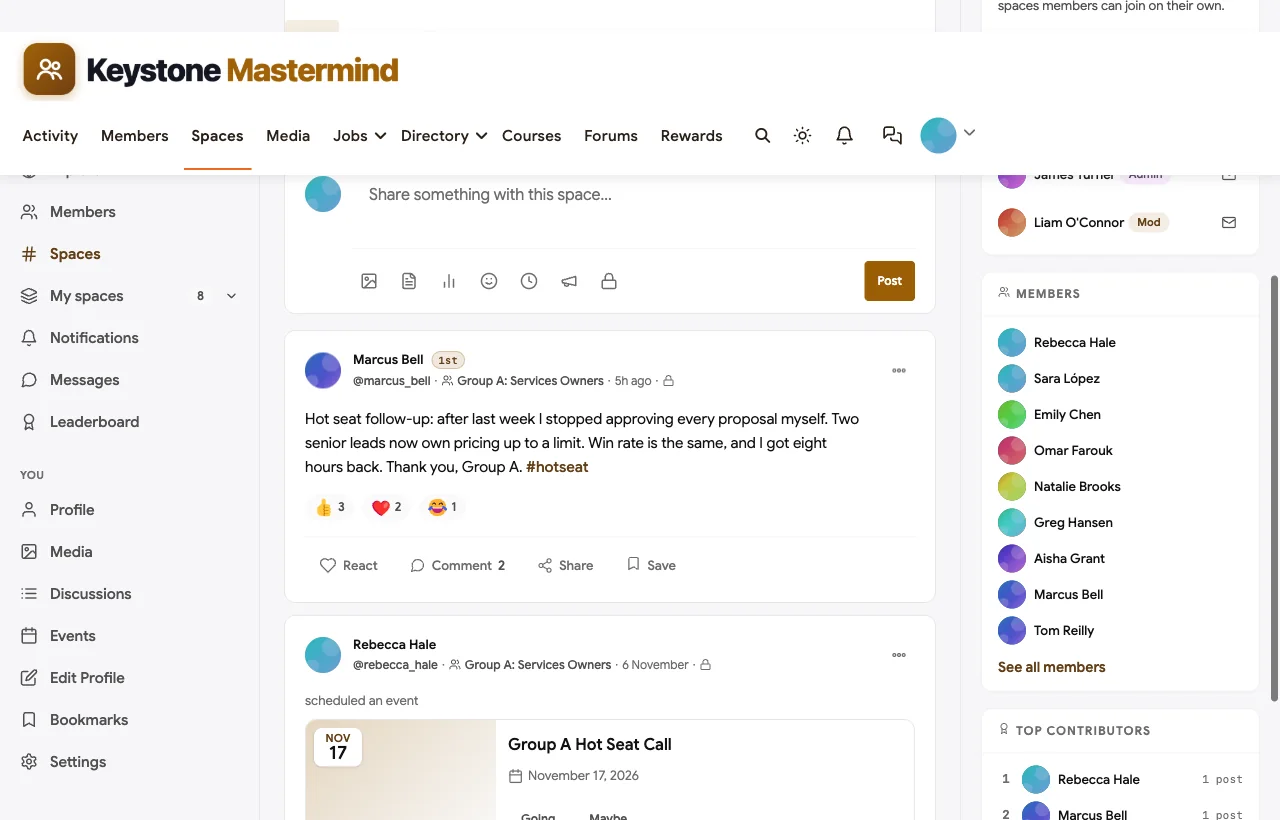
A private space for every group. Each mastermind group is its own private space: visible in the directory so members know it exists, but posts are members-only and joining needs approval. In the demo, Group A is seven services business owners and Group B is seven operators. Here is Group A, where a member reports back on a decision made in his hot seat:
A secret space for facilitators. The Facilitators space is secret: it does not appear in the space directory or in search for anyone outside it. Facilitators use it for member check-in notes, group matching and agenda planning.
Hot seat requests. Members request a hot seat in an open space with the problem, what they have tried and the decision they need to make, and facilitators schedule the strongest requests into group calls. Longer questions that the whole community can learn from run as Q&A threads, where the most useful answer is marked as accepted:


Accountability between calls. After each call, members post their commitments in their group space, and check in on them before the next call. In the demo, a home services owner reports that two of four process documents are done; two group members reply with encouragement and an offer to share their own. Points and streaks reward members who keep checking in.
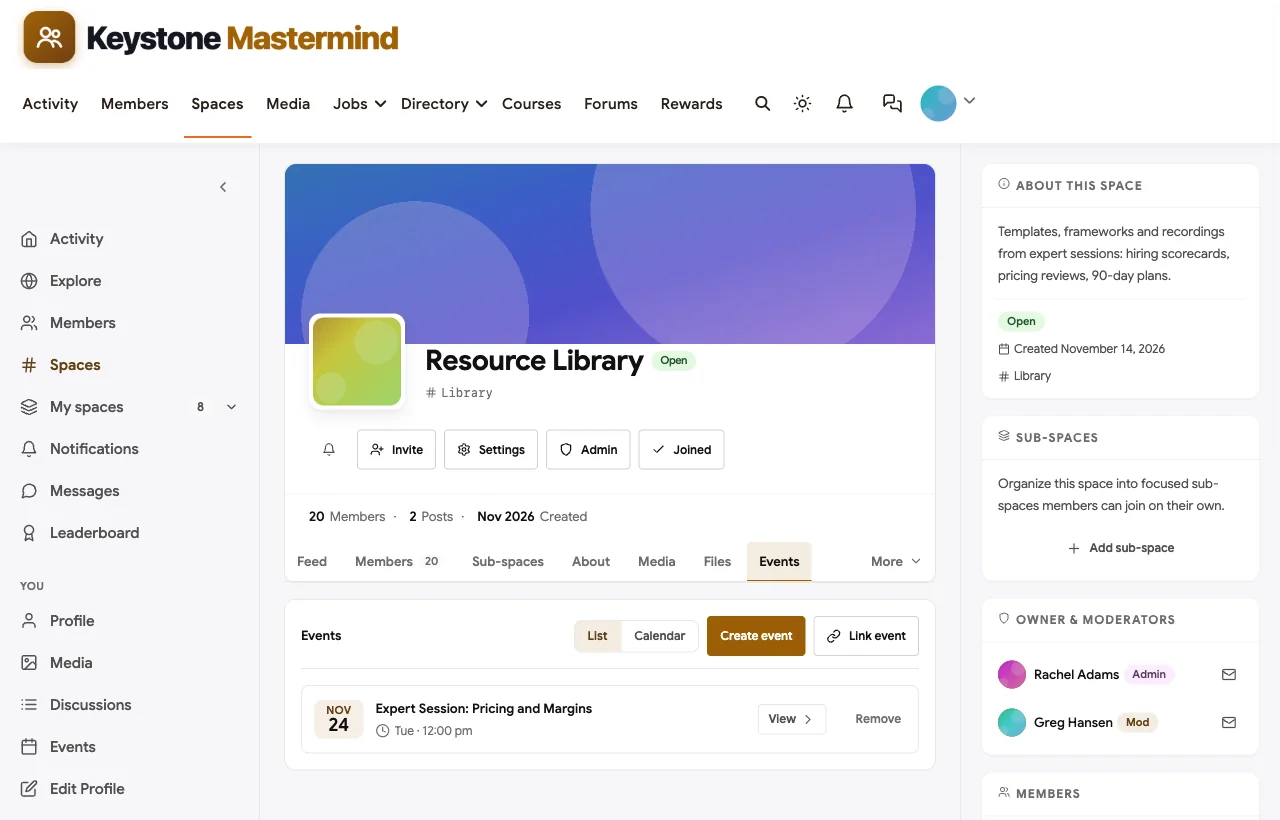
Recurring calls, expert sessions and retreats. Hot seat calls are events attached to each group’s space, with RSVPs and reminders. Online events carry a video link for Zoom or Google Meet. The spring retreat has its own private planning space with the agenda, travel and an in-person event with a venue:

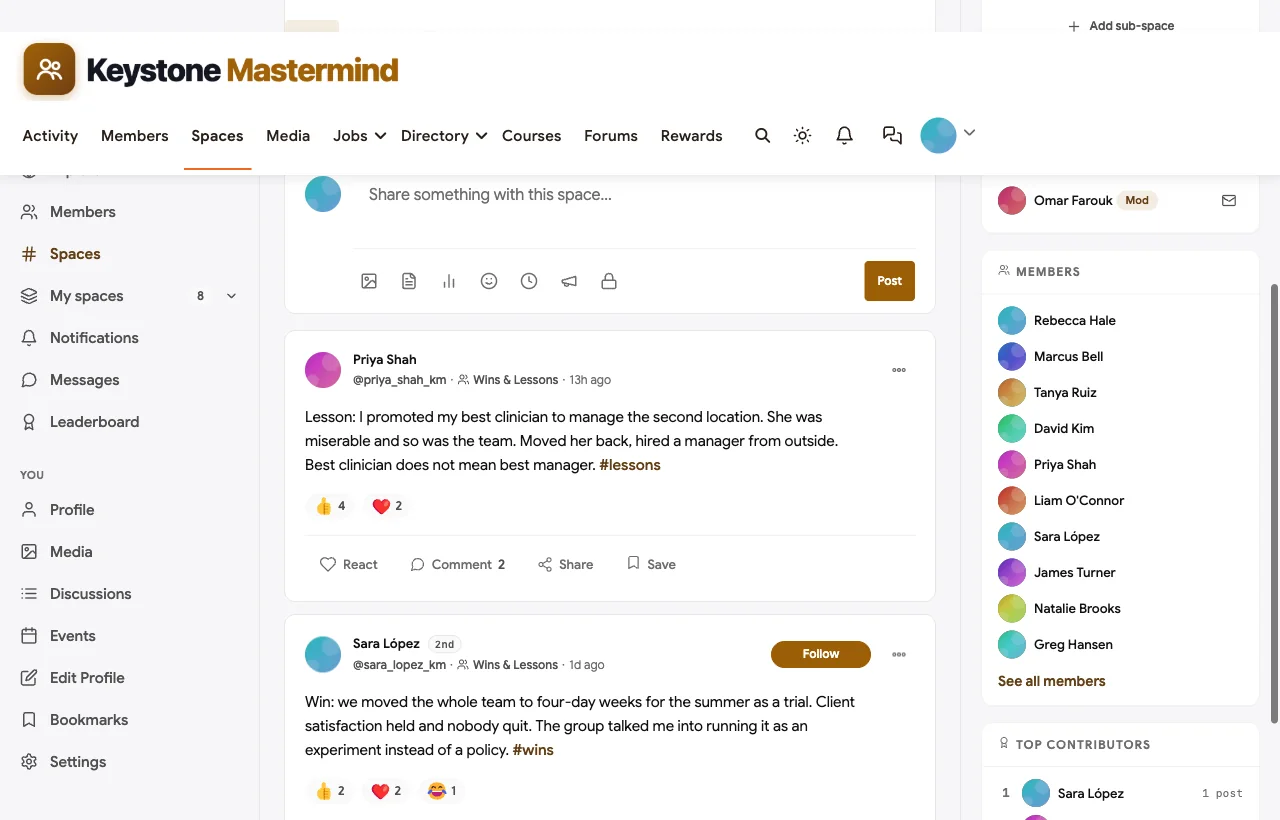
Wins and lessons. An open space where members share wins, lessons and mistakes worth avoiding gives the whole community a reason to visit between calls, and shows new members what the groups produce:
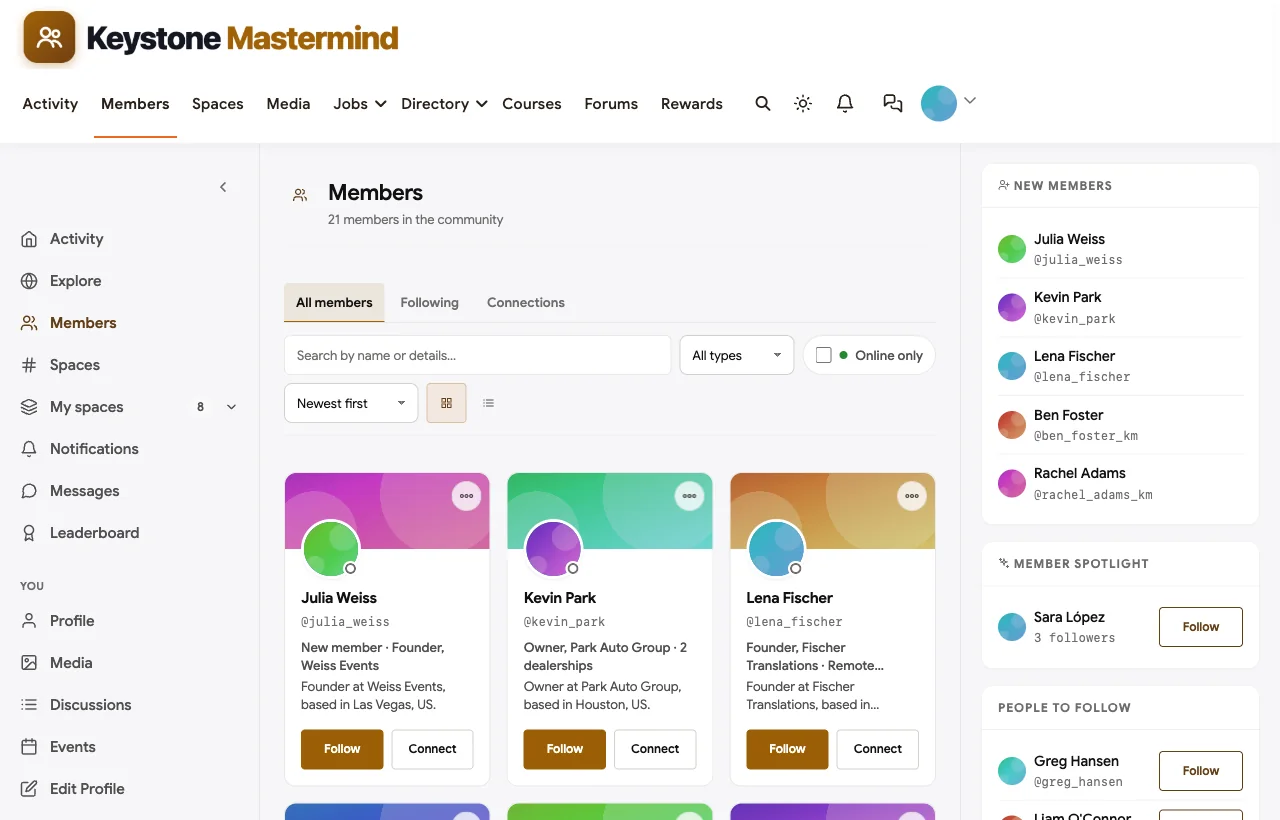
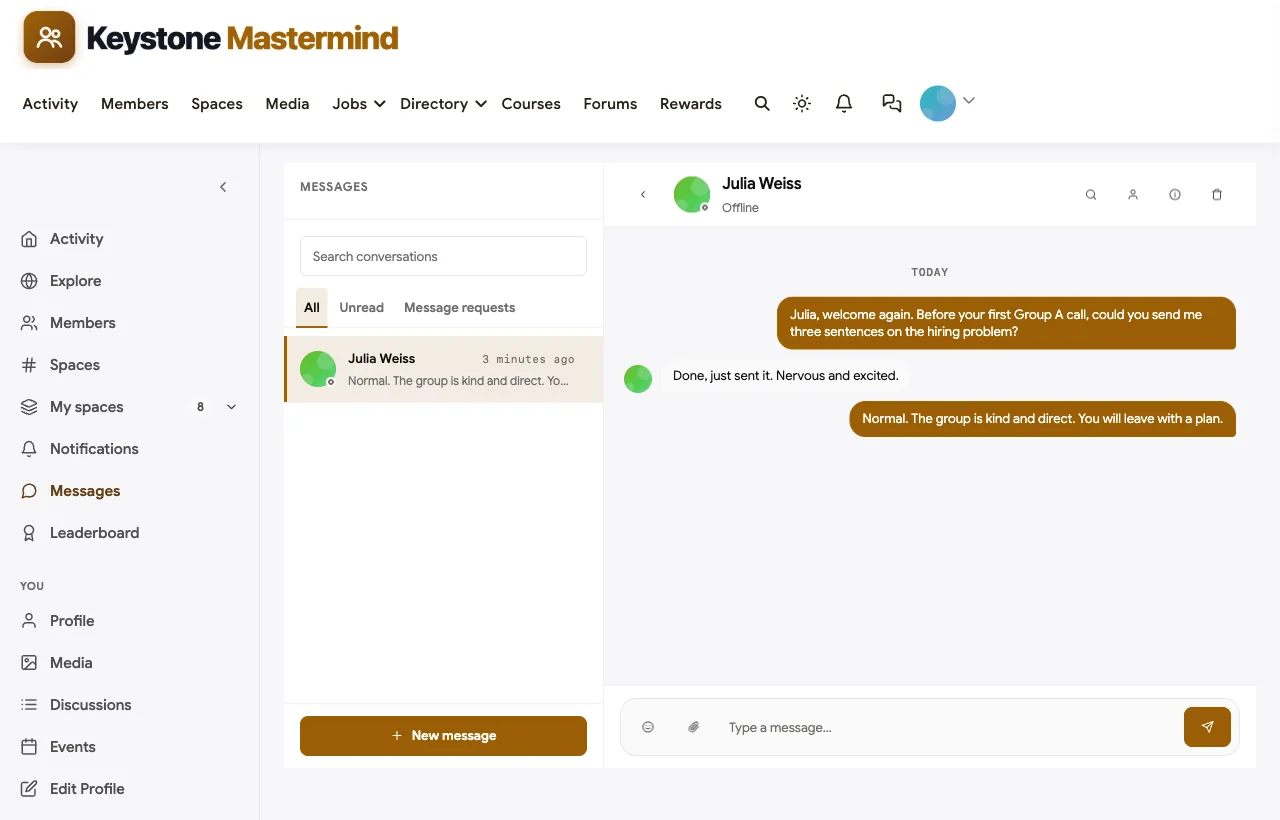
Members, profiles and messages. A searchable member directory with each owner’s business and role, full profiles and direct messages make one-to-one follow-ups easy, and the facilitator can message a new member before their first call:
Also built in. Polls for choosing the next expert session, a leaderboard and streaks, a jobs board for members hiring a second-in-command, notifications, and a mobile layout that works without an app download.

Not built for: native video rooms or automatic call recordings; hot seat calls run on Zoom, Google Meet or similar, linked from each event, and recordings are uploaded to the library afterwards. It is self-hosted, so you run WordPress or use a managed host.
What’s included, and how it is delivered
BuddyNext is one platform made of a core and add-on platform modules. Everything shown in the demo above runs on the BuddyNext platform. This table shows which parts come with the core, which are platform modules you install and activate alongside it, and which need a third-party plugin, another system or custom work.
| Capability | How it is delivered |
|---|---|
| Open, private and secret spaces | Core platform |
| Members-only mode, admin approval, invites and email verification | Core platform |
| Member profiles with custom fields and searchable directory | Core platform |
| Direct messages | Platform module, installed alongside |
| Activity feed, pinned announcements and hashtags | Core platform |
| Polls | Core platform |
| Recurring memberships with trials and coupons | Platform module, installed alongside |
| Q&A with accepted answers | Platform module, installed alongside |
| Events with RSVPs, online or in person | Platform module, installed alongside |
| Points, badges, streaks and leaderboards | Platform module, installed alongside |
| Courses and a structured resource library | Platform module, installed alongside |
| Video calls and recordings | Third-party video tool (Zoom, Google Meet) |
Want to click around yourself? The Keystone Mastermind community in this guide was built on a private test site, so it is not public. The BuddyNext live demo is a general community you can open in your browser and explore without installing anything.
2. Circle: best hosted platform for a polished paid mastermind
Circle describes itself as a way to “build a home for your community, events, and courses, all under your own brand” (Circle). It supports membership tiers and paywalls, monthly, quarterly, annual and one-time billing, free trials, and gating specific spaces, content and events to paying members (Circle).
For live calls, Circle separates live streams for larger audiences from live rooms “for hosting smaller, more interactive discussions where everyone can engage,” with branded event pages, RSVPs, reminder emails and recordings with searchable transcripts and summaries (Circle). Courses, a member directory and direct messaging are included on every plan, and every plan has a custom domain (Circle pricing). Member lists can be exported as CSV (Circle help).
Strengths for masterminds: polished member experience, native live rooms with recordings, multiple spaces, strong paywalls.
Gaps: we found no application or approval step on Circle’s pages, so payment is the gate; no dedicated accountability or check-in tool; branded mobile apps and full white-labeling are reserved for the top tier.
3. Mighty Networks: best for an app-first mastermind with cohorts
Mighty Networks calls itself “the community platform that delivers: community, courses, events” (Mighty Networks). Every paid plan includes “Private Groups & Cohorts,” so one network can hold several private groups, along with native live streaming (with streaming hours and viewer limits that rise on higher plans), cohort-based and live courses, challenges and resource libraries (Mighty Networks pricing). Its People Explorer helps members find each other, and its Streaks feature tracks daily activity with milestone badges (Mighty Networks docs).
Strengths for masterminds: private groups and cohorts on every paid plan, built-in streaming, streaks for accountability, courses and resource libraries in one place.
Gaps: no application or approval step found; custom domain starts above the entry plan; a fully branded mobile app is reserved for the custom Mighty Pro tier.
4. Heartbeat: best for facilitator-led groups with built-in video
Heartbeat’s pitch is “build a community people will pay for,” aimed at creators and coaches who want community, courses, events and payments in one place (Heartbeat). Native live video rooms are the main format, with a Zoom integration that schedules the meeting and “syncs the recording back into the community afterwards, so members who missed it can catch up”; Heartbeat also tracks RSVPs against actual attendance (Heartbeat events). Payments run through Stripe with membership tiers and subscription or one-time purchases, and Heartbeat adds its own transaction fee, lower on higher plans (Heartbeat payments).
Strengths for masterminds: live rooms with recordings, attendance tracking for hot seat calls, direct and group messaging, a custom domain on every plan.
Gaps: organised as channels and threads; we could not confirm separate private pods with their own visibility; no application step or dedicated accountability tool found.
5. Kajabi: best for a coach-led mastermind with courses
Kajabi positions itself as “the operating system for human expertise” (Kajabi). Its communities can be “private, paid, or tiered,” organised into channels that can each be “public, private, or read-only,” with scheduled meetups in a built-in live room and a leaderboard that rewards participation (Kajabi communities). Its coaching product adds built-in live video (“no Zoom or third-party tool required”), group rooms of up to 200 people with breakout rooms, private session notes for coach and client, and recordings and resources attached to the program (Kajabi coaching).
Strengths for masterminds: private channels, built-in video with breakout rooms, session notes, recordings and courses in one product, and a branded mobile app option.
Gaps: no application or approval step found; it is built around the coach rather than peers, so peer-to-peer features such as a member directory were not confirmed on its pages.
6. Disco: best for application-based cohort programs
Disco describes itself as “AI-powered academies, built for human transformation,” aimed at training businesses, bootcamps, accelerators and consultants (Disco). It is the only mainstream platform in this list whose pricing page confirms “Applications into Products,” so prospective members can apply to join a program, and Disco says it takes no transaction fee on programs you sell beyond standard Stripe processing (Disco pricing). It supports groups and subgroups, live events and chat with a Zoom integration, and smart reminders (Disco).
Strengths for masterminds: a real application step, subgroups, reminders, and a strong fit for structured cohorts.
Gaps: positioned for training and accelerators rather than ongoing peer groups; member directory, direct messages and dedicated accountability tools were not confirmed.
7. Skool: best for a simple mastermind launch with one group
Skool calls itself “a community platform” for starting and running an online business, set up “under 30 minutes” (Skool). Both plans include unlimited courses, unlimited live calls and a custom URL, with a transaction fee that is lower on the higher plan (Skool pricing). Gamification uses points, levels and 7-day, 30-day and all-time leaderboards (Skool help), and member lists for paid groups can be exported (Skool).
Strengths for masterminds: fast setup, live calls and courses included, simple gamification.
Gaps: each Skool group is a single flat community; we found no way to run several private groups inside one, which matters when a mastermind has more than one group. A true custom domain is, per Skool’s own community posts, still in development.
8. Slack: best as a chat layer for an existing mastermind
Slack is team collaboration software, not a membership platform (Slack). Channels can be public or private and you can create as many as you like, so each mastermind group can have a private channel (Slack channels). Slack Connect brings in people from other organisations by email, and admins may need to approve invitations. Huddles provide audio and video with AI-generated notes, but on the free plan huddles are limited to two people (Slack huddles), and the free plan only keeps the last 90 days of messages (Slack pricing).
Strengths for masterminds: members may already use it daily; private channels per group; quick back-and-forth between calls.
Gaps: no payments, applications, courses, resource library, branded domain or member directory for a community; the free plan’s history limit erases older hot seat discussions.
9. WhatsApp Communities: best for logistics and reminders only
WhatsApp Communities “connect related groups under one umbrella so admins can easily organize group chats, reach everyone at once through the announcement group, and have focused and meaningful conversations” (WhatsApp). A facilitator can put each mastermind group in its own group inside one community and use the announcement group for reminders.
Strengths for masterminds: everyone already has it; good for quick reminders and logistics.
Gaps: no payments, applications, resource library, member directory, branding or data export; members can see each other’s phone numbers. Use it alongside a real platform, not instead of one.
A note on Mastermind.com
You may come across Mastermind.com when researching this topic. It is a coaching and training program built around Tony Robbins and Dean Graziosi that teaches people to build a knowledge business, not software you can license to run your own mastermind. Its own program page mentions a members-only community plus a separate private Facebook group (Mastermind.com). We have not included it in the rankings for that reason.
Running the hot seat call
Whatever software you choose, the call is the product. This is the agenda we used in the demo:
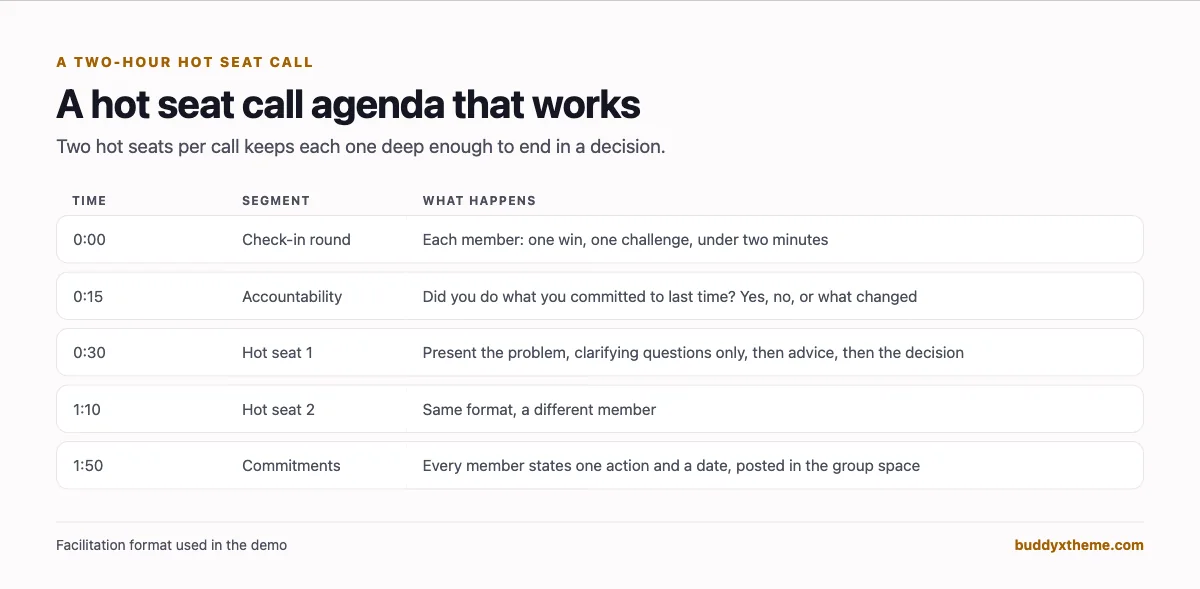
A few facilitation rules make the difference between a pleasant chat and a decision:
- The presenter sends the problem in writing before the call. In the demo, members post their hot seat request with the decision they need to make, so the group arrives prepared.
- Clarifying questions come before advice. The group asks questions until it understands the problem, and only then offers suggestions.
- Every hot seat ends with a decision and a date. The facilitator asks the presenter what they will do and when, then posts it in the group space.
- The next call opens with accountability. Did the presenter do what they said? If not, what changed? This one habit is what members pay for.
Matching members into groups
Group composition decides whether a mastermind works. Rules most facilitators use:
| Rule | Why |
|---|---|
| No direct competitors in the same group | Members will not share real numbers or plans with a competitor. Vistage builds this into its groups. |
| Similar stage, different industries | Owners at the same scale face similar problems; different industries bring fresh ideas. |
| Six to twelve members | Large enough for varied perspectives, small enough for everyone to get a hot seat regularly. EO Forum groups are 8 to 12. |
| Same meeting rhythm | Members who can reliably make the same slot build trust faster. |
| Facilitator in every group | Someone has to keep time, protect confidentiality and push for decisions. |
In BuddyNext, profile fields collected at application (industry, business size, main challenge) and the member directory make matching easier, and each group gets its own private space once members are placed.
The confidentiality agreement
Every serious peer group has one. Yours should cover, at minimum:
- What is said in the group stays in the group. No sharing names, numbers or situations outside it.
- No screenshots or recordings without consent. If calls are recorded for the library, say so and get agreement.
- No soliciting. Members do not sell to each other inside the group without being asked.
- What happens if it is broken. Usually removal, and a refund policy that is clear in advance.
Ask members to accept it at registration; BuddyNext can require new members to accept your terms before their account is created, and you can link the agreement there.
Which software fits your mastermind?
| If you… | Choose |
|---|---|
| Want several confidential groups, approvals, accountability and your own data in one place | BuddyNext |
| Want the most polished hosted platform with native live rooms | Circle |
| Want an app-first experience with cohorts and streaks | Mighty Networks |
| Run facilitator-led calls and want built-in video with recordings | Heartbeat or Kajabi |
| Run structured cohort programs with a formal application | Disco |
| Have one group and want the fastest possible launch | Skool |
| Already have a platform and just need chat between calls | Slack or WhatsApp Communities |
More community platform comparisons
Running a different kind of community, or one that overlaps with this one? These guides use the same method: a working demo community and vendor claims checked at the source.
- Best platforms for a women entrepreneurs network: application-based membership, confidential peer circles, chapters and a member business directory.
- Best platforms for an Amazon FBA seller community: launch courses, a help desk for listing problems, coaching calls and trusted providers.
- Best software for a private business networking community: referral chapters, a member business directory, mixers and dues for local business clubs and chambers.
- Best software for a startup founder community: founder pods, asks and intros, and fundraising rooms for early-stage startups.
- Best platforms for a paid coaching membership community: coach-led memberships with courses and group calls.
- Best software for a professional association community: chapters, committees and member directories at a larger scale.
- How to start a private professional association community: approvals, memberships and renewals, step by step.
- How to set up a community space on WordPress: the step-by-step setup guide behind every demo in this series.
How we built and checked this list
We built the Keystone Mastermind demo on a local WordPress site running BuddyNext, with fictional members, groups, hot seats, events and a retreat created for this guide. Every BuddyNext screenshot is from that demo. Competitor features were checked against each vendor’s own website, help center or pricing page in November 2026, and peer group facts come from Vistage, EO and YPO’s own pages. Where we could not confirm a feature on a vendor’s pages, the scorecard says “Not found” rather than assuming it is missing. We excluded Hivebrite because we could not access its own pages to verify claims at the time of writing, and Guild because it has closed. We did not run a hands-on trial of every competitor, so features can change; confirm anything critical with the vendor. buddyxtheme.com is published by the team behind BuddyNext, which is why BuddyNext is listed first; we have tried to be fair about its gaps as well as its strengths.
Frequently asked questions
What is the best software to run a paid mastermind?
BuddyNext is the best choice for a paid mastermind you own, with approval-based joining, a private space for each group, a secret facilitators’ space, hot seat requests, accountability check-ins, events and recurring memberships on your own WordPress site. Circle and Mighty Networks are the strongest hosted alternatives.
How many people should be in a mastermind group?
Most peer groups sit between six and sixteen. EO Forum groups have 8 to 12 entrepreneurs and Vistage CEO groups have 12 to 16 members. Smaller groups mean each member gets a hot seat more often.
How often should a mastermind meet?
Every two weeks or monthly is common. Vistage groups meet monthly. Whatever the rhythm, keep it fixed and use the time between calls for accountability check-ins.
How do I run a hot seat?
The presenter sends the problem in writing beforehand, the group asks clarifying questions, then offers advice, and the hot seat ends with a decision and a date. The next call opens by checking whether it happened.
Should a mastermind use an application?
Yes. An application lets the facilitator check fit, avoid placing competitors together and match members by stage. Choose software with an approval step, not just a payment page.
Can I run several mastermind groups in one community?
Yes, if the software supports multiple private groups. In BuddyNext each group is a private space; Circle uses spaces, Mighty Networks has private groups and cohorts, and Disco has groups and subgroups. Skool groups are single communities.
How do I keep mastermind discussions confidential?
Use private spaces for each group, a hidden space for facilitators, members-only access to the whole community, and a written confidentiality agreement that members accept when they join.
Do I need built-in video for hot seat calls?
Not necessarily. Many masterminds run calls on Zoom or Google Meet and keep everything else in the community. Circle, Heartbeat, Kajabi and Mighty Networks have native video; BuddyNext links events to the video tool you already use.
Can I use Slack or WhatsApp for a mastermind?
As a chat layer, yes. On their own, they lack payments, applications, a resource library and member profiles, and Slack’s free plan only keeps 90 days of history.
The bottom line
A paid mastermind succeeds on trust, small groups and follow-through. The software should make confidentiality the default, give each group its own room, keep commitments visible between calls and hold the library members pay to access. If you want that on your own domain, with your own member list and no per-member limits, BuddyNext is the strongest foundation. If you prefer a hosted platform with built-in video, Circle, Mighty Networks, Heartbeat and Kajabi each lead in their own area.
And give your members a room they renew for.