
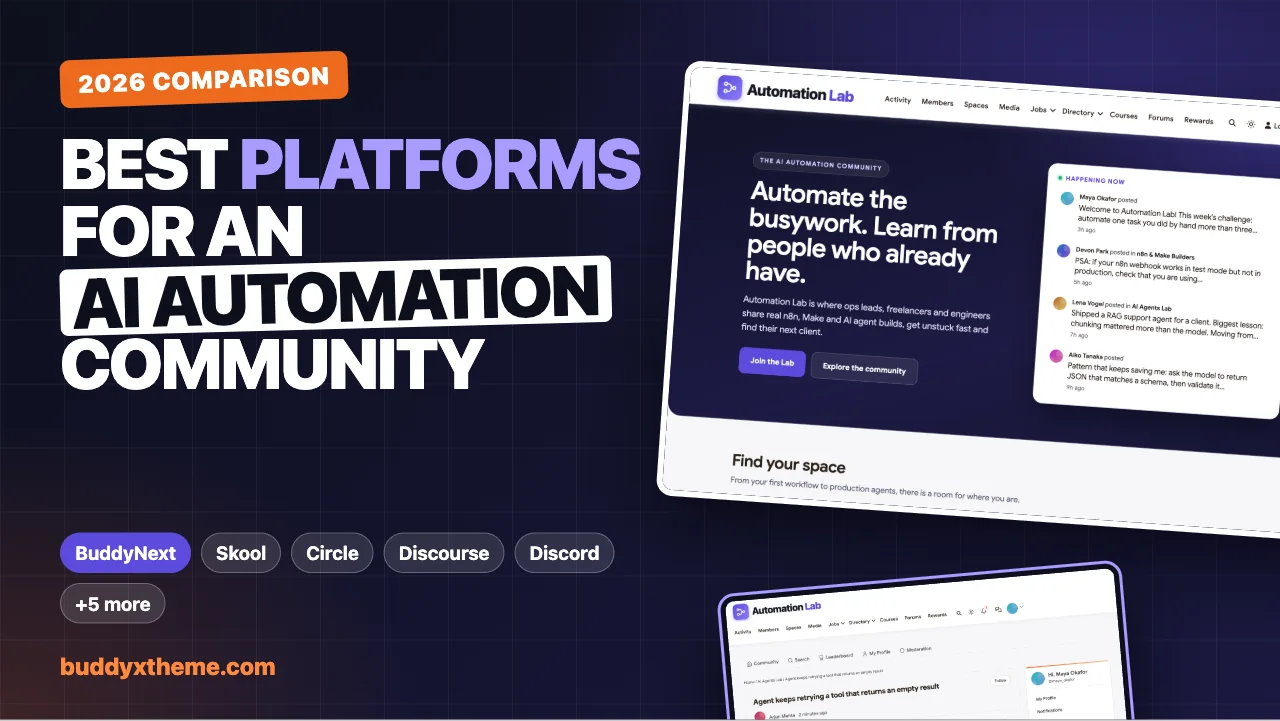
You have a following that wants to learn AI automation: n8n flows, Make scenarios, agents that call tools, prompts that hold up in production. Now you need somewhere to put them. Pick the wrong home and you will feel it within a month: workflow JSON pasted as screenshots, the best answers buried in a chat scroll, and no way to take your members with you if the platform changes its rules.
This guide compares the platforms people actually use for AI automation communities, judged on what this audience needs rather than generic “ease of use” scores. We built a working demo community for the first entry so you can see it, checked every competitor claim against the vendor’s own pages in November 2026, and kept the trade-offs honest, including where our own platform falls short.
Quick answer
If you want an AI automation community you own and control, BuddyNext is the strongest choice, because it combines spaces, code-friendly discussion forums, courses, live events, gamification and webhooks on your own WordPress site. Skool is the simplest choice for a paid course-plus-community, Discourse is best for a searchable technical knowledge base, and Discord suits free, real-time chat.
In this guide
- The best AI automation community platforms at a glance
- What an AI automation community needs (and generic community advice misses)
- What the biggest automation communities actually run on
- 1. BuddyNext: best for owning a complete AI automation community
- 2. Skool: best for a simple paid course-plus-community
- 3. Circle: best for branded communities with native AI tools
- 4. Discourse: best for a searchable technical knowledge base
- 5. Discord: best for free, real-time chat
- 6. Mighty Networks: best for cohort programs with a mobile app
- 7. Heartbeat: best for coaches running courses and calls
- 8. Bettermode: best for software companies embedding a community
- 9. Slack: best for small, invite-only builder groups
- 10. Facebook Groups: best for testing an audience at zero cost
- Skool vs Circle for an AI automation community
- Running an n8n learning community
- Which platform should you choose?
- A 30-day launch blueprint for an AI automation community
- More community platform comparisons
- How we built and evaluated this list
- Frequently asked questions
- The bottom line
The best AI automation community platforms at a glance
| Platform | Best for | Code and workflow sharing | Courses | Live events | Self-hostable |
|---|---|---|---|---|---|
| BuddyNext | Owning a complete AI automation community | Code blocks in space discussion forums | Built in | Built in, per space | Yes |
| Skool | Simple paid course-plus-community | No code formatting | Built in | Calendar | No |
| Circle | Branded communities with native AI tools | Not documented | Built in | Built in, with streaming | No |
| Discourse | Technical Q&A and knowledge bases | Full Markdown with highlighting | No | Via plugins | Yes |
| Discord | Free, real-time chat | Code blocks (highlighting on desktop) | No | Voice channels | No |
| Mighty Networks | Cohort programs with a mobile app | Not documented | Built in | Built in | No |
| Heartbeat | Coaches running courses and calls | Not documented | Built in | Built in, with Zoom | No |
| Bettermode | Software companies embedding a community | Not documented | No | Not documented | No |
| Slack | Small invite-only builder groups | Code blocks | No | Huddles only | No |
| Facebook Groups | Zero-setup audience testing | No | No | Facebook events | No |
“Not documented” means the vendor’s own feature pages did not cover it when we checked in November 2026, not that the feature is impossible. Details for each platform are below.
Running a paid coaching program rather than a builder community? See the best platforms to launch a paid coaching membership.
Teaching automation through structured courses? See the best platforms for an online course community.
What an AI automation community needs (and generic community advice misses)
Most “best community platform” lists score every platform on the same handful of generic qualities. An AI automation community has specific needs, and they decide which platform works.
1. A way to share code and workflows that stays readable. Your members will share n8n workflow JSON, Make blueprints, Python snippets, prompts and API payloads every day. Without code blocks and syntax highlighting, that content turns into screenshots nobody can copy, or links to outside paste sites that break.
2. Separate rooms for beginners and builders. Someone asking how to connect Gmail to a Google Sheet and someone debugging a multi-agent retry loop should not share one noisy feed. You need spaces you can lock, open or hide, so beginners feel safe and experienced builders do not leave.
3. Answers that are still findable next year. The same twenty questions come up every month. If answers vanish into a chat scroll, your experts burn out repeating themselves. Threaded discussions, good search and, ideally, pages that search engines can index turn a community into a knowledge base.
4. Live builds and office hours. Automation is learned by watching someone debug. Weekly live builds, office hours and showcase sessions are where communities in this niche create their strongest habits, so events should be part of the platform, not a separate tool.
5. Structured learning. Most AI automation communities sell or give away a curriculum. Courses with lessons and progress make that easier than a pinned post with links. If courses are central to your plan, compare options in our guide to the best WordPress LMS plugins.
6. Hooks for automation. This is an automation audience. Webhooks and an API let you trigger n8n, Make or Zapier from community events: welcome a new member, tag their CRM record, post a weekly digest. A closed platform with no hooks is an odd home for automation builders.
7. Ownership of members and content. If your community is a business, the member list is the business. Check whether you can export it, and whether a policy change on someone else’s platform can take it away.
What the biggest automation communities actually run on
Before the rankings, it is worth looking at what established communities in this space chose, because they made the same decision you are making.
| Community | Platform | Why it matters |
|---|---|---|
| n8n’s official community forum | Discourse | The official home for help and shared workflows of one of the most popular automation tools (community.n8n.io) |
| Make’s official community | Discourse | Make moved its community from Facebook to Discourse to build a searchable, durable knowledge hub (Discourse blog) |
| Zapier Community | Gainsight Customer Communities | An enterprise customer-community suite, as the page footer shows (community.zapier.com) |
| AI Automation Society | Skool | One of the largest creator-run AI automation communities, listing 481.8k members on its own page in November 2026 (Skool) |
The pattern is clear. Tool vendors pick searchable, code-friendly forums, because their community doubles as documentation. Creators selling education pick all-in-one course communities, because simplicity and monetization matter most. Chat apps such as Discord usually sit alongside one of these rather than replacing them.
The audience is large and growing. n8n reported 1.7 million monthly active builders by May 2026, according to its investor announcement (Highland Europe), and Zapier’s own 2026 survey found 88% of the US enterprise leaders it asked were using or testing AI agents (Zapier). Both are company-reported figures, but they point the same way: plenty of people need somewhere to learn this.
The best platform is the one that gives you the forum strengths tool vendors chose and the course-and-community strengths creators chose, without giving up ownership. That is the bar we used.
1. BuddyNext: best for owning a complete AI automation community
Best for: builders, agencies and educators who want spaces, code-friendly Q&A, courses, live events and gamification on their own site, with full ownership of the member list.
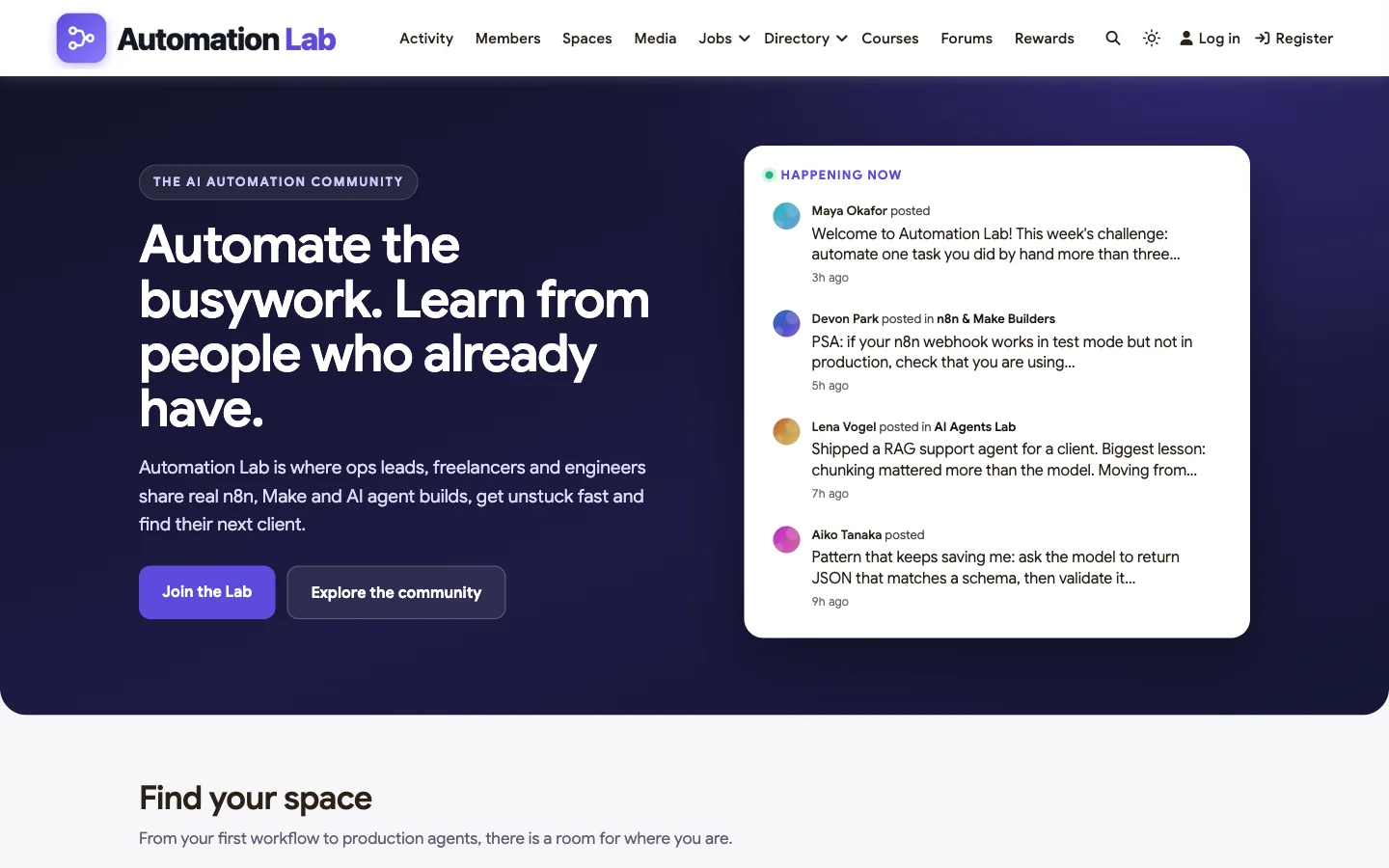
BuddyNext is a complete community platform that runs on your own WordPress site with the BuddyX theme as its design layer. To show what that looks like for this niche, we built a demo community called Automation Lab for this guide. Every screenshot below comes from it. The members are fictional, but everything you see is real product behaviour.
Why it fits an AI automation community
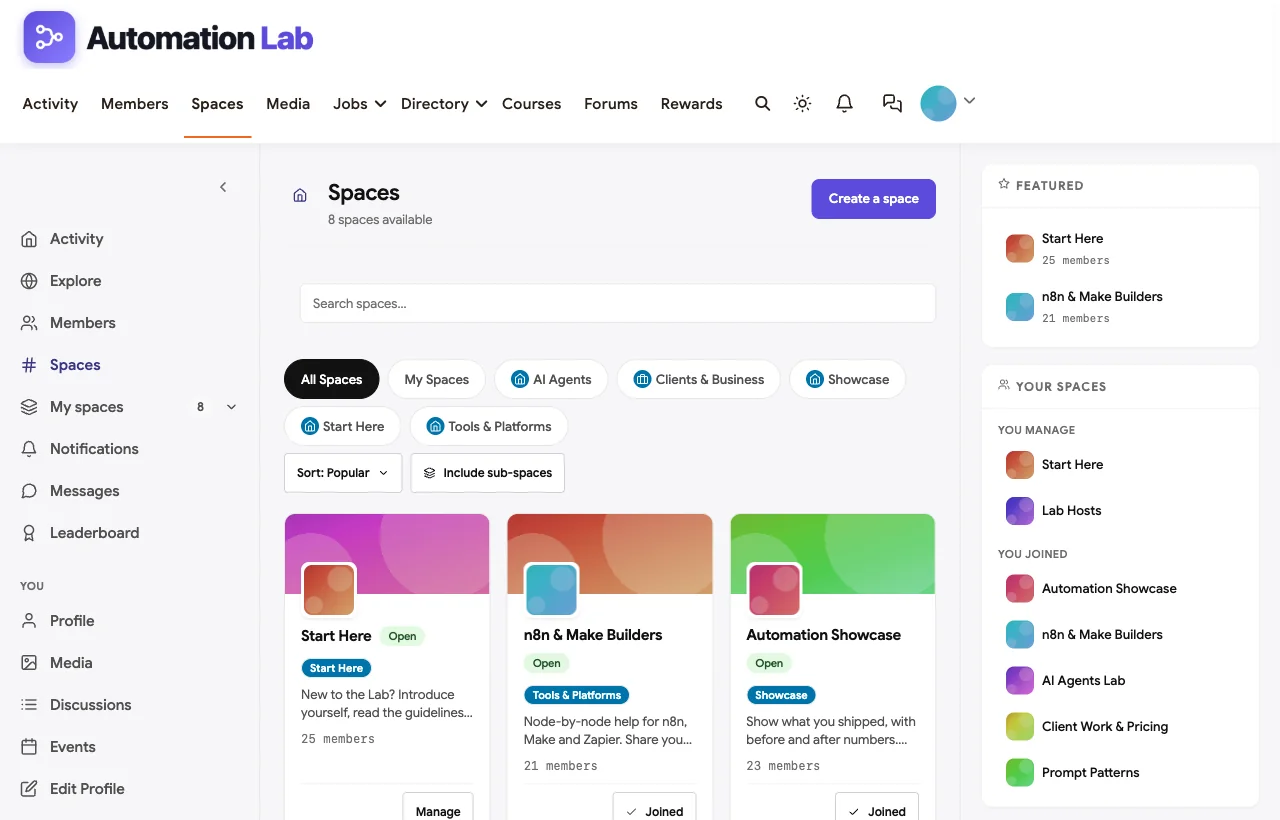
Spaces for every level. Automation Lab has Open spaces (Start Here, n8n & Make Builders, AI Agents Lab, Prompt Patterns, Automation Showcase), Private spaces that members request to join (Client Work & Pricing, Pro Builders Circle) and a Secret space for hosts. Beginners and production engineers each get their own room, with owners and moderators per space.
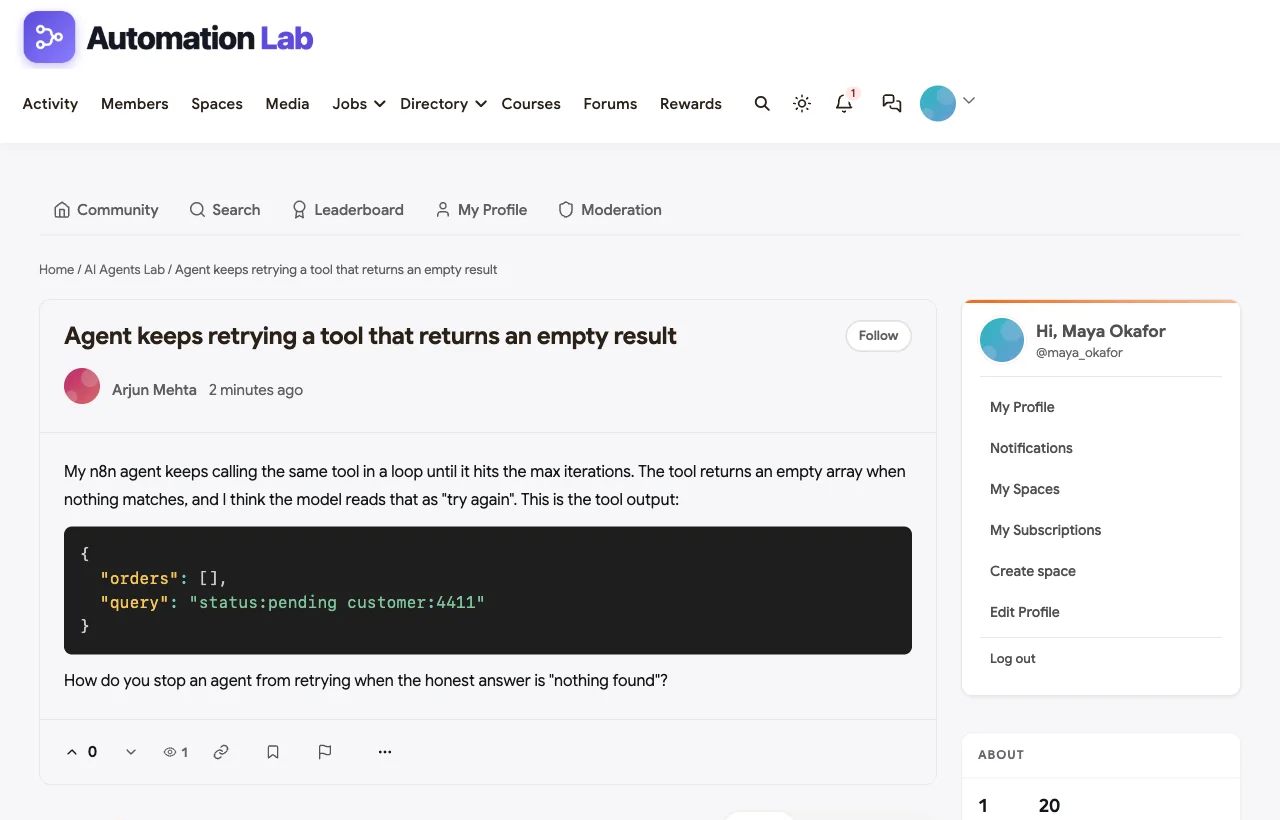
Code-friendly discussions. Each space can have its own discussion forum with code blocks and syntax highlighting, Q&A threads, voting and reputation. This is where workflow JSON and code belong.
A feed that keeps people coming back. The activity feed handles announcements, polls, hashtags, reactions and threaded comments. Members follow each other and see trending topics such as #agents, #evals and #prompting.
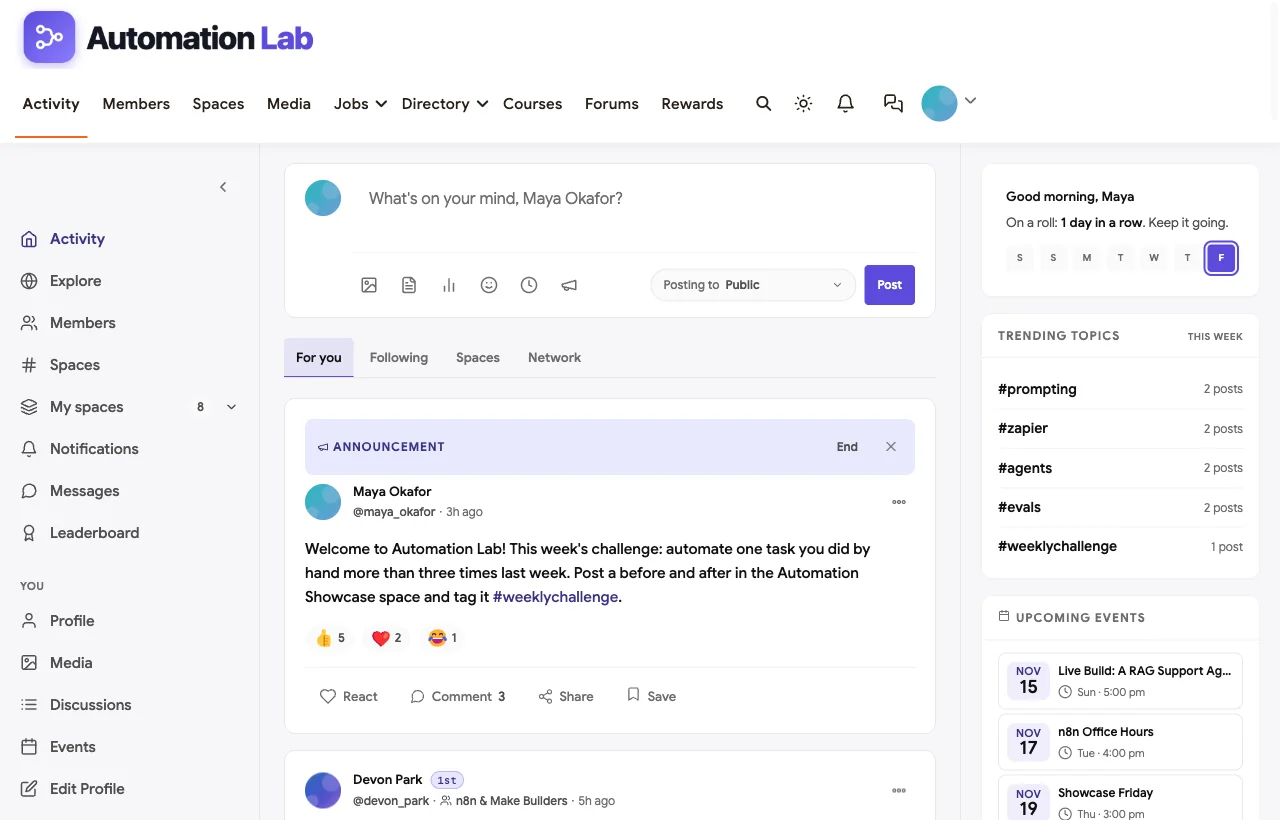
Live sessions inside the right space. Events such as a live RAG agent build or n8n office hours belong to a specific space, so each audience sees the sessions that matter to it.
Built-in courses. A structured curriculum lives on the same site and login as the community.
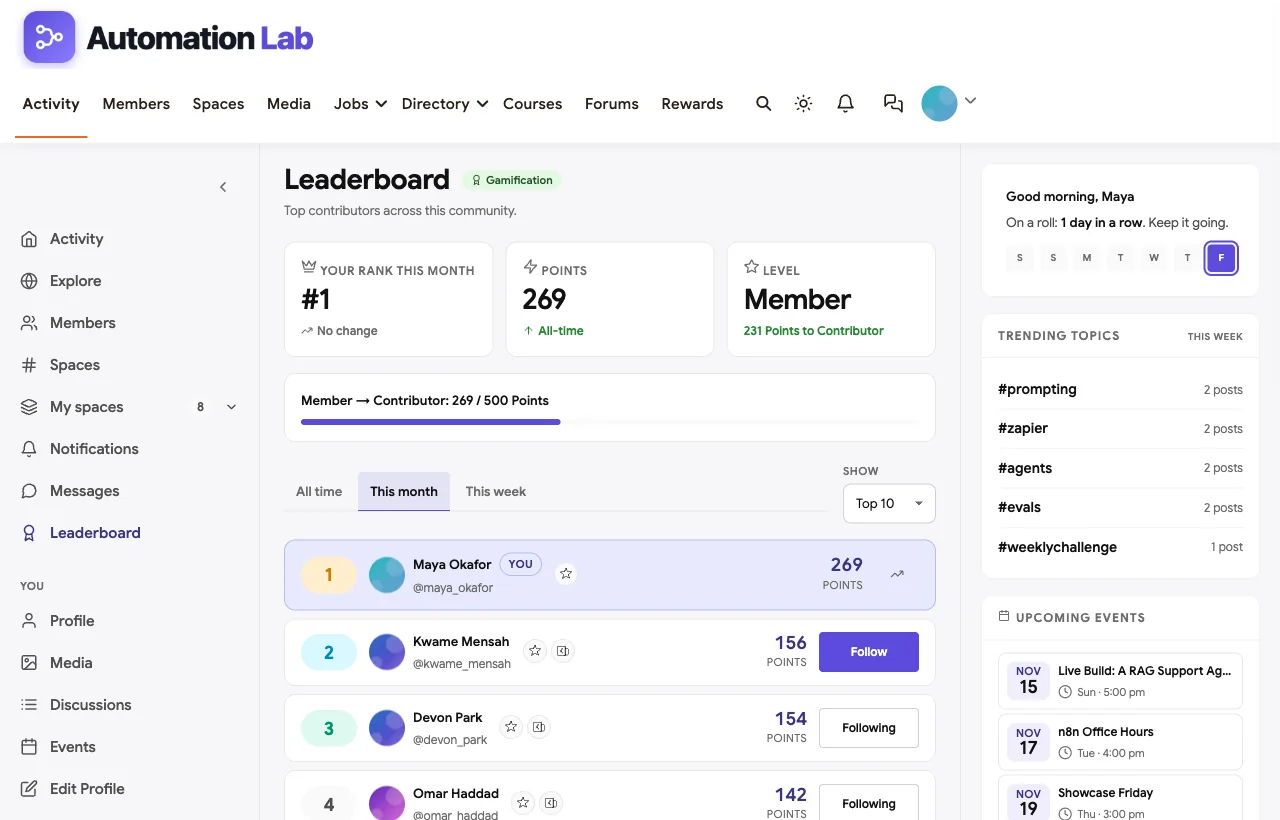
Gamification with real leaderboards. Members earn points for posting, answering, reacting and joining, and the leaderboard rewards the people who help most.
Hooks for your automations. A full REST API and outbound webhooks mean you can connect community events to n8n, Make or Zapier: tag a new member in your CRM, alert a Slack channel when a post is reported, or send a weekly digest.
Members-only when you need it. One switch makes the whole community, including its API data, visible only to logged-in members. Registration can be open, invite only, admin approval or closed, with email verification and allowed email domains.
Strengths
- Everything this niche needs in one place: spaces, code-friendly forums, courses, events, gamification, messages and moderation.
- You own the members, content and data, on hosting you choose, with no per-member platform fees.
- Webhooks and a REST API fit an automation audience naturally.
- Strong moderation: reporting, auto-hide thresholds, strikes, banned words, link and IP blocking.
- Public spaces and discussions can be indexed by search engines if you choose, so answers keep bringing in new members.
Limitations
- Feed posts do not format code. Short snippets in the main feed show as plain text. Put code in the space discussion forums, which do support code blocks.
- You run the hosting. Self-hosting means you handle updates, backups and performance. Good managed WordPress hosting covers most of this.
- No native app store app. Members use the responsive site, which can be installed as a web app, rather than a branded iOS or Android app.
Pricing model: self-hosted, with no per-member or transaction fees charged by the platform. Your main ongoing cost is hosting.
Verdict: the strongest choice if your AI automation community is a long-term asset you want to own, especially if you plan to teach, run live builds and connect it to your own automations.
What’s included, and how it is delivered
BuddyNext is one platform made of a core and add-on platform modules. Everything shown in the demo above runs on the BuddyNext platform. This table shows which parts come with the core, which are platform modules you install and activate alongside it, and which need a third-party plugin, another system or custom work.
| Capability | How it is delivered |
|---|---|
| Open, private and secret spaces | Core platform |
| Activity feed, pinned announcements and hashtags | Core platform |
| Member profiles and searchable member directory | Core platform |
| Direct messages | Platform module, installed alongside |
| Q&A with accepted answers and code highlighting | Platform module, installed alongside |
| Courses and certificates | Platform module, installed alongside |
| Events with RSVPs, online or in person | Platform module, installed alongside |
| Points, badges, streaks and leaderboards | Platform module, installed alongside |
| Paid plans with trials and coupons | Platform module, installed alongside |
Want to click around yourself? The Automation Lab community in this guide was built on a private test site, so it is not public. The BuddyNext live demo is a general community you can open in your browser and explore without installing anything.
2. Skool: best for a simple paid course-plus-community
Best for: creators selling AI automation education who want the fastest possible setup.
Skool combines a discussion feed, a Classroom for courses, a calendar and payments in one deliberately simple product (Skool). It has become the default home for creator-led AI automation education: AI Automation Society and AI Automation Agency Hub both run on it.
Why it fits: the Classroom suits structured automation curricula, and the levels and leaderboard system keeps members posting. Setup takes an afternoon.
Strengths
- Very quick to launch, with a clean, familiar layout.
- Courses, community and calendar under one login.
- Gamification and leaderboards drive daily activity.
- Built-in payments for subscriptions and course sales.
Limitations
- No code formatting. Skool’s post editor does not support Markdown, so there are no code blocks or syntax highlighting; members work around it with Unicode text formatters (Skoo.li). Workflow JSON ends up as screenshots or outside links.
- One main feed per community, so beginners and advanced builders share the same stream.
- Skool presents itself as an all-in-one system rather than an integrations platform, so connecting it to your own automations takes workarounds.
- Your community lives on Skool’s platform, under Skool’s rules.
Pricing model: paid subscription, with built-in member payments.
Verdict: excellent for launching a paid automation course community fast, as long as you can live without code formatting and full ownership.
3. Circle: best for branded communities with native AI tools
Best for: established educators, agencies and companies that want a polished, branded community with automation features built in.
Circle offers spaces for discussions, courses, events, live streams and chat, with payments and access control (Circle). It is notably strong on AI: Circle AI agents can be trained on your content, and Circle MCP, launched in April 2026, exposes the Circle API to AI assistants such as Claude, ChatGPT and Gemini (Circle).
Why it fits: separate spaces for each tool or skill level, native events and streaming for live builds, and genuine AI and automation hooks for an AI-native audience.
Strengths
- Flexible spaces with permissions, plus courses, events and chat.
- Native AI agents and MCP access for AI-assisted community management.
- Open API, Zapier triggers, and webhooks on higher plans.
- Branded mobile apps, a custom domain and white-labeling options.
Limitations
- The most useful automation features, including MCP, the admin API and webhooks, sit on higher plans.
- More setup decisions than Skool, so launching takes longer.
- Your community still lives on Circle’s servers.
Pricing model: tiered paid plans, with features unlocking at higher tiers.
Verdict: a strong premium choice if you want branded polish and native AI tools and are comfortable on a hosted platform. If you already run on Circle and want to own your community, here is how to move a Circle community to WordPress.
4. Discourse: best for a searchable technical knowledge base
Best for: tool vendors, open-source projects and technical communities whose answers must stay findable for years.
Discourse is open-source forum software you can self-host or run on Discourse’s hosting. It supports full Markdown with fenced, syntax-highlighted code blocks, and “anything you see on screen, you can also do via an API call” (Discourse). n8n and Make both run their official communities on it.
Why it fits: it is the best tool here for long-lived technical Q&A, where workflow exports, error messages and fixes stay readable and searchable. (Why that matters for search visibility is covered in our guide to software for an SEO professionals community.) Building for developers who write agents in code rather than no-code workflows? See our guide to platforms for an AI agent developer community.
Strengths
- Excellent Markdown, code highlighting and search.
- Full REST API and webhooks.
- Open source and self-hostable, with strong data ownership.
- Topics are easy for search engines to index, which builds organic traffic over time.
Limitations
- No native courses, and events, payments and deep gamification need plugins or other tools.
- Forum-first design feels less social than a feed-based community.
- Self-hosting takes technical effort, otherwise you pay for managed hosting.
Pricing model: free open-source software if you self-host, or paid managed hosting.
Verdict: the right choice for a support or documentation-style community. Pair it with other tools if you also want courses and a social feed.
5. Discord: best for free, real-time chat
Best for: free communities, open-source builders and anyone whose members already live in Discord.
Discord is a real-time chat platform built on servers, channels, threads and voice. It supports Markdown and fenced code blocks with syntax highlighting, although highlighting does not render in the mobile app (Markdown Guide).
Why it fits: fast help, screen-sharing for live debugging and a huge bot ecosystem.
Strengths
- Free to start, and very familiar to developers.
- Real-time chat, voice and screen sharing for live debugging.
- Code blocks on desktop and a large bot and webhook ecosystem.
Limitations
- No courses, native leaderboard or member directory without bots.
- Answers get buried in chat history, so the same questions repeat.
- No self-hosting and no official way to take your members elsewhere.
Pricing model: free, with optional paid server subscriptions for monetization.
Verdict: great as a companion chat space, weak as the only home for a community that needs to keep its knowledge. We compare chat-first and forum-first approaches in Discord vs Facebook Groups vs Jetonomy.
6. Mighty Networks: best for cohort programs with a mobile app
Best for: educators running multi-week cohorts who want members on a mobile app.
Mighty Networks combines a feed, chat, courses, livestreamed events and payments, with native iOS and Android apps as a headline feature (Mighty Networks). Its AI Cohost helps you set up the network and offers.
Strengths
- Courses, events and community designed to work together for cohorts.
- Native mobile apps, with standalone branded apps on its top tier.
- Built-in payments.
Limitations
- Code formatting and member directory features are not documented on its features page, so check them before relying on them.
- A fully branded standalone app is reserved for the top tier.
- Hosted platform, so your community lives on Mighty’s servers.
Pricing model: tiered paid plans.
Verdict: good for cohort-based automation bootcamps where mobile access matters more than code sharing. For other options, see our roundup of Mighty Networks alternatives.
7. Heartbeat: best for coaches running courses and calls
Best for: coaches and consultants teaching automation through courses, calls and member match-ups.
Heartbeat combines discussions, courses, events, payments and landing pages (Heartbeat). Courses can be self-paced, dripped or cohort-based, and events handle Zoom setup and bring recordings back into the community.
Strengths
- Flexible course formats with discussion channels per course.
- Events with ticketing, reminders and recordings.
- Voice and video rooms, DMs and member match-ups.
Limitations
- Paid plans only, with no free tier.
- Custom domain, badge removal and the branded mobile app sit on higher tiers.
- Integration and code-formatting depth are not detailed on its features page.
Pricing model: paid plans only.
Verdict: a solid coaching-first platform, less suited to code-heavy technical discussion.
8. Bettermode: best for software companies embedding a community
Best for: AI and automation software companies that want a branded community inside their product or documentation.
Bettermode is a white-label, API-first community platform with knowledge hubs, messaging, badges, leaderboards, a branded domain and APIs and webhooks on higher plans (Bettermode).
Strengths
- Built to embed in your own product and docs.
- Strong APIs and white-labeling for B2B teams.
- Knowledge-hub structure suits customer support communities.
Limitations
- Designed and priced for B2B companies rather than solo creators.
- Full API access is reserved for higher plans.
- No built-in courses.
Pricing model: tiered paid plans aimed at businesses.
Verdict: worth a look if you sell an automation product and want the community inside it.
9. Slack: best for small, invite-only builder groups
Best for: small professional groups that already work in Slack.
Slack offers channels, threads, DMs, code blocks and a deep app ecosystem, with AI summaries on paid plans. It is a work messaging tool rather than a community platform: no courses, native events, gamification or paywall.
Strengths
- Familiar to professionals, with a large app marketplace and APIs.
- Code blocks and threads for focused technical help.
Limitations
- Free workspaces limit how much message history you can see, so older answers drop out of search.
- No courses, events, gamification, member directory or payments.
- No self-hosting or public, indexable content.
Pricing model: free plan with limited history, then paid per-user plans.
Verdict: fine for a small mastermind of practitioners, not for a growing community.
10. Facebook Groups: best for testing an audience at zero cost
Best for: testing interest before you commit to a real platform.
Facebook Groups are free, familiar and on everyone’s phone. That convenience comes with heavy limits for this niche.
Strengths
- Free and instant to set up.
- Members are already on Facebook.
Limitations
- No code formatting, which makes workflow sharing painful.
- No courses, paywall or structured spaces.
- No official way to export your members, so the audience never really belongs to you.
Pricing model: free.
Verdict: useful for a quick test, risky as a long-term home.
Skool vs Circle for an AI automation community
These two come up most often, so here is the short version.
| Skool | Circle | |
|---|---|---|
| Setup speed | Fastest | Slower, more choices |
| Structure | One feed plus Classroom | Many spaces with permissions |
| Code sharing | No code formatting | Rich text editor |
| AI and automation hooks | Minimal, relies on workarounds | AI agents, MCP, API and webhooks on higher plans |
| Branding | Skool’s look | Custom domain, branded apps |
| Best for | Simple paid course communities | Polished, branded, AI-native communities |
Choose Skool if speed and simplicity matter most and your content is mostly video lessons. Choose Circle if you need separate spaces for skill levels and want AI tools built in. Choose BuddyNext if you want Circle-style spaces and Skool-style gamification, plus code-friendly forums and webhooks, on a site you own.
Running an n8n learning community
n8n deserves its own section, because so many automation creators teach it, sell n8n templates or run an n8n-focused group. n8n describes itself as “the platform for agents and workflows you can follow. Open any step, see what it does, and explain to anyone who runs it” (n8n), and its homepage invites people to “join 250k+ developers in our community” and lists “500+ native integrations.”
Three things about n8n shape what its learners need from a community:
- It is often self-hosted. n8n offers “n8n Cloud (fully-managed) and Self-hosted (deploy on your own infrastructure)” (n8n docs), so a large share of questions are about hosting, updates, queues and credentials, not just nodes.
- Templates are part of the culture. n8n runs a creators program for “Verified n8n Automation Workflows Creators” who publish templates (n8n creators). Many educators share or sell workflow templates, so members expect a clear place to find them.
- There is official learning to build on. The n8n Academy at learn.n8n.io offers courses such as “Essentials: Your First Workflows” and “Integrations: APIs & Connected Workflows.” An independent community adds practice, feedback and accountability on top.
n8n’s own forum at community.n8n.io is “Powered by Discourse,” which tells you what serious n8n learners are used to: long technical threads, code blocks and solved answers. An independent n8n community should match that, and add what an official forum does not offer creators: courses, cohorts, paid tiers and a home under your own brand.
| What n8n learners need | How to set it up in your community |
|---|---|
| Workflow JSON that stays readable | Q&A with code blocks and syntax highlighting; ask members to paste exported workflows in code blocks |
| Solved answers | Mark the accepted answer on every node, expression and error question |
| Self-hosting help | A separate space for hosting, updates, queue mode and backups, so node questions stay focused |
| Template sharing | A showcase or directory space for templates, with a description, required credentials and the n8n version used |
| Version awareness | Ask members to include their n8n version in every question; pin breaking-change notes after major releases |
| Credential safety | A pinned rule: never post API keys, webhook URLs with secrets or credential exports, and rotate any key shared by mistake |
| Learning path | A beginner course that points to the official n8n Academy, then builds on it with practice projects |
| Live help | Weekly n8n office hours as an event, with recordings |
In the BuddyNext demo above, the n8n & Make Builders space, the AI Agents Lab and the Automation Showcase cover most of this. For an n8n-only community, split them further: n8n Help, Self-Hosting, Templates and Showcase, AI Agents with n8n, and Office Hours. Because BuddyNext has outbound webhooks and a REST API, you can also use n8n itself to automate the community: welcome new members, tag them in your CRM when they finish the beginner course, or post a weekly round-up of solved threads.
Which platform should you choose?
The right answer depends on two things: who your members are and how you make money.

- Technical builders, free community, tool documentation: Discourse, with Discord for real-time chat.
- Business operators learning automation, paid course: Skool for the fastest launch, or BuddyNext if you want ownership and room to grow.
- Agencies and premium educators who want a brand: Circle, or BuddyNext for full ownership.
- Software company supporting customers: Discourse or Bettermode.
- You want everything (spaces, code Q&A, courses, events, gamification, webhooks) and to own it: BuddyNext.
If you choose BuddyNext, our step-by-step guide shows how to set up a community space on WordPress, from the setup wizard to moderation and privacy.
A 30-day launch blueprint for an AI automation community
Whichever platform you choose, the first month decides whether your community becomes a habit or a ghost town. This is the structure we used for the Automation Lab demo, and it works on any platform that supports spaces and events.
Start with six spaces, not twenty
| Space | Type | What it is for |
|---|---|---|
| Start Here | Open | Introductions, guidelines and a “first workflow” challenge |
| Tool spaces (for example n8n & Make Builders) | Open | Node-by-node help, where workflow exports and errors get shared |
| AI Agents Lab | Open | Tool-calling agents, RAG, memory and evals |
| Automation Showcase | Open | Before-and-after builds with real numbers |
| Client Work & Pricing | Private | Scoping, pricing and retainers for freelancers and agencies |
| Hosts | Secret | Moderators planning events and handling escalations |
Six rooms are enough for the first few hundred members. A space with three posts a month makes the whole community feel quiet, so only add a space when a topic keeps spilling out of its current home.
Give the week a rhythm
Automation communities grow around repeatable rituals:
- Monday challenge. Ask everyone to automate one task they did by hand more than three times last week, and post the before and after.
- Midweek office hours. A live session where members bring a stuck workflow and debug it together on screen.
- Friday showcase. Five members demo something they shipped, five minutes each.
Pin the challenge as an announcement, attach each live session to the space it belongs to, and reward showcase posts with points or a badge.
Write rules for this niche
Generic community rules miss the risks specific to automation work. Add these to your guidelines on day one:
- No credentials in shared workflows. Ask members to check exports and screenshots for API keys, tokens and webhook URLs before posting, and remove any you spot.
- No client data in screenshots. Real customer names, emails and records should never appear in a showcase.
- No unsolicited selling in direct messages. Freelancers and agencies are part of the audience, so set clear rules for when promotion is welcome.
- Credit other people’s workflows. Shared templates are the lifeblood of these communities, and attribution keeps people sharing.
Measure the right things
Ignore total member count for the first month. Track how many new members post within their first week, how quickly questions get a first reply, and how many members come back to a live session. Those three numbers tell you whether the community is working.
More community platform comparisons
Building a different kind of community, or one that overlaps with this one? These guides use the same method: a working demo community and vendor claims checked at the source.
- Best platforms for a no-code developer community: visual Q&A, showcases, weekly build challenges, an agency directory and jobs.
- Best software for an AI agent developer community: code Q&A, roadmaps and hackathons.
- Best software for a SaaS customer community: Q&A, ideas boards and public roadmaps.
- Best software for an SEO professionals community: indexable Q&A and code-friendly answers.
- Best software for an online course community: course creators who want learners to finish.
- Best software for a startup founder community: confidential pods, intros and fundraising rooms.
- How to set up a community space on WordPress: the step-by-step setup guide behind every demo in this series.
How we built and evaluated this list
We built the Automation Lab demo community on BuddyNext for this guide: 24 fictional members, eight spaces, real posts, discussions, events and a leaderboard, so every BuddyNext claim comes with a screenshot. We did not run paid accounts on the other platforms. Instead, every competitor claim comes from the vendor’s own website, documentation or community, checked in November 2026 and linked in each section. Where a vendor page did not document a feature, we say so rather than guess.
Disclosure: BuddyNext and the BuddyX theme are made by Wbcom Designs, the team behind this site. We have tried to be fair, including about where BuddyNext is not the best fit.
Frequently asked questions
What is the best platform to build an AI automation community?
For a community you want to own long term, BuddyNext is the strongest all-round choice: spaces, code-friendly forums, courses, events, gamification and webhooks on your own site. For the fastest paid launch, Skool is simplest. For a technical knowledge base, Discourse is the standard.
Is Skool good for an AI automation community?
Yes for paid course communities that need a fast launch and strong engagement, which is why many AI automation educators use it. Its main weakness for this niche is the lack of code formatting, so workflow JSON and code are hard to share.
What is the best platform for an n8n community?
For an n8n community you own, BuddyNext gives you Q&A with code blocks and accepted answers for workflow JSON, separate spaces for self-hosting and templates, courses, office hours as events and webhooks that n8n can use to automate the community. Discourse, which n8n’s own forum runs on, is the strongest alternative if you only need a technical forum.
Can you share code and workflow JSON in Skool?
Not with formatting. Skool has no native Markdown or code blocks, so members usually share screenshots or link to outside files. Discourse, Discord on desktop and BuddyNext’s discussion forums all support code blocks.
Discord or Discourse for a technical automation community?
Use Discourse when answers need to stay findable, because threads are organised, searchable and indexable. Use Discord for fast, real-time help. Many tool communities run Discourse as the official home and Discord as a side chat.
Can I self-host an AI automation community?
Yes. BuddyNext runs on your own WordPress site, and Discourse can be self-hosted. Skool, Circle, Mighty Networks, Heartbeat, Bettermode, Slack, Discord and Facebook Groups are hosted platforms.
How do I connect my community to n8n, Make or Zapier?
Use a platform with webhooks or an API. BuddyNext includes a REST API and outbound webhooks, Discourse offers both, and Circle provides an API, Zapier triggers and webhooks on higher plans. Skool presents itself as an all-in-one system rather than an integrations platform.
Can I charge for my AI automation community?
Yes, on most of these platforms. Skool, Circle, Mighty Networks and Heartbeat include payments, BuddyNext supports paid membership plans with gated spaces, and Discord offers server subscriptions. Discourse and Facebook Groups need other tools.
How many spaces should a new AI automation community start with?
Start with four to six: a welcome space, one or two tool spaces (for example n8n and Make), an AI agents space, a showcase space and, if you sell services, a private client-work space. Add more only when a topic keeps outgrowing its current home.
The bottom line
If you are building an AI automation community as a long-term asset, choose a platform that treats code as a first-class citizen, keeps answers searchable, runs live sessions where your members already are, and lets you own the result. BuddyNext does all of that on your own site, and the Automation Lab demo shows what it looks like in practice.
And build your ai automation community on a platform you own.