
Block patterns - ready-made page sections built into BuddyX
Free themeBuddyX ships 27 block patterns: pre-built page sections (hero, about, services, testimonials, pricing, FAQ, call-to-action, blog listings, and footers) made entirely from core WordPress blocks, so you can drop a finished-looking section into any page and edit it in place.
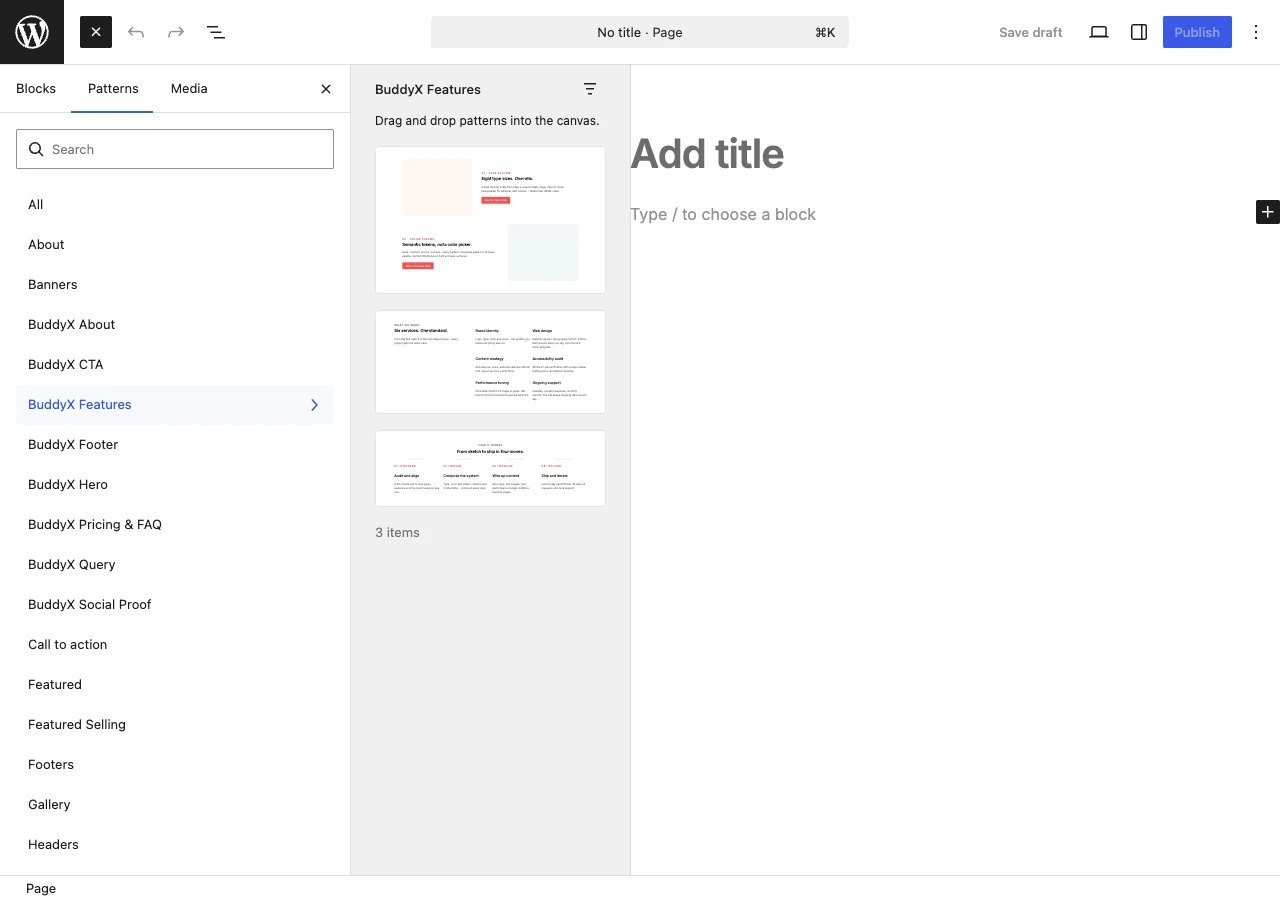
Quick answer: Edit any page, click the block inserter (the + button), open the Patterns tab, and pick a BuddyX category (Hero, About, Services, and so on). Click a pattern to drop it in. It already uses your theme colors and fonts, so you mostly just swap the text and images.
What a block pattern is
A block pattern is a ready-arranged group of standard WordPress blocks - headings, paragraphs, images, buttons, columns, query loops - saved as a single insertable layout. When you insert one, you get the whole section (spacing, structure, sample content) in one click, and every piece stays fully editable. Nothing is locked.
Two things make the BuddyX patterns worth reaching for first:
- They are built from core blocks only. No page builder, no extra plugin, no shortcodes. If you ever switch these patterns work on plain WordPress.
- They inherit your theme automatically. Colors come from Appearance -> Customize -> Site Skin, and fonts come from your theme typography. Set your brand color once and every pattern you insert already matches it. Change the color scheme later and the patterns follow - you are not restyling anything twice.
How to insert a pattern
You can reach the patterns two ways, and both land in the same place:
- From the block inserter. In the page or post editor, click the + button (top-left, or inline where you want the section). Switch to the Patterns tab, then pick a BuddyX category from the dropdown. Click any pattern to insert it at the cursor.
- From the inserter search. Open the + inserter and type what you want (for example "hero", "pricing", "footer"). Matching BuddyX patterns appear in the results - click to insert.
Once a pattern is on the page, edit it like any other blocks: click the text to rewrite it, replace the placeholder images with your own, adjust buttons, and delete any rows you do not need. Publish when it looks right, then check it at a phone-width preview so you can catch anything that needs a smaller-screen tweak.
First-time tip: Start with one hero pattern at the top, add a couple of body sections (about, services, or stats), and finish with a call-to-action. That is a complete landing page in a few minutes, and it is the fastest way to see how the patterns pick up your colors.
The 27 patterns, grouped by purpose
Every pattern below is real and lives in the theme. Titles are exactly as they appear in the Patterns tab.
Hero sections (3) - the top of a page
| Pattern | Good for |
|---|---|
| Hero - Image-led | A large image with a headline over or beside it |
| Hero - Split Screen | Text on one side, visual on the other |
| Hero - Typography-led | A bold, text-first opener with no big image |
About and team (3) - introduce yourself
| Pattern | Good for |
|---|---|
| About - Story | A narrative "who we are" section |
| About - Founder Spotlight | Highlight one person or founder |
| Team - 4-up Grid | A four-across grid of team members |
Features, services, and process (3) - explain what you offer
| Pattern | Good for |
|---|---|
| Features - Alternating Rows | Feature rows that alternate image and text sides |
| Services - 3-up Grid | Three service cards side by side |
| Steps - Numbered Process | A numbered "how it works" walkthrough |
Social proof (3) - build trust
| Pattern | Good for |
|---|---|
| Logo Cloud - Trusted by | A row of client or partner logos |
| Stats Row | Headline numbers (members, sales, downloads) |
| Testimonials - Editorial 3-up | Three customer quotes in an editorial layout |
Pricing and FAQ (2) - answer the buying questions
| Pattern | Good for |
|---|---|
| Pricing - 3-tier Editorial | A three-column pricing table |
| FAQ - Editorial | A clean question-and-answer section |
Calls to action (3) - move people to the next step
| Pattern | Good for |
|---|---|
| CTA - Full-bleed Gradient | A full-width, high-contrast call-to-action |
| CTA - Newsletter Signup | A sign-up prompt for your list |
| Banner - Light Asymmetric | A lighter, offset promo banner |
Blog and post listings (5) - show your content
| Pattern | Good for |
|---|---|
| Posts - 3-up Editorial Grid | Three latest posts in an editorial grid |
| Posts - Asymmetric Hero + Stack | One featured post plus a stacked list |
| Posts - Horizontal List Split | Wide horizontal post rows |
| Posts - 4-up Featured Cards | Four featured post cards |
| Posts - Minimal Date + Title List | A stripped-back date-and-title list |
These five use the core Query Loop block, so they pull in your real posts automatically and respect your blog settings.
Footers (5) - close every page
| Pattern | Good for |
|---|---|
| Footer - Default Mega | The full multi-column footer with everything |
| Footer - Mega 5-column | A five-column mega footer |
| Footer - Central CTA | A footer built around one central prompt |
| Footer - Simple Centered | A clean, centered footer |
| Footer - Minimal Bar | A single-line minimal footer |
That is 27 patterns in total: 3 hero, 3 about/team, 3 features/services/process, 3 social proof, 2 pricing/FAQ, 3 calls to action, 5 blog listings, and 5 footers.
Dark mode and responsive behavior
Because the patterns use theme colors rather than fixed values, they switch with your site. If a visitor is in dark mode, the sections re-color themselves - you do not build a separate dark version. The layouts also stack down for phones on their own, so a three-column grid becomes a single column on a small screen. Always preview a new page at a narrow width before publishing to confirm the flow reads well for you.
Want even more sections?
The 27 patterns cover the common page-building needs, and they are free with the theme. If you want a larger library - more blocks, more layout variety, and BuddyPress-aware sections - install Wbcom Essential, our free companion plugin. It adds its own blocks and patterns that inherit your BuddyX colors the same way, so everything still matches without extra work.
Related
- Wbcom Essential - the free companion plugin that adds more blocks and patterns
- Color scheme - set the theme colors every pattern inherits
- Plugin family - the full in-house lineup of free and Pro products
- Quick Start - first-time theme setup
Next: Color scheme - set your colors once so every pattern you insert matches your brand.