
Post Elements & Meta
Pro featureUnderstand what appears in the post meta row - the small line of author, date, and (optionally) reading-time details next to every post - and which parts you can actually control from the Customizer.
 A post card with its automatic meta row: author avatar, "Written by", and the publish date
How the Meta Row Works
BuddyX Pro renders the post meta row automatically from the post itself (template-parts/content/entry_meta.php). Most of it is not a set of on/off switches - the theme decides what to show based on the post type and the data on the post. That keeps archives consistent and avoids a wall of toggles that do nothing on posts without that data.
The parts that are configurable are:
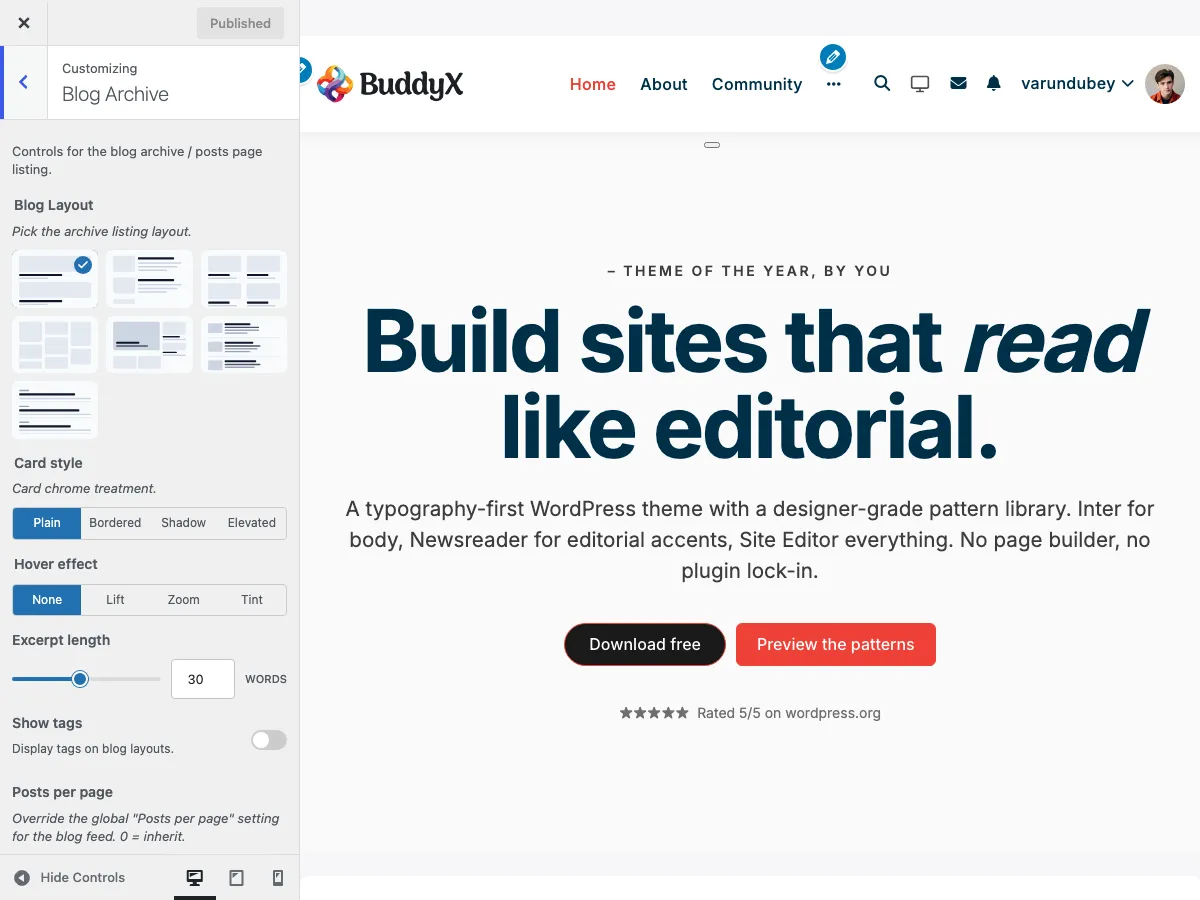
- Tags - shown or hidden on the archive, with a choice of style (Blog Archive panel)
- Reading time - an optional "X min read" label on single posts (Single Post panel)
- Edit link - a front-end "Edit" link for administrators (Blog Archive panel)
Everything else in the row - the author and the date - renders automatically as described below.
What Renders Automatically
Author
Every post that supports authors shows its author. When BuddyPress is active the byline links to the member's BuddyPress profile; otherwise it links to the standard WordPress author archive.
What's shown:
- Author avatar (38px, from Gravatar or the BuddyPress avatar)
- The wording "Written by {Author Name}"
- A link to the author's profile or archive
There is no show/hide toggle for the author and no separate avatar-size control - the row is designed to be consistent across every post.
Date
Posts (and any custom post type with an archive) show their publish date, linked to the post. If a post has been edited since publishing, the theme also emits a hidden machine-readable "updated" time for SEO while displaying the published date.
Changing the date format:
- Go to Settings > General
- Find Date Format
- Choose a preset or enter a custom format
- Save changes
This is a WordPress core setting that applies site-wide (F j, Y gives "January 29, 2026", M j, Y gives "Jan 29, 2026", Y-m-d gives "2026-01-29").
Attachment Parent
On attachment views only, the row links back to the parent post. This is automatic and has no setting.
Tags (Archive)
Tags are the one meta element you can toggle on the blog archive. They live in Appearance > Customize > Blog Archive, not in a separate "Post Meta" section.
Show tags (blog_show_tags, default Disabled) - Enable / Disable.
Tag style (blog_show_tags_style, default default) - appears when tags are enabled:
| Style | Key | Appearance |
|---|---|---|
| Default (default) | default |
Plain text links |
| Badge | badge |
Tag with a filled background |
| Underline | underline |
Tag with a bottom border |
See Blog Archive Layout for the full archive control set.
Reading Time (Single Posts)
An estimated "X min read" label can be appended to the meta row - on single posts only. It is calculated automatically from the post content (200 words per minute) and ships off by default.
Setting: Show reading time (single_post_reading_time)
Location: Appearance > Customize > Single Post
Default: No
Options: Yes / No
The label renders through the buddyx_entry_meta_after action, so it sits at the end of the meta row next to the date and author. It never appears on archive listings, pages, custom post types, or BuddyPress activity. Full detail lives in Reading Time.
Edit Link
Setting: Show edit link (blog_edit_link)
Location: Appearance > Customize > Blog Archive
Default: Disabled
Who sees it: Logged-in administrators (manage_options)
Shows an "Edit" link inside the meta area so administrators can open the editor from the front end. It only renders for logged-in administrators, so regular visitors never see it.
Styling the Meta Row with CSS
Because the meta row is template-driven, fine adjustments are done with custom CSS in Appearance > Customize > Additional CSS. Useful hooks:
.entry-meta- the whole row wrapper.entry-meta__content- the inner flex container.posted-by- the author span (contains the avatar and "Written by" text).posted-on- the date span.bx-reading-time- the reading-time span (also carries.posted-on).entry-edit-link- the administrator edit link
Examples
/* Hide the date on mobile */
@media (max-width: 767px) {
    .entry-meta .posted-on {
        display: none;
    }
}
/* Make the author avatar a touch smaller */
.entry-meta .posted-by img {
    width: 32px;
    height: 32px;
}
/* Emphasise the date */
.entry-meta .posted-on {
    font-weight: 700;
}
The reading-time label inherits your active Site Skin and typography, so it matches the rest of the row in both light and dark mode automatically.
Accessibility Notes
The template already uses accessible markup:
- Dates use semantic
<time>elements withdatetimeattributes - The author name is a real link to the profile/archive
- The avatar is output through
get_avatar(), which includes analtattribute
When adding your own CSS, keep the row readable: don't drop the font size below 14px, keep sufficient colour contrast, and avoid hiding text behind icon-only styling.
Common Questions
Can I hide the author or the date from the Customizer?
No. The theme renders author and date automatically for consistency. Use the CSS hooks above if you need to hide one for a specific design.
Why isn't my reading time showing?
Check these:
- Setting enabled: Customizer > Single Post > Show reading time = Yes
- You're on a single post: reading time never appears on archives or pages
- Cache cleared: clear site and browser cache
- Plugin conflicts: disable other reading-time plugins that may hook the same row
How do I change the date format?
Go to Settings > General > Date Format. This is a WordPress core setting affecting all dates site-wide.
The author link goes to a 404 page.
This happens when the author has no published posts, or permalinks need flushing. Re-save Settings > Permalinks, or publish at least one post under that author.
Can I add tags on single posts too?
The blog_show_tags toggle governs the archive. Single-post tag output is handled by the theme's single-post content template and the post's own tag terms.
Related Settings
- Blog Archive Layout - Layout, tags, edit link, category filter
- Single Post Layout - Title layouts, author bio, related posts, navigation
- Reading Time - The single-post read-time estimate
- Typography - Meta text styling
- Color Scheme - Meta color customization
Got a question? We're a friendly team - happy to help.
- Visit our Documentation Portal
- Email us at support@wbcomdesigns.com