
Online Courses and LMS
Free & ProBuddyX Pro makes a great foundation for a course platform. Your theme colors, sidebars, dark mode, and header layouts carry straight through to the course catalog, lesson pages, and quizzes - through dedicated theme-side styling for LearnDash, and through shared design tokens for the in-house Learnomy plugin. Start with Learnomy for the tightest fit, or point BuddyX Pro at LearnDash or another LMS you already run.
Where to get it: Learn more - Get it
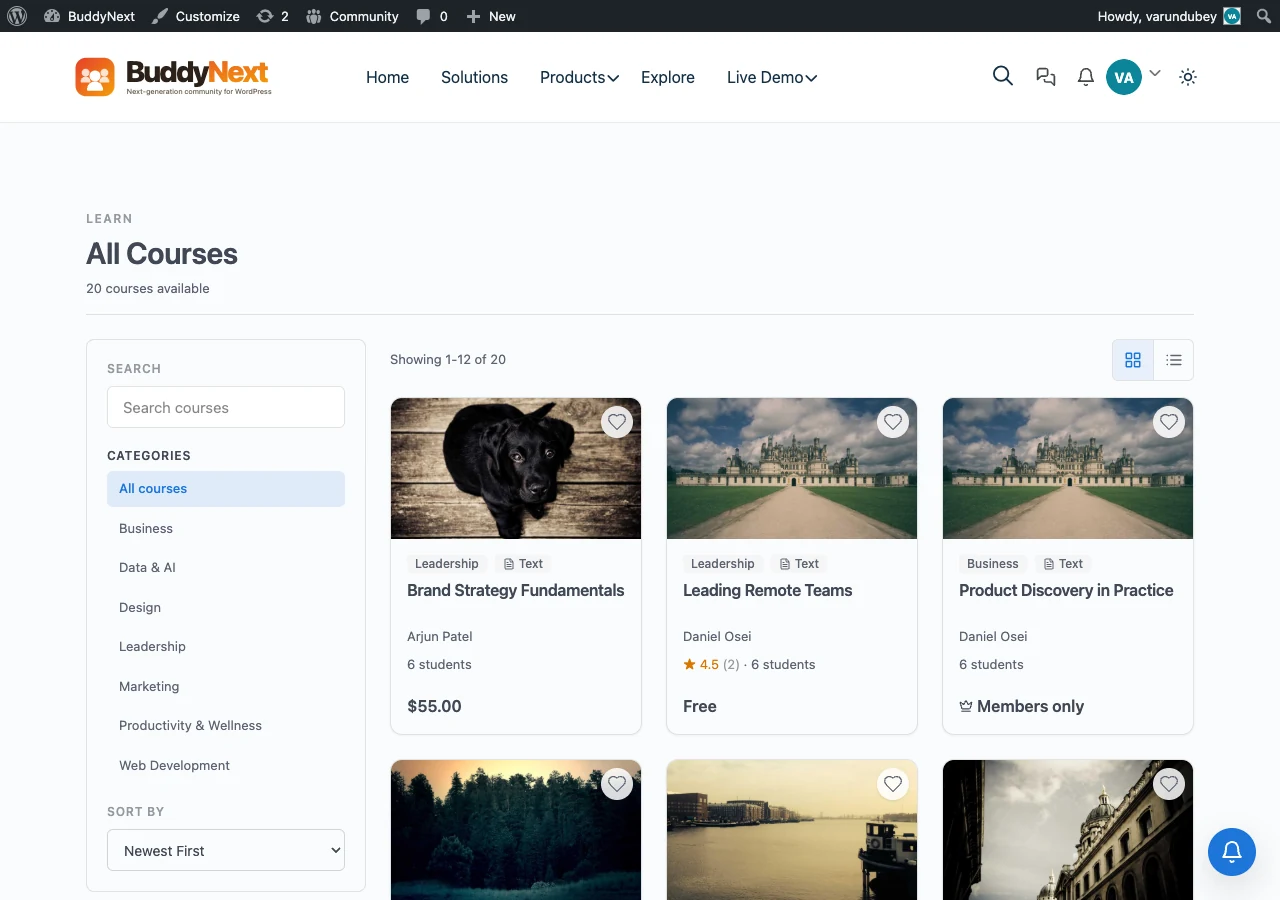 Learnomy course catalog in BuddyX Pro.
Learnomy - the in-house LMS
Learnomy is Wbcom's own learning platform: courses, lessons, quizzes, certificates, and paid enrollments. Because it is built by the same team as the theme, it shares the BuddyX Pro design system out of the box - no bridge plugin, no CSS overrides.
What you get:
- Courses and lessons - structured curriculum with drip scheduling and progress tracking.
- Quizzes - graded assessments with pass marks and retakes.
- Certificates - awarded automatically when a learner completes a course.
- Paid enrollments - sell courses through WooCommerce checkout.
Learnomy is one of the in-house plugins in the BuddyX family. See the full lineup on the plugin family page. It is free to start, with a Pro upgrade that adds the deeper selling, grading, and reporting features.
How Learnomy pairs with BuddyX Pro
Learnomy is built to read the theme's design tokens, so once it is active it inherits your theme without a separate skin:
- Theme colors - course cards, progress bars, buttons, and quiz controls read your
--bx-color-*palette from Appearance > Customize > Colors. Change the primary color once and the catalog follows. - Sidebars - course archive and single-course pages sit inside the standard BuddyX Pro page frame, so they honor your sidebar choice at Appearance > Customize > Sidebar. Set Left, Right, or None per the layout you want for focused learning.
- Dark mode - because Learnomy's colors come from tokens, the catalog, lesson body, quiz screens, and certificate preview follow light and dark mode. Learners toggle light/dark from the header and the choice persists across pages.
- Header layouts - your chosen Pro header layout, top bar, and mega menu sit above every course page as they do on any page, so navigation stays consistent with the rest of the site.
Set it up
- Install and activate Learnomy from Plugins > Add New.
- Go to Appearance > Customize > Colors and confirm your primary color - the catalog picks it up.
- Go to Appearance > Customize > Sidebar and set the sidebar for course pages.
- Visit your course archive - the grid renders in your BuddyX Pro colors immediately.
Tip: For a distraction-free lesson view, set the course sidebar to None and let the lesson content run full width.
LearnDash
Already invested in LearnDash? BuddyX Pro ships dedicated LearnDash styling and Customizer options - course layouts, focus mode, and a themed learner dashboard. See the LearnDash setup guide for the full walkthrough.
Other LMS plugins
BuddyX Pro also styles LearnPress, LifterLMS, Sensei LMS, and Tutor LMS. Pick your platform and follow its page under other LMS integrations for the specifics.
| LMS | Best for | BuddyX Pro support |
|---|---|---|
| Learnomy | New course sites wanting the tightest theme fit | In-house, inherits theme design tokens |
| LearnDash | Established LearnDash catalogs | Dedicated Customizer panel + focus mode |
| LearnPress / LifterLMS / Sensei / Tutor | Existing sites on those platforms | Themed archives, lessons, and dashboards |
Related
- Learnomy and the plugin family - Every in-house plugin, free and Pro
- LearnDash Setup - Course layouts, focus mode, dashboard
- LifterLMS - One of the supported third-party LMS plugins
- Sidebar Layouts - Choose sidebars per course page
- Color Scheme - Set the palette the catalog inherits
Got a question? We're a friendly team - happy to help. support@wbcomdesigns.com